seats VOLVO V70 2005 User Guide
[x] Cancel search | Manufacturer: VOLVO, Model Year: 2005, Model line: V70, Model: VOLVO V70 2005Pages: 139, PDF Size: 3.84 MB
Page 36 of 139

pg. 57 Manual climate control with air conditioning, A/C
A/C - ON/OFF
The air conditioning function is engaged by pressing ON and disengaged by pressing OFF. When you select Defroster
, the air conditioning is automatically engaged if the fan is not set to position 0.
Heated front seats (option)
Please see page 42
for more information on this function.
Heated rear window/sideview mirrors
This function demists/de-ices the rear window and sideview mirrors. The LED in the switch will light up to indicate
that the heating function is engaged. See page 42
for additional information on this function.
CAUTION:
Never use ice scrapers made of metal as they can easily scratch the mirror surface.
Recirculation
Recirculation can be used to shut out stale air, exhaust, etc. from the passenger compartment. The air in the passenger
compartment is then recirculated, i. e. no air from outside the car is taken into the car when this function is activated.
Recirculation (together with the air conditioning system) cools the passenger compartment more quickly in warm
weather.
If you allow the air in the car to recirculate, there is a risk of icing and fogging, especially in winter. The timer function
minimizes the risk of ice, misting and stale air.
Activate the timer function as follows:
Press for more that 3 seconds. The LED flashes for 5 seconds. The air recirculates in the car for 3-12
minutes depending on the outside temperature.
The timer function is activated each time you press .
To switch off the timer function :
Press again for more than 3 seconds. The LED lights for 5 seconds to confirm your selection.
Recirculation is always disconnected when you select Defroster
.
Blower
Blower speed can be increases or decreased by turning the knob. If the knob is set to 0, the air conditioning function is
automatically disengaged.
ProCarManuals.com
Page 38 of 139
2 0 0 5
VOLVO V70
Chapter 4 - Interior
pg. 59 Interior
Front seats (electrically operated)60
Front seats (manually operated)61
Storage compartments63
Front storage compartments, coat hanger65
Folding table in rear seat66
Rear seat and cargo area67
Cargo area71
Securing cargo72
Steel grid, cargo net73
Nylon cargo net - XC7074
Cargo area cover, vanity mirrors75
Spare tire76
Auxiliary seat in cargo area, Extra handgrip - XC7077
Interior lighting78
pg. 60 Front seats
Electrically operated seats (option)
Operation
Driver's seat:
The seat can be adjusted if the ignition key is in position I, II or if the engine is running.
It can also be adjusted as follows with the ignition off :
· Within 10 minutes after the driver's door has been unlocked from the outside and has been opened and remains open.
· Within 40 seconds, if the driver's door has just been closed.
· Within 40 seconds, if the driver's door has not been opened after the ignition has been switched off.
Passenger's seat:
The seat can only be adjusted if the ignition key is in position I, II or if the engine is running.
ProCarManuals.com
Page 39 of 139
Seat adjustment
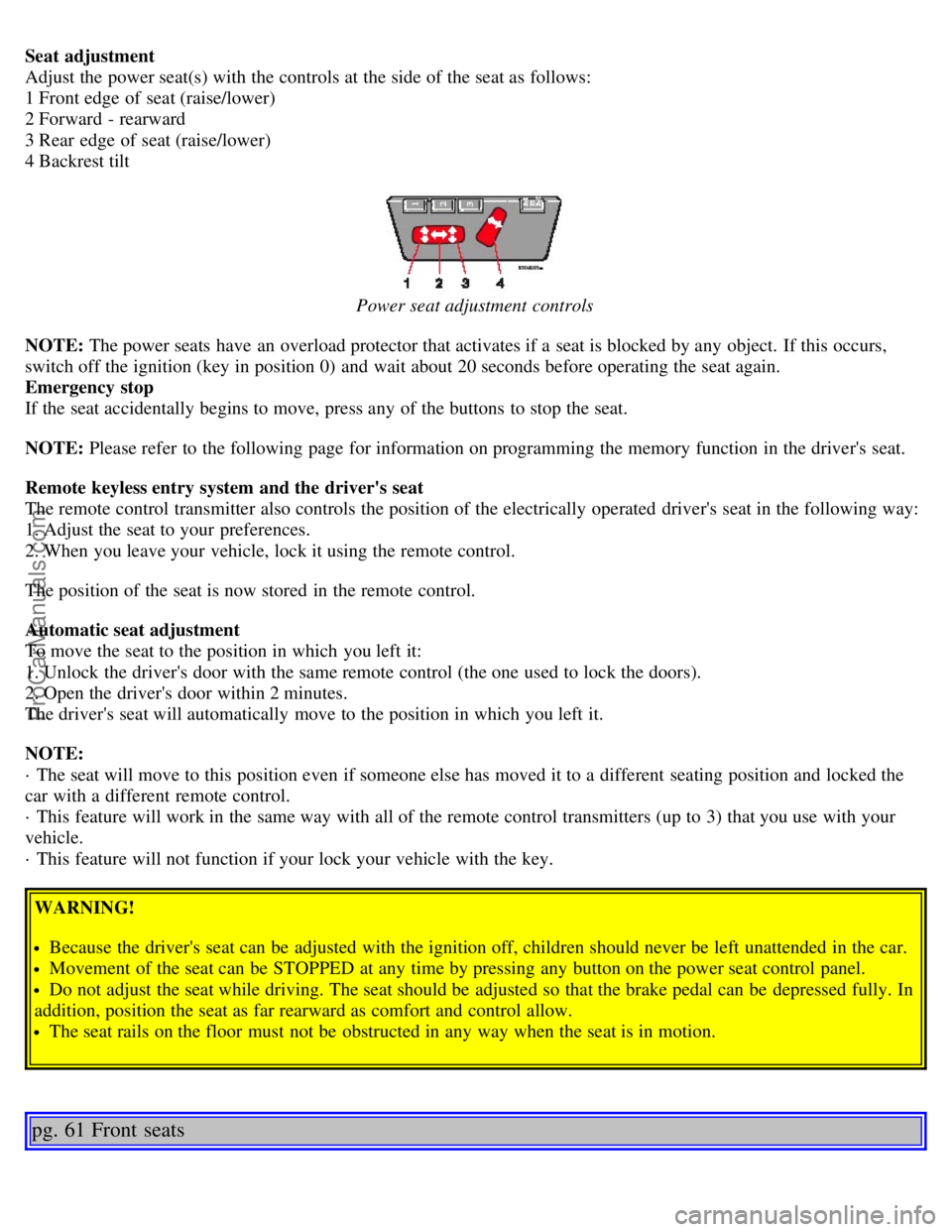
Adjust the power seat(s) with the controls at the side of the seat as follows:
1 Front edge of seat (raise/lower)
2 Forward - rearward
3 Rear edge of seat (raise/lower)
4 Backrest tilt
Power seat adjustment controls
NOTE: The power seats have an overload protector that activates if a seat is blocked by any object. If this occurs,
switch off the ignition (key in position 0) and wait about 20 seconds before operating the seat again.
Emergency stop
If the seat accidentally begins to move, press any of the buttons to stop the seat.
NOTE: Please refer to the following page for information on programming the memory function in the driver's seat.
Remote keyless entry system and the driver's seat
The remote control transmitter also controls the position of the electrically operated driver's seat in the following way:
1. Adjust the seat to your preferences.
2. When you leave your vehicle, lock it using the remote control.
The position of the seat is now stored in the remote control.
Automatic seat adjustment
To move the seat to the position in which you left it:
1. Unlock the driver's door with the same remote control (the one used to lock the doors).
2. Open the driver's door within 2 minutes.
The driver's seat will automatically move to the position in which you left it.
NOTE:
· The seat will move to this position even if someone else has moved it to a different seating position and locked the
car with a different remote control.
· This feature will work in the same way with all of the remote control transmitters (up to 3) that you use with your
vehicle.
· This feature will not function if your lock your vehicle with the key.
WARNING!
Because the driver's seat can be adjusted with the ignition off, children should never be left unattended in the car.
Movement of the seat can be STOPPED at any time by pressing any button on the power seat control panel.
Do not adjust the seat while driving. The seat should be adjusted so that the brake pedal can be depressed fully. In
addition, position the seat as far rearward as comfort and control allow.
The seat rails on the floor must not be obstructed in any way when the seat is in motion.
pg. 61 Front seats
ProCarManuals.com
Page 40 of 139
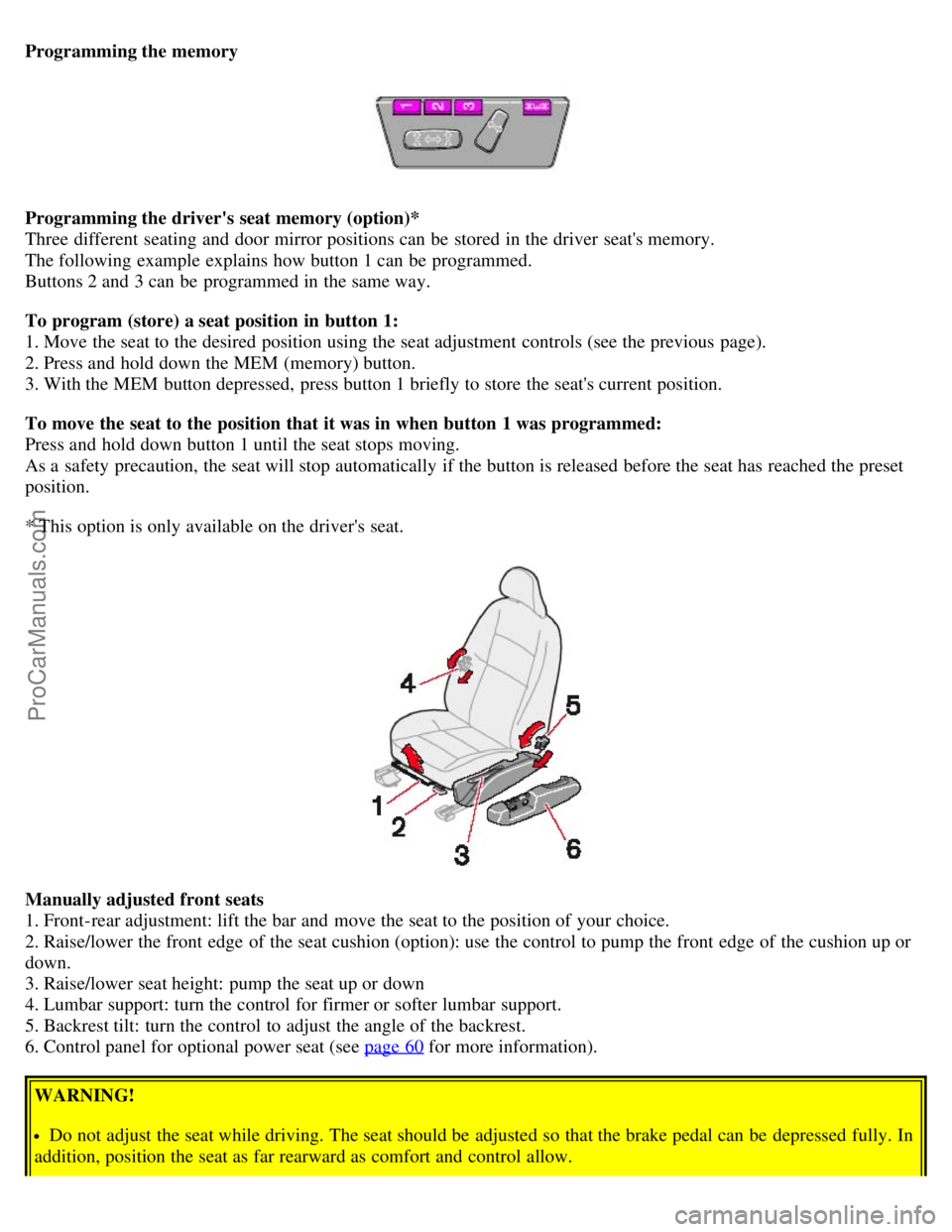
Programming the memory
Programming the driver's seat memory (option)*
Three different seating and door mirror positions can be stored in the driver seat's memory.
The following example explains how button 1 can be programmed.
Buttons 2 and 3 can be programmed in the same way.
To program (store) a seat position in button 1:
1. Move the seat to the desired position using the seat adjustment controls (see the previous page).
2. Press and hold down the MEM (memory) button.
3. With the MEM button depressed, press button 1 briefly to store the seat's current position.
To move the seat to the position that it was in when button 1 was programmed:
Press and hold down button 1 until the seat stops moving.
As a safety precaution, the seat will stop automatically if the button is released before the seat has reached the preset
position.
* This option is only available on the driver's seat.
Manually adjusted front seats
1. Front-rear adjustment: lift the bar and move the seat to the position of your choice.
2. Raise/lower the front edge of the seat cushion (option): use the control to pump the front edge of the cushion up or
down.
3. Raise/lower seat height: pump the seat up or down
4. Lumbar support: turn the control for firmer or softer lumbar support.
5. Backrest tilt: turn the control to adjust the angle of the backrest.
6. Control panel for optional power seat (see page 60
for more information).
WARNING!
Do not adjust the seat while driving. The seat should be adjusted so that the brake pedal can be depressed fully. In
addition, position the seat as far rearward as comfort and control allow.
ProCarManuals.com
Page 41 of 139
Check that the seat is securely locked into position after adjusting.
pg. 62 Front seats
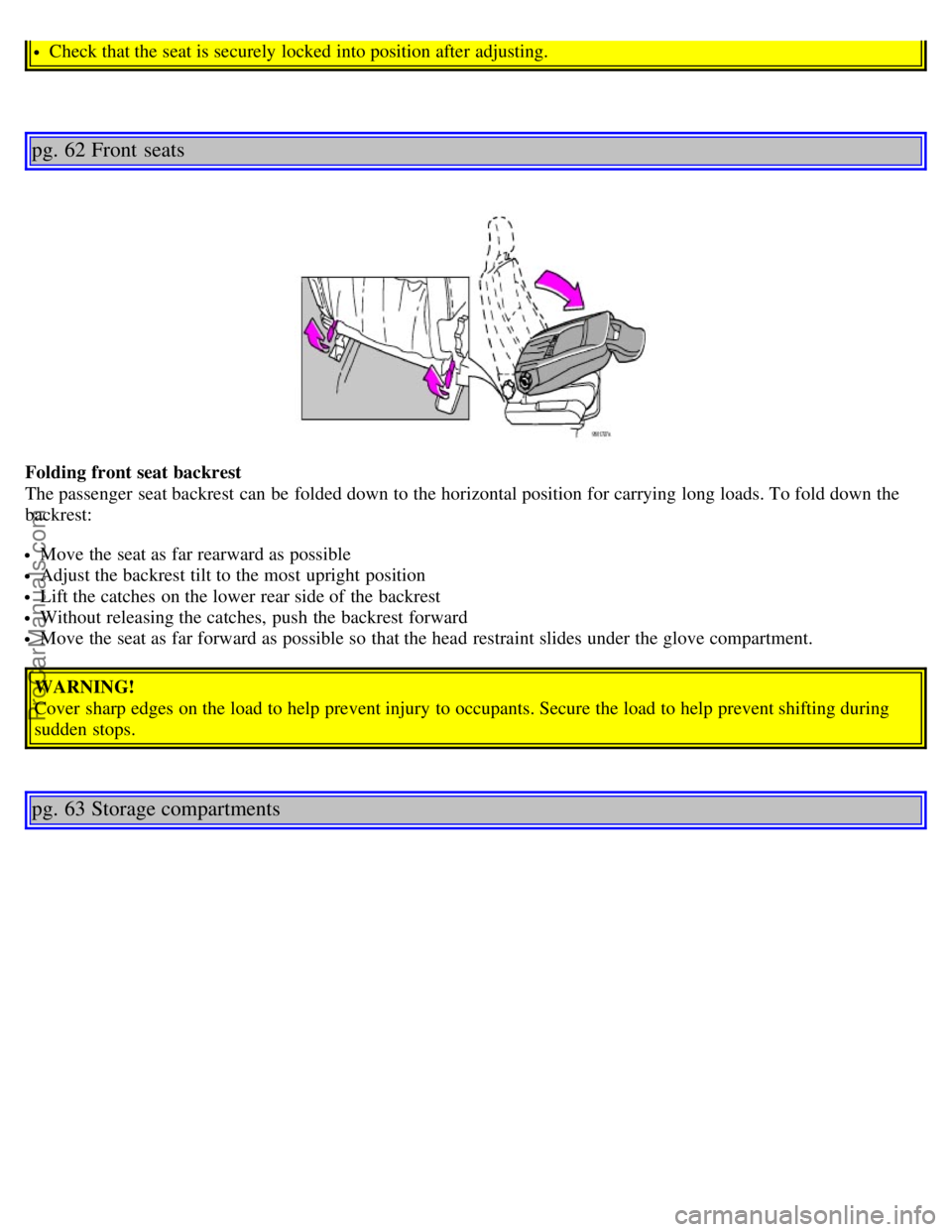
Folding front seat backrest
The passenger seat backrest can be folded down to the horizontal position for carrying long loads. To fold down the
backrest:
Move the seat as far rearward as possible
Adjust the backrest tilt to the most upright position
Lift the catches on the lower rear side of the backrest
Without releasing the catches, push the backrest forward
Move the seat as far forward as possible so that the head restraint slides under the glove compartment.
WARNING!
Cover sharp edges on the load to help prevent injury to occupants. Secure the load to help prevent shifting during
sudden stops.
pg. 63 Storage compartments
ProCarManuals.com
Page 42 of 139
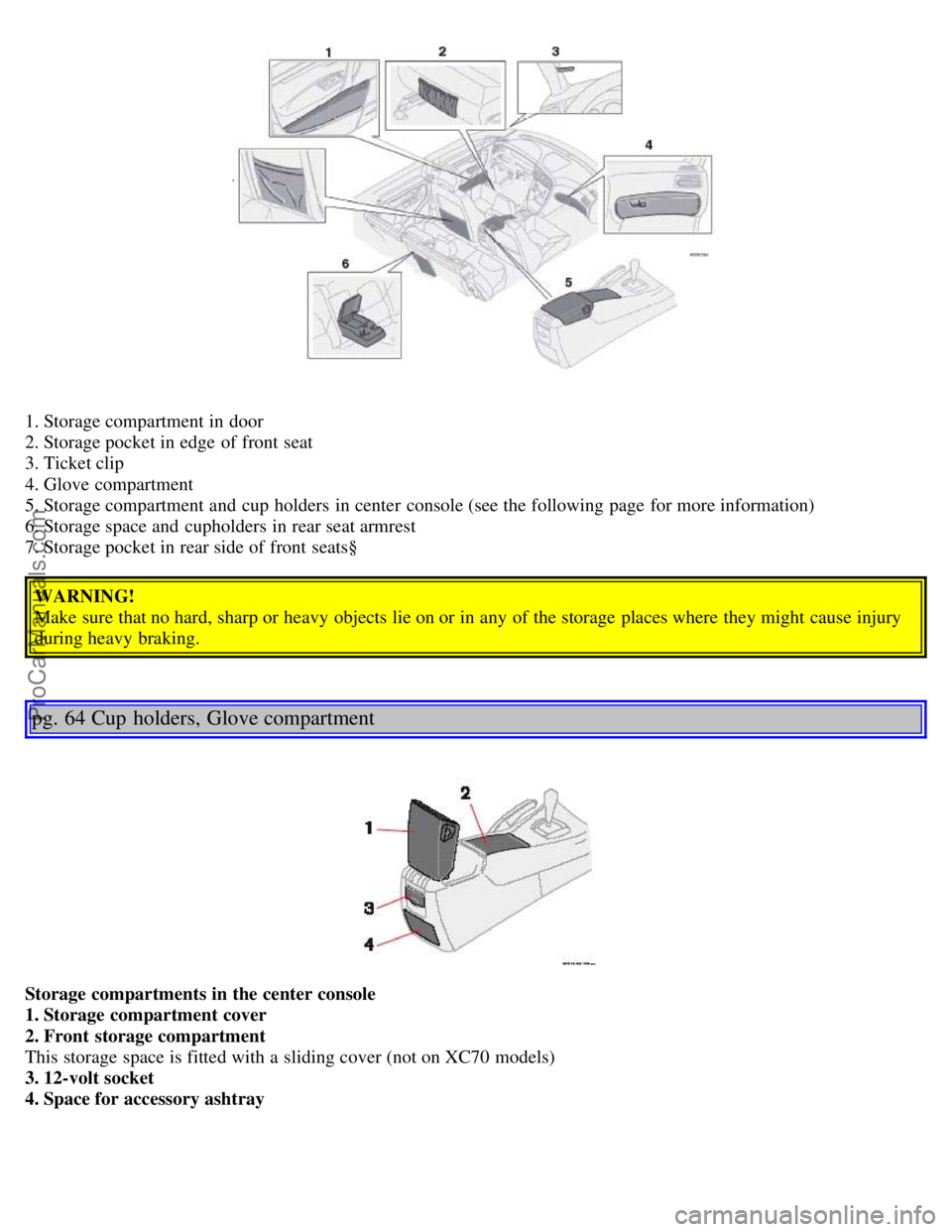
1. Storage compartment in door
2. Storage pocket in edge of front seat
3. Ticket clip
4. Glove compartment
5. Storage compartment and cup holders in center console (see the following page for more information)
6. Storage space and cupholders in rear seat armrest
7. Storage pocket in rear side of front seats§WARNING!
Make sure that no hard, sharp or heavy objects lie on or in any of the storage places where they might cause injury
during heavy braking.
pg. 64 Cup holders, Glove compartment
Storage compartments in the center console
1. Storage compartment cover
2. Front storage compartment
This storage space is fitted with a sliding cover (not on XC70 models)
3. 12-volt socket
4. Space for accessory ashtray
ProCarManuals.com
Page 49 of 139

If the doors are unlocked with the remote, the locks will automatically reengage (re-lock) and the alarm will reset
after 2 minutes unless a door has been opened.
The lock/unlock and alarm features can also be utilized by using the keys.
FCC ID:LQNP2T-APU
This device complies with part 15 of the FCC rules. Operation is subject to the following conditions: (1) This device
may not cause harmful interference, and (2) this device must accept any interference received, including interference
that may cause undesired operation.
Canadian 2306104388
Model 504 2927 by Donnelly
Operation is subject to the following conditions: (1) this device may not cause interference, and (2) this device must
accept any interference, including interference that may cause undesired operation of the device.
Canadian 2306104388A
Model 509 977 by Connaught Electronics
Operation is subject to the following conditions: (1) this device may not cause interference, and (2) this device must
accept any interference, including interference that may cause undesired operation of the device.
pg. 82 Remote keyless entry system
Remote keyless entry system - replacing batteries
If the range of the transmitter is noticeably reduced, this indicates that the battery is weak and should be replaced.
To replace the battery
Remove the cover by carefully prying up its rear edge with a small screwdriver
Replace the battery with a new 3-volt, CR 2032 battery. The battery should be inserted with the plus side upward.
Avoid touching the contact surfaces of the battery with your fingers.
Press the cover back into place. Ensure that the rubber seal seats correctly to help prevent moisture from entering the
unit.
NOTE: The old battery should be disposed of properly at a recycling center or at your Volvo retailer.
WARNING!
Volvo does not recommend using the transmitter to lock the doors from inside the car. The alarm would be activated
ProCarManuals.com
Page 92 of 139
35 -
36 -
37 -
38 -
pg. 133 Fuses in the passenger compartment
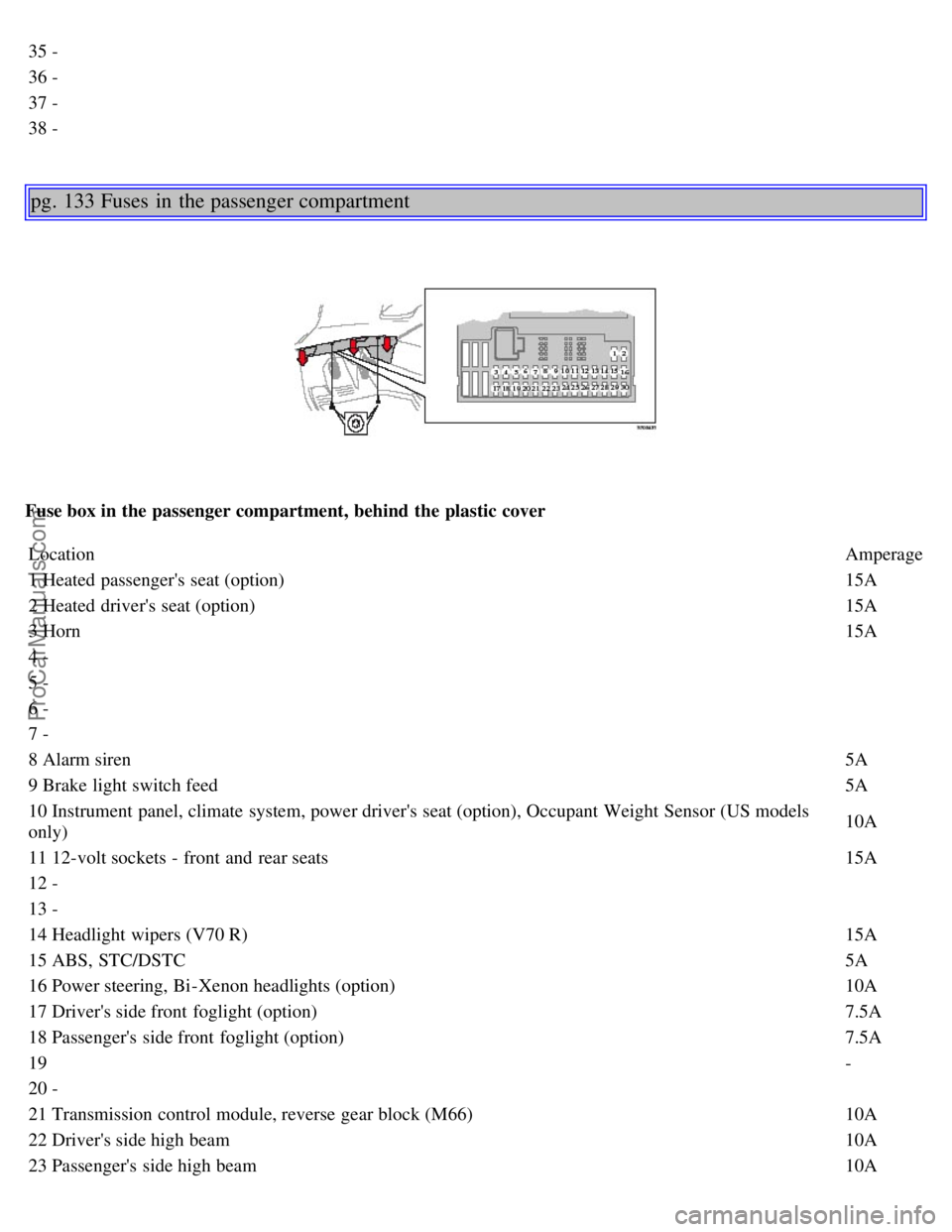
Fuse box in the passenger compartment, behind the plastic coverLocation Amperage
1 Heated passenger's seat (option) 15A
2 Heated driver's seat (option) 15A
3 Horn 15A
4 -
5 -
6 -
7 -
8 Alarm siren 5A
9 Brake light switch feed 5A
10 Instrument panel, climate system, power driver's seat (option), Occupant Weight Sensor (US models
only) 10A
11 12-volt sockets - front and rear seats 15A
12 -
13 -
14 Headlight wipers (V70 R) 15A
15 ABS, STC/DSTC 5A
16 Power steering, Bi -Xenon headlights (option) 10A
17 Driver's side front foglight (option) 7.5A
18 Passenger's side front foglight (option) 7.5A
19 -
20 -
21 Transmission control module, reverse gear block (M66) 10A
22 Driver's side high beam 10A
23 Passenger's side high beam10A
ProCarManuals.com
Page 96 of 139
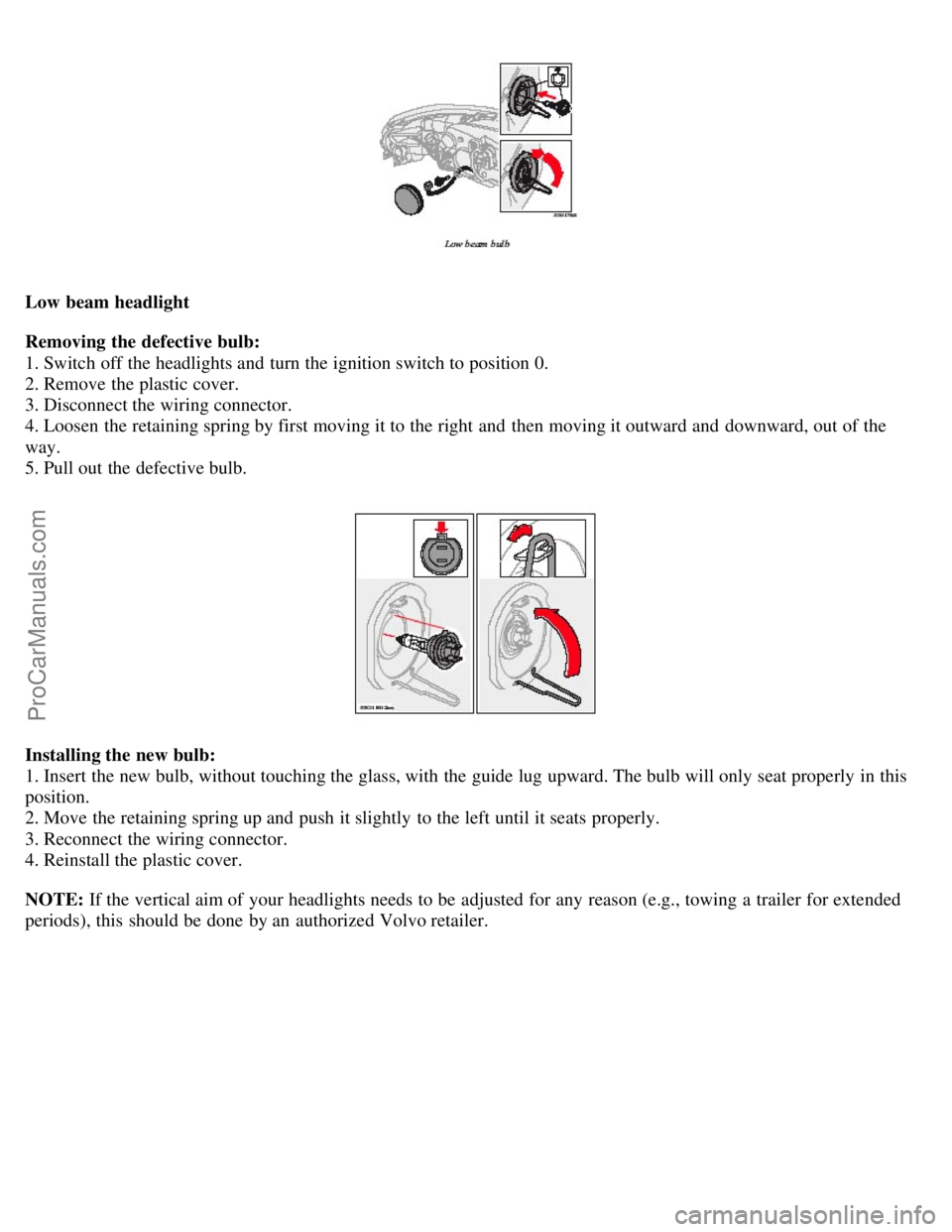
Low beam headlight
Removing the defective bulb:
1. Switch off the headlights and turn the ignition switch to position 0.
2. Remove the plastic cover.
3. Disconnect the wiring connector.
4. Loosen the retaining spring by first moving it to the right and then moving it outward and downward, out of the
way.
5. Pull out the defective bulb.
Installing the new bulb:
1. Insert the new bulb, without touching the glass, with the guide lug upward. The bulb will only seat properly in this
position.
2. Move the retaining spring up and push it slightly to the left until it seats properly.
3. Reconnect the wiring connector.
4. Reinstall the plastic cover.
NOTE: If the vertical aim of your headlights needs to be adjusted for any reason (e.g., towing a trailer for extended
periods), this should be done by an authorized Volvo retailer.
ProCarManuals.com
Page 98 of 139
Turn signal, driver's side
Removing the defective bulb:
1. Switch off the headlights and turn the ignition switch to position 0.
2. Pull out the bulb holder by twisting it counterclockwise.
3. Remove the bulb from the holder by pressing it in and turning it counterclockwise.
Installing the new bulb:
1. Insert the new bulb into the holder by pressing it in and turning it clockwise.
2. Reinsert the bulb holder in the headlight housing and twist it clockwise until it seats properly.
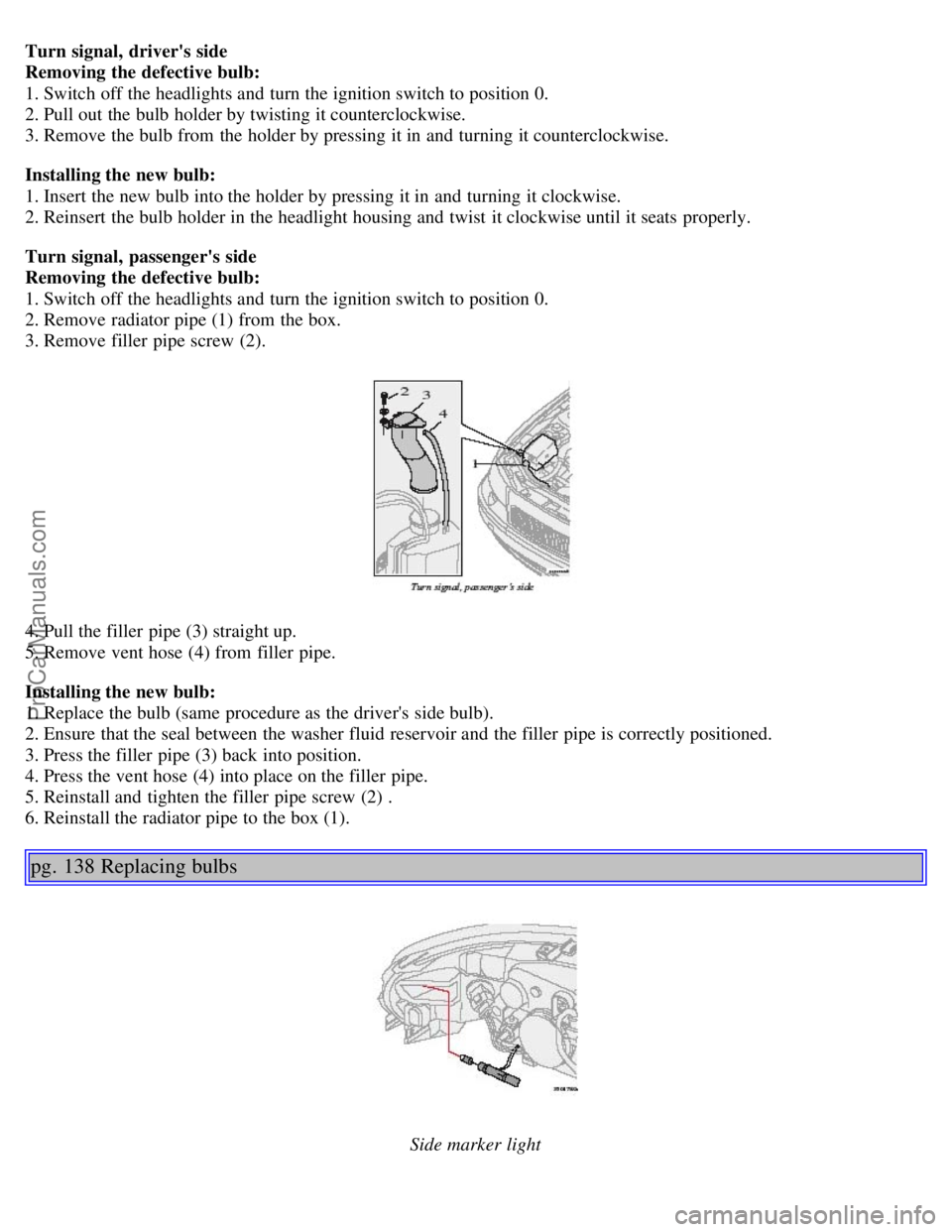
Turn signal, passenger's side
Removing the defective bulb:
1. Switch off the headlights and turn the ignition switch to position 0.
2. Remove radiator pipe (1) from the box.
3. Remove filler pipe screw (2).
4. Pull the filler pipe (3) straight up.
5. Remove vent hose (4) from filler pipe.
Installing the new bulb:
1. Replace the bulb (same procedure as the driver's side bulb).
2. Ensure that the seal between the washer fluid reservoir and the filler pipe is correctly positioned.
3. Press the filler pipe (3) back into position.
4. Press the vent hose (4) into place on the filler pipe.
5. Reinstall and tighten the filler pipe screw (2) .
6. Reinstall the radiator pipe to the box (1).
pg. 138 Replacing bulbs
Side marker light
ProCarManuals.com