center console VOLVO V70 2005 Owners Manual
[x] Cancel search | Manufacturer: VOLVO, Model Year: 2005, Model line: V70, Model: VOLVO V70 2005Pages: 139, PDF Size: 3.84 MB
Page 15 of 139

pg. 9 Occupant Weight Sensor (OWS)*
WARNING!
Never try to open, remove, or repair any components in the OWS system. This could result in system malfunction.
Maintenance or repairs should only be carried out by an authorized Volvo service technician.
*NOTE: Not available on the V70R. WARNING!
Keep the following points in mind with respect to the OWS system. Failure to follow these instructions could
adversely affect the system's function and result in serious injury to the occupant of the front passenger's seat:
The full weight of the front seat passenger should always be on the seat cushion. The passenger should never lift
him/herself off the seat cushion using the armrest in the door or the center console, by pressing the feet on the floor,
by sitting on the edge of the seat cushion, or by pressing against the backrest in a way that reduces pressure on the
seat cushion. This could cause OWS to disable the front, passenger's side airbag.
The front passenger's seat should not be modified in any way. This could reduce pressure on the seat cushion, which
might interfere with the OWS system's function.
Do not place any type of object on the front passenger's seat in such a way that jamming, pressing, or squeezing
occurs between the object and hte front seat, other than as a direct result of the correct use of the ALR/ELR seat belt
(see page 16)
.
No objects should be placed under the front passenger's seat. This could interfere with the OWS system's function.
WARNING!
No objects that add to the total weight on the seat should be placed on the front passenger's seat. If a child is seated
in the front passenger's seat with any additional weight, this extra weight could cause the OWS system to enable the
airbag, which might cause it to deploy in the event of a collision, thereby injuring the child.
The seat belt should never be wrapped around an object on the front passenger's seat. This could interfere with the
OWS system's function.
The front passenger's seat belt should never be used in a way that exerts more pressure on the passenger than
normal. This could increase the pressure exerted on the weight sensor by a child, and could result in the airbag being
enabled, which might cause it to deploy in the event of a collision, thereby injuring the child.
pg. 10 Side impact airbags (SIPS)
ProCarManuals.com
Page 20 of 139

2 0 0 5
VOLVO V70
Chapter 2 - Instruments, switches and controls
pg. 25 Instruments, switches and controls
Interior26
Exterior27
Instruments28
Instrument panel29
Indicator and warning lights30
Text information window32
Switches in the center console33
Trip computer34
Cruise control35
Light switch panel37
Steering wheel adjustment/lock38
Ignition switch, Turn signals39
Windshield wipers/washers,40
Tailgate wipers/washers, Water repellent glass41
Warning flashers, heated mirrors/rear window, heated front seats42
Parking brake, auxiliary socket/ashtrays43
Electrically operated windows44
Rearview/sideview mirrors45
Power moonroof46
pg. 26 Interior
ProCarManuals.com
Page 27 of 139

top up if necessary. See page 151, 153.
2) OIL LEVEL LOW/SEE MANUAL* Stop as soon as possible and switch off the engine, check the oil level and
top up if necessary. See page 151, 153
.
* These messages apply to R-models only.
1) Orange warning triangle, see page 30
.
2) Red warning triangle, see page 30
.
pg. 33 Switches in the center console
The positions of these buttons may vary, depending on the specifications of your car
Stability Traction Control (STC)*/ Dynamic Stability Traction Control (DSTC)**
Press this switch to turn the Spin Control (SC) function of the STC/DSTC system on or off. To help reduce the risk
that the SC function is turned off inadvertently, the switch must be held in for at least half a second to disable this
function.
See pages 22-23
for more information. R-models only:
The Active Yaw Control function can also be deactivated. See page 22
for more information.
WARNING!
Please be aware that the car's handling characteristics may be affected if the Spin Control/Active Yaw Control
functions are switched off.
Disconnecting the alarm
This button is used to temporarily disconnect alarm sensors. See page 85
for further information
ProCarManuals.com
Page 42 of 139
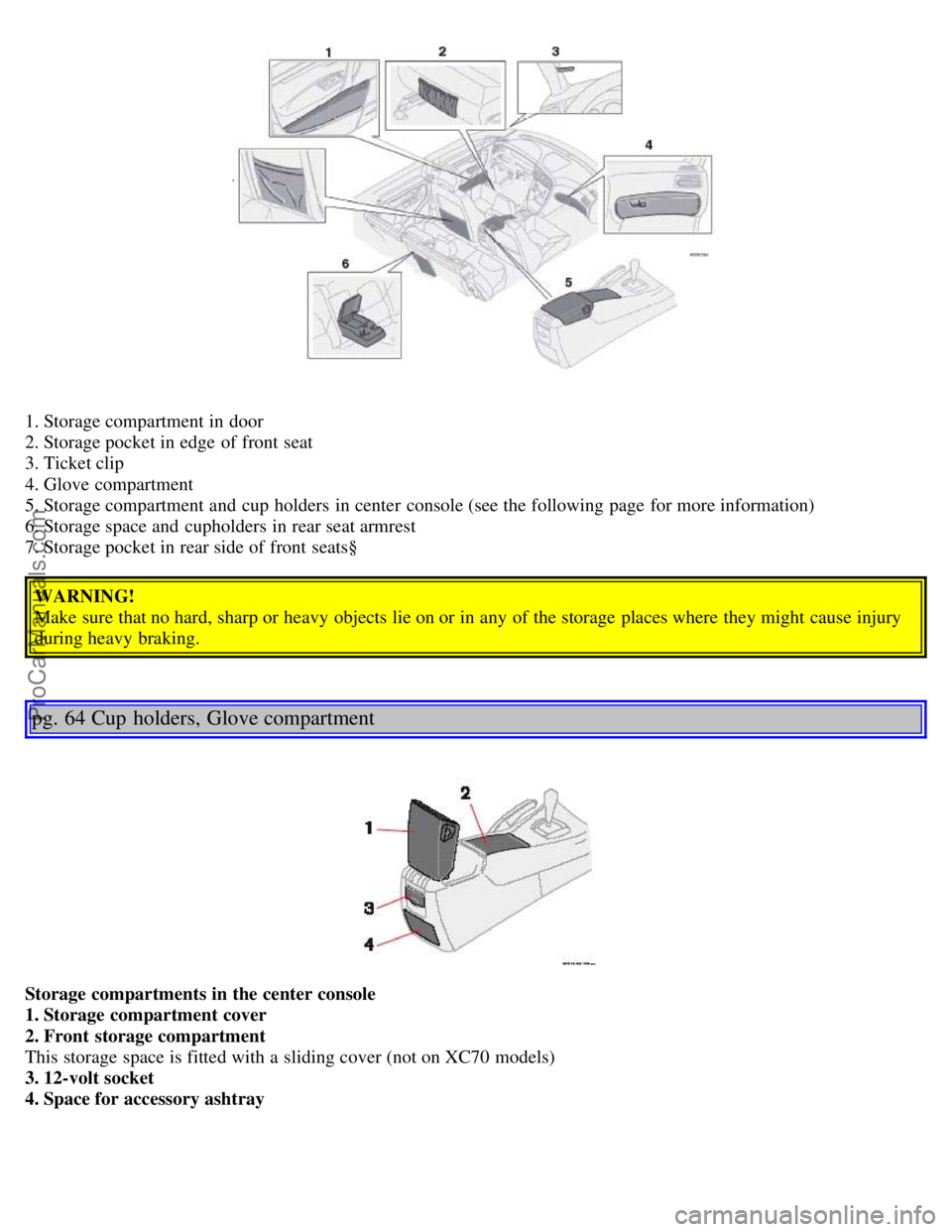
1. Storage compartment in door
2. Storage pocket in edge of front seat
3. Ticket clip
4. Glove compartment
5. Storage compartment and cup holders in center console (see the following page for more information)
6. Storage space and cupholders in rear seat armrest
7. Storage pocket in rear side of front seats§WARNING!
Make sure that no hard, sharp or heavy objects lie on or in any of the storage places where they might cause injury
during heavy braking.
pg. 64 Cup holders, Glove compartment
Storage compartments in the center console
1. Storage compartment cover
2. Front storage compartment
This storage space is fitted with a sliding cover (not on XC70 models)
3. 12-volt socket
4. Space for accessory ashtray
ProCarManuals.com
Page 43 of 139

Cup holder for rear seat passengers
· To access the storage compartment, press the button on the left side of the armrest and fold the entire cover rearward.
· To open the rear seat cup holder, press the button on the right side of the armrest. Fold the upper section of the cover
rearward.
The two sections of the cover can be closed separately.
Cup holders in the center console
To remove the cup holders:
1. Pull up the rear edge of the cup holder.
2. Move the cup holder rearward.
3. Pull up the front edge of the cup holder and lift it out of the storage space.
Return the cup holder to the storage space in the reverse order.
pg. 65 Front storage compartments, Coat hanger
Pen holder on the center console
ProCarManuals.com
Page 52 of 139

This device complies with part 15 of the FCC rules. Operation is subject to the following conditions: (1) This device
may not cause harmful interference, and (2) this device must accept any interference received, including interference
that may cause undesired operation.
Canadian IC: 4405A-DA5823
Movement sensor DA5823 by Dynex
Operation is subject to the following conditions: (1) this device may not cause interference, and (2) this device must
accept any interference, including interference that may cause undesired operation of the device.
In certain situations it may be desirable to turn off the inclination and movement alarm sensors if, for example, you
drive your car onto a ferry where the rocking of the boat could trigger the alarm or if a pet is left in the car with the
doors locked.
To temporarily turn off the inclination and movement alarm sensors from the alarm system:
From the time the ignition key is turned from the Drive position (position II) until you lock the car, you can press the
button in the center console. The LED in the switch will light up and a message will be displayed in the text window
to indicate that the sensors are disconnected.
The car can then be locked in the usual way to set the alarm.
NOTE:
This function will not turn off the vehicle's standard alarm.
The optional sensors are automatically reconnected to the alarm system the next time the car is unlocked and then
locked again.
LED alarm status signals
The status of the alarm system is indicated by the red LED at the top of the dash:
LED off - the alarm is not armed
LED flashes once per second - the alarm is armed
LED flashes rapidly before the ignition is switched on - the alarm has been triggered
Fault in the alarm system: If a fault has been detected in the alarm system, a message will be displayed in the text
window. Contact a Volvo retailer.
Automatic re-lock/re -arm system
If the car is unlocked with the remote, the car will re-lock and the alarm will re-arm after 2 minutes unless a door or
the tailgate has been opened.
pg. 86 Child safety locks - rear doors
ProCarManuals.com
Page 67 of 139
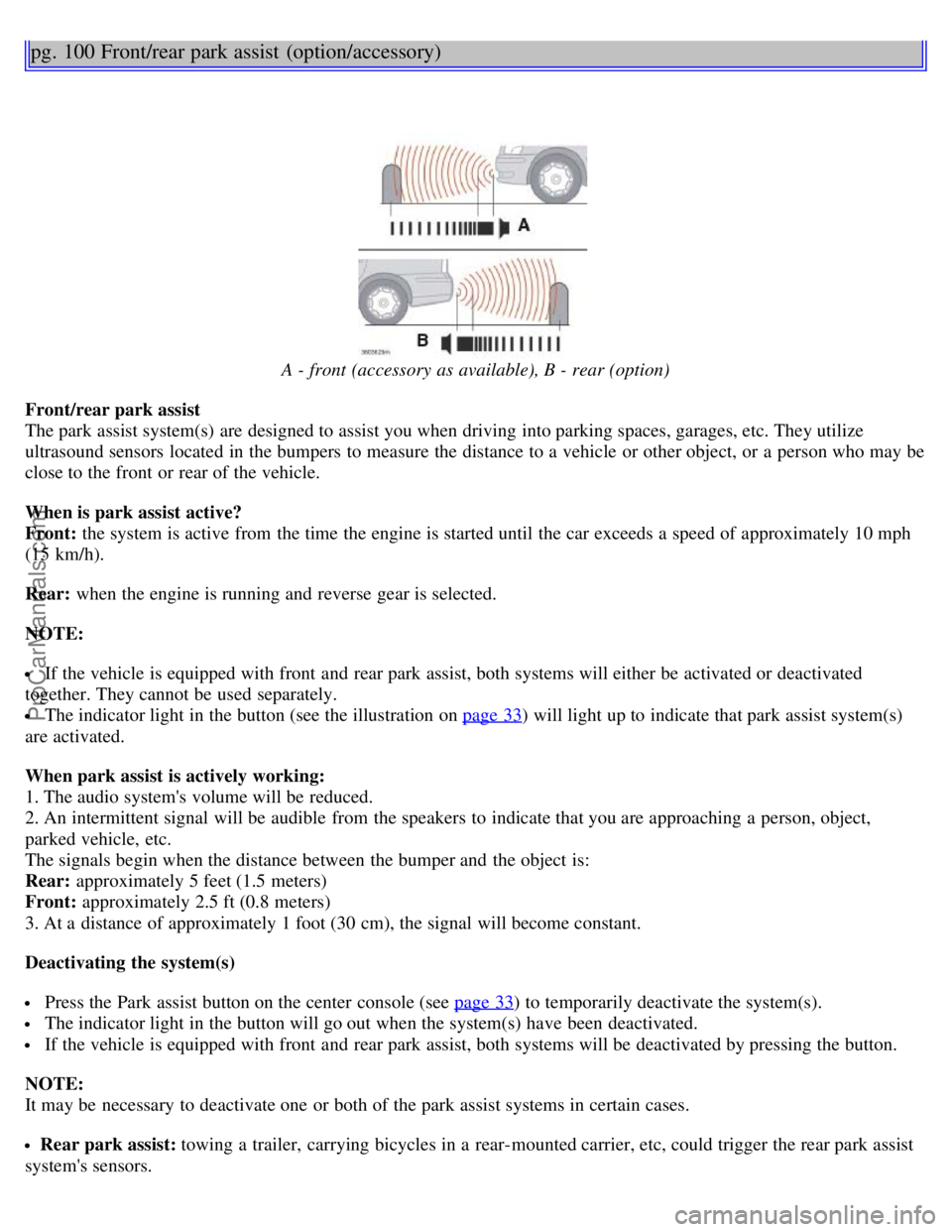
pg. 100 Front/rear park assist (option/accessory)
A - front (accessory as available), B - rear (option)
Front/rear park assist
The park assist system(s) are designed to assist you when driving into parking spaces, garages, etc. They utilize
ultrasound sensors located in the bumpers to measure the distance to a vehicle or other object, or a person who may be
close to the front or rear of the vehicle.
When is park assist active?
Front: the system is active from the time the engine is started until the car exceeds a speed of approximately 10 mph
(15 km/h).
Rear: when the engine is running and reverse gear is selected.
NOTE:
If the vehicle is equipped with front and rear park assist, both systems will either be activated or deactivated
together. They cannot be used separately.
The indicator light in the button (see the illustration on page 33) will light up to indicate that park assist system(s)
are activated.
When park assist is actively working:
1. The audio system's volume will be reduced.
2. An intermittent signal will be audible from the speakers to indicate that you are approaching a person, object,
parked vehicle, etc.
The signals begin when the distance between the bumper and the object is:
Rear: approximately 5 feet (1.5 meters)
Front: approximately 2.5 ft (0.8 meters)
3. At a distance of approximately 1 foot (30 cm), the signal will become constant.
Deactivating the system(s)
Press the Park assist button on the center console (see page 33) to temporarily deactivate the system(s).
The indicator light in the button will go out when the system(s) have been deactivated.
If the vehicle is equipped with front and rear park assist, both systems will be deactivated by pressing the button.
NOTE:
It may be necessary to deactivate one or both of the park assist systems in certain cases.
Rear park assist: towing a trailer, carrying bicycles in a rear-mounted carrier, etc, could trigger the rear park assist
system's sensors.
ProCarManuals.com
Page 129 of 139
AWD
- general information98
B
Backrest (center) - 3-section rear seat68
Battery110, 166
- maintenance156
- replacing155
- ventilation hose155
Booster cushion14
Brake failure warning light30
Brake fluid154
Brake system20
Bulbs (list)166
Bulbs - replacing135-141
C
Capacities (oils and fluids)159
, 164
Cargo compartment cover75
Cargo compartment lighting71
Cargo eyelets72
Cargo net73
Catalytic converters - three-way112
Center armrest - 3-section rear seat69
Center backrest (3-section rear seat)68
Center console - switches33
Center head restraint - 3-section rear seat68
Center head restraint - rear seat3
Center seat head restraint67
Central locking buttons83
Changing a wheel126
Chassis settings (R-models)99
Child booster cushion14
Child Restraint Anchorages17
Child safety13, 14, 16, 18
Child safety locks - rear doors86
Child seat anchors, ISOFIX17
Climate controls52-55
Climate system - general information51
Clock29
Clutch interlock93
Coat hanger65
Cold weather driving110
Combination filter52, 55
Coolant148
Cooling system - general information102
ProCarManuals.com
Page 135 of 139
Subwoofer76, 173
Supplemental Restraint System4, 30
Suspension165
Switches in center console33
T
Tachometer29
Tailgate - locking/unlocking83
Tailgate wiper blade - replacing157
Temperature gauge29
Text window32
Three-way catalytic converters112
Timing belt149
Tire Pressure Monitoring System118
Tires114, 127
Tires - changing126
Tool bag76
Towing a trailer107
Towing eyelet105
Towing the car105, 106
Trailer towing107
Trailer weight - maximum162
Transmission - automatic94-99
Trip computer34
Trip odometer29
Turn signals39
U
Unlocking the tailgate83
Upholstery - cleaning145
V
Vehicle Identification Number (VIN)160
Ventilation50
Ventilation hose, battery155
Volvo On Call167
Volumes (oils and fluids)164
W
Warning flashers42
Warning light - center30
Warning lights30, 31
Warranty146
Washer fluid reservoir150
Washer fluid solvent110
Washing the car143-145
Water repellent glass41
Water repellent glass - cleaning143
ProCarManuals.com