buttons VOLVO V70 2006 User Guide
[x] Cancel search | Manufacturer: VOLVO, Model Year: 2006, Model line: V70, Model: VOLVO V70 2006Pages: 138, PDF Size: 3.53 MB
Page 114 of 138
2 0 0 6
VOLVO V70
Chapter 10 - Audio systems
pg. 175 Audio systems
Introduction176
Audio system HU-650 overview177
Audio system HU-850 overview178
Radio functions179
RBDS functions183
HU - 650 CD player186
HU - 850 internal CD changer187
External CD changer (option)188
Dolby Surround Pro Logic II189
Specifications191
HomeLink®192
pg. 176 Introduction
The audio system in your car is operated with the buttons and knobs in the system's front panel. Certain functions,
such as adjusting the volume, changing radio stations or tracks on a CD, etc, can also be controlled with the optional
steering wheel-mounted keypad.
The audio system is available in two versions:
HU-650
Features: AM/FM radio, single-disc CD player, 4x25W output, six speakers.
HU-850
Features: AM/FM radio, integrated 6-disc CD changer, 4x50W or 4x70W output plus 25W Dolby Pro Logic II, eleven
speakers.
A subwoofer mounted under the floor in the cargo area is available as an option. Consult your Volvo retailer.
Compact disc care
• Keep the discs clean. Wipe them with a soft, clean, lint-free cloth, working from the center outwards. If necessary,
dampen the cloth with a neutral soap solution. Dry thoroughly before using.
ProCarManuals.com
Page 115 of 138

• Never use cleaning spray or antistatic liquid. Use only cleaners specifically made for CDs.
• Use discs of the correct size only (3.5" discs should never be used). The discs should conform to the norms EN60908
(IEC60908).
• Do not put tape or labels on the disc itself.
• Volvo does not recommend the use of plastic outer rings on the disc.
• Condensation may occur on discs/optical components of the changer in cold winter weather. The disc can be dried
with a clean, lint-free cloth. Optical components in the CD changer may, however, take up to one hour to dry off.
• Never attempt to play a disc which is damaged in any way.
• When not in use, the discs should be stored in their covers. Avoid storing discs in excessive heat, direct sunlight or
dusty locations.
pg. 177 Audio system HU-650 - overview
1. On/off - press
Volume - turn
2. Buttons for selecting stored radio stations/discs in optional CD changer
3. Bass (press to release control and turn to adjust)
4. Treble (press to release the control, and turn to adjust)
5. Balance (left/right) - press to release control and turn to adjust
6. Fader (front/rear) - press to release the control, and turn to adjust
7. Source/Menu
Press to open main menu
Turn to select FM, AM, CD, CD changer (option)
8. Scan function (automatically search for radio stations)
9. Exit (exit the menu)
10. Navigation buttons (seek/change radio station or CD track)
11. CD eject
12. CD slot
ProCarManuals.com
Page 116 of 138

13. CD random play
14. FM (select FM1, FM2, FM3)
15. AM (select AM1 or AM2)
16. CD player
17. AUTO - automatically search for radio stations
18. Display
pg. 178 Audio system HU-850 - overview
1. On/off - press
Volume - turn
2. Buttons for selecting stored radio stations/discs in optional CD changer
3. Bass (press to release control and turn to adjust)
4. Treble (press to release the control, and turn to adjust)
5. Balance (left/right) - press to release control and turn to adjust
6. Fader (front/rear) - press to release the control, and turn to adjust
7. Source/Menu
Press to open main menu
Turn to select FM, AM, CD, CD changer (option)
8. Scan function (automatically search for radio stations)
9. Exit (exit the menu)
10. Navigation buttons (seek/change radio station or CD track)
11. CD eject
12. Dolby Surround Pro Logic II
ProCarManuals.com
Page 117 of 138
13. 2-channel stereo
14. 3-channel stereo
15. CD slot
16. CD random play
17. FM (select FM1, FM2, FM3)
18. AM (select AM1 or AM2)
19. CD player
20. AUTO - automatically search for radio stations
21. Display
pg. 179 Radio functions HU-650/HU-850
Switch on/off
Press the knob to switch on or turn off the radio.
Volume control
Turn the knob clockwise to increase volume. Volume control is electronic and does not have an end stop. If you have
a key pad in the steering wheel, increase or decrease the volume with the + or - buttons.
Volume control - ALARM
If a CD is playing when the radio receives an alarm bulletin (available in certain areas only), the CD player enters
pause mode. The bulletin is broadcast at the volume selected for this type of message.
After the bulletin has been completed, the audio system reverts to the originally selected sound source (radio or CD),
which is played at the volume that was selected for that source.
If the bulletin volume is adjusted while the bulletin is being broadcast, this new volume is saved and used for
subsequent bulletins.
ProCarManuals.com
Page 119 of 138

This function is used to fine-tune the balance of sound in the speakers. To set the level:
1. Press SOURCE.
2. Turn the SOURCE knob, select ADVANCED MENU and press SOURCE.
3. Turn the SOURCE knob, select AUDIO SETTINGS and press SOURCE.
4. Turn the SOURCE knob, select MID EQ LEVEL and press SOURCE.
5. Turn the SOURCE knob, select the desired level and press SOURCE.
6. Press EXIT.
Selecting a sound source
The sound source (e.g. AM, FM, etc.) can be selected in two ways:
• Use the sound source buttons (see the center illustration above).
• Turn the SOURCE knob (see illustration above) to select a sound source (AM1, AM2, FM1, FM2, FM3, or CD).
Press the knob to select the AM or FM band of your choice.
The sound source selected will be shown in the display.
pg. 181 Radio functions HU-650/HU-850
Scan
Press the SCAN button to start the station scan function. When a station is found, scanning stops for approximately 10
seconds, after which scanning will continue.
Press the SCAN or SOURCE button when a station has been found if you would like to listen to that station and to
discontinue the scan function.
Station seek up/down
Press
to start the seek function. The radio seeks the next audible station and tunes it in. Repeat the procedure
to continue the seek function.
Manual station search
Press and hold it down. MAN will be shown in the display. The radio scans slowly in the selected direction and
ProCarManuals.com
Page 120 of 138
will increase the scanning speed after a few seconds. Release the button when the desired frequency appears in the
display.
The frequency can be fine-tuned by short presses on the
keys.
The system will remain in manual search mode for 5 seconds after the button is released, after which it will return to
seek mode.
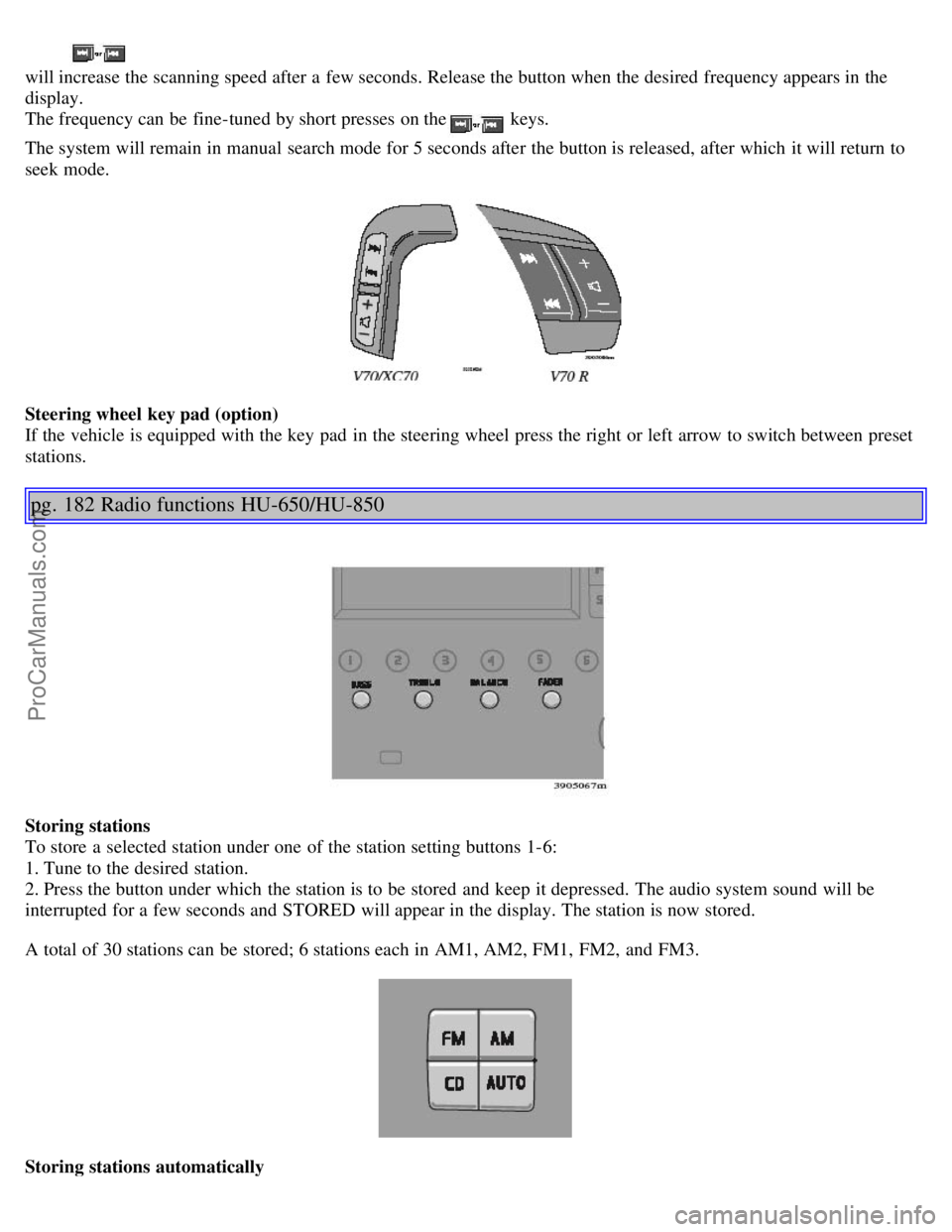
Steering wheel key pad (option)
If the vehicle is equipped with the key pad in the steering wheel press the right or left arrow to switch between preset
stations.
pg. 182 Radio functions HU-650/HU-850
Storing stations
To store a selected station under one of the station setting buttons 1-6:
1. Tune to the desired station.
2. Press the button under which the station is to be stored and keep it depressed. The audio system sound will be
interrupted for a few seconds and STORED will appear in the display. The station is now stored.
A total of 30 stations can be stored; 6 stations each in AM1, AM2, FM1, FM2, and FM3.
Storing stations automatically
ProCarManuals.com
Page 121 of 138
This function automatically searches for and stores up to 10 strong AM or FM stations in a separate memory. If more
than ten stations are found, the ten strongest ones are stored. This function is especially useful in areas in which you
are not familiar with radio stations or their frequencies.
To use the AUTO function:
1. Select radio mode using the AM or FM buttons, or by turning the SOURCE knob.
2. Start the search by pressing AUTO for more than 2 seconds.
3. AUTO appears in the display and a number of stations with strong signals (max. 10) from the selected frequency
band will be stored in the auto-store memory. If there are no stations with sufficient signal strength, NO STATION is
displayed.
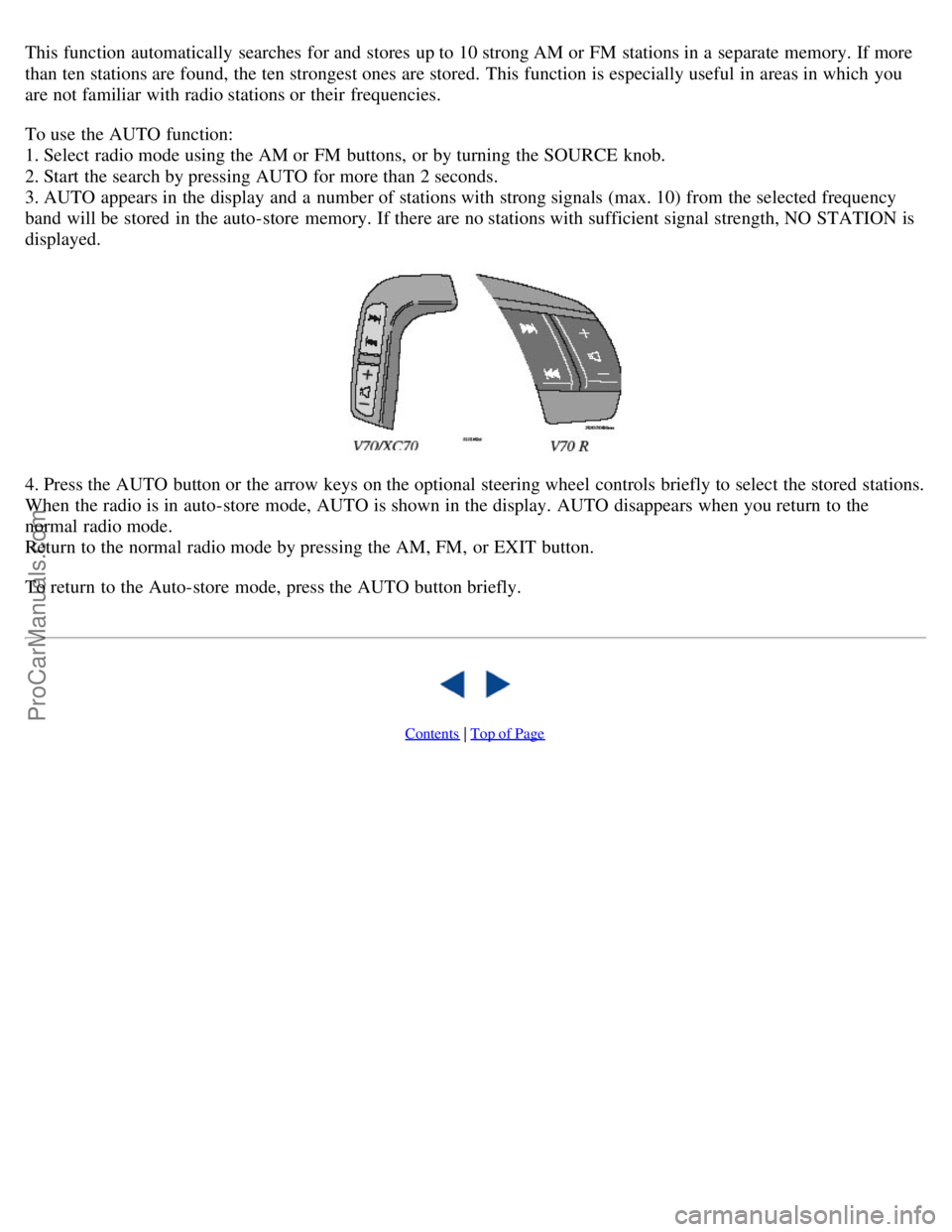
4. Press the AUTO button or the arrow keys on the optional steering wheel controls briefly to select the stored stations.
When the radio is in auto-store mode, AUTO is shown in the display. AUTO disappears when you return to the
normal radio mode.
Return to the normal radio mode by pressing the AM, FM, or EXIT button.
To return to the Auto-store mode, press the AUTO button briefly.
Contents | Top of Page
ProCarManuals.com
Page 122 of 138
2 0 0 6
VOLVO V70
HomeLink® Universal Transceiver (option)
pg. 192 HomeLink® Universal Transceiver (option)
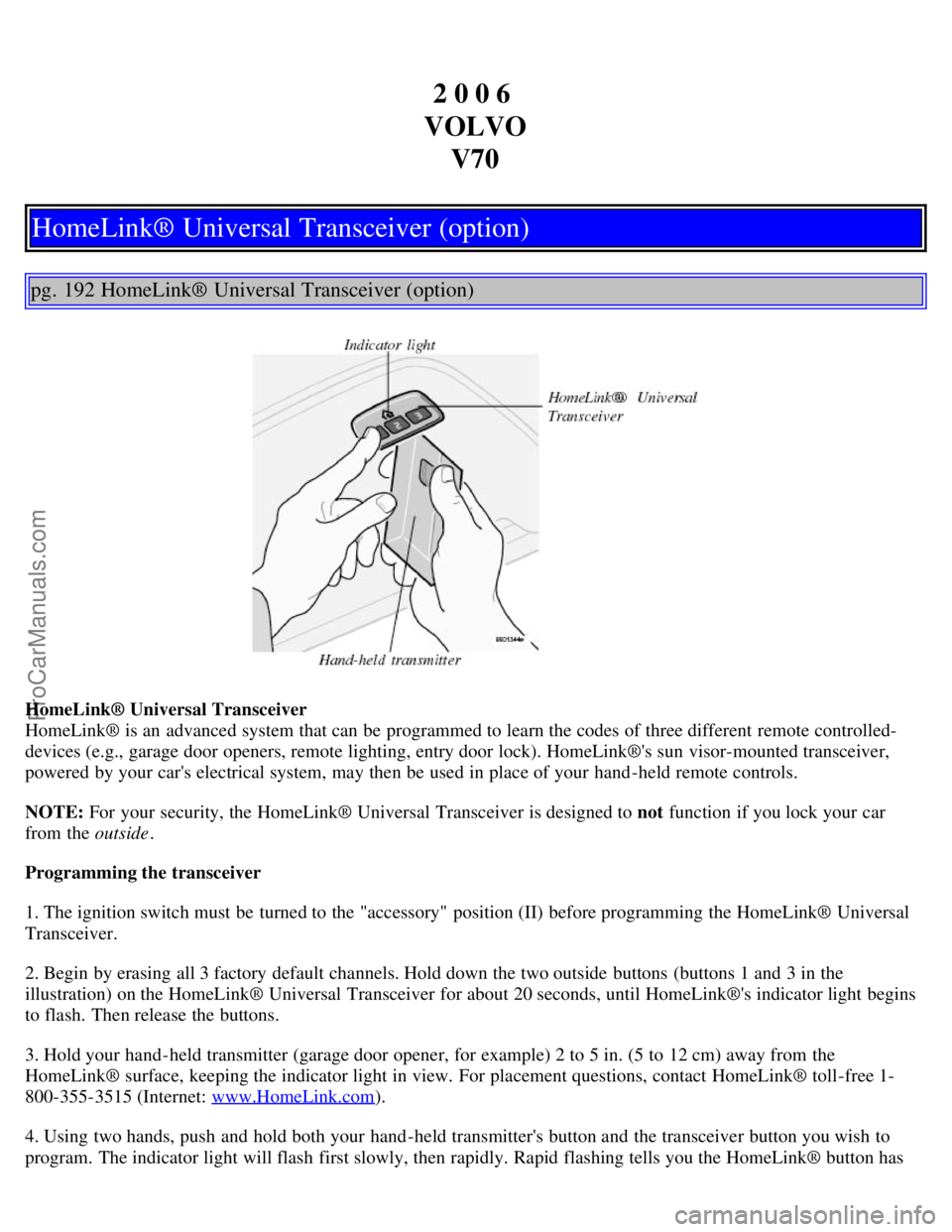
HomeLink® Universal Transceiver
HomeLink® is an advanced system that can be programmed to learn the codes of three different remote controlled-
devices (e.g., garage door openers, remote lighting, entry door lock). HomeLink®'s sun visor-mounted transceiver,
powered by your car's electrical system, may then be used in place of your hand -held remote controls.
NOTE: For your security, the HomeLink® Universal Transceiver is designed to not function if you lock your car
from the outside .
Programming the transceiver
1. The ignition switch must be turned to the "accessory" position (II) before programming the HomeLink® Universal
Transceiver.
2. Begin by erasing all 3 factory default channels. Hold down the two outside buttons (buttons 1 and 3 in the
illustration) on the HomeLink® Universal Transceiver for about 20 seconds, until HomeLink®'s indicator light begins
to flash. Then release the buttons.
3. Hold your hand -held transmitter (garage door opener, for example) 2 to 5 in. (5 to 12 cm) away from the
HomeLink® surface, keeping the indicator light in view. For placement questions, contact HomeLink® toll-free 1-
800-355-3515 (Internet: www.HomeLink.com
).
4. Using two hands, push and hold both your hand -held transmitter's button and the transceiver button you wish to
program. The indicator light will flash first slowly, then rapidly. Rapid flashing tells you the HomeLink® button has
ProCarManuals.com
Page 123 of 138
been successfully programmed. Release both buttons.
5. If you are programming a rolling code-equipped device (e.g., garage door opener or entry door lock), refer to
"Programming rolling codes" on the next page to complete the programming process.
Repeat steps 3 and 4 to program the other two transceiver buttons.
If, after several attempts, you are unable to successfully train the HomeLink® Universal Transceiver to learn your
hand -held transmitter's signal, contact HomeLink® toll-free 1-800-355-3515 (Internet: www.HomeLink.com
).
WARNING!
If you use HomeLink® to open a garage door or gate, be sure no one is near the gate or door while it is in motion.
Do not use the HomeLink® Universal Transceiver with any garage door opener that lacks safety "stop" and
"reverse" features as required by federal safety standards. (This includes any garage door opener model
manufactured before April 1, 1982) A garage door opener that cannot "detect" an object, signalling the door to
"stop" and "reverse" does not meet current federal safety standards. Using a garage door opener without these
features increases the risk of serious injury or death. For more information on this matter, call toll-free 1-800-355-
3515 (Internet: www.HomeLink.com
).
pg. 193 HomeLink® Universal Transceiver (option)
NOTE - Canadian residents:
During programming, your hand -held transmitter may automatically stop transmitting. To successfully train
HomeLink®, continue to hold the HomeLink® button. At the same time, repeatedly press and hold your hand -held
transmitter's button at two -second intervals until HomeLink® has learned your transmitter's code. The HomeLink®
indicator light will flash first slowly, and then rapidly to indicate that the button has been successfully programmed.
Determining if your garage door uses a rolling code
Determine, in one of the following ways, if your garage door uses a rolling code system and is manufactured after
1996:
Refer to the garage door opener owner's manual for verification.
If your hand -held transmitter appears to program the HomeLink® Universal Transceiver but the programmed button
does not activate the garage door, your garage door opener may have a rolling code.
Press the programmed HomeLink® button. If the garage door opener has the rolling code feature, the HomeLink®
indicator light flashes rapidly and then glows steadily after approximately 2 seconds.
To train a rolling code garage door opener, follow these instructions after programming the desired transceiver
button according to "Programming the transceiver." The help of a second person may make training easier.
1. Locate the training button on the garage door opener motor head unit . The location and color of the training button
may vary. If you encounter difficulty, refer to the garage door opener owner's manual or call toll-free 1-800-355-3515
(Internet: www.HomeLink.com
).
2. Press the "training" button on the garage door opener motor head unit until the "training" light comes on.
3. Press and release the programmed HomeLink® button. Press and release the programmed HomeLink® button a
second time to complete the training process. Some garage door openers may require you to do this procedure a third
time to complete the training.
The programmed button on your HomeLink® Universal Transceiver should now operate your garage door opener. The
ProCarManuals.com
Page 124 of 138
original hand -held transmitter can also be used, as desired, to operate the garage door.
The remaining two HomeLink® buttons can be programmed in the same way. In the event of any problems in
programming the HomeLink® Universal Transceiver, call toll-free 1-800-355-3515 (Internet: www.HomeLink.com
).
Operating the HomeLink® Universal Transceiver
Once programmed, the HomeLink® Universal Transceiver can be used in place of your hand -held transmitters.
To operate, the key must be turned to the "accessory" position (II) or the engine must be running. Press the
programmed HomeLink® button to activate the garage door, driveway gate, security lighting, home security system,
etc.
Your original hand -held transmitters may, of course, be used at any time.
Erasing programmed buttons
Individual buttons cannot be erased. To erase all three programmed buttons:
1. Turn the ignition key to the "accessory" position (II).
2. Hold down the two outside buttons on the HomeLink® Universal Transceiver for about 20 seconds, until
HomeLink®'s indicator light begins to flash.
3. Release both buttons.
The HomeLink® buttons can be reprogrammed using the procedures described on the previous page.
(HomeLink® information continues on the next page)
pg. 194 HomeLink® Universal Transceiver (option)
Reprogramming a single HomeLink® button
1. Press and hold the desired HomeLink® button. Do not release the button until step 3 has been completed.
2. When the indicator light begins to flash slowly (after approximately 20 seconds), position your hand -held
transmitter 2 to 5 in. (5 to 12 cm) away from the HomeLink® surface.
3. Press and hold the hand -held transmitter button. The HomeLink® indicator light will flash first slowly, then rapidly.
When the indicator light flashes rapidly, release both buttons.
The previously programmed device has now been erased and the new device can be activated by pressing the
HomeLink® button that has just been programmed. This procedure will not affect any other programmed HomeLink®
buttons.
NOTE:
Retain the original transmitter(s) for future programming procedures (e.g., if you purchase a new car).
For your own security, erase all programmed buttons on the HomeLink® Universal Transceiver when you sell your
car.
Metallic sun protection films should not be used on any windows in a car equipped with HomeLink® Universal
Transceiver. This could interfere with the transceiver's function.
ProCarManuals.com