steering VOLVO V70 2006 User Guide
[x] Cancel search | Manufacturer: VOLVO, Model Year: 2006, Model line: V70, Model: VOLVO V70 2006Pages: 138, PDF Size: 3.53 MB
Page 66 of 138

With this feature, the steering is most responsive at lower speeds to make parking, driving in city traffic, etc., easier.
The effect of the power steering diminishes as you accelerate for greater stability at highway speeds.
Weight distribution affects handling
At the specified curb weight your car has a tendency to understeer, which means that the steering wheel has to be
turned more than might seem appropriate for the curvature of a bend. This ensures good stability and reduces the risk
of rear wheel skid. Remember that these properties can alter with the vehicle load. The heavier the load on the rear of
the vehicle (e.g., heavily loaded (max. 220 lbs, 100 kg) cargo area or when towing a trailer, the less the tendency to
understeer.
pg. 102 Points to remember
Cooling system
The risk for engine overheating is greatest, especially in hot weather, when:
Towing a trailer up steep inclines for prolonged periods at wide open throttle and low engine rpm.
Stopping the engine suddenly after high speed driving (so-called "after-boiling" can occur).
To avoid overheating, the following rules should be followed:
Do not drive for prolonged periods at engine speeds above 4500 rpm if you are towing a trailer in hilly terrain.
Reduce speed when towing a trailer up long, steep inclines. The risk of overheating can be reduced by switching off
the air conditioning system for a short time.
Do not let the engine idle unnecessarily for prolonged periods.
Do not mount auxiliary lamps in front of the grill.
When the risk of overheating is imminent, or in the event of overheating (the temperature gauge goes repeatedly into,
or stays continually in, the red section), the following precautions should be taken:
Switch off the air conditioning system.
Pull off the road, away from traffic, stop the car and put the gear selector into neutral.
Switch the heater to full (maximum) position. Increase the engine speed to approx. 2000 rpm (twice idling speed)
until the temperature begins to drop.
WARNING!
Do not remove coolant expansion tank cap. The coolant will be extremely hot.
If necessary, see page 154
for information on checking and topping-up the coolant level.
CAUTION: Drive slowly and carefully if going through standing water (i.e. flooded roadways, etc.). Damage to the
engine could result if excess water is drawn in through the air intake system. Never drive the vehicle in water deeper
than 1 foot (300 mm). See the flood warning on page 5
.
WARNING!
Driving with the tailgate open : Driving with the tailgate open could mean that poisonous exhaust gases enter the
passenger compartment.
If the tailgate must be kept open for any reason, proceed as follows:
- Close the windows.
- Set the ventilation system to air flow to floor, windshield and side windows and blower control to its highest
setting.
Floor mats : An extra mat on the driver's floor can cause the accelerator pedal to catch. Check that the movement
ProCarManuals.com
Page 77 of 138

run flat tires.
Tires of this type have specially reinforced sidewalls that make it possible to continue driving in the event of a drop in
inflation pressure. Tires of this type are mounted on special rims.
NOTE: Self supporting run flat tires are only available in conjunction with TPMS.
If a self supporting run flat tire should lose inflation pressure, the yellow TPMS warning symbol (
) in the instrument
panel lights up to alert the driver, and a message will be shown in the text window in the instrument panel.
If this occurs, reduce vehicle speed to a maximum of 50 mph (80 km/h). The vehicle can be driven approximately 50
miles (80 km), or somewhat farther if the vehicle is not heavily loaded. The tire should be replaced as soon as
possible.
Hard braking and sudden steering maneuvers should be avoided.
In certain cases, it may be difficult to see which self supporting run flat tire is defective. To determine which tire is
damaged, check the inflation pressure of all four tires.
WARNING!
• Only specially trained persons should mount self supporting run flat tires.
• If self supporting run flat tires are mounted, the vehicle must be equipped with a Tire Pressure Monitoring System.
• After a low pressure warning has been displayed, do not exceed 50 mph (80 km/h).
• Avoid severe cornering and hard braking, and minimize the distance traveled before replacing the self supporting
run flat tire.
• Self supporting run flat tires cannot be repaired. They must be replaced if damaged or punctured.
pg. 126 Wheels and tires
Tire designations
Federal law mandates that tire manufacturers place standardized information on the sidewall of all tires (see the
illustration).
The following information is listed on the tire sidewall:
The tire designation (the following figures are examples of a tire designation):
1. 215: the width of the tire (in millimeters) from sidewall edge to sidewall edge. The larger the number, the wider the
tire.
ProCarManuals.com
Page 86 of 138
2 0 0 6
VOLVO V70
Chapter 8 - Maintenance/Servicing
pg. 135 Maintenance/Servicing
Fuses136
Replacing bulbs141
Paint touch up148
Washing the car149
Cleaning the upholstery151
Maintenance service, Warranty152
Fuel/emissions systems153
Drive belt, Coolant154
Maintaining your car155
Servicing157
Opening the hood, Engine compartment158
Engine oil159
Power steering/Brake fluid reservoirs161
Replacing the battery162
Battery maintenance163
Replacing wiper blades164
pg. 136 Fuses
ProCarManuals.com
Page 89 of 138

7 Moon roof (option)15A
8 Ignition switch, SRS system, engine control module, immobilizer, transmission control module (R-
models)7.5A
9 Onboard diagnostics, headlight switch, steering wheel angle sensor, steering wheel control module 5A
10 Audio system 20A
11 Audio system amplifier 30A
12 Navigation system display (option) 10A
13 -
14 -
15 -
16 -
17 -
18 -
19 -
20 -
21 -
22 -
23 -
24 -
25 -
26 -
27 -
28 -
29 -
30 -
31 -
32 -
33 -
34 -
35 -
36 -
37 -
38 -
pg. 139 Fuses in the passenger compartment
ProCarManuals.com
Page 90 of 138

Fuse box in the passenger compartment, behind the plastic coverLocation Amperage
1 Heated passenger's seat (option) 15A
2 Heated driver's seat (option) 15A
3 Horn 15A
4 -
5 -
6 -
7 -
8 Alarm siren 5A
9 Brake light switch feed 5A
10 Instrument panel, climate system, power driver's seat (option), Occupant Weight Sensor (US models
only) 10A
11 12-volt sockets - front and rear seats 15A
12 -
13 -
14 Headlight wipers (V70 R) 15A
15 ABS, STC/DSTC 5A
16 Power steering, Bi -Xenon headlights (option) 10A
17 Driver's side front foglight (option) 7.5A
18 Passenger's side front foglight (option) 7.5A
19 -
20 -
21 Transmission control module, reverse gear block (M66) 10A
22 Driver's side high beam 10A
23 Passenger's side high beam 10A
24 -
25 -
26 -
27 -
28 Power passenger's seat (option), audio system 5A
29 -
30 -
ProCarManuals.com
Page 110 of 138
Charge air cooler (Intercooler)
Turbocharged engines employ a turbo-compressor to force air into the engine inlet manifold and a charge air cooler to
cool the compressed inlet air. The resulting increase in air flow raises pressure in the intake manifold and increases
engine power over that developed by A normally-aspirated engine. The charge air cooler (which resembles a radiator)
is located between the turbo-compressor and inlet manifold.
pg. 170 Oil/fluid specifications and volumes
Engine Oil
Type: Engine oil must meet the minimum ILSAC specification GF-3, API SL, or ACEA A1/B1.
Volume: 5.8 qts (5.5 liters)
Volume between MIN and MAX on dipstick: 1.3 US qts (1.2 liters)
Manual transmission oil
Type: MTF 97309
M56 (five speed): 2.2 US qts. (2.1 liters)
M66 (6 speed): 2.1 US qts. (2.0 liters)
Automatic Transmission Fluid
Type: JWS 3309
AW5: 7.6 US qts (7.2 liters)
TF-80SC (V70 R): 7.4 US qts (7.0 liters)
Do not mix with other oils.
Cooling system
Type: Positive pressure, closed system. The thermostat begins to open at 194 °F (90 °C)
Coolant: Volvo original coolant/antifreeze
Power steering fluid
Volvo synthetic power steering fluid (Pentosin CHF 11S) P/N 1161529 or equivalent.
Volume: 0.95 US qts (0.9 liters)
Brake fluid
DOT 4+ boiling point >536°F(280°C), P/N 9437433
Volume: 0.64 US qts (0.6 liters)
Climate control system - refrigerant (R 134a)
Oil: PAG
Volume: 2.2 lbs (1,000 g) R134a
Fuel
Minimum octane requirement - AKI 87 (RON 91)
Fuel tank volume:
Front wheel drive, non-turbo models - 18.5 US gal. (70 liters)
All turbo models - 18 US gal. (68 liters)
Washer fluid reservoir
Volume: 6.8 US qts (6.4 liters) or 4.8 US qts (4.5 liters) on the V70 R.
All specifications are subject to change without prior notice.
pg. 171 Fuel system, Electronic ignition system, Suspension
ProCarManuals.com
Page 111 of 138
Fuel system
The engine is equipped with a multiport fuel injection system.
Distributor ignition system
Firing order: 1-2-4-5-3
Electronic ignition setting: Not adjustable
Spark plugs: Champion RC8PYP 8 (or equivalent)
Spark plug gap: 0.028-0.032" (0.7-0.8 mm)
Tightening torque: 18.4 ft. lbs. (25 Nm) WARNING!
The ignition system operates at very high voltages. Special safety precautions must be followed to prevent injury.
Always turn the ignition off when:
Replacing ignition components e.g. plugs, coil, etc.
Do not touch any part of the ignition system while the engine is running. This may result in a shock and bodily
injury.
Front suspension
Spring strut suspension with integrated shock absorbers and control arms linked to the support frame. Power-assisted
rack and pinion steering. Safety type steering column. The alignment specifications apply to an unladen car but include
fuel, coolant and spare wheel.
Rear suspension
Individual rear wheel suspension with longitudinal support arms, double link arms and track rods.
All specifications are subject to change without prior notice.
pg. 172 Electrical system
Electrical system
12 Volt, negative ground.
Voltage-controlled generator. Single-wire system with chassis and engine used as conductors. Grounded on chassis.
Battery
Voltage: 12 Volt, capacity: 600 A/115 min reserve capacity.
The battery contains corrosive and poisonous acids. It is of the utmost importance that old batteries are disposed of
correctly. Your Volvo retailer can assist you in this matter.
Generator
Rated output: max. current: 140 A
Starter motor:
Output: 1.7 kW
ProCarManuals.com
Page 114 of 138
2 0 0 6
VOLVO V70
Chapter 10 - Audio systems
pg. 175 Audio systems
Introduction176
Audio system HU-650 overview177
Audio system HU-850 overview178
Radio functions179
RBDS functions183
HU - 650 CD player186
HU - 850 internal CD changer187
External CD changer (option)188
Dolby Surround Pro Logic II189
Specifications191
HomeLink®192
pg. 176 Introduction
The audio system in your car is operated with the buttons and knobs in the system's front panel. Certain functions,
such as adjusting the volume, changing radio stations or tracks on a CD, etc, can also be controlled with the optional
steering wheel-mounted keypad.
The audio system is available in two versions:
HU-650
Features: AM/FM radio, single-disc CD player, 4x25W output, six speakers.
HU-850
Features: AM/FM radio, integrated 6-disc CD changer, 4x50W or 4x70W output plus 25W Dolby Pro Logic II, eleven
speakers.
A subwoofer mounted under the floor in the cargo area is available as an option. Consult your Volvo retailer.
Compact disc care
• Keep the discs clean. Wipe them with a soft, clean, lint-free cloth, working from the center outwards. If necessary,
dampen the cloth with a neutral soap solution. Dry thoroughly before using.
ProCarManuals.com
Page 117 of 138
13. 2-channel stereo
14. 3-channel stereo
15. CD slot
16. CD random play
17. FM (select FM1, FM2, FM3)
18. AM (select AM1 or AM2)
19. CD player
20. AUTO - automatically search for radio stations
21. Display
pg. 179 Radio functions HU-650/HU-850
Switch on/off
Press the knob to switch on or turn off the radio.
Volume control
Turn the knob clockwise to increase volume. Volume control is electronic and does not have an end stop. If you have
a key pad in the steering wheel, increase or decrease the volume with the + or - buttons.
Volume control - ALARM
If a CD is playing when the radio receives an alarm bulletin (available in certain areas only), the CD player enters
pause mode. The bulletin is broadcast at the volume selected for this type of message.
After the bulletin has been completed, the audio system reverts to the originally selected sound source (radio or CD),
which is played at the volume that was selected for that source.
If the bulletin volume is adjusted while the bulletin is being broadcast, this new volume is saved and used for
subsequent bulletins.
ProCarManuals.com
Page 120 of 138
will increase the scanning speed after a few seconds. Release the button when the desired frequency appears in the
display.
The frequency can be fine-tuned by short presses on the
keys.
The system will remain in manual search mode for 5 seconds after the button is released, after which it will return to
seek mode.
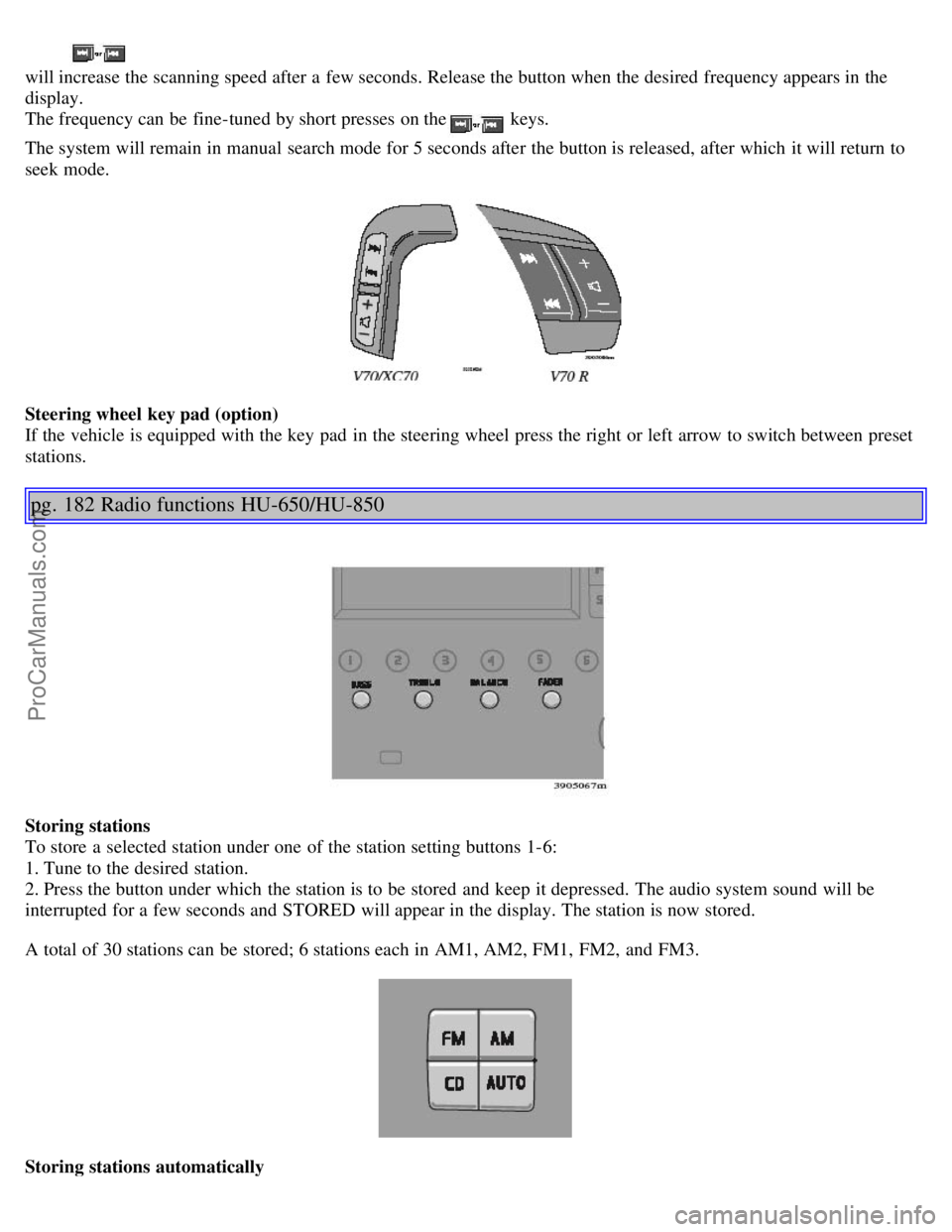
Steering wheel key pad (option)
If the vehicle is equipped with the key pad in the steering wheel press the right or left arrow to switch between preset
stations.
pg. 182 Radio functions HU-650/HU-850
Storing stations
To store a selected station under one of the station setting buttons 1-6:
1. Tune to the desired station.
2. Press the button under which the station is to be stored and keep it depressed. The audio system sound will be
interrupted for a few seconds and STORED will appear in the display. The station is now stored.
A total of 30 stations can be stored; 6 stations each in AM1, AM2, FM1, FM2, and FM3.
Storing stations automatically
ProCarManuals.com