warning light VOLVO V70 2006 Owner's Manual
[x] Cancel search | Manufacturer: VOLVO, Model Year: 2006, Model line: V70, Model: VOLVO V70 2006Pages: 138, PDF Size: 3.53 MB
Page 76 of 138

Each tire, including the spare (if provided), should be checked monthly when cold and inflated to the inflation pressure
recommended by the vehicle manufacturer on the vehicle placard or tire inflation pressure label. (If your vehicle has
tires of a different size than the size indicated on the vehicle placard or tire inflation pressure label, you should consult
the appropriate section of this owner's manual to determine the proper tire inflation pressure.) When the low tire
pressure telltale is illuminated, one or more of your tires is significantly underinflated. You should stop and check your
tires as soon as possible, and inflate them to the proper pressure. Driving on a significantly underinflated tire causes
the tire to overheat and can lead to tire failure. Under-inflation also reduces fuel efficiency and tire tread life, and may
affect the vehicle's handling and stopping ability. Your vehicle has also been equipped with a TPMS malfunction
telltale to indicate when the system is not operating properly. When the malfunction telltale is illuminated, the system
may not be able to detect or signal low tire pressure as intended. TPMS malfunctions may occur for a variety of
reasons, including the installation of incompatible replacement tires on the vehicle. Always check the TPMS
malfunction telltale after replacing one or more tires on your vehicle to ensure that the replacement tires are
compatible with the TPMS.
NOTE: TPMS indicates low tire pressure but does not replace normal tire maintenance. For information on correct tire
pressure, please refer to the table on page 122
, or consult your Volvo retailer.
Erasing warning messages
When a low tire pressure warning message has been displayed, and the tire pressure warning light has come on:
1. Use a tire pressure gauge to check the inflation pressure of all four tires.
2. Re-inflate the tire(s) to the correct pressure (consult the tire pressure placard or the table on page 122
).
3. Drive the car for several minutes at a speed of 20 mph (30 km/h) or faster.
This will erase the warning text and the warning light will go out.
WARNING!
Incorrect inflation pressure could lead to tire failure, resulting in a loss of control of the vehicle.
(Contd. on following page)
pg. 124 Wheels and tires
Changing tires
Please note the following when changing or replacing the factory installed TPMS wheels/ tires on the vehicle:
Only the factory-mounted wheels are equipped with TPMS sensors in the valves.
If the vehicle is equipped with a temporary spare tire, this tire does not have a TPMS sensor.
If winter wheels without TPMS sensors are mounted on the vehicle, TIRE PRESS SYST SERVICE REQUIRED will
be displayed each time the vehicle is driven above 25 mph (40 km/h) for 10 minutes or more.
Once TPMS sensors are properly installed, the warning message should not reappear.
Volvo recommends that TPMS sensors be fitted on all wheels used on the vehicle. Volvo does not recommend
moving sensors back and forth between sets of wheels.
CAUTION!
When inflating tires with TPMS valves, press the pump's mouthpiece straight onto the valve to help avoid bending or
otherwise damaging the valve.
pg. 125 Wheels and tires
Self supporting run flat tires (option)
Certain models equipped with the Tire Pressure Monitoring System (TPMS) can also be equipped with self supporting
ProCarManuals.com
Page 77 of 138

run flat tires.
Tires of this type have specially reinforced sidewalls that make it possible to continue driving in the event of a drop in
inflation pressure. Tires of this type are mounted on special rims.
NOTE: Self supporting run flat tires are only available in conjunction with TPMS.
If a self supporting run flat tire should lose inflation pressure, the yellow TPMS warning symbol (
) in the instrument
panel lights up to alert the driver, and a message will be shown in the text window in the instrument panel.
If this occurs, reduce vehicle speed to a maximum of 50 mph (80 km/h). The vehicle can be driven approximately 50
miles (80 km), or somewhat farther if the vehicle is not heavily loaded. The tire should be replaced as soon as
possible.
Hard braking and sudden steering maneuvers should be avoided.
In certain cases, it may be difficult to see which self supporting run flat tire is defective. To determine which tire is
damaged, check the inflation pressure of all four tires.
WARNING!
• Only specially trained persons should mount self supporting run flat tires.
• If self supporting run flat tires are mounted, the vehicle must be equipped with a Tire Pressure Monitoring System.
• After a low pressure warning has been displayed, do not exceed 50 mph (80 km/h).
• Avoid severe cornering and hard braking, and minimize the distance traveled before replacing the self supporting
run flat tire.
• Self supporting run flat tires cannot be repaired. They must be replaced if damaged or punctured.
pg. 126 Wheels and tires
Tire designations
Federal law mandates that tire manufacturers place standardized information on the sidewall of all tires (see the
illustration).
The following information is listed on the tire sidewall:
The tire designation (the following figures are examples of a tire designation):
1. 215: the width of the tire (in millimeters) from sidewall edge to sidewall edge. The larger the number, the wider the
tire.
ProCarManuals.com
Page 84 of 138

Jack for AWD models
CAUTION:
The car must not be driven with wheels of different dimensions or with a spare tire other than the one that came with
the car. The use of different size wheels can seriously damage your car's transmission.
WARNING!
• The jack's attachment must engage the bar in the jack attachment (see inset illustration on the previous page). The
car's weight must not rest on the jack attachment.
• Be sure the jack is on a firm, level, non-slippery surface.
• Never allow any part of your body to be extended under a car supported by a jack.
• Use the jack intended for the car when replacing a wheel. For any other job, use stands to support the side of the
car being worked on.
• Apply the parking brake, select position P (automatic transmission) or Reverse gear (manual transmission).
• Block the wheels standing on the ground, use rigid wooden blocks or large stones.
• The jack should be kept well-greased.
Installing the wheel
Clean the contact surfaces on the wheel and hub. Lift the wheel and place it on the hub. Make sure that you align the
wheel with the guide stud on the wheel hub prior to installation. Install the wheel bolts crosswise (see illustration) and
tighten by turning lightly clockwise. Lower the vehicle to the ground and alternately tighten the bolts to 102 ft. lbs.
(140 Nm). Install the wheel cap (where applicable).
CAUTION : Correct tightening torque on wheel bolts must be observed. The wheel bolts should never be greased or
lubricated. The extended, chromed wheel bolts must not be used with steel rims, as they make it impossible to fit the
hub caps.
Correct tightening order for wheel bolts
pg. 134 This page intentionally left blank.
ProCarManuals.com
Page 93 of 138
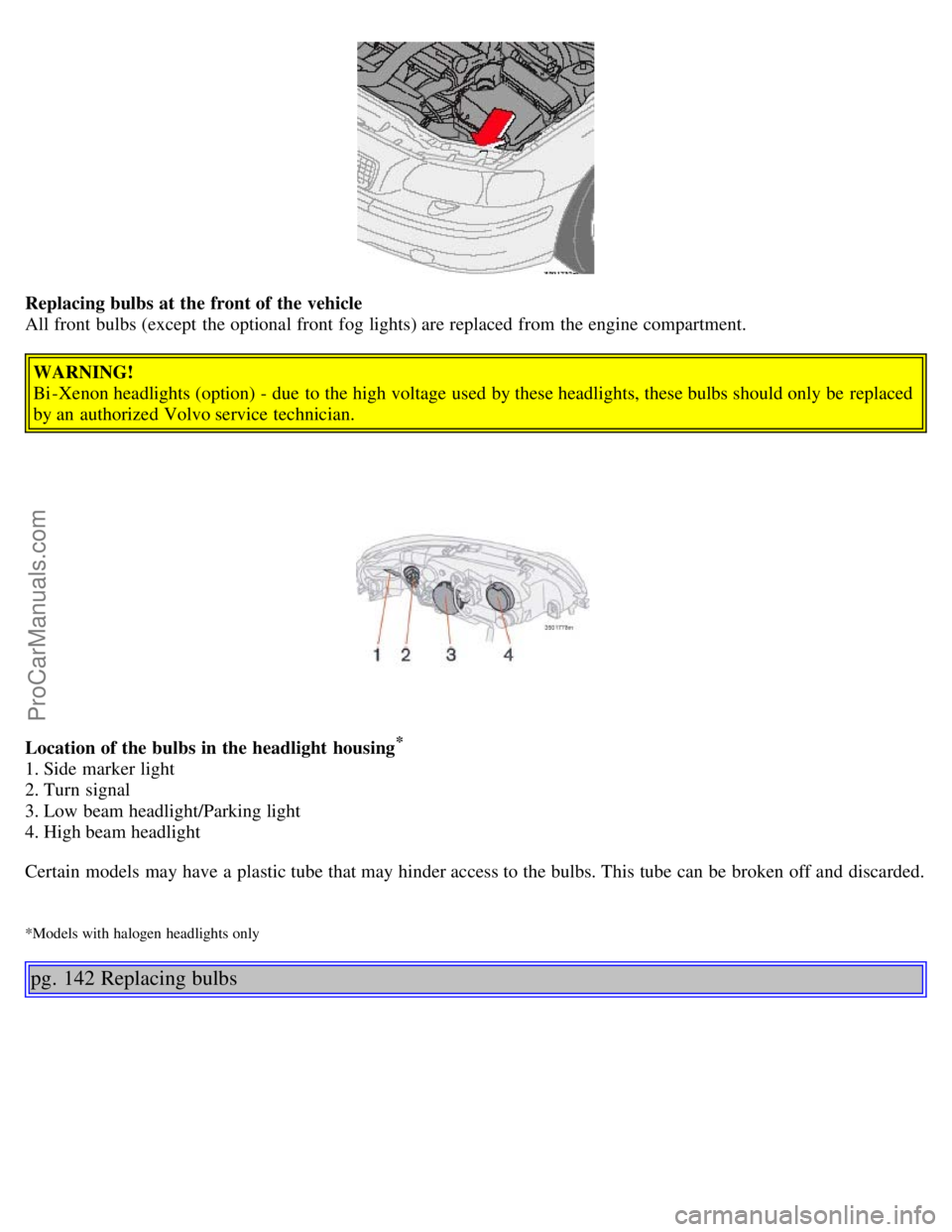
Replacing bulbs at the front of the vehicle
All front bulbs (except the optional front fog lights) are replaced from the engine compartment.
WARNING!
Bi -Xenon headlights (option) - due to the high voltage used by these headlights, these bulbs should only be replaced
by an authorized Volvo service technician.
Location of the bulbs in the headlight housing
*
1. Side marker light
2. Turn signal
3. Low beam headlight/Parking light
4. High beam headlight
Certain models may have a plastic tube that may hinder access to the bulbs. This tube can be broken off and discarded.
*Models with halogen headlights only
pg. 142 Replacing bulbs
ProCarManuals.com
Page 112 of 138
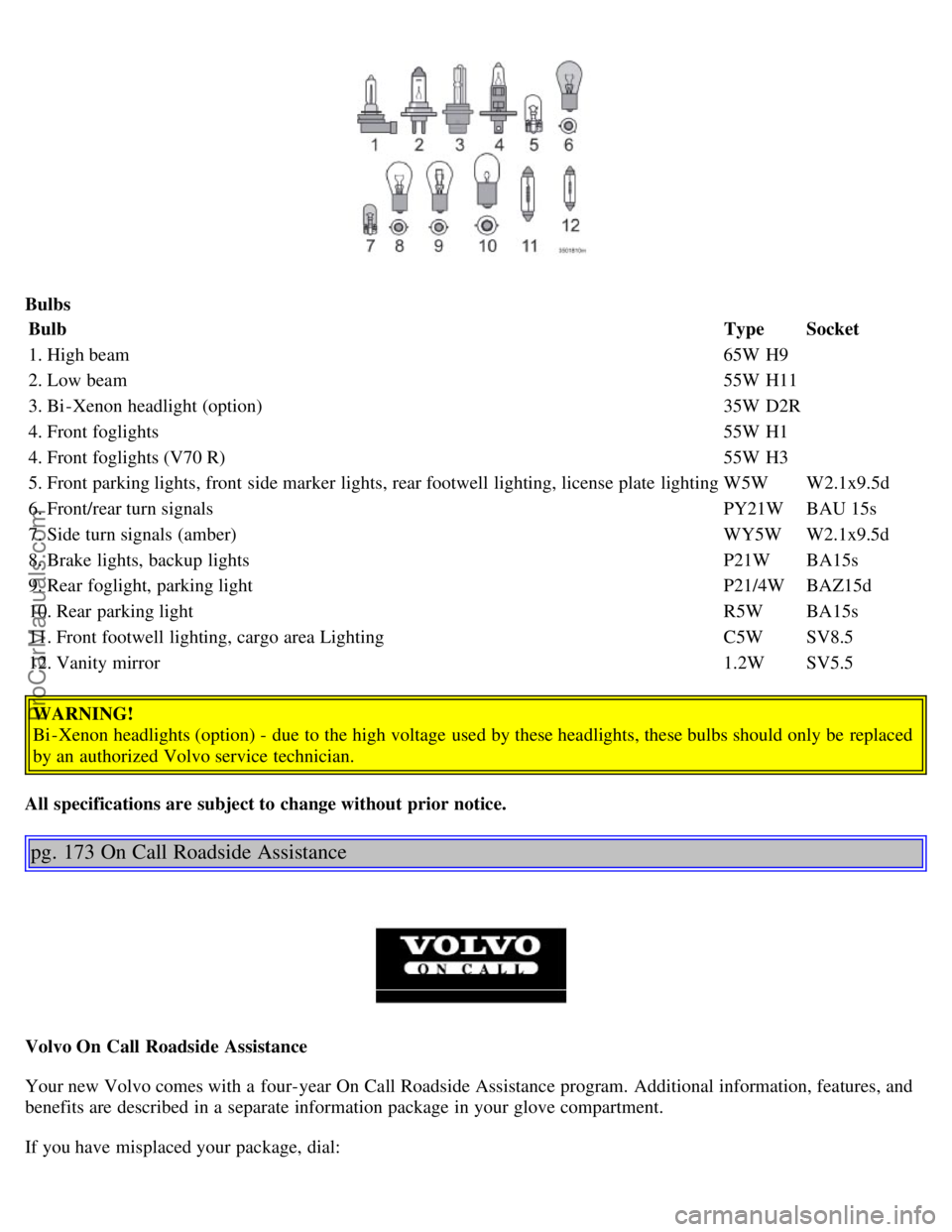
BulbsBulb TypeSocket
1. High beam 65W H9
2. Low beam 55W H11
3. Bi -Xenon headlight (option) 35W D2R
4. Front foglights 55W H1
4. Front foglights (V70 R) 55W H3
5. Front parking lights, front side marker lights, rear footwell lighting, license plate lighting W5WW2.1x9.5d
6. Front/rear turn signals PY21WBAU 15s
7. Side turn signals (amber) WY5WW2.1x9.5d
8. Brake lights, backup lights P21WBA15s
9. Rear foglight, parking light P21/4WBAZ15d
10. Rear parking light R5WBA15s
11. Front footwell lighting, cargo area Lighting C5WSV8.5
12. Vanity mirror 1.2WSV5.5
WARNING!
Bi -Xenon headlights (option) - due to the high voltage used by these headlights, these bulbs should only be replaced
by an authorized Volvo service technician.
All specifications are subject to change without prior notice.
pg. 173 On Call Roadside Assistance
Volvo On Call Roadside Assistance
Your new Volvo comes with a four-year On Call Roadside Assistance program. Additional information, features, and
benefits are described in a separate information package in your glove compartment.
If you have misplaced your package, dial:
ProCarManuals.com
Page 123 of 138
been successfully programmed. Release both buttons.
5. If you are programming a rolling code-equipped device (e.g., garage door opener or entry door lock), refer to
"Programming rolling codes" on the next page to complete the programming process.
Repeat steps 3 and 4 to program the other two transceiver buttons.
If, after several attempts, you are unable to successfully train the HomeLink® Universal Transceiver to learn your
hand -held transmitter's signal, contact HomeLink® toll-free 1-800-355-3515 (Internet: www.HomeLink.com
).
WARNING!
If you use HomeLink® to open a garage door or gate, be sure no one is near the gate or door while it is in motion.
Do not use the HomeLink® Universal Transceiver with any garage door opener that lacks safety "stop" and
"reverse" features as required by federal safety standards. (This includes any garage door opener model
manufactured before April 1, 1982) A garage door opener that cannot "detect" an object, signalling the door to
"stop" and "reverse" does not meet current federal safety standards. Using a garage door opener without these
features increases the risk of serious injury or death. For more information on this matter, call toll-free 1-800-355-
3515 (Internet: www.HomeLink.com
).
pg. 193 HomeLink® Universal Transceiver (option)
NOTE - Canadian residents:
During programming, your hand -held transmitter may automatically stop transmitting. To successfully train
HomeLink®, continue to hold the HomeLink® button. At the same time, repeatedly press and hold your hand -held
transmitter's button at two -second intervals until HomeLink® has learned your transmitter's code. The HomeLink®
indicator light will flash first slowly, and then rapidly to indicate that the button has been successfully programmed.
Determining if your garage door uses a rolling code
Determine, in one of the following ways, if your garage door uses a rolling code system and is manufactured after
1996:
Refer to the garage door opener owner's manual for verification.
If your hand -held transmitter appears to program the HomeLink® Universal Transceiver but the programmed button
does not activate the garage door, your garage door opener may have a rolling code.
Press the programmed HomeLink® button. If the garage door opener has the rolling code feature, the HomeLink®
indicator light flashes rapidly and then glows steadily after approximately 2 seconds.
To train a rolling code garage door opener, follow these instructions after programming the desired transceiver
button according to "Programming the transceiver." The help of a second person may make training easier.
1. Locate the training button on the garage door opener motor head unit . The location and color of the training button
may vary. If you encounter difficulty, refer to the garage door opener owner's manual or call toll-free 1-800-355-3515
(Internet: www.HomeLink.com
).
2. Press the "training" button on the garage door opener motor head unit until the "training" light comes on.
3. Press and release the programmed HomeLink® button. Press and release the programmed HomeLink® button a
second time to complete the training process. Some garage door openers may require you to do this procedure a third
time to complete the training.
The programmed button on your HomeLink® Universal Transceiver should now operate your garage door opener. The
ProCarManuals.com
Page 126 of 138
2 0 0 6
VOLVO V70
INDEX
pg. 196 - 199 Index
A
ABS 114
ABS - warning light29
Active chassis system99
Adjusting the steering wheel36
Advanced chassis mode99
Air conditioning50 - 53
Air vents48
Airbag - front6-8
Alarm84, 85
Alarm - "panic" function84
All Wheel Drive
- general information98
Anti-lock Brake System (ABS)114
Anti-lock Brake System - warning light29
Antifreeze110, 154
Approach lighting80
Armrest (center) - 3-section rear seat67
Ashtray41
Audio systems175
- CD player186, 187
Automatic car washing150
Automatic transmission94, 95
- Cold starts95
- Geartronic96, 97
- Kickdown95, 96
- Sport mode97
Auxiliary 12 Volt socket in cargo area70
Auxiliary seat18, 76
Auxiliary socket41
AWD
- general information98
ProCarManuals.com
Page 127 of 138

B
Backrest (center) - 3-section rear seat66
Backrests, rear - folding down65
Battery110, 172
- maintenance163
- replacing162
- ventilation hose162
"Black box" (Vehicle Event Data)152
Booster cushion19, 20
Brake failure warning light28
Brake fluid
- reservoir161
- specifications170
Brake system113
Bulbs (list)172
Bulbs - replacing141-147
C
Capacities (oils and fluids)165
, 170
Car washing149
Cargo compartment cover74
Cargo compartment lighting70
Cargo eyelets71
Cargo net72
Catalytic converters - three-way112
Center armrest - 3-section rear seat67
Center backrest (3-section rear seat)66
Center console - switches31
Center seat head restraint65
Central locking buttons83
Chains (winter driving)130
Changing a wheel132
Chassis settings (R-models)99
Child auxiliary seat18
Child booster cushion19, 20
Child Restraint Anchorages22
Child safety17-22
Child safety locks - rear doors86
Child seat anchors, ISOFIX22
Climate controls50-56
Climate system - general information49
Clock27
Clutch interlock93
Coat hanger63
Cold weather driving110
ProCarManuals.com
Page 128 of 138

Combination filter50, 53
Comfort chassis mode99
Coolant154
Cooling system - general information102
Courtesy light77
Courtesy lights (front) - replacing146
Courtesy lights - exterior80
Cruise control33
Cup holders63
D
Detachable trailer hitch108
Dimensions167
Direction indicators37
Direction indicators30
Distributor ignition system171
Dolby Surround Pro Logic II189
Dome lighting77
Door step courtesy lights - replacing147
Doors and locks80
Drive belt154
Driving economy101
Driving mode indicator27
Driving mode W95, 97, 110
Driving with tailgate open102
Dynamic Stability Traction Control (DSTC)115, 116
E
Economical driving101
Electric socket in cargo compartment70
Electrical system172
Electrical system - general information102
Electrically operated moonroof44
Electrically operated seats58
Electrically operated sideview mirrors43
Electrically operated windows42
Electronic Brake Force Distribution114
Electronic Climate Control (ECC)50 - 53
Emergency towing105, 106
Emergency warning flashers40
Emission inspection readiness156
Emissions systems153
Engine - specifications169
Engine - starting91, 92
Engine compartment158
Engine oil110, 159-160 , 170
ProCarManuals.com
Page 129 of 138
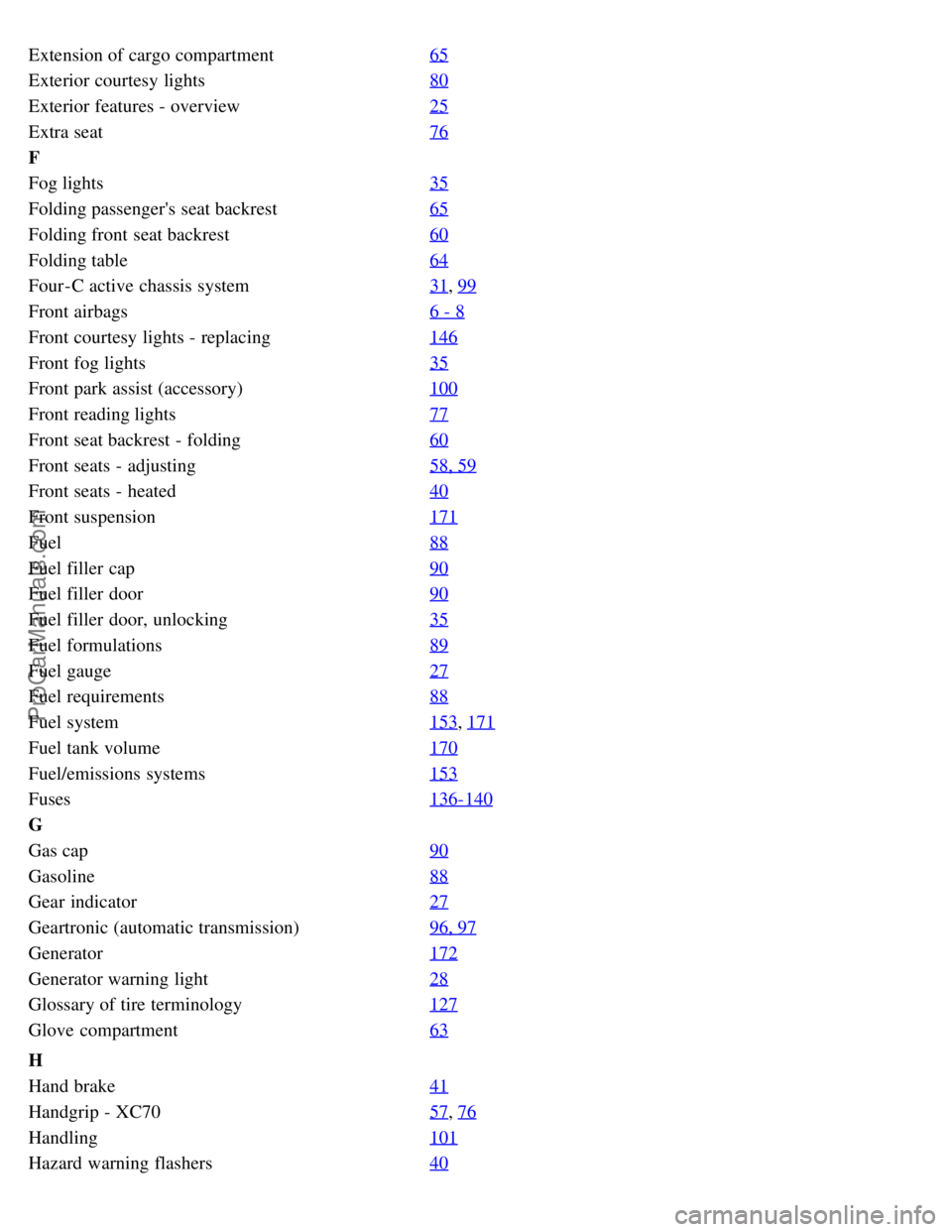
Extension of cargo compartment65
Exterior courtesy lights80
Exterior features - overview25
Extra seat76
F
Fog lights35
Folding passenger's seat backrest65
Folding front seat backrest60
Folding table64
Four-C active chassis system31, 99
Front airbags6 - 8
Front courtesy lights - replacing146
Front fog lights35
Front park assist (accessory)100
Front reading lights77
Front seat backrest - folding60
Front seats - adjusting58, 59
Front seats - heated40
Front suspension171
Fuel88
Fuel filler cap90
Fuel filler door90
Fuel filler door, unlocking35
Fuel formulations89
Fuel gauge27
Fuel requirements88
Fuel system153, 171
Fuel tank volume170
Fuel/emissions systems153
Fuses136-140
G
Gas cap90
Gasoline88
Gear indicator27
Geartronic (automatic transmission)96, 97
Generator172
Generator warning light28
Glossary of tire terminology127
Glove compartment63
H
Hand brake41
Handgrip - XC7057, 76
Handling101
Hazard warning flashers40
ProCarManuals.com