lights VOLVO V70 2006 Owners Manual
[x] Cancel search | Manufacturer: VOLVO, Model Year: 2006, Model line: V70, Model: VOLVO V70 2006Pages: 138, PDF Size: 3.53 MB
Page 6 of 138

Take a driver-retraining course
Have your eyes checked regularly
Keep your windshield and headlights clean.
Replace wiper blades when they start to leave streaks.
Take into account the traffic, road, and weather conditions, particularly with regard to stopping distance.
Reporting Safety Defects in the U.S.
If you believe that your vehicle has a defect which could cause a crash or could cause injury or death, you should
immediately inform the National Highway Traffic Safety Administration (NHTSA) in addition to notifying Volvo Cars
of North America. If NHTSA receives similar complaints, it may open an investigation, and if it finds that a safety
defect exists in a group of vehicles, it may order a recall and remedy campaign. However, NHTSA cannot become
involved in individual problems between you, your retailer, or Volvo Cars of North America. To contact NHTSA, you
may either call the Auto Safety Hotline toll-free at 1-800-424-9393 (or 202-366-0123 in Washington, D.C. area) or
write to: NHTSA, U.S. Department of Transportation, Washington D.C. 20590. You can also obtain other information
about motor vehicle safety from the Hotline. Volvo strongly recommends that if your vehicle is covered under a
service campaign, safety or emission recall or similar action, it should be completed as soon as possible. Please check
with your local retailer or Volvo Cars of North America, LLC. if your vehicle is covered under these conditions.
NHTSA can be reached at:
Internet : http://www.nhtsa.dot.gov
Telephone:
1-888-DASH-2-DOT (1-888-327-4236) (toll free)
1-800-424-9393 (toll free)
1-202-366-0123 (in Washington DC area)
pg. 3 Seat belts
Adjusting the seat belt
Using seat belts
Volvo, the inventor of the three-point seat belt, urges you and all occupants of your vehicle to wear seat belts and
ensure that children are properly restrained, using an infant, car, or booster seat determined by age, weight and height.
Volvo also believes no child should sit in the front seat of a vehicle. Most states and provinces make it mandatory for
occupants of a vehicle to use seat belts.
Seat belt tensioners
The seat belts are equipped with tensioners that reduce slack in the belts. These tensioners are triggered in situations
where the airbags deploy. The front seat belts also include a tension reducing device which, in the event of a collision,
limits the peak forces exerted by the seat belt on the occupant.
Buckling a seat belt
Pull the belt out far enough to insert the latch plate into the receptacle until a distinct click is heard. The seat belt
ProCarManuals.com
Page 17 of 138
2 0 0 6
VOLVO V70
Chapter 2 - Instruments, switches and controls
pg. 23 Instruments, switches and controls
Interior24
Exterior25
Instruments26
Instrument panel27
Indicator and warning lights28
Text information window30
Switches in the center console31
Trip computer32
Cruise control33
Lighting panel35
Steering wheel adjustment/lock, Ignition switch36
Left-side steering wheel lever37
Right-side steering wheel lever38
Tailgate wipers/washers, Water repellent glass39
Warning flashers, heated mirrors/rear window, heated front seats40
Parking brake, auxiliary socket/ashtrays41
Electrically operated windows42
Rearview/sideview mirrors43
Power moonroof44
Sun visor45
pg. 24 Interior
ProCarManuals.com
Page 20 of 138
7 General warning light (see page 28).
8 High beam indicator light
9 Tachometer
Indicates engine speed in thousands of rpm. Do not drive for long with the needle in the red section. The engine has an
built-in function preventing too high engine speed. When this function operates, you may discern some pulsation,
which is normal.
10 Gear and driving mode indicator
The currently selected driving mode is displayed here. If you use the Geartronic function on the automatic
transmission, the currently selected gear will be displayed.
11 Ambient temperature indicator
This display indicates the air temperature outside your car. A "snowflake" symbol in the text window is displayed
when the temperature is in the range of 23 - 36° F (-5 - +2° C).
Please note that this symbol does not indicate a fault with your car.
At low speeds or when the car is not moving, the temperature readings may be slightly higher than the actual ambient
temperature.
12 Clock/reset button
Turn the button to adjust the clock.
13 Fuel gauge
The fuel tank holds approximately:
Front wheel drive, non-turbo models - 18.5 US gal. (70 liters)
All turbo models - 18 US gal. (68 liters)
When the warning light comes on there are approximately 1.8 US gal. (8 liters) of fuel remaining.
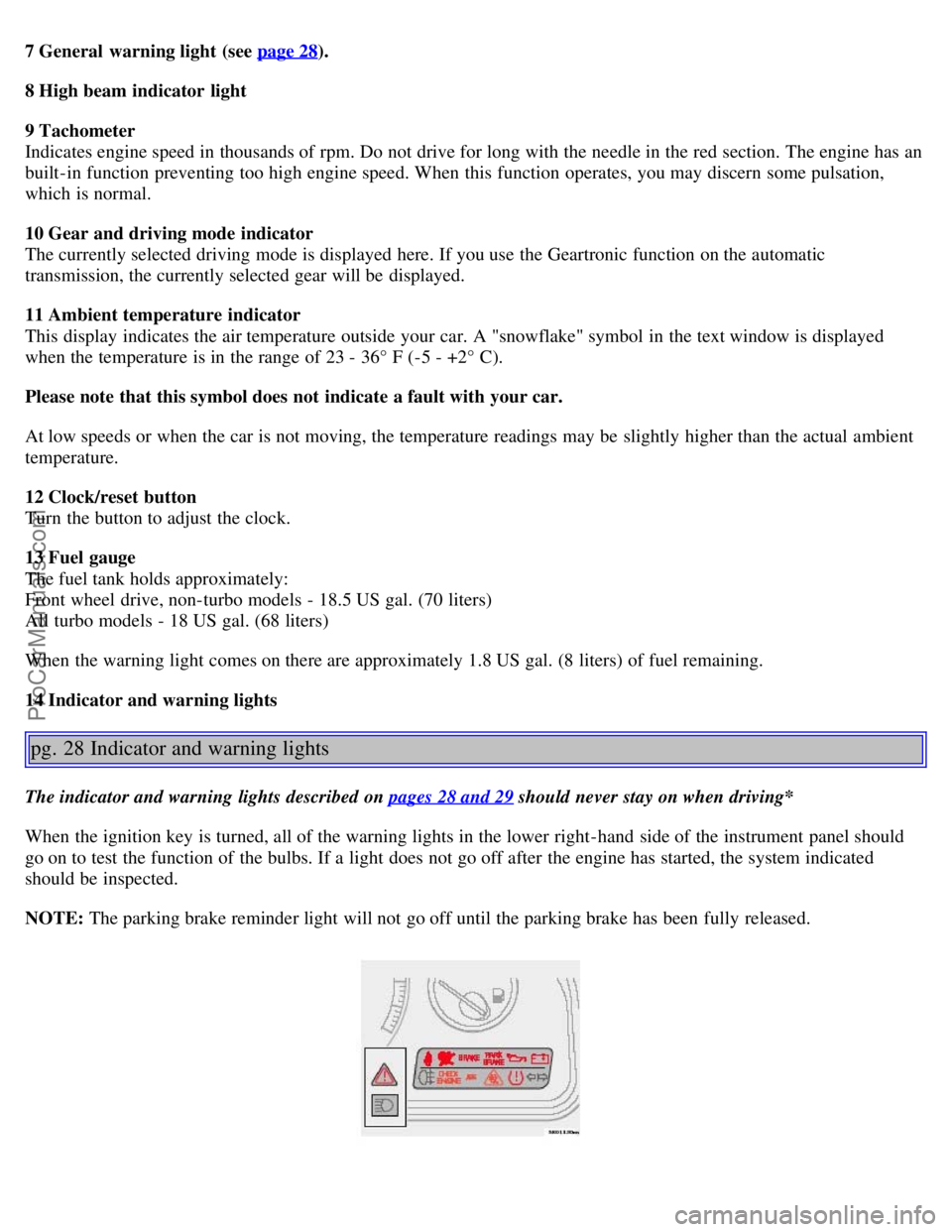
14 Indicator and warning lights
pg. 28 Indicator and warning lights
The indicator and warning lights described on pages 28 and 29 should never stay on when driving*
When the ignition key is turned, all of the warning lights in the lower right-hand side of the instrument panel should
go on to test the function of the bulbs. If a light does not go off after the engine has started, the system indicated
should be inspected.
NOTE: The parking brake reminder light will not go off until the parking brake has been fully released.
ProCarManuals.com
Page 21 of 138
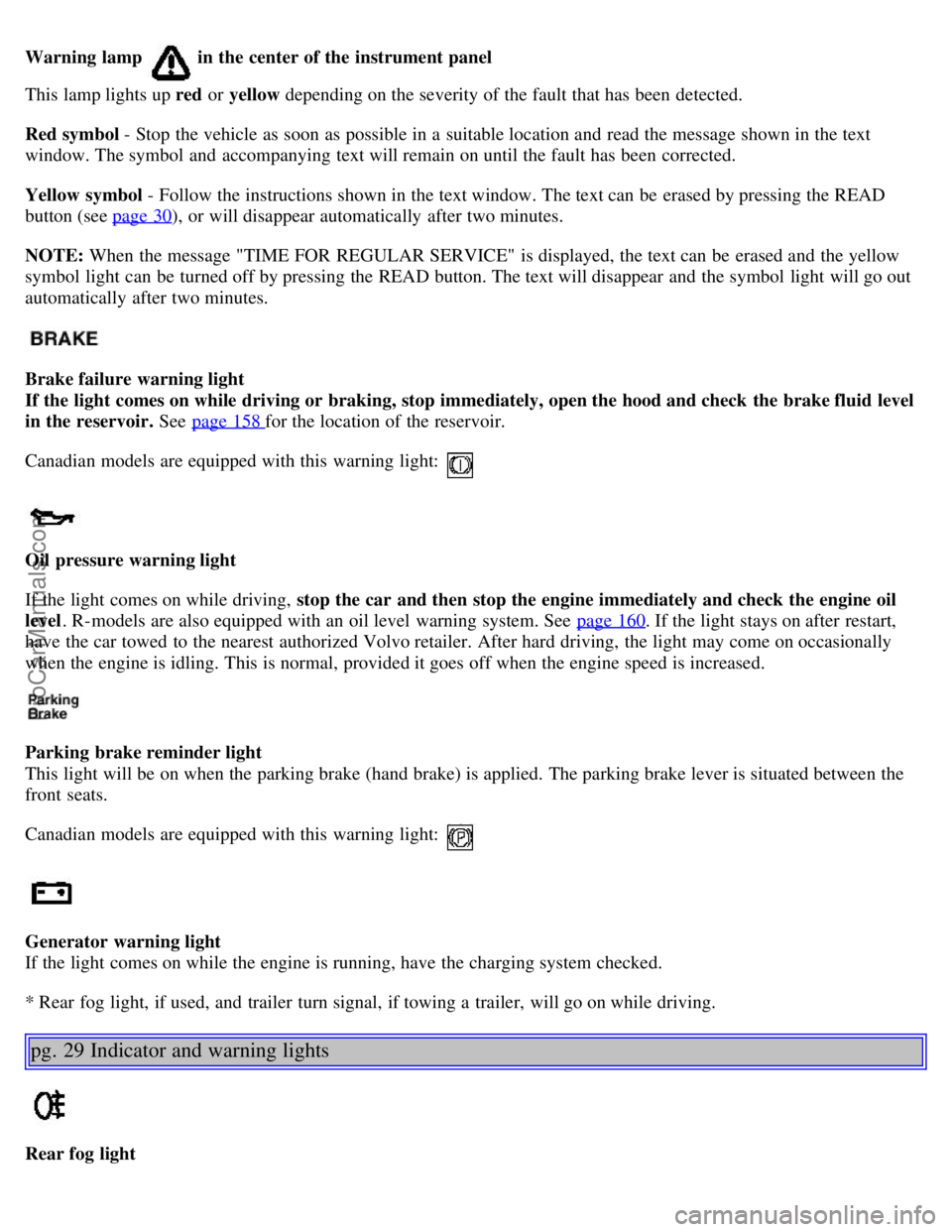
Warning lamp in the center of the instrument panel
This lamp lights up red or yellow depending on the severity of the fault that has been detected.
Red symbol - Stop the vehicle as soon as possible in a suitable location and read the message shown in the text
window. The symbol and accompanying text will remain on until the fault has been corrected.
Yellow symbol - Follow the instructions shown in the text window. The text can be erased by pressing the READ
button (see page 30
), or will disappear automatically after two minutes.
NOTE: When the message "TIME FOR REGULAR SERVICE" is displayed, the text can be erased and the yellow
symbol light can be turned off by pressing the READ button. The text will disappear and the symbol light will go out
automatically after two minutes.
Brake failure warning light
If the light comes on while driving or braking, stop immediately, open the hood and check the brake fluid level
in the reservoir. See page 158
for the location of the reservoir.
Canadian models are equipped with this warning light:
Oil pressure warning light
If the light comes on while driving, stop the car and then stop the engine immediately and check the engine oil
level . R-models are also equipped with an oil level warning system. See page 160
. If the light stays on after restart,
have the car towed to the nearest authorized Volvo retailer. After hard driving, the light may come on occasionally
when the engine is idling. This is normal, provided it goes off when the engine speed is increased.
Parking brake reminder light
This light will be on when the parking brake (hand brake) is applied. The parking brake lever is situated between the
front seats.
Canadian models are equipped with this warning light:
Generator warning light
If the light comes on while the engine is running, have the charging system checked.
* Rear fog light, if used, and trailer turn signal, if towing a trailer, will go on while driving.
pg. 29 Indicator and warning lights
Rear fog light
ProCarManuals.com
Page 22 of 138

This light indicates that the rear fog light is on.
Malfunction indicator lamp
On-Board Diagnostic II (OBDII): As you drive, a computer called "OBDII" monitors your car's engine, transmission,
electrical and emission systems. The CHECK ENGINE light will light up if the computer senses a condition that
potentially may need correcting. When this happens, please have your car checked by a Volvo retailer as soon as
possible.
A CHECK ENGINE light may have many causes. Sometimes, you may not notice a change in your car's behavior.
Even so, an uncorrected condition could hurt fuel economy, emission cleanliness, and driveability. Extended driving
without correcting the cause could even damage other components in your car.
Canadian models are equipped with this warning light:
NOTE : If the fuel filler cap is not closed tightly or if the engine is running when the car is refueled, the Malfunction
Indicator Lamp may indicate a fault. However, your vehicle's performance will not be affected. Use only Volvo
original or approved fuel filler caps.
Anti-lock Brake System ABS
If the warning light comes on, there is a malfunction of the ABS system (the standard braking system will still
function). The vehicle should be driven to a Volvo retailer for inspection. See page 114
for additional information.
Stability Traction Control (STC) system (option), or Dynamic Stability and Traction Control (DSTC) system
(option)
An indicator light will flash when STC or DSTC is actively working to stabilize the car. See pages 115-116
for more
detailed information.
Turn signal indicator - trailer (certain models)
If you are towing a trailer, this light will flash simultaneously with the turn signals on the trailer. If the light does not
flash when signaling, neither the trailer's turn signals nor the car's turn signals are functioning.
Seat belt reminder
This symbol lights up to indicate that the driver has not fastened his/her seat belt.
Tire pressure warning light
See page 123
for more information on this function.
ProCarManuals.com
Page 34 of 138
minutes depending on the outside temperature.
The timer function is activated each time you press .
To switch off the timer function :
Press again for more than 3 seconds. The LED lights for 5 seconds to confirm your selection.
Recirculation is always disconnected when you select Defroster
.
Blower
Blower speed can be increases or decreased by turning the knob. If the knob is set to 0, the air conditioning function is
automatically disengaged.
Temperature
Turn the control to set the temperature for the driver's and passenger's sides of the car. For cooler air, the air
conditioning function must be engaged.
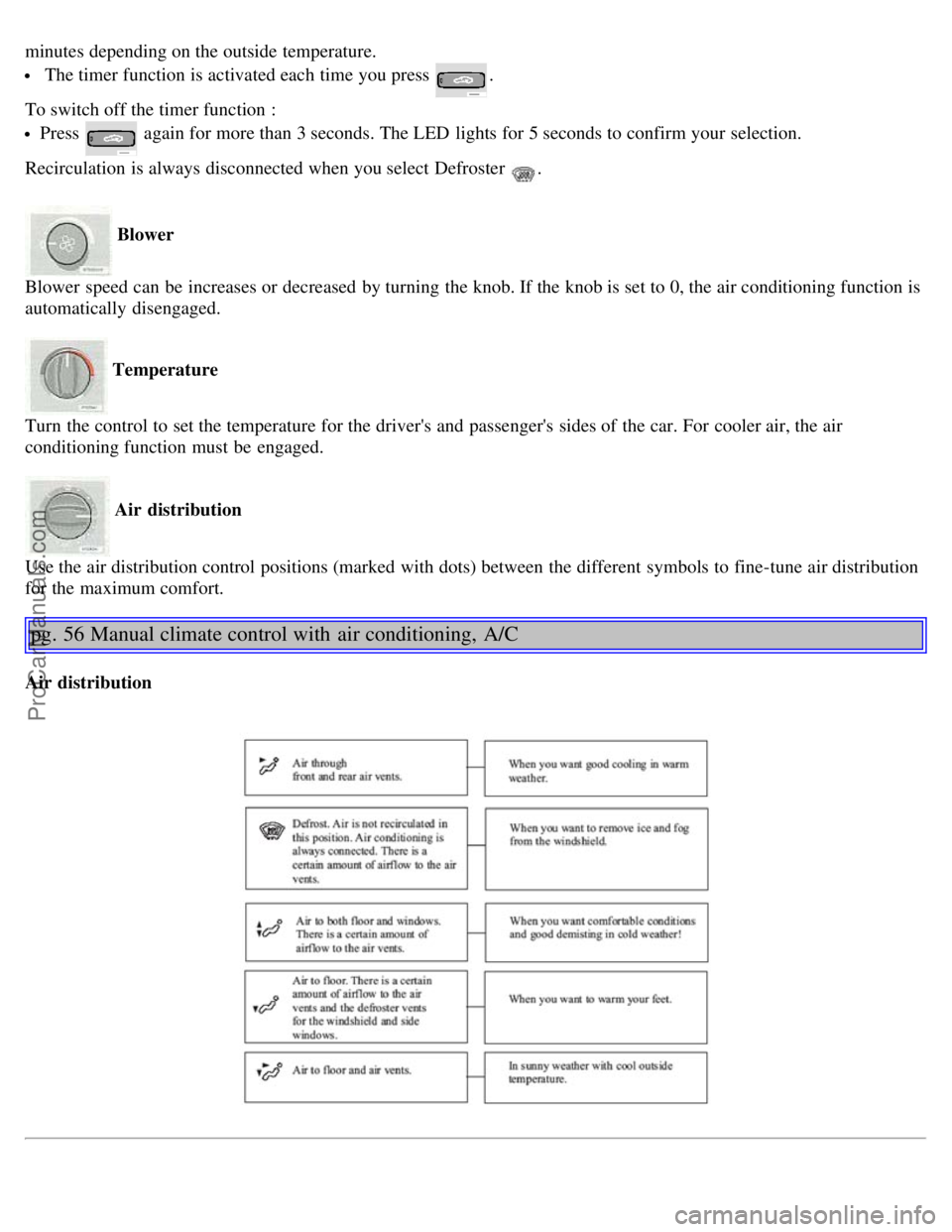
Air distribution
Use the air distribution control positions (marked with dots) between the different symbols to fine-tune air distribution
for the maximum comfort.
pg. 56 Manual climate control with air conditioning, A/C
Air distribution
ProCarManuals.com
Page 46 of 138

If one of the transmitters is misplaced, contact your nearest authorized Volvo retailer for replacement.
Buttons in remote control
1 - Fold key in/out, 2 - Lock, 3 - Approach lighting
4 - "Panic" function *, 5 - Unlock tailgate, 6 - Unlock
Using the remote control
Button 1: Press to extend the key. This button must also be pressed when the key is folded back into the slot in the
side of the remote control unit.
Button 2 ( Lock): Press once to lock all doors, and the tailgate.
Button 3 ( Approach lighting ): Press this button when approaching the car at night to light up the interior courtesy
light, parking lights, license plate lights and the lights in the sideview mirrors.
Button 4 ( Panic): See page 84
for more information on this function.
Button 5 ( Tailgate unlock ): Press this button twice within 3 seconds to unlock the tailgate (without unlocking the
other doors).
Button 6 ( Unlock): Press this button once to unlock the driver's door only. Wait for at least 1 second and press the
button again (within 10 seconds) to unlock all doors, and the tailgate.
NOTE:
If the doors are unlocked with the remote, the locks will automatically reengage (re-lock) and the alarm will reset
after 2 minutes unless a door has been opened.
The lock/unlock and alarm features can also be utilized by using the keys.
FCC ID:LQNP2T-APU
This device complies with part 15 of the FCC rules. Operation is subject to the following conditions: (1) This device
may not cause harmful interference, and (2) this device must accept any interference received, including interference
that may cause undesired operation.
Canadian 2306104388
Model 504 2927 by Donnelly
Operation is subject to the following conditions: (1) this device may not cause interference, and (2) this device must
accept any interference, including interference that may cause undesired operation of the device.
Canadian 2306104388A
Model 509 977 by Connaught Electronics
Operation is subject to the following conditions: (1) this device may not cause interference, and (2) this device must
accept any interference, including interference that may cause undesired operation of the device.
ProCarManuals.com
Page 49 of 138

Audible alarm signal
An audible alarm signal is given by a battery powered siren. One alarm cycle lasts for 25 seconds.
"Panic" button
In an emergency situation, this feature can be used to attract attention. Activate the "panic" function by pressing the
red button on the remote control (see illustration on page 81
) for at least 3 seconds or by pressing this button twice
within 3 seconds. The turn signals will flash, the interior lights will go on and the car's horn will sound.
The function can be turned off by pressing any of the buttons on the remote control or will stop automatically
after 25 seconds. When a button is pressed, there is a 5 second delay before the panic alarm is deactivated.
NOTE: This function will NOT unlock the car.
pg. 85 Alarm
Temporarily turning off the inclination and movement alarm sensor(s) - accessory
This button will only be found in cars equipped with the accessory inclination and/or movement sensors.
FCC ID: MAYDA5823
This device complies with part 15 of the FCC rules. Operation is subject to the following conditions: (1) This device
may not cause harmful interference, and (2) this device must accept any interference received, including interference
that may cause undesired operation.
Canadian IC: 4405A-DA5823
Movement sensor DA5823 by Dynex
Operation is subject to the following conditions: (1) this device may not cause interference, and (2) this device must
accept any interference, including interference that may cause undesired operation of the device.
In certain situations it may be desirable to turn off the inclination and movement alarm sensors if, for example, you
drive your car onto a ferry where the rocking of the boat could trigger the alarm or if a pet is left in the car with the
doors locked.
To temporarily turn off the inclination and movement alarm sensors from the alarm system:
From the time the ignition key is turned from the Drive position (position II) until you lock the car, you can press the
button in the center console. The LED in the switch will light up and a message will be displayed in the text window
ProCarManuals.com
Page 64 of 138

A - front (accessory as available), B - rear (option)
Front/rear park assist
The park assist system(s) are designed to assist you when driving into parking spaces, garages, etc. They utilize
ultrasound sensors located in the bumpers to measure the distance to a vehicle or other object, or a person who may be
close to the front or rear of the vehicle.
When is park assist active?
Front: the system is active from the time the engine is started until the car exceeds a speed of approximately 10 mph
(15 km/h).
Rear: when the engine is running and reverse gear is selected.
NOTE:
If the vehicle is equipped with front and rear park assist, both systems will either be activated or deactivated
together. They cannot be used separately.
The indicator light in the button (see the illustration on page 31) will light up to indicate that park assist system(s)
are activated.
When park assist is actively working:
1. The audio system's volume will be reduced.
2. An intermittent signal will be audible from the speakers to indicate that you are approaching a person, object,
parked vehicle, etc.
The signals begin when the distance between the bumper and the object is:
Rear: approximately 5 feet (1.5 meters)
Front: approximately 2.5 ft (0.8 meters)
3. At a distance of approximately 1 foot (30 cm), the signal will become constant.
Deactivating the system(s)
Press the Park assist button on the center console (see page 33) to temporarily deactivate the system(s).
The indicator light in the button will go out when the system(s) have been deactivated.
If the vehicle is equipped with front and rear park assist, both systems will be deactivated by pressing the button.
NOTE:
It may be necessary to deactivate one or both of the park assist systems in certain cases.
Rear park assist: towing a trailer, carrying bicycles in a rear-mounted carrier, etc, could trigger the rear park assist
system's sensors.
Front park assist: it may not be possible to combine auxiliary headlights and front park assist since these lights
could trigger the system's sensors.
Faults in the system
ProCarManuals.com
Page 77 of 138

run flat tires.
Tires of this type have specially reinforced sidewalls that make it possible to continue driving in the event of a drop in
inflation pressure. Tires of this type are mounted on special rims.
NOTE: Self supporting run flat tires are only available in conjunction with TPMS.
If a self supporting run flat tire should lose inflation pressure, the yellow TPMS warning symbol (
) in the instrument
panel lights up to alert the driver, and a message will be shown in the text window in the instrument panel.
If this occurs, reduce vehicle speed to a maximum of 50 mph (80 km/h). The vehicle can be driven approximately 50
miles (80 km), or somewhat farther if the vehicle is not heavily loaded. The tire should be replaced as soon as
possible.
Hard braking and sudden steering maneuvers should be avoided.
In certain cases, it may be difficult to see which self supporting run flat tire is defective. To determine which tire is
damaged, check the inflation pressure of all four tires.
WARNING!
• Only specially trained persons should mount self supporting run flat tires.
• If self supporting run flat tires are mounted, the vehicle must be equipped with a Tire Pressure Monitoring System.
• After a low pressure warning has been displayed, do not exceed 50 mph (80 km/h).
• Avoid severe cornering and hard braking, and minimize the distance traveled before replacing the self supporting
run flat tire.
• Self supporting run flat tires cannot be repaired. They must be replaced if damaged or punctured.
pg. 126 Wheels and tires
Tire designations
Federal law mandates that tire manufacturers place standardized information on the sidewall of all tires (see the
illustration).
The following information is listed on the tire sidewall:
The tire designation (the following figures are examples of a tire designation):
1. 215: the width of the tire (in millimeters) from sidewall edge to sidewall edge. The larger the number, the wider the
tire.
ProCarManuals.com