window VOLVO V70 2007 Owners Manual
[x] Cancel search | Manufacturer: VOLVO, Model Year: 2007, Model line: V70, Model: VOLVO V70 2007Pages: 123, PDF Size: 2.64 MB
Page 12 of 123

WARNING!
Do not use child safety seats or child booster cushions/backrests in the front passenger's seat. We also recommend
that occupants under 4 feet 7 inches (140 cm) in height who have outgrown these devices sit in the rear seat with the
seat belt fastened.
NOTE: Deployment of SRS components occurs only one time during an accident. In a collision where deployment
occurs, the airbags and seat belt tensioners activate. Some noise occurs and a small amount of powder is released. The
release of the powder may appear as smoke-like matter. This is a normal characteristic and does not indicate fire.
NOTE: Volvo's dual-threshold airbags use special sensors that are integrated with the front seat buckles. The point
at which the airbag deploys is determined by whether or not the seat belt is being used, as well as the severity of the
collision. Collisions can occur where only one of the airbags deploys.
NOTE: Volvo's dual-stage airbags: If the impact is less severe, but severe enough to present a clear injury risk, the
dual-stage airbags are triggered at just 70% of its total capacity. If the impact is more severe, the dual-stage airbags are
triggered with full capacity.
WARNING!
Children must never be allowed in the front passenger seat. Volvo recommends that ALL occupants (adults and
children) shorter than 4 feet 7 inches (140 cm) be seated in the back seat of any vehicle with a passenger -side front
airbag. See page 14
for guidelines.
Occupants in the front passenger's seat must never sit on the edge of the seat, sit leaning toward the instrument
panel or otherwise sit out of position. The occupant's back must be as upright as comfort allows and be against the
seat back with the seat belt properly fastened.
Feet must be on the floor, e.g. not on the dash, seat or out of the window.
No objects or accessory equipment, e.g. dash covers, may be placed on, attached to or installed near the SRS
hatch (the area above the glove compartment) or the area affected by airbag deployment (see illustration on page 4
).
There should be no loose articles, e.g. coffee cups, on the floor, seat or dash area.
Never try to open the SRS cover on the steering wheel or the passenger side dash. This should only be done by an
authorized Volvo service technician.
Failure to follow these instructions can result in injury to the vehicle occupants.
Page 15 of 123
NOTE: SIPS airbag deployment (one airbag) occurs only on the side of the vehicle affected by the impact.
*A SIPS airbag warning decal is also located at the end of the instrument panel on the driver's side of the car.
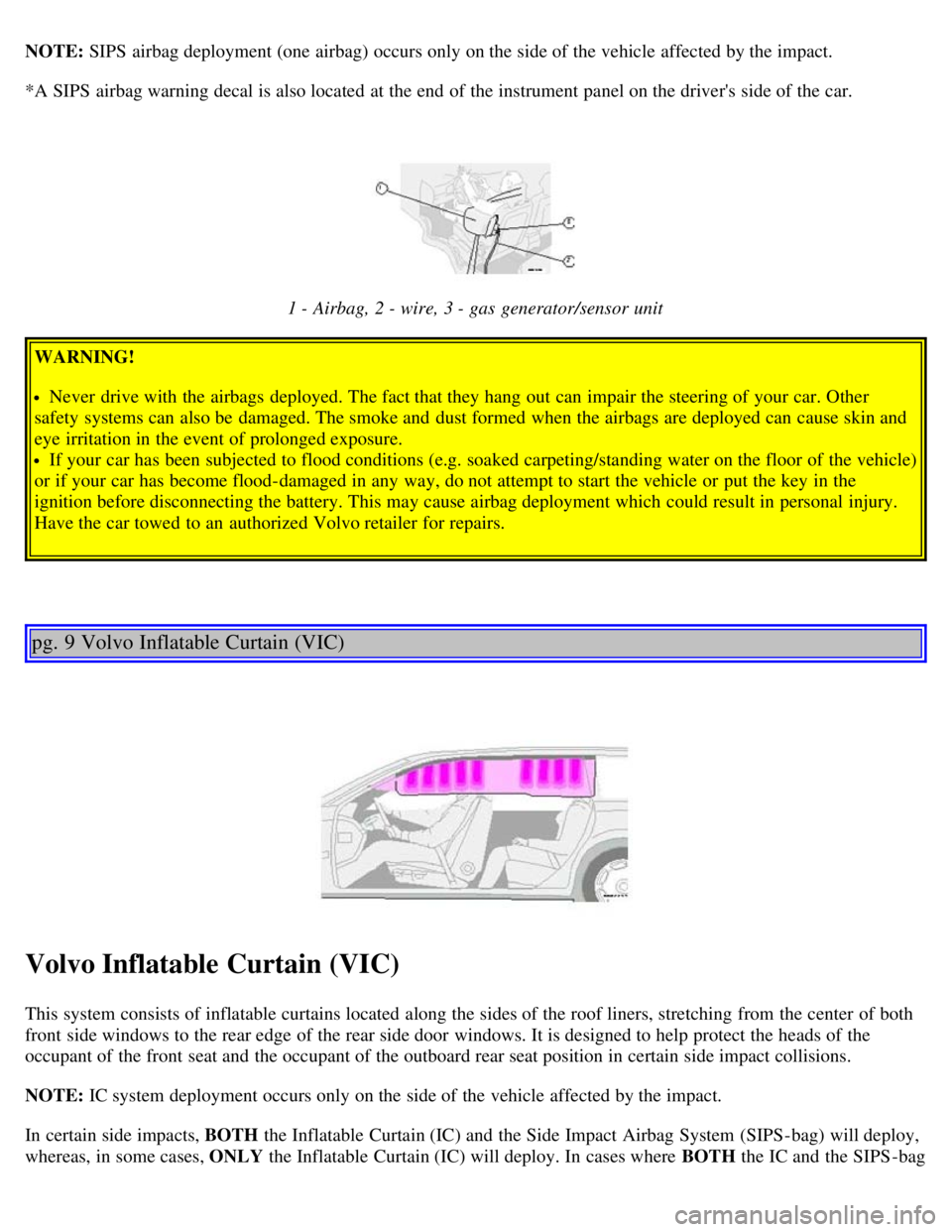
1 - Airbag, 2 - wire, 3 - gas generator/sensor unit
WARNING!
Never drive with the airbags deployed. The fact that they hang out can impair the steering of your car. Other
safety systems can also be damaged. The smoke and dust formed when the airbags are deployed can cause skin and
eye irritation in the event of prolonged exposure.
If your car has been subjected to flood conditions (e.g. soaked carpeting/standing water on the floor of the vehicle)
or if your car has become flood-damaged in any way, do not attempt to start the vehicle or put the key in the
ignition before disconnecting the battery. This may cause airbag deployment which could result in personal injury.
Have the car towed to an authorized Volvo retailer for repairs.
pg. 9 Volvo Inflatable Curtain (VIC)
Volvo Inflatable Curtain (VIC)
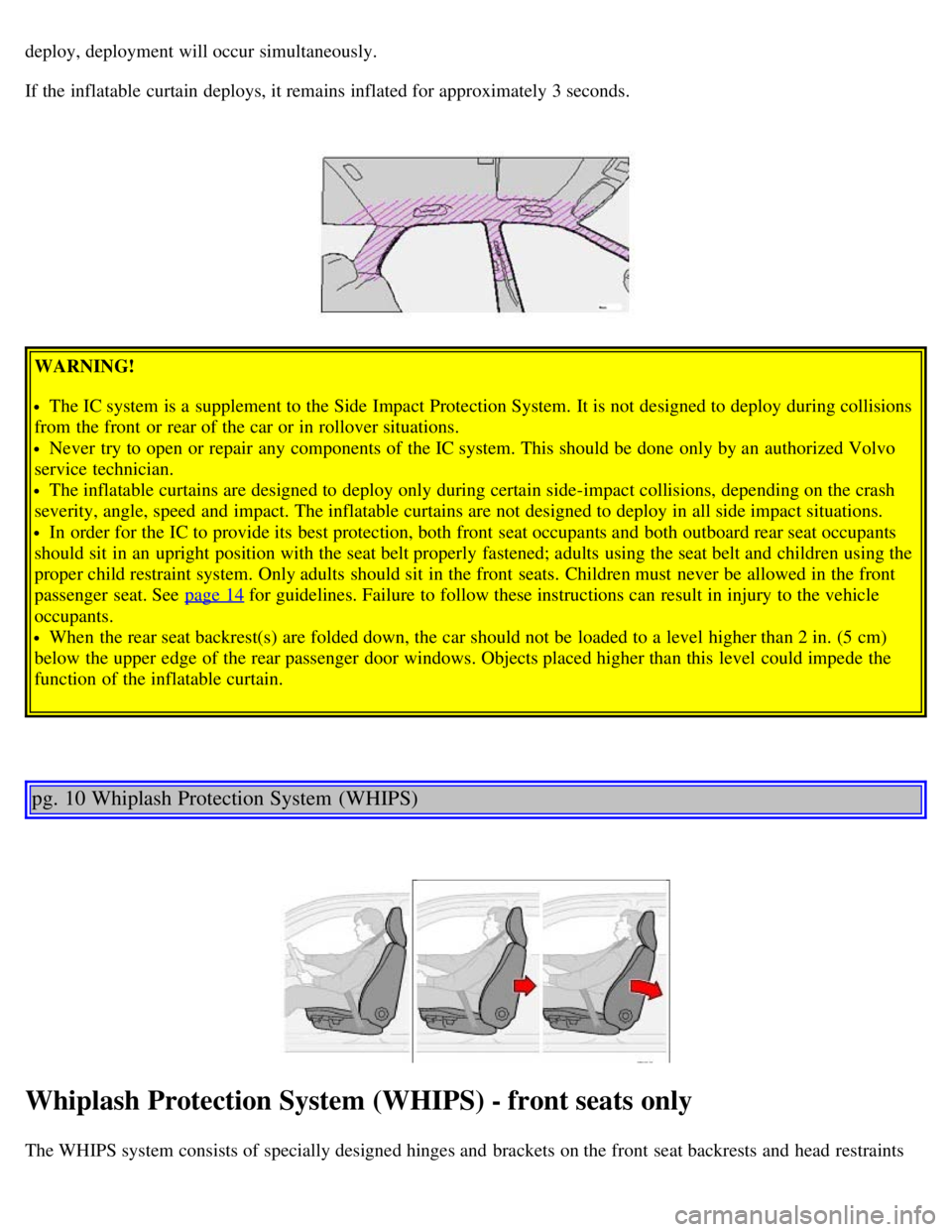
This system consists of inflatable curtains located along the sides of the roof liners, stretching from the center of both
front side windows to the rear edge of the rear side door windows. It is designed to help protect the heads of the
occupant of the front seat and the occupant of the outboard rear seat position in certain side impact collisions.
NOTE: IC system deployment occurs only on the side of the vehicle affected by the impact.
In certain side impacts, BOTH the Inflatable Curtain (IC) and the Side Impact Airbag System (SIPS-bag) will deploy,
whereas, in some cases, ONLY the Inflatable Curtain (IC) will deploy. In cases where BOTH the IC and the SIPS -bag
Page 16 of 123
deploy, deployment will occur simultaneously.
If the inflatable curtain deploys, it remains inflated for approximately 3 seconds.
WARNING!
The IC system is a supplement to the Side Impact Protection System. It is not designed to deploy during collisions
from the front or rear of the car or in rollover situations.
Never try to open or repair any components of the IC system. This should be done only by an authorized Volvo
service technician.
The inflatable curtains are designed to deploy only during certain side-impact collisions, depending on the crash
severity, angle, speed and impact. The inflatable curtains are not designed to deploy in all side impact situations.
In order for the IC to provide its best protection, both front seat occupants and both outboard rear seat occupants
should sit in an upright position with the seat belt properly fastened; adults using the seat belt and children using the
proper child restraint system. Only adults should sit in the front seats. Children must never be allowed in the front
passenger seat. See page 14
for guidelines. Failure to follow these instructions can result in injury to the vehicle
occupants.
When the rear seat backrest(s) are folded down, the car should not be loaded to a level higher than 2 in. (5 cm)
below the upper edge of the rear passenger door windows. Objects placed higher than this level could impede the
function of the inflatable curtain.
pg. 10 Whiplash Protection System (WHIPS)
Whiplash Protection System (WHIPS) - front seats only
The WHIPS system consists of specially designed hinges and brackets on the front seat backrests and head restraints
Page 18 of 123

2 0 0 4
VOLVO V70
Chapter 2 - Instruments, switches and controls
pg. 23 Instruments, switches and controls
Interior24
Exterior25
Instruments26
Instrument panel27
Indicator and warning lights28
Text information window30
Switches in the center console31
Trip computer32
Cruise control33
Light switch panel34
Steering wheel adjustment/lock35
Ignition switch, Turn signals36
Windshield wipers/washers37
Warning flashers, heated mirrors/rear window, heated front seats38
Parking brake, auxiliary socket/ashtrays39
Electrically operated windows40
Rearview/sideview mirrors41
Power moonroof42
pg. 24 Interior
Page 20 of 123

pg. 27 Instrument panel
1 Turn signals
2 Text window
3 Temperature gauge
The pointer should be approximately midway on the gauge when driving.
Do not drive the car if the warning light is on. The text window will provide you with additional information.
If the engine temperature remains high, check coolant level - see page 133
.
4 Trip odometer/reset button
The trip odometer is used for measuring shorter distances. The last digit indicates 1/10 mile/kilometer. Press the button
quickly to toggle between trip odometers 1 and 2. Hold in the button for more than 2 seconds to reset.
5 Odometer
6 Speedometer
Page 21 of 123

7 General warning light (see page 28).
8 High beam indicator light
9 Tachometer
Indicates engine speed in thousands of rpm. Do not drive for long with the needle in the red section. The engine has an
built-in function preventing too high an engine speed. When this function operates, you may discern some pulsation,
which is normal.
10 Gear and driving mode indicator
The currently selected driving mode is displayed here. If you use the Geartronic function on the automatic
transmission, the currently selected gear will be displayed.
11 Ambient temperature indicator
This display indicates the air temperature outside your car. A "snowflake" symbol in the text window is displayed
when the temperature is in the range of 23 - 36° F (-5 - +2° C).
Please note that this symbol does not indicate a fault with your car.
At low speeds or when the car is not moving, the temperature readings may be slightly higher than the actual ambient
temperature.
12 Clock/reset button
Turn the button to adjust the clock.
13 Fuel gauge
The fuel tank holds approximately:
Front wheel drive models:18.5 US gal. (70 liters)
All Wheel Drive models: 19 US gal. (72 liters)
V70R: 18 US gal. (68 liters)
When the warning light comes on there are approximately 1.8 US gal. (8 liters) of fuel remaining.
14 Indicator and warning lights
pg. 28 Indicator and warning lights
The indicator and warning lights described on pages 28 and 29 should never stay on when driving*
When the ignition key is turned, all of the warning lights in the lower right-hand side of the instrument panel should
go on to test the function of the bulbs. If a light does not go off after the engine has started, the system indicated
should be inspected.
NOTE: The parking brake reminder light will not go off until the parking brake has been fully released.
Page 22 of 123
Warning lamp in the center of the instrument panel
This lamp lights up red or yellow depending on the severity of the fault that has been detected.
Yellow light: Follow the instructions shown in the text window.
Red light: Stop the car as soon as possible in a suitable location and read the message shown in the text window.
Supplemental Restraint System (SRS)
If the light comes on (or stays on after the vehicle has started), the SRS diagnostic system has detected a fault. Drive to
an authorized Volvo retailer for an inspection of the system. See the SRS section for more information.
Brake failure warning light
If the light comes on while driving or braking, stop immediately, open the hood and check the brake fluid level
in the reservoir. See page 134
for reservoir position and page 137 for instructions.
Canadian models are equipped with this warning light:
Oil pressure warning light
If the light comes on while driving, stop the car and then stop the engine immediately and check the engine oil
level. See page 138
. If the light stays on after restart, have the car towed to the nearest authorized Volvo retailer. After
hard driving, the light may come on occasionally when the engine is idling. This is normal, provided it goes off when
the engine speed is increased.
Parking brake reminder light
This light will be on when the parking brake (hand brake) is applied. The parking brake lever is situated between the
front seats.
Canadian models are equipped with this warning light:
Generator warning light
Page 24 of 123

Turn signal indicator - trailer (certain models)
If you are towing a trailer, this light will flash simultaneously with the turn signals on the trailer. If the light does not
flash when signaling, neither the trailer's turn signals nor the car's turn signals are functioning.
Seat belt reminder
This symbol lights up to indicate that the driver has not fastened his/her seat belt.
pg. 30 Text information window
Messages in the text window
When a warning light in the instrument panel comes on, a message is also displayed in the text window. After you
have read the message, you can erase it by pressing button A (see illustration above).
NOTE: Certain messages cannot be erased until the condition has been corrected.
Warning messages override text messages from any car feature that also uses the text window. A warning message
must be acknowledged (erased) before you can access the feature of your choice. Press button A to erase the warning
message.
Erased messages are stored in the system's memory until the required action has been taken. You can scroll through
the stored messages by pressing button A. The text window can be cleared (the message will be returned to memory)
by pressing button A again.
General messages
STOP SAFELY: Stop and switch off the engine - to help prevent serious risk of damage.
STOP ENGINE: Stop and switch off the engine - to help prevent serious risk of damage.
SERVICE URGENT: Take your car to an authorized Volvo retailer for inspection as soon as possible.
Page 26 of 123

To help reduce the risk that the SC function is turned off inadvertently, the switch must be held in for at least half a
second to disable this function. " STC/DSTC SPIN CONTROL OFF" will be displayed in the text window.WARNING!
Please be aware that the car's handling characteristics may be affected if the Spin Control function is switched off.
5. Not in use
6. This button is used to temporarily disconnect alarm sensors. See page 81
for further information.
7. Not in use
8. Auxiliary socket
This 12 volt socket can be used to plug in certain accessories such as cellular telephones, etc. The ignition key must be
in position 1 (or higher) for the auxiliary socket to function.
NOTE: The auxiliary sockets can also be used for cigarette lighters, which are available at your Volvo retailer.
Four-C active chassis system: R-models only:
Please see page 95
for information on adjusting the active chassis settings.
* Standard on all models except the T5 turbo.
** Standard on the T5 turbo/R-models, optional on all other models.
pg. 32 Trip computer (option)
Trip computer
The trip computer stores information gathered from several systems in your car and has four menus that can be
displayed in the text window.
Driving distance on current fuel reserve
Average fuel consumption
Current fuel consumption
Average speed
Current speed in mph (Canadian models only)
NOTE: Warning messages from the car's monitoring systems will override the trip computer function. If a warning
message is displayed in the text window while you are using the trip computer, you must acknowledge the message by
pressing button A. Press button A again to return to the trip computer function.
Page 27 of 123

Trip computer controls and functions
The four* trip computer functions can be accessed by twisting control B one step at a time in either direction. Twisting
a fifth time** returns you to the original function.
The trip computer can be reset (current data will be erased from system memory) by pressing RESET (button C).
1. Driving distance on current fuel reserve
This function shows the approximate distance that can be driven on the fuel remaining in the tank. This calculation is
based on average fuel consumption during the last 12 miles (20 km) of driving and the amount of fuel remaining in the
tank when the reading was taken. When the driving distance on current fuel reserve is less than 12 miles (20 km), "----
" will be displayed in the text window.
2. Average fuel consumption
This value indicates fuel consumption since the last time the trip computer was reset (by pressing RESET, button C).
When the engine is switched off, information on fuel consumption is stored and remains in system memory until the
RESET (button C) is pressed again.
3. Current fuel consumption
This value indicates the current fuel consumption, based on readings taken once per second. When the car is not
moving, "----" will be displayed.
4. Average speed
This value indicates average speed since the last time the trip computer was reset (by pressing RESET, button C).
When the engine is switched off, information on average speed is stored and remains in system memory until the
RESET (button C) is pressed again.
5. Current speed in miles per hour (Canadian models only)
This function provides the driver with an instantaneous conversion of the car's current speed from km/h to mph.
NOTE: Trip computer readings may vary slightly depending on the circumference of the tires on the car.
*Five functions on Canadian models
**A sixth time on Canadian models
Contents | Top of Page