engine VOLVO V70 2008 User Guide
[x] Cancel search | Manufacturer: VOLVO, Model Year: 2008, Model line: V70, Model: VOLVO V70 2008Pages: 274, PDF Size: 7.82 MB
Page 66 of 274

Left turn signal indicator
Right turn signal indicator
NOTE
Both turn signal indicators will flash when the hazard warning flashers are used.
If either of these indicators flash faster than normal, the direction indicators are not functioning properly.
Indicator and warning symbols
Low oil pressure
If the light comes on while driving, stop the vehicle, stop the engine immediately, and check the engine oil level. If the
oil level is normal and the light stays on after restart, have the vehicle towed to the nearest trained and qualified Volvo
service technician. This is normal, provided it goes off when the engine speed is increased.
Parking brake applied
This symbol illuminates when the parking brake is applied. On models
77 03 Your driving environment
Instruments and controls
equipped with the electric parking brake, this symbol flashes while the brake is being applied and then glows steadily.
A flashing symbol means that a fault has been detected. See the message in the information display.
Canadian models are equipped with this symbol:
NOTE
This symbol also comes on when the mechanical parking brake is only slightly applied.
Airbags - SRS
ProCarManuals.com
Page 67 of 274

If this light comes on while the vehicle is being driven, or remains on for longer than approximately 10 seconds after
the vehicle has been started, the SRS system's diagnostic functions have detected a fault in a seat belt lock or
pretensioner, a front airbag, side impact airbag, and/or an inflatable curtain. Have the system(s) inspected by a trained
and qualified Volvo service technician as soon as possible.
Seat belt reminder
This symbol comes on for approximately 6 seconds if the driver has not fastened his or her seat belt.
Generator not charging
This symbol comes on during driving if a fault has occurred in the electrical system. Contact an authorized Volvo
workshop.
Engine temperature
Engine overheating can result from low oil or coolant levels, towing or hard driving at high heat and altitude, or
mechanical malfunction. Engine overheating will be signaled with text and a red warning triangle in the middle of the
instrument display. The exact text will depend on the degree of overheating. It may range from " HIGH ENGINE
TEMP - SLOW DOWN " to "HIGH ENGINE TEMP - STOP ENGINE ." If appropriate, other messages, such as
" COOLANT LEVEL LOW " will also be displayed. If your engine does overheat so that you must stop the engine,
always allow the engine to cool before attempting to check oil and coolant levels.
Fault in brake system
If this symbol lights, the brake fluid level may be too low. Stop the vehicle in a safe place and check the level in the
brake fluid reservoir, see page 223
. If the level in the reservoir is below MIN , the vehicle should be transported to an
authorized Volvo workshop to have the brake system checked.
If the brake and ABS symbols come on at the same time, there may be a fault in the brake force distribution system.
1. Stop the vehicle in a safe place and turn off the engine.
2. Restart the engine.
If both symbols extinguish, continue driving.
If the symbols remain on, check the level in the brake fluid reservoir. See page 223. If the brake fluid level is
normal but the symbols are still lit, the vehicle can be driven, with great care, to an authorized Volvo workshop to
have the brake system checked.
If the level in the reservoir is below MIN , the vehicle should be transported to an authorized Volvo workshop to
have the brake system checked.
WARNING
If the fluid level is below the MIN mark in the reservoir or if a warning message is displayed in the text window:
DO NOT DRIVE. Have the vehicle towed to an authorized Volvo retailer and have the brake system inspected.
If the ABS and Brake system lights are on at the same time, there is a risk of reduced vehicle stability.
78 03 Your driving environment
Instruments and controls
Warning symbol
The red warning symbol comes on when a fault has been indicated which could affect the safety and/or drivability of
the vehicle. An explanatory text is shown on the information display at the same time. The symbol remains visible
ProCarManuals.com
Page 70 of 274

Ignition mode I
Press the remote key into the ignition slot and press START/STOP ENGINE.
Ignition mode II
Press the remote key into the ignition slot and press START/STOP ENGINE for approx. 2 seconds.
Ignition mode III (engine start)
Start the engine, see page 109
.
Stopping the engine
Press START/STOP ENGINE . (If the engine is running and the vehicle is moving, keep the button depressed until
the engine stops).
Return to ignition mode 0
Press START/STOP ENGINE to return from I, II, or III to ignition mode 0.
NOTE
During towing, ignition mode II should be used so that the lighting can be switched on.
81 03 Your driving environment
Ignition modes
Functions with timer
The audio system can be operated without a key for 15 minutes at a time by pressing the POWER button. The power
windows work for several minutes after the key has been removed, although not after the door has been opened.
NOTE
Use the POWER button for the audio system when the engine is not running to avoid discharging the battery.
82 03 Your driving environment
ProCarManuals.com
Page 72 of 274

Without releasing the catches, push the backrest forward.
Move the seat as far forward as possible so that the head restraint slides under the glove compartment.
WARNING
Cover sharp edges on the load to help prevent injury to occupants. Secure the load to help prevent shifting during
sudden stops.
83 03 Your driving environment
Seats
Power seat (option)
Front edge of seat cushion up/down
Seat forward/backward and up/down
Backrest tilt
Operation
The seats can be adjusted for a short period after unlocking the door with the remote control without the key in the
ignition slot. Seat adjustment is normally made when the ignition is on and can always be made when the engine is
running.
NOTE
Only one of the power seat's controls can be used at the same time.
The power seats have an overload protector that activates if a seat is blocked by any object. If this occurs, switch
off the ignition (key in position 0) and wait for a short period before operating the seat again.
Seat with memory function (option)
ProCarManuals.com
Page 75 of 274

The three sections of the rear seat backrest can be folded down in different combinations to make it easier to transport
long objects.
The left (driver's side) section can be folded down separately.
The center section can be folded down separately.
The right (passenger's side) section can be folded down together with the center section.
All three sections can be folded down together.
Release and lower the center head restraint (see page 86) if the center and/or right section of the backrest is to be
lowered. The outboard head restraints fold down automatically.
Pull up the backrest release control on the respective section(s) and fold the section(s) down.
NOTE
It may be necessary to move the front seats forward or put their backrests in a more upright position before folding
down the rear seat backrests.
WARNING
When the backrest(s) are returned to the upright position, check that it is properly locked in place. The red
indicators should not be visible.
Return the outboard head restraints to the upright position.
Long loads should always be securely anchored to help avoid injury in the event of a sudden stop.
Always turn the engine off and apply the parking brake when loading/unloading the vehicle.
Place the transmission in the Park ( P) position to help prevent inadvertent movement of the gear selector.
On hot days, the temperature in the vehicle interior can rise very quickly. Exposure of people to these high
temperatures for even a short period of time can cause heat-related injury or death. Small children are particularly at
risk.
86 03 Your driving environment
Seats
Rear center head restraint
ProCarManuals.com
Page 79 of 274
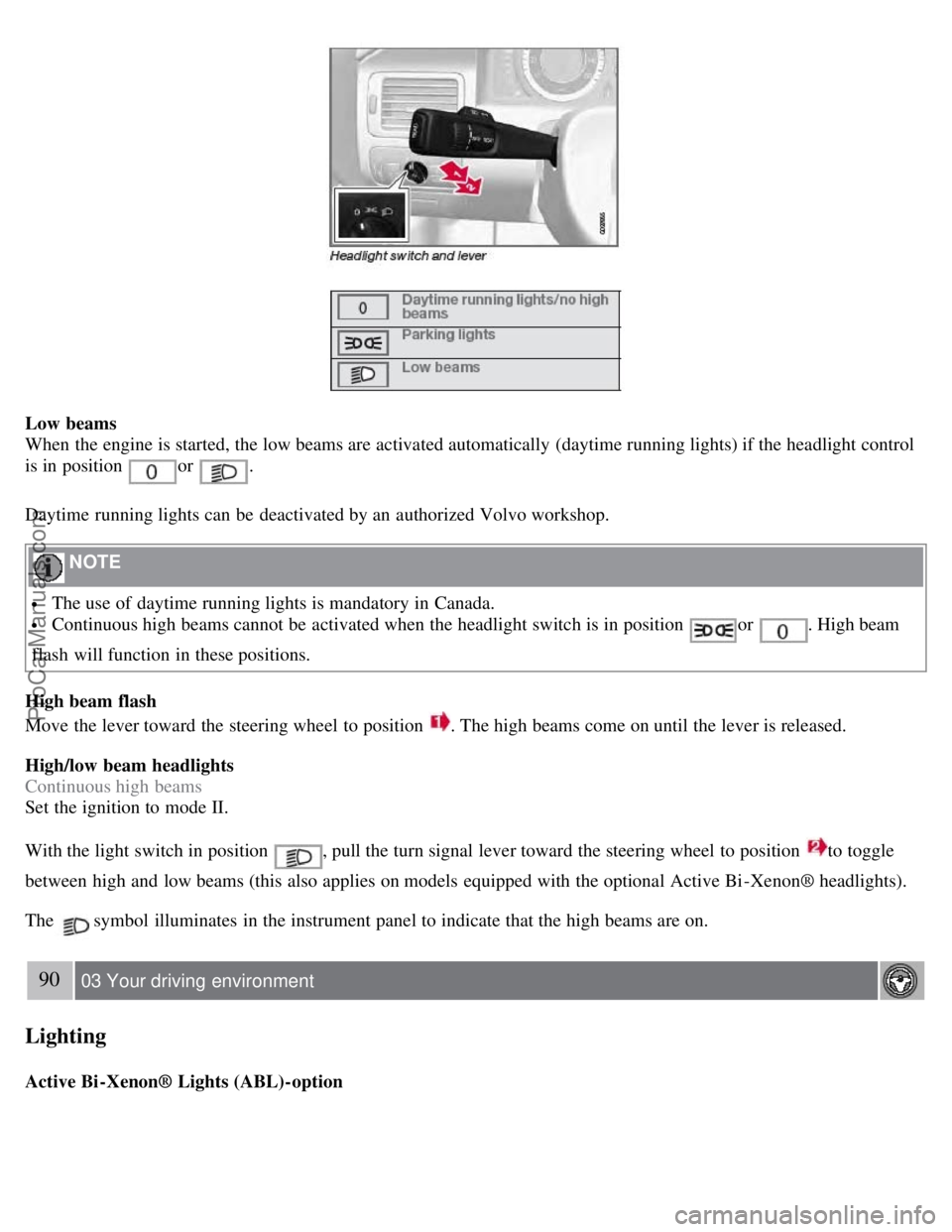
Low beams
When the engine is started, the low beams are activated automatically (daytime running lights) if the headlight control
is in position
or .
Daytime running lights can be deactivated by an authorized Volvo workshop.
NOTE
The use of daytime running lights is mandatory in Canada.
Continuous high beams cannot be activated when the headlight switch is in position or . High beam
flash will function in these positions.
High beam flash
Move the lever toward the steering wheel to position
. The high beams come on until the lever is released.
High/low beam headlights
Continuous high beams
Set the ignition to mode II.
With the light switch in position
, pull the turn signal lever toward the steering wheel to position to toggle
between high and low beams (this also applies on models equipped with the optional Active Bi -Xenon® headlights).
The
symbol illuminates in the instrument panel to indicate that the high beams are on.
90 03 Your driving environment
Lighting
Active Bi -Xenon® Lights (ABL)-option
ProCarManuals.com
Page 80 of 274

When the ABL function is activated, the headlight beams adjust laterally to help light up a curve according to
movements of the steering wheel (see the right-pointing beam in the illustration).
This function is activated automatically when the engine is started and can be deactivated/reactivated by pressing the
ABL button
in the center console. This button lights up when the ABL function is activated, and will flash if
there is a fault in the system.
NOTE
This function is only active in twilight or dark conditions, and only when the vehicle is in motion.
Parking lights
The front and rear parking lights can be turned on even when the ignition is switched off.
Turn the headlight control to the center position (the license plate lighting comes on at the same time).
The lighting also comes on when the trunk lid is opened in order to alert anyone traveling behind your vehicle.
91 03 Your driving environment
Lighting
Brake lights
The brake lights come on automatically when the brakes are applied.
Emergency brake lights (EBL)
ProCarManuals.com
Page 84 of 274

The lights are switched on or off by pressing each respective button.
Courtesy lights/door step lighting (option)
The courtesy lights/door step lighting switch on/off automatically when one of the front doors is opened/closed.
Glove compartment lighting
The glove compartment lighting switches on/off automatically when the lid is opened/closed.
Overhead courtesy lighting
The passenger compartment lighting is switched on and off automatically when button
is in the neutral position.
The lighting comes on and remains on for 30 seconds if:
the vehicle is unlocked from the outside with the key or remote control
the engine is switched off and the ignition is in mode 0.
The lighting switches off when:
the engine is started
the vehicle is locked from the outside.
The lighting comes on and remains on for two minutes if one of the doors is open.
The passenger compartment lighting can be switched on and off manually within 30 minutes after the vehicle has been
unlocked.
If the lighting is switched on manually and the vehicle is locked, the courtesy lighting will switch off automatically
after one minute.
Home safe lighting
When you leave your vehicle at night, you can make use of the home safe lighting function to illuminate the area in
front of the vehicle.
1. Remove the key from the ignition slot.
2. Pull the direction indicator lever as far as possible towards the steering wheel and release it.
3. Exit the vehicle and lock the doors.
The headlights, parking lights, turn signals, lights in the door mirrors, license plate lights, and footwell lighting will
illuminate and remain on for 30
1, 60 or 90 seconds. The time interval can be set under Car settingsLight settings
Home safe lighting . For a description of the menu system, see page 125.
ProCarManuals.com
Page 92 of 274

driver's door is opened.
The function can be activated/deactivated under Car key memory Seat & mirror positions. For a description of the
menu system, see page 125
.
Tilting the door mirrors when parking (option)
The door mirrors can be tilted down to help give the driver to a better view along the sides of the vehicle, for example
when parallel parking.
To activate this function, select reverse gear and press either the L or R mirror control button to tilt the mirror down.
The door mirror will reset to its normal position:
after 10 seconds when reverse is disengaged and the car remains stopped.
immediately when reverse is disengaged and the vehicle's forward speed exceeds approximately 6 mph (10 km/h).
immediately if you press the corresponding L or R button again.
when the engine is turned off.
when the side mirrors are folded in.
NOTE
Only one mirror can be tilted down at a time.
Automatic retraction when locking
When the vehicle is locked/unlocked with the remote key the door mirrors are automatically retracted/extended.
The function can be activated/deactivated under Car settings
Retract mirrors
102 03 Your driving environment
Mirrors
when locking. For a description of the menu system, see page 125.
Resetting to neutral
Mirrors that have been moved out of position by an external force must be electrically reset to the neutral position for
electric retracting/extending to work.
Retract the mirrors with the L and R buttons.
Fold them out again with the L and R buttons.
The mirrors are now reset in neutral position.
Home safe and approach lighting
The light on the door mirrors comes on when approach lighting or home safe lighting is selected, see page 94
.
Rear window and door mirror defrosters
ProCarManuals.com
Page 99 of 274

rapidly.
4. When the indicator light begins to flash rapidly, release both buttons.
The previous device has now been erased and the new device can be activated by pushing the HomeLink button that
has just been programmed. This procedure will not affect any other programmed HomeLink.
Erasing Channels
Individual buttons cannot be erased. However, to erase all three programmed buttons:
1. Press and hold the two outside buttons until the indicator light begins to flash (after 20 seconds).
2. Release both buttons.
The HomeLink® Wireless Control System is now in the training (learning) mode and can be programmed at any time
following steps 2 through 4 in the Programming section.
109 03 Your driving environment
Starting the engine
Starting the engine
Ignition switch with remote key inserted (see page 80
for more information)
1. Fasten the seat belt.
WARNING
Before starting the engine, check that the seat, steering wheel and mirrors are adjusted properly. Make sure the brake
pedal can be depressed completely. Adjust the seat if necessary.
2. Insert the remote key into the ignition slot. Press the key until it is drawn into the slot
1.
NOTE
The remote key should be inserted into the ignition slot with the key blade end of the remote pointing out and the
key pad facing up. See the illustration on page 80
.
3. Depress the brake pedal
2.
ProCarManuals.com