mirror VOLVO V70 2008 User Guide
[x] Cancel search | Manufacturer: VOLVO, Model Year: 2008, Model line: V70, Model: VOLVO V70 2008Pages: 274, PDF Size: 7.82 MB
Page 74 of 274

Automatic seat adjustment
To move the seat to the position in which you left it:
1. Unlock the driver's door with the same remote control (the one used to lock the doors)
2. Open the driver's door within 2 minutes.
The driver's seat will automatically move to the position in which you left it.
NOTE
The key memory is independent of the seat memory.
The seat will Move to this position even if someone else has moved it to a different seating position and locked
the vehicle with a different remote control.
This feature will work in the same way with all of the remote control transmitters that you use with your vehicle.
The function can be activated/deactivated under Car key memory
Seat & mirror positions . For a description of the
menu system, see the information beginning on page 125
.
Emergency stop
If the seat accidentally begins to move, press one of the buttons to stop the seat.
WARNING
Because the driver's seat can be adjusted with the ignition off, children should never be left unattended in the
vehicle.
Movement of the seat can be STOPPED at any time by pressing any button on the power seat control panel.
Do not adjust the seat while driving. The seat should be adjusted so that the brake pedal can be depressed fully. In
addition, position the seat as far rearward as comfort and control allow.
The seat rails on the floor must not be obstructed in any way when the seat is in motion.
Heated/ventilated seats (option)
See page 131
.
85 03 Your driving environment
Seats
Rear seats
Folding down the rear seat backrests
ProCarManuals.com
Page 84 of 274

The lights are switched on or off by pressing each respective button.
Courtesy lights/door step lighting (option)
The courtesy lights/door step lighting switch on/off automatically when one of the front doors is opened/closed.
Glove compartment lighting
The glove compartment lighting switches on/off automatically when the lid is opened/closed.
Overhead courtesy lighting
The passenger compartment lighting is switched on and off automatically when button
is in the neutral position.
The lighting comes on and remains on for 30 seconds if:
the vehicle is unlocked from the outside with the key or remote control
the engine is switched off and the ignition is in mode 0.
The lighting switches off when:
the engine is started
the vehicle is locked from the outside.
The lighting comes on and remains on for two minutes if one of the doors is open.
The passenger compartment lighting can be switched on and off manually within 30 minutes after the vehicle has been
unlocked.
If the lighting is switched on manually and the vehicle is locked, the courtesy lighting will switch off automatically
after one minute.
Home safe lighting
When you leave your vehicle at night, you can make use of the home safe lighting function to illuminate the area in
front of the vehicle.
1. Remove the key from the ignition slot.
2. Pull the direction indicator lever as far as possible towards the steering wheel and release it.
3. Exit the vehicle and lock the doors.
The headlights, parking lights, turn signals, lights in the door mirrors, license plate lights, and footwell lighting will
illuminate and remain on for 30
1, 60 or 90 seconds. The time interval can be set under Car settingsLight settings
Home safe lighting . For a description of the menu system, see page 125.
ProCarManuals.com
Page 85 of 274

1Factory setting
95 03 Your driving environment
Lighting
Approach lighting
Approach lighting is activated by pressing the approach light button on the remote key (see the illustration on page 54
).
When the function has been activated, the parking lights, indicator lights, door mirror lights, license plate lighting,
dome lighting and door step lighting come on.
The time interval for this lighting can be set under Car settings
Light settings Approach lighting . For a description
of the menu system, see page 125
.
Contents | Top of Page
ProCarManuals.com
Page 91 of 274

100 03 Your driving environment
Power windows
Laminated glass (option on certain markets only)
This glass is reinforced to help provide protection against break-ins and improved sound insulation in the passenger
compartment. The windshield and side windows have laminated glass.
101 03 Your driving environment
Mirrors
Power door mirrors
Adjusting
1. Press the L button for the left door mirror or the R button for the right door mirror. The light in the button comes on.
2. Adjust the position with the joystick in the center.
3. Press the L or R button again. The light should no longer be on.
WARNING
Objects seen in the mirrors may appear further away than they actually are.
Retractable power door mirrors (option on certain markets only)
The mirrors can be retracted for parking/driving in narrow spaces:
1. Press down the L and R buttons at the same time.
2. Release them after approximately one second. The mirrors automatically stop in the fully retracted position.
Fold out the mirrors by pressing down the L and R buttons at the same time. The mirrors automatically stop in the
fully extended position.
Storing the position (option)
The mirror positions are stored in the key memory when the vehicle has been locked with the remote key. When the
vehicle is unlocked with the same remote control the mirrors and the driver's seat adopt the stored positions when the
ProCarManuals.com
Page 92 of 274

driver's door is opened.
The function can be activated/deactivated under Car key memory Seat & mirror positions. For a description of the
menu system, see page 125
.
Tilting the door mirrors when parking (option)
The door mirrors can be tilted down to help give the driver to a better view along the sides of the vehicle, for example
when parallel parking.
To activate this function, select reverse gear and press either the L or R mirror control button to tilt the mirror down.
The door mirror will reset to its normal position:
after 10 seconds when reverse is disengaged and the car remains stopped.
immediately when reverse is disengaged and the vehicle's forward speed exceeds approximately 6 mph (10 km/h).
immediately if you press the corresponding L or R button again.
when the engine is turned off.
when the side mirrors are folded in.
NOTE
Only one mirror can be tilted down at a time.
Automatic retraction when locking
When the vehicle is locked/unlocked with the remote key the door mirrors are automatically retracted/extended.
The function can be activated/deactivated under Car settings
Retract mirrors
102 03 Your driving environment
Mirrors
when locking. For a description of the menu system, see page 125.
Resetting to neutral
Mirrors that have been moved out of position by an external force must be electrically reset to the neutral position for
electric retracting/extending to work.
Retract the mirrors with the L and R buttons.
Fold them out again with the L and R buttons.
The mirrors are now reset in neutral position.
Home safe and approach lighting
The light on the door mirrors comes on when approach lighting or home safe lighting is selected, see page 94
.
Rear window and door mirror defrosters
ProCarManuals.com
Page 93 of 274

Use the defroster to quickly remove misting and ice from the rear window and the door mirrors.
Press the button once to start simultaneous rear window and door mirror defrosting. The light in the button indicates
that the function is active. Defrosting is deactivated automatically and its duration is controlled by the outside
temperature.
The rear window is demisted/de-iced automatically if the vehicle is started in an outside temperature lower than + 7
°C.
Defrosting can be selected under Climate settings
Auto. rear defroster. Select between On or Off.
Interior rearview mirror
Auto-dim function
An integrated sensor reacts to headlights from following traffic and automatically reduces glare in the mirror.
103 03 Your driving environment
Power moonroof
Power moonroof (option on certain markets only)
The moonroof controls are located in the ceiling console near the rearview mirror. The moonroof can be opened
vertically and horizontally. The vehicle's must be in ignition mode I or II for the moonroof to be operated.
Sliding moonroof
Opening, automatic
Opening, manual
ProCarManuals.com
Page 99 of 274

rapidly.
4. When the indicator light begins to flash rapidly, release both buttons.
The previous device has now been erased and the new device can be activated by pushing the HomeLink button that
has just been programmed. This procedure will not affect any other programmed HomeLink.
Erasing Channels
Individual buttons cannot be erased. However, to erase all three programmed buttons:
1. Press and hold the two outside buttons until the indicator light begins to flash (after 20 seconds).
2. Release both buttons.
The HomeLink® Wireless Control System is now in the training (learning) mode and can be programmed at any time
following steps 2 through 4 in the Programming section.
109 03 Your driving environment
Starting the engine
Starting the engine
Ignition switch with remote key inserted (see page 80
for more information)
1. Fasten the seat belt.
WARNING
Before starting the engine, check that the seat, steering wheel and mirrors are adjusted properly. Make sure the brake
pedal can be depressed completely. Adjust the seat if necessary.
2. Insert the remote key into the ignition slot. Press the key until it is drawn into the slot
1.
NOTE
The remote key should be inserted into the ignition slot with the key blade end of the remote pointing out and the
key pad facing up. See the illustration on page 80
.
3. Depress the brake pedal
2.
ProCarManuals.com
Page 114 of 274

The navigation button can be used instead of ENTER and EXIT when navigating the menu hierarchy. The right arrow
is equal to ENTER and the left arrow to EXIT .
The menu options are numbered and can also be selected directly with the numerical keypad (1-9 only).
125 04 Comfort and driving pleasure
Menus and messages
Menu overview
Car key memory
Seat & mirror positions
Car settings
Fold mirr. when locking (option on certain markets only)
Collision warning settings (option)
Light settings
Lock settings
Reduced guard
1
Parking camera settings (accessory)
Steering force level (option)
Information
Climate settings
Automatic blower adjust
Recirculation timer
Auto. rear defroster
Reset climate settings
1Certain models
Main menu AM
Audio settings
2
Sound stage
Equalizer, front
Equalizer, rear
ProCarManuals.com
Page 118 of 274

Sensor location
The sunlight sensor is located on the top side of the dashboard.
NOTE
The sunlight sensor monitors which side of the car that is most exposed to sunlight. This can mean that the
temperature may differ between the right and left-side air vents, even if the temperatures set for both sides of the
passenger compartment are the same.
The temperature sensor for the passenger compartment is located below the climate control panel.
The outside temperature sensor is located on the door mirror.
The humidity sensor (option) is located in the interior rearview mirror.
NOTE
Do not cover or block the sensors with clothing or other objects.
Side windows and moonroof
To ensure that the air conditioning works optimally, the side windows, and the optional moonroof should be closed.
Fog on the inside of the windows
The defroster function should be used to remove fog or mist from the inside of the windows. Keeping the windows
clean with a commercially available window washing spray will also help prevent fogging or misting.
Vents in the parcel shelf
NOTE
The air vents at the rear of the parcel shelf should never be obstructed.
Temporary shut-off of the air conditioning
The air conditioning is momentarily disengaged during full-throttle acceleration or when driving uphill with a trailer.
This may result in a temporary increase in cabin temperature.
Ice and snow
Always keep the air intake grille at the base of the windshield free of snow.
Climate system maintenance
Special tools and equipment are required to maintain and carry out repairs on the climate system. Work of this type
should only be done by a trained and qualified Volvo service technician.
Refrigerant
Volvo cares about the environment. The air conditioning system in your car contains a CFC-free refrigerant - R134a.
This substance
129 04 Comfort and driving pleasure
Climate system
will not deplete the ozone layer. The air conditioning system contains 1.8 lbs (800 g) of R134a. The systems uses PAG
oil.
ProCarManuals.com
Page 121 of 274
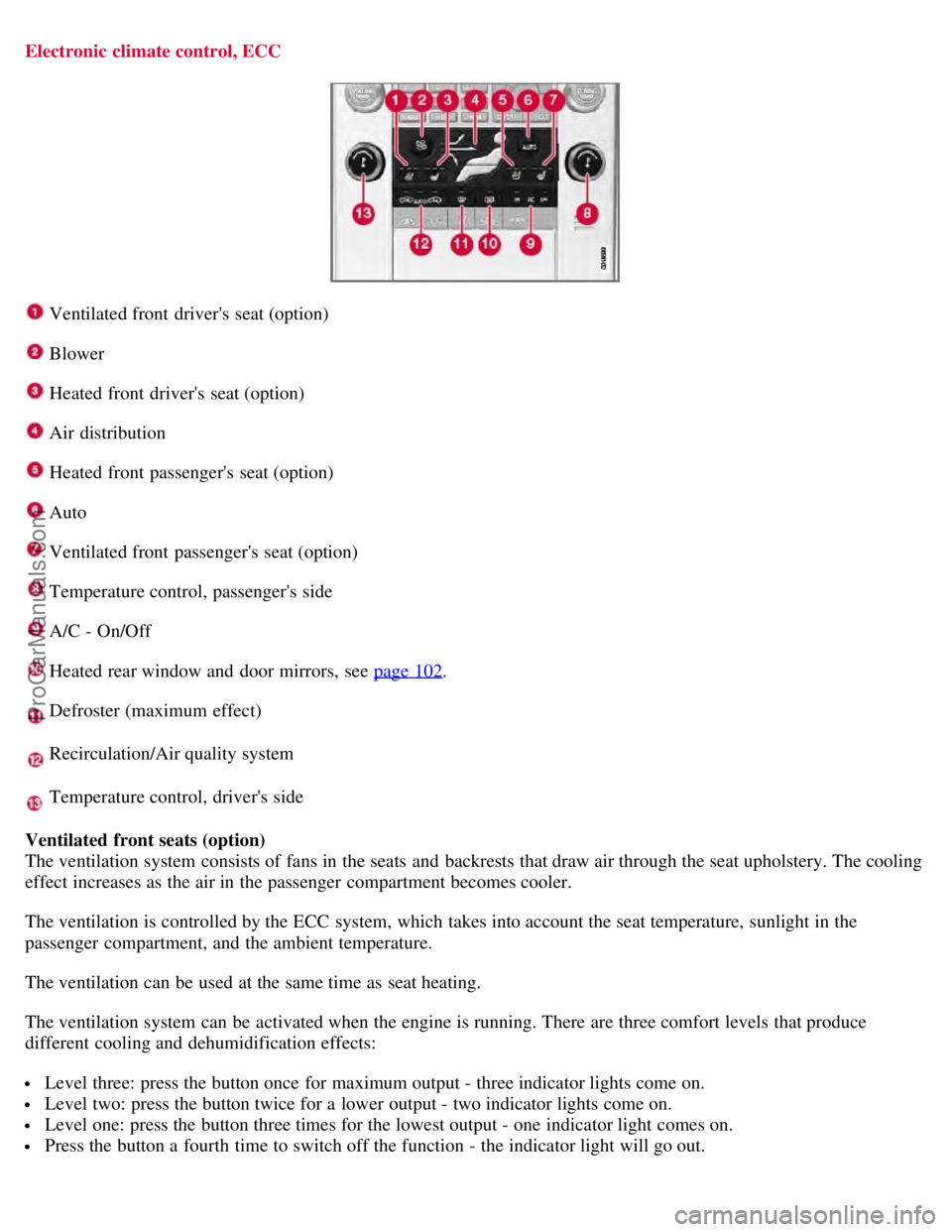
Electronic climate control, ECC
Ventilated front driver's seat (option)
Blower
Heated front driver's seat (option)
Air distribution
Heated front passenger's seat (option)
Auto
Ventilated front passenger's seat (option)
Temperature control, passenger's side
A/C - On/Off
Heated rear window and door mirrors, see page 102.
Defroster (maximum effect)
Recirculation/Air quality system
Temperature control, driver's side
Ventilated front seats (option)
The ventilation system consists of fans in the seats and backrests that draw air through the seat upholstery. The cooling
effect increases as the air in the passenger compartment becomes cooler.
The ventilation is controlled by the ECC system, which takes into account the seat temperature, sunlight in the
passenger compartment, and the ambient temperature.
The ventilation can be used at the same time as seat heating.
The ventilation system can be activated when the engine is running. There are three comfort levels that produce
different cooling and dehumidification effects:
Level three: press the button once for maximum output - three indicator lights come on.
Level two: press the button twice for a lower output - two indicator lights come on.
Level one: press the button three times for the lowest output - one indicator light comes on.
Press the button a fourth time to switch off the function - the indicator light will go out.
ProCarManuals.com