warning light VOLVO V70 2008 User Guide
[x] Cancel search | Manufacturer: VOLVO, Model Year: 2008, Model line: V70, Model: VOLVO V70 2008Pages: 274, PDF Size: 7.82 MB
Page 77 of 274
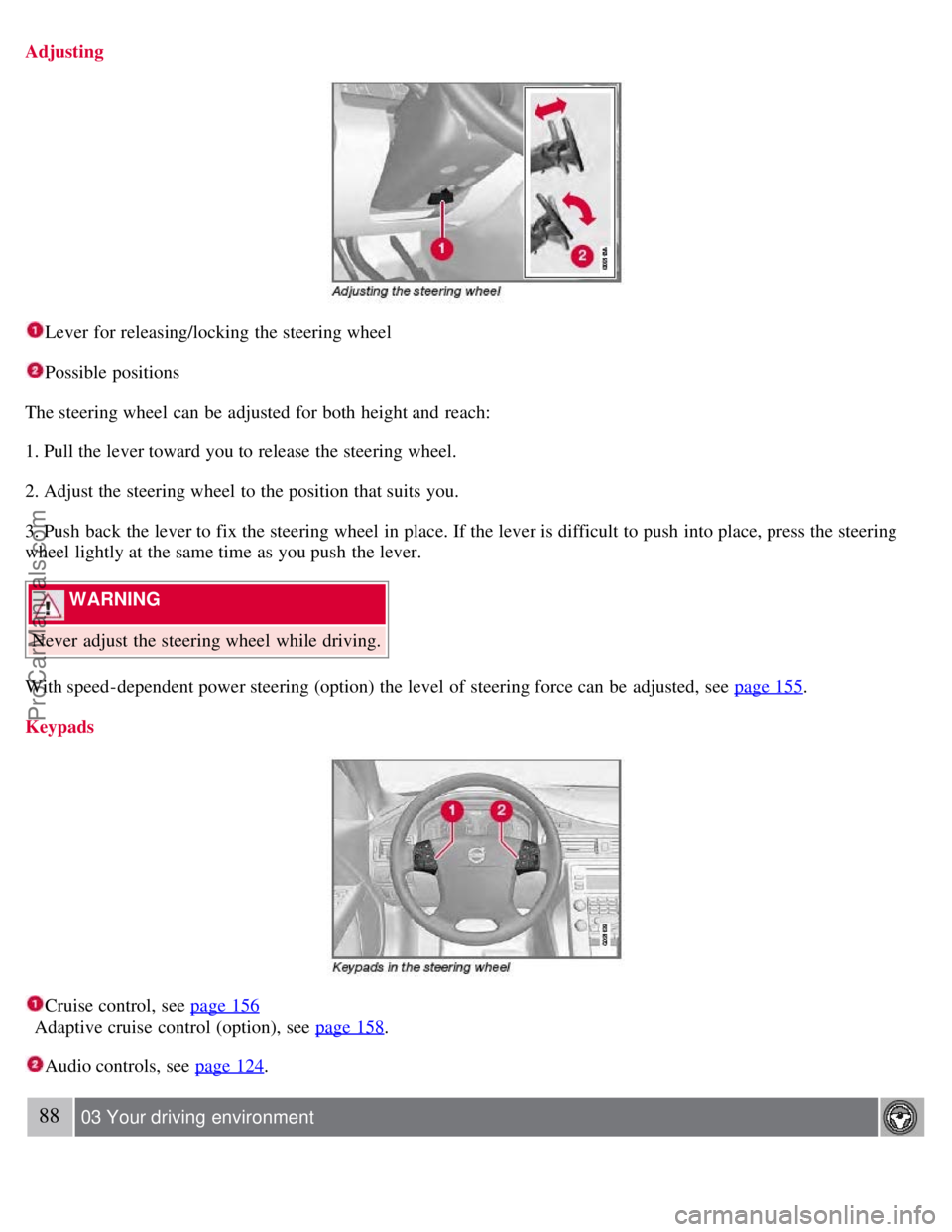
Adjusting
Lever for releasing/locking the steering wheel
Possible positions
The steering wheel can be adjusted for both height and reach:
1. Pull the lever toward you to release the steering wheel.
2. Adjust the steering wheel to the position that suits you.
3. Push back the lever to fix the steering wheel in place. If the lever is difficult to push into place, press the steering
wheel lightly at the same time as you push the lever.
WARNING
Never adjust the steering wheel while driving.
With speed-dependent power steering (option) the level of steering force can be adjusted, see page 155
.
Keypads
Cruise control, see page 156
Adaptive cruise control (option), see page 158
.
Audio controls, see page 124.
88 03 Your driving environment
ProCarManuals.com
Page 82 of 274

Press the button to switch the rear fog light on/off. The rear fog light indicator symbol on the instrument panel
and the light in the button come on when the rear fog light is switched on.
NOTE
The rear fog light is considerably brighter than the normal tail lights and should be used only when conditions such
as fog, rain, snow, smoke or dust reduce visibility for other vehicles to less than 500 ft. (150 meters).
Hazard warning flashers
The hazard warning flasher should be used to indicate that the vehicle has become a traffic hazard. To activate the
flashers, press the button in the center dash. Press the button again to turn off the flashers.
NOTE
Regulations regarding the use of the hazard warning flasher may vary, depending on where you live.
The hazard warning flashers will be activated automatically if an airbag deploys.
93 03 Your driving environment
Lighting
Turn signals
When changing lanes
The driver can automatically flash the turn signals 3 times by moving the turn signal lever up or down to the first
position and releasing it.
ProCarManuals.com
Page 90 of 274

WARNING
Always remove the ignition key when the vehicle is unattended.
Never leave children unattended in the vehicle.
Make sure that the windows are completely unobstructed before they are operated.
1Option on certain markets only.
Operating
Manual up/down
Auto up/down.
All power windows can be operated using the control panel in the driver's door. The control panels in the other doors
only operate the window in the respective doors.
For the power windows to function, the ignition must be in at least mode I . When the vehicle has been running, the
power windows can be operated for several minutes after the remote key has been removed from the ignition slot, or
until a door has been opened.
NOTE
Movement of the windows will stop if they are obstructed in any way.
To reduce buffeting wind noise if the rear windows are opened, also open the front windows slightly.
Manual up/down
Move one of the controls up/down gently. The power windows move up/down as long as the control is held in
position.
Auto up/down
Move one of the controls up/down as far as possible and release it. The window will open or close completely.
Resetting
If the battery has been disconnected, the auto open function must be reset so that it will work properly.
1. Gently raise the front section of the button to close the window and hold it for one second.
2. Release the button briefly.
3. Raise the front section of the button again for one second.
ProCarManuals.com
Page 91 of 274

100 03 Your driving environment
Power windows
Laminated glass (option on certain markets only)
This glass is reinforced to help provide protection against break-ins and improved sound insulation in the passenger
compartment. The windshield and side windows have laminated glass.
101 03 Your driving environment
Mirrors
Power door mirrors
Adjusting
1. Press the L button for the left door mirror or the R button for the right door mirror. The light in the button comes on.
2. Adjust the position with the joystick in the center.
3. Press the L or R button again. The light should no longer be on.
WARNING
Objects seen in the mirrors may appear further away than they actually are.
Retractable power door mirrors (option on certain markets only)
The mirrors can be retracted for parking/driving in narrow spaces:
1. Press down the L and R buttons at the same time.
2. Release them after approximately one second. The mirrors automatically stop in the fully retracted position.
Fold out the mirrors by pressing down the L and R buttons at the same time. The mirrors automatically stop in the
fully extended position.
Storing the position (option)
The mirror positions are stored in the key memory when the vehicle has been locked with the remote key. When the
vehicle is unlocked with the same remote control the mirrors and the driver's seat adopt the stored positions when the
ProCarManuals.com
Page 96 of 274

switching on the vehicle's ignition.
Press the programmed HomeLink button to activate the garage door, driveway gate, security lightning, home security
system etc.
Your original hand -held transmitters may, of course, be used at any time.
WARNING
If you use HomeLink to open a garage door or gate, be sure no one is near the gate or door while it is in motion.
Do not use the HomeLink Universal Transceiver with any garage door opener that lacks safety "stop" and
"reverse" features as required by federal safety standards. (This includes any garage door opener model manufactured
before April 1, 1982). A garage door opener that cannot "detect" an object, signalling the door to "stop" and
"reverse" does not meet current federal safety standards. Using a garage door opener without these features increases
the risk of serious injury or death. For more information on this matter, call toll-free 1-800-355-3515. (Internet:
www.HomeLink.com
).
Programming the transceiver for the first time (U.S. residents)
1. For first time training, press and hold the two outer HomeLink buttons, releasing only when the HomeLink indicator
light begins to flash after 20 seconds. (Do not perform this step when training the additional HomeLink buttons.)
2. Position the hand -held transmitter 1-3 inches away from the HomeLink surface
106 03 Your driving environment
HomeLink® Universal Transceiver
(located on your sun visor), keeping the HomeLink indicator light in view.
Using both hands, simultaneously press and hold both the desired HomeLink button and hand held transmitter button.
DO NOT release until the HomeLink indicator light flashes slowly and then rapidly. When the indicator light flashes
rapidly, both buttons may be released. (The rapid flashing indicates successful training.)
NOTE
Some garage door openers may require you to replace step 3 with the "cycling" procedure noted in the
"Programming the transceiver for the first time (Canadian residents)" section.
3. Press and hold the trained HomeLink button and observe the indicator light.
If the indicator light is solid/continuous, training is complete and your device should activate when the HomeLink
button is pressed and released.
If the indicator light blinks rapidly for 2 seconds and then turns a solid/continuous light, proceed with the following
training instructions for a rolling code device. A second person may make the following steps quicker and easier.
Please use a ladder or other device. Do not stand on your vehicle to perform the next steps.
4. At the garage door opener receiver (motorhead unit) in the garage, locate the "learn" or "smart" button (usually near
where the hanging antenna wire is attached to the unit). If there is difficulty locating the training button, reference the
garage door opener's manual or contact us toll-free 1-800-355-3515 (Internet: www.HomeLink.com
).
5. Press and release the "learn" or "smart" button (the name and color of the button may vary by manufacturer).
ProCarManuals.com
Page 99 of 274

rapidly.
4. When the indicator light begins to flash rapidly, release both buttons.
The previous device has now been erased and the new device can be activated by pushing the HomeLink button that
has just been programmed. This procedure will not affect any other programmed HomeLink.
Erasing Channels
Individual buttons cannot be erased. However, to erase all three programmed buttons:
1. Press and hold the two outside buttons until the indicator light begins to flash (after 20 seconds).
2. Release both buttons.
The HomeLink® Wireless Control System is now in the training (learning) mode and can be programmed at any time
following steps 2 through 4 in the Programming section.
109 03 Your driving environment
Starting the engine
Starting the engine
Ignition switch with remote key inserted (see page 80
for more information)
1. Fasten the seat belt.
WARNING
Before starting the engine, check that the seat, steering wheel and mirrors are adjusted properly. Make sure the brake
pedal can be depressed completely. Adjust the seat if necessary.
2. Insert the remote key into the ignition slot. Press the key until it is drawn into the slot
1.
NOTE
The remote key should be inserted into the ignition slot with the key blade end of the remote pointing out and the
key pad facing up. See the illustration on page 80
.
3. Depress the brake pedal
2.
ProCarManuals.com
Page 100 of 274

WARNING
An extra mat on the driver's floor can cause the accelerator and/or brake pedal to catch. Check that the movement of
these pedals is not impeded. Not more than one protective floor covering may be used at one time.
4. Press and release the START/STOP ENGINE button. The autostart function will operate the starter motor until the
engine starts.
The starter motor operates for a maximum of 10 seconds. If the engine has not started, repeat the procedure.
1On vehicles with the optional keyless drive, it is only necessary to have a remote control in the passenger's compartment.
2 If the vehicle is moving, it is only necessary to press the START/STOP ENGINE button to start the vehicle.
WARNING
Always remove the remote key from the ignition slot when leaving the vehicle, especially if there are children in
the vehicle.
Never remove the remote key from the ignition slot while driving or when the vehicle is being towed. The
steering lock could otherwise be activated, making it impossible to steer the vehicle. Never remove the remote key
with keyless drive function (option) from the vehicle while driving or during towing.
Always place the gear selector in Park and apply the parking brake before leaving the vehicle. Never leave the
vehicle unattended with the engine running.
Always open garage doors fully before starting the engine inside a garage to ensure adequate ventilation. The
exhaust gases contain carbon monoxide, which is invisible and odorless but very poisonous.
110 03 Your driving environment
Starting the engine
NOTE
The idling speed can be noticeably higher than normal during cold starts. This is to enable emission control system
can reach normal operating temperature as quickly as possible, which helps reduce exhaust emissions
1.
Keylock: Your vehicle is equipped with a keylock system. When the engine is switched off, the gear selector must
be in the Park position before the key can be removed
2 from the ignition slot.
1If the gear selector is in the D or R positions and the car is not moving, engine speed (rpm) will be lower and it will take longer for the engine to
reach normal operating temperature.
2Does not apply to vehicles with the optional keyless drive.
CAUTION
When starting in cold weather, the automatic transmission may shift up at slightly higher engine speeds than
normal until the automatic transmission fluid reaches normal operating temperature.
Do not race a cold engine immediately after starting. Oil flow may not reach some lubrication points fast enough
to prevent engine damage.
The engine should be idling when you move the gear selector. Never accelerate until after you feel the
transmission engage. Accelerating immediately after selecting a gear will cause harsh engagement and premature
transmission wear.
Selecting P or N when idling at a standstill for prolonged periods of time will help prevent overheating of the
ProCarManuals.com
Page 105 of 274
114 03 Your driving environment
Transmission
Insert the key blade into the opening as far as possible. Press the key blade down and keep it held down. Move the
gear selector from the P position. For information on the key blade, see page 52
.
All Wheel Drive - AWD
1
Your Volvo can be equipped with permanent All Wheel Drive, which means that power is distributed automatically
between the front and rear wheels. Under normal driving conditions, most of the engine's power is directed to the front
wheels. However, if there is any tendency for the front wheels to spin, an electronically controlled coupling distributes
power to the wheels that have the best traction.
NOTE
The message AWD disabled Service required will be appear in the information display if an electrical fault should
occur in the AWD system. A warning light will also illuminate in the instrument panel. If this occurs, have the
system checked by a trained and authorized Volvo service technician.
1Standard on certain models.
115 03 Your driving environment
Brakes
Brake system
The brake system is a hydraulic system consisting of two separate brake circuits. If a problem should occur in one of
these circuits, it is still possible to stop the vehicle with the other brake circuit.
If the brake pedal must be depressed farther than normal and requires greater foot pressure, the stopping distance will
be longer.
A warning light in the instrument panel will light up to warn the driver that a fault has occurred.
If this light comes on while driving or braking, stop immediately and check the brake fluid level in the reservoir.
NOTE
Press the brake pedal hard and maintain pressure on the pedal - do not pump the brakes.
WARNING
If the fluid level is below the MIN mark in the reservoir or if a brake system message is shown in the information
display: DO NOT DRIVE. Have the vehicle towed to a trained and qualified Volvo service technician and have the
brake system inspected.
Power brakes function only when the engine is running
The power brakes utilize vacuum pressure which is only created when the engine is running. Never let the vehicle roll
ProCarManuals.com
Page 114 of 274

The navigation button can be used instead of ENTER and EXIT when navigating the menu hierarchy. The right arrow
is equal to ENTER and the left arrow to EXIT .
The menu options are numbered and can also be selected directly with the numerical keypad (1-9 only).
125 04 Comfort and driving pleasure
Menus and messages
Menu overview
Car key memory
Seat & mirror positions
Car settings
Fold mirr. when locking (option on certain markets only)
Collision warning settings (option)
Light settings
Lock settings
Reduced guard
1
Parking camera settings (accessory)
Steering force level (option)
Information
Climate settings
Automatic blower adjust
Recirculation timer
Auto. rear defroster
Reset climate settings
1Certain models
Main menu AM
Audio settings
2
Sound stage
Equalizer, front
Equalizer, rear
ProCarManuals.com
Page 144 of 274
1. Stop the vehicle in a safe place and turn off the engine.
2. Restart the engine.
If the message remains when the engine is restarted, drive to an authorized Volvo workshop to have the system
inspected.
Symbols in the instrument panel
If the symbols
and are displayed at the same time, read the message in the information display.
If the symbol
appears alone, it may appear as follows:
If the symbol flashes, this indicates that the stability system is actively functioning to help counteract wheel spin
and/or a skid.
If the symbol remains on for approximately 2 seconds after the engine has been started, this indicates that the system
is performing a self -diagnostic test.
WARNING
The stability system is intended to help improve driving safety. It supplements, but can never replace, the driver's
judgment and responsibility when operating the vehicle. Speed and driving style should always be adapted to traffic
and road conditions.
155 04 Comfort and driving pleasure
Active chassis system-Four C
Active chassis (Four C)-option
Active chassis, Four-C (Continuously Controlled Chassis Concept), regulates the characteristics of the shock absorbers
so that the car's driving characteristics can be adjusted. There are three settings: Comfort, Sport and Advanced.
Comfort
Comfort mode offers a somewhat softer ride and the transmission shifts gears at lower rpm. This mode is particularly
suitable for long-distance highway driving. The indicator light in the button will be on when this mode is selected.
Sport
In this mode, the vehicle's body sway is reduced during cornering and steering response is more immediate. The
transmission shifts up at higher rpm for sportier driving. The indicator light in the button will be on to indicate that
Sport mode has been selected.
Advanced
In this mode, body sway in curves is minimal and steering response is very direct. Gear shifting is done at high rpm in
each gear for dynamic and active driving.
Operation
ProCarManuals.com