brake light VOLVO V70 2008 Owner's Manual
[x] Cancel search | Manufacturer: VOLVO, Model Year: 2008, Model line: V70, Model: VOLVO V70 2008Pages: 274, PDF Size: 7.82 MB
Page 160 of 274

Limitations
Strong sunlight, reflections, extreme light contrasts, the use of sunglasses, or if the driver is not looking straight ahead
may make the visual warning signal in the windshield difficult to see. For this reason, always activate the audible
warning signal in such conditions.
NOTE
The visual warning signal may be temporarily disengaged in the event of high passenger compartment temperature
due to strong sunlight, etc. If this occurs, the audible warning signal will be used, even if it has been deactivated in
the menu system.
Warnings may not appear if the distance to the vehicle ahead is very small or if steering wheel and pedal movements
are great, for example, due to a very active driving style.
WARNING
In certain situations, the system cannot provide warnings or warning may be delayed if traffic conditions or other
external factors make it impossible for the radar sensor or camera to detect the vehicle ahead.
Warnings may not be provided if the distance to the vehicle ahead is short, or if movements of the steering
wheel/brake pedal are great, such as during active driving.
The sensor system has a limited range for stationary or slow-moving vehicles and may therefore give delayed or
no warnings if your vehicle's speed is above approximately 45 mph (70 km/h).
Warnings for stationary or slow-moving vehicles may not be provided in dark conditions.
The Collision Warning system uses the same radar sensors as Adaptive Cruise Control. For more information on the
radar sensor and its limitations, see page 162.
If no warning is given, or if a warning is delayed, Auto-brake will also not be provided or will be delayed.
NOTE
If warnings are given too frequently, the warning distance can be reduced (see "Setting a warning distance" on page
169). This causes the system to provide later warnings, which decreases the total number of warnings provided.
The camera's limitations
The camera is used by Collision Warning with Auto-brake, Driver Alert Control (see page 173
), and Lane Departure
Warning (see page 176
).
NOTE
Keep the section of the windshield in front of the camera clean and free of ice, snow, or condensation.
171 04 Comfort and driving pleasure
Collision Warning with Auto-brake (option)
WARNING
The camera has the same limitations as the human eye. In other words, its "vision is impaired" by adverse weather
conditions such as heavy snowfall, dense fog, etc. These conditions may reduce the function of systems that depend
ProCarManuals.com
Page 161 of 274

on the camera or cause these systems to temporarily stop functioning.
Never place any objects, decals, etc., on the windshield in front of the camera. This could reduce or block the
camera's function, and could cause one or more of the systems that utilize the camera to stop functioning.
Strong sunlight, reflections from the road surface, a dirty road surface, or unclear lane marker lines may
drastically reduce the camera's capacity to detect the side of a lane or another vehicle.
Fault tracing and actions
If the message Camera blocked See manual is displayed, this means that the camera is obscured and cannot detect
vehicle or road marker lines in front of the vehicle.
This, in turn, means that Collision Warning with Auto-brake, Lane Departure Warning, and Driver Alert Control will
not have full functionality.
The table lists possible causes for this message being displayed, and suitable actions.
172 04 Comfort and driving pleasure
Collision Warning with Auto-brake (option)
Symbols and messages in the display
ProCarManuals.com
Page 165 of 274

This function is designed to help reduce the risk of accidents in situations where the vehicle leaves its lane and there is
a risk of driving off the road or into the opposite lane.
LDW consists of a camera that monitors the lane's side marker lines. The driver is alerted by an audible signal if the
vehicle crosses a side marker line or the road's center dividing line.
Operation and function
LDW can be switched on or off by pressing the button on the center console. A light in the button illuminates when the
function is on.
The trip computer display shows Lane Depart Warn Unavailable when the function is in standby mode.
When LDW is in standby mode, the function is activated automatically after the camera has monitored the road's side
marker lines and the vehicle's speed exceeds 40 mph (65 km/h). Lane Depart Warn Available will be displayed.
If the camera can no longer monitor the road's side marker lines, or if the vehicle's speed falls below 37 mph (60
km/h), LDW will return to standby mode and Lane Depart Warn Unavailable will be displayed.
If the vehicle unexpectedly crosses the lane's left or right side marker lines, the driver will be alerted by an audible
signal.
No warning signal will be given in the following situations:
The turn signal is being used
The driver's foot is on the brake pedal1
The throttle pedal is pressed quickly
If the steering wheel is moved quickly
In sharp turns that cause the vehicle's body to sway.
The camera also has certain limitations. See page 170
for information.
WARNING
ProCarManuals.com
Page 167 of 274

who may be close to the front or rear of your vehicle. An audible signal and symbols in the audio system's display
indicate the distance to the object.
WARNING
Park Assist is an information system, NOT a safety system. This system is designed to be a supplementary aid when
parking the vehicle. It is not, however, intended to replace the driver's attention and judgement.
Function
The system is activated automatically when the vehicle is started. The indicator light in the button in the center console
illuminates when the system is on.
The front park assist system is active from the time the engine is started until the vehicle exceeds a speed of
approximately 10 mph (15 km/h). It is also active when the vehicle is backing up.
Rear park assist is active when the engine is running and reverse gear has been selected.
Activating/deactivating
The system is activated automatically when the vehicle is started.
Press the Park assist button on the center console to temporarily deactivate the system(s). The indicator light in the
button will go out when the system has been deactivated.
Park assist will be automatically reactivated the next time the engine is started, or if the button is pressed (the
indicator light in the button will illuminate).
NOTE
Front park assist is disengaged automatically when the parking brake is applied.
If the vehicle is equipped with front and rear park assist, both systems will be deactivated by pressing the button.
179 04 Comfort and driving pleasure
Park assist (option)
Signals from the park assist system
ProCarManuals.com
Page 169 of 274

Rear park assist is deactivated automatically when towing a trailer if Volvo genuine trailer wiring is used.
180 04 Comfort and driving pleasure
Park assist (option)
Front park assist
The distance monitored in front of the vehicle is approximately 2.5 ft (0.8 m). The audible signal comes from the audio
system's front speakers.
It may not be possible to combine auxiliary headlights and front park assist since these lights could trigger the system's
sensors.
Faults in the system
If the information symbol illuminates and Park Assist syst Service required is shown on the information display, this
indicates that the system is not functioning properly and has been disengaged. Consult a trained and qualified Volvo
service technician.
CAUTION
In certain circumstances, the park assist system may give unexpected warning signals that can be caused by external
sound sources that use the same ultrasound frequencies as the system. This may include such things as the horns of
other vehicles, wet tires on asphalt, pneumatic brakes, motorcycle exhaust pipes, etc. This does not indicate a fault in
the system.
Cleaning the sensors
ProCarManuals.com
Page 180 of 274

Remove snow tires when threat of snow or ice has ended.
Note that roof racks, ski racks, etc, increase air resistance and also fuel consumption.
At highway driving speeds, fuel consumption will be lower with the air conditioning on and the windows closed
than with the air conditioning off and the windows open.
Using the onboard trip computer's fuel consumption modes can help you learn how to drive more economically.
Other factors that decrease gas mileage are:
Dirty air cleaner
Dirty engine oil and clogged oil filter
Dragging brakes
Incorrect front end alignment
Some of the above mentioned items and others are checked at the standard maintenance intervals.
WARNING
Driving with the tailgate open: Driving with the tailgate open could lead to poisonous exhaust gases entering the
passenger compartment. If the tailgate must be kept open for any reason, proceed as follows:
Close the windows
Set the ventilation system control to air flow to floor, windshield and side windows and the blower control to its
highest setting.
Weight distribution affects handling
At the specified curb weight your vehicle has a tendency to understeer, which means that the steering wheel has to be
turned more than might seem appropriate for the curvature of a bend. This ensures good stability and reduces the risk
of rear wheel skid. Remember that these properties can alter with the vehicle load. The heavier the load in the cargo
area, the less the tendency to understeer.
Handling, roadholding
Vehicle load, tire design and inflation pressure all affect vehicle handling. Therefore, check that the tires are inflated to
the recommended pressure according to the vehicle load. See the "Tire pressure" section. Loads should be distributed
so that capacity weight
193 05 During your trip
Driving recommendations
or maximum permissible axle loads are not exceeded.
Driving through water
The vehicle can be driven through water up to a depth of approximately 9 in. (25 cm), at a maximum speed of 6 mph
(10 km/h).
Take particular care when driving through flowing water.
Clean the electrical connections for trailer wiring after driving in mud or water.
When driving through water, maintain low speed and do not stop in the water.
WARNING
After driving through water, press lightly on the brake pedal to ensure that the brakes are functioning normally.
ProCarManuals.com
Page 181 of 274

Water or mud can make the brake linings slippery, resulting in delayed braking effect.
CAUTION
Engine damage will occur if water is drawn into the air cleaner.
If the vehicle is driven through water deeper than 9 in (25 cm), water may enter the differential and the
transmission. This reduces the oil's lubricating capacity and may shorten the service life of these components.
Do not allow the vehicle to stand in water up to the door sills longer than absolutely necessary. This could result
in electrical malfunctions.
If the engine has been stopped while the vehicle is in water, do not attempt to restart it. Have the vehicle towed
out of the water.
Engine and cooling system
Under special conditions, for example when driving in hilly terrain, extreme heat or with heavy loads, there is a risk
that the engine and cooling system will overheat. Proceed as follows to avoid overheating the engine.
Maintain a low speed when driving with a trailer up long, steep hills.
Do not turn the engine off immediately when stopping after a hard drive.
WARNING
The cooling fan may start or continue to operate (for up to 6 minutes) after the engine has been switched off.
Remove any auxiliary lights from in front of the grille when driving in hot weather conditions.
Do not exceed engine speeds of 4500 rpm if driving with a trailer in hilly terrain. The oil temperature could become
too high.
Conserving electrical current
Keep the following in mind to help minimize battery drain:
When the engine is not running, avoid using ignition mode II . Many electrical systems (the audio system, the
optional navigation system, power windows, etc) will function in ignition modes 0 and I . These modes reduce drain on
the battery.
Please keep in mind that using systems, accessories, etc., that consume a great deal of current when the engine is not
running could result in the battery being completely drained.
The optional 12 volt socket in the cargo area provides electrical current even with the ignition switched off, which
drains the battery.
194 05 During your trip
Driving recommendations
Before a long distance trip
It is always worthwhile to have your vehicle checked by a trained and qualified Volvo service technician before
driving long distances. Your retailer will also be able to supply you with bulbs, fuses, spark plugs and wiper blades for
your use in the event that problems occur.
As a minimum, the following items should be checked before any long trip:
Check that engine runs smoothly and that fuel consumption is normal.
Check for fuel, oil, and fluid leakage
Have the transmission oil level checked.
ProCarManuals.com
Page 182 of 274
Check condition of drive belts.
Check state of the battery's charge.
Examine tires carefully (the spare tire as well), and replace those that are worn. Check tire pressures.
The brakes, front wheel alignment, and steering gear should be checked by a trained and qualified Volvo service
technician only.
Check all lights, including high beams.
Reflective warning triangles are legally required in some states/provinces.
Have a word with a trained and qualified Volvo service technician if you intend to drive in countries where it may
be difficult to obtain the correct fuel.
Consider your destination. If you will be driving through an area where snow or ice are likely to occur, consider
snow tires.
Cold weather precautions
If you wish to check your vehicle before the approach of cold weather, the following advice is worth noting:
Make sure that the engine coolant contains 50 percent antifreeze. Any other mixture will reduce freeze protection.
This gives protection against freezing down to - 31°F (-35°C). The use of "recycled" antifreeze is not approved by
Volvo. Different types of antifreeze must not be mixed.
Volvo recommends using only genuine Volvo antifreeze in your vehicle's radiator.
Try to keep the fuel tank well filled - this helps prevent the formation of condensation in the tank. In addition, in
extremely cold weather conditions it is worthwhile to add fuel line de -icer before refueling.
The viscosity of the engine oil is important. Oil with low viscosity (thinner oil) improves cold-weather starting as
well as decreasing fuel consumption while the engine is warming up. For winter use, 5W -30 oil, particularly the
synthetic type, is recommended. Be sure to use good quality oil but do not use cold-weather oil for hard driving or in
warm weather. See page 276
for more information on engine oil.
NOTE
Synthetic oil is not used when the oil is changed at the normal maintenance intervals except at owner request and at
additional charge.
The load placed on the battery is greater during the winter since the windshield wipers, lighting, etc. are used more
often. Moreover, the capacity of the battery decreases as the temperature drops. In very cold weather, a poorly charged
battery can freeze and be damaged. It is therefore advisable to check the state of charge more frequently and spray an
anti-rust oil on the battery posts.
Volvo recommends the use of snow tires on all four wheels for winter driving. See the information on page 259.
To prevent the washer fluid reservoir from freezing, add washer solvents containing antifreeze. This is important
since dirt is often splashed on the windshield during winter driving, requiring the frequent use of the washers and
wipers. Volvo Washer Solvent should be diluted as follows: Down to 14° F (-10° C): 1 part washer solvent and 4 parts
water Down to 5° F (-15° C):
195 05 During your trip
Driving recommendations
1 part washer solvent and 3 parts water Down to 0° F (-18° C): 1 part washer solvent and 2 parts water Down to -18°
F (-28° C): 1 part washer solvent and 1 part water.
Use Volvo Teflon Lock Spray in the locks.
Avoid using de -icing sprays as they can cause damage to the locks.
196 05 During your trip
ProCarManuals.com
Page 188 of 274
cargo, the weight of any accessories that may be installed, etc.
When loading the cargo area, keep the following in mind:
Load objects in the cargo area against the backrest whenever possible.
Unstable loads can be secured to the load anchoring eyelets with straps or web lashings to help keep them from
shifting.
Stop the engine and apply the parking brake when loading or unloading long objects. The gear selector can be
knocked out of position by long loads, which could set the vehicle in motion.
NOTE
To increase loading space, the rear seat backrests can be folded down, see page 85
.
WARNING
Stop the engine, put the gear selector in P , and apply the parking brake when loading or unloading long objects.
The vehicle's driving characteristics may change depending on the weight and distribution of the load.
A 44-pound (20 kg) object produces a force of 2,200 pounds (1,000 kg) in a head-on collision at 30 mph (50
km/h).
The cargo area and rear seat should not be loaded to a level higher than 2 in. (5 cm) below the upper edge of the
rear side windows. Objects placed higher than this level could impede the function of the Volvo Inflatable Curtain.
203 05 During your trip
Loading
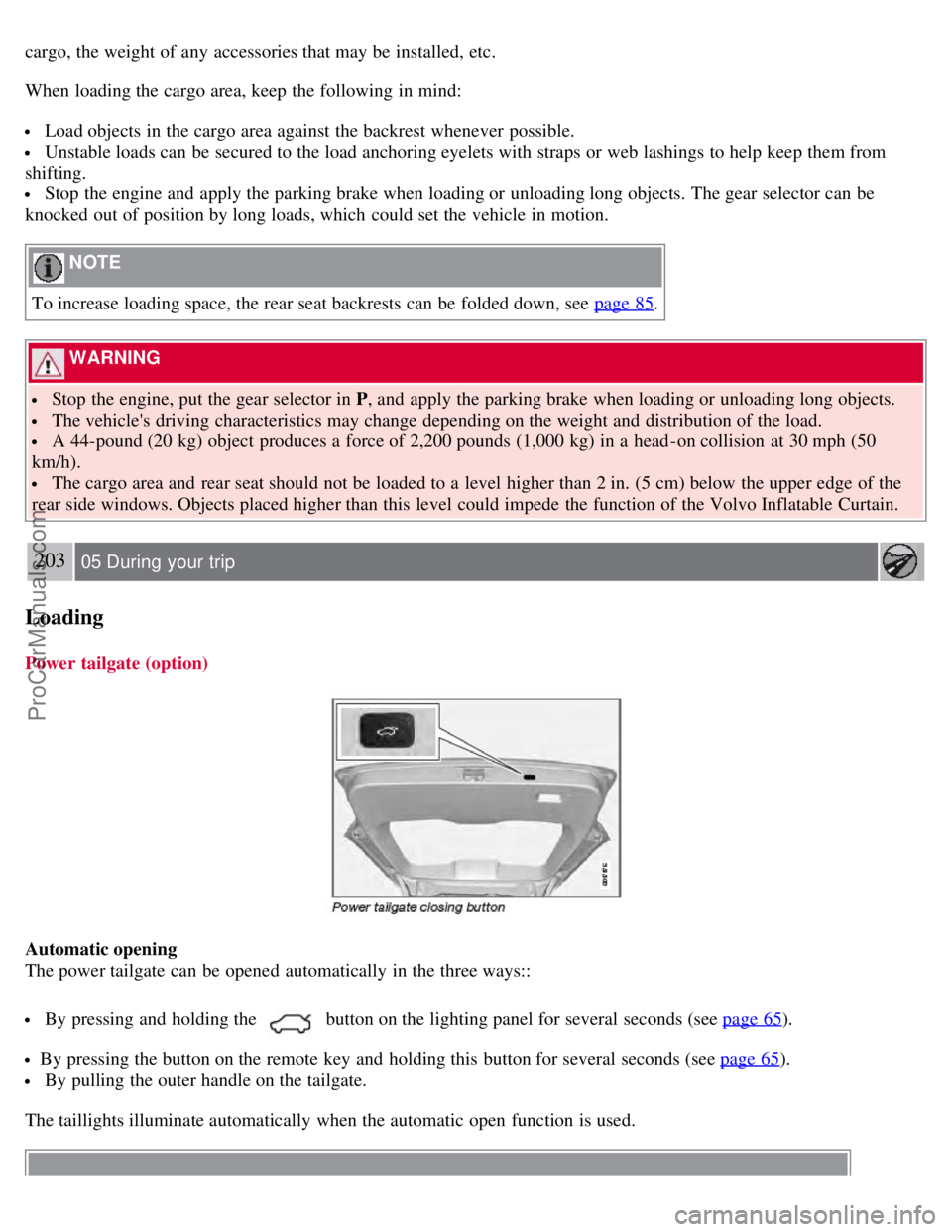
Power tailgate (option)
Automatic opening
The power tailgate can be opened automatically in the three ways::
By pressing and holding thebutton on the lighting panel for several seconds (see page 65).
By pressing the button on the remote key and holding this button for several seconds (see page 65).
By pulling the outer handle on the tailgate.
The taillights illuminate automatically when the automatic open function is used.
ProCarManuals.com
Page 191 of 274
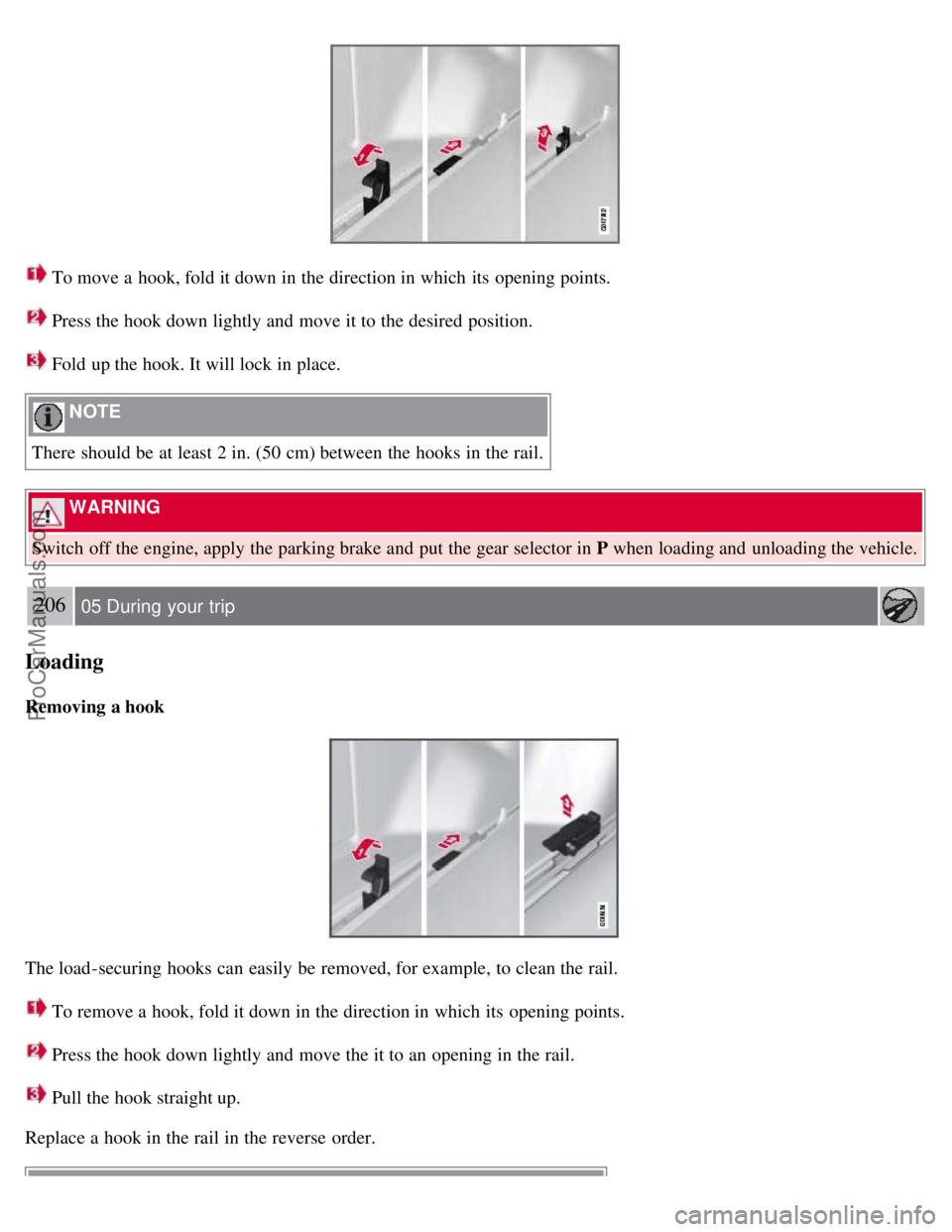
To move a hook, fold it down in the direction in which its opening points.
Press the hook down lightly and move it to the desired position.
Fold up the hook. It will lock in place.
NOTE
There should be at least 2 in. (50 cm) between the hooks in the rail.
WARNING
Switch off the engine, apply the parking brake and put the gear selector in P when loading and unloading the vehicle.
206 05 During your trip
Loading
Removing a hook
The load-securing hooks can easily be removed, for example, to clean the rail.
To remove a hook, fold it down in the direction in which its opening points.
Press the hook down lightly and move the it to an opening in the rail.
Pull the hook straight up.
Replace a hook in the rail in the reverse order.
ProCarManuals.com