fog light VOLVO V90 2017 User Guide
[x] Cancel search | Manufacturer: VOLVO, Model Year: 2017, Model line: V90, Model: VOLVO V90 2017Pages: 594, PDF Size: 15.07 MB
Page 144 of 594
INSTRUMENTS AND CONTROLS
* Option/accessory.
142
Front fog lamps/cornering lights *
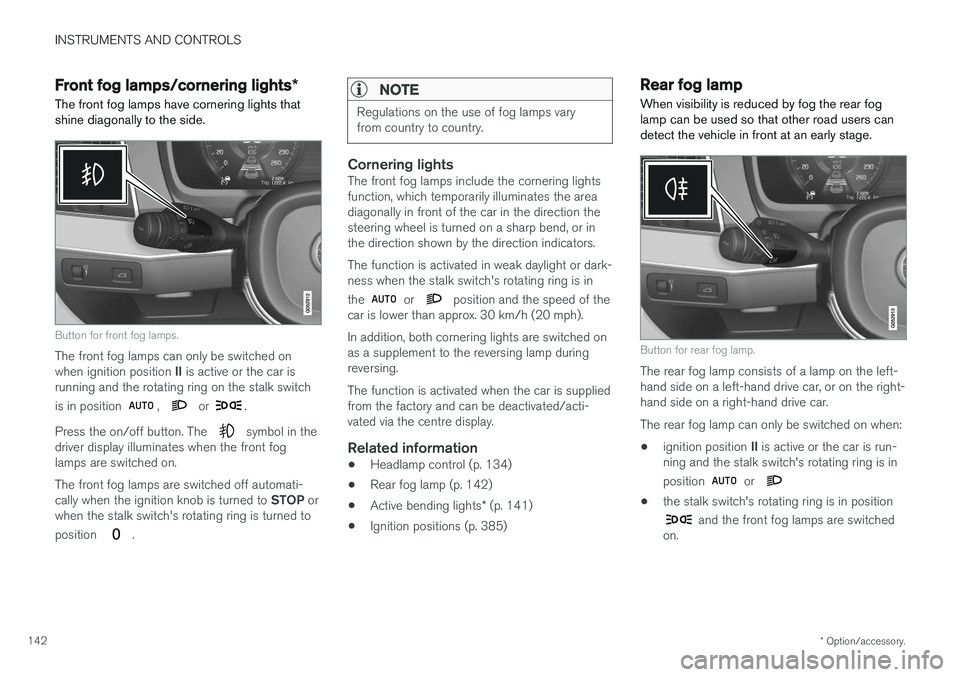
The front fog lamps have cornering lights that shine diagonally to the side.
Button for front fog lamps.
The front fog lamps can only be switched on when ignition position II is active or the car is
running and the rotating ring on the stalk switch is in position
, or .
Press the on/off button. The
symbol in the
driver display illuminates when the front fog lamps are switched on. The front fog lamps are switched off automati- cally when the ignition knob is turned to STOP or
when the stalk switch's rotating ring is turned to position
.
NOTE
Regulations on the use of fog lamps vary from country to country.
Cornering lightsThe front fog lamps include the cornering lights function, which temporarily illuminates the areadiagonally in front of the car in the direction thesteering wheel is turned on a sharp bend, or inthe direction shown by the direction indicators. The function is activated in weak daylight or dark- ness when the stalk switch's rotating ring is in the
or position and the speed of the
car is lower than approx. 30 km/h (20 mph). In addition, both cornering lights are switched on as a supplement to the reversing lamp duringreversing. The function is activated when the car is supplied from the factory and can be deactivated/acti-vated via the centre display.
Related information
• Headlamp control (p. 134)
• Rear fog lamp (p. 142)
• Active bending lights
* (p. 141)
• Ignition positions (p. 385)
Rear fog lamp
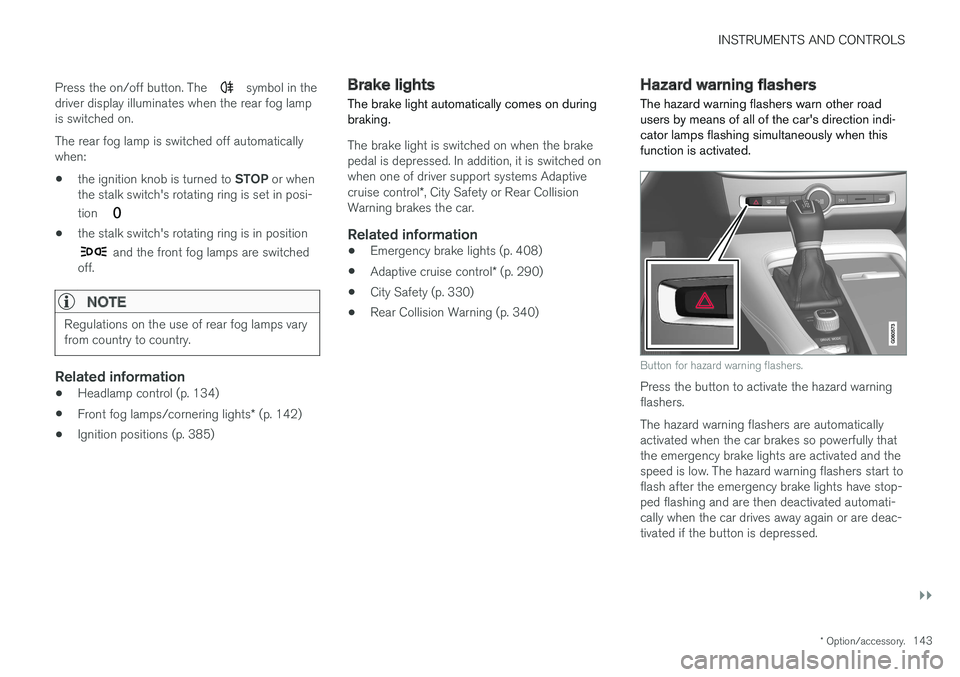
When visibility is reduced by fog the rear fog lamp can be used so that other road users candetect the vehicle in front at an early stage.
Button for rear fog lamp.
The rear fog lamp consists of a lamp on the left- hand side on a left-hand drive car, or on the right-hand side on a right-hand drive car. The rear fog lamp can only be switched on when:
• ignition position
II is active or the car is run-
ning and the stalk switch's rotating ring is in position
or
• the stalk switch's rotating ring is in position
and the front fog lamps are switched
on.
Page 145 of 594
INSTRUMENTS AND CONTROLS
}}
* Option/accessory.143
Press the on/off button. The
symbol in the
driver display illuminates when the rear fog lamp is switched on. The rear fog lamp is switched off automatically when:
• the ignition knob is turned to
STOP or when
the stalk switch's rotating ring is set in posi- tion
• the stalk switch's rotating ring is in position
and the front fog lamps are switched
off.
NOTE
Regulations on the use of rear fog lamps vary from country to country.
Related information
• Headlamp control (p. 134)
• Front fog lamps/cornering lights
* (p. 142)
• Ignition positions (p. 385)
Brake lights The brake light automatically comes on during braking.
The brake light is switched on when the brake pedal is depressed. In addition, it is switched onwhen one of driver support systems Adaptive cruise control
*, City Safety or Rear Collision
Warning brakes the car.
Related information
• Emergency brake lights (p. 408)
• Adaptive cruise control
* (p. 290)
• City Safety (p. 330)
• Rear Collision Warning (p. 340)
Hazard warning flashers
The hazard warning flashers warn other road users by means of all of the car's direction indi-cator lamps flashing simultaneously when thisfunction is activated.
Button for hazard warning flashers.
Press the button to activate the hazard warning flashers. The hazard warning flashers are automatically activated when the car brakes so powerfully thatthe emergency brake lights are activated and thespeed is low. The hazard warning flashers start toflash after the emergency brake lights have stop-ped flashing and are then deactivated automati-cally when the car drives away again or are deac-tivated if the button is depressed.
Page 317 of 594
DRIVER SUPPORT
}}
* Option/accessory.315
IMPORTANT
In certain situations, Pilot Assist steering assistance may have difficulty helping thedriver in the right way or it may be automati-cally deactivated - in which case, the use ofPilot Assist is not recommended. Examples ofsuch situations may be that: •the lane markings are worn, missing or cross each other.
• lane division is unclear, for example, whenthe lanes divide or merge or at exits or inthe event of multiple sets of markings.
• edges or other lines than lane markingsare present on or near the road, e.g.curbs, joints or repairs to the road sur-face, edges of barriers, roadside edges orstrong shadows.
• the lane is narrow or winding.
• the lane contains ridges or holes.
• weather conditions are poor, e.g. rain,snow or fog or slush or impaired viewwith poor light conditions, back-lighting,wet road surface etc.
The driver should also note that Pilot Assisthas the following limitations: • High kerbs, roadside barriers, temporary obstacles (traffic cones, safety barriers,etc.) are not detected. Alternatively, theymay be detected incorrectly as lane
markings, with a subsequent risk of con- tact between the car and such obstacles.The driver must ensure him/herself thatthe car is at a suitable distance from suchobstacles.
• The camera and radar sensor does nothave the capacity to detect all oncomingobjects and obstacles in traffic environ-ments, e.g. potholes, stationary obstaclesor objects which completely or partiallyblock the route.
• Pilot Assist does not "see" pedestrians,animals, etc.
• The recommended steering input is forcelimited, which means that it cannotalways help the driver to steer and keepthe car within the lane.
The driver always has the possibility of correcting or adjusting a steering intervention imposed byPilot Assist and can turn the steering wheel tothe desired position.
Steep roads and/or heavy loadBear in mind that Pilot Assist is primarilyintended for use when driving on level road surfa-ces. The function may have difficulty in keepingthe correct distance from the vehicle ahead whendriving on steep downhill slopes - in which case,be extra attentive and ready to brake. Do not usePilot Assist with a heavy load or with a trailer con-nected to the car.
Miscellaneous
•Off Road drive mode cannot be selected
when Pilot Assist is activated.
NOTE
The function uses the car's camera unit, which has some general limitations, see the"Limitations for camera unit" section.
NOTE
The function uses the car's radar unit, which has some general limitations, see the "Limita-tions for radar unit" section.
Related information
• Pilot Assist
* (p. 304)
• Activating and starting the Pilot Assist
*
(p. 307)
• Managing the speed for Pilot Assist
* (p. 309)
• Setting the time interval for Pilot Assist
*
(p. 310)
• Change of target and automatic braking with Pilot Assist
* (p. 313)
• Deactivating/activating the Pilot Assist
*
(p. 311)
• Overtaking assistance with the adaptivecruise control
* or Pilot Assist * (p. 298)
Page 329 of 594
DRIVER SUPPORT
}}
327
Limitations of the camera unit
The camera unit has certain limitations - which in turn also limits those functions that use the unit.
Impaired visionThe camera has limitations similar to the human eye, i.e. it can "see" worse in for example intensesnowfall or rain, dense fog, heavy dust stormsand snow flurries. Under such conditions, thefunctions of camera-dependent systems could besignificantly reduced or temporarily disengaged. Strong oncoming light, reflections in the carriage- way, snow or ice on the road surface, dirty roadsurfaces or unclear lane markings can also sig-nificantly reduce camera function when it is usedto scan the carriageway to detect pedestrians,cyclists, large animals and other vehicles.
Blocked unit
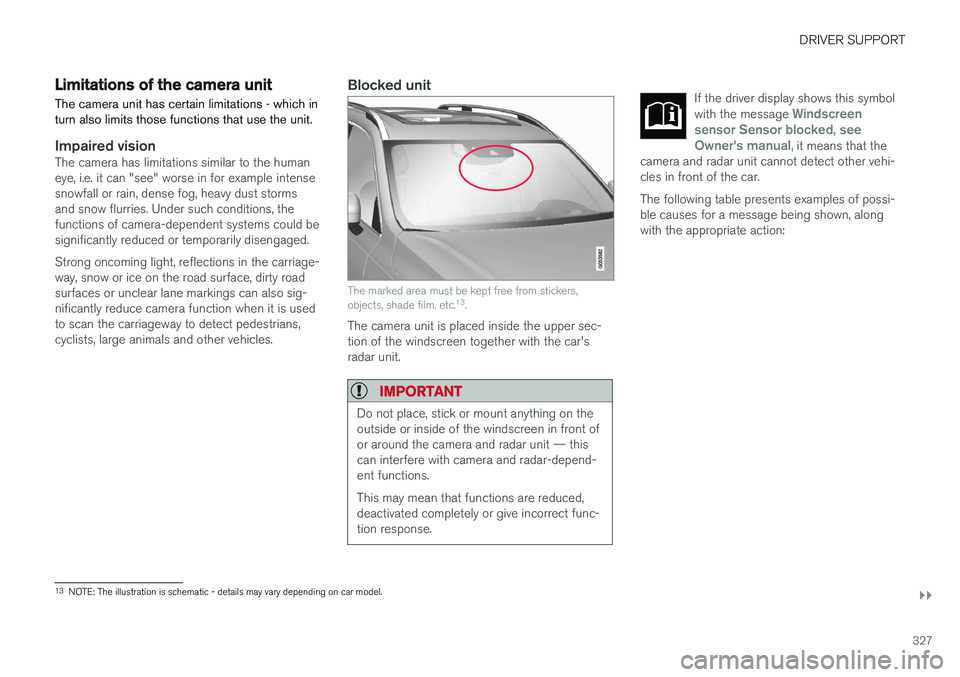
The marked area must be kept free from stickers, objects, shade film, etc. 13
.
The camera unit is placed inside the upper sec- tion of the windscreen together with the car'sradar unit.
IMPORTANT
Do not place, stick or mount anything on the outside or inside of the windscreen in front ofor around the camera and radar unit — thiscan interfere with camera and radar-depend-ent functions. This may mean that functions are reduced, deactivated completely or give incorrect func-tion response.
If the driver display shows this symbol with the message Windscreen
sensor Sensor blocked, see
Owner's manual, it means that the
camera and radar unit cannot detect other vehi- cles in front of the car.
The following table presents examples of possi- ble causes for a message being shown, alongwith the appropriate action:
13 NOTE: The illustration is schematic - details may vary depending on car model.
Page 330 of 594
||
DRIVER SUPPORT
328
CauseAction
The windscreen surface in front of the camera and radar unit is dirty or covered with ice or snow. Clean dirt, ice and snow from the windscreen surface in front of the camera andradar unit.
Thick fog and heavy rain or snow block the radar signals or the cameraview. No action. Sometimes the unit does not work during heavy rain or snowfall.
Water or snow from the road surface swirls up and blocks the radarsignals or camera view. No action. Sometimes the unit does not work on a very wet or snow-covered roadsurface.
Dirt has appeared between the inside of the windscreen and the cam-era and radar unit. Visit a workshop to have the windscreen inside the unit's cover cleaned - anauthorised Volvo workshop is recommended.
Strong oncoming light No action. The camera unit is reset automatically in more favourable light condi-tions.
NOTE
Keep the windscreen clean in front of the camera and radar unit.
High temperatureAt very high temperatures the camera and radar unit can temporarily be switched off forabout 15 minutes after the engine is started soas to protect the unit's electronics. The cameraand radar unit restarts automatically when thetemperature has fallen sufficiently.
Damaged windscreen
IMPORTANT
If a crack, scratch or stone chip in the wind- screen in front of one of the camera andradar unit “windows” covers an area ofapprox. 0.5 x 3.0 mm or larger, a workshopmust be contacted to have the windscreenreplaced. An authorised Volvo workshop isrecommended. If not rectified it can lead to reduced perform- ance for the driver support systems that usethe camera and radar unit.
This may mean that functions are reduced, deactivated completely or give incorrect func-tion response. To avoid the risk of failed, deficient or reduced operation of driver support systemsthat use the radar unit, the following alsoapplies:
• Volvo recommends
against repairing
cracks, scratches or stone chips in thearea in front of the camera and radar unit.Instead, the whole windscreen should bereplaced.
• Before replacing a windscreen, contactan authorised Volvo workshop to verify
Page 522 of 594
MAINTENANCE AND SERVICE
520
Servicing the climate control system The air conditioning system must only be serv- iced and repaired by an authorised workshop.
Troubleshooting and repairThe air conditioning system contains fluorescent tracing agents. Ultraviolet light must be used dur-ing leak detection. Volvo recommends that you contact an author- ised Volvo workshop.
Cars with R134a refrigerant
WARNING
The air conditioning system contains pressur- ised refrigerant R134a. This system must onlybe serviced and repaired by an authorisedworkshop.
Cars with R1234yf refrigerant
WARNING
The air conditioning system contains pressur- ised refrigerant R1234yf. In accordance withSAE J2845 (Technician Training for SafeService and Containment of RefrigerantsUsed in Mobile A/C System), service andrepair of the refrigerant system must only beperformed by trained and certified techniciansin order to ensure the safety of the system.
Related information
•Volvo service programme (p. 506)
Bulb replacement
The bulb in the halogen headlamp, reversing lamp and rear fog lamp can be replaced by thedriver.
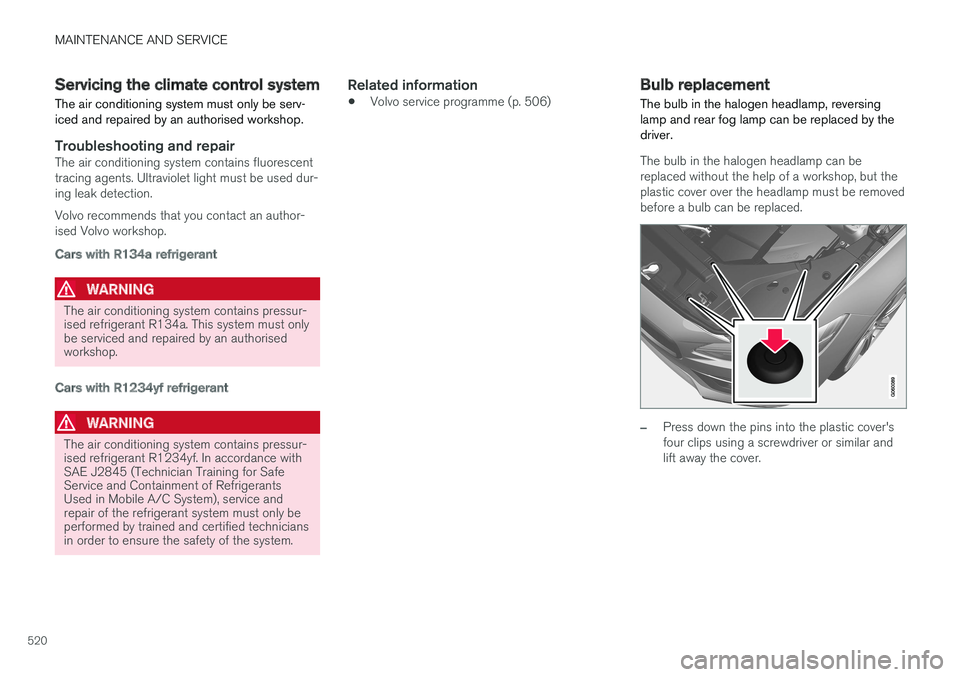
The bulb in the halogen headlamp can be replaced without the help of a workshop, but theplastic cover over the headlamp must be removedbefore a bulb can be replaced.
–Press down the pins into the plastic cover's four clips using a screwdriver or similar andlift away the cover.
Page 523 of 594
MAINTENANCE AND SERVICE
}}
* Option/accessory.521
NOTE
Points to remember when the cover is refit- ted: •The pin in the clip needs to be pressed back fully before the clip is refitted in thecover.
• When the cover is refitted, the pin mustbe pressed in until the end surface islevel with the surface of the clip.
The reversing lamp bulb and the rear fog lamp bulb can be replaced without assistance from aworkshop. Contact a workshop 9
if there is a fault in bulbs
other than the bulbs in the halogen headlamps, the reversing lamp bulb or the rear fog lamp bulb. If a fault occurs in LED 10
lamps, the entire lamp
unit usually must be replaced.
WARNING
The car's electrical system must be in ignition position 0 when replacing bulbs.
IMPORTANT
Never touch the glass part of the bulbs with your fingers. Grease from your fingers isvaporised by the heat, coating the reflectorand then causing damage.
NOTE
If an error message remains after the broken bulb has been replaced then we recommendvisiting an authorised Volvo workshop.
NOTE
Outside lighting such as headlamps and rear lamps may temporarily have condensation onthe inside of the lens. This is normal, all exte-rior lighting is designed to withstand this.Condensation is normally vented out of thelamp housing when the lamp has beenswitched on for a time.
Lamps, front (car with halogen headlamps)
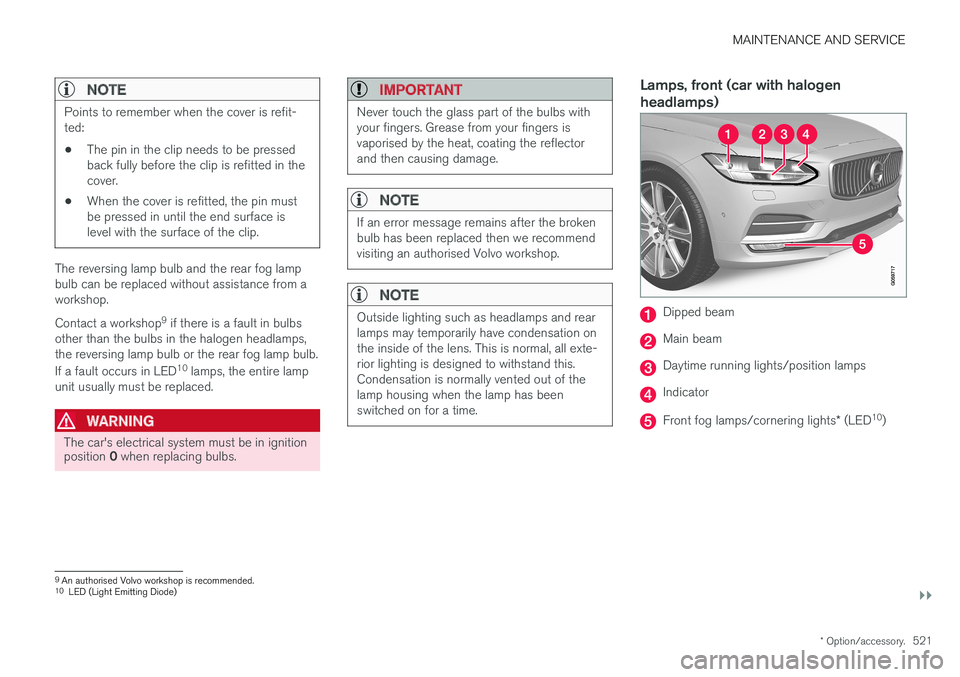
Dipped beam
Main beam
Daytime running lights/position lamps
Indicator
Front fog lamps/cornering lights * (LED 10
)
9An authorised Volvo workshop is recommended.
10 LED (Light Emitting Diode)
Page 524 of 594
||
MAINTENANCE AND SERVICE
522
Lamps, rear
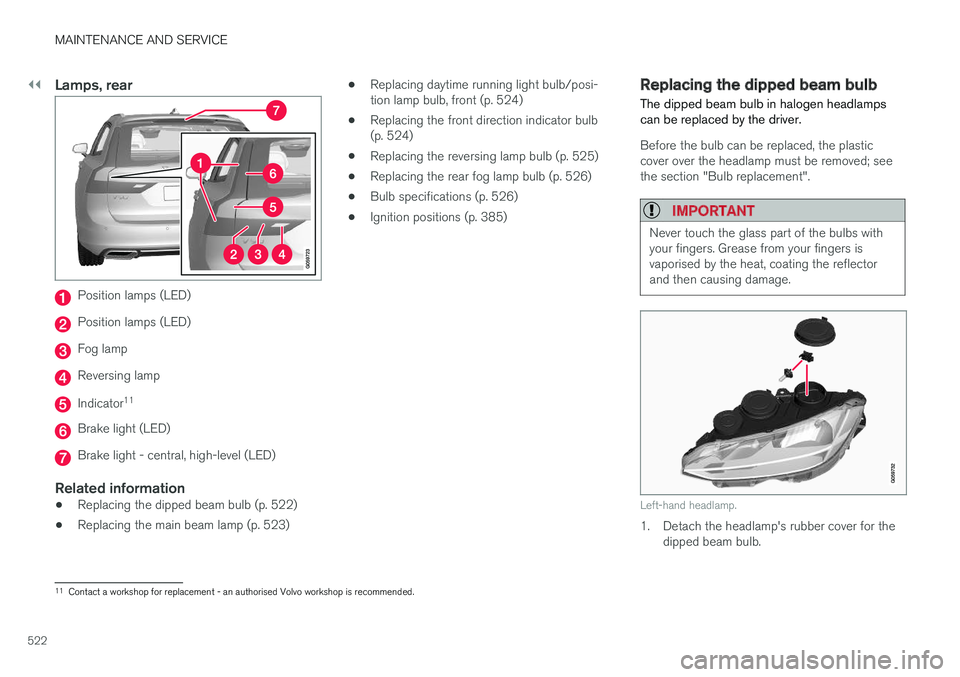
Position lamps (LED)
Position lamps (LED)
Fog lamp
Reversing lamp
Indicator11
Brake light (LED)
Brake light - central, high-level (LED)
Related information
•
Replacing the dipped beam bulb (p. 522)
• Replacing the main beam lamp (p. 523) •
Replacing daytime running light bulb/posi- tion lamp bulb, front (p. 524)
• Replacing the front direction indicator bulb(p. 524)
• Replacing the reversing lamp bulb (p. 525)
• Replacing the rear fog lamp bulb (p. 526)
• Bulb specifications (p. 526)
• Ignition positions (p. 385)
Replacing the dipped beam bulb
The dipped beam bulb in halogen headlamps can be replaced by the driver.
Before the bulb can be replaced, the plastic cover over the headlamp must be removed; seethe section "Bulb replacement".
IMPORTANT
Never touch the glass part of the bulbs with your fingers. Grease from your fingers isvaporised by the heat, coating the reflectorand then causing damage.
Left-hand headlamp.
1. Detach the headlamp's rubber cover for the dipped beam bulb.
11Contact a workshop for replacement - an authorised Volvo workshop is recommended.
Page 528 of 594
MAINTENANCE AND SERVICE
526
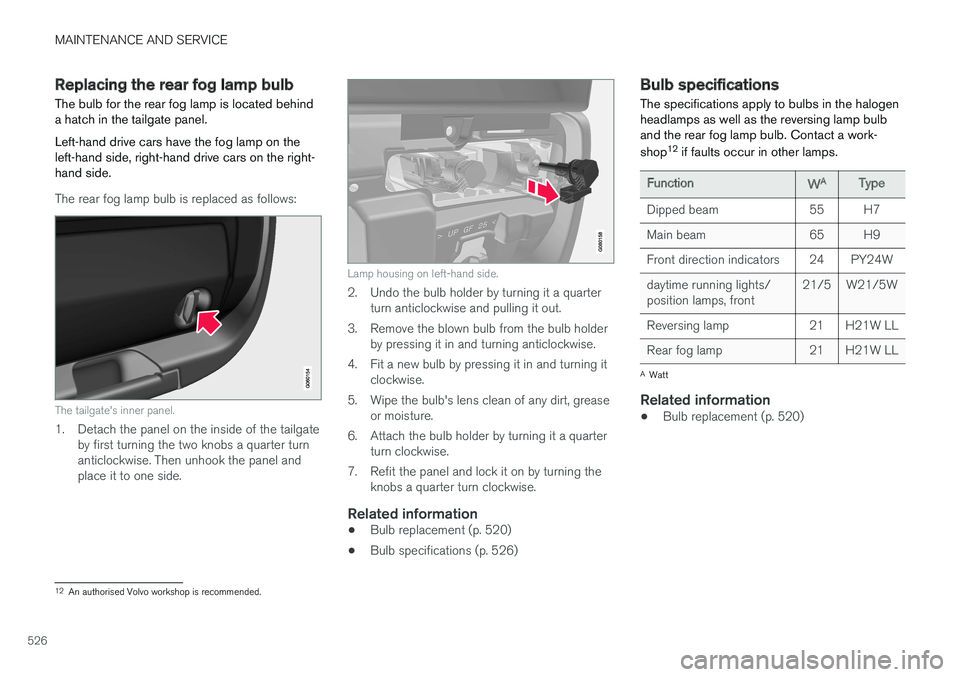
Replacing the rear fog lamp bulb The bulb for the rear fog lamp is located behind a hatch in the tailgate panel. Left-hand drive cars have the fog lamp on the left-hand side, right-hand drive cars on the right-hand side.
The rear fog lamp bulb is replaced as follows:
The tailgate's inner panel.
1. Detach the panel on the inside of the tailgateby first turning the two knobs a quarter turn anticlockwise. Then unhook the panel andplace it to one side.
Lamp housing on left-hand side.
2. Undo the bulb holder by turning it a quarterturn anticlockwise and pulling it out.
3. Remove the blown bulb from the bulb holder by pressing it in and turning anticlockwise.
4. Fit a new bulb by pressing it in and turning it clockwise.
5. Wipe the bulb's lens clean of any dirt, grease or moisture.
6. Attach the bulb holder by turning it a quarter turn clockwise.
7. Refit the panel and lock it on by turning the knobs a quarter turn clockwise.
Related information
• Bulb replacement (p. 520)
• Bulb specifications (p. 526)
Bulb specifications The specifications apply to bulbs in the halogen headlamps as well as the reversing lamp bulband the rear fog lamp bulb. Contact a work- shop 12
if faults occur in other lamps.
Function WA
Type
Dipped beam 55 H7
Main beam 65 H9
Front direction indicators 24 PY24Wdaytime running lights/ position lamps, front 21/5 W21/5W
Reversing lamp 21 H21W LL
Rear fog lamp 21 H21W LL
A Watt
Related information
• Bulb replacement (p. 520)
12
An authorised Volvo workshop is recommended.
Page 585 of 594
ALPHABETICAL INDEX
583
L
Labels 558
Laminated glass 32
Lamps 520
Lane Keeping Aid - LKA 354, 356, 358Lane keeping assistantoperation 356
Leather upholstery, washing instructions 552
Level control 405
License agreement 470
Lifting tool 501Lighting active bending lights 141
approach lighting 148automatic lighting, passenger compart-
ment 145
Automatic main beam 138
bulbs, specifications 526
controls 134, 145
controls lighting 135
cornering lights 142
daytime running lights 137
dipped beam 137
display lighting 135
fog lamp 142
headlamp levelling 135
home safe lighting 148
instrument lighting 135
in the passenger compartment 145
main beam 138
position lamps 136
rear fog lamp 142
Lighting, bulb replacement 520 daytime running lights/position lamps
front 524
dipped beam 522
direction indicators front 524
main beam 523
rear fog lamp 526
Reversing lamp 525
LKA - Lane Keeping Aid 354, 356, 358 Loading cargo area 227
General 227
load retaining eyelets 228
long load 227
Loading hooks 228 Load retaining eyelets cargo area 228
Lock locking 241, 245
unlocking 241, 245
Lockable wheel bolts 498
Lock confirmation 243Locking/unlocking tailgate 247, 249
Low battery voltage Battery 415
M
Main beam 138
Maintained climate comfort 206start/shut-off 210
maintenance Rustproofing 552
Manual gearbox 392
Max. roof load 563
Media player 442 compatible file formats 455
voice control 118
Messages and symbols Adaptive Cruise Control 302
Collision Warning with Auto Brake 339
Messages in BLIS 347
Messages in displays 106 manage 108
saved 110
Metric, Imperial, US 98
Mileage 165