mirror controls VOLVO V90 2017 User Guide
[x] Cancel search | Manufacturer: VOLVO, Model Year: 2017, Model line: V90, Model: VOLVO V90 2017Pages: 594, PDF Size: 15.07 MB
Page 156 of 594
||
INSTRUMENTS AND CONTROLS
* Option/accessory.
154
Memory function in power front seat *Door mirror positions can be saved in the mem- ory function of the power front seat.
Angling the door mirror when parking 28The door mirror can be angled down for thedriver to view the side of the road when parkingfor example.
–Engage reverse gear and press the
L or R
button.
When reverse gear is disengaged the mirror automatically returns to its original position afterapprox. 10 seconds, or earlier by pressing the button labelled L or R respectively.
Automatic angling of the door mirror
when parking 28
When reverse gear is engaged the door mirror is automatically angled down so that the driver cansee the side of the road when parking for exam-ple. When reverse gear is disengaged the mirrorautomatically returns to its original position aftera short time. Settings for this function are set via the centre display: 1.
Press
Settings in the top view.
2. Press
My CarMirrors and Easy Entry. 3.
Under
Exterior Mirror Tilt at Reverse,
select Off, Driver, Passenger or Both to
activate/deactivate and to select which review mirror should be angled.
Automatic retraction when locking *When the car is locked/unlocked with the remotecontrol key the door mirrors are automaticallyretracted/extended. The function can be activated/deactivated via the centre display: 1.
Press
Settings in the top view.
2. Press
My CarMirrors and Easy Entry.
3. Select
Fold Mirror When Locked to acti-
vate/deactivate.
Resetting to neutralMirrors that have been moved out of position by an external force must be reset electrically to theneutral position for electric retracting/extendingto work correctly: 1. Retract the mirrors with the L and R buttons.
2. Fold them out again with the L and R but-
tons.
3. Repeat the above procedure as necessary.The mirrors are now reset in neutral position.
Automatic dimming *Bright light from behind is automatically dimmed by the interior rearview and door mirrors. For the door mirrors to be fitted with this function requires that the interior rearview mirror also hasautomatic dimming, see the section "Interior rear-view mirror". Automatic dimming is always active while driving, apart from when gearbox reverse position isselected. Dimming sensitivity can be adjusted inthree levels and will affect the interior rearviewand the door mirrors.
NOTE
When sensitivity is changed there is no imme- diately noticeable change in dimming, but thechange will be complete after a while.
Settings for this function are set via the centre display: 1.
Press
Settings in the top view.
2. Press
My CarMirrors and Easy Entry.
3. Under
Rearview Mirror Auto Dimming,
select Normal, Dark or Light.
28 Only in combination with power seat with memory.
Page 157 of 594
INSTRUMENTS AND CONTROLS
}}
* Option/accessory.155
Retractable power door mirrors *The mirrors can be retracted for parking/driving in narrow spaces: 1.
Depress the L and R buttons simultaneously
(ignition position must be at least I).
2. Release them after approximately 1 second. The mirrors automatically stop in the fully retracted position.
Fold out the mirrors by pressing down the L and
R buttons simultaneously. The mirrors automati-
cally stop in the fully extended position.
Related information
• Interior rearview mirror (p. 155)
• Settings view (p. 169)
• Using the memory function in the power front seat
* (p. 122)
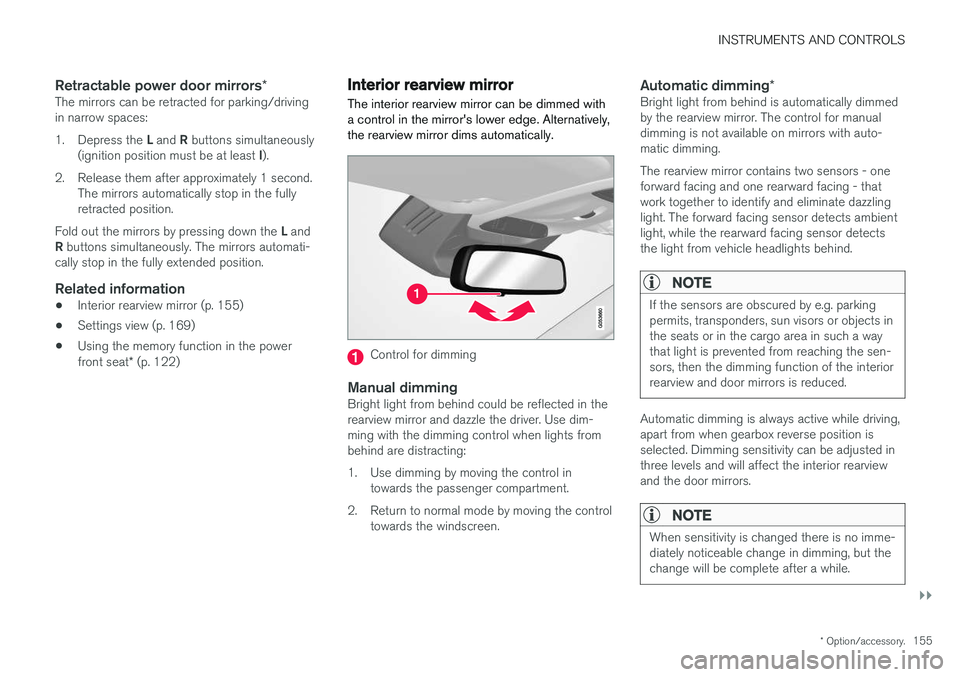
Interior rearview mirror The interior rearview mirror can be dimmed with a control in the mirror's lower edge. Alternatively,the rearview mirror dims automatically.
Control for dimming
Manual dimmingBright light from behind could be reflected in the rearview mirror and dazzle the driver. Use dim-ming with the dimming control when lights frombehind are distracting:
1. Use dimming by moving the control in
towards the passenger compartment.
2. Return to normal mode by moving the control towards the windscreen.
Automatic dimming *Bright light from behind is automatically dimmed by the rearview mirror. The control for manualdimming is not available on mirrors with auto-matic dimming. The rearview mirror contains two sensors - one forward facing and one rearward facing - thatwork together to identify and eliminate dazzlinglight. The forward facing sensor detects ambientlight, while the rearward facing sensor detectsthe light from vehicle headlights behind.
NOTE
If the sensors are obscured by e.g. parking permits, transponders, sun visors or objects inthe seats or in the cargo area in such a waythat light is prevented from reaching the sen-sors, then the dimming function of the interiorrearview and door mirrors is reduced.
Automatic dimming is always active while driving, apart from when gearbox reverse position isselected. Dimming sensitivity can be adjusted inthree levels and will affect the interior rearviewand the door mirrors.
NOTE
When sensitivity is changed there is no imme- diately noticeable change in dimming, but thechange will be complete after a while.
Page 158 of 594
||
INSTRUMENTS AND CONTROLS
* Option/accessory.
156 Settings for this function are set via the centre display: 1.
Press
Settings in the top view.
2. Press
My CarMirrors and Easy Entry.
3. Under
Rearview Mirror Auto Dimming,
select Normal, Dark or Light.
Related information
• Adjusting the door mirrors (p. 153)
• Settings view (p. 169)
Compass
*
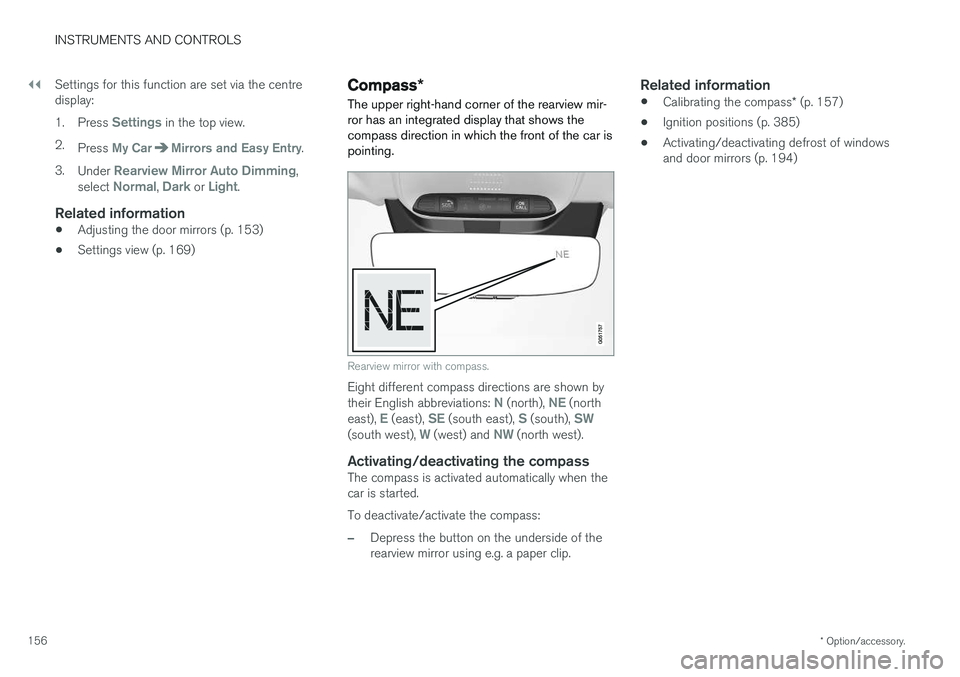
The upper right-hand corner of the rearview mir- ror has an integrated display that shows thecompass direction in which the front of the car ispointing.
Rearview mirror with compass.
Eight different compass directions are shown by their English abbreviations: N (north), NE (north
east), E (east), SE (south east), S (south), SW(south west), W (west) and NW (north west).
Activating/deactivating the compassThe compass is activated automatically when the car is started. To deactivate/activate the compass:
–Depress the button on the underside of the rearview mirror using e.g. a paper clip.
Related information
• Calibrating the compass
* (p. 157)
• Ignition positions (p. 385)
• Activating/deactivating defrost of windowsand door mirrors (p. 194)
Page 159 of 594
INSTRUMENTS AND CONTROLS
* Option/accessory.157
Calibrating the compass *
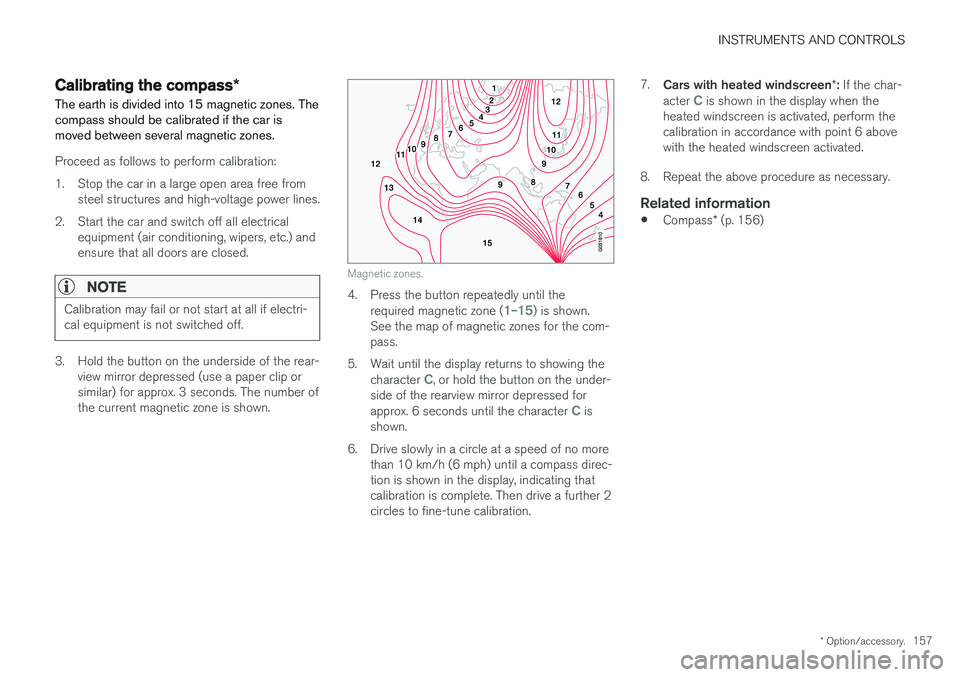
The earth is divided into 15 magnetic zones. The compass should be calibrated if the car ismoved between several magnetic zones.
Proceed as follows to perform calibration:
1. Stop the car in a large open area free from steel structures and high-voltage power lines.
2. Start the car and switch off all electrical equipment (air conditioning, wipers, etc.) and ensure that all doors are closed.
NOTE
Calibration may fail or not start at all if electri- cal equipment is not switched off.
3. Hold the button on the underside of the rear-view mirror depressed (use a paper clip or similar) for approx. 3 seconds. The number ofthe current magnetic zone is shown.
Magnetic zones.
4. Press the button repeatedly until the
required magnetic zone (1–15) is shown.
See the map of magnetic zones for the com- pass.
5. Wait until the display returns to showing the character
C, or hold the button on the under-
side of the rearview mirror depressed for approx. 6 seconds until the character
C is
shown.
6. Drive slowly in a circle at a speed of no more than 10 km/h (6 mph) until a compass direc- tion is shown in the display, indicating thatcalibration is complete. Then drive a further 2circles to fine-tune calibration. 7.
Cars with heated windscreen *: If the char-
acter
C is shown in the display when the
heated windscreen is activated, perform the calibration in accordance with point 6 abovewith the heated windscreen activated.
8. Repeat the above procedure as necessary.
Related information
• Compass
* (p. 156)
Page 164 of 594
||
INSTRUMENTS AND CONTROLS
* Option/accessory.
162 blind once more in the same direction without pinch protection, if this is done within 10 secondsafter pinch protection deployment. It is thereforepossible to override the pinch protection whenclosing has been interrupted e.g. if ice hasformed around the glass cover, by continuallypressing the control forward/downward until theglass cover and/or sun blind is closed.
Related information
•
Panorama roof
* (p. 158)
• Ignition positions (p. 385)
• Remote control key (p. 236)
• Locking/unlocking from the inside (p. 245)
• Locking/unlocking from the outside (p. 241)
HomeLink ®
*30
HomeLink ®
is a programmable remote control
that is integrated into the car's electrical system.
General
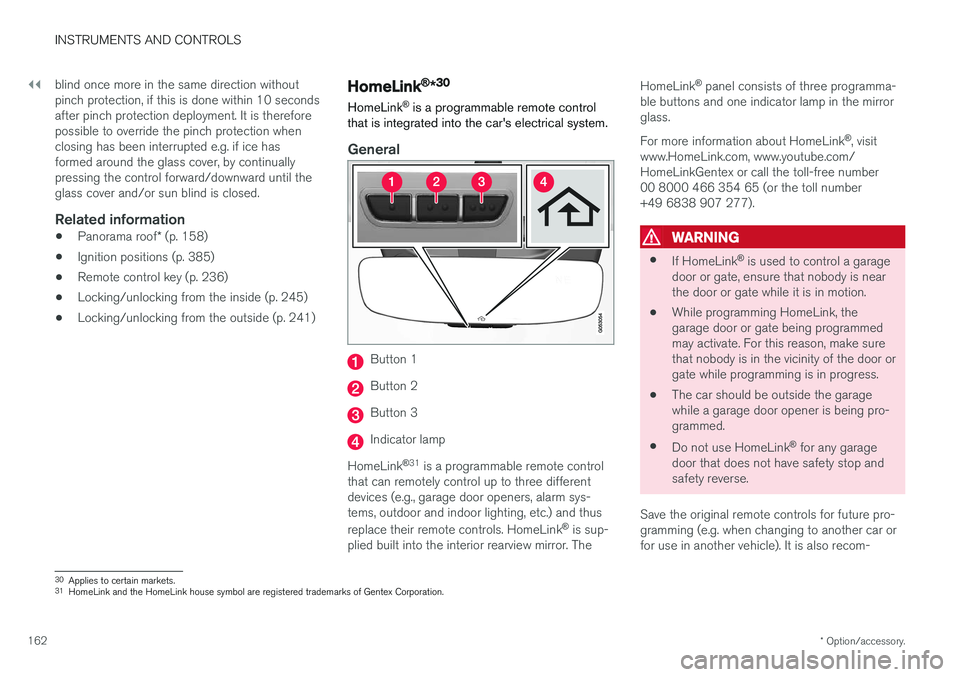
Button 1
Button 2
Button 3
Indicator lamp
HomeLink ®
31
is a programmable remote control
that can remotely control up to three different devices (e.g., garage door openers, alarm sys-tems, outdoor and indoor lighting, etc.) and thus replace their remote controls. HomeLink ®
is sup-
plied built into the interior rearview mirror. The HomeLink
®
panel consists of three programma-
ble buttons and one indicator lamp in the mirror glass. For more information about HomeLink ®
, visit
www.HomeLink.com, www.youtube.com/ HomeLinkGentex or call the toll-free number00 8000 466 354 65 (or the toll number+49 6838 907 277).
WARNING
• If HomeLink ®
is used to control a garage
door or gate, ensure that nobody is near the door or gate while it is in motion.
• While programming HomeLink, thegarage door or gate being programmedmay activate. For this reason, make surethat nobody is in the vicinity of the door orgate while programming is in progress.
• The car should be outside the garagewhile a garage door opener is being pro-
grammed.
• Do not use HomeLink ®
for any garage
door that does not have safety stop andsafety reverse.
Save the original remote controls for future pro-gramming (e.g. when changing to another car orfor use in another vehicle). It is also recom-
30 Applies to certain markets.
31 HomeLink and the HomeLink house symbol are registered trademarks of Gentex Corporation.
Page 173 of 594
INSTRUMENTS AND CONTROLS
}}
* Option/accessory.171
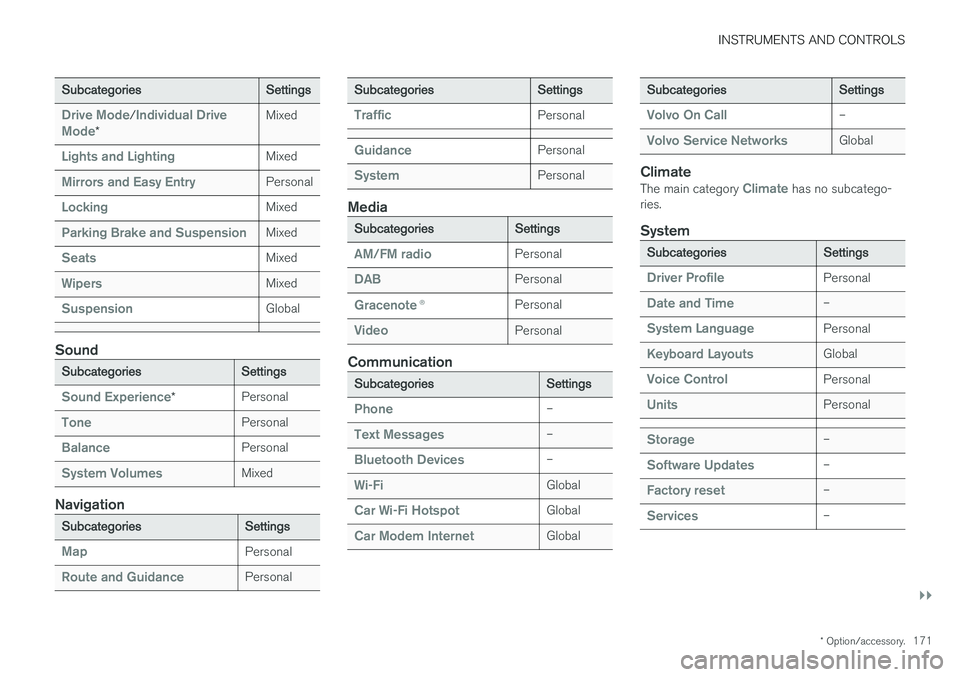
Subcategories Settings
Drive Mode/Individual Drive
Mode* Mixed
Lights and LightingMixed
Mirrors and Easy EntryPersonal
LockingMixed
Parking Brake and SuspensionMixed
SeatsMixed
WipersMixed
SuspensionGlobal
Sound
Subcategories
Settings
Sound Experience*Personal
TonePersonal
BalancePersonal
System VolumesMixed
Navigation
Subcategories
Settings
MapPersonal
Route and GuidancePersonal
SubcategoriesSettings
TrafficPersonal
GuidancePersonal
SystemPersonal
Media
SubcategoriesSettings
AM/FM radioPersonal
DABPersonal
Gracenote®Personal
VideoPersonal
Communication
Subcategories Settings
Phone–
Text Messages–
Bluetooth Devices–
Wi-FiGlobal
Car Wi-Fi HotspotGlobal
Car Modem InternetGlobal
SubcategoriesSettings
Volvo On Call–
Volvo Service NetworksGlobal
ClimateThe main category Climate has no subcatego-
ries.
System
Subcategories Settings
Driver ProfilePersonal
Date and Time–
System LanguagePersonal
Keyboard LayoutsGlobal
Voice ControlPersonal
UnitsPersonal
Storage–
Software Updates–
Factory reset–
Services–
Page 176 of 594
INSTRUMENTS AND CONTROLS
174
Driver profiles
Many of the settings made in the car can be adapted according to the driver's personal pref-erences and can be saved in one or more driverprofiles.
The personal settings are automatically saved in the active driver profile. Each key can be linked toa driver profile. When the linked key is used, thecar is adapted to the settings of that specificdriver profile.
What settings are saved in the driver profiles?
Many of the settings made in the car will be auto-matically saved in the active driver profile if theprofile is not locked; see the section "Editing adriver profile". Settings made in the car are eitherpersonal or global. Only personal settings aresaved in driver profiles. Settings that can be saved in a driver profile include, amongst other things, screens, mirrors,front seats, navigation, audio and media system,language and voice control. Some settings, referred to as global settings, can be changed but are not saved to a specific driverprofile. Changes to global settings affect all pro-files.
Global settings
The global settings and parameters are not changed when changing between driver profiles. They remain the same regardless of which driverprofile is active. Keyboard layout settings are an example of global settings. If driver profile X is used to addadditional languages to the keyboard, theseremain available for use even if driver profile Y isused. The keyboard layout settings are not savedto a specific driver profile - the settings areglobal.
Personal preferences
If driver profile X was used to e.g. set centre dis- play brightness, driver profile Y is not affected bythis setting. It has been saved to driver profile X -the brightness setting is a personal setting. Refer to the section "Categories in the settings view" for more information on which settings arepersonal and which are global.
Related information
•
Editing a driver profile (p. 175)
• Categories in the settings view (p. 170)
• Selecting driver profile (p. 174)
Selecting driver profile
The last used driver profile is the one selected when the car is unlocked. It is possible tochange to another driver profile after the car hasbeen unlocked.
When the centre display has been started, the selected driver profile is shown at the top of thescreen. The driver profile last used is the one thatwill be active next time the car is unlocked. How-ever, if the remote control key has been linked toa driver profile then this is what is selected whenthe car is started. See "Linking remote controlkey to driver profile". There are two options for changing to another driver profile. Option 1:
1. Tap on the name of the driver profile shown in the top of the centre display when the dis- play has been started.
> A list of selectable driver profiles is shown.
2. Select the driver profile required. 3. Press
Confirm.
> The driver profile is selected and the sys- tem loads the settings for the new driver profile.
Option 2:
1. Drag down the top view in the centre display.
Page 185 of 594
CLIMATE CONTROL
* Option/accessory.183
Climate control - sensors The climate control system has a number of sen- sors to help control the climate in the car.
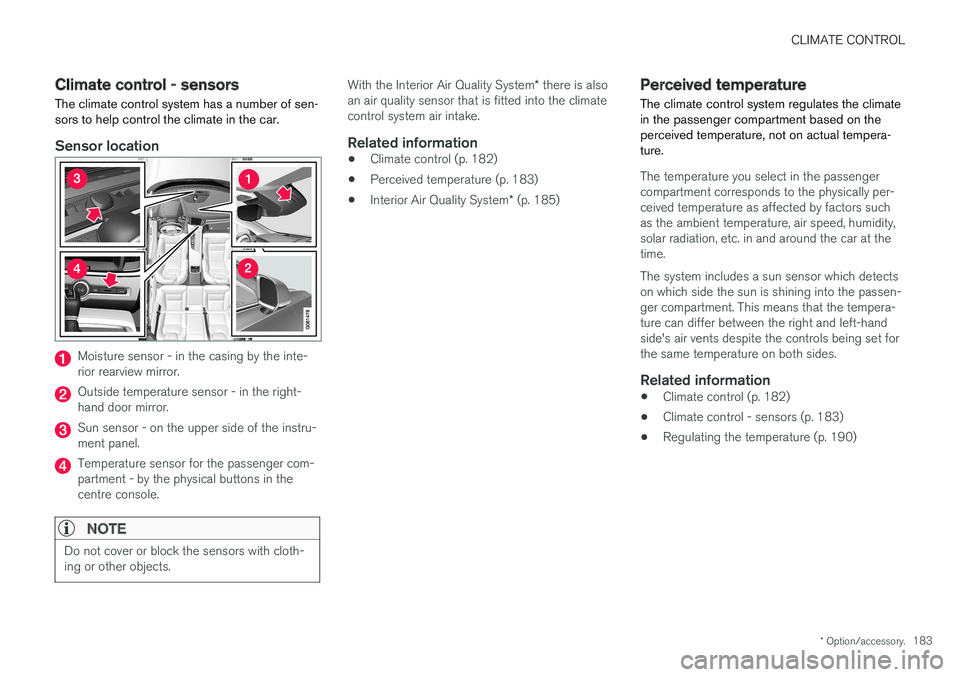
Sensor location
Moisture sensor - in the casing by the inte- rior rearview mirror.
Outside temperature sensor - in the right- hand door mirror.
Sun sensor - on the upper side of the instru- ment panel.
Temperature sensor for the passenger com- partment - by the physical buttons in thecentre console.
NOTE
Do not cover or block the sensors with cloth- ing or other objects.
With the Interior Air Quality System * there is also
an air quality sensor that is fitted into the climate control system air intake.
Related information
• Climate control (p. 182)
• Perceived temperature (p. 183)
• Interior Air Quality System
* (p. 185)
Perceived temperature
The climate control system regulates the climate in the passenger compartment based on theperceived temperature, not on actual tempera-ture.
The temperature you select in the passenger compartment corresponds to the physically per-ceived temperature as affected by factors suchas the ambient temperature, air speed, humidity,solar radiation, etc. in and around the car at thetime. The system includes a sun sensor which detects on which side the sun is shining into the passen-ger compartment. This means that the tempera-ture can differ between the right and left-handside's air vents despite the controls being set forthe same temperature on both sides.
Related information
• Climate control (p. 182)
• Climate control - sensors (p. 183)
• Regulating the temperature (p. 190)
Page 188 of 594
||
CLIMATE CONTROL
* Option/accessory.
186 1.
Press
Settings in the top view in the centre
display.
2. Press
Climate.
3. Select
Air Quality Sensor to activate/deac-
tivate the air quality sensor.
Related information
• Air quality (p. 184)
• Passenger compartment filter (p. 185)
• Clean Zone Interior Package
* (p. 185)
• Activating/deactivating air recirculation (p. 196)
Climate controls
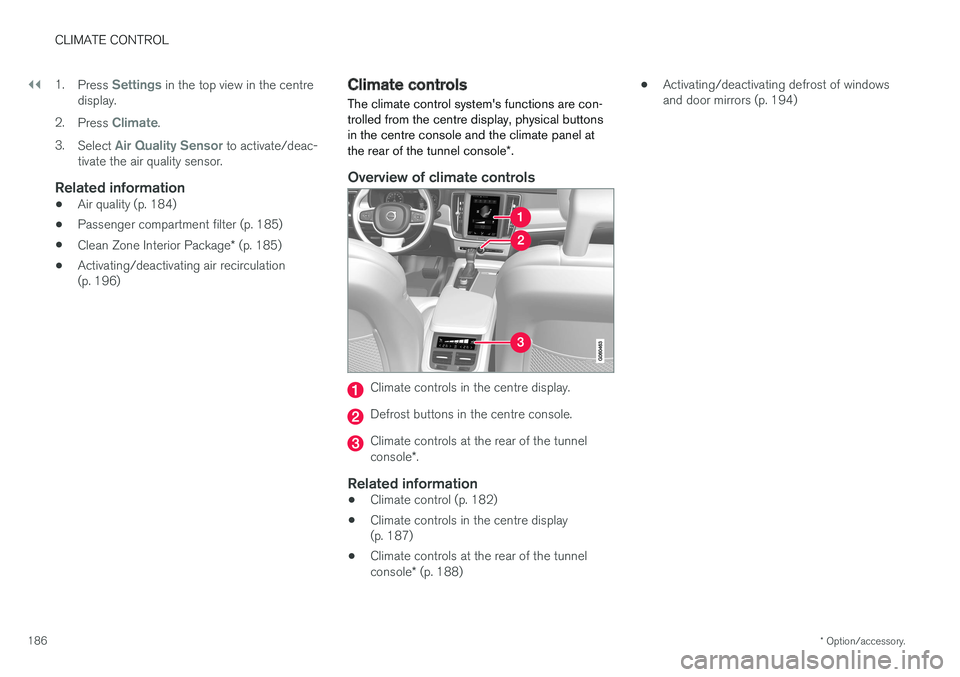
The climate control system's functions are con- trolled from the centre display, physical buttonsin the centre console and the climate panel at the rear of the tunnel console *.
Overview of climate controls
Climate controls in the centre display.
Defrost buttons in the centre console.
Climate controls at the rear of the tunnel console *.
Related information
• Climate control (p. 182)
• Climate controls in the centre display (p. 187)
• Climate controls at the rear of the tunnel console
* (p. 188) •
Activating/deactivating defrost of windows and door mirrors (p. 194)
Page 189 of 594
CLIMATE CONTROL
}}
* Option/accessory.187
Climate controls in the centre display All climate functions can be regulated from the climate row and the climate view in the centredisplay.
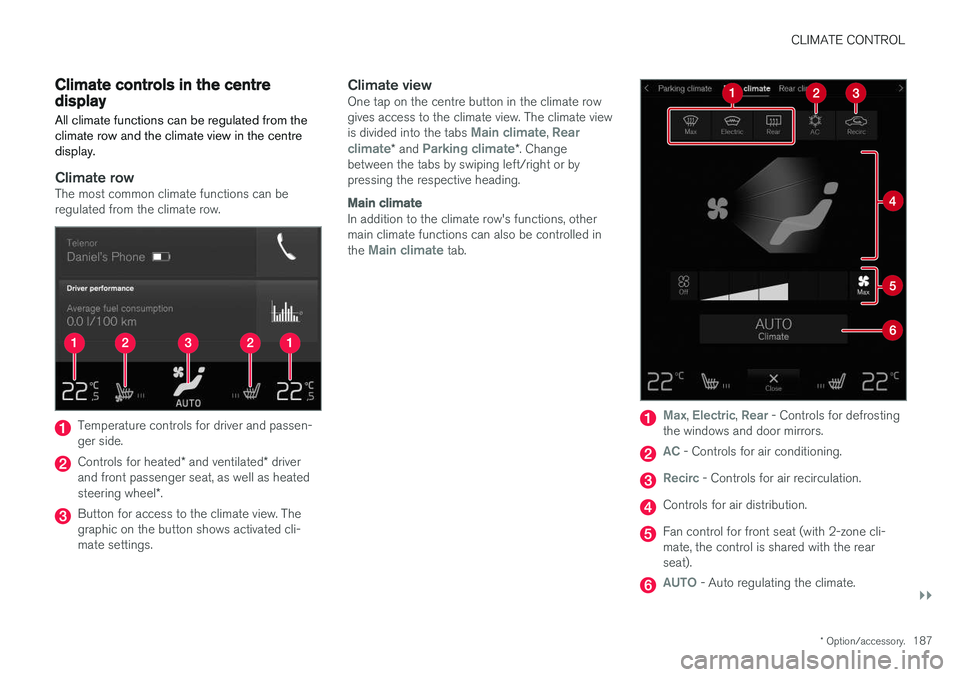
Climate rowThe most common climate functions can be regulated from the climate row.
Temperature controls for driver and passen- ger side.
Controls for heated * and ventilated * driver
and front passenger seat, as well as heated steering wheel *.
Button for access to the climate view. The graphic on the button shows activated cli-mate settings.
Climate viewOne tap on the centre button in the climate rowgives access to the climate view. The climate view is divided into the tabs
Main climate, Rear
climate* and Parking climate*. Change
between the tabs by swiping left/right or by pressing the respective heading.
Main climate
In addition to the climate row's functions, other main climate functions can also be controlled in the
Main climate tab.
Max, Electric, Rear - Controls for defrosting
the windows and door mirrors.
AC - Controls for air conditioning.
Recirc - Controls for air recirculation.
Controls for air distribution.
Fan control for front seat (with 2-zone cli- mate, the control is shared with the rearseat).
AUTO - Auto regulating the climate.