lights VOLVO V90 2017 Owner's Manual
[x] Cancel search | Manufacturer: VOLVO, Model Year: 2017, Model line: V90, Model: VOLVO V90 2017Pages: 594, PDF Size: 15.07 MB
Page 173 of 594
INSTRUMENTS AND CONTROLS
}}
* Option/accessory.171
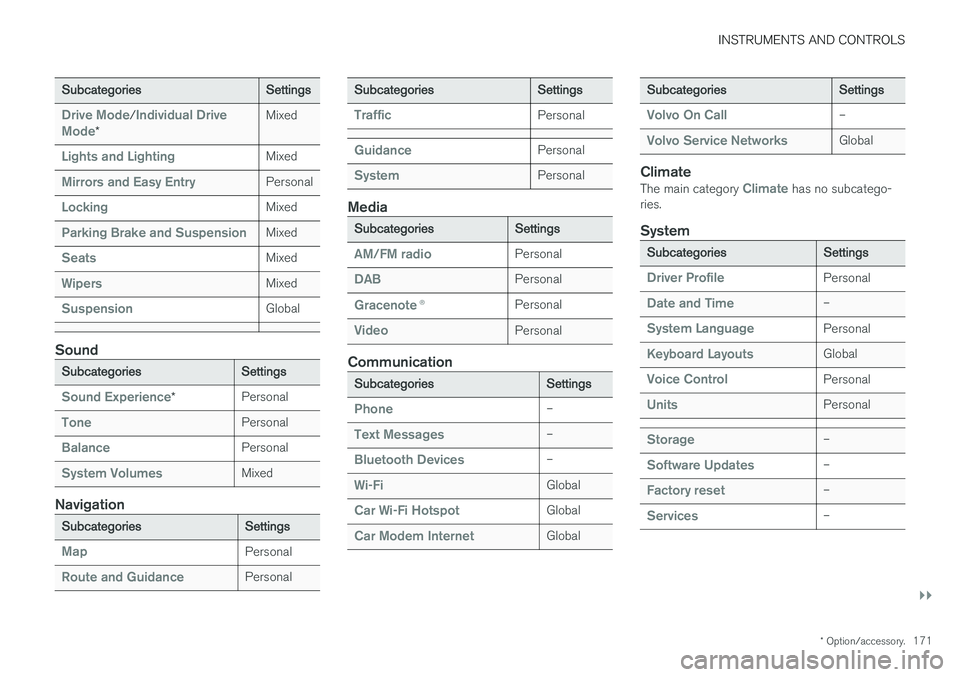
Subcategories Settings
Drive Mode/Individual Drive
Mode* Mixed
Lights and LightingMixed
Mirrors and Easy EntryPersonal
LockingMixed
Parking Brake and SuspensionMixed
SeatsMixed
WipersMixed
SuspensionGlobal
Sound
Subcategories
Settings
Sound Experience*Personal
TonePersonal
BalancePersonal
System VolumesMixed
Navigation
Subcategories
Settings
MapPersonal
Route and GuidancePersonal
SubcategoriesSettings
TrafficPersonal
GuidancePersonal
SystemPersonal
Media
SubcategoriesSettings
AM/FM radioPersonal
DABPersonal
Gracenote®Personal
VideoPersonal
Communication
Subcategories Settings
Phone–
Text Messages–
Bluetooth Devices–
Wi-FiGlobal
Car Wi-Fi HotspotGlobal
Car Modem InternetGlobal
SubcategoriesSettings
Volvo On Call–
Volvo Service NetworksGlobal
ClimateThe main category Climate has no subcatego-
ries.
System
Subcategories Settings
Driver ProfilePersonal
Date and Time–
System LanguagePersonal
Keyboard LayoutsGlobal
Voice ControlPersonal
UnitsPersonal
Storage–
Software Updates–
Factory reset–
Services–
Page 301 of 594
DRIVER SUPPORT
}}
* Option/accessory.299
–Activate the direction indicator. Use the left direction indicator in a car with the steering wheel on the left, or the rightdirection indicator in a car with the steeringwheel on the right.
> Overtaking assistance is started.
LimitationsWhen using Overtaking Assistance the driver should be prepared for sudden changes in condi-tions. In some conditions Overtaking Assistancecan cause unwanted acceleration. Some situations should be avoided for this rea- son. Examples of such situations are:
• the car is approaching an exit road in orderto turn off in the same direction that is nor-mally used for overtaking
• the vehicle in front slows before your car hasentered the overtaking lane
• traffic in the overtaking lane is slowing
• a car designed for right-hand traffic is beingdriven in a country with left-hand traffic (orvice versa).
Situations of this kind can be avoided by tempo-rarily setting ACC or Pilot Assist in standby mode.
Related information
• Pilot Assist
* (p. 304)
• Adaptive cruise control
* (p. 290)
Change of target and automatic braking with the Adaptive CruiseControl
In combination with automatic gearbox, the adaptive cruise control (Adaptive Cruise Control- ACC ) has functionality for change of targetand braking at certain speeds.
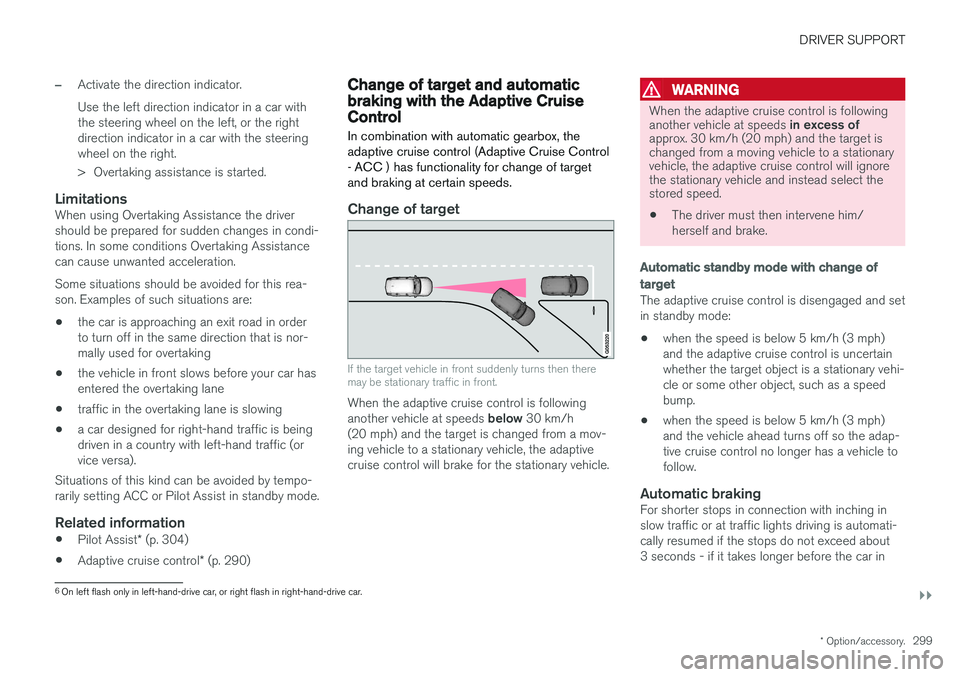
Change of target
If the target vehicle in front suddenly turns then there may be stationary traffic in front.
When the adaptive cruise control is following another vehicle at speeds below 30 km/h
(20 mph) and the target is changed from a mov- ing vehicle to a stationary vehicle, the adaptivecruise control will brake for the stationary vehicle.
WARNING
When the adaptive cruise control is following another vehicle at speeds in excess of
approx. 30 km/h (20 mph) and the target is changed from a moving vehicle to a stationaryvehicle, the adaptive cruise control will ignorethe stationary vehicle and instead select thestored speed.
• The driver must then intervene him/ herself and brake.
Automatic standby mode with change of target
The adaptive cruise control is disengaged and set in standby mode: • when the speed is below 5 km/h (3 mph) and the adaptive cruise control is uncertainwhether the target object is a stationary vehi-cle or some other object, such as a speedbump.
• when the speed is below 5 km/h (3 mph)and the vehicle ahead turns off so the adap-tive cruise control no longer has a vehicle tofollow.
Automatic brakingFor shorter stops in connection with inching inslow traffic or at traffic lights driving is automati-cally resumed if the stops do not exceed about3 seconds - if it takes longer before the car in
6
On left flash only in left-hand-drive car, or right flash in right-hand-drive car.
Page 315 of 594
DRIVER SUPPORT
}}
* Option/accessory.313
Change of target and automatic braking with Pilot Assist *
In combination with automatic gearbox, Pilot Assist has functionality for change of target and braking at certain speeds.
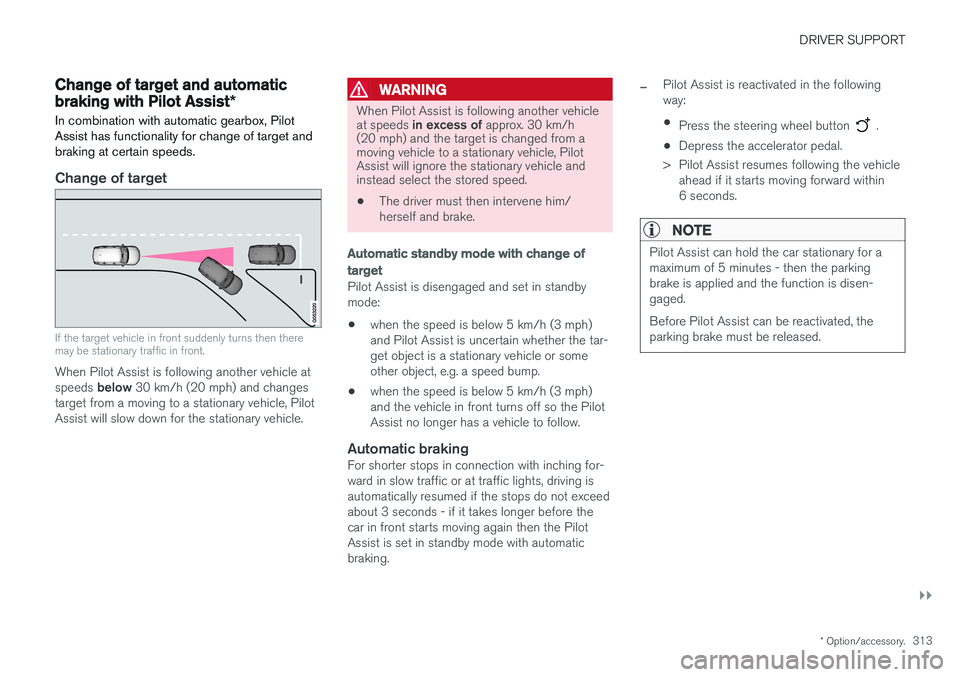
Change of target
If the target vehicle in front suddenly turns then there may be stationary traffic in front.
When Pilot Assist is following another vehicle at speeds below 30 km/h (20 mph) and changes
target from a moving to a stationary vehicle, Pilot Assist will slow down for the stationary vehicle.
WARNING
When Pilot Assist is following another vehicle at speeds in excess of approx. 30 km/h
(20 mph) and the target is changed from a moving vehicle to a stationary vehicle, PilotAssist will ignore the stationary vehicle andinstead select the stored speed.
• The driver must then intervene him/ herself and brake.
Automatic standby mode with change of target
Pilot Assist is disengaged and set in standby mode: •when the speed is below 5 km/h (3 mph) and Pilot Assist is uncertain whether the tar-get object is a stationary vehicle or someother object, e.g. a speed bump.
• when the speed is below 5 km/h (3 mph)and the vehicle in front turns off so the PilotAssist no longer has a vehicle to follow.
Automatic brakingFor shorter stops in connection with inching for-ward in slow traffic or at traffic lights, driving isautomatically resumed if the stops do not exceedabout 3 seconds - if it takes longer before thecar in front starts moving again then the PilotAssist is set in standby mode with automaticbraking.
–Pilot Assist is reactivated in the following way:
• Press the steering wheel button
.
• Depress the accelerator pedal.
> Pilot Assist resumes following the vehicle ahead if it starts moving forward within 6 seconds.
NOTE
Pilot Assist can hold the car stationary for a maximum of 5 minutes - then the parkingbrake is applied and the function is disen-gaged. Before Pilot Assist can be reactivated, the parking brake must be released.
Page 334 of 594
||
DRIVER SUPPORT
332
Auto Brake
The automatic brake function is activated last. If in this situation the driver has not yet started to take evasive action and the risk of collision isimminent then the automatic braking function isdeployed - this takes place irrespective ofwhether or not the driver brakes. Braking thentakes place with full brake force in order toreduce collision speed, or with limited brake forceif it is sufficient to avoid a collision. In connection with automatic braking the seatbelt tensioner may also be activated. For more infor-mation see the "Seatbelt tensioner" section. In some situations, the action of Auto-brake may begin with light braking and then progress to fullbrake action. When City Safety has prevented a collision with a stationary object, the car remains stationary inanticipation of positive action by the driver. If thecar has been braked to avoid collision with aslower vehicle in front, its speed is reduced tomatch that of the vehicle in front.
NOTE
On cars with manual gearbox, the engine stops when the Auto-brake function has stop-ped the car, unless the driver has managed todepress the clutch pedal beforehand.
The driver can always interrupt a braking inter- vention by firmly depressing the acceleratorpedal.
NOTE
When City Safety™ brakes, the brake lights
come on.
When City Safety is activated and brakes the vehicle, the driver display shows a text messageto the effect that the function is/has been active.
WARNING
City Safety must not be used as an excuse for the driver to change his/her driving style. Ifthe driver relies solely on City Safety to do thebraking, there might be a risk of a collisionsooner or later.
Related information
• Setting the warning distance for City Safety (p. 332)
• Detection of obstacles with City Safety
™
(p. 333)
• City Safety when evasive manoeuvres areprevented (p. 336)
• City Safety in cross traffic (p. 335)
• Limitations of City Safety (p. 337)
• Messages for City Safety (p. 339)
• Seatbelt tensioner (p. 59)
Setting the warning distance for City Safety
City Safety is always activated, but it is possible to select the warning distance for the function.
NOTE
The City Safety function cannot be deacti- vated. It is activated automatically when theengine/electric operation is started andremains switched on until the engine/electricoperation is switched off.
The warning distance determines the sensitivity of the system and regulates the distance atwhich the visual, acoustic and haptic warningsshall be triggered. 1. Tap on
Settings in top view in the centre
display.
2. Press
My CarIntelliSafe.
3. Under
City Safety Warning, select Late,Normal or Early to set the desired warning
distance.
If the
Early setting produces too many warnings,
which could be perceived as irritating in certain situations, then use the
Normal or Late warning
distance. If warnings are perceived as being too frequent or disturbing then the warning distance can bereduced. This would lead to the system warning
Page 344 of 594
||
DRIVER SUPPORT
* Option/accessory.
342
WARNING
The system is a supplement to, not a replace- ment for, a safe driving style and use of therearview mirrors. It can never replace the driv-er's attention and responsibility. The responsi-bility for changing lanes safely always restswith the driver.
Related information
• Activate/deactivate Blind Spot Information
*
(p. 342)
• Limitations of Blind Spot Information
*
(p. 343)
• Messages for Blind Spot Information
* and
Cross Traffic Alert * (p. 347)
• Cross Traffic Alert
* (p. 343)
Activate/deactivate Blind Spot Information *
The Blind Spot Information (BLIS) function can be activated/deactivated.
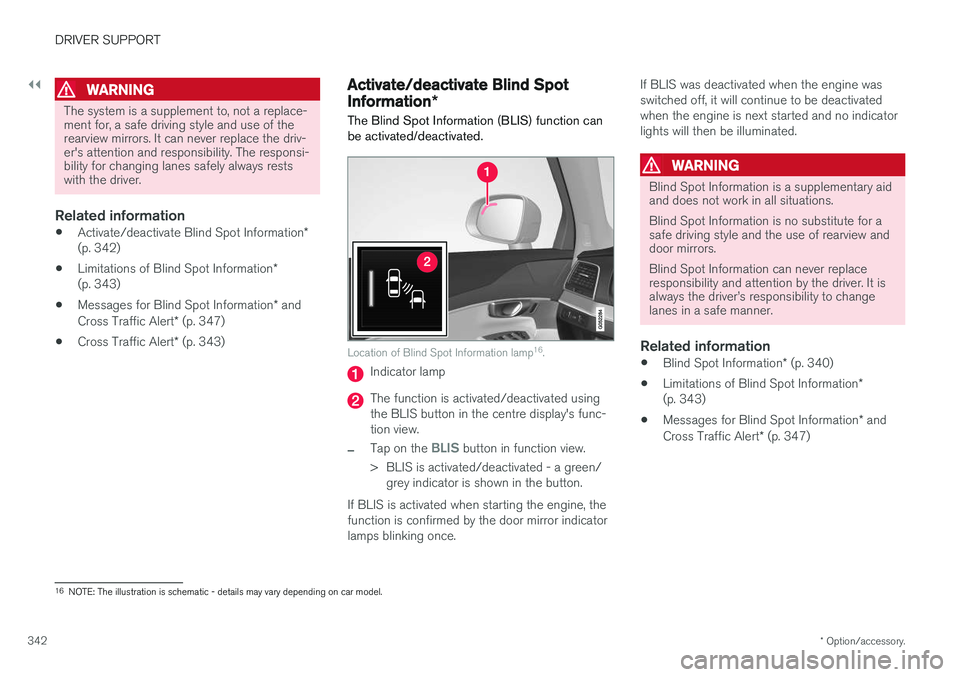
Location of Blind Spot Information lamp 16
.
Indicator lamp
The function is activated/deactivated using the BLIS button in the centre display's func-tion view.
–Tap on the BLIS button in function view.
> BLIS is activated/deactivated - a green/ grey indicator is shown in the button.
If BLIS is activated when starting the engine, the function is confirmed by the door mirror indicatorlamps blinking once. If BLIS was deactivated when the engine wasswitched off, it will continue to be deactivatedwhen the engine is next started and no indicatorlights will then be illuminated.
WARNING
Blind Spot Information is a supplementary aid and does not work in all situations. Blind Spot Information is no substitute for a safe driving style and the use of rearview anddoor mirrors. Blind Spot Information can never replace responsibility and attention by the driver. It isalways the driver
Page 398 of 594
||
STARTING AND DRIVING
* Option/accessory.
396
Automatic deactivation
In gear position D the steering wheel paddles are
deactivated after a short time if they are not used. This is indicated by means of the figure for thecurrent gear extinguishing. The exception is during engine braking - then the paddles are activated for as long as engine brak-ing is in progress. In gear position M there is no automatic deactiva-
tion.
Related information
• Gear positions for automatic gearbox (p. 390)
• Gear shift indicator
* (p. 392)
Start/Stop
With the Start/Stop function, the engine switches off temporarily when the car has stop-ped e.g. at traffic lights or in a traffic queue, andthen starts again automatically when the journeyis resumed.
Start/Stop is one of several energy-saving func- tions intended to reduce fuel consumption, whichin turn helps to reduce exhaust emissions. The system makes it possible to adopt an envi- ronmentally-conscious driving style by allowingthe car to engine auto-stop when possible.
Related information
• Using the Start/Stop function (p. 396)
• Conditions for the Start/Stop function(p. 398)
Using the Start/Stop function The Start/Stop function temporarily switches off the engine when stationary and then restarts itautomatically when the journey is resumed.
The Start/Stop function is available when the engine is started and can be activated if certainconditions have been met. The driver display indi-cates whether the function is available, active orunavailable, see heading "Symbols in driver dis-play" below. All of the car's normal systems such as lighting, radio, etc. work normally, even when the engine isauto-stopped. However, some equipment mayhave its output temporarily reduced, e.g. the cli-mate control system's fan speed or extremelyhigh volume on the audio system.
Auto-stopThe following is required for the engine to auto-stop:
Page 409 of 594
STARTING AND DRIVING
407
•
Brake now and again to remove any layer of salt. Make sure that other road users are notput at risk by the braking.
• Gently depress the brake pedal after finish-ing driving and before starting your next trip.
MaintenanceTo keep the car as safe and reliable as possible,follow the Volvo service intervals as specified inthe Service and Warranty Booklet. New and replaced brake linings and brake discs do not provide optimal braking effect until theyhave been "worn in" a few hundred kilometres.Compensate for the reduced braking effect bydepressing the brake pedal harder. Volvo recom-mends only fitting brake linings that are approvedfor your Volvo.
IMPORTANT
The wear on the brake system's components must be checked regularly. Contact a workshop for information about the procedure or engage a workshop to carry outthe inspection - an authorised Volvo work-shop is recommended.
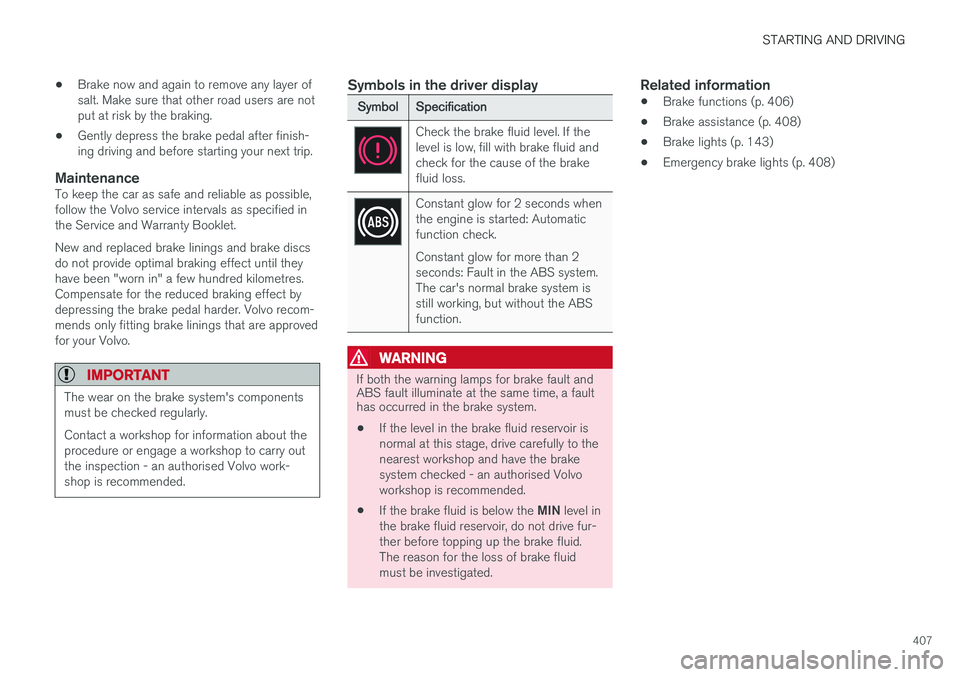
Symbols in the driver display
Symbol
Specification
Check the brake fluid level. If the level is low, fill with brake fluid andcheck for the cause of the brakefluid loss.
Constant glow for 2 seconds when the engine is started: Automaticfunction check. Constant glow for more than 2 seconds: Fault in the ABS system.The car's normal brake system isstill working, but without the ABSfunction.
WARNING
If both the warning lamps for brake fault and ABS fault illuminate at the same time, a faulthas occurred in the brake system.
• If the level in the brake fluid reservoir is normal at this stage, drive carefully to thenearest workshop and have the brakesystem checked - an authorised Volvoworkshop is recommended.
• If the brake fluid is below the
MIN level in
the brake fluid reservoir, do not drive fur-ther before topping up the brake fluid.The reason for the loss of brake fluidmust be investigated.
Related information
• Brake functions (p. 406)
• Brake assistance (p. 408)
• Brake lights (p. 143)
• Emergency brake lights (p. 408)
Page 410 of 594
STARTING AND DRIVING
408
Emergency brake lightsEmergency brake lights are activated to alert vehicles behind about heavy braking. The func-tion means that the brake light flashes instead of- as in normal braking - shining with a constantglow.
The emergency brake lights are activated during heavy braking or if the ABS system is activated athigh speeds. After emergency braking to a lowspeed, the brake lights return from flashing to thenormal constant glow. The car's hazard warningflashers are activated at the same time. Theseflash until the driver accelerates the car to ahigher speed again or switches off the hazardwarning flashers.
Related information
• Foot brake (p. 406)
• Hazard warning flashers (p. 143)
• Brake lights (p. 143)
Brake assistance
The brake assist system, BAS (Brake Assist System), helps to increase brake force duringbraking, thereby shortening the braking distance.
The system detects the way in which the driver brakes and increases brake force where neces-sary. The brake force can be boosted up to thelevel when the ABS system is engaged. Thefunction is suspended when the pressure on thebrake pedal decreases.
NOTE
When BAS is activated the brake pedal low- ers slightly more than usual, depress (hold)the brake pedal as long as necessary. When the brake pedal is released, all braking ceases.
Related information
• Foot brake (p. 406)
Auto braking after a collision In the event of a collision in which the activation level is reached for the pyrotechnic seatbelt ten-sioners or airbags, or if a collision with a largeanimal is detected, the car's brakes are automat-ically applied. This function is to prevent orreduce the effects of any subsequent collision.
After a serious collision there is a risk that it is no longer possible to control and steer the car. Inorder to avoid or mitigate a possible further colli-sion with a vehicle or an object in the vehicle'spath, the auto braking system is activated auto-matically and brakes the car in a safe manner. Brake lights and hazard warning lights are acti- vated during braking. When the car has stopped,the hazard warning lights continue to flash andthe parking brake is applied. If braking is not appropriate, e.g. if there is a risk of being hit by following traffic, the system can beoverridden by the driver depressing the accelera-tor pedal. The function assumes that the brake system is intact after the collision. See also the sections "Rear Collision Warning" and "Blind Spot Information".
Related information
• Brake functions (p. 406)
• Seatbelt tensioner (p. 59)
• Airbags (p. 63)
Page 414 of 594
||
STARTING AND DRIVING
412
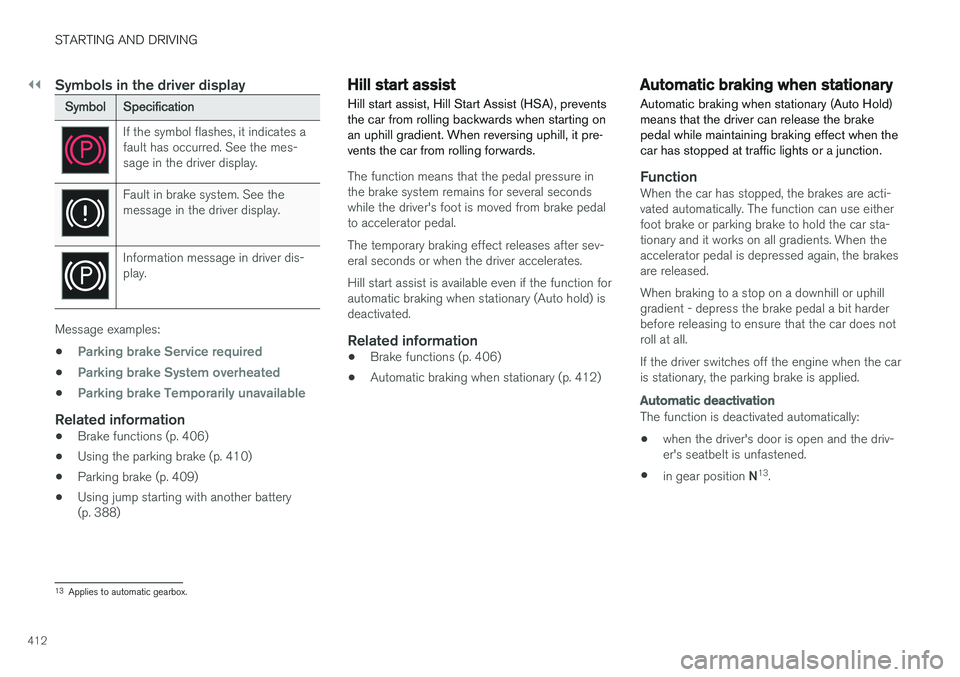
Symbols in the driver display
SymbolSpecification
If the symbol flashes, it indicates a fault has occurred. See the mes-sage in the driver display.
Fault in brake system. See the message in the driver display.
Information message in driver dis- play.
Message examples:
•
Parking brake Service required
•Parking brake System overheated
•Parking brake Temporarily unavailable
Related information
• Brake functions (p. 406)
• Using the parking brake (p. 410)
• Parking brake (p. 409)
• Using jump starting with another battery (p. 388)
Hill start assist
Hill start assist, Hill Start Assist (HSA), prevents the car from rolling backwards when starting onan uphill gradient. When reversing uphill, it pre-vents the car from rolling forwards.
The function means that the pedal pressure in the brake system remains for several secondswhile the driver's foot is moved from brake pedalto accelerator pedal. The temporary braking effect releases after sev- eral seconds or when the driver accelerates. Hill start assist is available even if the function for automatic braking when stationary (Auto hold) isdeactivated.
Related information
• Brake functions (p. 406)
• Automatic braking when stationary (p. 412)
Automatic braking when stationary
Automatic braking when stationary (Auto Hold) means that the driver can release the brakepedal while maintaining braking effect when thecar has stopped at traffic lights or a junction.
FunctionWhen the car has stopped, the brakes are acti- vated automatically. The function can use eitherfoot brake or parking brake to hold the car sta-tionary and it works on all gradients. When theaccelerator pedal is depressed again, the brakesare released. When braking to a stop on a downhill or uphill gradient - depress the brake pedal a bit harderbefore releasing to ensure that the car does notroll at all. If the driver switches off the engine when the car is stationary, the parking brake is applied.
Automatic deactivation
The function is deactivated automatically: • when the driver's door is open and the driv- er's seatbelt is unfastened.
• in gear position
N13
.
13 Applies to automatic gearbox.
Page 428 of 594
STARTING AND DRIVING
426
Driving with a trailer
When driving with a trailer, there are a number of points that are important to think about regar-ding the towing bracket, the trailer and how theload is positioned in the trailer.
Payload depends on the car's kerb weight. The total of the weight of the passengers and allaccessories, e.g. towbar, reduces the car's pay-load by a corresponding weight. The car is supplied with the necessary equipment for towing a trailer.
• The car's towing bracket must be of anapproved type.
• Distribute the load on the trailer so that theweight on the towing bracket complies withthe specified maximum towball load. Towballload is calculated as part of the car's payload.
• Increase the tyre pressure to the recom-mended pressure for a full load. For moreinformation on tyre pressure, see the section"Approved tyre pressures".
• The engine is loaded more heavily than usualwhen driving with a trailer.
• Do not tow a heavy trailer when the car isbrand new. Wait until it has been driven atleast 1000 km.
• The brakes are loaded much more than usualon long and steep downhill slopes. Downshiftto a lower gear and adjust your speed. •
Follow the regulations in force for the permit-ted speeds and weights.
• Maintain a low speed when driving with atrailer up long, steep ascents.
• The maximum trailer weights given only applyto altitudes up to 1000 metres above sealevel. At higher altitudes, engine power andthus the car's climbing ability is decreaseddue to the reduced air density, and the maxi-mum trailer weight must therefore bereduced. The weight of the car and trailermust be decreased by 10 % for each addi-tional 1000 m (or part thereof).
• Avoid driving with a trailer on inclines of morethan 12%.
NOTE
Extreme weather conditions, driving with a trailer or driving at high altitudes in combina-tion with fuel quality are factors that consider-ably increase the car's fuel consumption.
Trailer connectorAn adapter is required if the car's towing bracket has a 13 pin connector and the trailer has a 7 pinconnector. Use an adapter approved by Volvo.Make sure the cable does not drag on theground.
IMPORTANT
When the engine is switched off, the constant battery voltage to the trailer connector can beswitched off automatically so as not to drainthe starter battery.
Trailer weightsInformation about Volvo's permitted trailer weights is available in the article "Towingcapacity and towball load".
WARNING
Follow the stated recommendations for trailer weights. Otherwise, the car and trailer may bedifficult to control in the event of suddenmovement and braking.
NOTE
The stated maximum permitted trailer weights are those permitted by Volvo. National vehicleregulations can further limit trailer weightsand speeds. Towbars can be certified forhigher towing weights than the car canactually tow.
Direction indicators and brake lights on the trailer
If one or more of the trailer's direction indicators or brake light bulbs is broken, the driver display