clutch VOLVO V90 2017 Owners Manual
[x] Cancel search | Manufacturer: VOLVO, Model Year: 2017, Model line: V90, Model: VOLVO V90 2017Pages: 594, PDF Size: 15.07 MB
Page 288 of 594
DRIVER SUPPORT
286•
Deactivating/reactivating the cruise control (p. 286)
• Deactivating Cruise Control (p. 287)
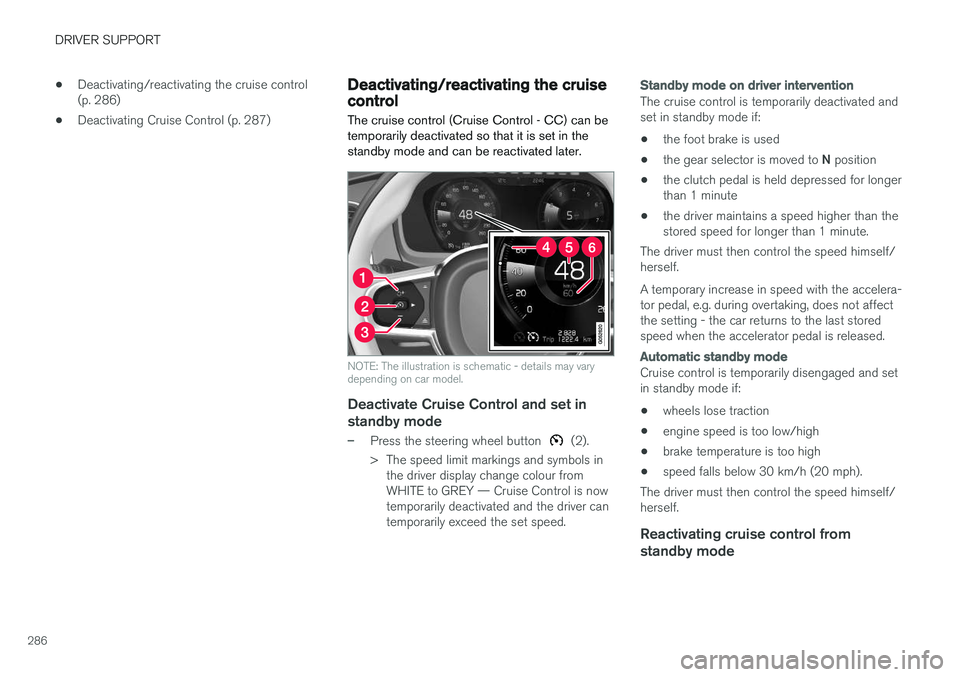
Deactivating/reactivating the cruise control The cruise control (Cruise Control - CC) can be temporarily deactivated so that it is set in thestandby mode and can be reactivated later.
NOTE: The illustration is schematic - details may vary depending on car model.
Deactivate Cruise Control and set in
standby mode
–Press the steering wheel button (2).
> The speed limit markings and symbols in the driver display change colour from WHITE to GREY — Cruise Control is nowtemporarily deactivated and the driver cantemporarily exceed the set speed.
Standby mode on driver intervention
The cruise control is temporarily deactivated and set in standby mode if:
• the foot brake is used
• the gear selector is moved to
N position
• the clutch pedal is held depressed for longerthan 1 minute
• the driver maintains a speed higher than thestored speed for longer than 1 minute.
The driver must then control the speed himself/herself. A temporary increase in speed with the accelera- tor pedal, e.g. during overtaking, does not affectthe setting - the car returns to the last storedspeed when the accelerator pedal is released.
Automatic standby mode
Cruise control is temporarily disengaged and set in standby mode if:
• wheels lose traction
• engine speed is too low/high
• brake temperature is too high
• speed falls below 30 km/h (20 mph).
The driver must then control the speed himself/herself.
Reactivating cruise control from standby mode
Page 299 of 594
DRIVER SUPPORT
}}
* Option/accessory.297
Deactivating/activating the adaptive cruise control *
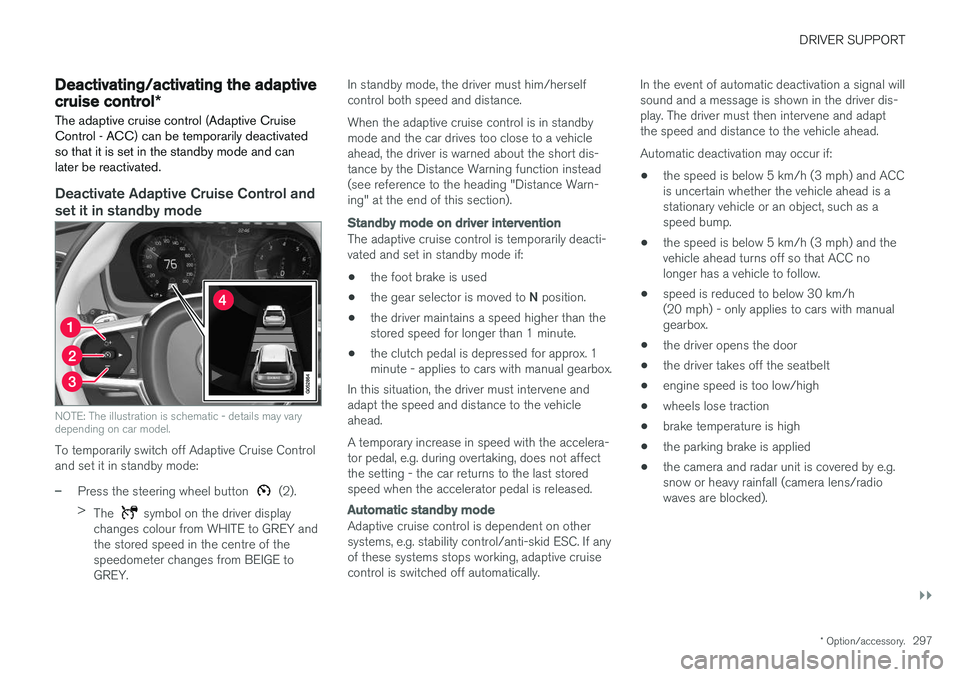
The adaptive cruise control (Adaptive Cruise Control - ACC) can be temporarily deactivatedso that it is set in the standby mode and canlater be reactivated.
Deactivate Adaptive Cruise Control and set it in standby mode
NOTE: The illustration is schematic - details may vary depending on car model.
To temporarily switch off Adaptive Cruise Control and set it in standby mode:
–Press the steering wheel button (2).
> The
symbol on the driver display
changes colour from WHITE to GREY and the stored speed in the centre of thespeedometer changes from BEIGE toGREY. In standby mode, the driver must him/herselfcontrol both speed and distance. When the adaptive cruise control is in standby mode and the car drives too close to a vehicleahead, the driver is warned about the short dis-tance by the Distance Warning function instead(see reference to the heading "Distance Warn-ing" at the end of this section).
Standby mode on driver intervention
The adaptive cruise control is temporarily deacti- vated and set in standby mode if:
• the foot brake is used
• the gear selector is moved to
N position.
• the driver maintains a speed higher than thestored speed for longer than 1 minute.
• the clutch pedal is depressed for approx. 1minute - applies to cars with manual gearbox.
In this situation, the driver must intervene andadapt the speed and distance to the vehicleahead. A temporary increase in speed with the accelera- tor pedal, e.g. during overtaking, does not affectthe setting - the car returns to the last storedspeed when the accelerator pedal is released.
Automatic standby mode
Adaptive cruise control is dependent on other systems, e.g. stability control/anti-skid ESC. If anyof these systems stops working, adaptive cruisecontrol is switched off automatically. In the event of automatic deactivation a signal willsound and a message is shown in the driver dis-play. The driver must then intervene and adaptthe speed and distance to the vehicle ahead. Automatic deactivation may occur if:
• the speed is below 5 km/h (3 mph) and ACC is uncertain whether the vehicle ahead is astationary vehicle or an object, such as aspeed bump.
• the speed is below 5 km/h (3 mph) and thevehicle ahead turns off so that ACC nolonger has a vehicle to follow.
• speed is reduced to below 30 km/h(20 mph) - only applies to cars with manualgearbox.
• the driver opens the door
• the driver takes off the seatbelt
• engine speed is too low/high
• wheels lose traction
• brake temperature is high
• the parking brake is applied
• the camera and radar unit is covered by e.g.snow or heavy rainfall (camera lens/radiowaves are blocked).
Page 313 of 594
DRIVER SUPPORT
}}
* Option/accessory.311
Deactivating/activating the Pilot Assist*
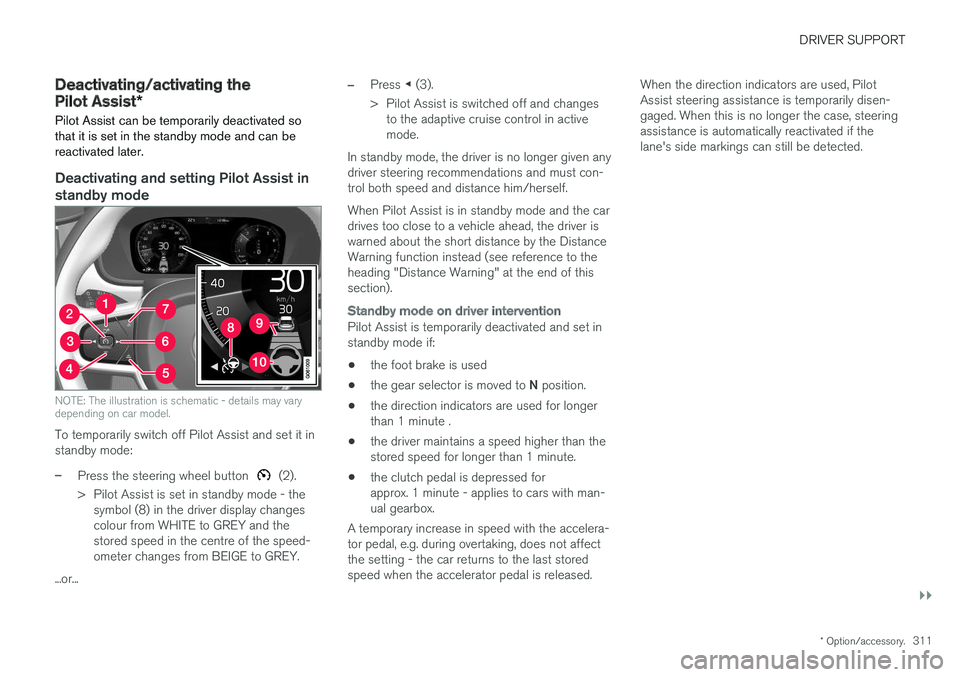
Pilot Assist can be temporarily deactivated so that it is set in the standby mode and can bereactivated later.
Deactivating and setting Pilot Assist in
standby mode
NOTE: The illustration is schematic - details may vary depending on car model.
To temporarily switch off Pilot Assist and set it in standby mode:
–Press the steering wheel button (2).
> Pilot Assist is set in standby mode - the symbol (8) in the driver display changes colour from WHITE to GREY and thestored speed in the centre of the speed-ometer changes from BEIGE to GREY.
...or...
–Press ◀ (3).
> Pilot Assist is switched off and changes to the adaptive cruise control in active mode.
In standby mode, the driver is no longer given anydriver steering recommendations and must con-trol both speed and distance him/herself. When Pilot Assist is in standby mode and the car drives too close to a vehicle ahead, the driver iswarned about the short distance by the DistanceWarning function instead (see reference to theheading "Distance Warning" at the end of thissection).
Standby mode on driver intervention
Pilot Assist is temporarily deactivated and set in standby mode if:
• the foot brake is used
• the gear selector is moved to
N position.
• the direction indicators are used for longerthan 1 minute .
• the driver maintains a speed higher than thestored speed for longer than 1 minute.
• the clutch pedal is depressed forapprox. 1 minute - applies to cars with man-ual gearbox.
A temporary increase in speed with the accelera-tor pedal, e.g. during overtaking, does not affectthe setting - the car returns to the last storedspeed when the accelerator pedal is released. When the direction indicators are used, PilotAssist steering assistance is temporarily disen-gaged. When this is no longer the case, steeringassistance is automatically reactivated if thelane's side markings can still be detected.
Page 334 of 594
||
DRIVER SUPPORT
332
Auto Brake
The automatic brake function is activated last. If in this situation the driver has not yet started to take evasive action and the risk of collision isimminent then the automatic braking function isdeployed - this takes place irrespective ofwhether or not the driver brakes. Braking thentakes place with full brake force in order toreduce collision speed, or with limited brake forceif it is sufficient to avoid a collision. In connection with automatic braking the seatbelt tensioner may also be activated. For more infor-mation see the "Seatbelt tensioner" section. In some situations, the action of Auto-brake may begin with light braking and then progress to fullbrake action. When City Safety has prevented a collision with a stationary object, the car remains stationary inanticipation of positive action by the driver. If thecar has been braked to avoid collision with aslower vehicle in front, its speed is reduced tomatch that of the vehicle in front.
NOTE
On cars with manual gearbox, the engine stops when the Auto-brake function has stop-ped the car, unless the driver has managed todepress the clutch pedal beforehand.
The driver can always interrupt a braking inter- vention by firmly depressing the acceleratorpedal.
NOTE
When City Safety™ brakes, the brake lights
come on.
When City Safety is activated and brakes the vehicle, the driver display shows a text messageto the effect that the function is/has been active.
WARNING
City Safety must not be used as an excuse for the driver to change his/her driving style. Ifthe driver relies solely on City Safety to do thebraking, there might be a risk of a collisionsooner or later.
Related information
• Setting the warning distance for City Safety (p. 332)
• Detection of obstacles with City Safety
™
(p. 333)
• City Safety when evasive manoeuvres areprevented (p. 336)
• City Safety in cross traffic (p. 335)
• Limitations of City Safety (p. 337)
• Messages for City Safety (p. 339)
• Seatbelt tensioner (p. 59)
Setting the warning distance for City Safety
City Safety is always activated, but it is possible to select the warning distance for the function.
NOTE
The City Safety function cannot be deacti- vated. It is activated automatically when theengine/electric operation is started andremains switched on until the engine/electricoperation is switched off.
The warning distance determines the sensitivity of the system and regulates the distance atwhich the visual, acoustic and haptic warningsshall be triggered. 1. Tap on
Settings in top view in the centre
display.
2. Press
My CarIntelliSafe.
3. Under
City Safety Warning, select Late,Normal or Early to set the desired warning
distance.
If the
Early setting produces too many warnings,
which could be perceived as irritating in certain situations, then use the
Normal or Late warning
distance. If warnings are perceived as being too frequent or disturbing then the warning distance can bereduced. This would lead to the system warning
Page 388 of 594
||
STARTING AND DRIVING
* Option/accessory.
386
NOTE
To reach level I or II without starting the
engine - do not depress the brake pedal, or
the clutch pedal for cars with manual gear changing, when these ignition positions are tobe selected.
• Ignition position I
- Turn the ignition dial to
START and release it. The control automati-
cally returns to its starting position.
• Ignition position II
- Turn the ignition dial to
START and hold it in the START position for
approx. 4 seconds. Then release the knob, which automatically returns to its startingposition.
• Back to ignition position 0
- To return to
ignition position 0 from position I and II -
Turn the ignition dial to STOP and release it.
The control automatically returns to its star-ting position.
Related information
• Starting the car (p. 386)
• Switching off the car (p. 387)
• Driver display (p. 90)
Starting the car
The car is started using the remote control key and the start knob in the tunnel console.
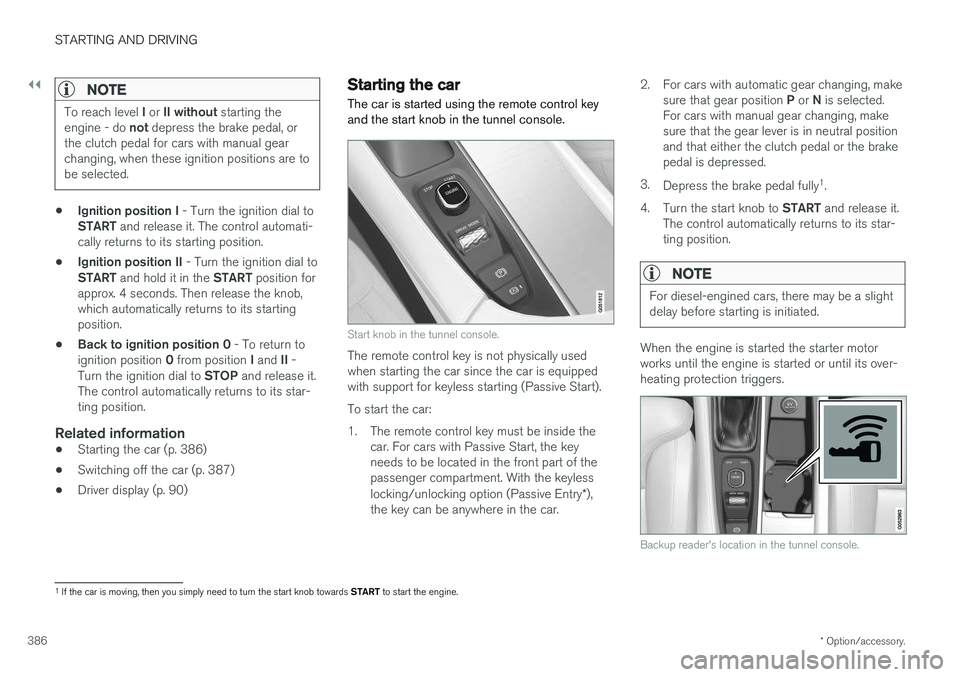
Start knob in the tunnel console.
The remote control key is not physically used when starting the car since the car is equippedwith support for keyless starting (Passive Start). To start the car:
1. The remote control key must be inside the car. For cars with Passive Start, the key needs to be located in the front part of thepassenger compartment. With the keyless locking/unlocking option (Passive Entry *),
the key can be anywhere in the car. 2. For cars with automatic gear changing, make
sure that gear position P or N is selected.
For cars with manual gear changing, make sure that the gear lever is in neutral positionand that either the clutch pedal or the brakepedal is depressed.
3. Depress the brake pedal fully 1
.
4. Turn the start knob to START and release it.
The control automatically returns to its star-ting position.
NOTE
For diesel-engined cars, there may be a slight delay before starting is initiated.
When the engine is started the starter motor works until the engine is started or until its over-heating protection triggers.
Backup reader's location in the tunnel console.
1 If the car is moving, then you simply need to turn the start knob towards START to start the engine.
Page 394 of 594
STARTING AND DRIVING
* Option/accessory.
392
Manual gearbox
With a manual gearbox, the driver selects a suit- able gear manually, according to speed andpower requirements at the time.
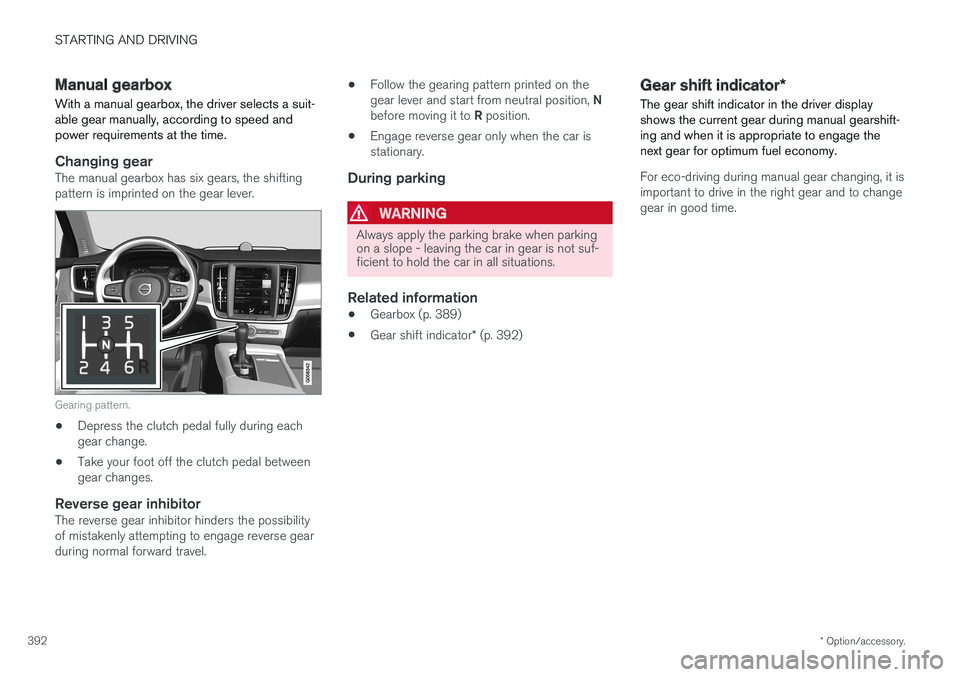
Changing gearThe manual gearbox has six gears, the shifting pattern is imprinted on the gear lever.
Gearing pattern.
• Depress the clutch pedal fully during each gear change.
• Take your foot off the clutch pedal betweengear changes.
Reverse gear inhibitorThe reverse gear inhibitor hinders the possibilityof mistakenly attempting to engage reverse gearduring normal forward travel. •
Follow the gearing pattern printed on the gear lever and start from neutral position,
N
before moving it to R position.
• Engage reverse gear only when the car is stationary.
During parking
WARNING
Always apply the parking brake when parking on a slope - leaving the car in gear is not suf-ficient to hold the car in all situations.
Related information
• Gearbox (p. 389)
• Gear shift indicator
* (p. 392)
Gear shift indicator *
The gear shift indicator in the driver display shows the current gear during manual gearshift-ing and when it is appropriate to engage thenext gear for optimum fuel economy.
For eco-driving during manual gear changing, it is important to drive in the right gear and to changegear in good time.
Page 399 of 594
STARTING AND DRIVING
}}
397
With automatic gearbox
• Stop the car with the foot brake and then keep your foot on the brake pedal - theengine stops automatically.
With manual gearbox
• Declutch, set the gear lever in neutral posi-tion and release the clutch pedal - theengine stops automatically.
In drive mode
Eco or Comfort3 , the engine may
auto-stop before the car is completely stationary. With the
Adaptive cruise or Pilot Assist func-
tion activated, the engine will autostop after approximately three seconds. See the section "Conditions for Start/Stop func- tion".
AutostartThe following is required for the engine to auto-start: With automatic gearbox
• Release the brake pedal - the engine will autostart and you can continue driving. On anuphill gradient hill start assist (HSA) engages, which prevents the car from rollingbackwards.
• When the
Auto hold function is activated,
auto-start is delayed until the accelerator pedal is depressed.
• When the
Adaptive cruise or Pilot Assistfunction are activated, the engine will autos- tart when the accelerator pedal is depressed, or by pressing the
button on the left
keypad of the steering wheel.
• Maintain foot pressure on the brake pedal and depress the accelerator pedal - theengine auto-starts.
• On a downhill gradient: Release pressure onthe brake pedal slightly so that the carbegins to roll - the engine will auto-start aftera slight speed increase.
With manual gearbox
• With the gear lever in neutral position:Depress the clutch pedal or depress theaccelerator pedal - the engine starts.
• On a downhill gradient: Release pressure onthe brake pedal slightly so that the carbegins to roll - the engine will auto-start aftera slight speed increase.
Symbols in the driver display
With 12-inch driver display
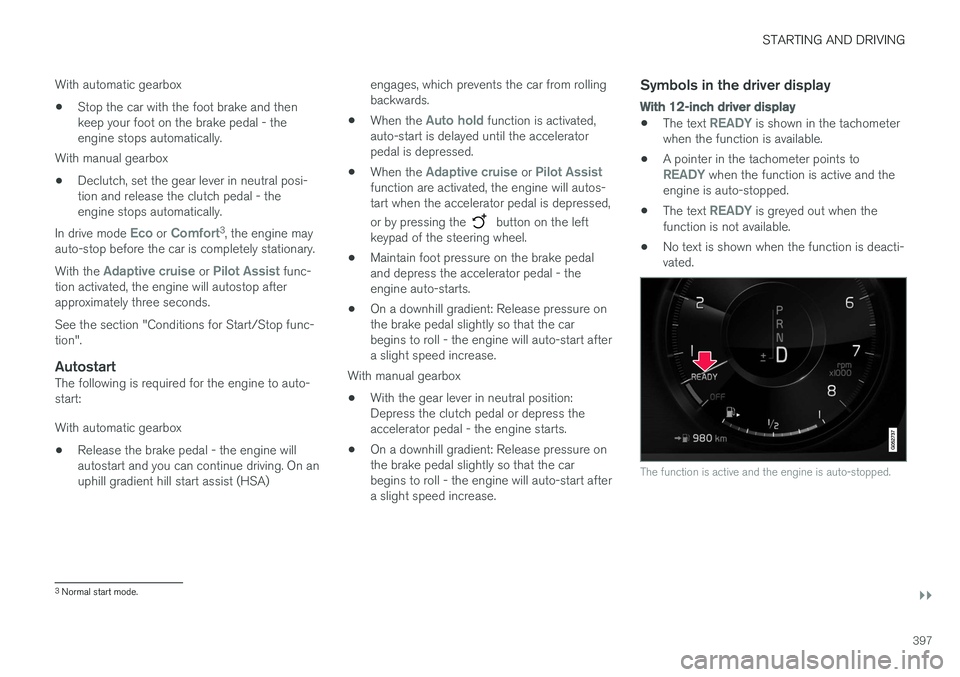
•
The text READY is shown in the tachometer
when the function is available.
• A pointer in the tachometer points to
READY when the function is active and the
engine is auto-stopped.
• The text
READY is greyed out when the
function is not available.
• No text is shown when the function is deacti- vated.
The function is active and the engine is auto-stopped.
3
Normal start mode.
Page 413 of 594
STARTING AND DRIVING
}}
411
Releasing automatically
1. Put the seatbelt on.
2. Start the car.
3. With automatic gearbox:Select gear position D or R and depress the
accelerator pedal.With manual gearbox:Engage a suitable gear, release the clutch and depress the accelerator pedal.
> The parking brake releases and the sym- bol in the driver display extinguishes.
Parking on a hill
WARNING
Always use the parking brake when parking on an inclined surface. Engaging a gear or the automatic transmission's P position is not suf-
ficient to hold the car stationary in all situa- tions.
If the car is parked facing uphill: • Turn the wheels
away from the kerb.
If the car is parked facing downhill:
• Turn the wheels
towards the kerb.
Heavy load uphill
A heavy load, such as a trailer, can cause the car to roll backward when the parking brake isreleased automatically on a steep incline. Avoid this by pulling the control upwards while drivingthe car away. Release the control when theengine achieves traction.
Settings for parking brake
Automatic activation of the parking brake isselected via the centre display. Automatic activation when the car is switched off:1.
Press
Settings in the top view.
2. Press
My CarParking Brake and
Suspension and deselect/select the func-
tion Auto Activate Parking Brake.
Related information
• Parking brake (p. 409)
• In the event of a fault in the parking brake (p. 411)
• Automatic braking when stationary (p. 412)
In the event of a fault in the parking brake
Contact an authorised Volvo workshop if it is not possible to release or apply the parking brakeafter several attempts.
An acoustic warning signal sounds when driving with the parking brake applied. If the car has to be parked before a possible fault is rectified then the wheels must be turned as ifparking on a hill and the gear selector must be in position P, or engage first gear if the car has a
manual gearbox.
Low battery voltageIf the battery voltage is too low then the parking brake can neither be released nor applied. Con-nect a donor battery if the battery voltage is toolow.
Replacing the brake liningsThe rear brake linings must be replaced at aworkshop due to the design of the electrically-operated parking brake - an authorised Volvoworkshop is recommended.
Page 517 of 594
MAINTENANCE AND SERVICE
515
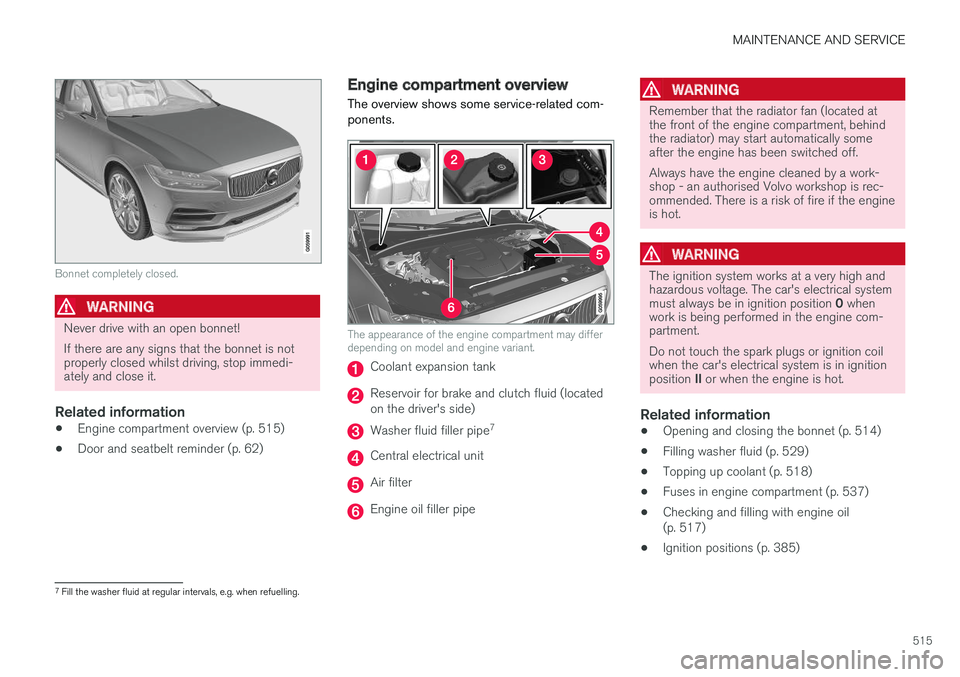
Bonnet completely closed.
WARNING
Never drive with an open bonnet! If there are any signs that the bonnet is not properly closed whilst driving, stop immedi-ately and close it.
Related information
•Engine compartment overview (p. 515)
• Door and seatbelt reminder (p. 62)
Engine compartment overview
The overview shows some service-related com- ponents.
The appearance of the engine compartment may differ depending on model and engine variant.
Coolant expansion tank
Reservoir for brake and clutch fluid (located on the driver's side)
Washer fluid filler pipe 7
Central electrical unit
Air filter
Engine oil filler pipe
WARNING
Remember that the radiator fan (located at the front of the engine compartment, behindthe radiator) may start automatically someafter the engine has been switched off. Always have the engine cleaned by a work- shop - an authorised Volvo workshop is rec-ommended. There is a risk of fire if the engineis hot.
WARNING
The ignition system works at a very high and hazardous voltage. The car's electrical system must always be in ignition position
0 when
work is being performed in the engine com- partment. Do not touch the spark plugs or ignition coil when the car's electrical system is in ignition position II or when the engine is hot.
Related information
• Opening and closing the bonnet (p. 514)
• Filling washer fluid (p. 529)
• Topping up coolant (p. 518)
• Fuses in engine compartment (p. 537)
• Checking and filling with engine oil (p. 517)
• Ignition positions (p. 385)
7
Fill the washer fluid at regular intervals, e.g. when refuelling.
Page 536 of 594
||
MAINTENANCE AND SERVICE
534
Size , L×W×H (mm) 150×90×130
Capacity (Ah) 10
AAccording to EN standard.
B Cold Cranking Amperes.
IMPORTANT
When replacing the starter battery or support battery, a battery of AGM 15
type must be fit-
ted.
NOTE
• The higher the current take-off in the car, the more the alternator must be workingand the batteries charging = Increasedfuel consumption.
• When the capacity of the starter batteryhas fallen below the lowest permissiblelevel then the Start/Stop function is dis-engaged.
Temporarily reduced Start/Stop function due to high current take-off means: •
The engine starts automatically 16
without the
driver depressing the clutch pedal (manualgearbox).
• The engine starts automatically without thedriver lifting his/her foot off the foot brakepedal (automatic gearbox).
The support battery normally requires no moreservice than the normal starter battery. A work-shop should be contacted in the event of ques-tions or problems - an authorised Volvo workshopis recommended.
IMPORTANT
If the following instruction is not observed then the Start/Stop function may temporarilycease to work after the connection of anexternal starter battery or battery charger:
• The negative battery terminal on the car's starter battery must
never be used for
connecting an external starter battery orbattery charger - only the car's negative
charging point may be used as the
grounding point.
NOTE
If the starter battery has been discharged so much that the car has no normal electricalfunctions and the engine is then jump-startedwith an external battery or a battery charger,the Start/Stop function will continue to beactivated. If the Start/Stop function thenauto-stops the engine shortly after, there is agreat risk that engine auto-start will fail dueto insufficient battery capacity, because thebattery has not had the opportunity torecharge. If the car has been jump-started, or if there is insufficient time to charge the battery with abattery charger, the recommendation is totemporarily deactivate the Start/Stop functionuntil the battery has been recharged by thecar. In an outside temperature of +15 °C, thebattery needs to be charged for at least1 hour by the car. In a lower outside tempera-ture, the charging time may increase to3-4 hours. The recommendation is to chargethe battery using an external battery charger.
Related information
• Starter battery (p. 530)
• Start/Stop (p. 396)
15
Absorbed Glass Mat.
16 Automatic starting can only take place if the gear lever is in neutral position.