radio controls VOLVO V90 2017 Owners Manual
[x] Cancel search | Manufacturer: VOLVO, Model Year: 2017, Model line: V90, Model: VOLVO V90 2017Pages: 594, PDF Size: 15.07 MB
Page 5 of 594
3
Table for location of i-Size child seats81
Integrated booster cushion *
82
Folding up the integrated booster cushion * 82
Folding down the integrated boostercushion * 84
INSTRUMENTS AND CONTROLS
Instruments and controls, left-hand drive car
86
Instruments and controls, right-handdrive car 87
Driver display 90
Driver display settings 94
Indicator symbols in the driver display 95
Warning symbols in the driver display 97
Outside temperature gauge 98
Clock 99
License agreement for the driver display 99
Application menu in the driver display 105
Using the application menu in thedriver display 105
Messages in the driver display andthe centre display 106
Managing messages in the driverdisplay and the centre display 108
Managing messages saved from thedriver display and centre display 110
Head-up display *
112
Voice recognition 115
Using voice recognition 116
Settings for voice recognition 117
Voice recognition control of the phone 118
Voice recognition control of radioand media 118
Voice recognition control of climate control119
Voice recognition and map navigation 120
Manual front seat 121
Power front seat *
121
Adjusting the power front seat *
122
Using the memory function in the power front seat * 122
Multi-functional front seat *
123
Adjusting functions in the multi-func-tional front seat * 124
Adjusting the passenger seat fromthe driver's seat * 127
Rear seat 128
Adjusting the head restraints in the rear seat 128
Lowering the backrests in the rear seat 130
Steering wheel 131
Adjusting the steering wheel 132
Headlamp control 134
Headlamp levelling 135
Position lamps 136
Daytime running lights 137
Dipped beam 137
Activating/deactivating main beam 138
Active bending lights *
141
Page 37 of 594
INTRODUCTION
* Option/accessory.35
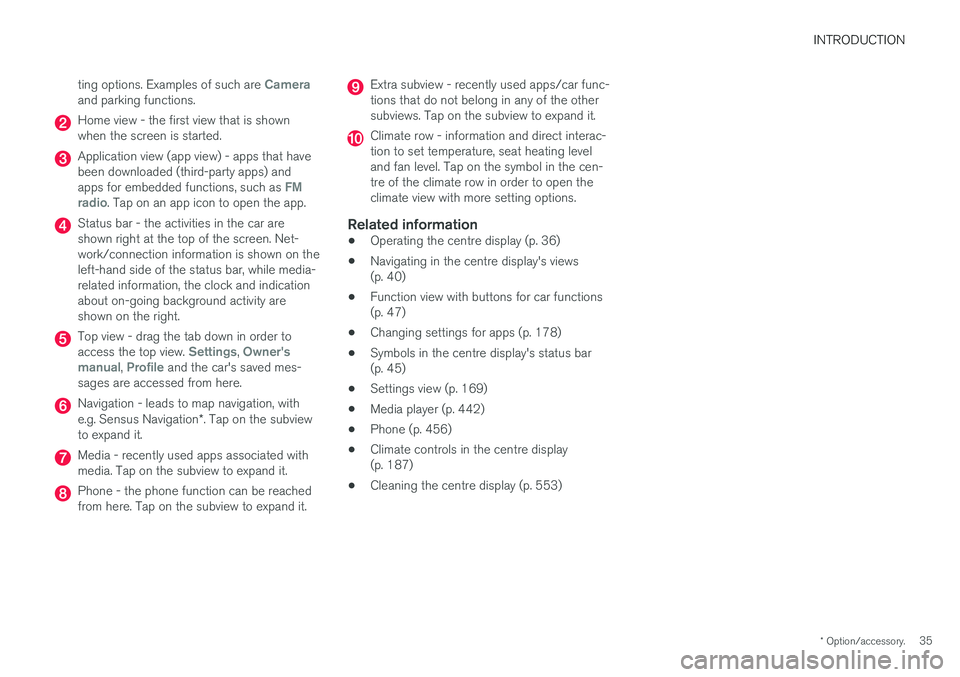
ting options. Examples of such are
Cameraand parking functions.
Home view - the first view that is shown when the screen is started.
Application view (app view) - apps that have been downloaded (third-party apps) and apps for embedded functions, such as
FM
radio. Tap on an app icon to open the app.
Status bar - the activities in the car are shown right at the top of the screen. Net-work/connection information is shown on theleft-hand side of the status bar, while media-related information, the clock and indicationabout on-going background activity areshown on the right.
Top view - drag the tab down in order to access the top view. Settings, Owner's
manual, Profile and the car's saved mes-
sages are accessed from here.
Navigation - leads to map navigation, with e.g. Sensus Navigation *. Tap on the subview
to expand it.
Media - recently used apps associated with media. Tap on the subview to expand it.
Phone - the phone function can be reached from here. Tap on the subview to expand it.
Extra subview - recently used apps/car func- tions that do not belong in any of the othersubviews. Tap on the subview to expand it.
Climate row - information and direct interac- tion to set temperature, seat heating leveland fan level. Tap on the symbol in the cen-tre of the climate row in order to open theclimate view with more setting options.
Related information
• Operating the centre display (p. 36)
• Navigating in the centre display's views(p. 40)
• Function view with buttons for car functions(p. 47)
• Changing settings for apps (p. 178)
• Symbols in the centre display's status bar(p. 45)
• Settings view (p. 169)
• Media player (p. 442)
• Phone (p. 456)
• Climate controls in the centre display(p. 187)
• Cleaning the centre display (p. 553)
Page 118 of 594
||
INSTRUMENTS AND CONTROLS
116
Related information
•Using voice recognition (p. 116)
• Voice recognition control of the phone (p. 118)
• Voice recognition control of radio and media(p. 118)
• Voice recognition control of climate control(p. 119)
• Voice recognition and map navigation(p. 120)
• Settings for voice recognition (p. 117)Using voice recognition 9
Basic instructions for using voice recognition control.
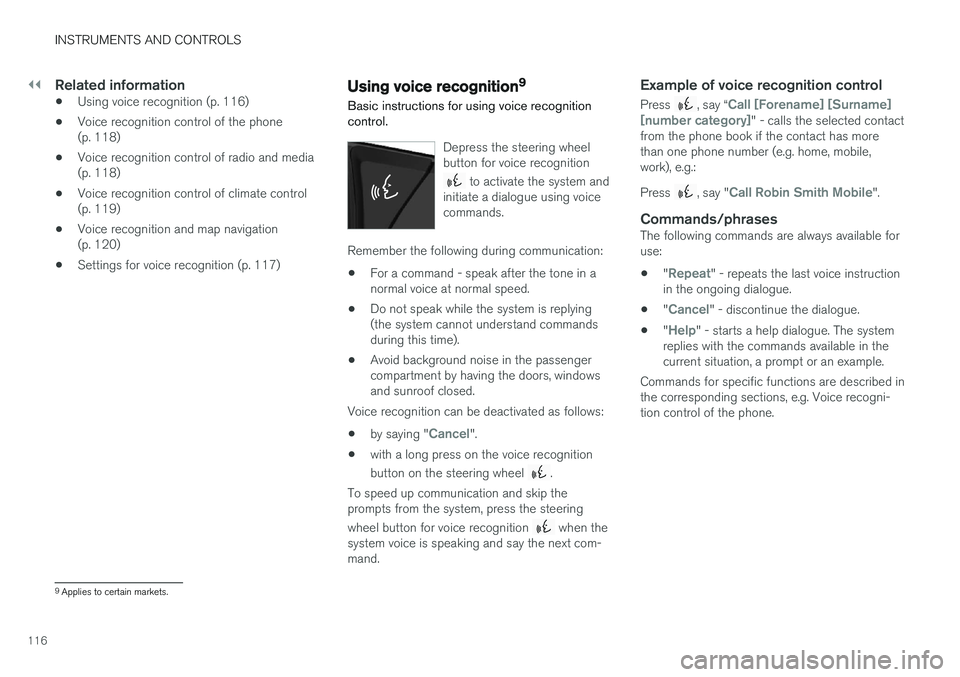
Depress the steering wheel button for voice recognition
to activate the system and
initiate a dialogue using voice commands.
Remember the following during communication:
• For a command - speak after the tone in a normal voice at normal speed.
• Do not speak while the system is replying(the system cannot understand commandsduring this time).
• Avoid background noise in the passengercompartment by having the doors, windowsand sunroof closed.
Voice recognition can be deactivated as follows:
• by saying "
Cancel".
• with a long press on the voice recognition button on the steering wheel
.
To speed up communication and skip the prompts from the system, press the steering wheel button for voice recognition
when the
system voice is speaking and say the next com- mand.
Example of voice recognition control
Press , say “Call [Forename] [Surname]
[number category]" - calls the selected contact
from the phone book if the contact has more than one phone number (e.g. home, mobile,work), e.g.: Press
, say "Call Robin Smith Mobile".
Commands/phrasesThe following commands are always available for use:
• "
Repeat" - repeats the last voice instruction
in the ongoing dialogue.
• "
Cancel" - discontinue the dialogue.
• "
Help" - starts a help dialogue. The system
replies with the commands available in the current situation, a prompt or an example.
Commands for specific functions are described inthe corresponding sections, e.g. Voice recogni-tion control of the phone.
9 Applies to certain markets.
Page 119 of 594
INSTRUMENTS AND CONTROLS
117
Digits
The number commands are stated differently depending on the function to be controlled: •Phone numbers and postcodes
must be
spoken individually, number by number, e.g. zero three one two two four four three(03122443).
• House numbers
can be spoken individually
or in groups, e.g. two two or twenty-two (22).For English and Dutch, several groups canbe said in sequence, e.g. twenty-two twenty-two (22 22). For English, double or triple canbe used, e.g. double zero (00). Numbers canbe given within the range 0-2300.
• Frequencies
can be spoken as ninety eight
point eight (98.8), a hundred and four pointtwo or hundred four point two (104.2).
Related information
• Voice recognition (p. 115)
• Voice recognition control of the phone(p. 118)
• Voice recognition control of radio and media(p. 118)
• Voice recognition control of climate control(p. 119)
• Voice recognition and map navigation(p. 120)
• Settings for voice recognition (p. 117)
Settings for voice recognition 10
Several settings for the voice recognition system can be made.
1. Press Settings in top view.
2. Press
SystemVoice Control and select
settings.
•
Repeat Voice Command
•Gender
•Speech Rate
Audio settings
1. Press Settings in top view.
2. Press
SoundSystem VolumesVoice
Control and select settings.
Change language
Voice recognition is not possible for all lan- guages. Languages available for voice recogni-tion are marked with an icon in the language list -
.
Changing the language also affects menu, mes- sage and help texts. 1. Press
Settings in top view.
2. Press
SystemSystem Language and
select language.
Related information
• Voice recognition (p. 115)
• Using voice recognition (p. 116)
• Voice recognition control of the phone (p. 118)
• Voice recognition control of radio and media(p. 118)
• Voice recognition control of climate control(p. 119)
• Voice recognition and map navigation(p. 120)
10
Applies to certain markets.
Page 120 of 594
INSTRUMENTS AND CONTROLS
* Option/accessory.
118
Voice recognition control of the phone 11
Command for voice recognition control of a Bluetooth-connected mobile phone to e.g. call acontact, a number, or to listen to a message.
To specify a contact in the phone book, the voice recognition command must include contact infor-mation that is entered in the phone book. If a contact, e.g.
Robyn Smith, has several phone
numbers then the number category can also be stated, e.g.
Home or Mobile: "Call Robin
Smith Mobile".
Tap on
and say one of the following com-
mands:
• "
Call [contact]" - dials the selected contact
from the phone book.
• "
Call [phone number]" - dials the phone
number.
• "
Recent calls" - displays the call list.
• "
Read message" - message is read out. If
there are several messages - select which message should be read out.
Related information
• Voice recognition (p. 115)
• Using voice recognition (p. 116)
• Settings for voice recognition (p. 117)
Voice recognition control of radio and media 12
Command for voice recognition control of radio and media player.
Tap on and say one of the following com-
mands:
• "
Media" - starts a dialogue for media and
radio and shows examples of commands.
• "
Play [artist]" - plays back music by the
selected artist.
• "
Play [song title]" - plays back the selected
song.
• "
Play [song title] from [album]" - plays
back the selected song from the selected album.
• "
Play [TV channel name]" - starts the
selected TV channel.
• "
Play [radio station]" - starts playing back
the selected radio channel.
• "
Tune to [frequency]" - starts the selected
radio frequency in the current frequency band. If no radio source is active, the FMband is started by default.
• "
Tune to [frequency] [wavelength]" -
starts the selected radio frequency in the selected frequency band. •
"
Radio" - starts FM radio.
• "
Radio FM" - starts FM radio.
• "
Radio AM" - starts AM radio.
• "
DAB " - starts DAB radio.
• "
TV" - starts playback from TV
*.
• "
CD" - starts playback from CD
*.
• "
USB" - starts playback from USB.
• "
iPod" - starts playback from iPod.
• "
Bluetooth" - starts playback from a Blue-
tooth-connected media source.
• "
Similar music" — plays back music similar
to the music currently playing back from USB devices.
Related information
• Voice recognition (p. 115)
• Using voice recognition (p. 116)
• Settings for voice recognition (p. 117)
11
Applies to certain markets.
12 Applies to certain markets.
Page 165 of 594
INSTRUMENTS AND CONTROLS
}}
* Option/accessory.163
mended that the programming for the buttons is deleted when the car is sold; see the section "Programming HomeLink
®
".
Related information
• Programming HomeLink ®
* (p. 163)
Programming HomeLink ®
*32
Instructions for programming HomeLink ®
.
Programming HomeLink ®
NOTE
In certain vehicles the ignition must be switched on or in "accessory position" before HomeLink
®
can be programmed or used.
Preferably fit new batteries in the remote con-trol that will be replaced by HomeLink ®
for
faster programming and improved transmis-sion of the radio signal. The HomeLink ®
but-
tons should be reset before programming,see the heading "Resetting the HomeLink ®
buttons". When the reset is complete,HomeLink ®
is set in "learn mode" and ready
for programming.
1. Press the 33
button on HomeLink ®
you want
to program. The indicator lamp 33
on
HomeLink ®
should flash yellow once per
second. It is not necessary to hold the button depressed. 2. Aim the remote control towards the
HomeLink ®
button to be programmed and
hold it 2-8 cm from the button. Do not obstruct the indicator lamp on HomeLink ®
.
Note: Some remote controls can program
HomeLink ®
better at a distance of
15-20 cm. Bear this in mind if you encounter problems during programming.
3. Press and hold the button on the original remote control to be programmed on HomeLink ®
and keep an eye on the indicator
lamp. Do not release the button until the indicator lamp has switched from flashingyellow once per second to either flashinggreen 10 times per second or illuminating ina constant green glow. The button on theremote control can be released once theindicator lamp flashes or illuminates in green. Note: For some receivers, programming step
3 may need to be replaced with the instruc- tions in step 4.
4. Press and release the button on the original remote control every other second until theindicator lamp has changed from flashingyellow once per second to either flashinggreen 10 times per second or illuminating ina constant green glow.
32Applies to certain markets.
33 See section "HomeLink ®
*" for the location of buttons and indicator lamp.
Page 171 of 594
INSTRUMENTS AND CONTROLS
}}
169
1.
Press
Settings in the top view.
2. Press
SystemUnits.
3. Under
Units of Measurement, select the
required unit standard: Metric, Imperial orUS.
Related information
• Trip computer (p. 165)
• Show trip data in the driver display (p. 166)
Settings view
Settings and information for many of the car's
functions can be managed in the centre dis- play's settings view.
Opening/closing and navigating in the
settings view
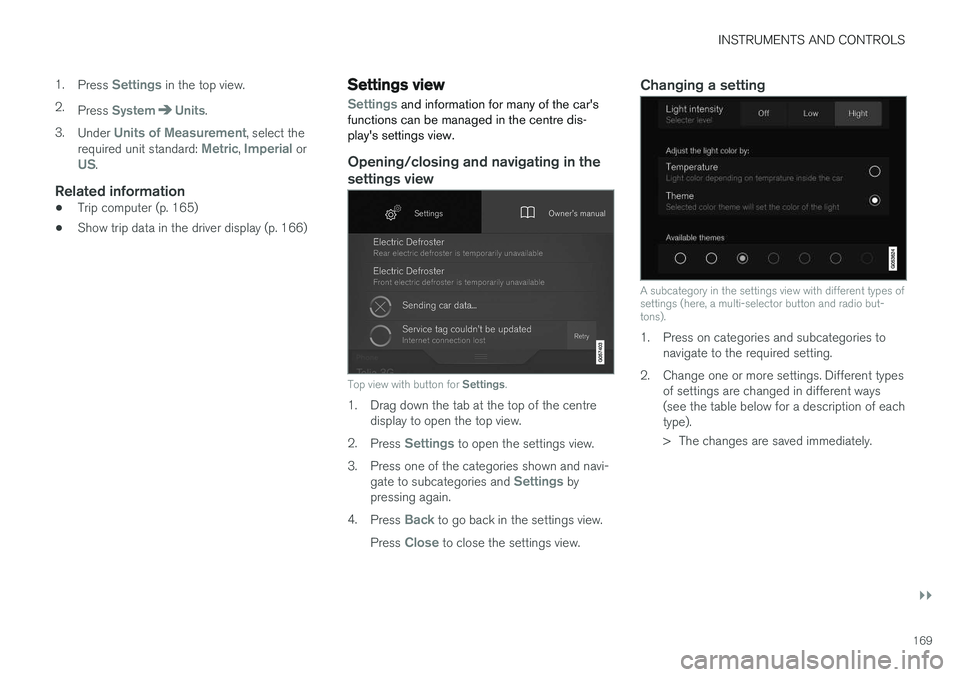
Top view with button for Settings.
1. Drag down the tab at the top of the centre
display to open the top view.
2. Press
Settings to open the settings view.
3. Press one of the categories shown and navi- gate to subcategories and
Settings by
pressing again.
4. Press
Back to go back in the settings view.
Press
Close to close the settings view.
Changing a setting
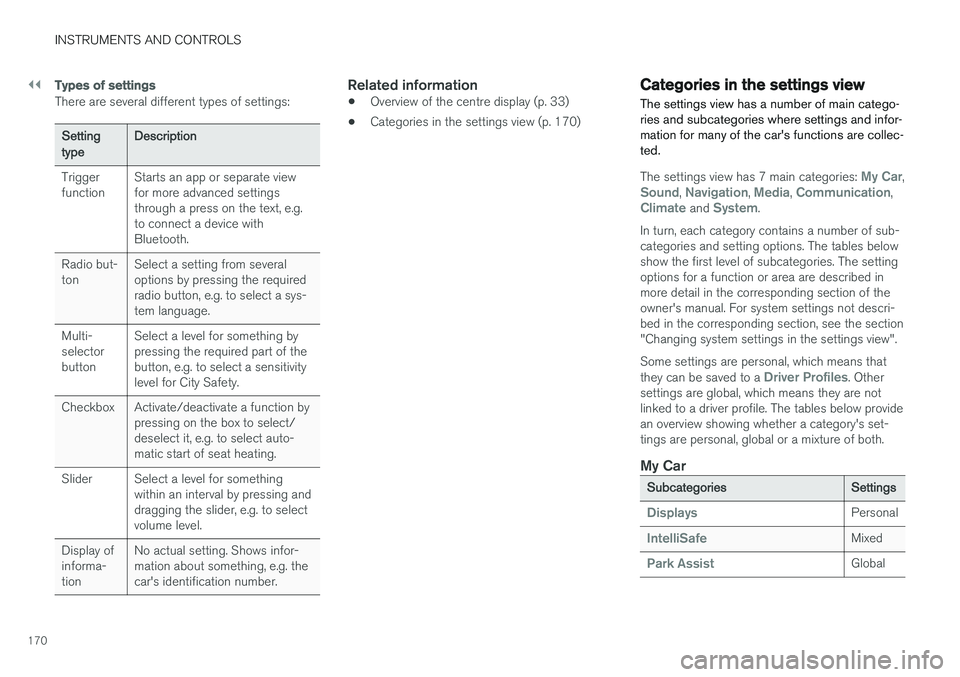
A subcategory in the settings view with different types of settings (here, a multi-selector button and radio but-tons).
1. Press on categories and subcategories to navigate to the required setting.
2. Change one or more settings. Different types of settings are changed in different ways (see the table below for a description of eachtype).
> The changes are saved immediately.
Page 172 of 594
||
INSTRUMENTS AND CONTROLS
170
Types of settings
There are several different types of settings:
Setting typeDescription
Trigger function Starts an app or separate viewfor more advanced settingsthrough a press on the text, e.g.to connect a device withBluetooth.
Radio but-ton Select a setting from severaloptions by pressing the requiredradio button, e.g. to select a sys-tem language.
Multi-selectorbutton Select a level for something bypressing the required part of thebutton, e.g. to select a sensitivitylevel for City Safety.
Checkbox Activate/deactivate a function by pressing on the box to select/deselect it, e.g. to select auto-matic start of seat heating.
Slider Select a level for something within an interval by pressing anddragging the slider, e.g. to selectvolume level.
Display ofinforma-tion No actual setting. Shows infor-mation about something, e.g. thecar's identification number.
Related information
•
Overview of the centre display (p. 33)
• Categories in the settings view (p. 170)
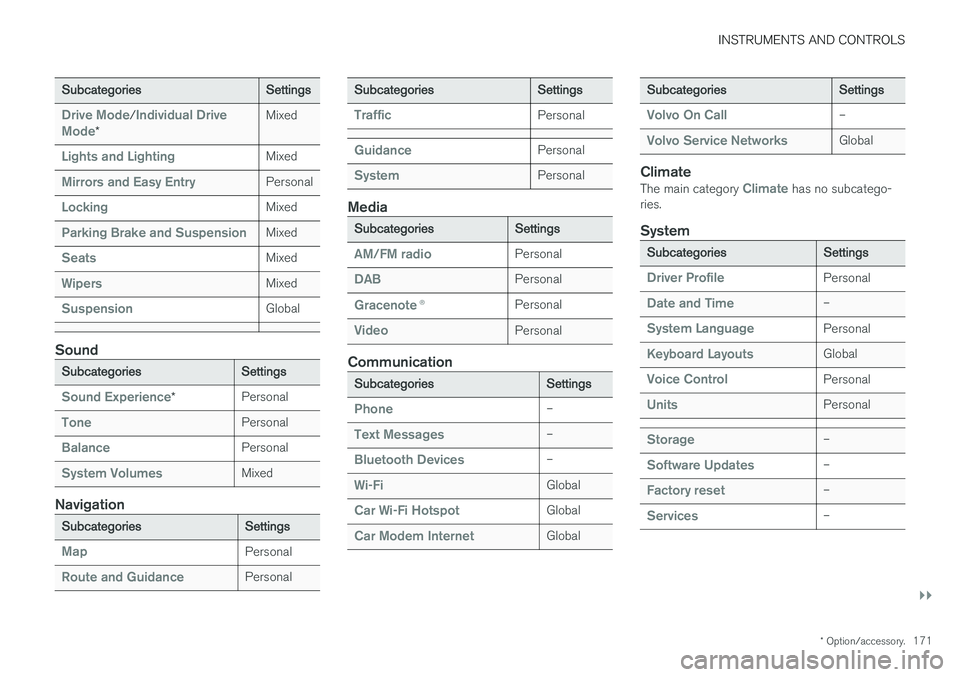
Categories in the settings view The settings view has a number of main catego- ries and subcategories where settings and infor-mation for many of the car's functions are collec-ted.
The settings view has 7 main categories: My Car,Sound, Navigation, Media, Communication,Climate and System.
In turn, each category contains a number of sub- categories and setting options. The tables belowshow the first level of subcategories. The settingoptions for a function or area are described inmore detail in the corresponding section of theowner's manual. For system settings not descri-bed in the corresponding section, see the section"Changing system settings in the settings view". Some settings are personal, which means that they can be saved to a
Driver Profiles. Other
settings are global, which means they are not linked to a driver profile. The tables below providean overview showing whether a category's set-tings are personal, global or a mixture of both.
My Car
Subcategories Settings
DisplaysPersonal
IntelliSafeMixed
Park AssistGlobal
Page 173 of 594
INSTRUMENTS AND CONTROLS
}}
* Option/accessory.171
Subcategories Settings
Drive Mode/Individual Drive
Mode* Mixed
Lights and LightingMixed
Mirrors and Easy EntryPersonal
LockingMixed
Parking Brake and SuspensionMixed
SeatsMixed
WipersMixed
SuspensionGlobal
Sound
Subcategories
Settings
Sound Experience*Personal
TonePersonal
BalancePersonal
System VolumesMixed
Navigation
Subcategories
Settings
MapPersonal
Route and GuidancePersonal
SubcategoriesSettings
TrafficPersonal
GuidancePersonal
SystemPersonal
Media
SubcategoriesSettings
AM/FM radioPersonal
DABPersonal
Gracenote®Personal
VideoPersonal
Communication
Subcategories Settings
Phone–
Text Messages–
Bluetooth Devices–
Wi-FiGlobal
Car Wi-Fi HotspotGlobal
Car Modem InternetGlobal
SubcategoriesSettings
Volvo On Call–
Volvo Service NetworksGlobal
ClimateThe main category Climate has no subcatego-
ries.
System
Subcategories Settings
Driver ProfilePersonal
Date and Time–
System LanguagePersonal
Keyboard LayoutsGlobal
Voice ControlPersonal
UnitsPersonal
Storage–
Software Updates–
Factory reset–
Services–
Page 180 of 594
||
INSTRUMENTS AND CONTROLS
178If the import fails, it may be due to the following:
• The USB memory is incorrectly inserted or was pulled out during the import.
• There is no driver profile saved on the USBmemory.
• The file for the driver profile on the USBmemory is corrupt.
Related information
• Driver profiles (p. 174)
Changing settings for apps
All of the car's apps are listed in the app view. The app settings that relate to the car's embed-ded functions can be changed from the centredisplay's top view.
Apps for embedded functions - basic
apps
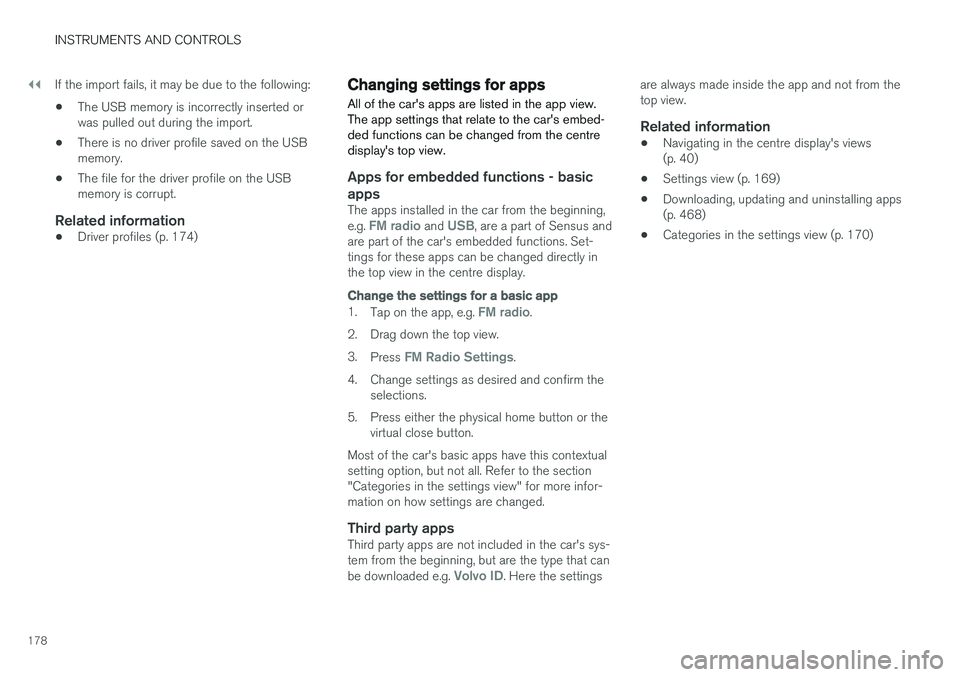
The apps installed in the car from the beginning, e.g. FM radio and USB, are a part of Sensus and
are part of the car's embedded functions. Set- tings for these apps can be changed directly inthe top view in the centre display.
Change the settings for a basic app
1. Tap on the app, e.g. FM radio.
2. Drag down the top view. 3. Press
FM Radio Settings.
4. Change settings as desired and confirm the selections.
5. Press either the physical home button or the virtual close button.
Most of the car's basic apps have this contextual setting option, but not all. Refer to the section"Categories in the settings view" for more infor-mation on how settings are changed.
Third party appsThird party apps are not included in the car's sys-tem from the beginning, but are the type that can be downloaded e.g.
Volvo ID. Here the settings are always made inside the app and not from the top view.
Related information
•
Navigating in the centre display's views(p. 40)
• Settings view (p. 169)
• Downloading, updating and uninstalling apps(p. 468)
• Categories in the settings view (p. 170)