CD player VOLVO V90 2018 Owner´s Manual
[x] Cancel search | Manufacturer: VOLVO, Model Year: 2018, Model line: V90, Model: VOLVO V90 2018Pages: 656, PDF Size: 11.78 MB
Page 477 of 656
AUDIO, MEDIA AND INTERNET
* Option/accessory.475
4. Tap one of the divisions to display:
•
In progress: play-by-play information
about a match/game/tournament cur- rently in progress. Continue tapping todisplay. In the detailed view, you can alsoselect a radio station that is currentlybroadcasting an ongoing sporting event
•
Headlines for MLB: Tap to display brief
headline information
•
Scheduled: schedules for coming
matches, games, etc.
•
Scores: match/game results
The same principle applies to all sports.
Related information
• SiriusXM Travel Link ®
* (p. 470)
• SiriusXM Travel Link ®
* - Notifications
(p. 472)
• SiriusXM Travel Link ®
* - Fuel (p. 473)
• SiriusXM Travel Link ®
* - Weather (p. 471)
Media player
The media player can play audio from the CD player * and from external audio sources con-
nected via USB port or Bluetooth. It can also play video format via the USB port.
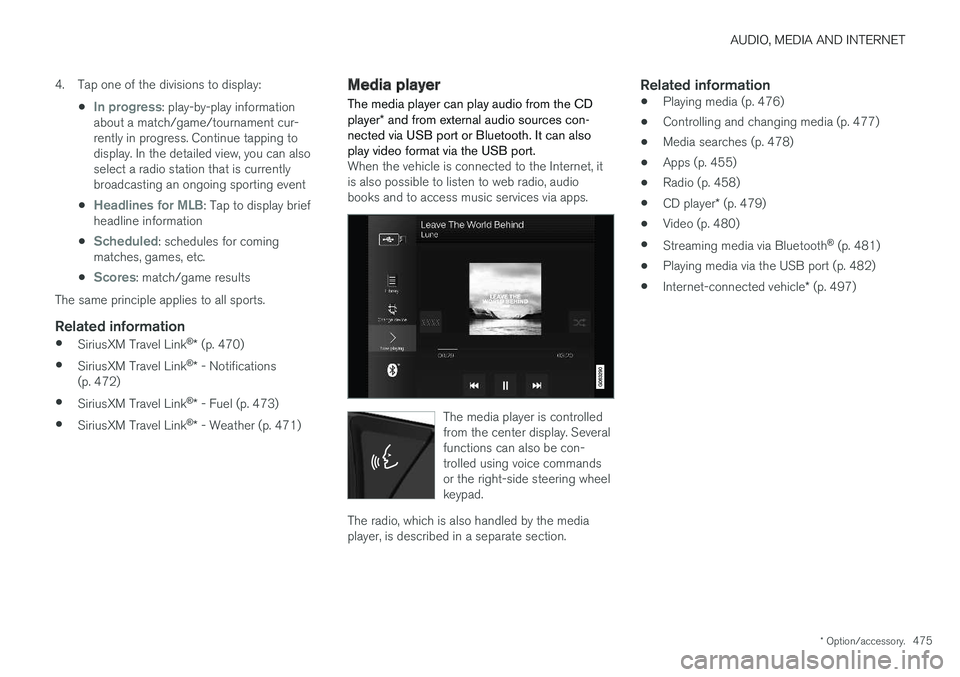
When the vehicle is connected to the Internet, it is also possible to listen to web radio, audiobooks and to access music services via apps.
The media player is controlled from the center display. Severalfunctions can also be con-trolled using voice commandsor the right-side steering wheelkeypad.
The radio, which is also handled by the media player, is described in a separate section.
Related information
• Playing media (p. 476)
• Controlling and changing media (p. 477)
• Media searches (p. 478)
• Apps (p. 455)
• Radio (p. 458)
• CD player
* (p. 479)
• Video (p. 480)
• Streaming media via Bluetooth ®
(p. 481)
• Playing media via the USB port (p. 482)
• Internet-connected vehicle
* (p. 497)
Page 478 of 656
AUDIO, MEDIA AND INTERNET
* Option/accessory.
476
Playing media The media player is controlled from the center display. Several other functions can also be con-trolled using the right-side steering wheel key-pad or by using voice commands. The radio can also be controlled in the media player. See the section describing the radio.
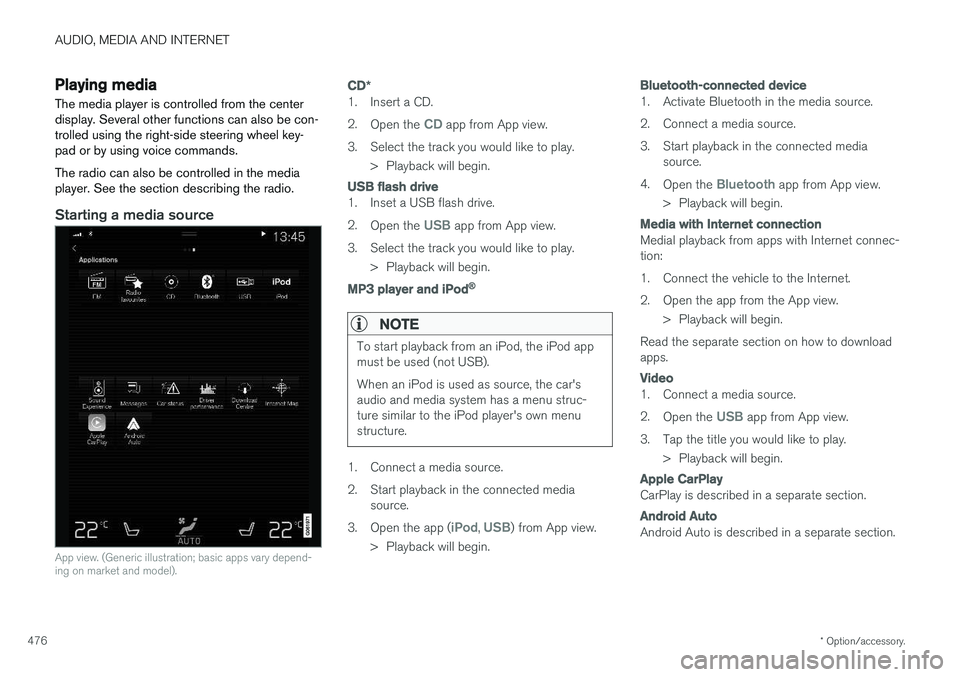
Starting a media source
App view. (Generic illustration; basic apps vary depend- ing on market and model).
CD *
1. Insert a CD. 2.
Open the
CD app from App view.
3. Select the track you would like to play. > Playback will begin.
USB flash drive
1. Inset a USB flash drive. 2.Open the
USB app from App view.
3. Select the track you would like to play. > Playback will begin.
MP3 player and iPod®
NOTE
To start playback from an iPod, the iPod app must be used (not USB). When an iPod is used as source, the car's audio and media system has a menu struc-ture similar to the iPod player's own menustructure.
1. Connect a media source.
2. Start playback in the connected mediasource.
3. Open the app (
iPod, USB) from App view.
> Playback will begin.
Bluetooth-connected device
1. Activate Bluetooth in the media source.
2. Connect a media source.
3. Start playback in the connected media source.
4. Open the
Bluetooth app from App view.
> Playback will begin.
Media with Internet connection
Medial playback from apps with Internet connec- tion:
1. Connect the vehicle to the Internet.
2. Open the app from the App view. > Playback will begin.
Read the separate section on how to download apps.
Video
1. Connect a media source. 2. Open the
USB app from App view.
3. Tap the title you would like to play. > Playback will begin.
Apple CarPlay
CarPlay is described in a separate section.
Android Auto
Android Auto is described in a separate section.
Page 479 of 656
AUDIO, MEDIA AND INTERNET
}}
* Option/accessory.477
Related information
•Handling the App menu in the instrument panel (p. 105)
• Radio (p. 458)
• Controlling and changing media (p. 477)
• Connecting a device via the USB port(p. 482)
• Connecting a device via Bluetooth ®
(p. 481)
• Download apps (p. 456)
• Internet-connected vehicle
* (p. 497)
• Video (p. 480)
• Apple ®
CarPlay ®
* (p. 483)
• Android Auto
* (p. 486)
• Voice control for radio and media (p. 150)
• Compatible file formats for media (p. 504)
Controlling and changing media
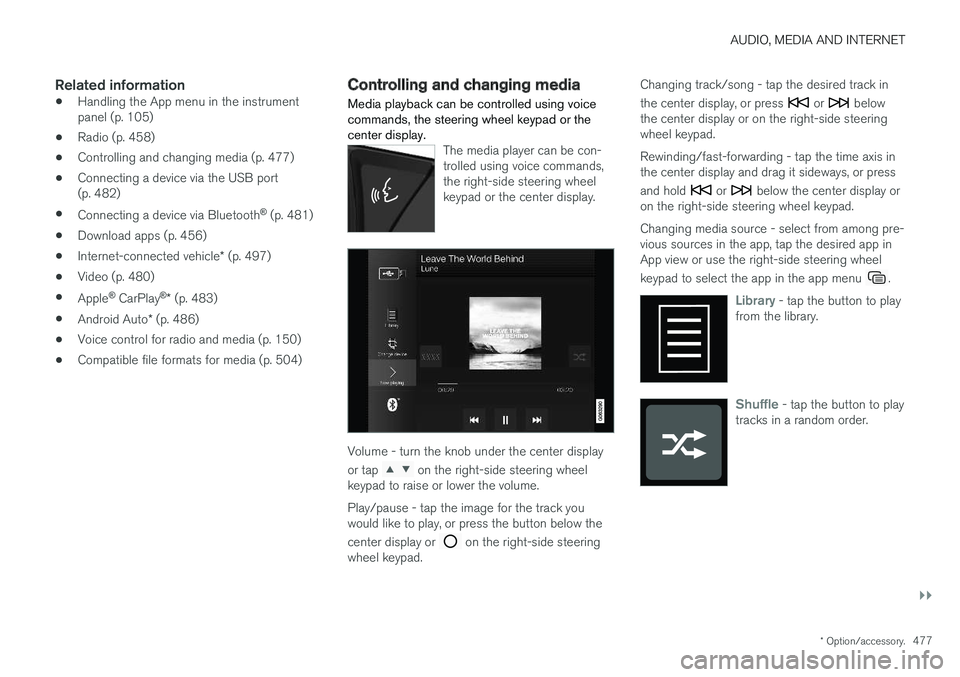
Media playback can be controlled using voice commands, the steering wheel keypad or thecenter display.
The media player can be con- trolled using voice commands,the right-side steering wheelkeypad or the center display.
Volume - turn the knob under the center display or tap
on the right-side steering wheel
keypad to raise or lower the volume. Play/pause - tap the image for the track you would like to play, or press the button below the center display or
on the right-side steering
wheel keypad. Changing track/song - tap the desired track in the center display, or press
or below
the center display or on the right-side steering wheel keypad. Rewinding/fast-forwarding - tap the time axis in the center display and drag it sideways, or press and hold
or below the center display or
on the right-side steering wheel keypad. Changing media source - select from among pre- vious sources in the app, tap the desired app inApp view or use the right-side steering wheel keypad to select the app in the app menu
.
Library - tap the button to play
from the library.
Shuffle - tap the button to play
tracks in a random order.
Page 480 of 656
||
AUDIO, MEDIA AND INTERNET
* Option/accessory.
478
Similar - tap the button to use
Gracenote to search for similar music on the USB device andcreate a playlist from the musicfound. The playlist can containup to 50 tracks.
Change device - tap the but-
ton to toggle between USB devices when more than one isconnected.
Related information
• Media player (p. 475)
• Media searches (p. 478)
• Sound settings (p. 454)
• Apps (p. 455)
• Gracenote ®
(p. 479)
• Voice control for radio and media (p. 150)
Media searches
Searches can be performed to locate a specific artist, composer, song title, album, video, audiobook or playlist. If the vehicle is connected to theInternet, it is also possible to search for pod-casts (online digital media).
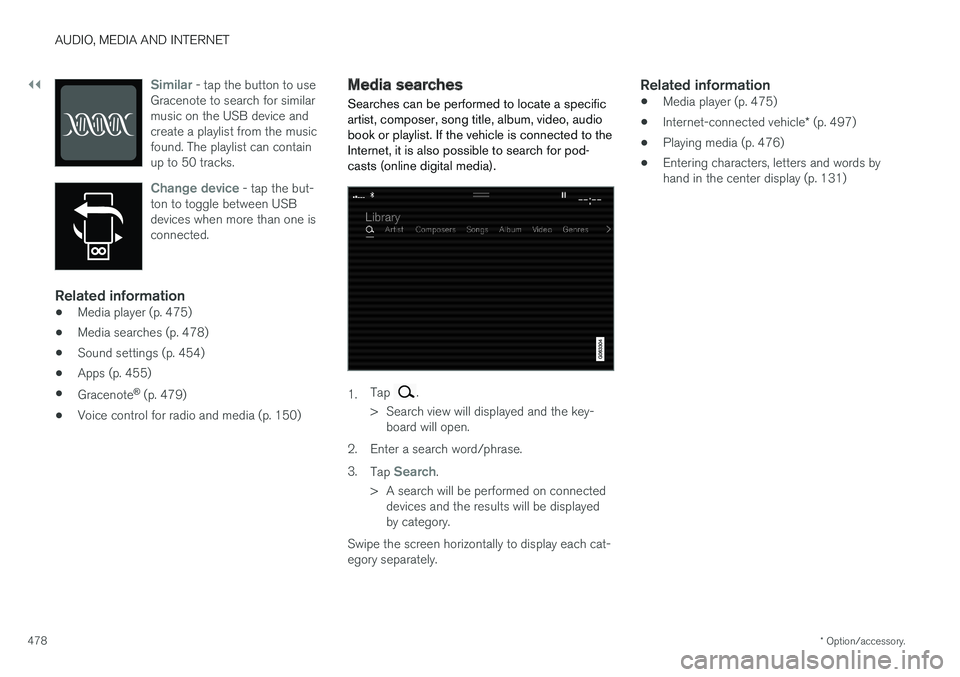
1. Tap .
> Search view will displayed and the key- board will open.
2. Enter a search word/phrase. 3. Tap
Search.
> A search will be performed on connected devices and the results will be displayed by category.
Swipe the screen horizontally to display each cat-egory separately.
Related information
• Media player (p. 475)
• Internet-connected vehicle
* (p. 497)
• Playing media (p. 476)
• Entering characters, letters and words byhand in the center display (p. 131)
Page 481 of 656
AUDIO, MEDIA AND INTERNET
* Option/accessory.479
Gracenote®
Gracenote identifies artists, albums, tracks and any associated images that can be displayedduring playback.
Gracenote MusicID ®
is a standard for music rec-
ognition. 1. Tap
Settings in the Top view.
2. Tap
MediaGracenote ®.
3. Choose settings for Gracenote data:
•
Gracenote ®
Online Search - search
Gracenote's online database for currently playing media.
•
Gracenote ® Multiple Results - select how
Gracenote data should be displayed if there are multiple search results.
1 - the file's original data will be used. 2 - Gracenote data will be used.3 - Gracenote or original data can be selected.
•
None - no result will be displayed.
Updating GracenoteThe contents of the Gracenote database are con- tinuously updated. For optimal functionality,update to the latest version. Seesupport.volvocars.com for information and down-loads.
Related information
• Playing media (p. 476)
• License agreement for audio and media(p. 507)
CD player
*
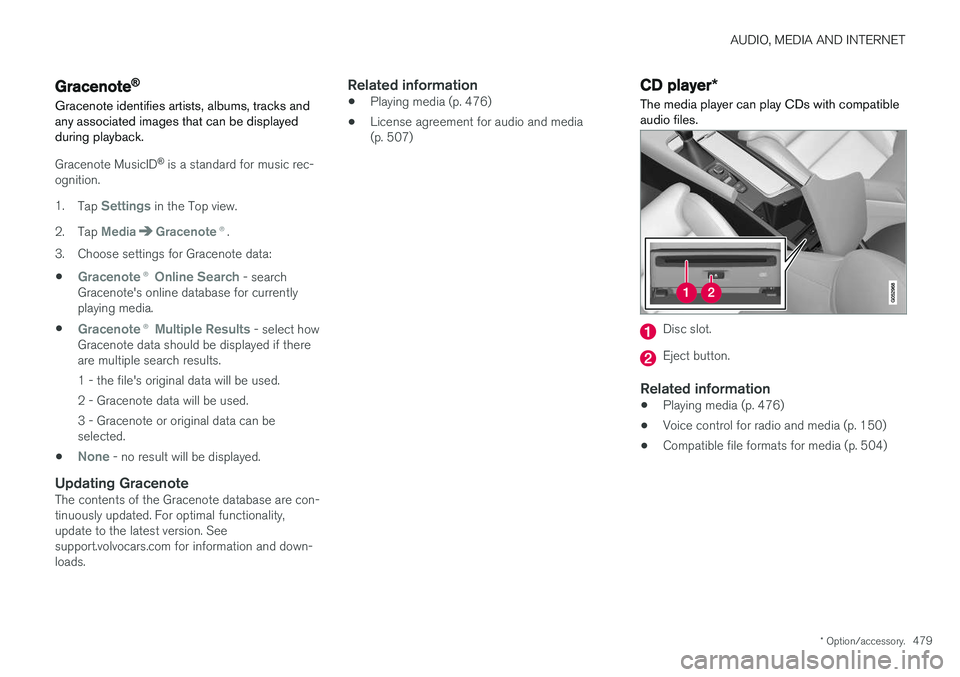
The media player can play CDs with compatible audio files.
Disc slot.
Eject button.
Related information
• Playing media (p. 476)
• Voice control for radio and media (p. 150)
• Compatible file formats for media (p. 504)
Page 482 of 656
AUDIO, MEDIA AND INTERNET
480
Video
The media player can play videos from USB- connected devices.
Video is not available when the vehicle is moving; only audio will be played. Video will resume whenthe vehicle is stationary. Information on compatible media formats is provi- ded in a separate section.
Related information
• Playing video (p. 480)
• Playing DivX ®
(p. 480)
• Video settings (p. 481)
• Compatible file formats for media (p. 504)
Playing video
The
USB app in App view is used to play videos.1. Connecting media source (USB device). 2. Open the
USB app from App view.
3. Tap the title you would like to play. > Playback will begin.
Related information
• Video (p. 480)
• Playing DivX ®
(p. 480)
• Video settings (p. 481)
• Compatible file formats for media (p. 504)
Playing DivX®
The DivX Certified ®
device must be registered to
play purchased DivX video-on-demand (VOD) movies.
1. Tap Settings in the Top view.
2. Tap
VideoDivX ® VOD to get a registra-
tion code.
3. Go to vod.divx.com for more information and to complete the registration process.
Related information
• Video (p. 480)
• Playing video (p. 480)
• Video settings (p. 481)
• Compatible file formats for media (p. 504)
Page 483 of 656
AUDIO, MEDIA AND INTERNET
481
Video settingsSome video playback settings can be adjusted, e.g. language.
The following can be adjusted by opening Top view and tapping
SettingsVideo or with the
video player in full-screen mode: Audio
Language, Off and Subtitle Language.
Related information
• Video (p. 480)
Streaming media via Bluetooth®
The vehicle's media player is equipped with Bluetooth and can play audio files fromBluetooth-enabled external devices such as cel-lular phones and tablets.
In order for the media player to be able to wire- lessly play audio files from an external device, thedevice must be connected to the vehicle viaBluetooth.
Related information
• Connecting a device via Bluetooth ®
(p. 481)
• Connecting a phone to the car via Bluetoothfor the first time (p. 489)
• Playing media (p. 476)
• Compatible file formats for media (p. 504)
Connecting a device via Bluetooth®
Connect a Bluetooth ®
device to the vehicle to
wirelessly play media and give the vehicle an Internet connection if it is available.
Many cellular phones on the market currently offer wireless Bluetooth ®
technology, but not all
phones are fully compatible with the vehicle. For additional information on compatibility, seesupport.volvocars.com. The procedure for connecting a media device is the same as for connecting a cellular phone to the vehicle via Bluetooth ®
.
Related information
• Streaming media via Bluetooth ®
(p. 481)
• Connecting a phone to the car via Bluetooth for the first time (p. 489)
• Playing media (p. 476)
Page 484 of 656

AUDIO, MEDIA AND INTERNET
* Option/accessory.
482
Playing media via the USB port External audio sources, such as an iPod ® or
MP3 player, can be connected to the audio sys- tem via the vehicle's USB port.
Devices with rechargeable batteries can be charged when they are connected via the USB port and the ignition is in mode I, II or the engine
is running. The content on the external source can be read faster if it only contains data of a compatible for-mat. Video files can also be played via the USBport. Some MP3 players have their own file system that the vehicle has support for.
Related information
• Connecting a device via the USB port(p. 482)
• Playing media (p. 476)
• Video (p. 480)
• Ignition modes (p. 403)
• Technical specifications for USB devices(p. 505)
• Apple ®
CarPlay ®
* (p. 483)
• Android Auto
* (p. 486)
Connecting a device via the USBport
External audio sources, such as an iPod ®
or
MP3 player, can be connected to the audio sys- tem via any of the vehicle's USB ports.
If the vehicle has two USB ports, the phone must be connected to the port with the white frame to use Apple CarPlay * or Android Auto *.
USB ports (type A) in the tunnel console. Route the cable forward to help avoid pinching when the cover isclosed.
Related information
• Playing media (p. 476)
• Playing media via the USB port (p. 482)
• Media player (p. 475)
• Technical specifications for USB devices (p. 505) •
Technical specifications for USB devices(p. 505)
• Apple ®
CarPlay ®
* (p. 483)
• Android Auto
* (p. 486)
Page 488 of 656
AUDIO, MEDIA AND INTERNET
* Option/accessory.
486
Android Auto *
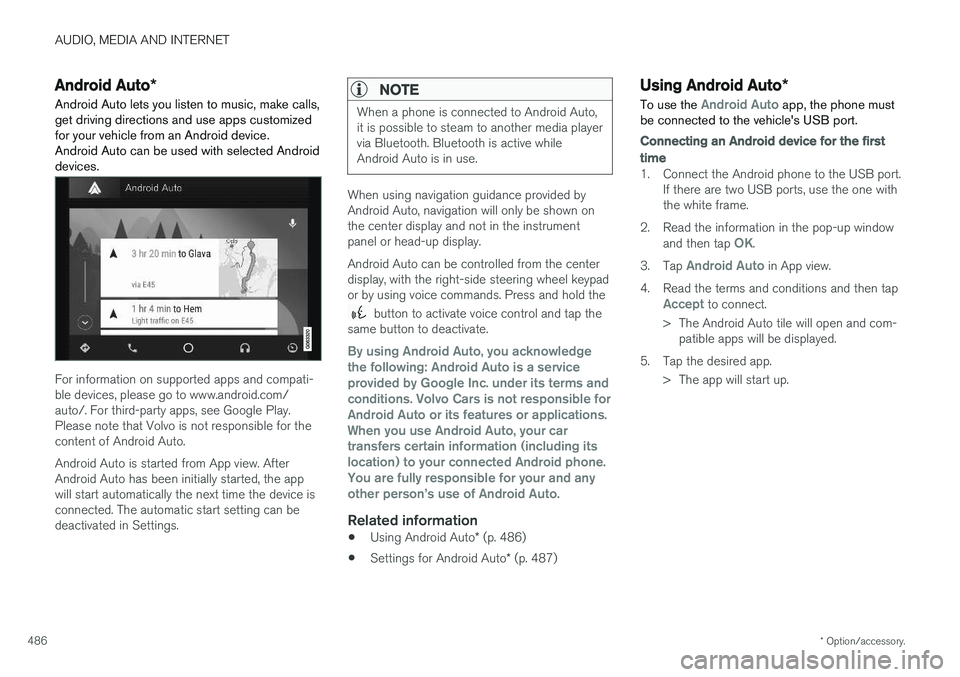
Android Auto lets you listen to music, make calls, get driving directions and use apps customizedfor your vehicle from an Android device.Android Auto can be used with selected Androiddevices.
For information on supported apps and compati- ble devices, please go to www.android.com/auto/. For third-party apps, see Google Play.Please note that Volvo is not responsible for thecontent of Android Auto. Android Auto is started from App view. After Android Auto has been initially started, the appwill start automatically the next time the device isconnected. The automatic start setting can bedeactivated in Settings.
NOTE
When a phone is connected to Android Auto, it is possible to steam to another media playervia Bluetooth. Bluetooth is active whileAndroid Auto is in use.
When using navigation guidance provided by Android Auto, navigation will only be shown onthe center display and not in the instrumentpanel or head-up display. Android Auto can be controlled from the center display, with the right-side steering wheel keypador by using voice commands. Press and hold the
button to activate voice control and tap the
same button to deactivate.
By using Android Auto, you acknowledge the following: Android Auto is a serviceprovided by Google Inc. under its terms andconditions. Volvo Cars is not responsible forAndroid Auto or its features or applications.When you use Android Auto, your cartransfers certain information (including itslocation) to your connected Android phone.You are fully responsible for your and anyother person
Page 490 of 656
AUDIO, MEDIA AND INTERNET
* Option/accessory.
488
Tips for using Android Auto *
Here are some useful tips for when you use Android Auto.
• Ensure that your apps are updated.
• When starting the car, wait until the center display has started, connect the phone andthen open Android Auto from the app view.
• In the event of problems with Android Auto,disconnect your Android phone from theUSB port and then reconnect via USB. Oth-erwise, try closing the app on the phone andthen restarting the app.
• When a phone is connected to Android Autoit is still possible to playback media viaBluetooth to another media player. TheBluetooth function is on when Android Autois used.
Related information
•
Android Auto
* (p. 486)
Phone
A phone equipped with Bluetooth can be wire- lessly connected to the vehicle's integratedhands-free system.
The audio and media system offers hands-free functionality for remotely controlling a number ofthe phone's features. The phone's integratedcontrols can also be used, even when it is con-nected to the vehicle. When the phone has been paired and connected to the vehicle, it can be used as an Internet con-nection or to make or receive calls, send orreceive text messages or wirelessly play music.
The phone is controlled fromthe center display but the Appmenu (accessed using theright-side steering wheel key-pad) and voice commands canalso be used to control certainfunctions.
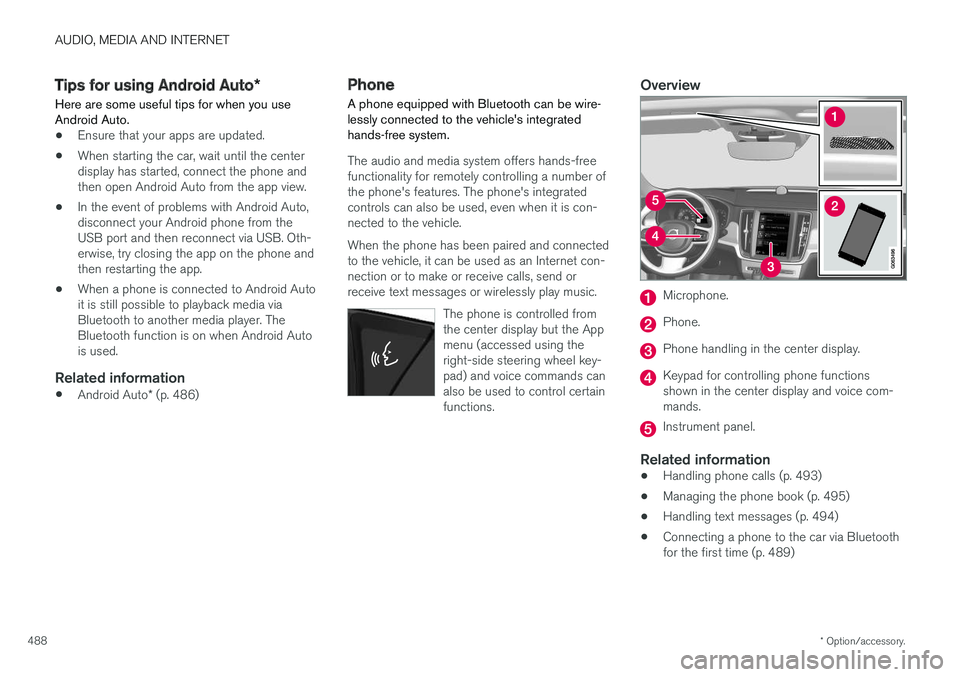
Overview
Microphone.
Phone.
Phone handling in the center display.
Keypad for controlling phone functions shown in the center display and voice com-mands.
Instrument panel.
Related information
•Handling phone calls (p. 493)
• Managing the phone book (p. 495)
• Handling text messages (p. 494)
• Connecting a phone to the car via Bluetooth for the first time (p. 489)