automatic transmission VOLVO V90 2018 Owner´s Manual
[x] Cancel search | Manufacturer: VOLVO, Model Year: 2018, Model line: V90, Model: VOLVO V90 2018Pages: 656, PDF Size: 11.78 MB
Page 419 of 656
STARTING AND DRIVING
}}
417
Shiftlock The automatic transmission's shiftlock function helps prevent inadvertently moving the gearselector between different positions.
There are two types of shiftlocks: mechanical and automatic.
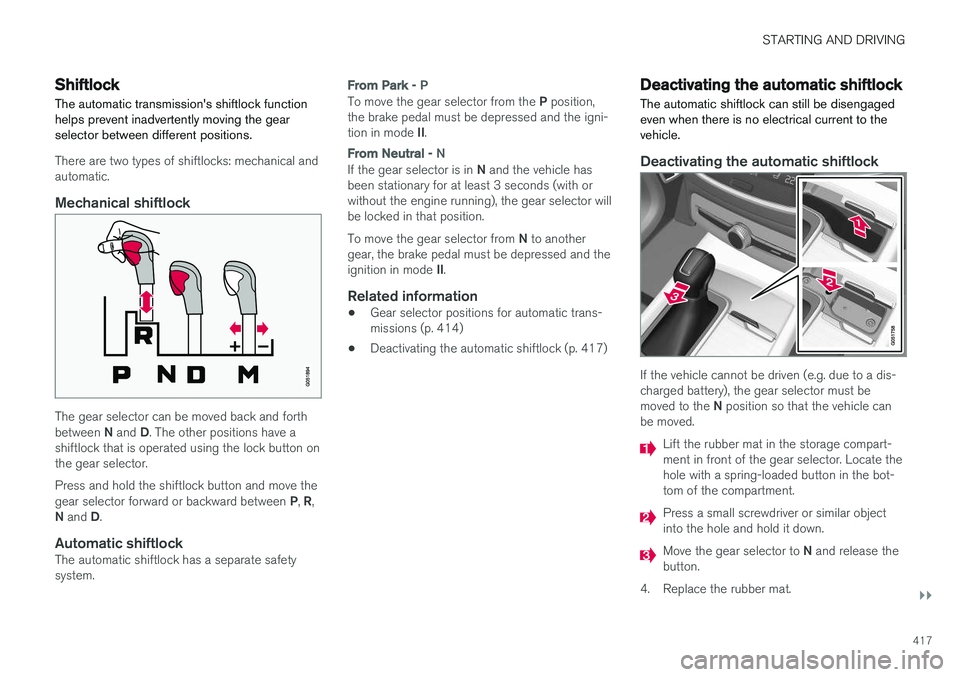
Mechanical shiftlock
The gear selector can be moved back and forth between N and D. The other positions have a
shiftlock that is operated using the lock button on the gear selector. Press and hold the shiftlock button and move the gear selector forward or backward between P, R ,
N and D.
Automatic shiftlockThe automatic shiftlock has a separate safety system.
From Park - P
To move the gear selector from the P position,
the brake pedal must be depressed and the igni- tion in mode II.
From Neutral - N
If the gear selector is in N and the vehicle has
been stationary for at least 3 seconds (with or without the engine running), the gear selector willbe locked in that position. To move the gear selector from N to another
gear, the brake pedal must be depressed and the ignition in mode II.
Related information
• Gear selector positions for automatic trans- missions (p. 414)
• Deactivating the automatic shiftlock (p. 417)
Deactivating the automatic shiftlock
The automatic shiftlock can still be disengaged even when there is no electrical current to thevehicle.
Deactivating the automatic shiftlock
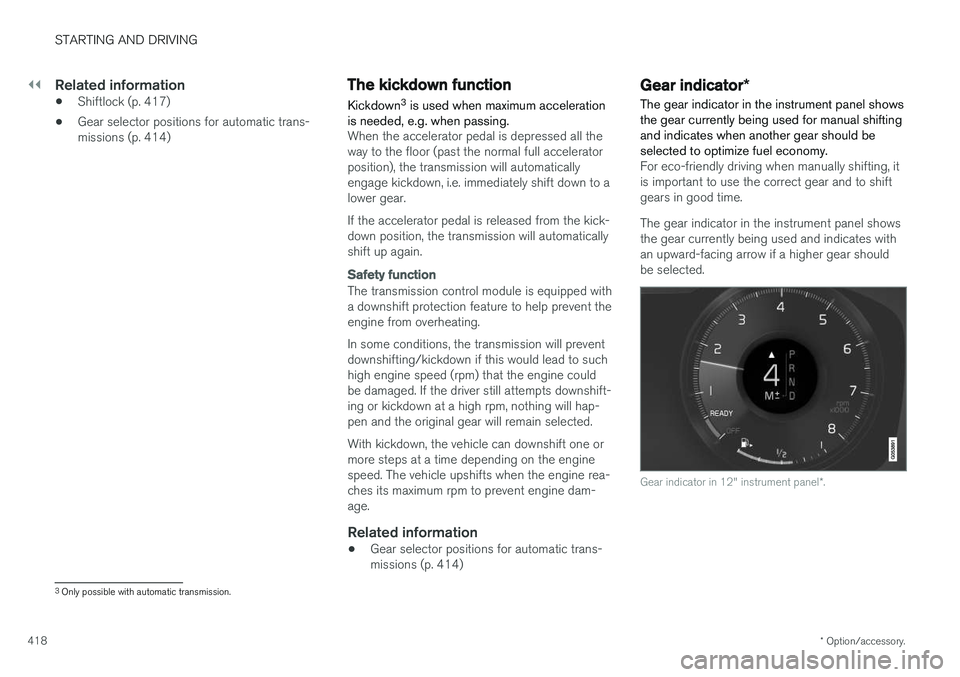
If the vehicle cannot be driven (e.g. due to a dis- charged battery), the gear selector must be moved to the N position so that the vehicle can
be moved.
Lift the rubber mat in the storage compart- ment in front of the gear selector. Locate thehole with a spring-loaded button in the bot-tom of the compartment.
Press a small screwdriver or similar object into the hole and hold it down.
Move the gear selector to N and release the
button.
4. Replace the rubber mat.
Page 420 of 656
||
STARTING AND DRIVING
* Option/accessory.
418
Related information
• Shiftlock (p. 417)
• Gear selector positions for automatic trans- missions (p. 414)
The kickdown function
Kickdown 3
is used when maximum acceleration
is needed, e.g. when passing.
When the accelerator pedal is depressed all the way to the floor (past the normal full acceleratorposition), the transmission will automaticallyengage kickdown, i.e. immediately shift down to alower gear. If the accelerator pedal is released from the kick- down position, the transmission will automaticallyshift up again.
Safety function
The transmission control module is equipped with a downshift protection feature to help prevent theengine from overheating. In some conditions, the transmission will prevent downshifting/kickdown if this would lead to suchhigh engine speed (rpm) that the engine couldbe damaged. If the driver still attempts downshift-ing or kickdown at a high rpm, nothing will hap-pen and the original gear will remain selected. With kickdown, the vehicle can downshift one or more steps at a time depending on the enginespeed. The vehicle upshifts when the engine rea-ches its maximum rpm to prevent engine dam-age.
Related information
• Gear selector positions for automatic trans- missions (p. 414)
Gear indicator
*
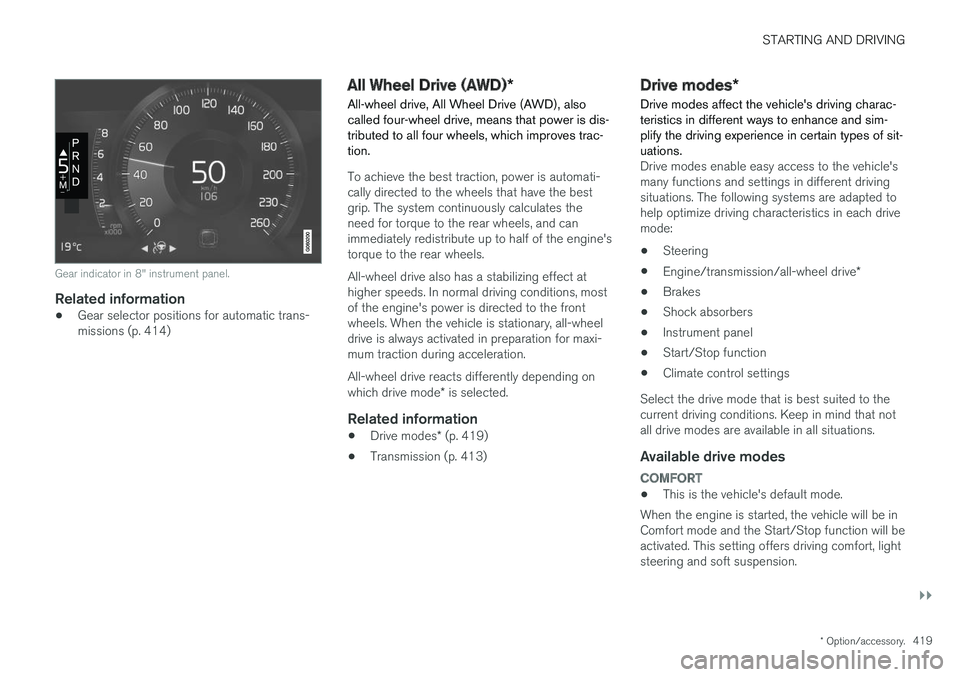
The gear indicator in the instrument panel shows the gear currently being used for manual shiftingand indicates when another gear should beselected to optimize fuel economy.
For eco-friendly driving when manually shifting, it is important to use the correct gear and to shiftgears in good time. The gear indicator in the instrument panel shows the gear currently being used and indicates withan upward-facing arrow if a higher gear shouldbe selected.
Gear indicator in 12" instrument panel *.
3
Only possible with automatic transmission.
Page 421 of 656
STARTING AND DRIVING
}}
* Option/accessory.419
Gear indicator in 8" instrument panel.
Related information
•Gear selector positions for automatic trans- missions (p. 414)
All Wheel Drive (AWD)
*
All-wheel drive, All Wheel Drive (AWD), also called four-wheel drive, means that power is dis-tributed to all four wheels, which improves trac-tion.
To achieve the best traction, power is automati- cally directed to the wheels that have the bestgrip. The system continuously calculates theneed for torque to the rear wheels, and canimmediately redistribute up to half of the engine'storque to the rear wheels. All-wheel drive also has a stabilizing effect at higher speeds. In normal driving conditions, mostof the engine's power is directed to the frontwheels. When the vehicle is stationary, all-wheeldrive is always activated in preparation for maxi-mum traction during acceleration. All-wheel drive reacts differently depending on which drive mode * is selected.
Related information
• Drive modes
* (p. 419)
• Transmission (p. 413)
Drive modes
*
Drive modes affect the vehicle's driving charac- teristics in different ways to enhance and sim-plify the driving experience in certain types of sit-uations.
Drive modes enable easy access to the vehicle's many functions and settings in different drivingsituations. The following systems are adapted tohelp optimize driving characteristics in each drivemode: • Steering
• Engine/transmission/all-wheel drive
*
• Brakes
• Shock absorbers
• Instrument panel
• Start/Stop function
• Climate control settings
Select the drive mode that is best suited to the current driving conditions. Keep in mind that notall drive modes are available in all situations.
Available drive modes
COMFORT
• This is the vehicle's default mode.
When the engine is started, the vehicle will be in Comfort mode and the Start/Stop function will beactivated. This setting offers driving comfort, lightsteering and soft suspension.
Page 423 of 656
STARTING AND DRIVING
}}
* Option/accessory.421
Changing drive mode *
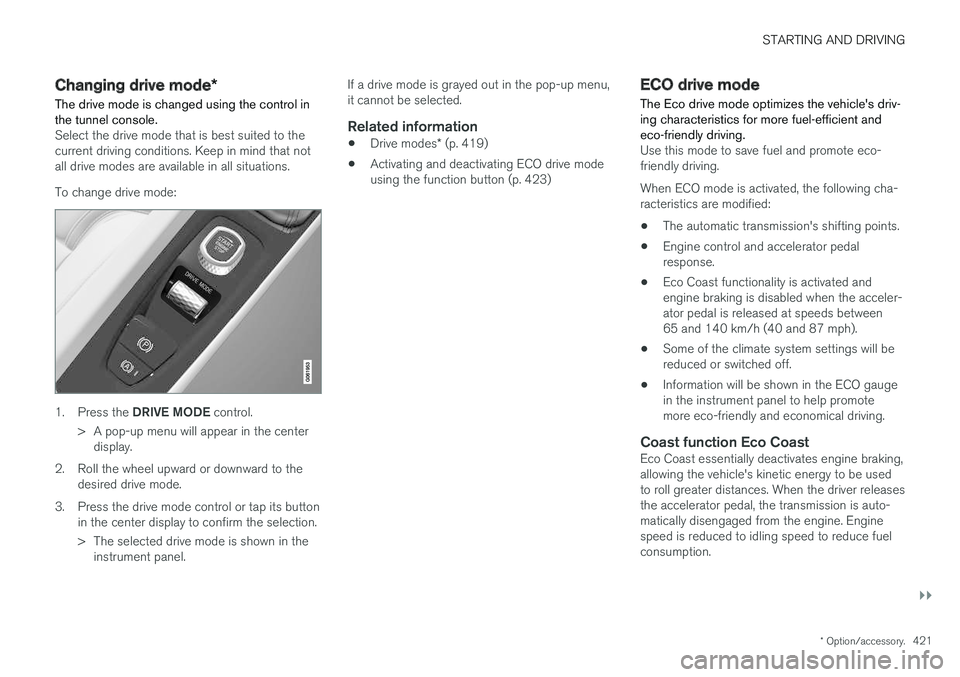
The drive mode is changed using the control in the tunnel console.
Select the drive mode that is best suited to the current driving conditions. Keep in mind that notall drive modes are available in all situations. To change drive mode:
1. Press the DRIVE MODE control.
> A pop-up menu will appear in the center display.
2. Roll the wheel upward or downward to the desired drive mode.
3. Press the drive mode control or tap its button in the center display to confirm the selection.
> The selected drive mode is shown in theinstrument panel. If a drive mode is grayed out in the pop-up menu, it cannot be selected.
Related information
•
Drive modes
* (p. 419)
• Activating and deactivating ECO drive modeusing the function button (p. 423)
ECO drive mode
The Eco drive mode optimizes the vehicle's driv- ing characteristics for more fuel-efficient andeco-friendly driving.
Use this mode to save fuel and promote eco- friendly driving. When ECO mode is activated, the following cha- racteristics are modified:
• The automatic transmission's shifting points.
• Engine control and accelerator pedalresponse.
• Eco Coast functionality is activated andengine braking is disabled when the acceler-ator pedal is released at speeds between65 and 140 km/h (40 and 87 mph).
• Some of the climate system settings will bereduced or switched off.
• Information will be shown in the ECO gaugein the instrument panel to help promotemore eco-friendly and economical driving.
Coast function Eco CoastEco Coast essentially deactivates engine braking,allowing the vehicle's kinetic energy to be used to roll greater distances. When the driver releases the accelerator pedal, the transmission is auto- matically disengaged from the engine. Enginespeed is reduced to idling speed to reduce fuelconsumption.
Page 443 of 656
STARTING AND DRIVING
* Option/accessory.441
CAUTION
•Bumper-attached trailer hitches must not be used on Volvos, nor should safetychains be attached to the bumper.
• Trailer hitches attaching to the vehiclerear axle must not be used.
• Never connect a trailer's hydraulic brakesystem directly to the vehicle brake sys-tem, nor a trailer's lighting system directlyto the vehicle lighting system. Consultyour nearest authorized Volvo retailer forcorrect installation.
• When towing a trailer, the trailer's safetychains or wire must be correctly fastenedto the attachment points provided in thetrailer hitch on the vehicle. The safetychain or wire must never be fastened toor wound around the towing ball.
NOTE
The optional detachable trailer hitch may not be available in all markets or on all models.Consult your Volvo retailer.
NOTE
Extreme weather conditions, towing a trailer, driving at high altitudes and fuel quality arefactors that significantly increase a vehicle'sfuel consumption.
Trailer weights
WARNING
Please adhere to the recommendations provi- ded for trailer weight. If the recommendationsare not followed, the vehicle and trailer maybe difficult to control during evasive maneu-vers and braking.
NOTE
The specified maximum trailer weights are those permitted by Volvo. National vehicleregulations may set additional restrictions ontrailer weight and speed. The trailer hitchesmay be certified for higher towing weightsthan the vehicle is permitted to tow.
Self-leveling suspension
*The vehicle's self-leveling system attempts to keep the vehicle at a constant level, regardless ofload (up to the maximum permitted weight).When the vehicle is stationary, the rear end of thevehicle will be slightly lowered, which is normal.
Driving in hilly terrain or hot weatherIn certain conditions, there is a risk of overheat-ing when driving with a trailer. If overheating ofthe engine and drive system is detected, a warn-ing symbol will illuminate in the instrument panelalong with a message. The automatic transmission selects the optimalgear for the current load and engine speed.
Steep inclines
Do not lock the automatic transmission into a higher gear than what the engine can handle
‒ it
is not always preferable to drive in high gears at low rpm.
Parking on a hill
1. Depress the brake pedal.
2. Apply the parking brake.3. Put the gear selector in P.
4. Release the brake pedal.Put chocks behind the wheels when the vehicle is parked on a hill with a trailer attached.
Starting on a hill
1. Depress the brake pedal. 2. Put the gear selector in D.
3. Release the parking brake.
4. Release the brake pedal and start driving.
Related information
• Trailer Stability Assist
* (p. 442)
• Checking trailer lights (p. 443)
• Towing capacity and tongue weight (p. 632)
• Overheating of engine and transmission (p. 437)
Page 446 of 656
STARTING AND DRIVING
444
Towing using a towlineThis section refers to one vehicle being towed behind another using a towline.
Before towing another vehicle, check applicable speed limit regulations.
Preparations and towing
CAUTION
Note that the vehicle must always be towed with the wheels rolling forward.
• Do not tow a vehicle with automatictransmission at a speed greater than80 km/h (50 mph) or for a distancegreater than 80 km (50 miles).
WARNING
•
Ignition mode
II must be active – all air-
bags are deactivated in ignition mode I.
• Always have the remote key in the vehicle when it is towed.
WARNING
The brake and steering servos do not work when the engine is off – it takesabout 5 times more pressure on the brakepedal and steering requires much more effortthan normal. 1. Turn on the hazard warning flashers.
2. Attach the towline to the towing eyelet.3.
Put the vehicle in ignition mode II – without
pressing the brake pedal, turn the start knob clockwise and hold it there for about4 seconds. Release the knob, which willautomatically return to its original position.
4. Move the gear selector to neutral ( N) and
release the parking brake. If the battery charge level is too low, it may not be possible to release the parking brake.Connect an auxiliary battery to the vehicle ifthe battery is discharged.
> The towing vehicle can now start driving.
5. Keep the towline taut when the towing vehi- cle slows down by applying light pressure to the brake pedal. This will help avoid jarringmovements.
6. Be prepared to apply the brakes to stop the vehicle.
Jump startingDo not tow the vehicle to start the engine. Use anauxiliary battery if the start battery's charge levelis so low that the engine cannot be started.
CAUTION
Attempting to tow with the engine running could result in damage to the three-way cata-lytic converter.
Related information
• Attaching and removing the towing eyelet (p. 445)
• Hazard warning flashers (p. 164)
• Recovery (p. 446)
• Jump starting using another battery (p. 439)
• Selecting ignition mode (p. 404)
Page 637 of 656
SPECIFICATIONS
635
Coolant specifications
Recommended grade: Volvo-recommended
coolant diluted with 50% water. See package. Consult a Volvo retailer if you have any ques-tions. Do not mix different types of antifreeze as this could pose a health risk.
Related information
• Refilling coolant (p. 580)
Transmission fluid specifications
Under normal driving conditions, the transmis- sion fluid will not need to be changed during itsservice life. However, it may need to be changedif the vehicle is driven frequently in adverse driv-ing conditions.
Automatic transmission
Prescribed transmission fluid: AW1
Brake fluid specifications The medium in the hydraulic brake system is called brake fluid and is used to transfer brakingforce from e.g. pressure on the brake pedal via amaster brake cylinder to one or more slave cylin-ders, which in turn act on a mechanical brake.
Recommended grade:
Volvo Original Dot 4
class 6 or equivalent.
NOTE
Changing or filling brake fluid should be entrusted to an authorized Volvo workshop.
Related information
• Engine compartment overview (p. 577)
Page 641 of 656
INDEX
639
1, 2, 3 ...
4WD 419
A
ABSanti-lock brakes 405
AC (Air conditioning) 229
ACC - Adaptive Cruise Control 289, 292, 293, 294, 295, 296, 298, 299, 300, 301, 303
Accessories and extra equipment 35 installation 36
Accessory installation warning 36
Active Bending Lights 161
Adapting driving characteristics 266, 419
Adaptive Cruise Control 289, 292, 293, 294, 295, 296, 298, 299, 300, 301, 303
change cruise control functionality 301
function 289
manage speed 293, 294
pass 298
radar sensor 320
set time interval 295, 296
troubleshooting 300
Adjusting the steering wheel 200
Airbag 52 activation/deactivation 56
driver's side 53
passenger side 53, 56
Air bag, see Airbag 52
Air conditioning 229Air conditioning, fluid volume and grade 636
Air distribution 208 air vents 208, 209
changing 208
defrosting 222
recirculation 221
table showing options 211
Air quality 205, 206 allergy and asthma 206
passenger compartment filter 207
Air recirculation 221
Alarm 261 deactivating 262
Allergy and asthma-inducing substances 206
All Wheel Drive, AWD 419
All Wheel Drive (AWD) 419
All Wheel Drive (four-wheel drive) 419
Android Auto 486, 488 Antenna location 251Apple CarPlay 483, 485
Approach lighting 164
Apps 455
Assistance at risk of collision 366, 367, 368, 369, 370, 371, 372, 374
Audio and media 454Audio system HD digital radio 465 SiriusXM ® Satellite radio 466, 467, 468
Auto-climate 220
Auto hold 411
Auto-hold brakes 411 activate and deactivate 412
after collision 413
Automatic car wash 614 Automatic engine stop auto-stop 424
Automatic high beam 159
Automatic locking 255
Automatic relocking 235, 248
Automatic Speed Limiter 276, 278, 279
Automatic transmission 414 kickdown 418
oil 635
Trailer 440
INDEX
Page 645 of 656
INDEX
643
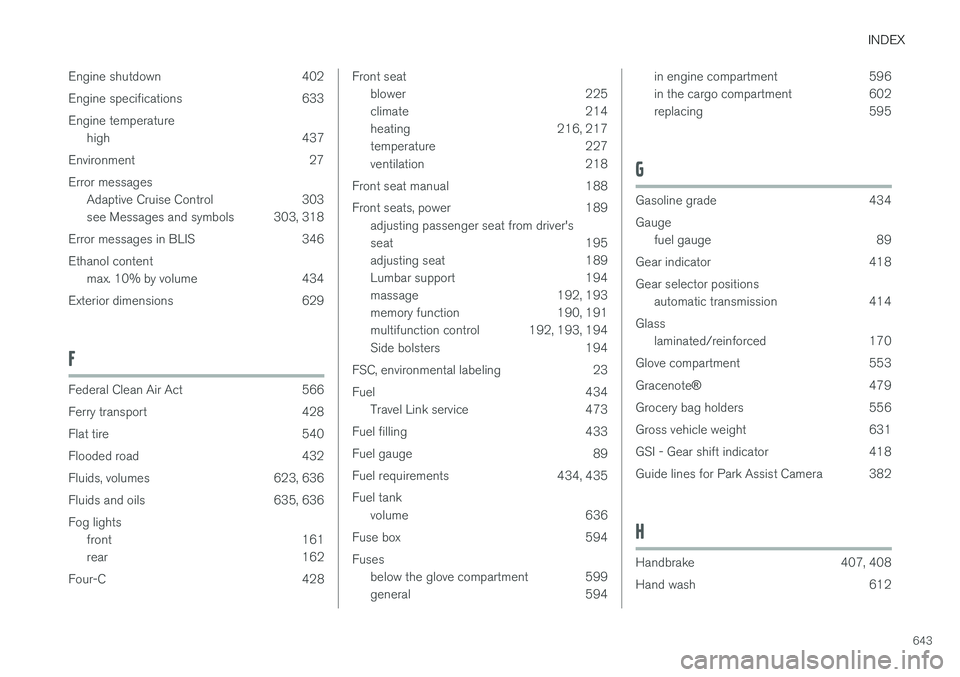
Engine shutdown 402
Engine specifications 633Engine temperature
high 437
Environment 27Error messages Adaptive Cruise Control 303
see Messages and symbols 303, 318
Error messages in BLIS 346 Ethanol content max. 10% by volume 434
Exterior dimensions 629
F
Federal Clean Air Act 566
Ferry transport 428
Flat tire 540
Flooded road 432
Fluids, volumes 623, 636
Fluids and oils 635, 636 Fog lights front 161
rear 162
Four-C 428
Front seat blower 225
climate 214
heating 216, 217
temperature 227
ventilation 218
Front seat manual 188
Front seats, power 189 adjusting passenger seat from driver's
seat 195
adjusting seat 189
Lumbar support 194
massage 192, 193
memory function 190, 191
multifunction control 192, 193, 194
Side bolsters 194
FSC, environmental labeling 23
Fuel 434 Travel Link service 473
Fuel filling 433
Fuel gauge 89
Fuel requirements 434, 435 Fuel tank volume 636
Fuse box 594 Fuses below the glove compartment 599
general 594in engine compartment 596
in the cargo compartment 602
replacing 595
G
Gasoline grade 434 Gaugefuel gauge 89
Gear indicator 418 Gear selector positions automatic transmission 414
Glass laminated/reinforced 170
Glove compartment 553 Gracenote ®
479
Grocery bag holders 556
Gross vehicle weight 631
GSI - Gear shift indicator 418
Guide lines for Park Assist Camera 382
H
Handbrake 407, 408
Hand wash 612
Page 652 of 656
INDEX
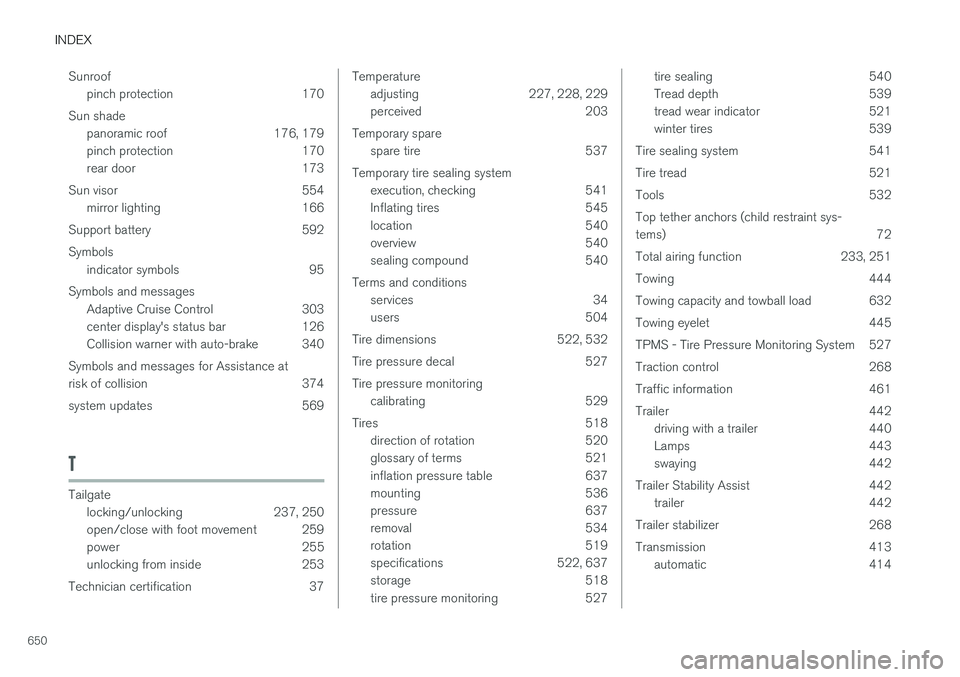
650Sunroof
pinch protection 170
Sun shade panoramic roof 176, 179
pinch protection 170
rear door 173
Sun visor 554 mirror lighting 166
Support battery 592 Symbols indicator symbols 95
Symbols and messages Adaptive Cruise Control 303
center display's status bar 126
Collision warner with auto-brake 340
Symbols and messages for Assistance at
risk of collision 374
system updates 569
T
Tailgate locking/unlocking 237, 250
open/close with foot movement 259
power 255
unlocking from inside 253
Technician certification 37
Temperature adjusting 227, 228, 229
perceived 203
Temporary spare spare tire 537
Temporary tire sealing system execution, checking 541
Inflating tires 545
location 540
overview 540
sealing compound 540
Terms and conditions services 34
users 504
Tire dimensions 522, 532
Tire pressure decal 527 Tire pressure monitoring calibrating 529
Tires 518 direction of rotation 520
glossary of terms 521
inflation pressure table 637
mounting 536
pressure 637
removal 534
rotation 519
specifications 522, 637
storage 518
tire pressure monitoring 527tire sealing 540
Tread depth 539
tread wear indicator 521
winter tires 539
Tire sealing system 541
Tire tread 521
Tools 532Top tether anchors (child restraint sys- tems) 72
Total airing function 233, 251
Towing 444
Towing capacity and towball load 632
Towing eyelet 445
TPMS - Tire Pressure Monitoring System 527
Traction control 268
Traffic information 461
Trailer 442 driving with a trailer 440
Lamps 443
swaying 442
Trailer Stability Assist 442 trailer 442
Trailer stabilizer 268
Transmission 413 automatic 414