buttons VOLVO V90 2018 Owner´s Manual
[x] Cancel search | Manufacturer: VOLVO, Model Year: 2018, Model line: V90, Model: VOLVO V90 2018Pages: 656, PDF Size: 11.78 MB
Page 132 of 656
||
DISPLAYS AND VOICE CONTROL
130
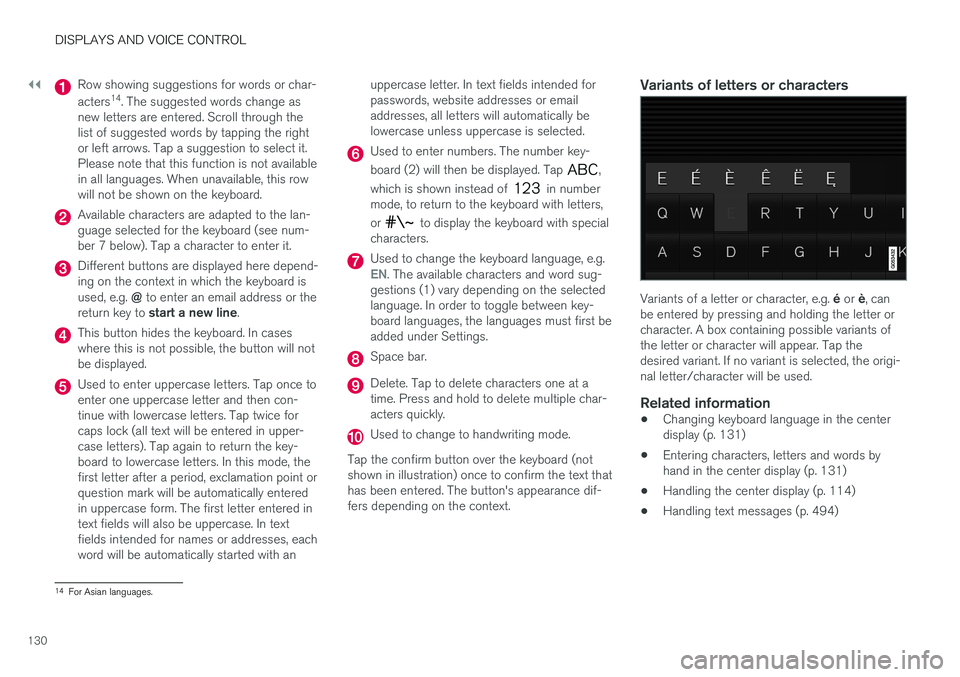
Row showing suggestions for words or char- acters14
. The suggested words change as
new letters are entered. Scroll through the list of suggested words by tapping the rightor left arrows. Tap a suggestion to select it.Please note that this function is not availablein all languages. When unavailable, this rowwill not be shown on the keyboard.
Available characters are adapted to the lan- guage selected for the keyboard (see num-ber 7 below). Tap a character to enter it.
Different buttons are displayed here depend- ing on the context in which the keyboard is used, e.g. @ to enter an email address or the
return key to start a new line .
This button hides the keyboard. In cases where this is not possible, the button will notbe displayed.
Used to enter uppercase letters. Tap once to enter one uppercase letter and then con-tinue with lowercase letters. Tap twice forcaps lock (all text will be entered in upper-case letters). Tap again to return the key-board to lowercase letters. In this mode, thefirst letter after a period, exclamation point orquestion mark will be automatically enteredin uppercase form. The first letter entered intext fields will also be uppercase. In textfields intended for names or addresses, eachword will be automatically started with an uppercase letter. In text fields intended forpasswords, website addresses or emailaddresses, all letters will automatically belowercase unless uppercase is selected.
Used to enter numbers. The number key- board (2) will then be displayed. Tap
,
which is shown instead of
in number
mode, to return to the keyboard with letters, or
to display the keyboard with special
characters.
Used to change the keyboard language, e.g.EN. The available characters and word sug-
gestions (1) vary depending on the selected language. In order to toggle between key-board languages, the languages must first beadded under Settings.
Space bar.
Delete. Tap to delete characters one at a time. Press and hold to delete multiple char-acters quickly.
Used to change to handwriting mode.
Tap the confirm button over the keyboard (not shown in illustration) once to confirm the text thathas been entered. The button's appearance dif-fers depending on the context.
Variants of letters or characters
Variants of a letter or character, e.g. é or è, can
be entered by pressing and holding the letter or character. A box containing possible variants ofthe letter or character will appear. Tap thedesired variant. If no variant is selected, the origi-nal letter/character will be used.
Related information
• Changing keyboard language in the centerdisplay (p. 131)
• Entering characters, letters and words byhand in the center display (p. 131)
• Handling the center display (p. 114)
• Handling text messages (p. 494)
14
For Asian languages.
Page 145 of 656
DISPLAYS AND VOICE CONTROL
143
Pop-up messages
Messages are sometimes shown as pop-up win- dows. Pop-up messages have a higher prioritythan messages shown in the status bar andrequire acknowledgment/action before they dis-appear. Messages that need to be saved arestored in Top view in the center display.
Related information
•Handling messages in the center display(p. 143)
• Handling messages saved from the centerdisplay (p. 144)
• Messages in the instrument panel (p. 106)
Handling messages in the centerdisplay Messages in the center display are handled in the center display's views.
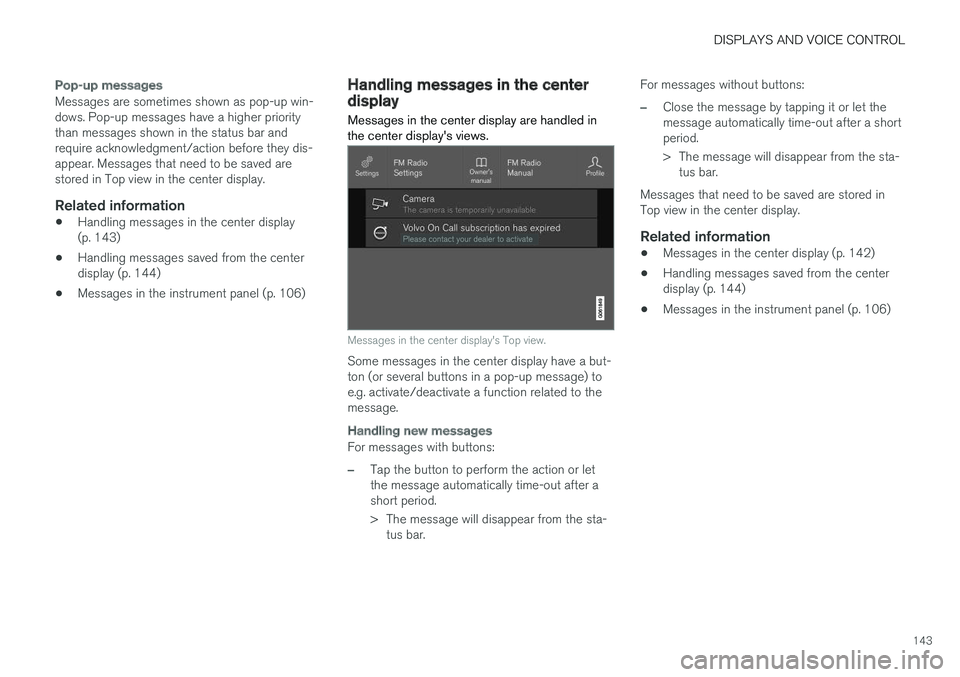
Messages in the center display's Top view.
Some messages in the center display have a but- ton (or several buttons in a pop-up message) toe.g. activate/deactivate a function related to themessage.
Handling new messages
For messages with buttons:
–Tap the button to perform the action or let the message automatically time-out after ashort period.
> The message will disappear from the sta-
tus bar. For messages without buttons:
–Close the message by tapping it or let the message automatically time-out after a shortperiod.
> The message will disappear from the sta-
tus bar.
Messages that need to be saved are stored in Top view in the center display.
Related information
• Messages in the center display (p. 142)
• Handling messages saved from the centerdisplay (p. 144)
• Messages in the instrument panel (p. 106)
Page 175 of 656
WINDOWS, GLASS AND MIRRORS
}}
* Option/accessory.173
WARNING
Make sure that no child or other passenger comes into contact with the windows as they are closing with keyless closing *.
NOTE
One way to reduce the pulsating wind noise heard when the rear windows are open is toalso open the front windows slightly.
NOTE
The windows cannot be opened at speeds over approx. 180 km/h (ca112 mph), but theycan be closed. The driver is always responsible for following applicable traffic regulations.
Related information
• Power windows (p. 171)
• Pinch protection for windows and sun cur- tains (p. 170)
• Reset procedure for pinch protection(p. 171)
• Keyless locking and unlocking
* (p. 248)
• Locking and unlocking using the remote key(p. 235)
• Locking and unlocking from inside the vehi-cle (p. 251)
Using sun curtains
*
Sun curtains are integrated into each of the rear doors.
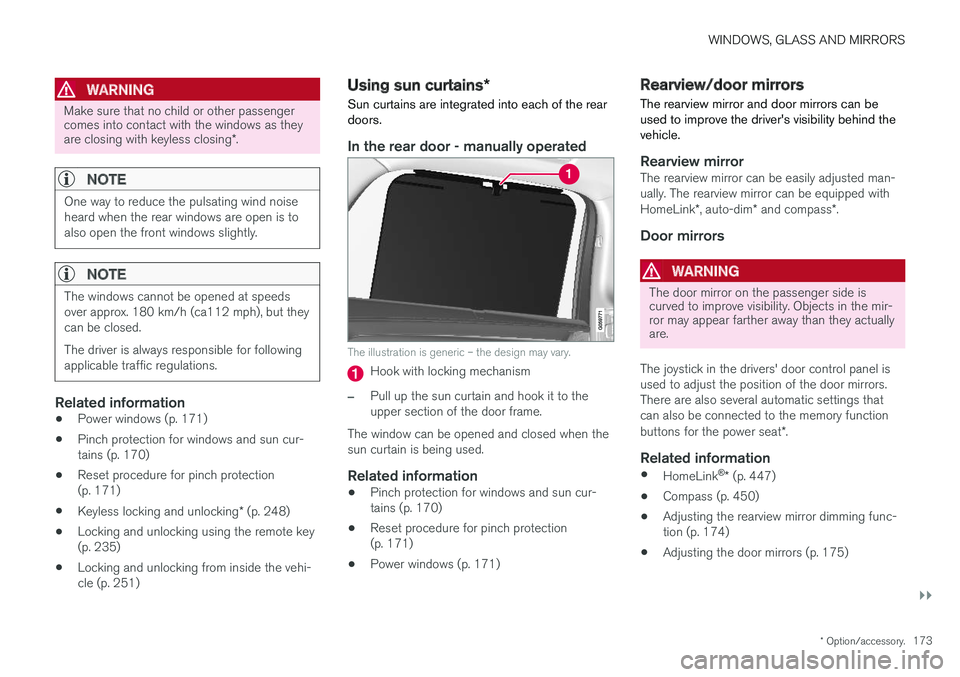
In the rear door - manually operated
The illustration is generic – the design may vary.
Hook with locking mechanism
–Pull up the sun curtain and hook it to the upper section of the door frame.
The window can be opened and closed when thesun curtain is being used.
Related information
• Pinch protection for windows and sun cur-tains (p. 170)
• Reset procedure for pinch protection(p. 171)
• Power windows (p. 171)
Rearview/door mirrors
The rearview mirror and door mirrors can be used to improve the driver's visibility behind thevehicle.
Rearview mirrorThe rearview mirror can be easily adjusted man- ually. The rearview mirror can be equipped with HomeLink *, auto-dim * and compass *.
Door mirrors
WARNING
The door mirror on the passenger side is curved to improve visibility. Objects in the mir-ror may appear farther away than they actuallyare.
The joystick in the drivers' door control panel is used to adjust the position of the door mirrors.There are also several automatic settings thatcan also be connected to the memory function buttons for the power seat *.
Related information
•
HomeLink ®
* (p. 447)
• Compass (p. 450)
• Adjusting the rearview mirror dimming func- tion (p. 174)
• Adjusting the door mirrors (p. 175)
Page 177 of 656
WINDOWS, GLASS AND MIRRORS
}}
* Option/accessory.175
Adjusting the door mirrors
To improve visibility to the rear, the door mirrors need to be adjusted to the driver's height andseating position. There are several automaticsettings that can also be connected to the mem- ory function buttons for the power seat *.
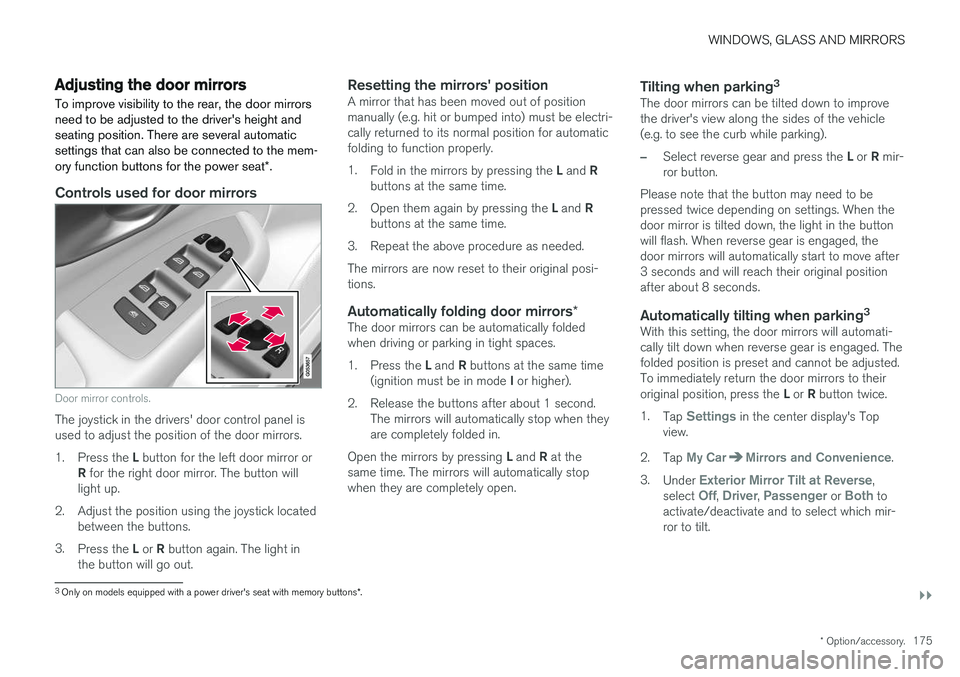
Controls used for door mirrors
Door mirror controls.
The joystick in the drivers' door control panel is used to adjust the position of the door mirrors. 1.
Press the L button for the left door mirror or
R for the right door mirror. The button will
light up.
2. Adjust the position using the joystick located between the buttons.
3. Press the L or R button again. The light in
the button will go out.
Resetting the mirrors' positionA mirror that has been moved out of position manually (e.g. hit or bumped into) must be electri-cally returned to its normal position for automaticfolding to function properly. 1. Fold in the mirrors by pressing the L and R
buttons at the same time.
2. Open them again by pressing the L and R
buttons at the same time.
3. Repeat the above procedure as needed.The mirrors are now reset to their original posi- tions.
Automatically folding door mirrors *The door mirrors can be automatically foldedwhen driving or parking in tight spaces. 1.
Press the L and R buttons at the same time
(ignition must be in mode I or higher).
2. Release the buttons after about 1 second. The mirrors will automatically stop when they are completely folded in.
Open the mirrors by pressing L and R at the
same time. The mirrors will automatically stopwhen they are completely open.
Tilting when parking 3The door mirrors can be tilted down to improvethe driver's view along the sides of the vehicle(e.g. to see the curb while parking).
–Select reverse gear and press the
L or R mir-
ror button.
Please note that the button may need to be pressed twice depending on settings. When thedoor mirror is tilted down, the light in the buttonwill flash. When reverse gear is engaged, thedoor mirrors will automatically start to move after3 seconds and will reach their original positionafter about 8 seconds.
Automatically tilting when parking 3With this setting, the door mirrors will automati-cally tilt down when reverse gear is engaged. Thefolded position is preset and cannot be adjusted.To immediately return the door mirrors to their original position, press the
L or R button twice.
1. Tap
Settings in the center display's Top
view.
2. Tap
My CarMirrors and Convenience.
3. Under
Exterior Mirror Tilt at Reverse,
select Off, Driver, Passenger or Both to
activate/deactivate and to select which mir- ror to tilt.
3 Only on models equipped with a power driver's seat with memory buttons *.
Page 192 of 656
||
SEATS AND STEERING WHEEL
* Option/accessory.
190 Only one movement (forward/rearward/up/ down) can be performed at a time. The front seat backrests cannot be folded down completely.
Related information
•
Manual front seats (p. 188)
• Power front seats
* (p. 189)
• Storing memory settings in power front seats
* (p. 190)
• Using stored memory in a powered front seat (p. 191)
• Adjusting front seat massage settings
*
(p. 192)
• Adjusting front seat cushion length (p. 193)
• Front seat massage settings
* (p. 192)
• Adjusting front seat side bolster settings
*
(p. 194)
• Adjusting front seat lumbar support
* (p. 194)
• Adjusting the passenger seat from the driv- er's seat
* (p. 195)
Storing memory settings in power
front seats *
The memory function can be used to store the settings for the seat, door mirrors and head-up display *.
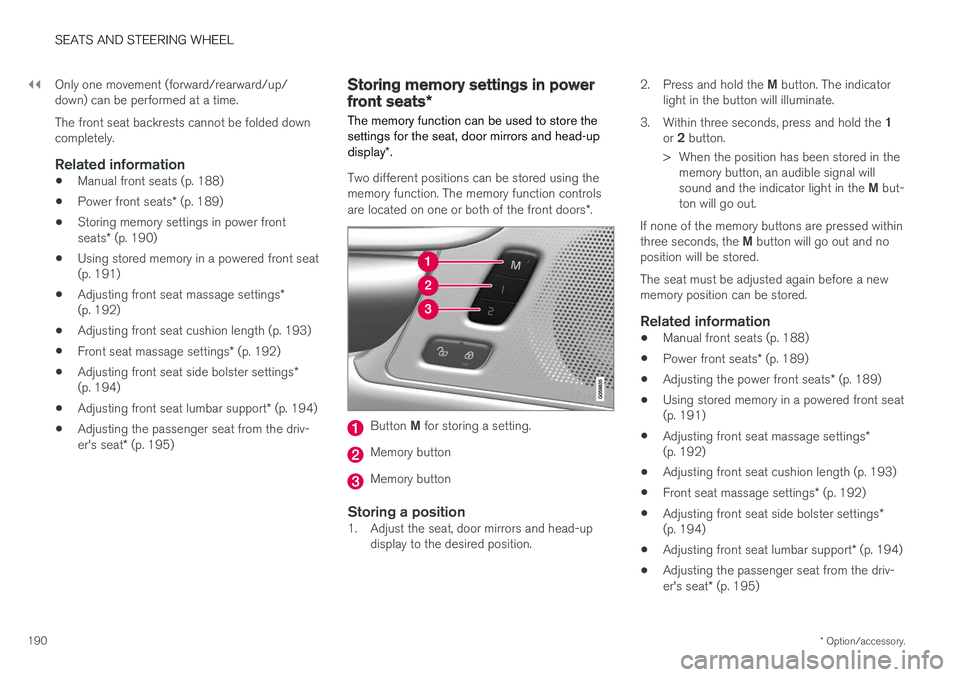
Two different positions can be stored using the memory function. The memory function controls are located on one or both of the front doors *.
Button M for storing a setting.
Memory button
Memory button
Storing a position1. Adjust the seat, door mirrors and head-up
display to the desired position. 2.
Press and hold the M button. The indicator
light in the button will illuminate.
3. Within three seconds, press and hold the 1
or 2 button.
> When the position has been stored in the memory button, an audible signal will sound and the indicator light in the M but-
ton will go out.
If none of the memory buttons are pressed withinthree seconds, the M button will go out and no
position will be stored. The seat must be adjusted again before a new memory position can be stored.
Related information
• Manual front seats (p. 188)
• Power front seats
* (p. 189)
• Adjusting the power front seats
* (p. 189)
• Using stored memory in a powered front seat(p. 191)
• Adjusting front seat massage settings
*
(p. 192)
• Adjusting front seat cushion length (p. 193)
• Front seat massage settings
* (p. 192)
• Adjusting front seat side bolster settings
*
(p. 194)
• Adjusting front seat lumbar support
* (p. 194)
• Adjusting the passenger seat from the driv- er's seat
* (p. 195)
Page 193 of 656
SEATS AND STEERING WHEEL
* Option/accessory.191
Using stored memory in a poweredfront seat
The memory function can be used to store the settings for the seat, door mirrors and head-up display *.
Using a stored positionA stored position can be used with the front door open or closed:
Front door open
–Briefly press one of the memory buttons ( 1
or 2). The seat, door mirrors and head-up
display will move and stop at the positions stored in that button.
Front door closed
–Press and hold one of the memory buttons ( 1 or 2) until the seat, door mirrors and
head-up display stop in the positions stored in that memory button.
If the memory button is released, the seat, doormirrors and head-up display will stop moving.
WARNING
• Because the front seats can be adjusted with the ignition off, children should neverbe left unattended in the vehicle.
• Movement of the seat can be STOPPEDat any time by pressing any button on thepower seat control panel.
• Do not adjust the seat while driving.
• The seat should be adjusted so that thebrake pedal can be depressed fully. Inaddition, position the seat as far rearwardas comfort and control allow.
• The seat rails on the floor must not beobstructed in any way when the seat is inmotion.
Related information
• Manual front seats (p. 188)
• Power front seats
* (p. 189)
• Adjusting the power front seats
* (p. 189)
• Storing memory settings in power front seats
* (p. 190)
• Adjusting front seat massage settings
*
(p. 192)
• Adjusting front seat cushion length (p. 193)
• Front seat massage settings
* (p. 192)
• Adjusting front seat side bolster settings
*
(p. 194) •
Adjusting front seat lumbar support
* (p. 194)
• Adjusting the passenger seat from the driv-er's seat
* (p. 195)
Page 194 of 656
SEATS AND STEERING WHEEL
* Option/accessory.
192
Front seat massage settings *
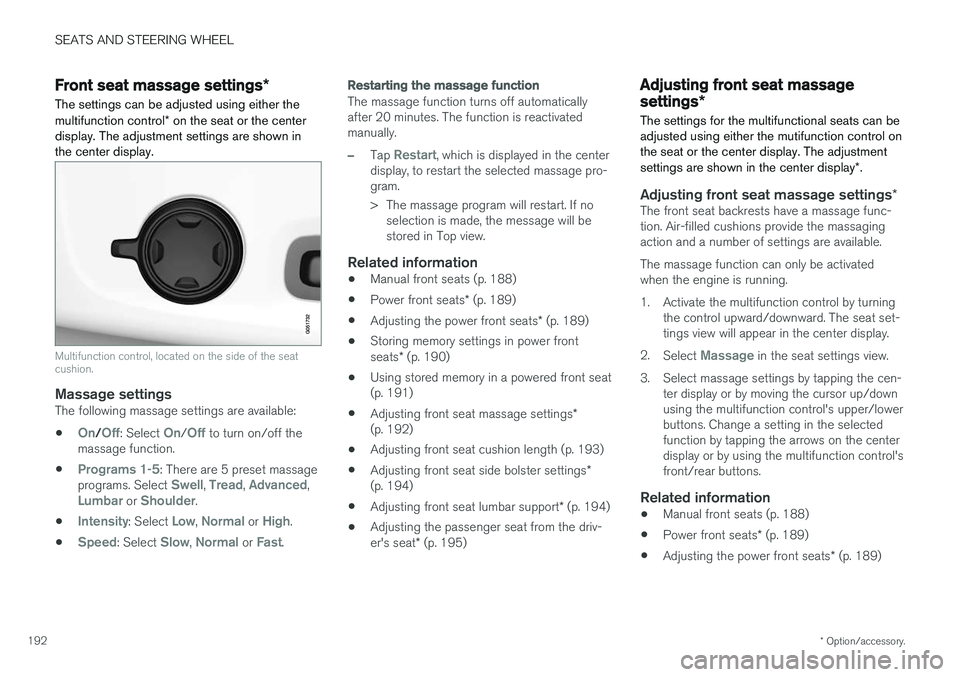
The settings can be adjusted using either the multifunction control * on the seat or the center
display. The adjustment settings are shown in the center display.
Multifunction control, located on the side of the seat cushion.
Massage settingsThe following massage settings are available:
•
On/Off: Select On/Off to turn on/off the
massage function.
•
Programs 1-5: There are 5 preset massage
programs. Select Swell, Tread, Advanced,Lumbar or Shoulder.
•
Intensity: Select Low, Normal or High.
•
Speed: Select Slow, Normal or Fast.
Restarting the massage function
The massage function turns off automatically after 20 minutes. The function is reactivatedmanually.
–Tap Restart, which is displayed in the center
display, to restart the selected massage pro- gram.
> The massage program will restart. If no selection is made, the message will be stored in Top view.
Related information
• Manual front seats (p. 188)
• Power front seats
* (p. 189)
• Adjusting the power front seats
* (p. 189)
• Storing memory settings in power front seats
* (p. 190)
• Using stored memory in a powered front seat (p. 191)
• Adjusting front seat massage settings
*
(p. 192)
• Adjusting front seat cushion length (p. 193)
• Adjusting front seat side bolster settings
*
(p. 194)
• Adjusting front seat lumbar support
* (p. 194)
• Adjusting the passenger seat from the driv- er's seat
* (p. 195)
Adjusting front seat massage
settings *
The settings for the multifunctional seats can be adjusted using either the mutifunction control onthe seat or the center display. The adjustment settings are shown in the center display *.
Adjusting front seat massage settings *The front seat backrests have a massage func- tion. Air-filled cushions provide the massagingaction and a number of settings are available. The massage function can only be activated when the engine is running.
1. Activate the multifunction control by turning
the control upward/downward. The seat set- tings view will appear in the center display.
2. Select
Massage in the seat settings view.
3. Select massage settings by tapping the cen- ter display or by moving the cursor up/down using the multifunction control's upper/lowerbuttons. Change a setting in the selectedfunction by tapping the arrows on the centerdisplay or by using the multifunction control'sfront/rear buttons.
Related information
• Manual front seats (p. 188)
• Power front seats
* (p. 189)
• Adjusting the power front seats
* (p. 189)
Page 199 of 656
SEATS AND STEERING WHEEL
* Option/accessory.197
Folding down the backrests
Models with the electric backrest fold-down
function
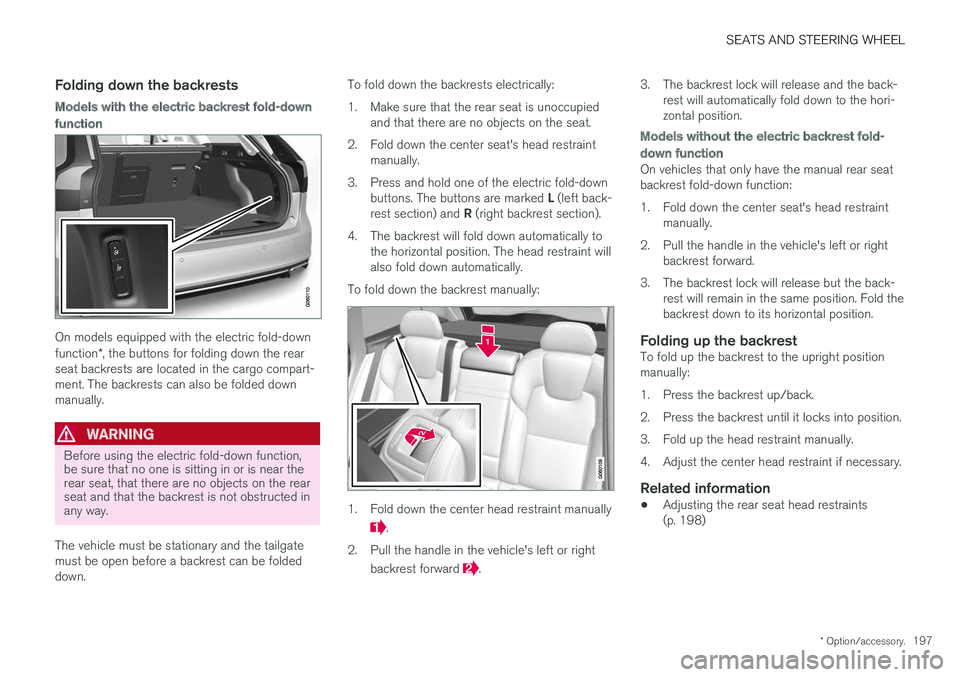
On models equipped with the electric fold-down function*, the buttons for folding down the rear
seat backrests are located in the cargo compart- ment. The backrests can also be folded downmanually.
WARNING
Before using the electric fold-down function, be sure that no one is sitting in or is near therear seat, that there are no objects on the rearseat and that the backrest is not obstructed inany way.
The vehicle must be stationary and the tailgate must be open before a backrest can be foldeddown. To fold down the backrests electrically:
1. Make sure that the rear seat is unoccupied
and that there are no objects on the seat.
2. Fold down the center seat's head restraint manually.
3. Press and hold one of the electric fold-down buttons. The buttons are marked L (left back-
rest section) and R (right backrest section).
4. The backrest will fold down automatically to the horizontal position. The head restraint will also fold down automatically.
To fold down the backrest manually:
1. Fold down the center head restraint manually
.
2. Pull the handle in the vehicle's left or right backrest forward
. 3. The backrest lock will release and the back-
rest will automatically fold down to the hori- zontal position.
Models without the electric backrest fold-
down function
On vehicles that only have the manual rear seat backrest fold-down function:
1. Fold down the center seat's head restraintmanually.
2. Pull the handle in the vehicle's left or right backrest forward.
3. The backrest lock will release but the back- rest will remain in the same position. Fold the backrest down to its horizontal position.
Folding up the backrestTo fold up the backrest to the upright positionmanually:
1. Press the backrest up/back.
2. Press the backrest until it locks into position.
3. Fold up the head restraint manually.
4. Adjust the center head restraint if necessary.
Related information
• Adjusting the rear seat head restraints (p. 198)
Page 204 of 656
CLIMATE CONTROL
* Option/accessory.
202
Climate
The vehicle is equipped with electronic climate control. The climate system cools, heats anddehumidifies the air in the passenger compart-ment.
All of the climate system functions are controlled from the center display and the buttons on thecenter console. Certain rear seat functions can also be controlled from the climate controls * on the rear of the tun-
nel console.
Related information
• Climate zones (p. 202)
• Climate control sensors (p. 203)
• Perceived temperature (p. 203)
• Climate control system voice commands (p. 204)
• Air quality (p. 205)
• Air distribution (p. 208)
• Climate system controls (p. 214)
Climate zones
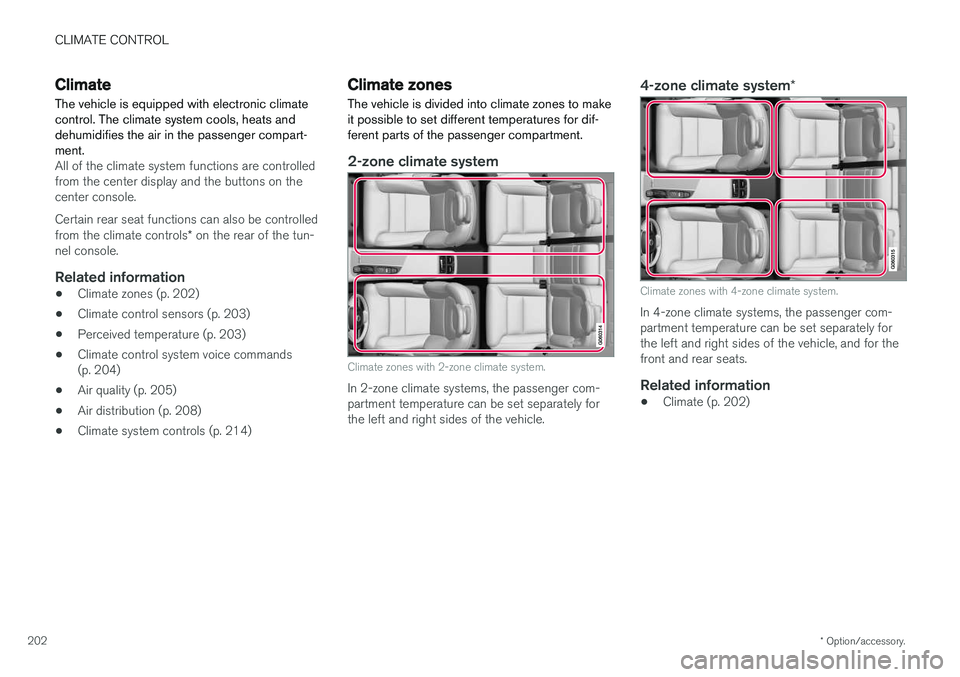
The vehicle is divided into climate zones to make it possible to set different temperatures for dif-ferent parts of the passenger compartment.
2-zone climate system
Climate zones with 2-zone climate system.
In 2-zone climate systems, the passenger com- partment temperature can be set separately forthe left and right sides of the vehicle.
4-zone climate system *
Climate zones with 4-zone climate system.
In 4-zone climate systems, the passenger com- partment temperature can be set separately forthe left and right sides of the vehicle, and for thefront and rear seats.
Related information
•Climate (p. 202)
Page 205 of 656
CLIMATE CONTROL
* Option/accessory.203
Climate control sensors
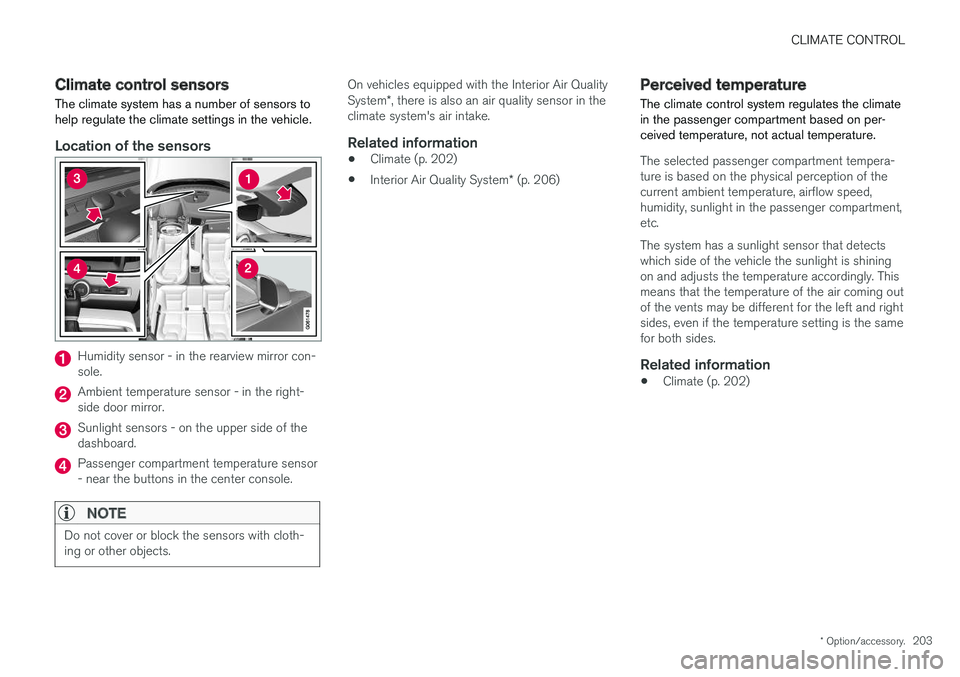
The climate system has a number of sensors to help regulate the climate settings in the vehicle.
Location of the sensors
Humidity sensor - in the rearview mirror con- sole.
Ambient temperature sensor - in the right- side door mirror.
Sunlight sensors - on the upper side of the dashboard.
Passenger compartment temperature sensor - near the buttons in the center console.
NOTE
Do not cover or block the sensors with cloth- ing or other objects.
On vehicles equipped with the Interior Air Quality System *, there is also an air quality sensor in the
climate system's air intake.
Related information
• Climate (p. 202)
• Interior Air Quality System
* (p. 206)
Perceived temperature
The climate control system regulates the climate in the passenger compartment based on per-ceived temperature, not actual temperature.
The selected passenger compartment tempera- ture is based on the physical perception of thecurrent ambient temperature, airflow speed,humidity, sunlight in the passenger compartment,etc. The system has a sunlight sensor that detects which side of the vehicle the sunlight is shiningon and adjusts the temperature accordingly. Thismeans that the temperature of the air coming outof the vents may be different for the left and rightsides, even if the temperature setting is the samefor both sides.
Related information
• Climate (p. 202)