roof VOLVO V90 2018 Owner´s Manual
[x] Cancel search | Manufacturer: VOLVO, Model Year: 2018, Model line: V90, Model: VOLVO V90 2018Pages: 656, PDF Size: 11.78 MB
Page 179 of 656
WINDOWS, GLASS AND MIRRORS
}}
* Option/accessory.177
Wind blocker
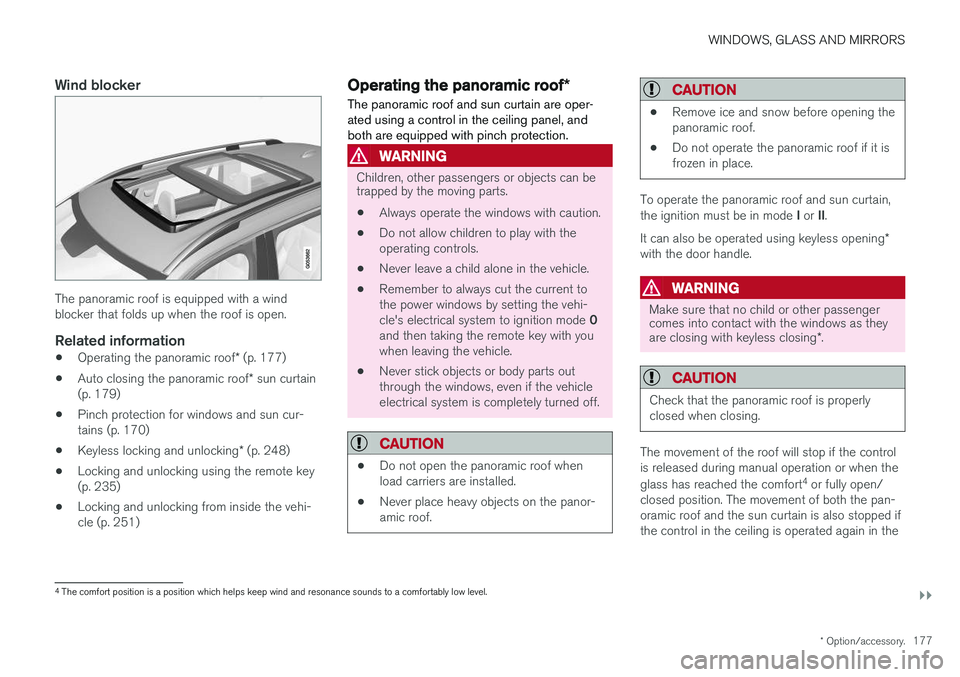
The panoramic roof is equipped with a wind blocker that folds up when the roof is open.
Related information
•Operating the panoramic roof
* (p. 177)
• Auto closing the panoramic roof
* sun curtain
(p. 179)
• Pinch protection for windows and sun cur-tains (p. 170)
• Keyless locking and unlocking
* (p. 248)
• Locking and unlocking using the remote key(p. 235)
• Locking and unlocking from inside the vehi-cle (p. 251)
Operating the panoramic roof
*
The panoramic roof and sun curtain are oper- ated using a control in the ceiling panel, andboth are equipped with pinch protection.
WARNING
Children, other passengers or objects can be trapped by the moving parts.
• Always operate the windows with caution.
• Do not allow children to play with the operating controls.
• Never leave a child alone in the vehicle.
• Remember to always cut the current tothe power windows by setting the vehi- cle's electrical system to ignition mode
0
and then taking the remote key with you when leaving the vehicle.
• Never stick objects or body parts outthrough the windows, even if the vehicleelectrical system is completely turned off.
CAUTION
• Do not open the panoramic roof when load carriers are installed.
• Never place heavy objects on the panor-amic roof.
CAUTION
• Remove ice and snow before opening the panoramic roof.
• Do not operate the panoramic roof if it isfrozen in place.
To operate the panoramic roof and sun curtain, the ignition must be in mode
I or II.
It can also be operated using keyless opening *
with the door handle.
WARNING
Make sure that no child or other passenger comes into contact with the windows as they are closing with keyless closing *.
CAUTION
Check that the panoramic roof is properly closed when closing.
The movement of the roof will stop if the control is released during manual operation or when the glass has reached the comfort 4
or fully open/
closed position. The movement of both the pan- oramic roof and the sun curtain is also stopped ifthe control in the ceiling is operated again in the
4 The comfort position is a position which helps keep wind and resonance sounds to a comfortably low level.
Page 180 of 656
||
WINDOWS, GLASS AND MIRRORS
178direction opposite that of the current direction of movement. The panoramic roof and sun curtain are also equipped with pinch protection.
NOTE
For manual opening, the sun curtain must be completely open before the panoramic roofcan be opened. For the reverse procedure,the panoramic roof must be completelyclosed before the sun curtain can be com-pletely closed.
Opening and closing ventilation position
Ventilation position, rear edge raised.
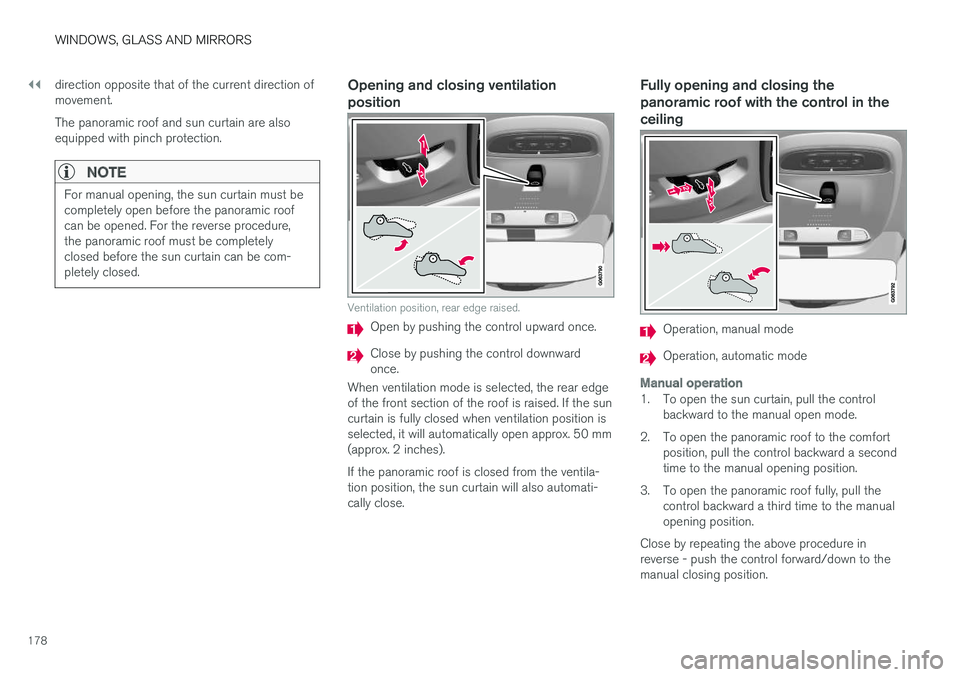
Open by pushing the control upward once.
Close by pushing the control downward once.
When ventilation mode is selected, the rear edgeof the front section of the roof is raised. If the suncurtain is fully closed when ventilation position isselected, it will automatically open approx. 50 mm(approx. 2 inches). If the panoramic roof is closed from the ventila- tion position, the sun curtain will also automati-cally close.
Fully opening and closing the panoramic roof with the control in theceiling
Operation, manual mode
Operation, automatic mode
Manual operation
1. To open the sun curtain, pull the control backward to the manual open mode.
2. To open the panoramic roof to the comfort position, pull the control backward a second time to the manual opening position.
3. To open the panoramic roof fully, pull the control backward a third time to the manualopening position.
Close by repeating the above procedure inreverse - push the control forward/down to themanual closing position.
Page 181 of 656
WINDOWS, GLASS AND MIRRORS
}}
* Option/accessory.179
Auto operation
1. To open the sun curtain to the fully open
position, pull the control backward to the auto open mode and release.
2. To open the panoramic roof to the comfort position, pull the control backward a secondtime to the automatic opening position andrelease.
3. To open the panoramic roof fully, pull the control backward a third time to the auto-matic opening position and release.
Close by repeating the above procedure inreverse - push the control forward/down to theauto close position.
Automatic operation - rapid opening or
closing
The panoramic roof and sun curtain can be opened or closed simultaneously:
–Open - press the control backward twice to the automatic operation position and release.
–Close - press the control forward/down twice to the automatic operation position andrelease.
Related information
• Panoramic roof
* (p. 176)
• Auto closing the panoramic roof
* sun curtain
(p. 179)
• Pinch protection for windows and sun cur-tains (p. 170) •
Keyless locking and unlocking
* (p. 248)
• Locking and unlocking using the remote key(p. 235)
• Locking and unlocking from inside the vehi-cle (p. 251)
Auto closing the panoramic roof
*sun curtain
With this function, the sun curtain closes auto- matically 15 minutes after the car has beenlocked if it is parked in hot weather. This is doneto lower the passenger compartment tempera-ture and protect the upholstery against beingbleached by the sun.
The function is deactivated as the default factory setting and can be activated or deactivated usingthe center display. 1. Tap
Settings in the Top view in the center
display.
2. Tap
My CarLocking.
Select
Auto Close Sunroof Curtain to
activate/deactivate.
NOTE
The sun curtain also closes when all windows are closed with keyless closing *.
Related information
• Panoramic roof
* (p. 176)
• Operating the panoramic roof
* (p. 177)
• Pinch protection for windows and sun cur- tains (p. 170)
• Keyless locking and unlocking
* (p. 248)
Page 207 of 656
CLIMATE CONTROL
}}
* Option/accessory.205
Air quality
The materials used in the passenger compart- ment and air filtering system have been selectedto ensure a high level of air quality in the passen-ger compartment.
Materials used in the passenger compartment
The materials in the passenger compartment are designed to be pleasant and comfortable, evenfor people with asthma or allergies. The materials have been developed and tested to minimize dust in the passenger compartment and make it easier to keep clean. The mats in both the passenger compartment and cargo compartment can be easily removedfor cleaning. Use Volvo-recommended cleaning agents and car care products to clean the interior.
Air filtering systemsIn addition to the passenger compartment filter, the Clean Zone Interior Package * and Interior Air
Quality System * also help maintain high air qual-
ity in the passenger compartment.
Related information
• Climate (p. 202)
• Clean Zone
* (p. 205)
• Clean Zone Interior Package
* (p. 206)
• Interior Air Quality System
* (p. 206) •
Passenger compartment air filter (p. 207)
Clean Zone
*
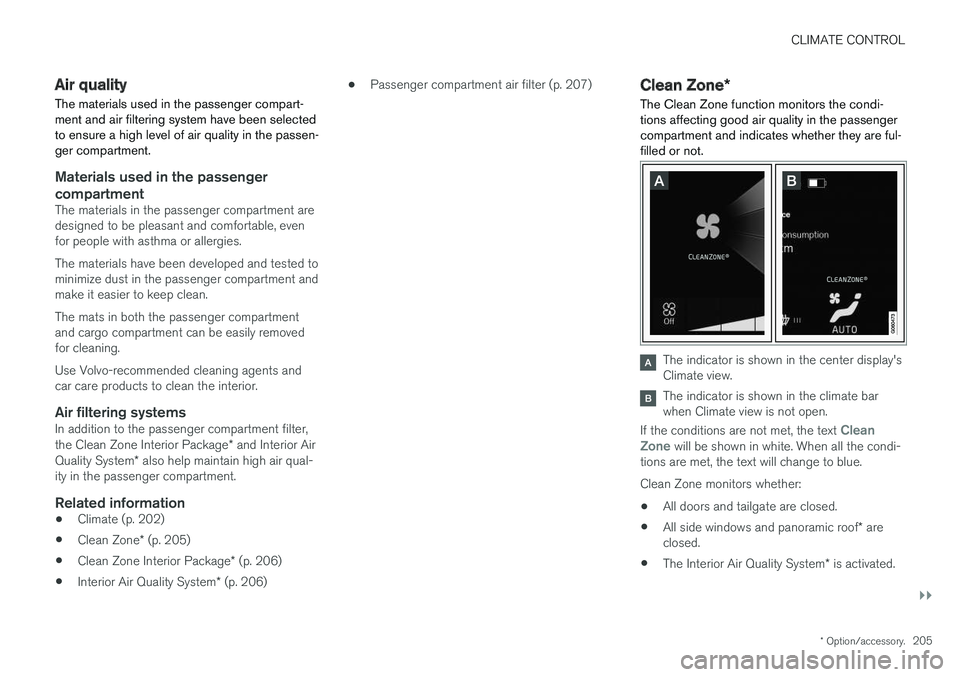
The Clean Zone function monitors the condi- tions affecting good air quality in the passengercompartment and indicates whether they are ful-filled or not.
The indicator is shown in the center display's Climate view.
The indicator is shown in the climate bar when Climate view is not open.
If the conditions are not met, the text
Clean
Zone will be shown in white. When all the condi-
tions are met, the text will change to blue. Clean Zone monitors whether:
• All doors and tailgate are closed.
• All side windows and panoramic roof
* are
closed.
• The Interior Air Quality System
* is activated.
Page 231 of 656
CLIMATE CONTROL
}}
* Option/accessory.229
Synchronize temperature
The temperature in the different climate zones of the vehicle can be synchronized with the tem-perature set for the driver's side.
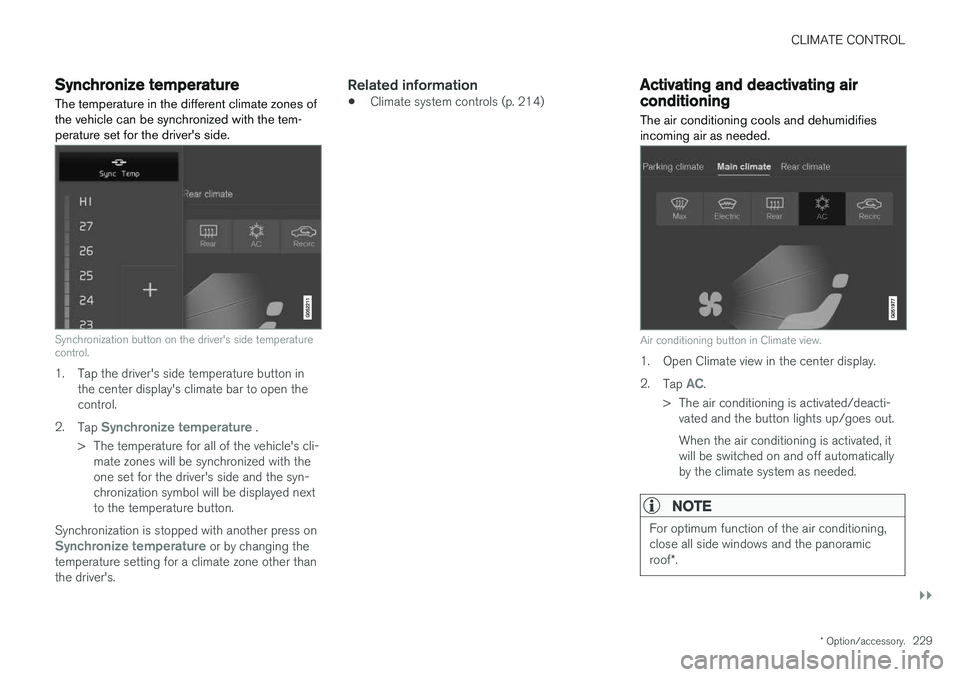
Synchronization button on the driver's side temperature control.
1. Tap the driver's side temperature button in the center display's climate bar to open the control.
2. Tap
Synchronize temperature .
> The temperature for all of the vehicle's cli- mate zones will be synchronized with the one set for the driver's side and the syn-chronization symbol will be displayed nextto the temperature button.
Synchronization is stopped with another press on
Synchronize temperature or by changing the
temperature setting for a climate zone other than the driver's.
Related information
• Climate system controls (p. 214)
Activating and deactivating airconditioning
The air conditioning cools and dehumidifies incoming air as needed.
Air conditioning button in Climate view.
1. Open Climate view in the center display. 2. Tap
AC.
> The air conditioning is activated/deacti- vated and the button lights up/goes out. When the air conditioning is activated, it will be switched on and off automaticallyby the climate system as needed.
NOTE
For optimum function of the air conditioning, close all side windows and the panoramic roof *.
Page 236 of 656
||
KEY, LOCKS AND ALARM
* Option/accessory.
234 The keyless system for locking/unlocking the doors, tailgate (Passive Entry
*) and fuel filler door
is available as an option. This system has a range in a semicircle with a radius of approximately1.5 meter (5 feet) out from the driver's door andapprox. 1 meter (3 feet) out from the tailgate. With keyless start in combination with keyless locking and unlocking, the remote key can belocated anywhere in the passenger compartmentor cargo compartment in order to start theengine. Each remote key supplied with the vehicle can be linked to a driver profile with unique settings forthe vehicle. When a key with a specific profile isused, the vehicle settings are adjusted accordingto that profile.
Buttonless key, Key TagFor vehicles equipped with keyless locking and unlocking *, a smaller, lighter and button-less key
(Key Tag 3
) is also provided. It works the same
way as the regular remote key as regard keyless start and keyless locking and unlocking 4
. It does
not have a detachable key blade and its battery cannot be replaced.
Remote key buttons
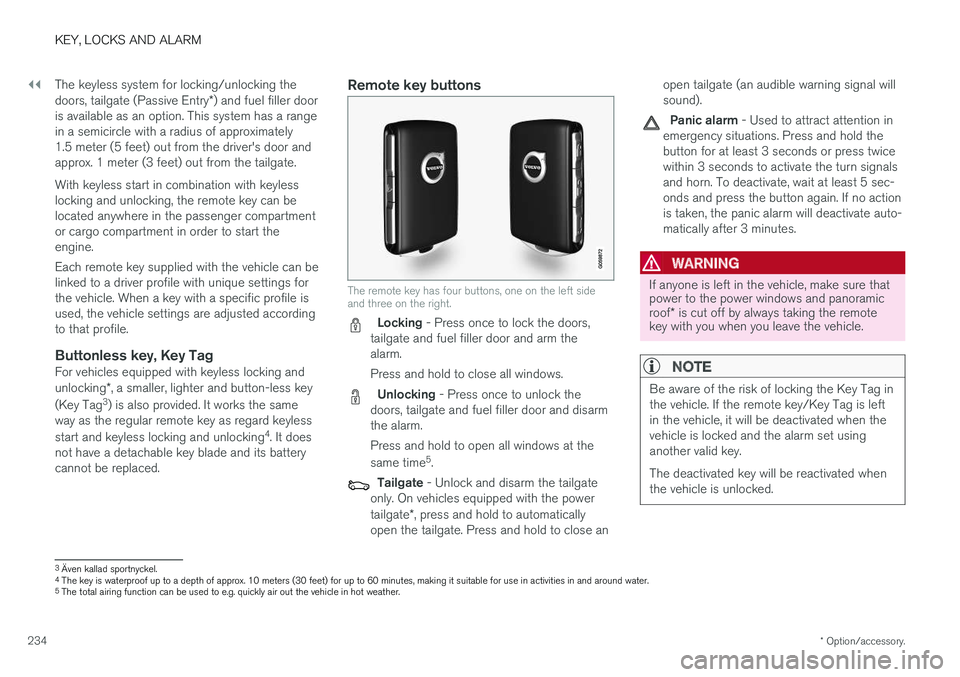
The remote key has four buttons, one on the left side and three on the right.
Locking - Press once to lock the doors,
tailgate and fuel filler door and arm the alarm. Press and hold to close all windows.
Unlocking - Press once to unlock the
doors, tailgate and fuel filler door and disarm the alarm. Press and hold to open all windows at the same time 5
.
Tailgate - Unlock and disarm the tailgate
only. On vehicles equipped with the power tailgate *, press and hold to automatically
open the tailgate. Press and hold to close an open tailgate (an audible warning signal will sound).
Panic alarm - Used to attract attention in
emergency situations. Press and hold the button for at least 3 seconds or press twicewithin 3 seconds to activate the turn signalsand horn. To deactivate, wait at least 5 sec-onds and press the button again. If no actionis taken, the panic alarm will deactivate auto-matically after 3 minutes.
WARNING
If anyone is left in the vehicle, make sure that power to the power windows and panoramic roof * is cut off by always taking the remote
key with you when you leave the vehicle.
NOTE
Be aware of the risk of locking the Key Tag in the vehicle. If the remote key/Key Tag is leftin the vehicle, it will be deactivated when thevehicle is locked and the alarm set usinganother valid key. The deactivated key will be reactivated when the vehicle is unlocked.
3 Även kallad sportnyckel.
4 The key is waterproof up to a depth of approx. 10 meters (30 feet) for up to 60 minutes, making it suitable for use in activities in and around water.
5 The total airing function can be used to e.g. quickly air out the vehicle in hot weather.
Page 405 of 656
STARTING AND DRIVING
* Option/accessory.403
Ignition modes
The vehicle's ignition can be put in various modes (levels) to make different functions availa-ble.
To enable the use of a limited number of func- tions when the engine is not running, the ignition can be put in one of three different levels: 0, I
and II. These levels are referred to as "ignition
modes" in the Owner's Manual. The following table shows which functions are available in each ignition mode:
ModeFunctions
0 •The odometer, clock and tem- perature gauge are illuminated A
.
• The power seats
* can be
adjusted.
• The power windows can be used.
• The center display is activatedand can be used A
.
• The 12 V outlet in the cargo com- partment
* can be used.
• The infotainment system can be used A
.
In this ignition mode, the functions are available for a limited time and then switch off automatically.
I •The panoramic roof, power win-dows, 12 V outlet in passengercompartment, Bluetooth, naviga-tion, phone, blower and wind-shield wipers can be used.
• The power seats can be adjusted.
• The 12 V outlet in the cargo com-partment can be used.
Electrical current will be takenfrom the battery in this ignitionmode.ModeFunctions
II •The headlights illuminate.
• Warning/indicator lights illumi- nate for 5 seconds.
• A number of other systems areactivated. However, seat and rearwindow heating can only be acti-vated when the engine is running.
This ignition mode uses a lot ofcurrent from the battery andshould be avoided whenever pos-sible!
A Also activated when the door is opened.
Related information
• Starting the vehicle (p. 400)
• Adjusting the steering wheel (p. 200)
• Jump starting using another battery (p. 439)
• Selecting ignition mode (p. 404)
Page 432 of 656
STARTING AND DRIVING
* Option/accessory.
430
Leveling control settings *
Turn off leveling control before lifting the vehicle with a jack to help avoid problems with thepneumatic suspension.
Center display settings
Disable Leveling Control
In certain situations, this function must be turned off, e.g. before the vehicle is raised using a jack *.
The level difference caused by raising the vehicle with a jack could cause problems with the pneu-matic suspension. Turning off the function in the center display:1. Tap
Settings in the Top view.
2. Tap
My CarParking Brake and
Suspension.
3. Select
Disable Leveling Control.
Related information
• Leveling control
* and suspension (p. 428)
• Loading recommendations (p. 555)
Economical driving
Drive economically and environmentally con- scious by thinking ahead, avoiding rapid startsand stops and adapting driving style and speedto the current traffic conditions.
Driving economically conserves natural resources
Observe the following rules:
• Do not warm up the engine by idling. It is better to begin driving normally immediately after starting the engine. A cold engine uses more fuel than a warm engine and is subject to increased wear.
• Whenever possible, avoid using the vehicle todrive short distances. The engine does nothave time to reach a normal operating tem-perature and this leads to increased fuelconsumption.
• Maintain a steady speed and a generous fol-lowing distance to traffic ahead to minimizebraking.
• For lower fuel consumption, activate Ecodrive mode.
• Use the Eco Coast function in drive mode Eco - engine braking is deactivated, allowing the vehicle's kinetic energy to be used to rollgreater distances.
• Use gear
D as often as possible and avoid
using the kick-down function. •
Fuel consumption is increased at highspeeds - air resistance increases with speed.
• Remove unnecessary items from the vehicle- the heavier the load, the higher the fuelconsumption.
• Maintain the correct pressure in the tires andcheck pressure regularly.
• The type of tires used could affect fuel con-sumption - consult a retailer for advice onsuitable tires.
• Do not use winter tires after the winter sea-son has ended.
• Roof loads increase air resistance andincrease fuel consumption. Remove roofboxes, ski racks, etc. that are not in use.
• Avoid driving with the windows open.
• Using the trip computer's fuel consumptionindicators can help you learn how to drivemore economically.
Other factors that decrease fuel
consumption
• Dirty air cleaner.
• Dirty engine oil and clogged oil filter.
• Incorrect front-end alignment.
• Incorrect wheel alignment.
Some of the above items and others are checked as part of Volvo's standard maintenance sched-ule.
Page 468 of 656
AUDIO, MEDIA AND INTERNET
* Option/accessory.
466
SiriusXM® Satellite radio *
The SiriusXM ®
Satellite system broadcasts from
of a number of high elevation satellites in geo- synchronous orbit.
Listening to satellite radioThe digital signals from the satellites are line-of- sight, which means that physical obstructionssuch as bridges, tunnels, etc, may temporarilyinterfere with signal reception. Avoid any obstructions, such as metallic objects transported on roof racks or in a ski box, or otherantennas that may impede signals from the SiriusXM ®
satellites.
Selecting SiriusXM ®
Satellite radio
mode
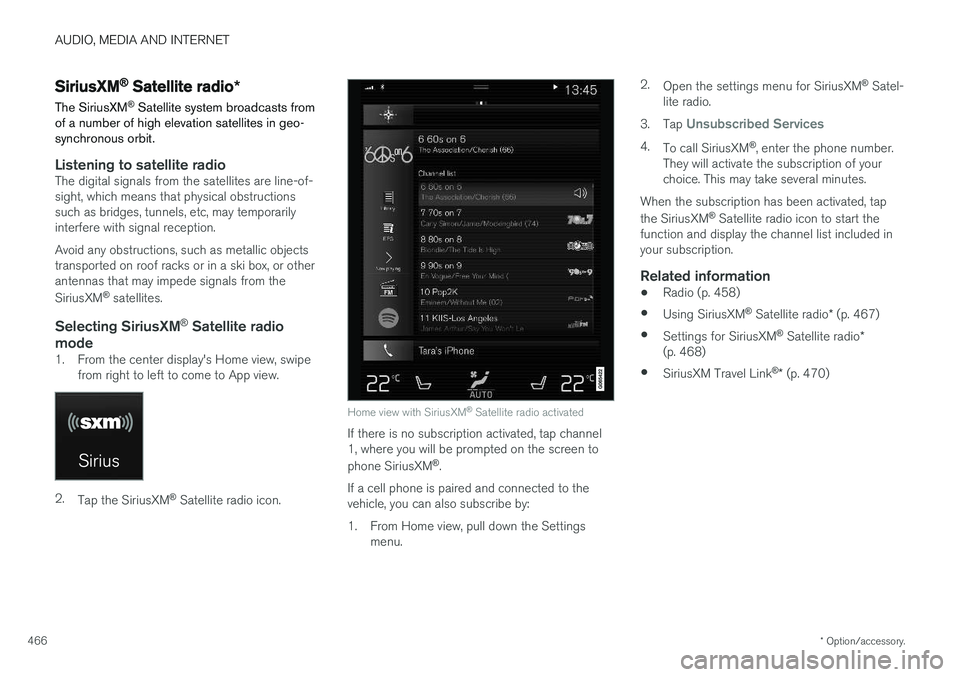
1. From the center display's Home view, swipe from right to left to come to App view.
2.Tap the SiriusXM ®
Satellite radio icon.
Home view with SiriusXM ®
Satellite radio activated
If there is no subscription activated, tap channel 1, where you will be prompted on the screen to phone SiriusXM ®
.
If a cell phone is paired and connected to the vehicle, you can also subscribe by:
1. From Home view, pull down the Settings menu. 2.
Open the settings menu for SiriusXM ®
Satel-
lite radio.
3. Tap
Unsubscribed Services
4.
To call SiriusXM ®
, enter the phone number.
They will activate the subscription of your choice. This may take several minutes.
When the subscription has been activated, tap the SiriusXM ®
Satellite radio icon to start the
function and display the channel list included in your subscription.
Related information
• Radio (p. 458)
• Using SiriusXM ®
Satellite radio * (p. 467)
• Settings for SiriusXM ®
Satellite radio *
(p. 468)
• SiriusXM Travel Link ®
* (p. 470)
Page 558 of 656
||
LOADING, STORAGE AND PASSENGER COMPARTMENT
* Option/accessory.
556
Extra cargo space
The rear seat backrests can be folded down to increase cargo compartment space and simplifyloading. If the rear seat backrests are foldeddown, make sure that no objects loaded into thevehicle prevent the WHIPS system for the frontseats from functioning correctly. The ski hatch in the rear seat can be folded down to carry skis or other long, thin objects.
Related information
• Load anchoring eyelets (p. 557)
• Folding down the rear seat backrests(p. 196)
• Rear seat ski hatch (p. 558)
• Roof loads and load carriers (p. 556)
• Leveling control
* and suspension (p. 428)
• Weights (p. 631)
Roof loads and load carriers Volvo-developed load carriers are recommended for carrying loads on the roof of the vehicle.
Volvo load carriers are specially designed to help prevent damage to your vehicle and help ensuremaximum safety while driving. Volvo load carriersare available from authorized Volvo retailers. Carefully follow the installation instructions provi- ded with the load carriers. •Check periodically to ensure that the load carriers and load are properly secured.Secure the load firmly using tie straps orsimilar.
• Distribute the load evenly throughout theload carriers. Place heavier cargo at the bot-tom of the load.
• The vehicle's wind resistance and fuel con-sumption increase with the size of the load.
• Drive smoothly. Avoid rapid acceleration, hardbraking and fast cornering.
WARNING
The vehicle's center of gravity and driving characteristics are altered by roof loads. Follow the vehicle's specifications regarding weights and maximum permitted load.
Related information
•Loading recommendations (p. 555)
• Weights (p. 631)
Grocery bag holders Grocery bag holders (hooks) help keep shop- ping bags in place and prevent them from fallingover and spilling their contents in the cargocompartment.
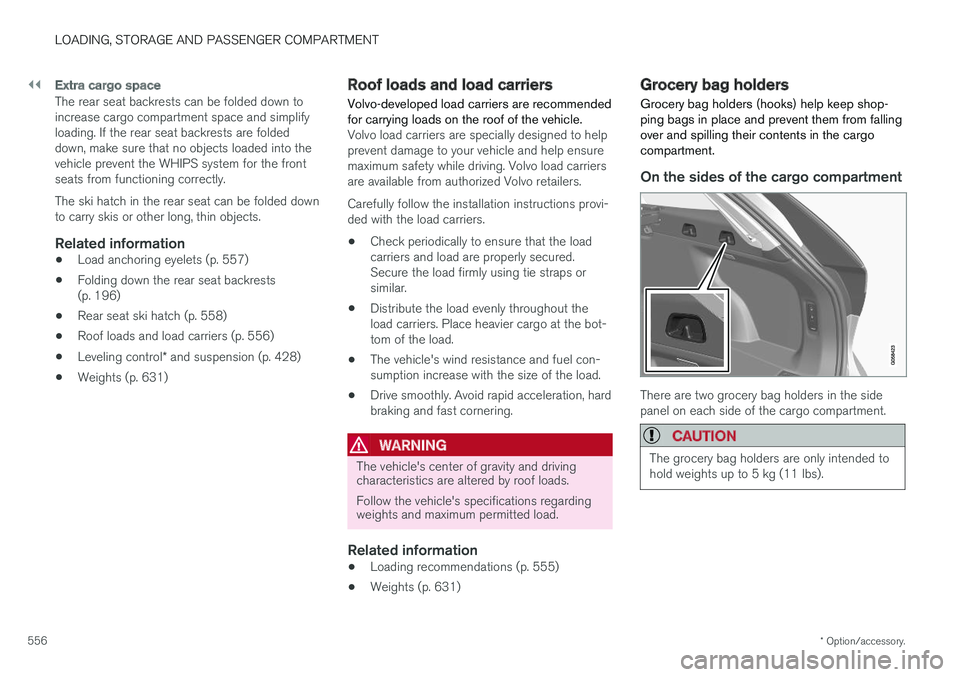
On the sides of the cargo compartment
There are two grocery bag holders in the side panel on each side of the cargo compartment.
CAUTION
The grocery bag holders are only intended to hold weights up to 5 kg (11 lbs).