air condition VOLVO V90 2018 Owner´s Manual
[x] Cancel search | Manufacturer: VOLVO, Model Year: 2018, Model line: V90, Model: VOLVO V90 2018Pages: 656, PDF Size: 11.78 MB
Page 329 of 656
DRIVER SUPPORT
}}}}
327
CauseAction
The area of the windshield in front of the camera/radar sensor is dirty or covered by ice or snow. Clean the windshield in front of the camera/radar sensor and remove dirt, ice andsnow.
Thick fog, heavy rain or snow is blocking the radar signals or thecamera's range of visibility. No action. Heavy precipitation may sometimes prevent the camera/radar sensor fromfunctioning.
Water or snow is spraying/swirling up and blocking the radar signalsor the camera's range of visibility. No action. Very wet or snow-covered roads may sometimes prevent the camera/radar sensor from functioning.
There is dirt between the inside of the windshield and the camera/radar sensor. Consult a workshop to have the area of the windshield on the inside of the camera'scasing cleaned. An authorized Volvo workshop is recommended.
Bright sunlight No action. The camera/radar sensor will reset automatically when lighting conditionsimprove.
NOTE
Keep the windshield in front of the camera and radar unit clean.
High temperaturesIf the temperature in the passenger compartment is very high, the camera/radar sensor will switchoff temporarily for approx. 15 minutes after theengine is started to protect its electronic compo-nents. When the temperature has cooled suffi-ciently, the camera/radar sensor will automati-cally restart.
Damaged windshield
CAUTION
If there are cracks, scratches or stone chips on the windshield in front of any of the cam-era and radar unit "windows" and this coversan area of about 0.5 × 3.0 mm(0.02 × 0.12 in.) or more, contact a workshopto have the windshield replaced – an author-ized Volvo workshop is recommended. Failure to take action could result in reduced performance for the driver support systemsthat use the camera and radar unit.
It could cause functions to be reduced, deac- tivated completely or produce an incorrectfunction response. To avoid the risk of loss of function, malfunc- tion or reduced function of the driver supportsystems that use the radar unit, the followingalso apply:
• Volvo advises
against repairing cracks,
scratches or stone chips in the area infront of the camera and radar unit – theentire windshield should instead bereplaced.
• Before replacing the windshield, contactan authorized Volvo workshop to verify
Page 388 of 656
||
DRIVER SUPPORT
* Option/accessory.
386
Blind sectors
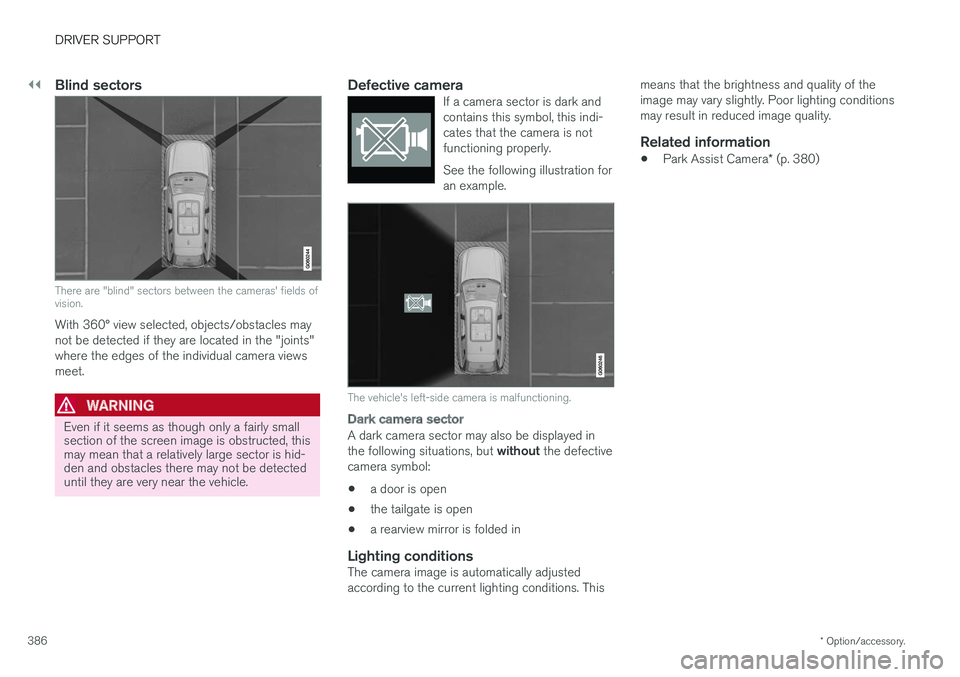
There are "blind" sectors between the cameras' fields of vision.
With 360° view selected, objects/obstacles may not be detected if they are located in the "joints"where the edges of the individual camera viewsmeet.
WARNING
Even if it seems as though only a fairly small section of the screen image is obstructed, thismay mean that a relatively large sector is hid-den and obstacles there may not be detecteduntil they are very near the vehicle.
Defective cameraIf a camera sector is dark and contains this symbol, this indi-cates that the camera is notfunctioning properly. See the following illustration for an example.
The vehicle's left-side camera is malfunctioning.
Dark camera sector
A dark camera sector may also be displayed in the following situations, but without the defective
camera symbol:
• a door is open
• the tailgate is open
• a rearview mirror is folded in
Lighting conditionsThe camera image is automatically adjusted according to the current lighting conditions. This means that the brightness and quality of theimage may vary slightly. Poor lighting conditionsmay result in reduced image quality.
Related information
•
Park Assist Camera
* (p. 380)
Page 432 of 656
STARTING AND DRIVING
* Option/accessory.
430
Leveling control settings *
Turn off leveling control before lifting the vehicle with a jack to help avoid problems with thepneumatic suspension.
Center display settings
Disable Leveling Control
In certain situations, this function must be turned off, e.g. before the vehicle is raised using a jack *.
The level difference caused by raising the vehicle with a jack could cause problems with the pneu-matic suspension. Turning off the function in the center display:1. Tap
Settings in the Top view.
2. Tap
My CarParking Brake and
Suspension.
3. Select
Disable Leveling Control.
Related information
• Leveling control
* and suspension (p. 428)
• Loading recommendations (p. 555)
Economical driving
Drive economically and environmentally con- scious by thinking ahead, avoiding rapid startsand stops and adapting driving style and speedto the current traffic conditions.
Driving economically conserves natural resources
Observe the following rules:
• Do not warm up the engine by idling. It is better to begin driving normally immediately after starting the engine. A cold engine uses more fuel than a warm engine and is subject to increased wear.
• Whenever possible, avoid using the vehicle todrive short distances. The engine does nothave time to reach a normal operating tem-perature and this leads to increased fuelconsumption.
• Maintain a steady speed and a generous fol-lowing distance to traffic ahead to minimizebraking.
• For lower fuel consumption, activate Ecodrive mode.
• Use the Eco Coast function in drive mode Eco - engine braking is deactivated, allowing the vehicle's kinetic energy to be used to rollgreater distances.
• Use gear
D as often as possible and avoid
using the kick-down function. •
Fuel consumption is increased at highspeeds - air resistance increases with speed.
• Remove unnecessary items from the vehicle- the heavier the load, the higher the fuelconsumption.
• Maintain the correct pressure in the tires andcheck pressure regularly.
• The type of tires used could affect fuel con-sumption - consult a retailer for advice onsuitable tires.
• Do not use winter tires after the winter sea-son has ended.
• Roof loads increase air resistance andincrease fuel consumption. Remove roofboxes, ski racks, etc. that are not in use.
• Avoid driving with the windows open.
• Using the trip computer's fuel consumptionindicators can help you learn how to drivemore economically.
Other factors that decrease fuel
consumption
• Dirty air cleaner.
• Dirty engine oil and clogged oil filter.
• Incorrect front-end alignment.
• Incorrect wheel alignment.
Some of the above items and others are checked as part of Volvo's standard maintenance sched-ule.
Page 433 of 656
STARTING AND DRIVING
431
Related information
•Drive-E
‒ purer driving pleasure (p. 27)
• ECO drive mode (p. 421)
• Checking tire pressure (p. 525)
Preparing for a long trip
It is important to have the vehicle's systems and equipment checked carefully before driving longdistances.
Check that:
• the engine is running properly and that fuel consumption is normal
• there are no leaks (fuel, oil or other fluid)
• the brake pedal is functioning optimally
• all lights are working
‒
adjust the headlight
height if the vehicle is carrying a heavy load
• tire tread depth and air pressure are at cor-rect levels. Change to snow tires when driv-ing in areas where there is a risk of snowy oricy roads.
• the start battery is sufficiently charged
• the wiper blades are in good condition
Related information
• Checking tire pressure (p. 525)
• Filling washer fluid (p. 623)
• Winter driving (p. 432)
• Economical driving (p. 430)
• Vehicle modem settings (p. 501)
• Loading recommendations (p. 555)
• Driving with a trailer (p. 440)
• Pilot Assist (p. 305)
• Speed limiter (p. 272) •
Tire sealing system (p. 540)
Page 439 of 656
STARTING AND DRIVING
}}
437
Emission controls
Three-way catalytic converter
•Keep your engine properly tuned. Certain engine malfunctions, particularly involving theelectrical, fuel or distributor ignition systems,may cause unusually high three-way catalyticconverter temperatures. Do not continue tooperate your vehicle if you detect enginemisfire, noticeable loss of power or otherunusual operating conditions, such as engineoverheating or backfiring. A properly tunedengine will help avoid malfunctions thatcould damage the three-way catalytic con-verter.
• Do not park your vehicle over combustiblematerials, such as grass or leaves, which cancome into contact with the hot exhaust sys-tem and cause such materials to ignite undercertain wind and weather conditions.
• Excessive starter cranking (in excess of oneminute), or an intermittently firing or floodedengine can cause three-way catalytic con-verter or exhaust system overheating.
• Remember that tampering or unauthorizedmodifications to the engine, the Engine Con-trol Module, or the vehicle may be illegal andcan cause three-way catalytic converter orexhaust system overheating. This includes:altering fuel injection settings or compo-nents, altering emission system components or location or removing components, and/orrepeated use of leaded fuel.NOTE
Unleaded fuel is required for vehicles with three-way catalytic converters.
Heated oxygen sensorsThe heated oxygen sensors monitor the oxygen content of the exhaust gases. Readings are fedinto a control module that continuously monitorsengine functions and controls fuel injection. Theratio of fuel to air into the engine is continuouslyadjusted for efficient combustion to help reduceharmful emissions.
Related information
•
Octane rating (p. 435)
• Fuel (p. 434)
Overheating of engine andtransmission
In demanding driving conditions, such as driving in mountainous areas or hot weather, there is arisk of the engine or transmission overheating,especially when carrying heavy loads.
• Engine power may be temporarily limited.
• Remove any auxiliary lights mounted in front of the grille when driving in hot weather.
• If the temperature in the engine's coolingsystem becomes too high, a warning symbolwill appear in the instrument panel along with the message
Engine temperature High
temperature Stop safely. Pull over to a
safe location and let the engine idle for a few minutes to cool down.
• If the message
Engine temperature High
temperature Turn off engine or Engine
coolant Level low, turn off engine is dis-
played, stop the vehicle and turn off the engine.
• If the transmission begins to overheat, analternative gear shifting program will beselected. An integrated protective functionwill also be activated, the warning symbol will illuminate and the message
Transmission
warm Reduce speed to lower
temperature or Transmission hot Stop
safely, wait for cooling will be displayed in
the instrument panel. Follow the recommen- dations given by reducing speed or stopping
Page 440 of 656
||
STARTING AND DRIVING
* Option/accessory.
438 the vehicle safely and letting the engine idle for a few minutes to let the transmissioncool.
• If the vehicle begins to overheat, the air con-ditioning may be temporarily switched off.
• After a prolonged period of driving indemanding conditions, do not turn off theengine immediately after stopping.
NOTE
It is normal for the engine's cooling fan to operate for a short time after the engine isswitched off.
Symbols in the instrument panel
SymbolMeaning
High engine temperature. Follow the recommendations provided.
Low coolant level. Follow the rec- ommendations provided.
Transmission hot/overheated/cool- ing. Follow the recommendationsprovided.
Related information
•Refilling coolant (p. 580)
• Driving with a trailer (p. 440)
• Preparing for a long trip (p. 431)
• Gear indicator
* (p. 418)
Battery drain The electrical functions in the vehicle drain the battery to varying degrees. Avoid using ignitionmode II when the engine is switched off. Use
ignition mode I instead, as this uses less electri-
cal current.
Note that certain accessories may also drain power from the electrical system. Do not usefunctions that use a lot of electrical current whenthe engine is turned off. Examples of such func-tions are:
• blower
• headlights
• windshield wipers
• audio system (especially at high volume).
If the starter battery voltage is low, a message isshown in the driver display. The vehicle's energy-saving function will then turn off or reduce certainfunctions, such as the blower and/or the audio system.
–Charge the battery by starting the engine and let it run for at least 15 minutes (drivingcharges the battery faster than letting theengine idle).
Related information
• Start battery (p. 589)
• Ignition modes (p. 403)
Page 499 of 656
AUDIO, MEDIA AND INTERNET
}}
* Option/accessory.497
Settings for Bluetooth devices
Settings for Bluetooth-connected devices.
1. Tap Settings in the Top view.
2. Tap
CommunicationBluetooth
Devices and select settings:
•
Add device - start the procedure for pairing
a new device.
•
Previously paired devices - list con-
nected/paired devices.
•
Remove device - remove a connected
device.
•
Allowed services for this device - select
what the device will be used for: making calls, sending/receiving messages, stream-ing media, Internet connection.
•
Internet connection connect the vehicle to
the Internet using the device's Bluetooth connection.
Bluetooth ®
declaration of conformityUSA FCC CAUTION Changes or modifications not expressly approved by the party responsible for compliance couldvoid the user's authority to operate the equip-ment. This transmitter must not be co-located oroperated in conjunction with any other antennaor transmitter. Canada This device complies with Industry Canada license-exempt RSS standard(s). Operation issubject to the following two conditions: (1) this device may not cause interference, and(2) this device must accept any interference, including interference that may cause undesiredoperation of the device.
Related information
•
Phone (p. 488)
• Phone settings (p. 496)
• Internet-connected vehicle
* (p. 497)
• Connecting a phone to the car via Bluetoothfor the first time (p. 489)
Internet-connected vehicle
*
When the vehicle is connected to the Internet, it is possible to use web radio and music servicesvia apps, download software and contact retail-ers from the vehicle.
The vehicle can be connected to the Internet using Bluetooth, Wi-Fi or the vehicle's integratedmodem.
Page 521 of 656
WHEELS AND TIRES
}}
519
imprinted on the sidewall of the tire. The last four digits in the series is the Department ofTransportation (DOT) stamp and indicates theweek and year the tire was manufactured. Thetire in the illustration has 0717 as the last fourdigits, which means it was manufactured week 7of 2017.
Tire ageTires degrade over time, even when they are notbeing used. It is recommended that tires gener-ally be replaced after 6 years of normal service.Heat caused by hot climates, frequent high load-ing conditions or Ultra Violet (U.V.) exposure canaccelerate the aging process. The temporary spare
2
should also be replaced at 6-year inter-
vals, even if it has never been used. A tire with e.g., visible cracks or discoloration should bereplaced immediately.
Tire economy
• Maintain correct tire pressure.
• Avoid fast starts, hard braking and tirescreeching.
• Tire wear increases with speed.
• Correct front wheel alignment is very impor-tant.
• Unbalanced wheels impair tire economy anddriving comfort. •
Tires must maintain the same direction ofrotation throughout their lifetime.
• When replacing tires, the tires with the mosttread should be mounted on the rear wheelsto reduce the chance of oversteer duringhard braking.
• Hitting curbs or potholes can damage thetires and/or wheels permanently.
Tire rotationYour vehicle has no required tire rotation. Drivingstyle, tire pressure, climate and road conditionsaffect how quickly the tires age and exhibit signsof wear. Maintaining the correct tire pressurehelps keep tread wear evenly distributed. To help prevent differences in tread depth and wear patterns forming on the tires, the front andrear wheels should be rotated, i.e. the front tiresmoved to the rear and the rear tires moved to thefront. Ideally, tire rotation should be done the firsttime after approximately 5000 km (ca3100 miles) and thereafter at 10,000 km(approx. 6200 miles) intervals. If you have any questions regarding tread depth, Volvo recommends consulting an authorizedVolvo workshop. If significant differences in wear(> 1 mm difference in tread depth) between thetires have already occurred, the least worn tiresshould always be mounted on the rear wheels. Afront-wheel skid (understeer) is usually easier to control than a rear-wheel skid (oversteer). If thefront wheels skid, the vehicle will continue in astraight line instead of the rear wheels skiddingto the side, which could cause you to completelylose control of the vehicle. It is therefore impor-tant that the rear wheels never lose grip beforethe front wheels.
Storing wheels and tiresWhen storing complete wheels (tires mounted onrims), they should be suspended off the floor orplaced on their sides on the floor. Tires not mounted on rims should be stored on their sides or standing upright, but should not besuspended.
CAUTION
Tires should preferably be stored in a cool, dry, dark place, and should never be stored inclose proximity to solvents, gasoline, oils, etc.
2
Not available on all models.
Page 525 of 656
WHEELS AND TIRES
523
NOTE
The tire's load index and speed rating may not appear on the sidewall because they arenot required by law.
7.M+S or M/S = Mud and Snow, AT = All Ter-
rain, AS = All Season
8. U.S. DOT Tire Identification Number (TIN) : This begins with the letters "DOT" and
indicates that the tire meets all federalstandards. The next two numbers are thefactory code where the tire was manufac-tured, the next two are the tire size code andthe last four numbers represent the weekand year the tire was made. For example,0717 means that the tire was manufacturedduring week 7 of 2017. The numbers inbetween are marketing codes used at themanufacturer's discretion. This informationhelps a tire manufacturer identify a tire forsafety recall purposes.
9. Tire Ply Composition and Material Used :
Indicates the number of plies indicates or thenumber of layers of rubber-coated fabric inthe tire tread and sidewall. Tire manufactur-ers also must indicate the ply materials in thetire and the sidewall, which include steel,nylon, polyester, and others.
10. Maximum Load : Indicates the maximum
load in pounds and kilograms that can becarried by the tire. Refer to the vehicle's tire information placard located on the B-Pillarfor the correct tire pressure for your vehicle.
11. Treadwear, Traction, and Temperaturegrades .
12. Maximum permissible inflation pressure: the greatest amount of air pressure that should ever be put in the tire. This limit is setby the tire manufacturer.
Speed SymbolA tire's Speed Symbol (SS) indicates the maxi-mum speed for which the tire has been certifiedand should be at least equivalent to the vehicle'stop speed. Winter tires, with or without studs, are exceptions and may use a lower SS. When winter tires areinstalled, the vehicle may not be driven fasterthan the tires' SS. The vehicle's speed should always be determined by the posted speed limit and traffic and roadconditions, not the tire's SS. The following table indicates the maximum per- missible speed for each SS.
M 130 km/h (81 mph)
Q 160 km/h (100 mph)
T 190 km/h (118 mph)
H 210 km/h (130 mph)
V 240 km/h (149 mph)
W 270 km/h (168 mph)
Y 300 km/h (186 mph)
WARNING
• The wheel and tire sizes for your Volvo are specified to meet stringent stabilityand handling requirements. Unapprovedwheel/tire size combinations can nega-tively affect your vehicle's stability andhandling.
• Any damage caused by installation ofunapproved wheel/tire size combinationswill not be covered by your new vehiclewarranty. Volvo assumes no responsibilityfor death, injury, or expenses that mayresult from such installations.
Related information
•
Tires (p. 518)
Page 554 of 656
LOADING, STORAGE AND PASSENGER COMPARTMENT
* Option/accessory.
552
Using the electrical outlets
The 12 V outlet can be used for devices intended for this such as MP3 players, coolersand cellular phones. The high-voltage outlet * can be used for devices
intended for this, such as chargers, laptops, etc.
The ignition must be in at least mode I for the
outlets to supply current. The outlets will then be active as long as there is sufficient charge in thestart battery. If the engine is turned off and the vehicle is locked, the outlets will be deactivated. If theengine is turned off and the vehicle remainsunlocked, the sockets will remain active for up to7 minutes.
NOTE
Bear in mind that using the electrical outlets when the engine is off could cause the starterbattery to have too low of a charge level,which could limit other functionality. Accessories connected to the electrical out- lets can be activated even when the vehicleelectrical system is off or if preconditioning isused. For this reason, disconnect plugs whenthey are not in use to prevent the starter bat-tery from becoming discharged.
WARNING
• Do not use accessories with large or heavy plugs – they could damage the out-let or come loose while you are driving.
• Do not use accessories that could causedisruptions to e.g. the vehicle's radioreceiver or electrical system.
• Position the accessory so that there is norisk of it injuring the driver or passengersin the event of heavy braking or a colli-sion.
• Pay attention to connected accessoriesas they can generate heat that could burnpassengers or the interior.
Using 12 V outlets1. Remove the stopper (tunnel console) or fold
down the cover (trunk/cargo compartment)over the socket and plug in the device.
2. Unplug the device and put the stopper back in (tunnel console) or fold up the cover(trunk/cargo compartment) when the socketis not in use or left unattended.
CAUTION
The maximum power is 120 W (10 A) per outlet.
Using high-voltage outletsThe ignition must be in at least mode I for outlets
to supply current. The outlets will then be active as long as there is sufficient charge in the startbattery. 1. Slide down the cover over the outlet and plug in the device. >
The LED 2
light on the outlet will indicate
its status.
2. The outlet is supplying electrical current when the light is glowing steadily green.
3. Disconnect the device by pulling out the plug (do not pull on the cord). Pull up the cover when the outlet is not in use or is left unattended.
CAUTION
The maximum power is 150 W.
WARNING
Do not attempt to alter or repair the high-volt- age outlet on your own. Volvo recommendscontacting an authorized Volvo workshop.
2LED (Light Emitting Diode)