bluetooth VOLVO V90 2018 Owner´s Manual
[x] Cancel search | Manufacturer: VOLVO, Model Year: 2018, Model line: V90, Model: VOLVO V90 2018Pages: 656, PDF Size: 11.78 MB
Page 494 of 656
AUDIO, MEDIA AND INTERNET
492•
Settings for Bluetooth devices (p. 497)
• Connecting the car to the Internet via a
mobile device (Bluetooth) (p. 499)
Disconnecting a Bluetooth-connected phone Disconnect a Bluetooth-connected phone from the vehicle by deactivating Bluetooth in thephone.
When the phone is out of range of the vehicle, it will be automatically disconnected. If a call is inprogress when the phone is disconnected fromthe vehicle, the call will be transferred from thevehicle's speakers and microphone to the cellularphone.
Related information
•Phone (p. 488)
• Phone settings (p. 496)
• Switch between phones connected via Blue-tooth (p. 492)
• Removing a Bluetooth-connected phone(p. 493)
• Settings for Bluetooth devices (p. 497)
Switch between phones connectedvia Bluetooth
It is possible to switch between Bluetooth-con- nected phones.
1. Open the phone tile. 2. Tap
Change or pull down Top view and
tap
SettingsCommunication
Bluetooth DevicesAdd device.
> A list of available Bluetooth devices will be displayed.
3. Tap the name of the phone you would like to connect.
Related information
• Phone (p. 488)
• Connecting a phone to the car via Bluetooth for the first time (p. 489)
• Settings for Bluetooth devices (p. 497)
• Disconnecting a Bluetooth-connected phone(p. 492)
• Removing a Bluetooth-connected phone(p. 493)
Page 495 of 656
AUDIO, MEDIA AND INTERNET
}}
493
Removing a Bluetooth-connectedphone
Phones in the list of registered Bluetooth devi- ces can be removed.
1. Tap Settings in the Top view.
2. Tap
CommunicationBluetooth
Devices.
> A list of registered Bluetooth devices is displayed.
3. Tap the name of the phone you would like to remove.
4. Tap
Remove device and confirm.
> The phone is no longer registered in the vehicle.
Related information
• Phone (p. 488)
• Connecting a phone to the car via Bluetooth for the first time (p. 489)
• Disconnecting a Bluetooth-connected phone(p. 492)
• Switch between phones connected via Blue-tooth (p. 492)
• Settings for Bluetooth devices (p. 497)
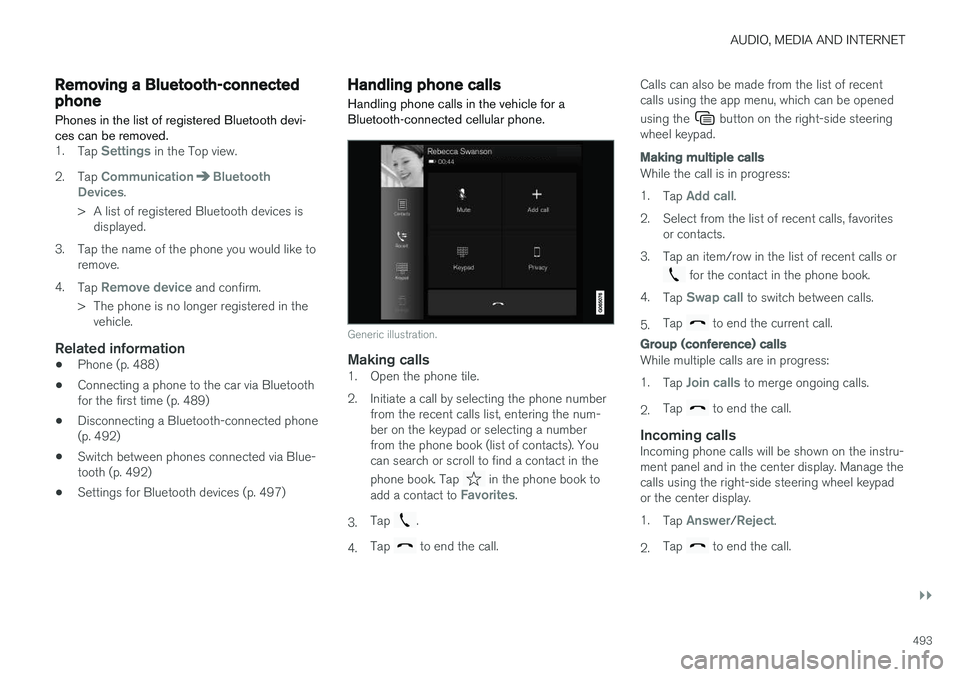
Handling phone calls Handling phone calls in the vehicle for a Bluetooth-connected cellular phone.
Generic illustration.
Making calls1. Open the phone tile.
2. Initiate a call by selecting the phone number
from the recent calls list, entering the num- ber on the keypad or selecting a numberfrom the phone book (list of contacts). Youcan search or scroll to find a contact in the phone book. Tap
in the phone book to
add a contact to Favorites.
3. Tap
.
4. Tap
to end the call. Calls can also be made from the list of recent calls using the app menu, which can be opened using the
button on the right-side steering
wheel keypad.
Making multiple calls
While the call is in progress: 1. Tap
Add call.
2. Select from the list of recent calls, favorites or contacts.
3. Tap an item/row in the list of recent calls or
for the contact in the phone book.
4. Tap
Swap call to switch between calls.
5. Tap
to end the current call.
Group (conference) calls
While multiple calls are in progress: 1.
Tap
Join calls to merge ongoing calls.
2. Tap
to end the call.
Incoming callsIncoming phone calls will be shown on the instru- ment panel and in the center display. Manage thecalls using the right-side steering wheel keypador the center display. 1.
Tap
Answer/Reject.
2. Tap
to end the call.
Page 496 of 656
||
AUDIO, MEDIA AND INTERNET
494
Incoming calls while another call is in
progress
1.Tap Answer/Reject.
2. Tap
to end the call.
Privacy
–While a call is in progress, tap Privacy and
select setting:
•
Switch to mobile phone - the hands-
free function will be disabled and the call will proceed on the cellular phone.
•
Driver focused - the microphone in the
ceiling liner on the passenger side will be muted and the call will proceed using thevehicle's hands-free function.
Related information
• Phone (p. 488)
• Connecting a phone to the car via Bluetoothfor the first time (p. 489)
• Voice control for cellular phones (p. 149)
• Handling the App menu in the instrumentpanel (p. 105)
• Entering characters, letters and words byhand in the center display (p. 131)
• Managing the phone book (p. 495)
• Handling text messages (p. 494)
• Sound settings (p. 454)
Handling text messages
A Bluetooth-connected cellular phone's text messages can be handled in the vehicle.
Text message functionality needs to be activated in certain phones. Not all phones are fully com-patible and therefore cannot display contacts andmessages in the vehicle. For additional informa-tion on compatibility, see support.volvocars.com.
Handling text messages in the center
display
Text messages are only shown in the center dis-play if the relevant setting is made.
Tap
Messages in App view to
handle text messages in the center display.
NOTE
When the vehicle is moving:
• Only one row of the message will be dis- played. Tap
Read out to have the entire
message read aloud.
• The center display's keyboard cannot be used.
Reading text messages in the center display
Tap the icon to have the message read aloud.
Sending text messages in the center
display10
1. It is possible to reply to text messages or
create a new message.
• To reply to a text message - tap the name of the contact who sent the message and then tap
Answer.
• To create a new message - tap
Create
new. Select a contact or enter a phone
number.
2. Write the message. 3. Tap
Send.
Handling test messages in the instrument panel
Text messages are only shown in the instrument panel if the relevant setting is made.
Reading new text messages in the
instrument panel
–To have the message read aloud, selectRead out using the steering wheel keypad.
10
Only certain phones can send messages via the vehicle. For additional information on compatibility, see support.volvocars.com.
Page 497 of 656
AUDIO, MEDIA AND INTERNET
}}
* Option/accessory.495
Dictating replies in the instrument panel
After the test message has been read aloud, it is possible to answer briefly with dictation if thevehicle has an Internet connection.
–Tap Answer using the steering wheel key-
pad. A dictation dialog will start.
Message notificationNotifications can be activated and deactivated in the text message settings.
Related information
• Phone (p. 488)
• Text message settings (p. 495)
• Phone settings (p. 496)
• Internet-connected vehicle
* (p. 497)
• Voice control for cellular phones (p. 149)
• Entering characters, letters and words byhand in the center display (p. 131)
• Connecting a phone to the car via Bluetoothfor the first time (p. 489)
Text message settings
Settings for handling text messages received through a connected phone can be personal-ized.
1. Tap Settings in the Top view.
2. Tap
CommunicationText Messagesand select settings: •
Notification in center display - display
text message notifications in the center display's status bar.
•
Notification in driver display - displays
notifications in the driver's display and incoming messages can be managedusing the steering wheel's right-hand key-pad.
•
Text message tone - select tone for
incoming text messages.
Related information
• Phone (p. 488)
• Connecting a phone to the car via Bluetooth for the first time (p. 489)
• Handling text messages (p. 494)
• Phone settings (p. 496)
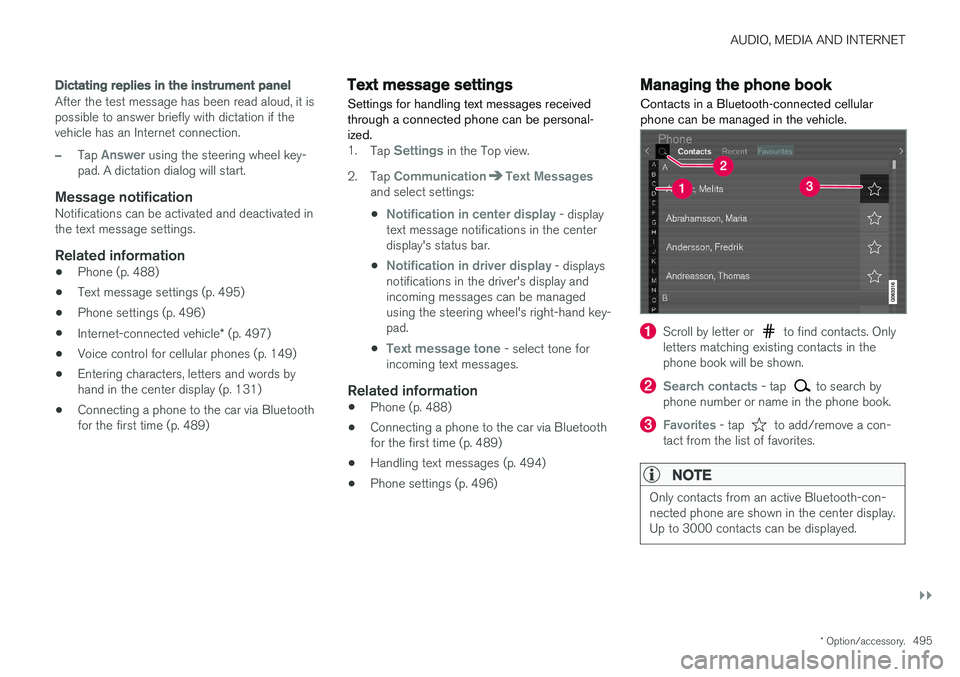
Managing the phone book
Contacts in a Bluetooth-connected cellular phone can be managed in the vehicle.
Scroll by letter or to find contacts. Only
letters matching existing contacts in the phone book will be shown.
Search contacts - tap to search by
phone number or name in the phone book.
Favorites - tap to add/remove a con-
tact from the list of favorites.
NOTE
Only contacts from an active Bluetooth-con- nected phone are shown in the center display.Up to 3000 contacts can be displayed.
Page 498 of 656
||
AUDIO, MEDIA AND INTERNET
* Option/accessory.
496
Sorting
The phone book is sorted in alphabetical order and special characters and numbers are sorted under
. The list can be sorted by either first
name or last name. This is adjusted in your cellu- lar phone settings.
Related information
• Phone (p. 488)
• Phone settings (p. 496)
• Voice control for cellular phones (p. 149)
• Entering characters, letters and words byhand in the center display (p. 131)
• Connecting a phone to the car via Bluetoothfor the first time (p. 489)
Phone settings
When the phone is connected to the car, the fol- lowing settings can be made:
1. Tap Settings in the Top view.
2. Tap
CommunicationPhone and select
settings:
•
Ringtones - select a ring tone. Ring
tones from the cellular phone or the vehi- cle can be used. Some phones are notfully compatible and it may not be possi-ble to use the phone's ring tones in thevehicle. For additional information oncompatibility, see support.volvocars.com.
•
Sort order - select sort order in the con-
tact list.
Call notifications in head up display *1.
Tap Settings in the center display's Top
view.
2. Tap
My CarDisplaysHead-Up
Display Options.
3. Select
Show Phone.
Related information
• Phone (p. 488)
• Text message settings (p. 495)
• Settings for Bluetooth devices (p. 497) •
Connecting a phone to the car via Bluetooth for the first time (p. 489)
• Head-up display
* (p. 144)
• Sound settings (p. 454)
Page 499 of 656
AUDIO, MEDIA AND INTERNET
}}
* Option/accessory.497
Settings for Bluetooth devices
Settings for Bluetooth-connected devices.
1. Tap Settings in the Top view.
2. Tap
CommunicationBluetooth
Devices and select settings:
•
Add device - start the procedure for pairing
a new device.
•
Previously paired devices - list con-
nected/paired devices.
•
Remove device - remove a connected
device.
•
Allowed services for this device - select
what the device will be used for: making calls, sending/receiving messages, stream-ing media, Internet connection.
•
Internet connection connect the vehicle to
the Internet using the device's Bluetooth connection.
Bluetooth ®
declaration of conformityUSA FCC CAUTION Changes or modifications not expressly approved by the party responsible for compliance couldvoid the user's authority to operate the equip-ment. This transmitter must not be co-located oroperated in conjunction with any other antennaor transmitter. Canada This device complies with Industry Canada license-exempt RSS standard(s). Operation issubject to the following two conditions: (1) this device may not cause interference, and(2) this device must accept any interference, including interference that may cause undesiredoperation of the device.
Related information
•
Phone (p. 488)
• Phone settings (p. 496)
• Internet-connected vehicle
* (p. 497)
• Connecting a phone to the car via Bluetoothfor the first time (p. 489)
Internet-connected vehicle
*
When the vehicle is connected to the Internet, it is possible to use web radio and music servicesvia apps, download software and contact retail-ers from the vehicle.
The vehicle can be connected to the Internet using Bluetooth, Wi-Fi or the vehicle's integratedmodem.
Page 500 of 656
||
AUDIO, MEDIA AND INTERNET
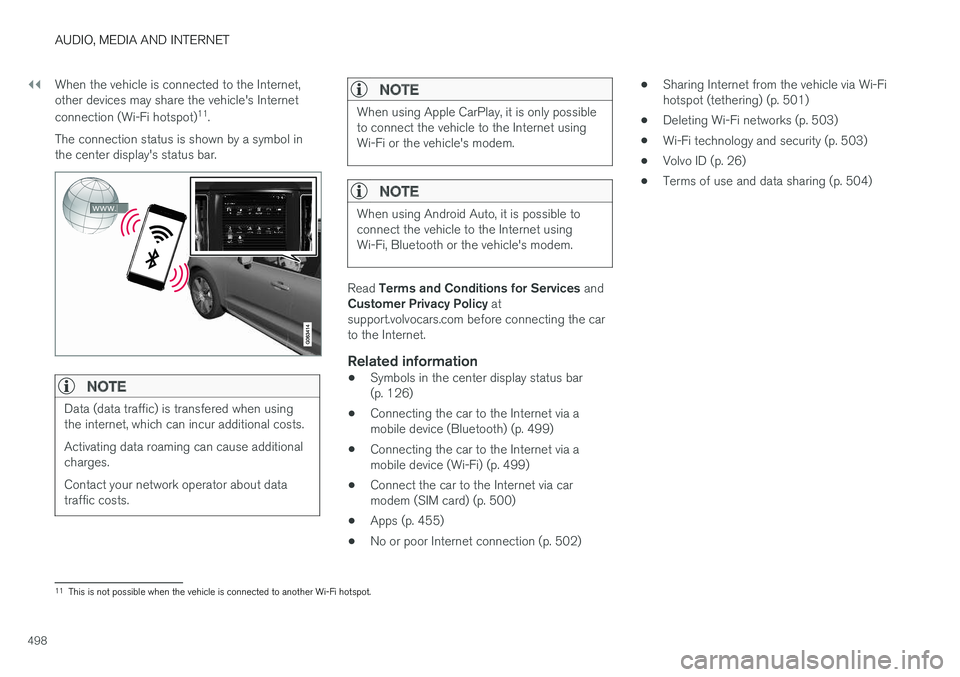
498When the vehicle is connected to the Internet, other devices may share the vehicle's Internet connection (Wi-Fi hotspot)
11
.
The connection status is shown by a symbol in the center display's status bar.
NOTE
Data (data traffic) is transfered when using the internet, which can incur additional costs. Activating data roaming can cause additional charges. Contact your network operator about data traffic costs.
NOTE
When using Apple CarPlay, it is only possible to connect the vehicle to the Internet usingWi-Fi or the vehicle's modem.
NOTE
When using Android Auto, it is possible to connect the vehicle to the Internet usingWi-Fi, Bluetooth or the vehicle's modem.
Read Terms and Conditions for Services and
Customer Privacy Policy at
support.volvocars.com before connecting the car to the Internet.
Related information
• Symbols in the center display status bar(p. 126)
• Connecting the car to the Internet via amobile device (Bluetooth) (p. 499)
• Connecting the car to the Internet via amobile device (Wi-Fi) (p. 499)
• Connect the car to the Internet via carmodem (SIM card) (p. 500)
• Apps (p. 455)
• No or poor Internet connection (p. 502) •
Sharing Internet from the vehicle via Wi-Fihotspot (tethering) (p. 501)
• Deleting Wi-Fi networks (p. 503)
• Wi-Fi technology and security (p. 503)
• Volvo ID (p. 26)
• Terms of use and data sharing (p. 504)
11
This is not possible when the vehicle is connected to another Wi-Fi hotspot.
Page 501 of 656
AUDIO, MEDIA AND INTERNET
}}
* Option/accessory.499
Connecting the car to the Internetvia a mobile device (Bluetooth)
Establish an Internet connection using Bluetooth and tethering from a phone and get access tomultiple connected services in your vehicle.
The phone and the network service provider must support Internet sharing (tethering) and the sub-scription must include data transfer.
1. To connect the vehicle to the Internet via a Bluetooth-connected phone, the phone must first be paired with the vehicle via Bluetooth.Ensure that the personal hotspot (portable/personal hotspot) is activated in your phone.
2. If the phone has been connected via Blue- tooth previously, tap
Settings in the center
display's Top view.
3. In the center display: Tap
Communication
Bluetooth Devices.
4. Mark the window for
Bluetooth Internet
connection under the heading Internet
connection.
> Your vehicle is now connected to the Internet via your Bluetooth-connected phone.
NOTE
When using Apple CarPlay, it is only possible to connect the vehicle to the Internet usingWi-Fi or the vehicle's modem.
Related information
• Internet-connected vehicle
* (p. 497)
• Connect the car to the Internet via car modem (SIM card) (p. 500)
• Connecting a phone to the car via Bluetoothfor the first time (p. 489)
• Connecting the car to the Internet via amobile device (Wi-Fi) (p. 499)
• Apple ®
CarPlay ®
* (p. 483)
• No or poor Internet connection (p. 502)
• Settings for Bluetooth devices (p. 497)
Connecting the car to the Internetvia a mobile device (Wi-Fi)
Establish an Internet connection via Wi-Fi tether- ing from a phone and get access to multipleconnected services in your vehicle.
The phone and the network service provider must support Internet sharing (tethering) and the sub-scription must include data transfer.
1. Activate Internet sharing (personal hotspot) in the phone.
2. Tap
Settings in the Top view.
3. Proceed to
CommunicationWi-Fi.
4. Activate/deactivate by tapping to check/ uncheck the Wi-Fi box.
5. Tap the name of the network you would like to connect.
6. Enter the network password.
7. If a different connection was used previously, confirm the connection change.
> The vehicle will connect to the network.
Please note that certain cellular phones will disa- ble Internet sharing (tethering) when the connec-
Page 642 of 656
INDEX
640
B
Backrestfront seat, adjusting 188, 189, 192, 193 , 194
rear seat, folding 196
Battery jump-start 439
Maintenance 589
start 589
support 592
symbols on the battery 593
warning symbols 593
BLIS 342, 343, 344, 345 Blower adjusting 225, 226
air distribution 208
air vents 209
Bluetooth connect 481
connecting vehicle to Internet 499
phone 488
settings 497
Book service and repair 570
Booster cushions 71Brake assist after collision 413
Brake fluidgrade 635
Brake functions 404
Brake light 163
Brakes 405 anti-lock brakes, ABS 405
automatic when stationary 411
Brake Assist System, BAS 406
brake lights 163
brake system 404
emergency brake lights 163
handbrake 407
Maintenance 407
on salted roads 407
on wet roads 406
brake system fluid 635
C
Camera sensor 338
Camera unit 325
Capacity weight 546, 631
Cargo compartment 555
attachment points 557
cargo net 562
electrical outlet 550, 552
Lighting 166
Cargo compartment cover 558, 559
cargo net 562
Car wash 611, 612, 614, 615, 616, 617
Catalytic converter 437 recovery 444
CD player 479
Cell phone, see Phone 489
Center console 549Center display change appearance 133
cleaning 606
climate controls 214
Function view 124
keyboard 128
messages 142, 143, 144
operation 114, 117, 121, 126
overview 111
settings 134, 135, 136
switch off and change volume 133
symbols in status bar 126
views 117
Central locking 251
Change of owner 136
Changing a wheel 532
Checking engine oil level 579
Page 643 of 656
INDEX
641
Child restraints 63, 65
booster cushions 71
convertible seats 69
infant seats 67
integrated booster cushion 75
ISOFIX/LATCH anchors 74
lower attachment points 73
recalls and registration 65
top tether anchors 72
Child safety 63
Child safety locks 253
City Safety 329, 330, 332, 333, 338, 340
City Safety in crossing traffic 335, 336 City Safety when evasive maneuver preven- ted 337
Cleaning 608, 610, 611 automatic car wash 614
car wash 611, 612, 614, 615, 616, 617
center display 606
Seat belts 608
textile upholstery 606, 608, 609
upholstery 606, 608, 609, 610, 611
wheels 617
Cleaning wheels 617
Cleaning wiper blades 615
Clean Zone 205
Clean Zone Interior Package 206
Climate 202 auto-regulation 220
blower control 225, 226
perceived temperature 203
Sensors 203
temperature control 227, 228, 229
voice control 204
zones 202
Climate controls 214 center display 214
rear seat 214
Climate system 202, 214 Refrigerant 636
repairs 576
Clock, setting 94
Collision 42, 47, 52, 61 Collision warner detection of pedestrians 333
radar sensor 320
Collision warning 329, 341
Color code, paintwork 619
Color codes 619
Compass 450, 451 calibration 451
Condensation in headlights 612, 614, 615, 616Connecting vehicle to InternetNo connection or poor connection 502
via a mobile device (WiFi) 499
via mobile device (Bluetooth) 499
via vehicle's modem 500
Connect phone 489
Contact information 26
Convertible seats 69
coolant 635
Coolant, filling 580 Cooling system overheating 437
Cornering illumination 162
Corner Traction Control 268
Corrosion protection 617Covering cargo compartment 559
Crash, see Collision 42
Crash event data 33
Cross Traffic Alert – CTA 347, 348, 349, 350
Cruise control 280, 281 manage speed 281, 282
temporary deactivation 283, 284
turn off 284
CTA – Cross Traffic Alert 347, 348, 349, 350
Curb weight 631