parking VOLVO V90 2018 Owner´s Manual
[x] Cancel search | Manufacturer: VOLVO, Model Year: 2018, Model line: V90, Model: VOLVO V90 2018Pages: 656, PDF Size: 11.78 MB
Page 268 of 656
DRIVER SUPPORT
* Option/accessory.
266
Driver support systems
The vehicle is equipped with a number of driver support systems that can provide the driver withactive or passive assistance in various situations.
The system can, for example, help the driver maintain a set speed or a set time interval to thevehicle ahead, help prevent a collision by warningthe driver and applying the brakes, or assist thedriver while parking. Some of the systems are standard and others are options. This also varies from market to market.
Related information
• Speed-dependent steering wheel resistance(p. 266)
• Electronic Stability Control (p. 268)
• Stability system Roll Stability Control(p. 267)
• Rear Collision Warning (p. 341)
• Speed limiter (p. 272)
• Cruise control (p. 280)
• Distance Alert
* (p. 285)
• Adaptive Cruise Control
* (p. 289)
• Pilot Assist (p. 305)
• Radar sensor (p. 320)
• Camera (p. 325)
• City Safety
™ (p. 329)
• BLIS
* (p. 342) •
Cross Traffic Alert
* (p. 347)
• Road Sign Information
* (p. 351)
• Driver Alert Control (p. 356)
• Lane Keeping Aid (p. 358)
• Steering assistance at risk of collision(p. 366)
• Park Assist
* (p. 375)
• Park Assist Camera
* (p. 380)
• Park Assist Pilot
* (p. 389)
Speed-dependent steering wheelresistance
Speed-dependent power steering increases the steering wheel resistance in pace with the vehi-cle's speed to give the driver an enhanced feel-ing of control and stability.
Steering may feel stiffer on highways. When parking and at low speeds, it will be easier tomove the steering wheel.
NOTE
In some situations, the power steering may become too hot and require temporary cool-ing – during such time the power steering willwork at reduced output and the steeringwheel may feel more difficult to move. In parallel with the temporarily reduced steer- ing assistance, the driver display shows amessage as well as a STEERING WHEELsymbol.
Page 299 of 656
DRIVER SUPPORT
* Option/accessory.297
Standby mode due to action by the driver
Adaptive Cruise Control will be temporarily deac- tivated and put in standby mode if:
• the brakes are applied.
• the gear selector is moved to
N
• the vehicle is driven faster than the setspeed for more than 1 minute
Temporarily increasing speed using the accelera-
tor pedal, e.g. when passing another vehicle, willnot affect the setting. The vehicle will return tothe set speed when the accelerator pedal isreleased.
Automatic standby mode
Adaptive Cruise Control is dependent on other systems, such as Electronic Stability Control (ESC 49
). If any of these other systems stops
working, Adaptive Cruise Control will automati- cally switch off.
WARNING
With automatic standby mode, the driver is warned by an acoustic signal and a messageon the instrument panel. • The driver must then regulate vehicle speed, apply the brakes if necessary, andmaintain a safe distance to other vehicles. Adaptive Cruise Control may go into standbymode if:
• your vehicle's speed goes below 5 km/h(3 mph) and ACC cannot determine if thevehicle ahead is stationary or if it is anotherobject, e.g. a speed bump.
• your vehicle's speed goes under 5 km/h(3 mph) and the vehicle ahead turns so thatACC no longer has a vehicle to follow.
• the driver opens the door.
• the driver unbuckles the seat belt.
• the engine speed (rpm) is too low/high.
• one or more of the wheels lose traction.
• the brake temperature is high.
• the parking brake is applied.
• the camera/radar sensor is covered by snowor heavy rain (the camera lens/radar wavesare blocked)
Reactivating Adaptive Cruise Control from standby mode
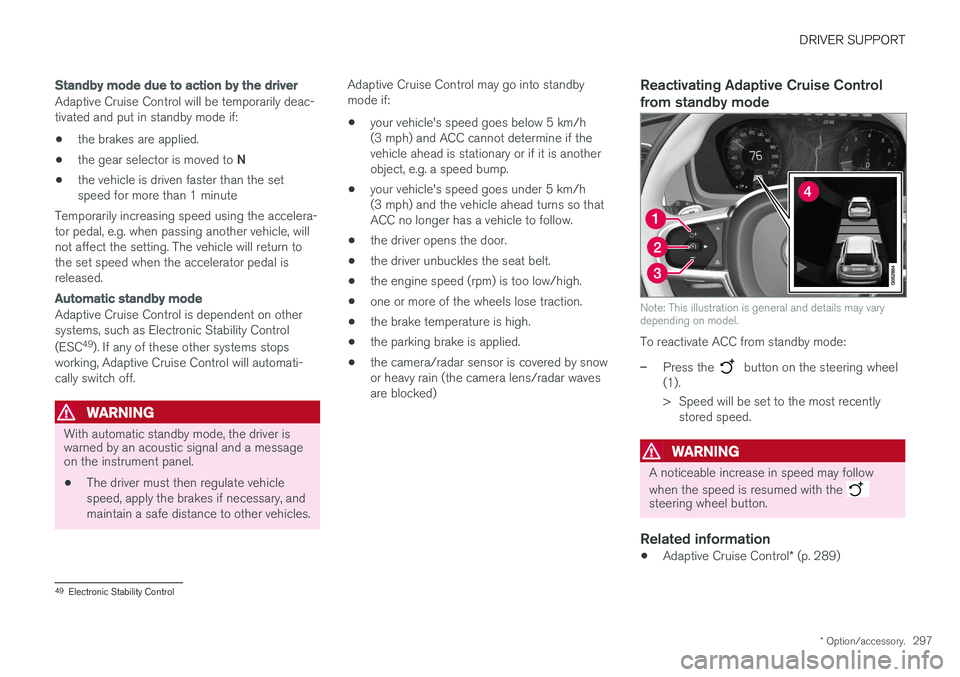
Note: This illustration is general and details may vary depending on model.
To reactivate ACC from standby mode:
–Press the button on the steering wheel
(1).
> Speed will be set to the most recently stored speed.
WARNING
A noticeable increase in speed may follow when the speed is resumed with the
steering wheel button.
Related information
• Adaptive Cruise Control
* (p. 289)
49
Electronic Stability Control
Page 300 of 656
DRIVER SUPPORT
* Option/accessory.
298
Passing assistance with AdaptiveCruise Control Adaptive Cruise Control (ACC 50
) can assist the
driver when passing other vehicles.
How passing assistance worksWhen ACC is following another vehicle and you indicate that you intend to pass that vehicle by using the turn signal 51
, Adaptive Cruise Control
will begin accelerating toward the vehicle ahead before your vehicle has moved into the passing
lane. The function will then delay a speed reduction to avoid early braking as your vehicle approaches aslower-moving vehicle. The function remains active until your vehicle has passed the other vehicle.
WARNING
Please note that this function can be acti- vated in more situations than just passinganother vehicle, such as when a direction indi-cator is used to indicate a lane change orbefore exiting to another road – the vehiclewill then briefly accelerate.
Related information
• Adaptive Cruise Control
* (p. 289)
Starting passing assistance withAdaptive Cruise Control
Requirements for passing assistanceIn order to activate passing assistance:
• your vehicle must be following a vehicle ahead (target vehicle)
• your vehicle's
current speed must be
at least 70 km/h (43 mph)
• the set speed
for ACC must be high
enough to safely pass another vehicle.
Starting parking assistanceTo start passing assistance:
–Turn on the left turn signal.
> Passing assistance will start.
Related information
• Adaptive Cruise Control
* (p. 289)
Limitations of passing assistancewith Adaptive Cruise Control
Passing assistance functionality may be reduced in certain situations.
WARNING
The driver should be aware that if conditions suddenly change when using Parking Assis-tance, the function may implement an unde-sired acceleration in certain conditions. Some situations should be avoided, e.g. if: • the vehicle is approaching an exit in the same direction as passing would normallyoccur
• the vehicle ahead slows before your vehi-cle has had time to switch to the passinglane
• traffic in the passing lane slows down
• a vehicle for right-hand traffic is driven ina country with left-hand traffic (or viceversa).
Situations of this type can be avoided by tempo- rarily putting ACC 52
in standby mode.
Related information
• Adaptive Cruise Control
* (p. 289)
50
Adaptive Cruise Control
51 Only the left-hand turn signal for left-hand drive vehicles, or right-hand turn signal for right-hand drive vehicles.
52 Adaptive Cruise Control
Page 302 of 656
||
DRIVER SUPPORT
* Option/accessory.
300
NOTE
ACC can keep the vehicle stationary for no more than 5 minutes – after that time theparking brake is applied and Adaptive CruiseControl is deactivated. The parking brake must be released before Adaptive Cruise Control can be reactivated.
Deactivation of the Auto-hold brake function
In certain situations, Auto-hold will be deactivated when the vehicle is at a standstill and AdaptiveCruise Control will go into standby mode. Thismeans that the brakes will be released and thevehicle could begin to roll. The driver mustactively apply the brakes to keep the vehicle sta-tionary. This can occur if:
• the driver depresses the brake pedal
• the parking brake is applied
• the gear selector is moved to the
P
, N
or R
positions
• the driver puts Adaptive Cruise Control in standby mode.
Auto Activate Parking BrakeIn certain situations, the parking brake will beapplied to keep the vehicle at a standstill. This occurs if Adaptive Cruise Control is keepingthe vehicle stationary using the brakes and:
• the driver opens the door or unbuckleshis/her seat belt
• ACC has kept the vehicle at a standstill formore than approx. 5 minutes
• the brakes overheat
• the driver switches off the engine manually.
Related information
•
Adaptive Cruise Control
* (p. 289)
Adaptive Cruise Control limitations
Adaptive Cruise Control (ACC 55
) may have lim-
ited functionality in certain situations.
Steep roads and/or heavy loadsAdaptive Cruise Control is primarily intended to be driven on flat roads. The function may not beable to maintain the correct time interval to thevehicle ahead when driving down steep hills. Thedriver should be extra attentive and prepared toapply the brakes.
• Do not use Adaptive Cruise Control if thevehicle is carrying a heavy load or towing atrailer.
Other limitations
•
The Off Road drive mode cannot be
selected if Adaptive Cruise Control is acti- vated.
NOTE
The function uses the vehicle's camera unit, which has some general limitations – see thesection "Camera unit limitations".
NOTE
The function uses the vehicle's radar unit, which has some general limitations – see thesection "Radar unit limitations".
55 Adaptive Cruise Control
Page 316 of 656
||
DRIVER SUPPORT
314
Automatic standby mode
Pilot Assist is dependent on other systems, such as Electronic Stability Control (ESC65
). If any of
these other systems stops working, Pilot Assist will automatically switch off.
WARNING
With automatic standby mode, the driver is warned by an acoustic signal and a messageon the instrument panel. • The driver must then regulate vehicle speed, apply the brakes if necessary, andmaintain a safe distance to other vehicles.
Adaptive Cruise Control may go into standbymode if, e.g.: • the driver opens the door.
• the brake temperature is high.
• the driver's hands are not on the steering wheel.
• the parking brake is applied.
• the engine speed (rpm) is too low/high.
• the driver unbuckles the seat belt.
• one or more of the wheels lose traction.
• the camera/radar sensor is covered by snowor heavy rain (the camera lens/radar wavesare blocked) •
your vehicle's speed goes below 5 km/h(3 mph) and Pilot Assist cannot determine ifthe vehicle ahead is stationary or if it isanother object, e.g. a speed bump.
• your vehicle's speed goes under 5 km/h(3 mph) and the vehicle ahead turns so thatPilot Assist no longer has a vehicle to follow.Reactivating Pilot Assist from standby
mode
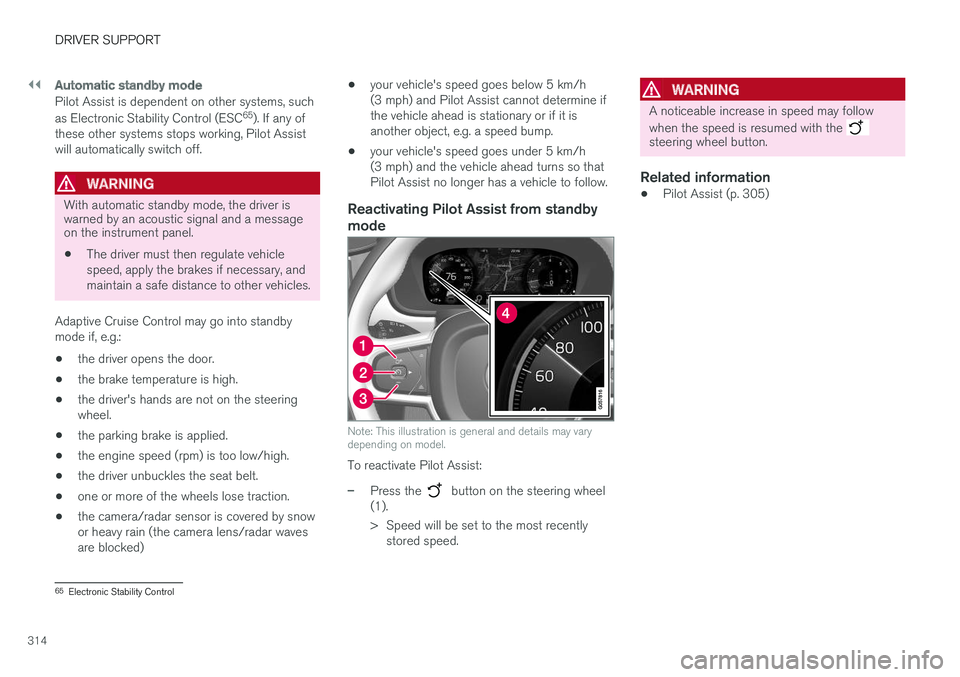
Note: This illustration is general and details may vary depending on model.
To reactivate Pilot Assist:
–Press the button on the steering wheel
(1).
> Speed will be set to the most recently stored speed.
WARNING
A noticeable increase in speed may follow when the speed is resumed with the
steering wheel button.
Related information
• Pilot Assist (p. 305)
65
Electronic Stability Control
Page 317 of 656
DRIVER SUPPORT
315
Passing assistance with Pilot Assist
Pilot Assist can assist the driver when passing other vehicles.
How passing assistance worksWhen Pilot Assist is following another vehicle and you indicate that you intend to pass that vehicle by using the turn signal 66
, Pilot Assist will
begin accelerating toward the vehicle ahead before your vehicle has moved into the passing
lane. The function will then delay a speed reduction to avoid early braking as your vehicle approaches aslower-moving vehicle. The function remains active until your vehicle has passed the other vehicle.
WARNING
Please note that this function can be acti- vated in more situations than just passinganother vehicle, such as when a direction indi-cator is used to indicate a lane change orbefore exiting to another road – the vehiclewill then briefly accelerate.
Related information
• Pilot Assist (p. 305)
Starting passing assistance withPilot Assist
Requirements for passing assistanceIn order to activate passing assistance:
• your vehicle must be following a vehicle ahead (target vehicle)
• your vehicle's
current speed must be
at least 70 km/h (43 mph)
• the set speed
for Pilot Assist must be high
enough to safely pass another vehicle.
Starting parking assistanceTo start passing assistance:
–Turn on the left turn signal.
> Passing assistance will start.
Related information
• Pilot Assist (p. 305)
Passing assistance with Pilot Assistlimitations
Passing assistance functionality may be reduced in certain situations.
WARNING
The driver should be aware that if conditions suddenly change when using Parking Assis-tance, the function may implement an unde-sired acceleration in certain conditions. Some situations should be avoided, e.g. if: • the vehicle is approaching an exit in the same direction as passing would normallyoccur
• the vehicle ahead slows before your vehi-cle has had time to switch to the passinglane
• traffic in the passing lane slows down
• a vehicle for right-hand traffic is driven ina country with left-hand traffic (or viceversa).
Situations of this type can be avoided by tempo-rarily putting Pilot Assist in standby mode.
Related information
• Pilot Assist (p. 305)
66
Only the left-hand turn signal for left-hand drive vehicles, or right-hand turn signal for right-hand drive vehicles.
Page 318 of 656
DRIVER SUPPORT
316
Switching target vehicles with PilotAssist
At certain speeds, models with automatic trans-
missions and Pilot Assist can switch target vehi-cles.
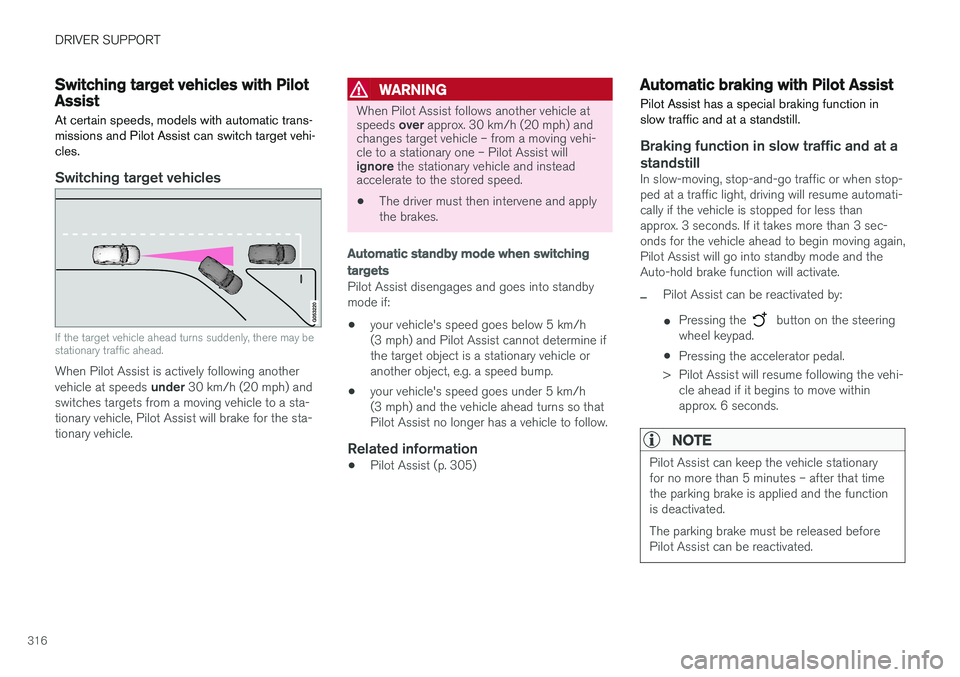
Switching target vehicles
If the target vehicle ahead turns suddenly, there may be stationary traffic ahead.
When Pilot Assist is actively following another vehicle at speeds under 30 km/h (20 mph) and
switches targets from a moving vehicle to a sta-
tionary vehicle, Pilot Assist will brake for the sta-tionary vehicle.
WARNING
When Pilot Assist follows another vehicle at speeds over approx. 30 km/h (20 mph) and
changes target vehicle – from a moving vehi- cle to a stationary one – Pilot Assist will ignore the stationary vehicle and instead
accelerate to the stored speed.
• The driver must then intervene and apply the brakes.
Automatic standby mode when switching
targets
Pilot Assist disengages and goes into standby mode if:
• your vehicle's speed goes below 5 km/h(3 mph) and Pilot Assist cannot determine ifthe target object is a stationary vehicle oranother object, e.g. a speed bump.
• your vehicle's speed goes under 5 km/h(3 mph) and the vehicle ahead turns so thatPilot Assist no longer has a vehicle to follow.
Related information
•Pilot Assist (p. 305)
Automatic braking with Pilot Assist
Pilot Assist has a special braking function in slow traffic and at a standstill.
Braking function in slow traffic and at a standstill
In slow-moving, stop-and-go traffic or when stop- ped at a traffic light, driving will resume automati-cally if the vehicle is stopped for less thanapprox. 3 seconds. If it takes more than 3 sec-onds for the vehicle ahead to begin moving again,Pilot Assist will go into standby mode and theAuto-hold brake function will activate.
–Pilot Assist can be reactivated by:
• Pressing the
button on the steering
wheel keypad.
• Pressing the accelerator pedal.
> Pilot Assist will resume following the vehi- cle ahead if it begins to move within approx. 6 seconds.
NOTE
Pilot Assist can keep the vehicle stationary for no more than 5 minutes – after that timethe parking brake is applied and the functionis deactivated. The parking brake must be released before Pilot Assist can be reactivated.
Page 319 of 656
DRIVER SUPPORT
}}}}
317
Deactivation of the Auto-hold brake function
In certain situations, Auto-hold will be deactivated when the vehicle is at a standstill and Pilot Assistwill go into standby mode. This means that thebrakes will be released and the vehicle couldbegin to roll. The driver must actively apply thebrakes to keep the vehicle stationary. This can occur if:
• the driver depresses the brake pedal
• the parking brake is applied
• the gear selector is moved to the
P, N or R
positions
• the driver puts Pilot Assist in standby mode.
Auto Activate Parking BrakeIn certain situations, the parking brake will be applied to keep the vehicle at a standstill. This occurs if Pilot Assist is keeping the vehicle stationary using the brakes and:
• the driver opens the door or unbuckleshis/her seat belt
• Pilot Assist has kept the vehicle at a stand-still for more than approx. 5 minutes
• the brakes overheat
• the driver switches off the engine manually.
Related information
•Pilot Assist (p. 305)
Pilot Assist limitations
Pilot Assist functionality may be reduced in cer- tain situations.
Pilot Assist is a driver support function designed to simplify driving and assist the driver in manysituations. However, the driver is always responsi-ble for maintaining a suitable distance to vehiclesor objects around it and ensuring that the vehicleis correctly positioned in the traffic lane.
WARNING
In some situations, Pilot Assist may have trou- ble helping the driver properly or may bedeactivated automatically – we advise againstusing Pilot Assist in such cases. Examples ofsuch situations include:
• the lane markings are worn, missing or cross each other.
• lane division is unclear, for example, whenthe lanes divide or merge or at exits orwhen there are multiple sets of markings.
• edges or other lines than lane markingsare present on or near the road, e.g.curbs, joints or repairs to the road sur-face, edges of barriers, roadside edges orstrong shadows.
• the lane is narrow or winding.
• the lane contains ridges or holes.
• weather conditions are poor, e.g. rain,snow or fog or slush or reduced visibilitywith poor light conditions, backlighting,wet road surface, etc.
The driver should also note that Pilot Assist has the following limitations: • High curbs, roadside barriers, temporary obstacles (traffic cones, safety barriers,etc.) are not detected. Alternatively, theymay be detected incorrectly as lane mark-ings, with a subsequent risk of contactbetween the vehicle and such obstacles.
Page 340 of 656
DRIVER SUPPORT
338
City Safety limitations
City Safety functionality may be reduced in cer- tain situations.
Surroundings
Low objects
Hanging objects, such as flags for overhanging loads or accessories such as auxiliary lights orfront protective grids that extend beyond theheight of the hood, may limit City Safety function-ality.
Slippery road conditions
The extended braking distance on slippery roads may reduce City Safety's capacity to help avoid acollision. In these types of situations, the Anti-lock Braking System and Electronic Stability Con- trol (ESC 76
) will help provide optimal braking
power with maintained stability.
Backlighting
The visual warning signal in the windshield may be difficult to detect in bright sunlight, if there arereflections, or if the driver is wearing sunglassesor not looking straight ahead.
Heat
If the temperature in the passenger compartment is high due to e.g. bright sunlight, the visual warn-ing signal in the windshield may be temporarilydisabled.
Camera and radar sensor's field of vision
The camera's field of vision is limited and in cer- tain situations, it may be unable to detect pedes-trians, large animals, cyclists or vehicles, or it maydetect them later than expected. Vehicles that are dirty may be detected later than clean vehicles, and in dark conditions, motorcy-cles may be detected late or not at all. If a text message displayed in the instrument panel indicates that the camera/radar sensor isobstructed, it may be difficult for City Safety todetect pedestrians, large animals, cyclists, vehi-cles or lane markings in front of the vehicle. CitySafety functionality may therefore be reduced. Text messages may not be displayed for all situa- tions in which the windshield sensors areblocked. The driver must therefore always keepthe windshield in front of the camera/radar sen-sor clean.
CAUTION
Maintenance and replacement of City Safety components may only be performed by aworkshop – an authorized Volvo workshop isrecommended.
Driver intervention
Backing up
City Safety is temporarily deactivated when the vehicle is backing up.
Low speed
City Safety is not activated at very low speeds under 4 km/h (3 mph). The system will thereforenot intervene in situations in which your vehicle isapproaching another vehicle very slowly, such aswhen parking.
Active driver
Action by the driver always has priority. City Safety will therefore not react or will react at alater stage with a warning or intervention in situa-tions in which the driver is clearly steering andoperating the accelerator pedal, even if a collisionis unavoidable. An active and aware driving style may therefore delay collision warnings and intervention in order to minimize unnecessary warnings.
76 Electronic Stability Control
Page 349 of 656
DRIVER SUPPORT
* Option/accessory.347
Cross Traffic Alert *
CTA 85
is a supplementary driver support system
to BLIS 86
that is intended to help the driver
detect vehicles crossing behind the vehicle while backing up.
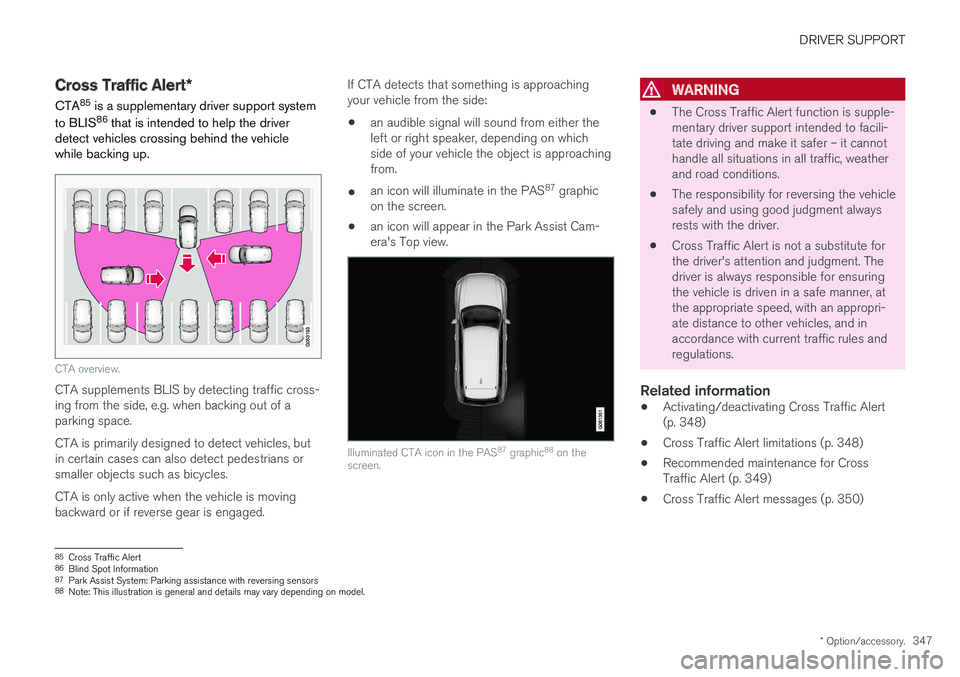
CTA overview.
CTA supplements BLIS by detecting traffic cross- ing from the side, e.g. when backing out of aparking space. CTA is primarily designed to detect vehicles, but in certain cases can also detect pedestrians orsmaller objects such as bicycles. CTA is only active when the vehicle is moving backward or if reverse gear is engaged. If CTA detects that something is approachingyour vehicle from the side:
• an audible signal will sound from either theleft or right speaker, depending on whichside of your vehicle the object is approachingfrom.
• an icon will illuminate in the PAS 87
graphic
on the screen.
• an icon will appear in the Park Assist Cam-era's Top view.
Illuminated CTA icon in the PAS 87
graphic 88
on the
screen.
WARNING
• The Cross Traffic Alert function is supple- mentary driver support intended to facili-tate driving and make it safer – it cannothandle all situations in all traffic, weatherand road conditions.
• The responsibility for reversing the vehiclesafely and using good judgment alwaysrests with the driver.
• Cross Traffic Alert is not a substitute forthe driver's attention and judgment. Thedriver is always responsible for ensuringthe vehicle is driven in a safe manner, atthe appropriate speed, with an appropri-ate distance to other vehicles, and inaccordance with current traffic rules andregulations.
Related information
•
Activating/deactivating Cross Traffic Alert(p. 348)
• Cross Traffic Alert limitations (p. 348)
• Recommended maintenance for CrossTraffic Alert (p. 349)
• Cross Traffic Alert messages (p. 350)
85
Cross Traffic Alert
86 Blind Spot Information
87 Park Assist System: Parking assistance with reversing sensors
88 Note: This illustration is general and details may vary depending on model.