park assist VOLVO V90 2018 Owner´s Manual
[x] Cancel search | Manufacturer: VOLVO, Model Year: 2018, Model line: V90, Model: VOLVO V90 2018Pages: 656, PDF Size: 11.78 MB
Page 396 of 656
DRIVER SUPPORT
* Option/accessory.
394
Park Assist Pilot * limitations
Park Assist Pilot PAP 126
may not be able to
detect all conditions in all situations and func- tionality may therefore be limited.WARNING
• The PAP function is supplementary driver support intended to facilitate driving andhelp make it safer – it cannot handle allsituations in all traffic, weather and roadconditions.
• Pay particular attention to people andanimals near the vehicle.
• Bear in mind that the front end of thevehicle may swing out towards oncomingtraffic during the parking maneuver.
• Objects situated higher than the detec-tion area of the sensors are not includedwhen the parking maneuver is calculated,which could cause PAP to swing into theparking space too early. Such parkingspaces should be avoided for this reason.
• PAP is not a substitute for the driver'sattention and judgment. The driver isalways responsible for ensuring the vehi-cle is driven in a safe manner, at theappropriate speed, with an appropriatedistance to other vehicles, and in accord-ance with current traffic rules and regula-tions.
The driver should be aware of the following limi-tations for Park Assist Pilot:
The parking sequence is cancelledA parking sequence will be cancelled if:
• the driver moves the steering wheel
• the vehicle's speed exceeds 7 km/h (4 mph)
• the driver taps
Cancel in the center display
• when the anti-lock brakes or the Electronic stability control are engaged - e.g. when awheel loses grip on a slippery road
• when the power steering works at reduced power - e.g. during cooling due to overheat- ing (see section "Speed-dependent steeringforce").
A message in the center display will explain whythe parking sequence was cancelled.
CAUTION
Under certain circumstances, PAP may not be able to find parking spaces – one reason maybe that the sensors are disrupted by externalsound sources that emit the same ultrasonicfrequencies that the system works with. Examples of such sources include horns, wet tires on asphalt, pneumatic brakes, exhaustnoise from motorcycles, etc.
126 Park Assist Pilot
Page 397 of 656
DRIVER SUPPORT
* Option/accessory.395
NOTE
Dirt, ice and snow covering the sensors reduce their function and can make measure-ment impossible.
Driver responsibilityThe driver should keep in mind that PAP is a parking aid ‒ not an infallible fully automatic sys-
tem. The driver must always be prepared to take control and cancel a parking sequence if neces-sary. There are a number of things to keep in mind when parking, including:
• The driver is always responsible for determin-ing if the space suggested by PAP is suita-ble for parking.
• Do not use PAP when using snow chains ora temporary spare tire.
• Do not use PAP if there are any objects pro-truding from the vehicle.
• Heavy rain or snowfall may inhibit PAP's abil-ity to accurately measure a parking space.
• While searching and measuring the parkingspace, PAP may be unable to detect objectslocated far into the space.
• PAP may not suggest parking spaces onnarrow streets if it does not detect sufficientspace for maneuvering the vehicle. •
Use approved tires 127
inflated to the correct
tire pressure because this affects PAP's abil-ity to provide parking assistance.
• PAP's function is based on the way the vehi-cles are parked behind and in front of yourparking space. If they are, for example,parked too close to the curb, there is a riskthat your vehicle's tires or wheel rims couldbe damaged by the curb during the parkingprocedure.
• Perpendicular parking spaces may not bedetected or may be suggested unnecessarilyif a parked vehicle is sticking out more thanother parked vehicles.
• PAP is intended to provide parking assis-tance on straight streets, not sections ofstreet with sharp curves or bends. Alwaysmake sure that your vehicle is parallel to rel-evant parking spaces when PAP is measur-ing the parking space.
CAUTION
Switching to another approved wheel and/or tire dimension could change the tire circum-ference, which would then require the PAPsystem to be updated. Consult a workshop –an authorized Volvo workshop is recom-mended.
Related information
•
Park Assist Pilot
* (p. 389)
• Speed-dependent steering wheel resistance (p. 266)
127
"Approved tires" refers to tires of the same type and make as the vehicle's original, factory-installed tires.
Page 398 of 656
DRIVER SUPPORT
* Option/accessory.
396
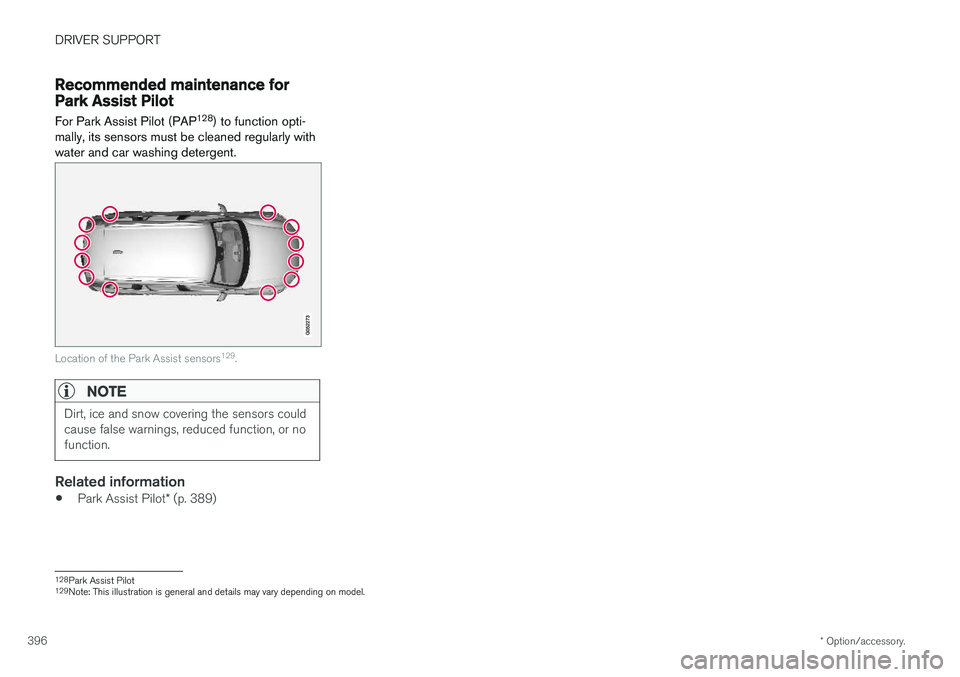
Recommended maintenance forPark Assist Pilot For Park Assist Pilot (PAP 128
) to function opti-
mally, its sensors must be cleaned regularly with water and car washing detergent.
Location of the Park Assist sensors 129
.
NOTE
Dirt, ice and snow covering the sensors could cause false warnings, reduced function, or nofunction.
Related information
• Park Assist Pilot
* (p. 389)
128
Park Assist Pilot
129 Note: This illustration is general and details may vary depending on model.
Page 399 of 656
DRIVER SUPPORT
* Option/accessory.397
Park Assist Pilot * messages
Messages for Park Assist Pilot PAP 130
may be
displayed in the instrument panel and/or the center display.
Some examples of symbols and messages are shown in the table below.
MessageMeaning
Park Assist System Sensors blocked, cleaning neededOne or more of the sensors are blocked. Check and clean/remove the obstacle as soon as possible.
Park Assist System Unavailable Service requiredThe system is not functioning as intended. Contact a workshop ‒ an authorized Volvo workshop is recommended.
A text message can be erased by briefly pressing the
button in the center of the right-side
steering wheel keypad. If the message persists: Contact a workshop ‒ an
authorized Volvo workshop is recommended.
Related information
• Park Assist Pilot
* (p. 389)
130
Park Assist Pilot
Page 406 of 656
STARTING AND DRIVING
404
Selecting ignition modeThe vehicle's ignition can be put in various modes (levels) to make different functions availa-ble.
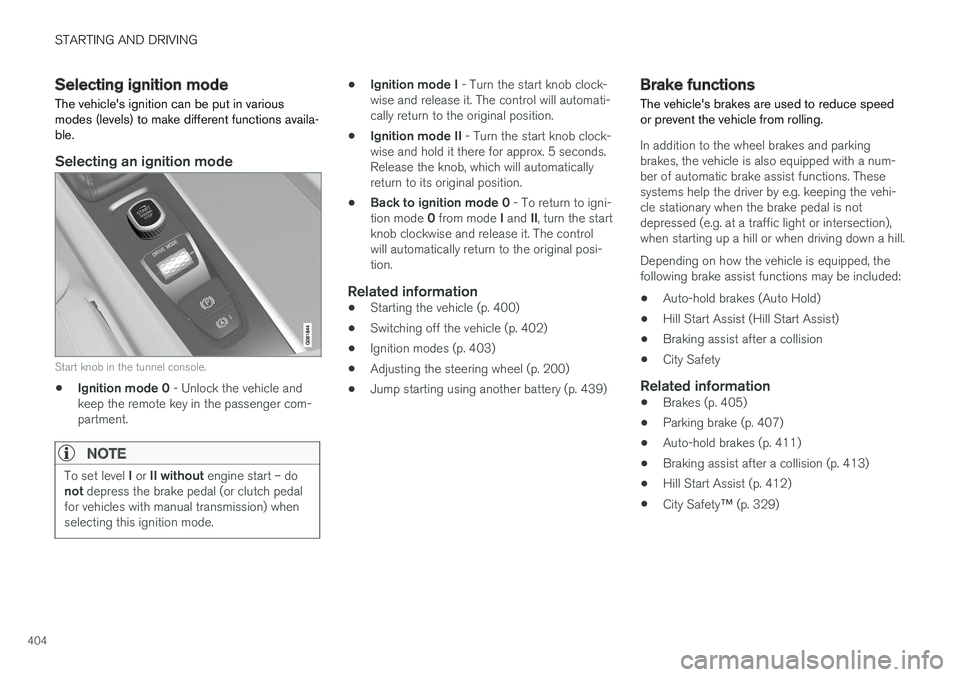
Selecting an ignition mode
Start knob in the tunnel console.
• Ignition mode 0
- Unlock the vehicle and
keep the remote key in the passenger com- partment.
NOTE
To set level I or II without engine start – do
not depress the brake pedal (or clutch pedal
for vehicles with manual transmission) when selecting this ignition mode.
• Ignition mode I
- Turn the start knob clock-
wise and release it. The control will automati- cally return to the original position.
• Ignition mode II
- Turn the start knob clock-
wise and hold it there for approx. 5 seconds.Release the knob, which will automaticallyreturn to its original position.
• Back to ignition mode 0
- To return to igni-
tion mode 0 from mode I and II, turn the start
knob clockwise and release it. The controlwill automatically return to the original posi-tion.
Related information
• Starting the vehicle (p. 400)
• Switching off the vehicle (p. 402)
• Ignition modes (p. 403)
• Adjusting the steering wheel (p. 200)
• Jump starting using another battery (p. 439)
Brake functions
The vehicle's brakes are used to reduce speed or prevent the vehicle from rolling.
In addition to the wheel brakes and parking brakes, the vehicle is also equipped with a num-ber of automatic brake assist functions. Thesesystems help the driver by e.g. keeping the vehi-cle stationary when the brake pedal is notdepressed (e.g. at a traffic light or intersection),when starting up a hill or when driving down a hill. Depending on how the vehicle is equipped, the following brake assist functions may be included:
• Auto-hold brakes (Auto Hold)
• Hill Start Assist (Hill Start Assist)
• Braking assist after a collision
• City Safety
Related information
•Brakes (p. 405)
• Parking brake (p. 407)
• Auto-hold brakes (p. 411)
• Braking assist after a collision (p. 413)
• Hill Start Assist (p. 412)
• City Safety
™ (p. 329)
Page 413 of 656
STARTING AND DRIVING
411
Related information
•Activating and deactivating the parking brake (p. 408)
• Start battery (p. 589)
• Volvo's service program (p. 566)
Auto-hold brakes
With the Auto-hold brake function, the driver can release the brake pedal and the brakes willremain applied, for example, when the vehiclehas stopped at a traffic light or intersection.
When the vehicle stops, the brakes are activated automatically. The function can use either thenormal brakes or the parking brakes to keep thevehicle stationary and works on flat surfaces orhills. When driving off, the brakes will be automat-ically released if the driver's seat belt is buckled.
NOTE
When braking to a stop on an uphill or down- hill gradient, depress the brake pedal withslightly more force than usual before releas-ing to ensure that the vehicle cannot move atall.
The parking brake is activated if: • the vehicle is switched off
• the driver's door is opened
• the driver's seat belt is removed
• the vehicle has been stationary for a pro- longed period of time (5-10 minutes)
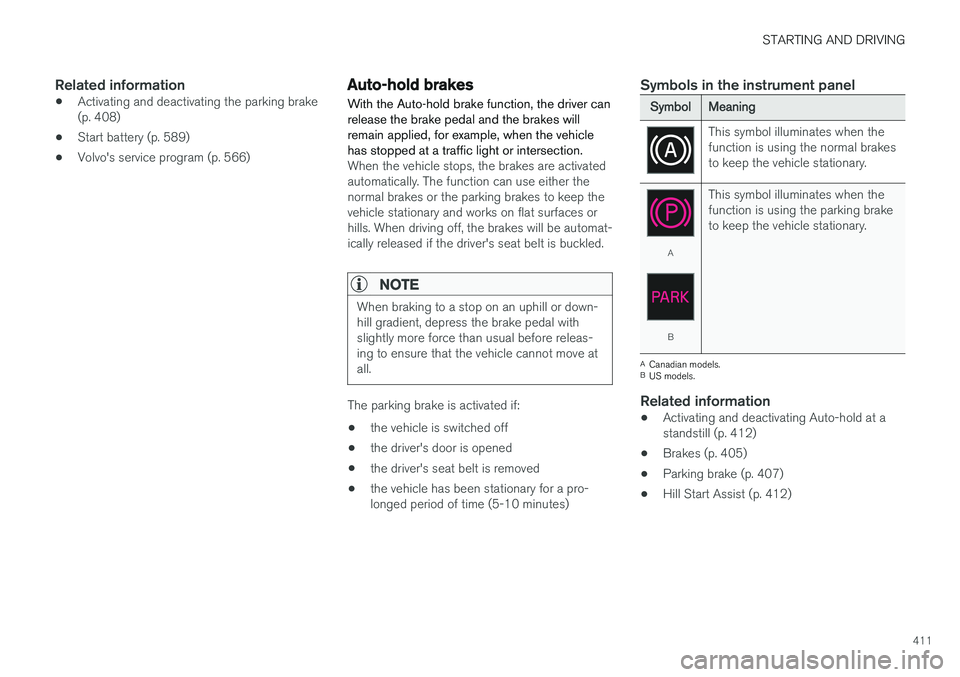
Symbols in the instrument panel
SymbolMeaning
This symbol illuminates when the function is using the normal brakesto keep the vehicle stationary.
A
B This symbol illuminates when the function is using the parking braketo keep the vehicle stationary.
A
Canadian models.
B US models.
Related information
• Activating and deactivating Auto-hold at a standstill (p. 412)
• Brakes (p. 405)
• Parking brake (p. 407)
• Hill Start Assist (p. 412)
Page 415 of 656
STARTING AND DRIVING
}}
* Option/accessory.413
Braking assist after a collision In a collision in which the activation level is reached for the pyrotechnic seat belt tensionersor airbags, or if a collision with a large animal isdetected, the vehicle's brakes will be automati-cally activated. This function is intended to helpprevent or reduce the effects of any subsequentcollision.
After a serious collision, it may no longer be pos- sible to control and steer the vehicle. In order toavoid or mitigate a possible further collision witha vehicle or an object in the vehicle's path, thebrake assist system is activated automatically tohelp stop the vehicle safely. The brake lights and hazard warning flashers are activated during braking. When the vehicle has stopped, the hazard warning flashers will con-tinue to flash and the parking brake will beapplied. If braking is not appropriate, e.g. if there is a risk of being hit by passing traffic, the driver can over-ride the system by depressing the acceleratorpedal. This function assumes that the brake system is intact after a collision. Brake assist is part of the Rear Collision Warning and Blind Spot Information safety systems.
Related information
•Rear Collision Warning (p. 341)
• BLIS
* (p. 342)
• Brake functions (p. 404)
Transmission The transmission is part of the vehicle's driveline (power transmission) between the engine andthe drive wheels. The function of the transmis-sion is to change gears depending on speedand power needs.
The vehicle has an 8-speed automatic transmis- sion. The number of gears allows the engine'storque and power band to be effectively utilized.Two of the gears are overdrive gears that savefuel when driving at a constant engine speed.Manual shifting is also possible. The instrumentpanel shows the gear currently in use.
CAUTION
Check the operating temperature of the transmission to help avoid damage to any ofthe drive system components. If there is a riskof overheating, a warning symbol will appearin the instrument panel and a text messagewill be displayed. Follow the recommenda-tions given.
Symbols in the instrument panelIf a problem should occur with the transmission, a symbol and a message will appear in the instru-ment panel.
Page 441 of 656
STARTING AND DRIVING
}}
439
Jump starting using another batteryIf the start battery is discharged, current from another battery can be used to start the vehicle.
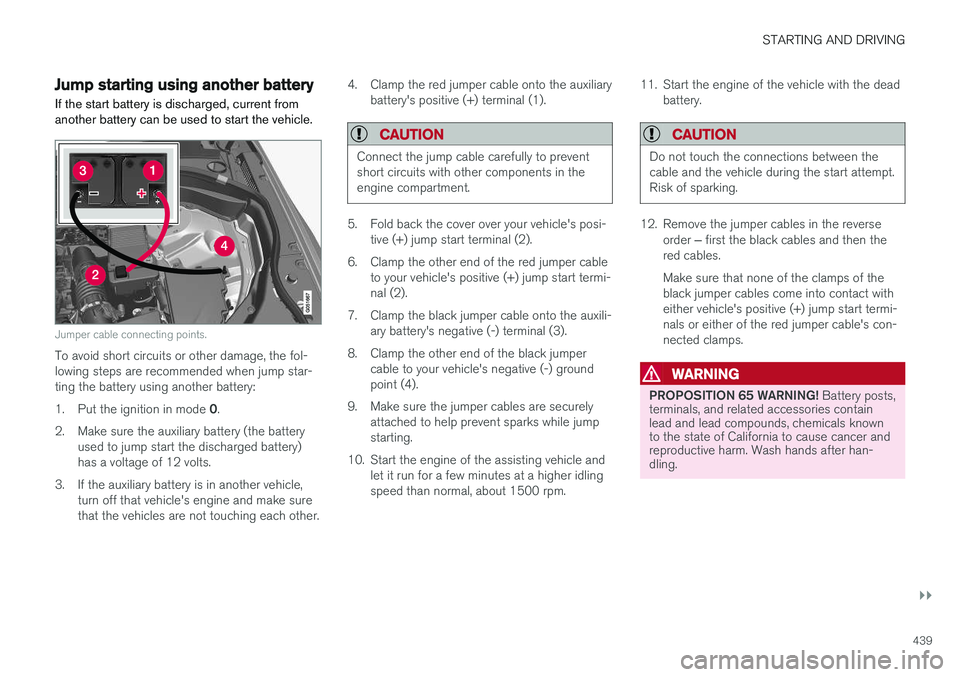
Jumper cable connecting points.
To avoid short circuits or other damage, the fol- lowing steps are recommended when jump star-ting the battery using another battery: 1. Put the ignition in mode 0.
2. Make sure the auxiliary battery (the battery used to jump start the discharged battery) has a voltage of 12 volts.
3. If the auxiliary battery is in another vehicle, turn off that vehicle's engine and make surethat the vehicles are not touching each other. 4. Clamp the red jumper cable onto the auxiliary
battery's positive (+) terminal (1).
CAUTION
Connect the jump cable carefully to prevent short circuits with other components in theengine compartment.
5. Fold back the cover over your vehicle's posi-tive (+) jump start terminal (2).
6. Clamp the other end of the red jumper cable to your vehicle's positive (+) jump start termi- nal (2).
7. Clamp the black jumper cable onto the auxili- ary battery's negative (-) terminal (3).
8. Clamp the other end of the black jumper cable to your vehicle's negative (-) groundpoint (4).
9. Make sure the jumper cables are securely attached to help prevent sparks while jumpstarting.
10. Start the engine of the assisting vehicle and let it run for a few minutes at a higher idlingspeed than normal, about 1500 rpm. 11. Start the engine of the vehicle with the dead
battery.
CAUTION
Do not touch the connections between the cable and the vehicle during the start attempt.Risk of sparking.
12. Remove the jumper cables in the reverse
order ‒ first the black cables and then the
red cables. Make sure that none of the clamps of the black jumper cables come into contact witheither vehicle's positive (+) jump start termi-nals or either of the red jumper cable's con-nected clamps.
WARNING
PROPOSITION 65 WARNING! Battery posts,
terminals, and related accessories contain lead and lead compounds, chemicals knownto the state of California to cause cancer andreproductive harm. Wash hands after han-dling.
Page 443 of 656
STARTING AND DRIVING
* Option/accessory.441
CAUTION
•Bumper-attached trailer hitches must not be used on Volvos, nor should safetychains be attached to the bumper.
• Trailer hitches attaching to the vehiclerear axle must not be used.
• Never connect a trailer's hydraulic brakesystem directly to the vehicle brake sys-tem, nor a trailer's lighting system directlyto the vehicle lighting system. Consultyour nearest authorized Volvo retailer forcorrect installation.
• When towing a trailer, the trailer's safetychains or wire must be correctly fastenedto the attachment points provided in thetrailer hitch on the vehicle. The safetychain or wire must never be fastened toor wound around the towing ball.
NOTE
The optional detachable trailer hitch may not be available in all markets or on all models.Consult your Volvo retailer.
NOTE
Extreme weather conditions, towing a trailer, driving at high altitudes and fuel quality arefactors that significantly increase a vehicle'sfuel consumption.
Trailer weights
WARNING
Please adhere to the recommendations provi- ded for trailer weight. If the recommendationsare not followed, the vehicle and trailer maybe difficult to control during evasive maneu-vers and braking.
NOTE
The specified maximum trailer weights are those permitted by Volvo. National vehicleregulations may set additional restrictions ontrailer weight and speed. The trailer hitchesmay be certified for higher towing weightsthan the vehicle is permitted to tow.
Self-leveling suspension
*The vehicle's self-leveling system attempts to keep the vehicle at a constant level, regardless ofload (up to the maximum permitted weight).When the vehicle is stationary, the rear end of thevehicle will be slightly lowered, which is normal.
Driving in hilly terrain or hot weatherIn certain conditions, there is a risk of overheat-ing when driving with a trailer. If overheating ofthe engine and drive system is detected, a warn-ing symbol will illuminate in the instrument panelalong with a message. The automatic transmission selects the optimalgear for the current load and engine speed.
Steep inclines
Do not lock the automatic transmission into a higher gear than what the engine can handle
‒ it
is not always preferable to drive in high gears at low rpm.
Parking on a hill
1. Depress the brake pedal.
2. Apply the parking brake.3. Put the gear selector in P.
4. Release the brake pedal.Put chocks behind the wheels when the vehicle is parked on a hill with a trailer attached.
Starting on a hill
1. Depress the brake pedal. 2. Put the gear selector in D.
3. Release the parking brake.
4. Release the brake pedal and start driving.
Related information
• Trailer Stability Assist
* (p. 442)
• Checking trailer lights (p. 443)
• Towing capacity and tongue weight (p. 632)
• Overheating of engine and transmission (p. 437)
Page 448 of 656
||
STARTING AND DRIVING
* Option/accessory.
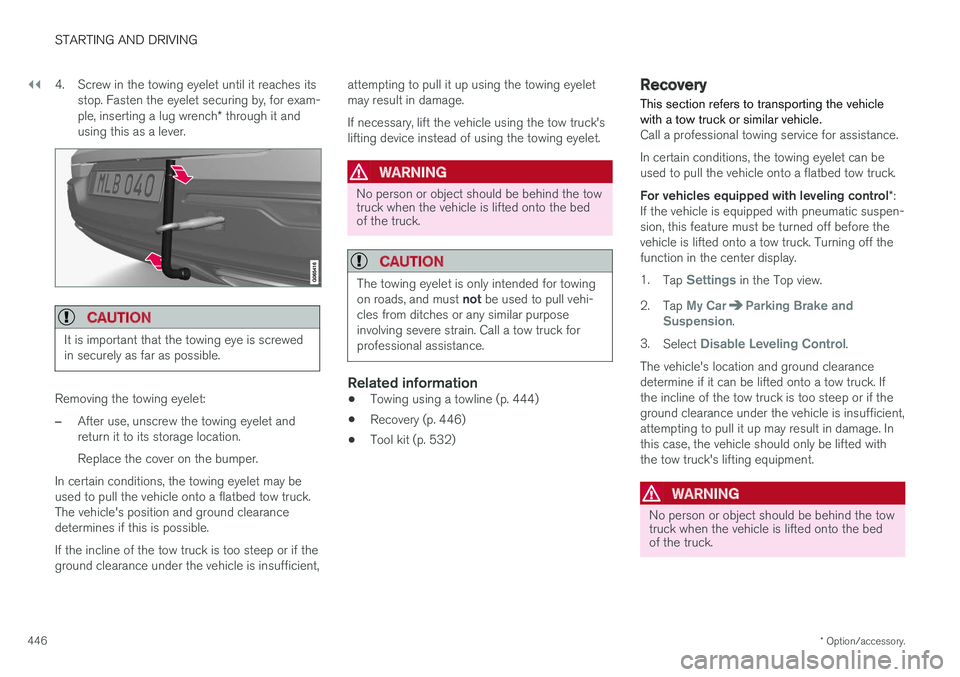
446 4. Screw in the towing eyelet until it reaches its
stop. Fasten the eyelet securing by, for exam- ple, inserting a lug wrench * through it and
using this as a lever.
CAUTION
It is important that the towing eye is screwed in securely as far as possible.
Removing the towing eyelet:
–After use, unscrew the towing eyelet and return it to its storage location. Replace the cover on the bumper.
In certain conditions, the towing eyelet may be used to pull the vehicle onto a flatbed tow truck.The vehicle's position and ground clearancedetermines if this is possible. If the incline of the tow truck is too steep or if the ground clearance under the vehicle is insufficient, attempting to pull it up using the towing eyeletmay result in damage. If necessary, lift the vehicle using the tow truck's lifting device instead of using the towing eyelet.
WARNING
No person or object should be behind the tow truck when the vehicle is lifted onto the bedof the truck.
CAUTION
The towing eyelet is only intended for towing on roads, and must
not be used to pull vehi-
cles from ditches or any similar purpose involving severe strain. Call a tow truck forprofessional assistance.
Related information
• Towing using a towline (p. 444)
• Recovery (p. 446)
• Tool kit (p. 532)
Recovery
This section refers to transporting the vehicle with a tow truck or similar vehicle.
Call a professional towing service for assistance. In certain conditions, the towing eyelet can be used to pull the vehicle onto a flatbed tow truck. For vehicles equipped with leveling control *:
If the vehicle is equipped with pneumatic suspen- sion, this feature must be turned off before thevehicle is lifted onto a tow truck. Turning off thefunction in the center display. 1. Tap
Settings in the Top view.
2. Tap
My CarParking Brake and
Suspension.
3. Select
Disable Leveling Control.
The vehicle's location and ground clearance determine if it can be lifted onto a tow truck. Ifthe incline of the tow truck is too steep or if theground clearance under the vehicle is insufficient,attempting to pull it up may result in damage. Inthis case, the vehicle should only be lifted withthe tow truck's lifting equipment.
WARNING
No person or object should be behind the tow truck when the vehicle is lifted onto the bedof the truck.