mirror VOLVO V90 2018 Owner´s Manual
[x] Cancel search | Manufacturer: VOLVO, Model Year: 2018, Model line: V90, Model: VOLVO V90 2018Pages: 656, PDF Size: 11.78 MB
Page 384 of 656
||
DRIVER SUPPORT
* Option/accessory.
382
Side cameras
The side cameras 119
are located in the rearview mirrors.
The side cameras can show views along each side of the vehicle.
Related information
• Park Assist Camera
* (p. 380)
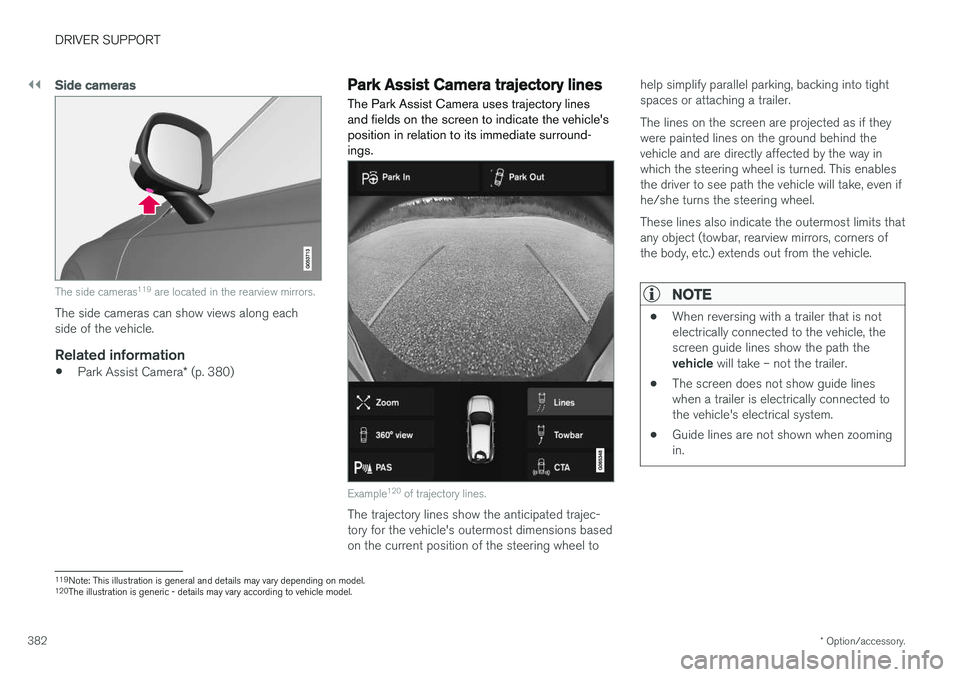
Park Assist Camera trajectory lines
The Park Assist Camera uses trajectory lines and fields on the screen to indicate the vehicle'sposition in relation to its immediate surround-ings.
Example 120
of trajectory lines.
The trajectory lines show the anticipated trajec- tory for the vehicle's outermost dimensions basedon the current position of the steering wheel to help simplify parallel parking, backing into tightspaces or attaching a trailer. The lines on the screen are projected as if they were painted lines on the ground behind thevehicle and are directly affected by the way inwhich the steering wheel is turned. This enablesthe driver to see path the vehicle will take, even ifhe/she turns the steering wheel. These lines also indicate the outermost limits that any object (towbar, rearview mirrors, corners ofthe body, etc.) extends out from the vehicle.
NOTE
•
When reversing with a trailer that is not electrically connected to the vehicle, thescreen guide lines show the path the vehicle
will take – not the trailer.
• The screen does not show guide lines when a trailer is electrically connected tothe vehicle's electrical system.
• Guide lines are not shown when zoomingin.
119
Note: This illustration is general and details may vary depending on model.
120 The illustration is generic - details may vary according to vehicle model.
Page 388 of 656
||
DRIVER SUPPORT
* Option/accessory.
386
Blind sectors
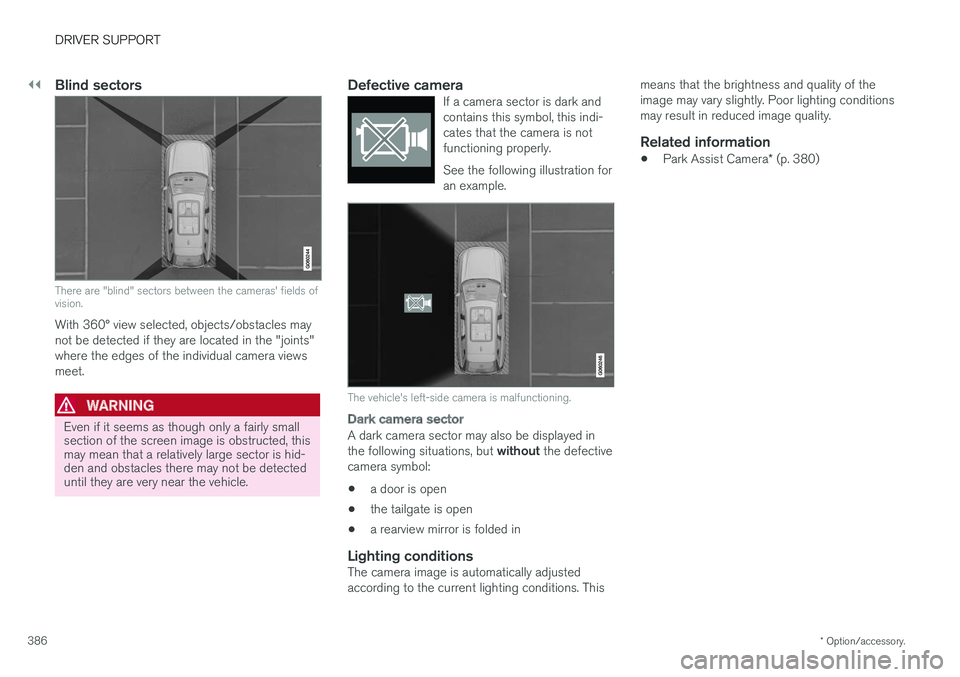
There are "blind" sectors between the cameras' fields of vision.
With 360° view selected, objects/obstacles may not be detected if they are located in the "joints"where the edges of the individual camera viewsmeet.
WARNING
Even if it seems as though only a fairly small section of the screen image is obstructed, thismay mean that a relatively large sector is hid-den and obstacles there may not be detecteduntil they are very near the vehicle.
Defective cameraIf a camera sector is dark and contains this symbol, this indi-cates that the camera is notfunctioning properly. See the following illustration for an example.
The vehicle's left-side camera is malfunctioning.
Dark camera sector
A dark camera sector may also be displayed in the following situations, but without the defective
camera symbol:
• a door is open
• the tailgate is open
• a rearview mirror is folded in
Lighting conditionsThe camera image is automatically adjusted according to the current lighting conditions. This means that the brightness and quality of theimage may vary slightly. Poor lighting conditionsmay result in reduced image quality.
Related information
•
Park Assist Camera
* (p. 380)
Page 449 of 656
STARTING AND DRIVING
* Option/accessory.447
CAUTION
The towing eyelet is only intended for towing on roads, and must not be used to pull vehi-
cles from ditches or any similar purpose involving severe strain. Call a tow truck forprofessional assistance.
CAUTION
Note that the vehicle must always be towed with the wheels rolling forward.
Related information
• Attaching and removing the towing eyelet (p. 445)
HomeLink®
*12
HomeLink ®
13
is a programmable remote control,
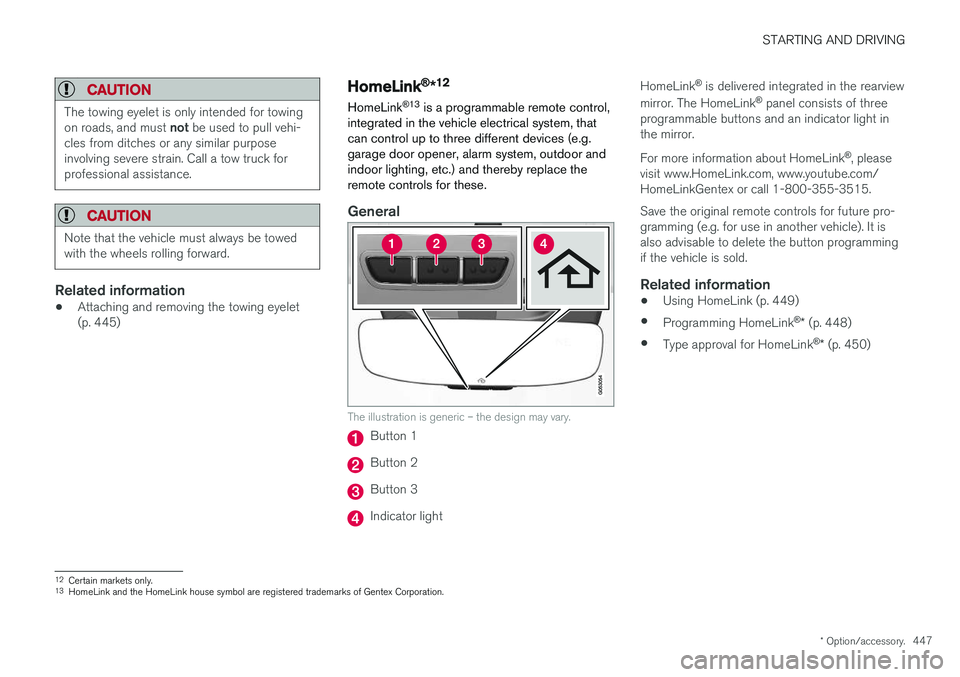
integrated in the vehicle electrical system, that can control up to three different devices (e.g.garage door opener, alarm system, outdoor andindoor lighting, etc.) and thereby replace theremote controls for these.
General
The illustration is generic – the design may vary.
Button 1
Button 2
Button 3
Indicator light HomeLink
®
is delivered integrated in the rearview
mirror. The HomeLink ®
panel consists of three
programmable buttons and an indicator light in the mirror. For more information about HomeLink ®
, please
visit www.HomeLink.com, www.youtube.com/ HomeLinkGentex or call 1-800-355-3515. Save the original remote controls for future pro- gramming (e.g. for use in another vehicle). It isalso advisable to delete the button programmingif the vehicle is sold.
Related information
• Using HomeLink (p. 449)
• Programming HomeLink ®
* (p. 448)
• Type approval for HomeLink ®
* (p. 450)
12
Certain markets only.
13 HomeLink and the HomeLink house symbol are registered trademarks of Gentex Corporation.
Page 452 of 656
STARTING AND DRIVING
* Option/accessory.
450
Type approval for HomeLink®
*16
FCC (USA) and IC (Canada)This device complies with FCC rules part 15 and Industry Canada RSS-210. Operation is subjectto the following two conditions: (1) This devicemay not cause harmful interference, and (2) Thisdevice must accept any interference that may bereceived including interference that may causeundesired operation.
WARNING
The transmitter has been tested and complies with FCC and IC rules. Changes or modifica-tions not expressly approved by the partyresponsible for compliance could void the user's authority to operate the device. 17
Type approval for EUGentex Corporation hereby declares that HomeLink®
Model UAHL5 complies with the
Radio equipment directive 2014/53/EU. Wavelengths within which the radio equipment operates:
• 433.05MHz-434.79MHz <10mW E.R.P.
• 868.00MHz-868.60MHz <25mW E.R.P.
• 868.70MHz-868.20MHz <25mW E.R.P.
• 869.40MHz-869.65MHz <25mW E.R.P. •
869.70MHz-870.00MHz <25mW E.R.P.
Certificate holder address: Gentex Corporation,600 North Centennial Street, Zeeland MI 49464,USA For more information, see support.volvocars.com.
Related information
• HomeLink ®
* (p. 447)
Compass
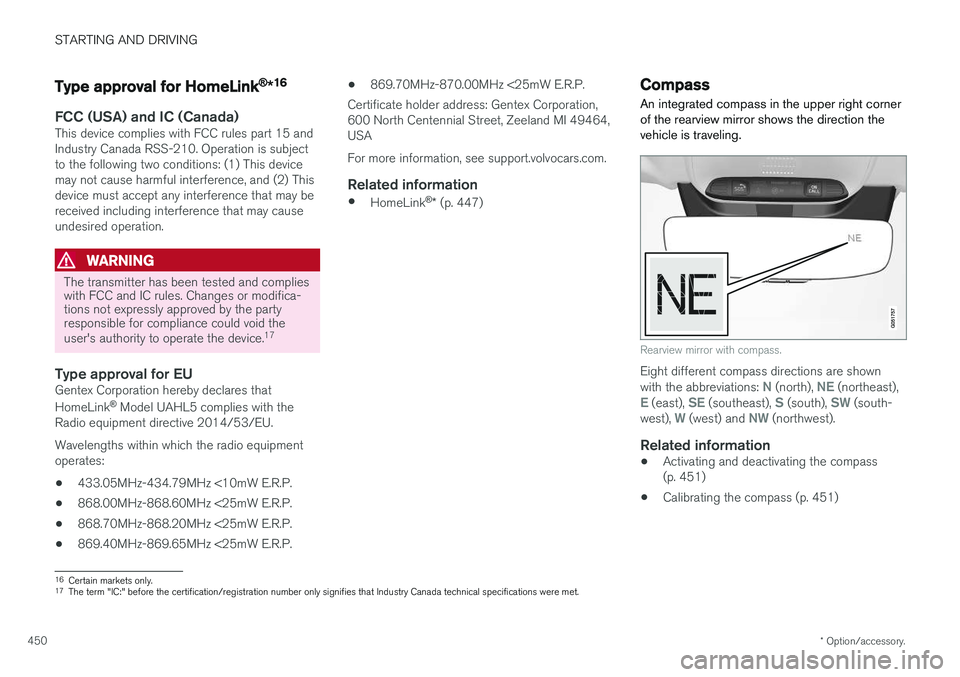
An integrated compass in the upper right corner of the rearview mirror shows the direction thevehicle is traveling.
Rearview mirror with compass.
Eight different compass directions are shown with the abbreviations: N (north), NE (northeast),E (east), SE (southeast), S (south), SW (south-
west), W (west) and NW (northwest).
Related information
• Activating and deactivating the compass (p. 451)
• Calibrating the compass (p. 451)
16
Certain markets only.
17 The term "IC:" before the certification/registration number only signifies that Industry Canada technical specifications were met.
Page 453 of 656
STARTING AND DRIVING
}}
* Option/accessory.451
Activating and deactivating thecompass
An integrated compass in the upper right corner of the rearview mirror shows the direction thevehicle is traveling.
Activating and deactivating the compass
The compass is automatically activated when the vehicle is started. To deactivate/activate the compass manually:
–Use a paper clip or similar object to press the button on the bottom of the mirror.
Related information
• Compass (p. 450)
• Calibrating the compass (p. 451)
Calibrating the compass
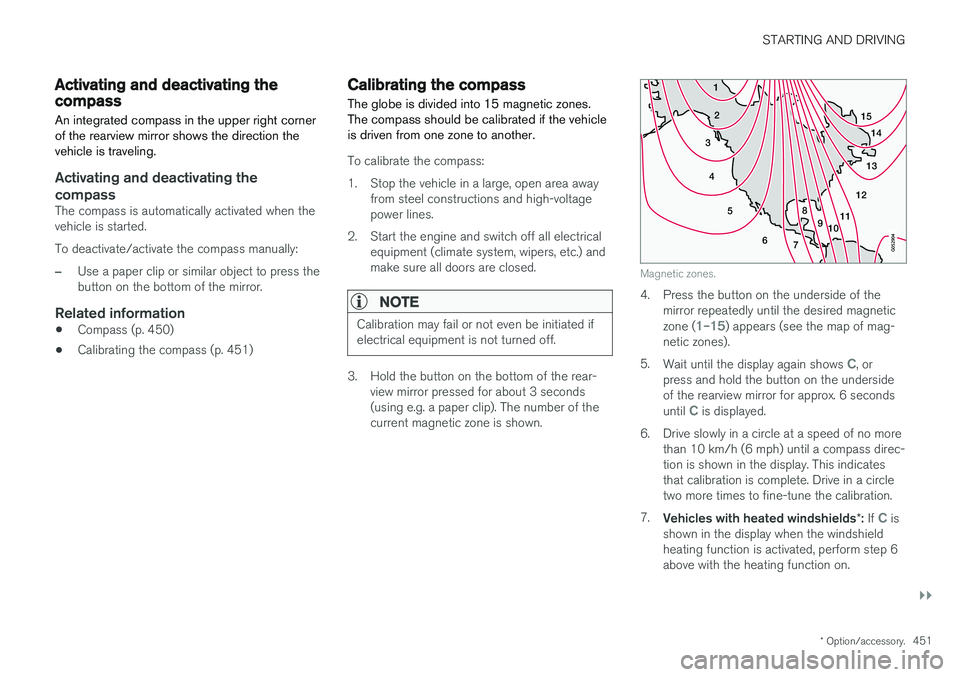
The globe is divided into 15 magnetic zones. The compass should be calibrated if the vehicleis driven from one zone to another.
To calibrate the compass:
1. Stop the vehicle in a large, open area away from steel constructions and high-voltage power lines.
2. Start the engine and switch off all electrical equipment (climate system, wipers, etc.) andmake sure all doors are closed.
NOTE
Calibration may fail or not even be initiated if electrical equipment is not turned off.
3. Hold the button on the bottom of the rear-view mirror pressed for about 3 seconds (using e.g. a paper clip). The number of thecurrent magnetic zone is shown.
15
14
13
12
11
9
8
7
6
5
4
3
2
1
10
Magnetic zones.
4. Press the button on the underside of themirror repeatedly until the desired magnetic zone (
1–15) appears (see the map of mag-
netic zones).
5. Wait until the display again shows
C, or
press and hold the button on the underside of the rearview mirror for approx. 6 seconds until
C is displayed.
6. Drive slowly in a circle at a speed of no more than 10 km/h (6 mph) until a compass direc- tion is shown in the display. This indicatesthat calibration is complete. Drive in a circletwo more times to fine-tune the calibration.
7. Vehicles with heated windshields *: If
C is
shown in the display when the windshield heating function is activated, perform step 6above with the heating function on.
Page 556 of 656
||
LOADING, STORAGE AND PASSENGER COMPARTMENT
* Option/accessory.
554
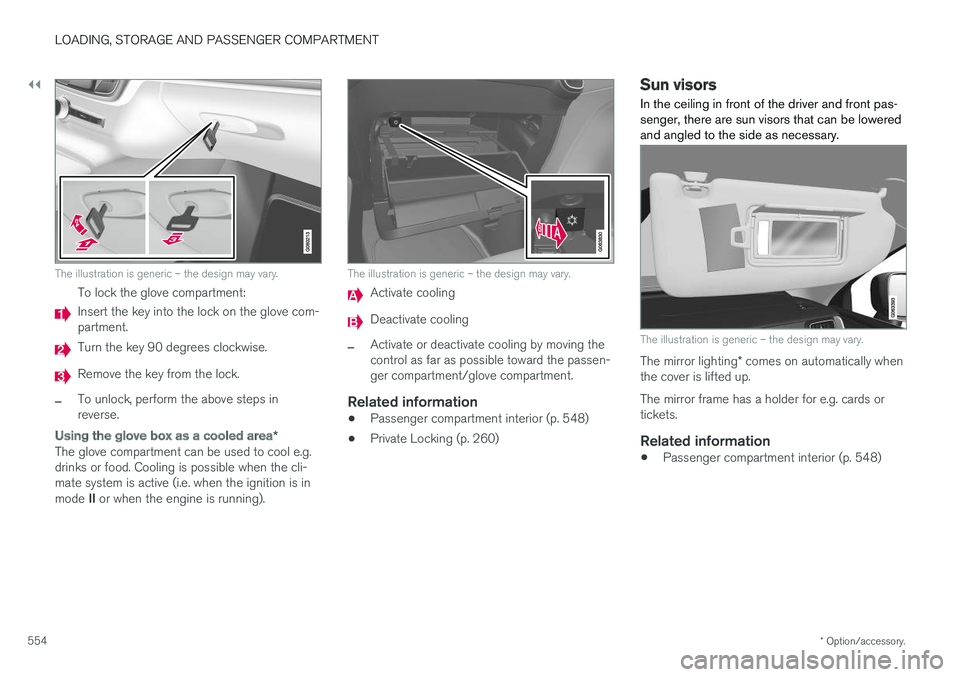
The illustration is generic – the design may vary.
To lock the glove compartment:
Insert the key into the lock on the glove com- partment.
Turn the key 90 degrees clockwise.
Remove the key from the lock.
–To unlock, perform the above steps in reverse.
Using the glove box as a cooled area *
The glove compartment can be used to cool e.g. drinks or food. Cooling is possible when the cli-mate system is active (i.e. when the ignition is in mode II or when the engine is running).
The illustration is generic – the design may vary.
Activate cooling
Deactivate cooling
–Activate or deactivate cooling by moving the control as far as possible toward the passen-ger compartment/glove compartment.
Related information
• Passenger compartment interior (p. 548)
• Private Locking (p. 260)
Sun visors In the ceiling in front of the driver and front pas- senger, there are sun visors that can be loweredand angled to the side as necessary.
The illustration is generic – the design may vary.
The mirror lighting
* comes on automatically when
the cover is lifted up. The mirror frame has a holder for e.g. cards or tickets.
Related information
• Passenger compartment interior (p. 548)
Page 602 of 656
||
MAINTENANCE AND SERVICE
* Option/accessory.
600 Fuse pliers are provided on the inside of the fuse box cover to assist in removing and insertingfuses. There are also spaces for several extra fuses in the
distribution box in the engine compart-
ment .
Positions
•Fuses 1, 3-21, 23-36, 39-53 and 55-59 are "Micro" fuses.
• Fuses 2-22, 37-38 and 54 are "MCase"fuses and should only be replaced by a work- shop 22
.
FunctionAA
– –
Electrical outlet in tunnel console between rear seats * 30
– –
Movement sensor
* 5
Media player 5
Instrument panel 5
Center console buttons 5
Sun sensor 5
FunctionAA
– –
– –
Steering wheel module 5
Module for start knob and parking brake controls 5
Heated steering wheel
* module 15
– –
– –
– –
– –
Climate system control module 10
– –
Data link connector OBD-II 10
Center display 5
Climate system blower module (front) 40
USB HUB 5
FunctionAA
Instrument lighting; Interior lighting; Rearview mirror auto-dim function
*;
Rain and light sensors *; Rear tun-
nel console keypad, rear seat *;
Power front seats *; Rear door con-
trol panels; Climate system blower module left/right 7.5
Control module for driver support functions
5
Panoramic roof with sun curtain
*20
Head-up display
* 5
Passenger compartment lighting 5
– –
Ceiling console display (seat belt reminder/front passenger side air-bag indicator) 5
– –
Humidity sensor 5
Door module in right-side rear door 20
Fuses in the trunk/cargo compart- ment
10
22
An authorized Volvo workshop is recommended.
Page 616 of 656
MAINTENANCE AND SERVICE
614
Automatic car washes The vehicle should be washed as soon as it becomes dirty. This makes the vehicle easier toclean because dirt does not attach as strongly. Italso reduces the risk of scratches and keeps thevehicle looking new.
Automatic car washesAn automatic car wash is a fast and easy way to keep your vehicle clean, but it does not reach allareas of the vehicle. For best results, Volvo rec-ommends hand washing your vehicle or supple-menting automatic car washes with a hand wash.
NOTE
Volvo recommends not washing the vehicle in an automatic car wash during the first fewmonths; the paintwork on new vehicles takessome time to fully harden.
CAUTION
Before driving the vehicle into a car wash, deactivate the Automatic Braking when Sta-tionary and Automatic Parking Brake Applica-tion functions. If the functions are not deacti-vated, the brake system will seize when thevehicle is stationary and the vehicle will not beable to roll.
CAUTION
For automatic car washes in which the vehicle is pulled forward on rolling wheels:
1. Before washing the vehicle, make surethat the automatic rain sensor is deacti- vated. If it is not deactivated and inadver-tently starts, the wiper arms could bedamaged.
2. To help prevent damage from the auto- matic car wash machinery, make surethat the door mirrors are folded in, anten-nas retracted or removed, and any auxili-ary lights secured.
3. Drive into the automatic car wash.
4. Turn off the "Automatic Braking when Stationary" function using the switch in the tunnel console.
5. Turn off the "Automatic Parking Brake Application" function in the center dis-play's Top view.
6. Turn off the engine by turning the start knob in the tunnel console clockwise.Hold the knob in position for at least2 seconds.
The vehicle is now ready for the automatic carwash.
Related information
• Cleaning the exterior (p. 611)
• Polishing and waxing (p. 612)
• Hand washing (p. 612)
• High-pressure washing (p. 615)
• Cleaning the wiper blades (p. 615)
• Cleaning exterior plastic, rubber and trim components (p. 616)
• Cleaning rims (p. 617)
• Corrosion protection (p. 617)
Page 632 of 656
||
SPECIFICATIONS
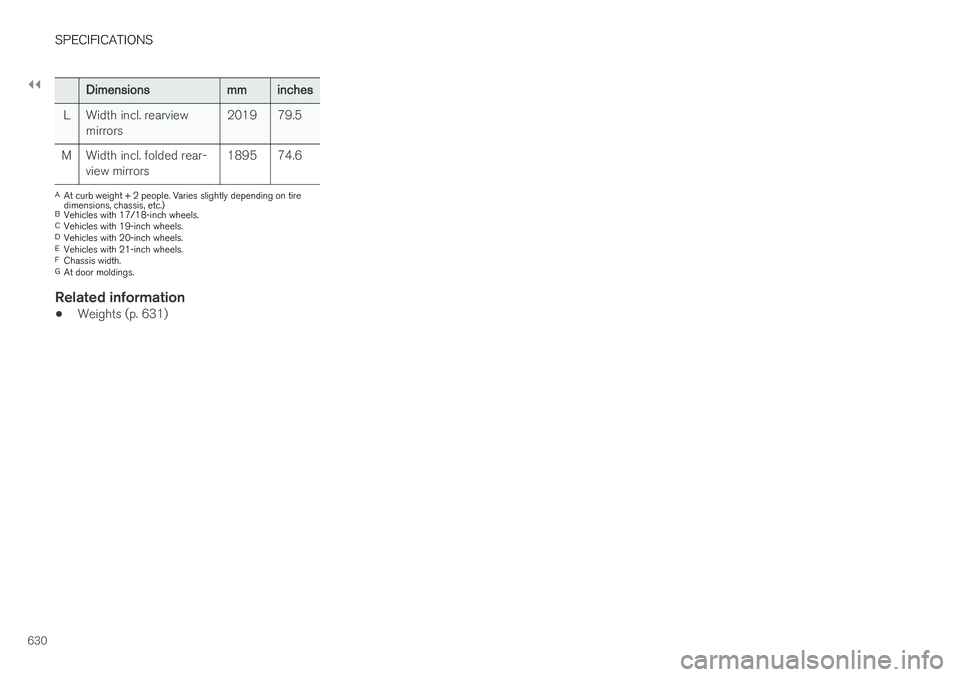
630
Dimensionsmminches
L Width incl. rearview mirrors 2019 79.5
M Width incl. folded rear- view mirrors 1895 74.6
A
At curb weight + 2 people. Varies slightly depending on tire dimensions, chassis, etc.)
B Vehicles with 17/18-inch wheels.
C Vehicles with 19-inch wheels.
D Vehicles with 20-inch wheels.
E Vehicles with 21-inch wheels.
F Chassis width.
G At door moldings.
Related information
• Weights (p. 631)
Page 644 of 656
INDEX
642CZIP (Clean Zone Interior Package) 206
D
Data
recording 33 transferring between vehicle and work-
shop 568
Data sharing 504
Daytime running lights 156Decals location of 626
Defrosting 222
Detection of cyclist 333
Dimensions 629
Dipstick, electronic 578
Direction of rotation 520
Disengaging the shiftlock 417
Display lighting 166
Distance Alert 285, 286, 287 limitations 288
DivX ®
480
Door mirrors 173, 175 compass 450, 451
dimming 174
outer 173, 175
power folding 175
resetting 175
Driveline transmission 413
Drive mode 419 changing 421
Driver Alert Control 356 operation 357, 358
Driver Alert Control limitations 358
Driver performance 92, 93
Driver profile 139 edit 141
select 140
Driver support system 266 Driving cooling system 437
with a trailer 440
Driving economy 430
Driving through standing water 432 driving with a trailer towball load 632
towing capacity 632E
ECO climate 421
ECO mode 421
activate with function button 423
Economical driving 421, 430
Electrical outlet 550 use 552
Electrical system 589
Electric parking brake 407
Electronic immobilizer 246
emergency brake lights 163
Emission inspection readiness 566 Engine overheating 437
start 400
Start/Stop 424
turn off 402
Engine compartment coolant 580
engine oil 577
overview 577
Engine drag control 268
Engine oil 577 filling 578
filter 577
grade and volume 634