service VOLVO V90 2018 Owner´s Manual
[x] Cancel search | Manufacturer: VOLVO, Model Year: 2018, Model line: V90, Model: VOLVO V90 2018Pages: 656, PDF Size: 11.78 MB
Page 430 of 656
STARTING AND DRIVING
* Option/accessory.
428
Leveling control * and suspension
Self-leveling and suspension functions are con- trolled automatically.
Rear leveling control keeps the rear section of the vehicle at the same height regardless of load.Leveling control may also remain active when thevehicle is parked.
Shock absorbers (Four-C)The shock absorbers are adapted to the selecteddrive mode and vehicle speed. The shock absorb-ers are normally set to provide the best possiblecomfort and are adjusted continuously accordingto the road surface and the vehicle's acceleration,braking and cornering.TransportingWhen transporting the vehicle on a ferry, train ortruck, only secure (lash) the vehicle around thetires, not using any other parts of the chassis.Changes in the pneumatic suspension may occurduring transport, which could adversely affect thelashing and result in damage.
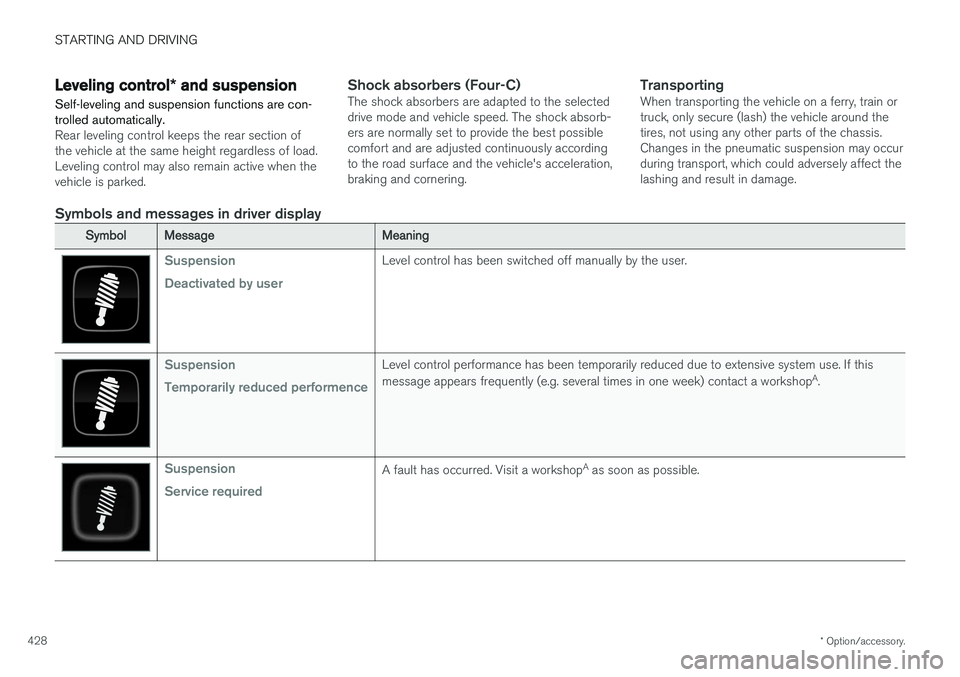
Symbols and messages in driver display
SymbolMessageMeaning
Suspension Deactivated by userLevel control has been switched off manually by the user.
Suspension Temporarily reduced performenceLevel control performance has been temporarily reduced due to extensive system use. If this message appears frequently (e.g. several times in one week) contact a workshop A
.
Suspension Service requiredA fault has occurred. Visit a workshop A
as soon as possible.
Page 435 of 656
STARTING AND DRIVING
}}
433
CAUTION
•Engine damage could occur if water enters the air cleaner.
• If water enters the transmission, the lubri-cating ability of the oils is reduced andthe service life of these systems is short-ened.
• Damage to any component, engine,transmission, turbocharger, differential orits internal components caused by flood-ing, vapor lock or insufficient oil is notcovered under warranty.
• If the engine stalls while the vehicle is inwater, do not attempt to restart it. Havethe vehicle towed out of the water to aworkshop. An authorized Volvo workshopis recommended. Risk of engine failure.
Related information
• Recovery (p. 446)
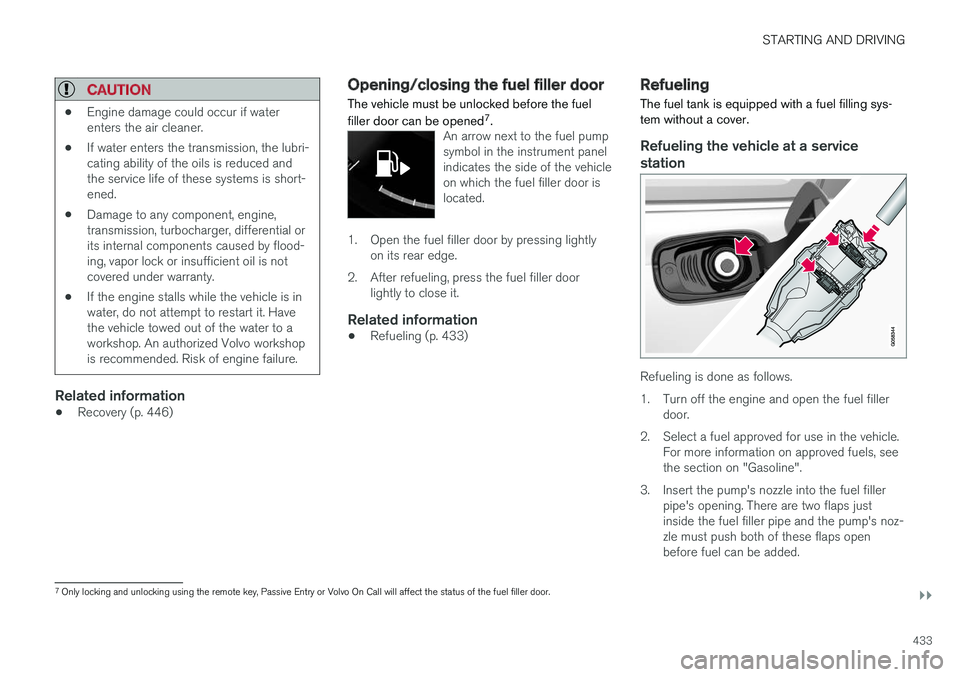
Opening/closing the fuel filler door The vehicle must be unlocked before the fuel filler door can be opened 7
.
An arrow next to the fuel pump symbol in the instrument panelindicates the side of the vehicleon which the fuel filler door islocated.
1. Open the fuel filler door by pressing lightly
on its rear edge.
2. After refueling, press the fuel filler door lightly to close it.
Related information
• Refueling (p. 433)
Refueling
The fuel tank is equipped with a fuel filling sys- tem without a cover.
Refueling the vehicle at a service station
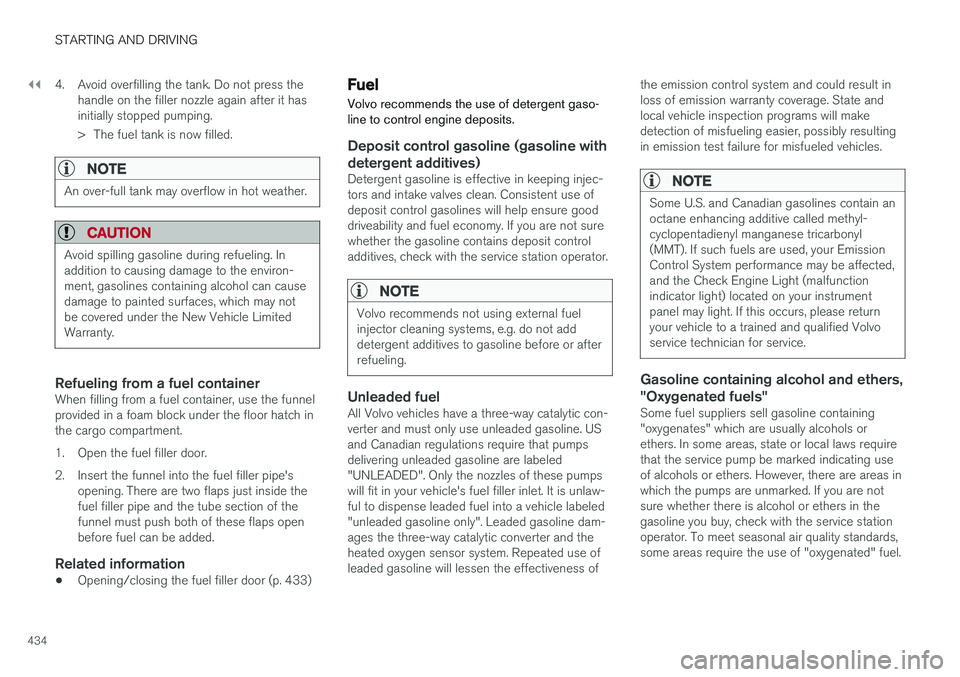
Refueling is done as follows.
1. Turn off the engine and open the fuel filler door.
2. Select a fuel approved for use in the vehicle. For more information on approved fuels, see the section on "Gasoline".
3. Insert the pump's nozzle into the fuel filler pipe's opening. There are two flaps justinside the fuel filler pipe and the pump's noz-zle must push both of these flaps openbefore fuel can be added.
7Only locking and unlocking using the remote key, Passive Entry or Volvo On Call will affect the status of the fuel filler door.
Page 436 of 656
||
STARTING AND DRIVING
4344. Avoid overfilling the tank. Do not press the
handle on the filler nozzle again after it has initially stopped pumping.
> The fuel tank is now filled.
NOTE
An over-full tank may overflow in hot weather.
CAUTION
Avoid spilling gasoline during refueling. In addition to causing damage to the environ-ment, gasolines containing alcohol can causedamage to painted surfaces, which may notbe covered under the New Vehicle LimitedWarranty.
Refueling from a fuel containerWhen filling from a fuel container, use the funnel provided in a foam block under the floor hatch inthe cargo compartment.
1. Open the fuel filler door.
2. Insert the funnel into the fuel filler pipe's opening. There are two flaps just inside the fuel filler pipe and the tube section of thefunnel must push both of these flaps openbefore fuel can be added.
Related information
• Opening/closing the fuel filler door (p. 433)
Fuel Volvo recommends the use of detergent gaso- line to control engine deposits.
Deposit control gasoline (gasoline with detergent additives)
Detergent gasoline is effective in keeping injec- tors and intake valves clean. Consistent use ofdeposit control gasolines will help ensure gooddriveability and fuel economy. If you are not surewhether the gasoline contains deposit controladditives, check with the service station operator.
NOTE
Volvo recommends not using external fuel injector cleaning systems, e.g. do not adddetergent additives to gasoline before or afterrefueling.
Unleaded fuelAll Volvo vehicles have a three-way catalytic con- verter and must only use unleaded gasoline. USand Canadian regulations require that pumpsdelivering unleaded gasoline are labeled"UNLEADED". Only the nozzles of these pumpswill fit in your vehicle's fuel filler inlet. It is unlaw-ful to dispense leaded fuel into a vehicle labeled"unleaded gasoline only". Leaded gasoline dam-ages the three-way catalytic converter and theheated oxygen sensor system. Repeated use ofleaded gasoline will lessen the effectiveness of the emission control system and could result inloss of emission warranty coverage. State andlocal vehicle inspection programs will makedetection of misfueling easier, possibly resultingin emission test failure for misfueled vehicles.
NOTE
Some U.S. and Canadian gasolines contain an octane enhancing additive called methyl-cyclopentadienyl manganese tricarbonyl(MMT). If such fuels are used, your EmissionControl System performance may be affected,and the Check Engine Light (malfunctionindicator light) located on your instrumentpanel may light. If this occurs, please returnyour vehicle to a trained and qualified Volvoservice technician for service.
Gasoline containing alcohol and ethers, "Oxygenated fuels"
Some fuel suppliers sell gasoline containing "oxygenates" which are usually alcohols orethers. In some areas, state or local laws requirethat the service pump be marked indicating useof alcohols or ethers. However, there are areas inwhich the pumps are unmarked. If you are notsure whether there is alcohol or ethers in thegasoline you buy, check with the service stationoperator. To meet seasonal air quality standards,some areas require the use of "oxygenated" fuel.
Page 437 of 656
STARTING AND DRIVING
}}
435
Volvo permits the use of the following "oxygen- ated" fuels. However, the specified octane ratingsmust still be met.
Alcohol - Ethanol
Fuels containing up to 10% ethanol by volume may be used. Ethanol may also be referred to asEthyl alcohol, or "Gasohol". Ethers - MTBE/ETBE: Fuels containing up to 15% MTBE/ETBE may be used.
MethanolDo not use gasolines containing methanol(methyl alcohol, wood alcohol). This practice canresult in vehicle performance deterioration andcan damage critical parts in the fuel system. Suchdamage may not be covered under the NewVehicle Limited Warranty.
Related information
•
Octane rating (p. 435)
• Opening/closing the fuel filler door (p. 433)
• Refueling (p. 433)
• Emission controls (p. 437)
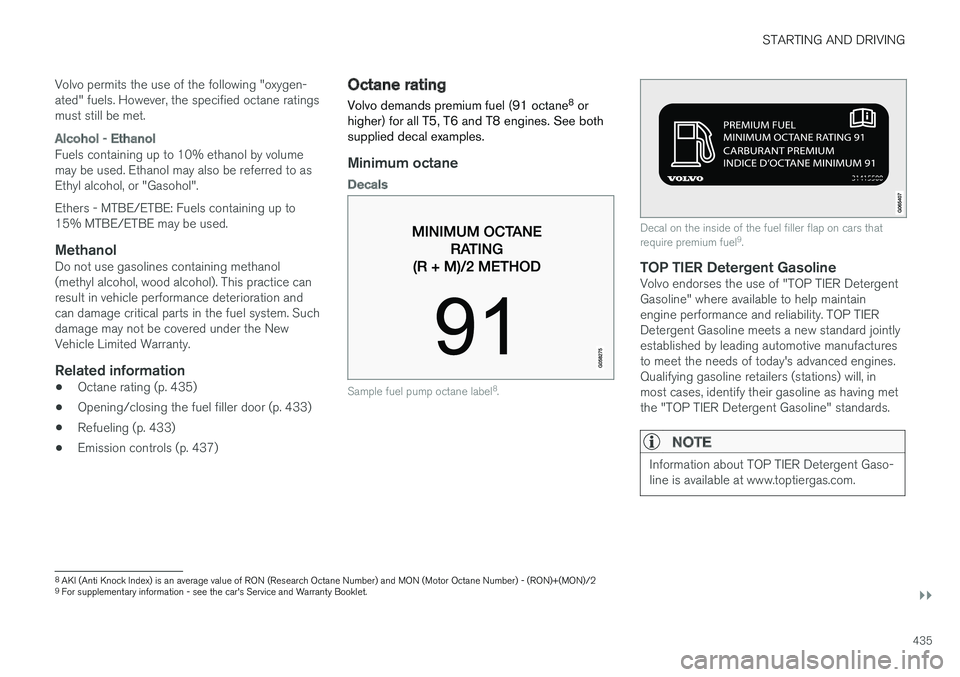
Octane rating Volvo demands premium fuel (91 octane 8
or
higher) for all T5, T6 and T8 engines. See both supplied decal examples.
Minimum octane
Decals
Sample fuel pump octane label 8
.
Decal on the inside of the fuel filler flap on cars that require premium fuel 9
.
TOP TIER Detergent GasolineVolvo endorses the use of "TOP TIER Detergent Gasoline" where available to help maintainengine performance and reliability. TOP TIERDetergent Gasoline meets a new standard jointlyestablished by leading automotive manufacturesto meet the needs of today's advanced engines.Qualifying gasoline retailers (stations) will, inmost cases, identify their gasoline as having metthe "TOP TIER Detergent Gasoline" standards.
NOTE
Information about TOP TIER Detergent Gaso- line is available at www.toptiergas.com.
8 AKI (Anti Knock Index) is an average value of RON (Research Octane Number) and MON (Motor Octane Number) - (RON)+(MON)/2
9 For supplementary information - see the car's Service and Warranty Booklet.
Page 438 of 656
||
STARTING AND DRIVING
436
NOTE
When switching to higher octane fuel or changing gasoline brands, it may be neces-sary to fill the tank more than once before adifference in engine operation is noticeable.
Fuel FormulationsDo not use gasoline that contains lead or manga- nese as a knock inhibitor, and do not use leadadditives. Besides damaging the exhaust emis-sion control systems on your vehicle, lead hasbeen strongly linked to certain forms of cancer. Many fuels contain benzene as a solvent. Unburned benzene has been strongly linked tocertain forms of cancer. If you live in an areawhere you must fill your own gas tank, take pre-cautions. These may include: •standing upwind away from the filler nozzle while refueling
• refueling only at gas stations with vaporrecovery systems that fully seal the mouth ofthe filler neck during refueling
• wearing neoprene gloves while handling afuel filler nozzle.
Use of AdditivesWith the exception of gas line antifreeze duringwinter months, do not add solvents, thickeners, or other store-bought additives to your vehicle'sfuel, cooling, or lubricating systems. Overuse maydamage your engine, and some of these additivescontain organically volatile chemicals. Do notneedlessly expose yourself to these chemicals.
WARNING
Never carry a cell phone that is
switched on
while refueling your vehicle. If the phone rings, this may cause a spark that could ignite gaso-line fumes, resulting in fire and injury.
WARNING
Carbon monoxide is a poisonous, colorless, and odorless gas. It is present in all exhaustgases. If you ever smell exhaust fumes insidethe vehicle, make sure the passenger com-partment is ventilated, and immediately returnthe vehicle to a trained and qualified Volvoservice technician for correction.
Demanding drivingIn demanding driving conditions, e.g. when driving in a hot climates, driving with a trailer or drivingfor longer periods at higher altitudes (mountainlandscapes) than normal, it is recommended switching to a higher octane fuel than AKI 91 8
or
changing gasoline brand to take full advantage of your car's engine capacity and obtain the opti-mum driving force.
Related information
• Fuel (p. 434)
• Emission controls (p. 437)
8
AKI (Anti Knock Index) is an average value of RON (Research Octane Number) and MON (Motor Octane Number) - (RON)+(MON)/2
Page 448 of 656
||
STARTING AND DRIVING
* Option/accessory.
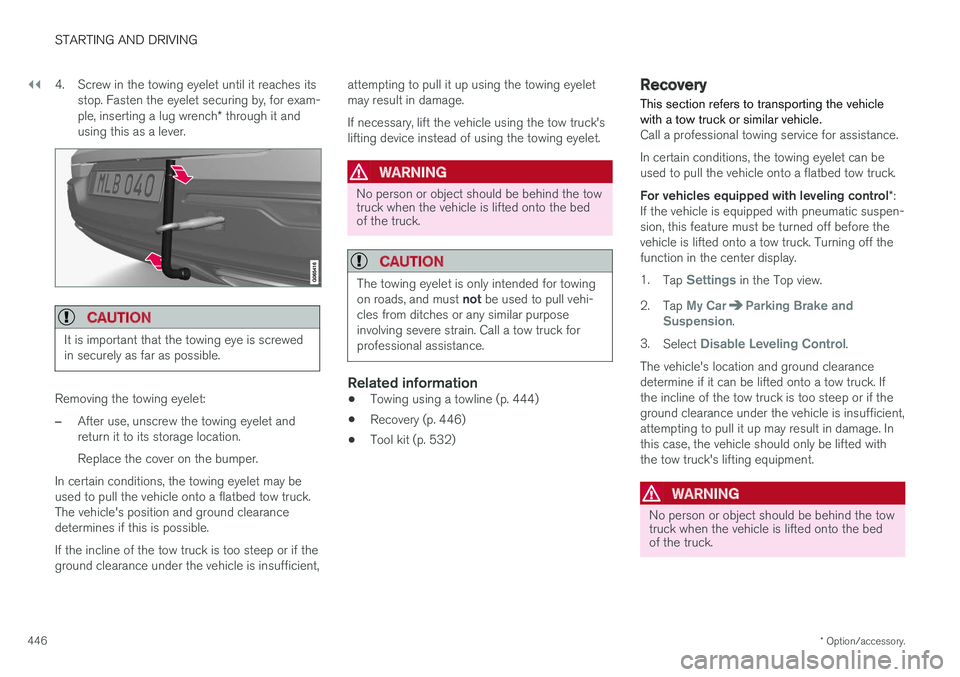
446 4. Screw in the towing eyelet until it reaches its
stop. Fasten the eyelet securing by, for exam- ple, inserting a lug wrench * through it and
using this as a lever.
CAUTION
It is important that the towing eye is screwed in securely as far as possible.
Removing the towing eyelet:
–After use, unscrew the towing eyelet and return it to its storage location. Replace the cover on the bumper.
In certain conditions, the towing eyelet may be used to pull the vehicle onto a flatbed tow truck.The vehicle's position and ground clearancedetermines if this is possible. If the incline of the tow truck is too steep or if the ground clearance under the vehicle is insufficient, attempting to pull it up using the towing eyeletmay result in damage. If necessary, lift the vehicle using the tow truck's lifting device instead of using the towing eyelet.
WARNING
No person or object should be behind the tow truck when the vehicle is lifted onto the bedof the truck.
CAUTION
The towing eyelet is only intended for towing on roads, and must
not be used to pull vehi-
cles from ditches or any similar purpose involving severe strain. Call a tow truck forprofessional assistance.
Related information
• Towing using a towline (p. 444)
• Recovery (p. 446)
• Tool kit (p. 532)
Recovery
This section refers to transporting the vehicle with a tow truck or similar vehicle.
Call a professional towing service for assistance. In certain conditions, the towing eyelet can be used to pull the vehicle onto a flatbed tow truck. For vehicles equipped with leveling control *:
If the vehicle is equipped with pneumatic suspen- sion, this feature must be turned off before thevehicle is lifted onto a tow truck. Turning off thefunction in the center display. 1. Tap
Settings in the Top view.
2. Tap
My CarParking Brake and
Suspension.
3. Select
Disable Leveling Control.
The vehicle's location and ground clearance determine if it can be lifted onto a tow truck. Ifthe incline of the tow truck is too steep or if theground clearance under the vehicle is insufficient,attempting to pull it up may result in damage. Inthis case, the vehicle should only be lifted withthe tow truck's lifting equipment.
WARNING
No person or object should be behind the tow truck when the vehicle is lifted onto the bedof the truck.
Page 457 of 656
AUDIO, MEDIA AND INTERNET
}}
* Option/accessory.455
Sound experience *
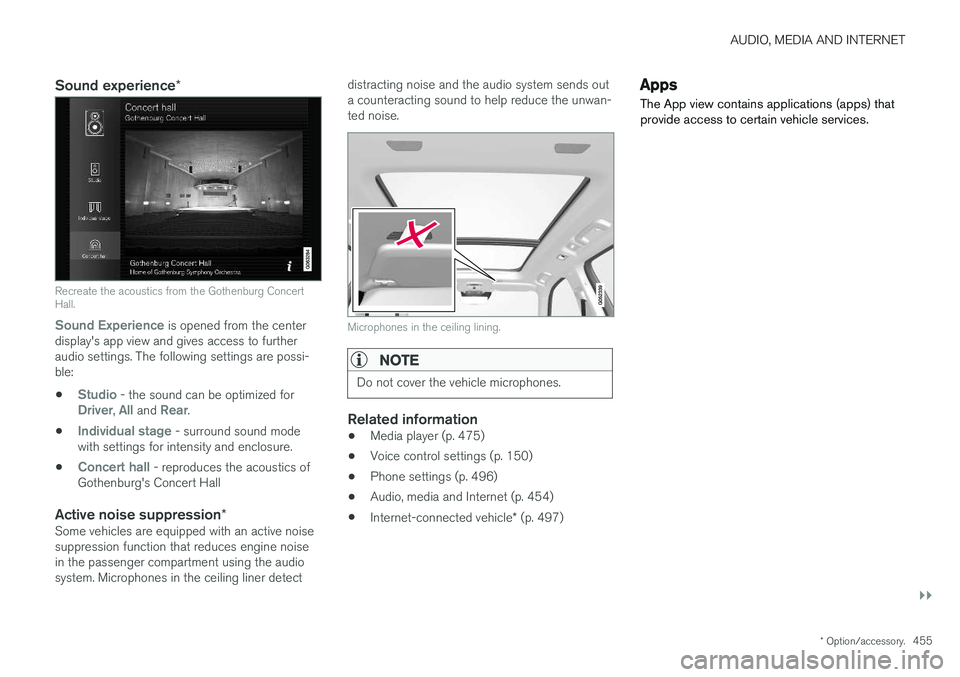
Recreate the acoustics from the Gothenburg Concert Hall.
Sound Experience
is opened from the center
display's app view and gives access to further audio settings. The following settings are possi-ble:
•
Studio - the sound can be optimized forDriver, All and Rear.
•
Individual stage - surround sound mode
with settings for intensity and enclosure.
•
Concert hall - reproduces the acoustics of
Gothenburg's Concert Hall
Active noise suppression *Some vehicles are equipped with an active noise suppression function that reduces engine noisein the passenger compartment using the audiosystem. Microphones in the ceiling liner detect distracting noise and the audio system sends outa counteracting sound to help reduce the unwan-ted noise.
Microphones in the ceiling lining.
NOTE
Do not cover the vehicle microphones.
Related information
•
Media player (p. 475)
• Voice control settings (p. 150)
• Phone settings (p. 496)
• Audio, media and Internet (p. 454)
• Internet-connected vehicle
* (p. 497)
Apps
The App view contains applications (apps) that provide access to certain vehicle services.
Page 458 of 656
||
AUDIO, MEDIA AND INTERNET
* Option/accessory.
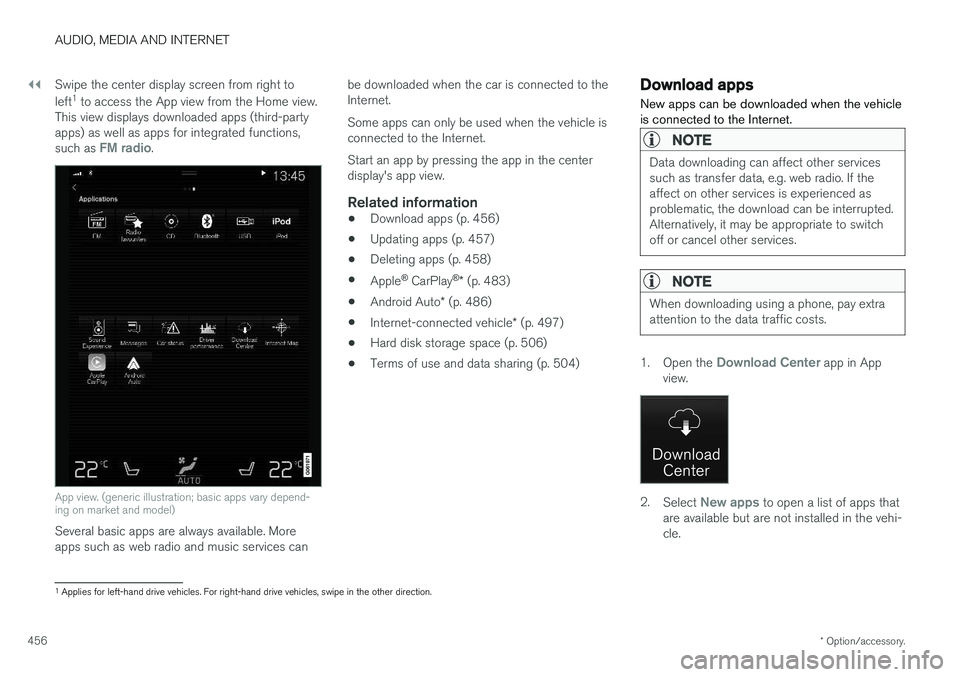
456 Swipe the center display screen from right to left
1
to access the App view from the Home view.
This view displays downloaded apps (third-party apps) as well as apps for integrated functions, such as
FM radio.
App view. (generic illustration; basic apps vary depend- ing on market and model)
Several basic apps are always available. More apps such as web radio and music services can be downloaded when the car is connected to theInternet. Some apps can only be used when the vehicle is connected to the Internet. Start an app by pressing the app in the center display's app view.
Related information
•
Download apps (p. 456)
• Updating apps (p. 457)
• Deleting apps (p. 458)
• Apple ®
CarPlay ®
* (p. 483)
• Android Auto
* (p. 486)
• Internet-connected vehicle
* (p. 497)
• Hard disk storage space (p. 506)
• Terms of use and data sharing (p. 504)
Download apps
New apps can be downloaded when the vehicle is connected to the Internet.
NOTE
Data downloading can affect other services such as transfer data, e.g. web radio. If theaffect on other services is experienced asproblematic, the download can be interrupted.Alternatively, it may be appropriate to switchoff or cancel other services.
NOTE
When downloading using a phone, pay extra attention to the data traffic costs.
1. Open the Download Center app in App
view.
2. Select New apps to open a list of apps that
are available but are not installed in the vehi- cle.
1 Applies for left-hand drive vehicles. For right-hand drive vehicles, swipe in the other direction.
Page 459 of 656
AUDIO, MEDIA AND INTERNET
* Option/accessory.457
3. Tap on the row for an app in order to expand
in the list and get more information about the app.
4. Select
Install to start the download and
installation of the app.
> The current status of the download and installation will be shown. If a download cannot be started immedi- ately, a message will be displayed. Theapp will remain in the list and it will bepossible to reattempt downloading.
Canceling a download
–Tap Abort to cancel a download in progress.
Note that only a download can be cancelled. An installation cannot be cancelled once it hasbegun.
Related information
• Apps (p. 455)
• Updating apps (p. 457)
• Deleting apps (p. 458)
• Internet-connected vehicle
* (p. 497)
• Handling system updates via Download Cen-ter (p. 569)
• Hard disk storage space (p. 506)
Updating apps
Apps can be updated when the vehicle is con- nected to the Internet.
NOTE
Data downloading can affect other services such as transfer data, e.g. web radio. If theaffect on other services is experienced asproblematic, the download can be interrupted.Alternatively, it may be appropriate to switchoff or cancel other services.
NOTE
When downloading using a phone, pay extra attention to the data traffic costs.
If an app is being used while an update is in pro- gress, it will be restarted to complete the update.
Update all
1. Open the Download Center app in App
view.
2. Select Install all.
> The update will begin.
Update certain apps
1. Open the Download Center app in App
view.
2. Select
Application updates to open a list
of all available updates.
3. Find the desired app and select
Install.
> The update will begin.
Related information
• Apps (p. 455)
• Download apps (p. 456)
• Deleting apps (p. 458)
• Handling system updates via Download Cen- ter (p. 569)
• Internet-connected vehicle
* (p. 497)
Page 463 of 656
AUDIO, MEDIA AND INTERNET
}}
461
Storing radio favorites
It is possible to add a radio a radio station in the
Radio favorites app and in the list of favorites
for the waveband (e.g. FM). Instructions for add- ing and removing favorites are provided below.
Radio favoritesRadio favorites shows saved favorites from all wavebands.
1. Open the Radio favorites app from App
view.
2. Tap the desired station in the list to listen.
Adding and deleting radio favorites
–Tap to add/remove a radio channel from
the waveband's list of favorites or Radio favorites.
If a favorite station is deleted here, it will also bedeleted from that waveband's list of favorites.
Related information
• Radio (p. 458)
• Starting the radio (p. 459)
• Searching for a radio station (p. 460)
• Changing waveband and radio station(p. 459) •
Voice control for radio and media (p. 150)
• Radio settings (p. 461)
• App menu in instrument panel (p. 104)
Radio settings
There are a number of different radio functions that can be activated and deactivated.
Canceling a traffic messageA current broadcast (e.g. a traffic message) can be temporarily interrupted by pressing
in the
right-side steering wheel keypad or tapping
Cancel in the center display.
Activating and deactivating radio
functions
Pull down Top view and select SettingsMedia and the desired waveband to see available
functions.
AM/FM Radio
•HD Radio AM: HD Radio ™
Technology:
makes it possible for AM audio to achieve an audio quality comparable to analog FM.
•
HD Radio FM: HD Radio ™ Technology:
makes it possible to achieve a sound quality comparable with a CD.
•
Show Broadcast Information: shows
information on program content, artists, etc.
•
Freeze Program Name: select to stop the
program service name from scrolling continu- ously. Instead it freezes after 20 seconds.