CD player VOLVO V90 CROSS COUNTRY 2017 Owner´s Manual
[x] Cancel search | Manufacturer: VOLVO, Model Year: 2017, Model line: V90 CROSS COUNTRY, Model: VOLVO V90 CROSS COUNTRY 2017Pages: 552, PDF Size: 13.6 MB
Page 431 of 552
INFOTAINMENT
}}
429
•
None: no results will be shown.
Updating GracenoteGracenote's contents are updated continuously. For optimal functionality, always use the latestversion. See support.volvocars.com for informa-tion and downloads.
Related information
•
Infotainment system license information(p. 437)
• Playing media (p. 424)
Video
The media player can play video from USB-con- nected devices.
No video will be available when the vehicle is moving. Video will resume playing when the vehi-cle is stationary. See the article "Media player technical data" for a list of video formats supported by the mediaplayer.
Related information
• Playing media (p. 424)
• Media player (p. 419)
• Media player technical data (p. 429)
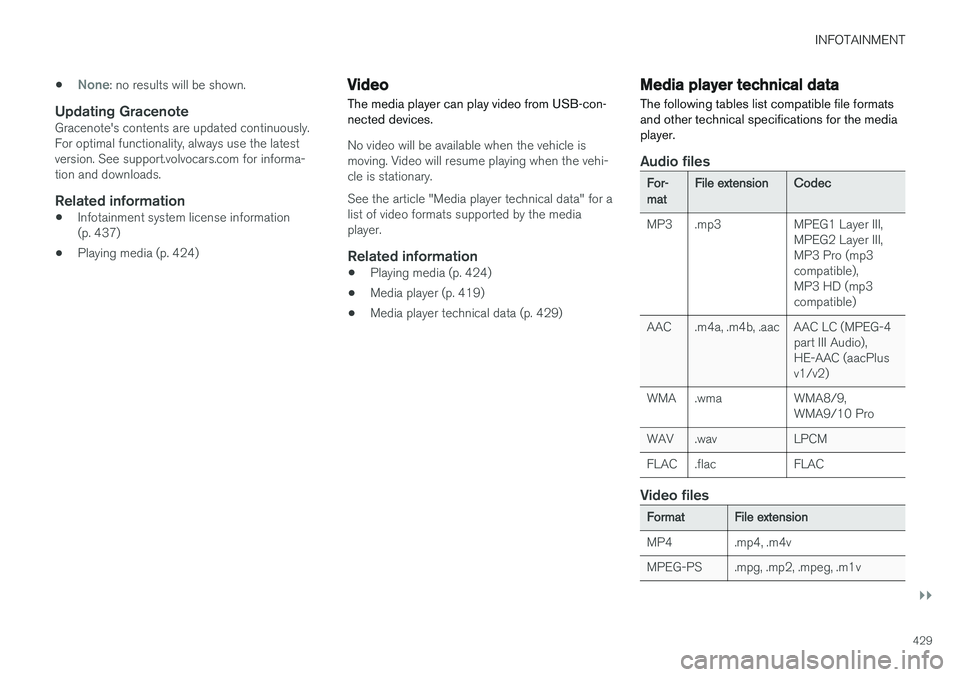
Media player technical data The following tables list compatible file formats and other technical specifications for the mediaplayer.
Audio files
For- mat File extension
Codec
MP3 .mp3 MPEG1 Layer III, MPEG2 Layer III, MP3 Pro (mp3compatible),MP3 HD (mp3compatible)
AAC .m4a, .m4b, .aac AAC LC (MPEG-4 part III Audio),HE-AAC (aacPlusv1/v2)
WMA .wma WMA8/9, WMA9/10 Pro
WAV .wav LPCM
FLAC .flac FLAC
Video files
Format File extension
MP4 .mp4, .m4v
MPEG-PS .mpg, .mp2, .mpeg, .m1v
Page 432 of 552
||
INFOTAINMENT
* Option/accessory.
430
Format File extension
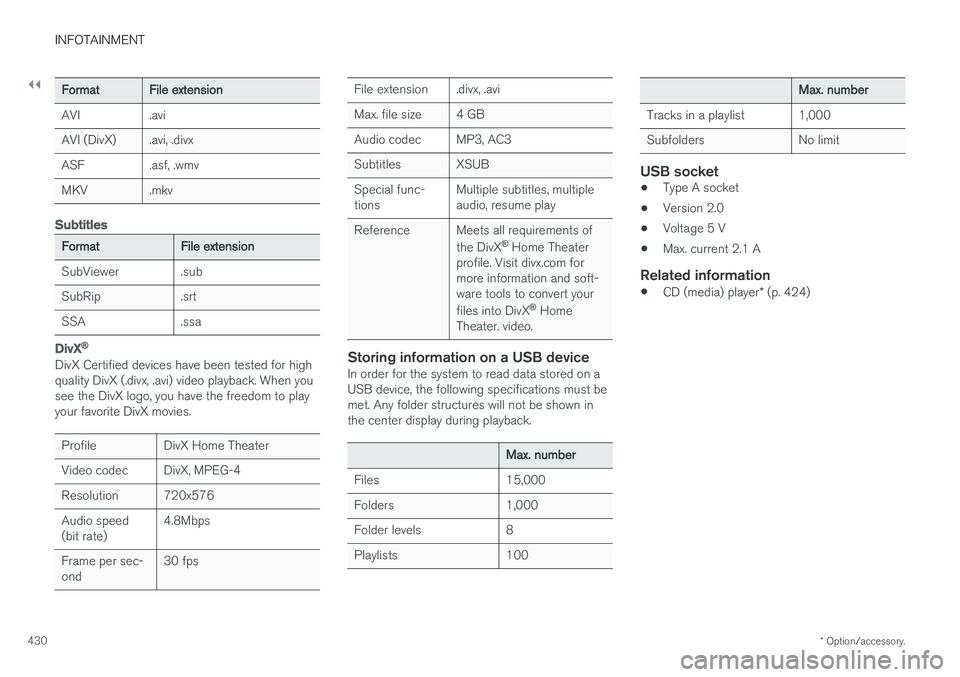
AVI .avi
AVI (DivX) .avi, .divx
ASF .asf, .wmv
MKV .mkv
Subtitles
Format File extension
SubViewer .sub
SubRip .srt
SSA .ssa
DivX ®
DivX Certified devices have been tested for high quality DivX (.divx, .avi) video playback. When yousee the DivX logo, you have the freedom to playyour favorite DivX movies.
Profile DivX Home Theater
Video codec DivX, MPEG-4
Resolution 720x576Audio speed (bit rate) 4.8Mbps
Frame per sec-ond 30 fps
File extension .divx, .avi
Max. file size 4 GB
Audio codec MP3, AC3
Subtitles XSUBSpecial func- tionsMultiple subtitles, multipleaudio, resume play
Reference Meets all requirements of the DivX®
Home Theater
profile. Visit divx.com formore information and soft-ware tools to convert your files into DivX ®
Home
Theater. video.
Storing information on a USB deviceIn order for the system to read data stored on a USB device, the following specifications must bemet. Any folder structures will not be shown inthe center display during playback.
Max. number
Files 15,000
Folders 1,000
Folder levels 8
Playlists 100
Max. number
Tracks in a playlist 1,000
Subfolders No limit
USB socket
• Type A socket
• Version 2.0
• Voltage 5 V
• Max. current 2.1 A
Related information
•
CD (media) player
* (p. 424)
Page 435 of 552
INFOTAINMENT
}}
433
Bluetooth settingsThe following settings apply to a Bluetooth-con- nected cell phone or other device.
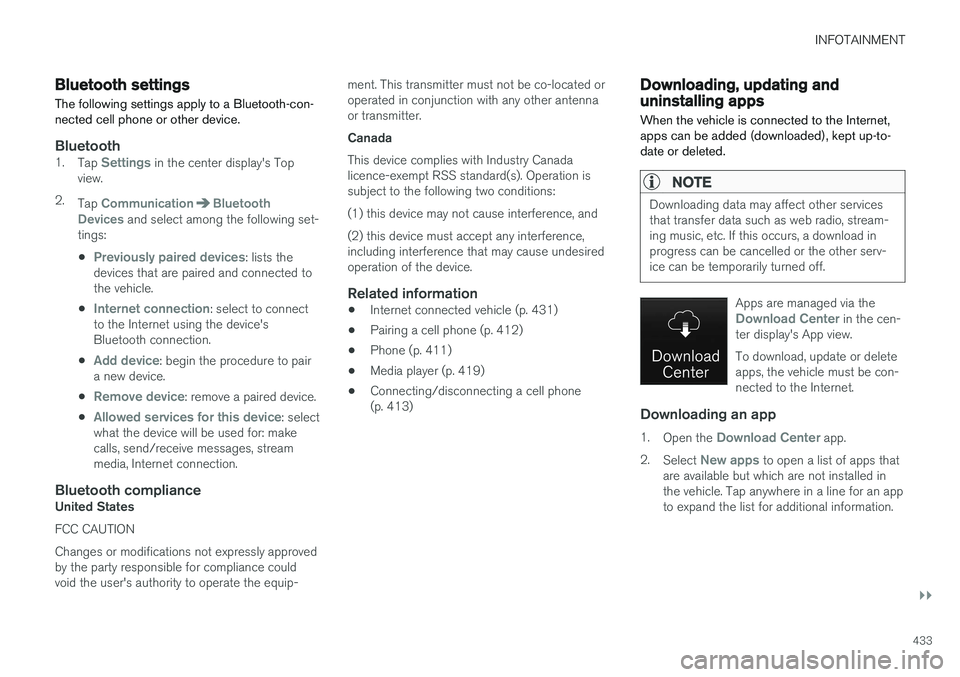
Bluetooth1. Tap Settings in the center display's Top
view.
2. Tap
CommunicationBluetooth
Devices and select among the following set-
tings:
•
Previously paired devices: lists the
devices that are paired and connected to the vehicle.
•
Internet connection: select to connect
to the Internet using the device's Bluetooth connection.
•
Add device: begin the procedure to pair
a new device.
•
Remove device: remove a paired device.
•
Allowed services for this device: select
what the device will be used for: make calls, send/receive messages, streammedia, Internet connection.
Bluetooth complianceUnited States FCC CAUTION Changes or modifications not expressly approved by the party responsible for compliance couldvoid the user's authority to operate the equip- ment. This transmitter must not be co-located oroperated in conjunction with any other antennaor transmitter. Canada This device complies with Industry Canada licence-exempt RSS standard(s). Operation issubject to the following two conditions: (1) this device may not cause interference, and(2) this device must accept any interference, including interference that may cause undesiredoperation of the device.
Related information
•
Internet connected vehicle (p. 431)
• Pairing a cell phone (p. 412)
• Phone (p. 411)
• Media player (p. 419)
• Connecting/disconnecting a cell phone(p. 413)
Downloading, updating and uninstalling apps
When the vehicle is connected to the Internet, apps can be added (downloaded), kept up-to-date or deleted.
NOTE
Downloading data may affect other services that transfer data such as web radio, stream-ing music, etc. If this occurs, a download inprogress can be cancelled or the other serv-ice can be temporarily turned off.
Apps are managed via theDownload Center in the cen-
ter display's App view. To download, update or delete apps, the vehicle must be con-nected to the Internet.
Downloading an app
1. Open the Download Center app.
2. Select
New apps to open a list of apps that
are available but which are not installed in the vehicle. Tap anywhere in a line for an appto expand the list for additional information.
Page 436 of 552
||
INFOTAINMENT
4343.
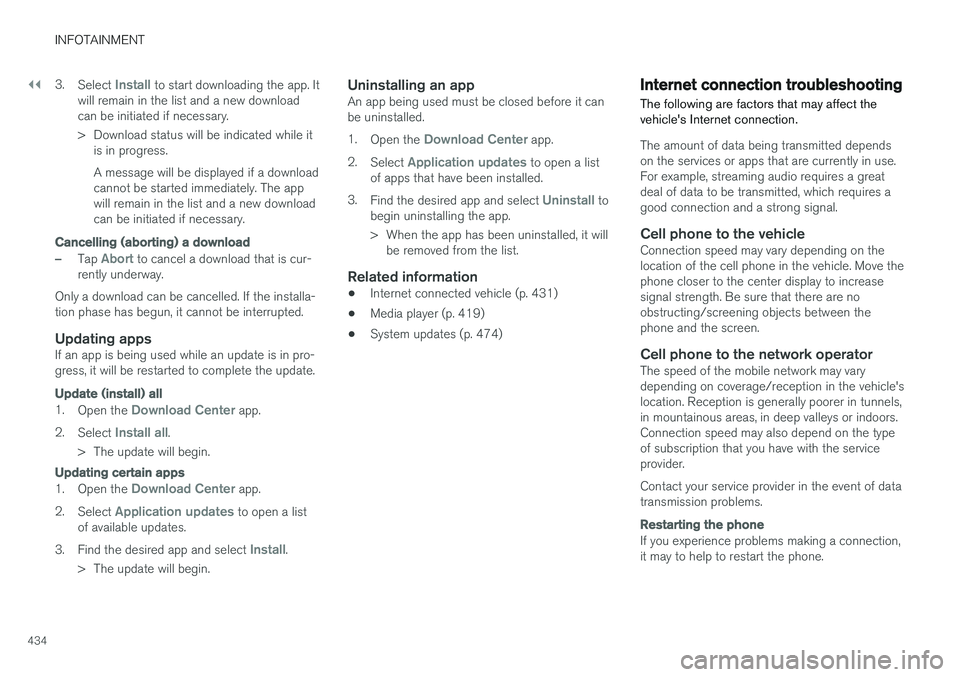
Select
Install to start downloading the app. It
will remain in the list and a new download can be initiated if necessary.
> Download status will be indicated while it is in progress. A message will be displayed if a download cannot be started immediately. The appwill remain in the list and a new downloadcan be initiated if necessary.
Cancelling (aborting) a download
–Tap Abort to cancel a download that is cur-
rently underway.
Only a download can be cancelled. If the installa-
tion phase has begun, it cannot be interrupted.
Updating appsIf an app is being used while an update is in pro- gress, it will be restarted to complete the update.
Update (install) all
1. Open the Download Center app.
2. Select
Install all.
> The update will begin.
Updating certain apps
1. Open the Download Center app.
2. Select
Application updates to open a list
of available updates.
3. Find the desired app and select
Install.
> The update will begin.
Uninstalling an appAn app being used must be closed before it can be uninstalled. 1. Open the
Download Center app.
2. Select
Application updates to open a list
of apps that have been installed.
3. Find the desired app and select
Uninstall to
begin uninstalling the app.
> When the app has been uninstalled, it will be removed from the list.
Related information
• Internet connected vehicle (p. 431)
• Media player (p. 419)
• System updates (p. 474)
Internet connection troubleshooting The following are factors that may affect the vehicle's Internet connection.
The amount of data being transmitted depends on the services or apps that are currently in use.For example, streaming audio requires a greatdeal of data to be transmitted, which requires agood connection and a strong signal.
Cell phone to the vehicleConnection speed may vary depending on thelocation of the cell phone in the vehicle. Move thephone closer to the center display to increasesignal strength. Be sure that there are noobstructing/screening objects between thephone and the screen.
Cell phone to the network operatorThe speed of the mobile network may varydepending on coverage/reception in the vehicle'slocation. Reception is generally poorer in tunnels,in mountainous areas, in deep valleys or indoors.Connection speed may also depend on the typeof subscription that you have with the serviceprovider. Contact your service provider in the event of data transmission problems.
Restarting the phone
If you experience problems making a connection, it may to help to restart the phone.
Page 494 of 552
||
MAINTENANCE AND SERVICING
* Option/accessory.
492
Positions
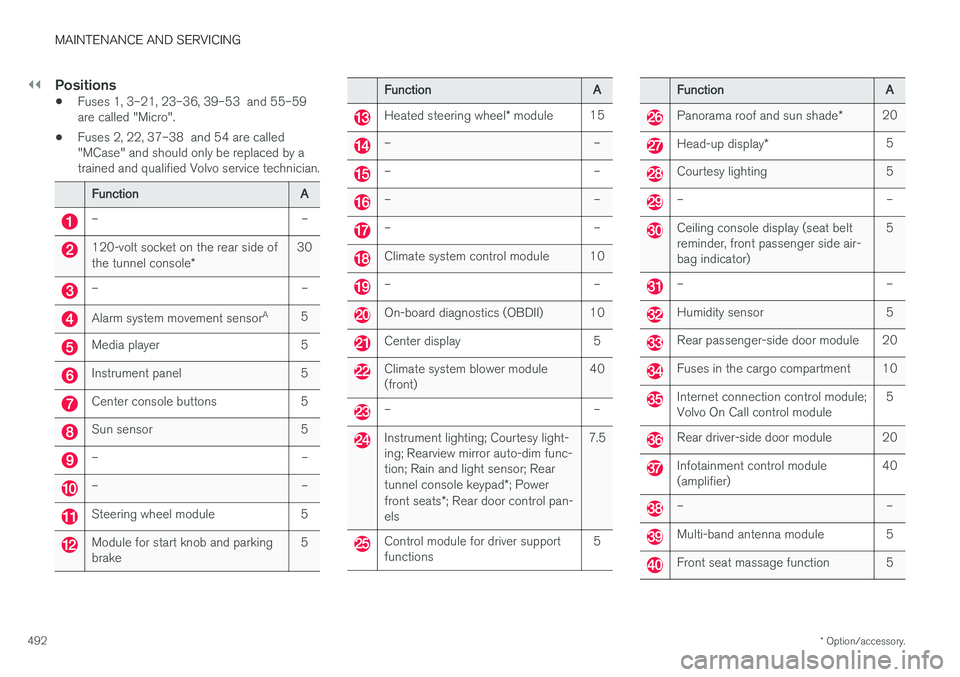
• Fuses 1, 3–21, 23–36, 39–53 and 55–59 are called "Micro".
• Fuses 2, 22, 37–38 and 54 are called"MCase" and should only be replaced by atrained and qualified Volvo service technician.
Function
A
– –
120-volt socket on the rear side of the tunnel console* 30
– –
Alarm system movement sensor
A
5
Media player 5
Instrument panel 5
Center console buttons 5
Sun sensor 5
– –
– –
Steering wheel module 5
Module for start knob and parking brake 5
Function
A
Heated steering wheel* module 15
– –
– –
– –
– –
Climate system control module 10
– –
On-board diagnostics (OBDII) 10
Center display 5
Climate system blower module (front) 40
– –
Instrument lighting; Courtesy light- ing; Rearview mirror auto-dim func-tion; Rain and light sensor; Rear tunnel console keypad
*; Power
front seats *; Rear door control pan-
els 7.5
Control module for driver support functions
5
Function
A
Panorama roof and sun shade*20
Head-up display
* 5
Courtesy lighting 5
– –
Ceiling console display (seat belt reminder, front passenger side air-bag indicator) 5
– –
Humidity sensor 5
Rear passenger-side door module 20
Fuses in the cargo compartment 10
Internet connection control module; Volvo On Call control module
5
Rear driver-side door module 20
Infotainment control module (amplifier)40
– –
Multi-band antenna module 5
Front seat massage function 5
Page 542 of 552
INDEX
540Bluetooth cell phone connection 414
Booster cushion, integrated 87, 89, 91
Booster cushions 83
Brake assist system 351
Brake lights 146, 352Brakes
auto-hold 350
Brake system Brake pad inspection 349
fluid 531
general information 348, 350, 351
Bulbs 501 replacing 497
specifications 503
C
Camera
driver support systems 294
limitations 295
Camera, Park Assist 334, 336, 338, 339
Capacity weight 450, 529
Cargo area, steel grid 209
Cargo area cover 211
Cargo compartment fuses 494
raising/lowering the level 202
Cargo net 208
Cargo space 202
Car wash 514
Catalytic converter 368CD, USB, iPod, AUX, Bluetooth, Recents, Library, Shuffle, Similar, Change device,Audio Language, Off, Subtitle Language, Video, DivX ® VOD 424
CD player 424 Cell phone hands-free 411
Pairing 412
Cell phone voice control 120 Center display changing settings 30
cleaning 519
keyboard 31
navigating in 38
overview 28
screen in the center console 44
symbols in the status bar 43
Chains 451
Changing a wheel 454Child restraints recalls and registration 77
Child restraint systems 77 booster cushions 83
convertible seats 80
infant seats 78
ISOFIX/LATCH anchors 84
top tether anchors 86
Child safety 75 booster cushions 83
child restraint systems 77, 85
convertible seats 80
infant seats 78
Child safety locks 240 Child seats lower attachment points 85
City safety 298, 306City Safety crossing traffic 303
detecting objects 301
limitations 306
rear collision warning 310
symbols and messages 309
troubleshooting 304
City Safety, On/Off 300 City Safety ™
Multi Target 304
Page 545 of 552
INDEX
543
Headlights
Active Bending Lights 143
active high beams 142
daytime running lights 138, 140
high/low beams 142
high beam flash 142
Headlight washers 158
Head restraint - center, rear 169
Head restraints, rear seat 169
Head-up display 116
Heated front seats 194
Heated oxygen sensors 368
Heated steering wheel 192
High beam bulb, replacing 500
High beams 142 active 142
Hill Descent Control 352
Hill Start Assist (HSA) 354
Hoisting the vehicle 504 HomeLink ®
Wireless Control System 98, 99
Home safe lighting 150
Hood, opening/closing 506
Horn, Keypad, Paddles, Signal 160
I
ID, Volvo 27
Ignition modes 375
Immobilizer (start inhibitor) 218
Indicator lights 135
Infant seats 78
Inflatable Curtain 73
Inflation pressure 452
Inflation pressure table 536
Information lights 135
Infotainment 441
Infotainment (Infotainment system) 394
Infotainment system 398, 400, 401 CD player 424
cell phone 411
general sound settings 395
Gracenote 428
introduction 394
media player 418, 424
media player sound settings 428
media search 426
radio 396
searching for radio stations 397
sound settings 395, 428
type approval 437
video 429
voice control 119
Inspection readiness 472
Instrument lighting 139
Instrument overview 94
Instrument panel 124 settings 126
Intellisafe 16
Interior Air Quality System 181
Interior lighting 147
Internet connection 431 applications (apps) 394
bluetooth settings 433
booking service 476
establishing a connection 431
troubleshooting 434
ISOFIX/LATCH anchors 84
J
Jack 454 location of 454, 457
Jump starting 364, 368
Page 546 of 552
INDEX
544
K
Keyremote 174, 221
Key blade 225, 237
Keys 224
L
Labels list of 525
location of 525
Laminated panoramic roof 104, 105
Lane Keeping Aid 322, 325 settings 324
LATCH anchors 84
Leather care 517
Lighting panel 138
Load anchoring eyelets 211
Loading the vehicle 202, 450
Locking 227, 229
Locks and alarm 218
Low beam bulb, replacing 499
Low beams 141, 142
Low Speed Control 353
M
Maintenance 472 hoisting the vehicle 504
performed by the owner 472
Malfunction indicator light 127
Manual front seat adjustment 162
Media player 418, 419 compatible file formats 429
Media player (infotainment system) 424Menus instrument panel 150, 152, 154, 156
Mirrors defroster 190
power door 102
retractable 102
Mirrors, rearview mirror 108
Modem 436Motor oil checking 508, 509
MP3 files 429
Multifunctional front seats 165, 166
MY CAR 109, 110
N
Navigation system voice commands 123
Net cargo 208
O
Occupant safety 56
Occupant weight sensor 68
Octane recommendations 366
Odometer 95Oilchecking 508, 509
Oil quality 535
On-board diagnostics 472
On-board Diagnostic socket 21
On Call Roadside Assistance 14
Opening the hood 506
Option/accessory 48
Options 21
Outside temperature sensor 114
Overhead courtesy lighting 147
Overheating, engine 360