climate settings VOLVO V90 CROSS COUNTRY 2017 Owner´s Manual
[x] Cancel search | Manufacturer: VOLVO, Model Year: 2017, Model line: V90 CROSS COUNTRY, Model: VOLVO V90 CROSS COUNTRY 2017Pages: 552, PDF Size: 13.6 MB
Page 383 of 552
STARTING AND DRIVING
* Option/accessory.381
DYNAMIC
Dynamic drive mode is designed to provide
sportier driving characteristics. Gear shifting will be faster and more distinct and will occur athigher rpm. Steering response will be more immediate and the suspension will be stiffer 3
to help reduce
body roll when cornering.
Start/Stop will be
deactivated.
INDIVIDUAL
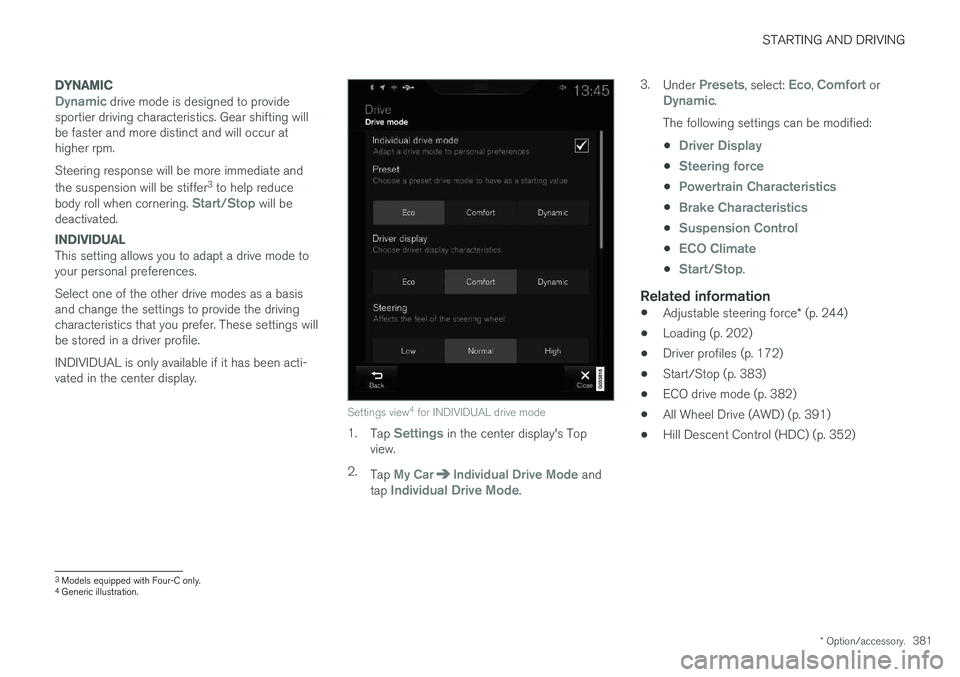
This setting allows you to adapt a drive mode to your personal preferences. Select one of the other drive modes as a basis and change the settings to provide the drivingcharacteristics that you prefer. These settings willbe stored in a driver profile. INDIVIDUAL is only available if it has been acti- vated in the center display.
Settings view 4
for INDIVIDUAL drive mode
1. Tap Settings in the center display's Top
view.
2. Tap
My CarIndividual Drive Mode and
tap Individual Drive Mode. 3.
Under
Presets, select: Eco, Comfort orDynamic.
The following settings can be modified: •
Driver Display
•Steering force
•Powertrain Characteristics
•Brake Characteristics
•Suspension Control
•ECO Climate
•Start/Stop.
Related information
• Adjustable steering force
* (p. 244)
• Loading (p. 202)
• Driver profiles (p. 172)
• Start/Stop (p. 383)
• ECO drive mode (p. 382)
• All Wheel Drive (AWD) (p. 391)
• Hill Descent Control (HDC) (p. 352)
3
Models equipped with Four-C only.
4 Generic illustration.
Page 384 of 552
STARTING AND DRIVING
* Option/accessory.
382
ECO drive mode
The Eco drive mode is a function designed to give the driver the opportunity to drive more eco-nomically and to help reduce fuel consumption.
When this mode is activated, the following cha- racteristics are modified:
• The automatic transmission's shifting points
• The engine management system and accel-erator pedal response
• Climate system settings: certain functionswill be temporarily reduced or deactivated
• Information is shown in an ECO gauge in theinstrument panel to help promote more eco-nomical driving
NOTE
When Eco is activated, several climate system parameters are changed and the function ofcertain current-consuming systems will bereduced. Some of these functions can be restarted manually but full functionality will not berestored until Eco is deactivated.
Selecting ECO modeWhen the engine is switched off, ECO mode is deactivated and must be reactivated each time the engine is started.
ECO will appear in the
instrument panel when the function is activated.
Via Function view
Tap the button in the center display's Function view. An indi-cator light in the button showsthat the function is activated.
With the drive mode control *
1.
Press the DRIVE MODE control.
> A pop-up menu will open in the center display.
2. Roll the control upward or downward to scroll to the desired drive mode and
3. Press the control again to select it. A drive mode can also be selected by tapping its button on the center display.
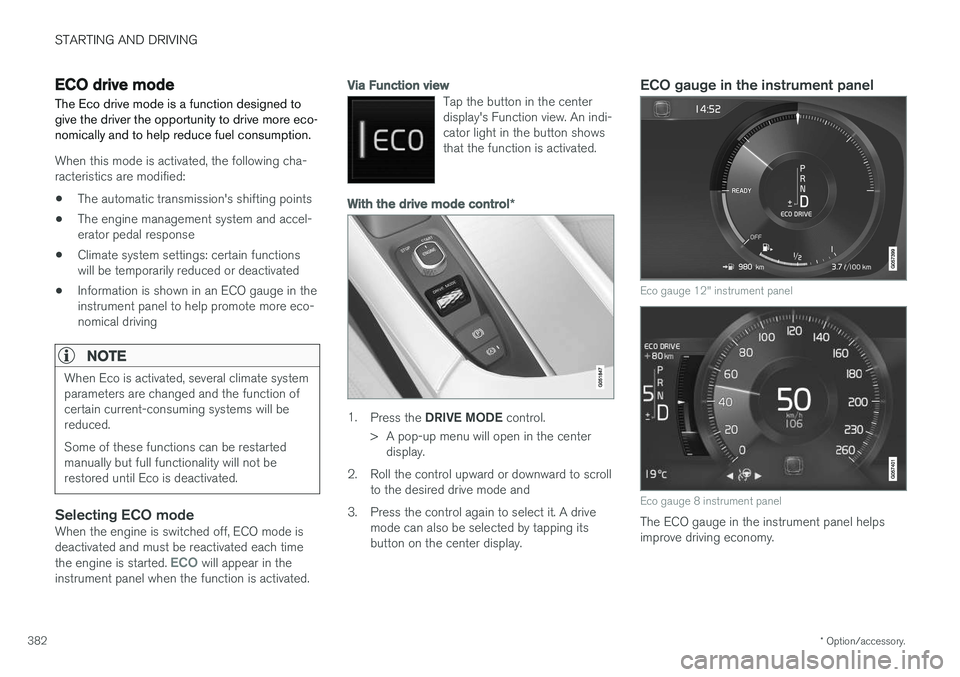
ECO gauge in the instrument panel
Eco gauge 12" instrument panel
Eco gauge 8 instrument panel
The ECO gauge in the instrument panel helps improve driving economy.
Page 387 of 552
STARTING AND DRIVING
}}
* Option/accessory.385
Related information
•Conditions for Start/Stop (p. 385)
• Start/Stop (p. 383)
Conditions for Start/Stop
Certain conditions must be met for the Start/ Stop feature to function. If a condition is not met,this will be indicated in the instrument panel.
The engine does not auto-stopIn certain situations or conditions, the engine may not auto-stop when the vehicle comes to a
standstill, such as when:
• the vehicle has not reached a speed of approx. 8 mph (12 km/h) after starting.
• after several auto-stops, the speed mustagain exceed approx. 8 mph (12 km/h)before the next auto-stop.
• the driver's seat belt is unbuckled.
• the main battery's charge is below the mini-mum level.
• the engine has not reached its normal oper-ating temperature.
• the ambient temperature is below approx.23°F (-5°C) or above approx. 85°F (30°C).
• the windshield's heating function
* is acti-
vated.
• the climate system cannot keep the desiredsettings in the passenger compartment.
• the vehicle is backing up.
• the main battery's temperature is above orbelow the permitted limits.
• the driver is turning the steering wheel hard. •
the road's incline is very steep.
• the hood is opened.
• the transmission has not reached its normaloperating temperature.
• driving at high altitude and the engine hasnot reached its normal operating tempera-ture.
• the gear selector is in the manual shiftingposition.
• the ABS brakes have activated.
• hard braking (even if the ABS brakes havenot activated).
• many starts during a short time period havetriggered the starter motor's overheating pro-tection.
• a trailer's electrical system is connected tothe vehicle's electrical system.
The engine does not auto-startIn certain situations or conditions, the engine may not auto-start
after an auto-stop, such as:
• if the driver is not wearing a seat belt
• the gear selector is in the
P position and the
driver's door is open. The engine must be started normally.
The engine auto-starts while the brake pedal is depressed
In the following situations, the engine will auto-
start even though the brake pedal is depressed:
Page 388 of 552
||
STARTING AND DRIVING
386•
condensation forms on the inside of the win- dows.
• the climate system cannot keep the desiredsettings in the passenger compartment.
• electrical current consumption is temporarilyhigh or the main battery's charge is belowthe minimum level.
• the brake pedal is pumped repeatedly.
• the hood is opened.
• the vehicle begins to move or increasesspeed slightly (if the engine auto-stoppedbefore the vehicle was at a standstill).
• the driver's seat belt is unbuckled while the gear selector is in the
D or N positions.
• the gear selector is moved from
D to R or ±.
• the driver's door is opened with the gearselector in
D: an audible signal and a text
message will inform the driver that the igni- tion is on.
WARNING
Do not open the hood if the engine has auto- stopped. The engine could suddenly auto-start. Before opening the hood:
• Switch off the ignition by turning the start knob in the tunnel console toward
STOP.
• Be aware that if the engine has been run- ning, components in the engine compart-ment will be very hot.
Related information
• Using the Start/Stop function (p. 383)
Automatic transmission
The automatic transmission has 8 forward gears and shifts up or down based on the level ofacceleration, speed and engine speed (meas-ured in revolutions per minute - rpm). Manualshifting is also possible. The gear indicator in theinstrument panel shows the gear currently beingused or gear shift mode.
CAUTION
The transmission
Page 481 of 552
MAINTENANCE AND SERVICING
479
Automatically connecting to a workshop
Without driver confirmation
This is the most convenient way to transmit trou- ble-shooting data. The driver does not need toconfirm that the vehicle will establish a connec-tion. If the vehicle stops at a workshop and the engine is switched off using the start knob, a messagewill appear above the status bar in the center dis-play. The vehicle will be automatically connectedwhen the driver's door is opened if the driver does not tap the
Cancel button in the message.
To help prevent the driver from being disturbed by unwanted requests to connect (e.g., if thevehicle is often parked near a workshop with anauthorized Volvo network), the vehicle will switchto manual connection if the driver cancels a con-nection request twice within 5 days.
With driver confirmation
With this alternative, the driver must confirm a connection. If the vehicle stops at a workshop and the engine is switched off using the start knob, a pop-upwindow will open in the center display. The vehi-cle will be automatically connected when the driv- er's door is opened if the driver taps
Connect in
the pop-up window. If the driver does nothing or taps the pop-up window's
Abort button, no
attempt will be made to establish a connection.
NOTE
To help prevent the driver from being distur- bed by unwanted requests to connect (e.g., ifthe vehicle is often parked near a workshopwith an authorized Volvo network), the vehiclewill switch to manual connection if the drivercancels a connection request twice within5 days.
Manually connecting to a workshopManual connections are handled by the service technician.
Changing the way a connection is madeThe type of connection (manual or automatic)can be changed in the center display's Settingsmenu.
1. Pull down the center display's Top view and
tap
Settings.
2. Tap
CommunicationVolvo Service
Networks.
3. Select
Automatically connect when I
arrive, Ask before connecting or Never
connect and never ask (manual connec-
tions).
Related information
• Internet connected vehicle (p. 431)
• Settings view (p. 109)
Climate system service
Service and repairs on the air conditioning sys- tem should only be done by a trained and quali-fied Volvo service technician.
Troubleshooting and repairsThe air conditioning system contains a floures- cent tracer substance. Ultraviolet light is used tosearch for leaks in the system.
Refrigerant R134a
WARNING
The air conditioning system contains the refrigerant R134a under pressure. Serviceand repairs on the system should only bedone by a trained and qualified Volvo servicetechnician.
Related information
• Climate control system (p. 178)
Page 547 of 552
INDEX
545
Owner's information
mobile applications 20
Owner's manual 16
Ownership, changing 114
Oxygen sensors, heated 368
P
Paint, touching up 520, 521
Park assist 330, 331, 332, 333
Park Assist Camera 334, 336, 338, 339 settings 334, 338
Park Assist Pilot 340, 341, 344, 346Parking brake electric, applying/releasing 355, 357
Parking light bulb, replacing 501Passenger compartment fuses 490
Passive Entry system location of antennas 230
Permissible axle weight 529Phone phone book 415
receiving calls 414
text messages 416, 418
Pilot Assist 270, 277, 280, 283, 284, 286, 287
Polishing 521 Power front seat memory function 164
Power mirrors 102 defroster 190
Power steering adjustable 244
Power tailgate 234
Power windows 107
Pregnancy, using seat belts during 58
PROPOSITION 65 WARNING 368
R
Radar driver support systems 290, 294
Radar sensor limitations 291
Radio RBDS 397
settings 396 SiriusXM ®
Satellite radio 402, 403, 404
Radio functions HD digital radio 398, 400, 401
Rain sensor 157
Rear Collision Warning 310
Rear fog lights 145, 502
Rear park assist 330, 331, 332, 333Rear seat
backrest 171
Rear seat head restraints 169
Rear seats 169 center head restraint 169
Rearview mirror compass 136, 137
Rear window defroster 190
Recalls 58
Recalls, child restraints 77
Recirculation (climate system) 189
Refrigerant (A/C system) 531
Refueling 365, 366 fuel filler door 367
Registering child restraints 77
Remote key 221, 224, 231 immobilizer 218
linking to a driver profile 174
range 223
replacing the battery 219
restricted (red) key 224
Remote updates 475