warning light VOLVO V90 CROSS COUNTRY 2017 Owner´s Manual
[x] Cancel search | Manufacturer: VOLVO, Model Year: 2017, Model line: V90 CROSS COUNTRY, Model: VOLVO V90 CROSS COUNTRY 2017Pages: 552, PDF Size: 13.6 MB
Page 238 of 552
||
LOCKS AND ALARM
* Option/accessory.
236
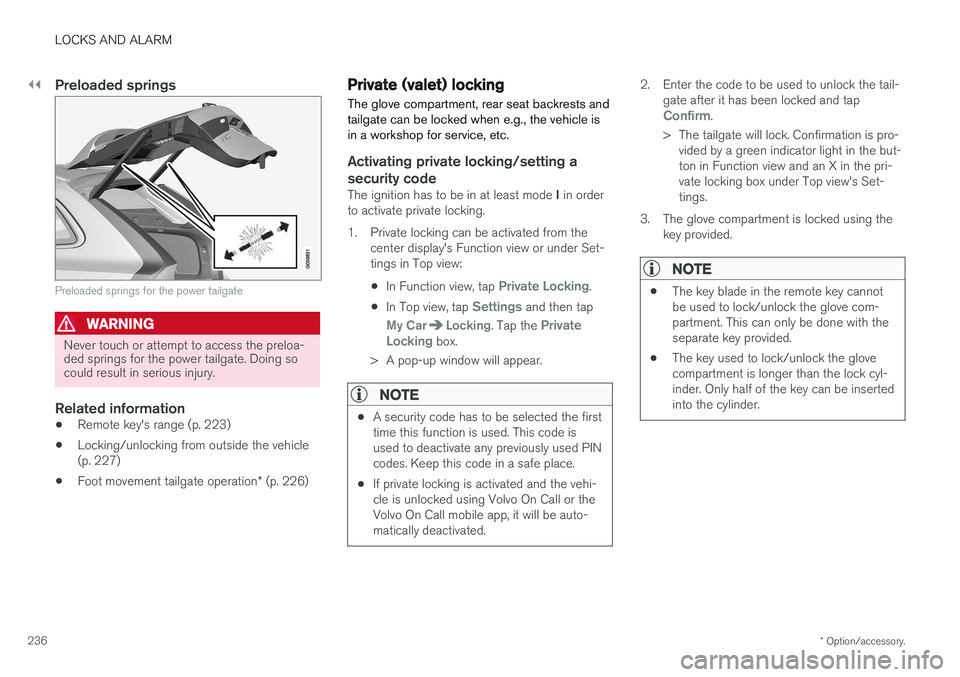
Preloaded springs
Preloaded springs for the power tailgate
WARNING
Never touch or attempt to access the preloa- ded springs for the power tailgate. Doing socould result in serious injury.
Related information
• Remote key's range (p. 223)
• Locking/unlocking from outside the vehicle (p. 227)
• Foot movement tailgate operation
* (p. 226)
Private (valet) locking
The glove compartment, rear seat backrests and tailgate can be locked when e.g., the vehicle isin a workshop for service, etc.
Activating private locking/setting a security code
The ignition has to be in at least mode I in order
to activate private locking.
1. Private locking can be activated from the center display's Function view or under Set- tings in Top view:
• In Function view, tap
Private Locking.
• In Top view, tap
Settings and then tap
My CarLocking. Tap the Private
Locking box.
> A pop-up window will appear.
NOTE
• A security code has to be selected the first time this function is used. This code isused to deactivate any previously used PINcodes. Keep this code in a safe place.
• If private locking is activated and the vehi-cle is unlocked using Volvo On Call or theVolvo On Call mobile app, it will be auto-matically deactivated.
2. Enter the code to be used to unlock the tail-
gate after it has been locked and tap
Confirm.
> The tailgate will lock. Confirmation is pro- vided by a green indicator light in the but- ton in Function view and an X in the pri-vate locking box under Top view's Set-tings.
3. The glove compartment is locked using the key provided.
NOTE
• The key blade in the remote key cannot be used to lock/unlock the glove com-partment. This can only be done with theseparate key provided.
• The key used to lock/unlock the glovecompartment is longer than the lock cyl-inder. Only half of the key can be insertedinto the cylinder.
Page 241 of 552
LOCKS AND ALARM
}}
* Option/accessory.239
Alarm
The alarm system provides a warning if an attempt is made to break into the vehicle.
The following conditions will trigger the alarm:
• a door/hood/tailgate are opened
• the battery is disconnected
• the alarm siren is disconnected
If a problem is detected in the alarm system, this symbol and
Alarm
system failure Service required will
be displayed in the instrument panel.
Do not attempt to repair any of the components in the alarm system yourself; this could affect theinsurance policy on the vehicle. Contact a trainedand qualified Volvo service technician.
NOTE
One of the alarm sensors, which is sensitive to metallic objects, is located under the tunnelconsole cup holders. Avoid leaving coins,keys, etc., in the cup holders because theymay inadvertently trigger the alarm.
Arming the alarm
–Lock the vehicle by pressing the remote key's lock button. On models with theoptional Passive Entry system, the vehiclecan also be locked by pressing the outerindentation for locking on one of the doorhandles or by pressing the tailgate's rubber-ized pressure plate. If the vehicle is equipped with a power tail- gate *, the button on the lower edge of the
tailgate can also be used to lock the vehicle and arm the alarm.
Disarming the alarmThe alarm can be disarmed by: • Unlock the vehicle by pressing the remote key's unlock button
• Pressing the pressure-sensitive area on theinside of one of the door handles on modelswith the optional Passive Entry system.
• Pressing the tailgate's rubberized pressureplate on models with the optional PassiveEntry system.
Turning off a triggered (sounding)
alarm
–Press the remote key's unlock button or put the ignition in mode I by turning the start
knob to START and releasing it.
Alarm signalsThe following occurs if the alarm has been trig- gered:
• A siren will sound for 30 seconds or until thealarm is turned off
• All turn signals flash for 5 minutes or untilthe alarm is turned off
If the door that triggered the alarm is left open,
the alarm cycle will be repeated 10 times.
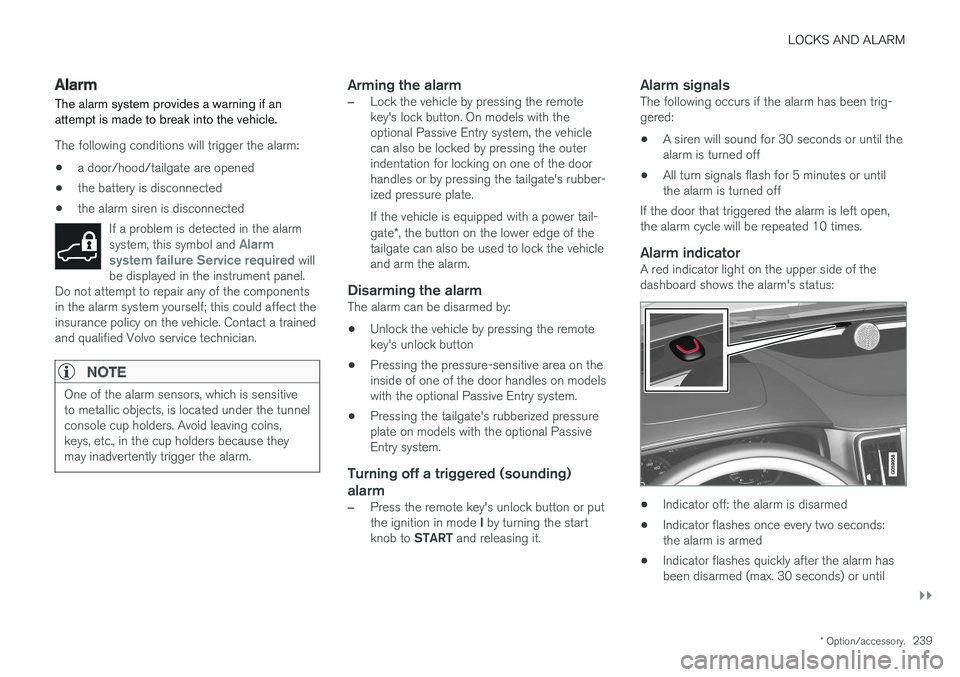
Alarm indicatorA red indicator light on the upper side of thedashboard shows the alarm's status:
• Indicator off: the alarm is disarmed
• Indicator flashes once every two seconds: the alarm is armed
• Indicator flashes quickly after the alarm hasbeen disarmed (max. 30 seconds) or until
Page 247 of 552
DRIVER SUPPORT
}}
* Option/accessory.245
Related information
•Driver support systems (p. 244)
• Drive modes
* (p. 379)
Electronic Stability Control (ESC)
Electronic Stability Control (ESC) helps reduce wheel spin, counteract skidding and to generallyhelp improve directional stability.
A pulsating sound will be audi- ble when the system is activelyoperating and is normal. Accel-eration may also be slightlyslower than normal.
WARNING
ESC is a supplementary aid and cannot deal with all situations or road conditions. The driver is always responsible for operating the vehicle in a safe manner in accordancewith current traffic regulations.
ESC consists of the following functions: • Traction control
• Spin control
• Active Yaw Control
• Engine Drag Control
• Trailer Stability Assist
Traction controlThis function is designed to help reduce wheel spin by transferring power from a drive wheel that begins to lose traction to the wheel on the oppo-site side of the vehicle (on the same axle).
Spin controlThis function is designed to help prevent thedrive wheels from spinning while the vehicle isaccelerating.
Active Yaw ControlAt low speeds, this function helps maintain direc-tional stability by braking one or more of thewheels if the vehicle shows a tendency to skid orslide laterally.
Engine Drag Control EDCEDC helps keep the engine running if the wheelsshow a tendency to lock, e.g., when shifting downin the manual shifting mode or while using theengine's braking function on a slippery surface. Ifthe wheels were to lock, the vehicle wouldbecome more difficult to steer.
Trailer Stability Assist
*1TSA helps stabilize a vehicle that is towing atrailer when the vehicle and trailer have begun tosway. This system is automatically deactivated if the driver selects
Sport mode.
1
This function is included if the vehicle is equipped with a Volvo original trailer hitch.
Page 255 of 552
DRIVER SUPPORT
}}
* Option/accessory.253
Activating/deactivating the Automatic Speed Limiter (ASL) *
The function Automatic Speed Limiter (ASL) is a
supplement to the Speed Limiter (SL) and can be activated/deactivated.
ASL is activated/deactivated in the center display's Functionview.
Activating ASL
With SL activated: 1.
Tap the
Speed Sign Assist button in the
center display's Function view.
> ASL will go into standby mode and a green indicator light in the button will illu- minate. A road sign symbol will be dis-played in center of the speedometer.
2. Press the
button on the left-side steer-
ing wheel keypad.
> ASL will be activated with the vehicle's current speed.
Deactivating ASL
–Tap the Speed Sign Assist button in the
center display's Function view.
> ASL will be deactivated, the indicator will be GRAY and the Speed limiter (SL) will be activated.
WARNING
After switching from ASL to SL, the vehicle will no longer adapt speed to posted speedlimits. It will only limit the vehicle's maximumspeed.
Related information
• Speed limiter (SL)
* (p. 249)
• Automatic Speed Limiter (ASL)
* (p. 251)
Changing tolerance for the Automatic Speed Limiter
Automatic Speed Limiter can be set to different tolerance levels.
Posted speed limit toleranceASL can be set to allow the vehicle to drive above or below the posted speed limit. For exam-ple, if the current posted speed limit is 43 mph(70 km/h), the driver can opt to allow the vehicleto drive at a speed of 47 mph (75 km/h).
Page 263 of 552
DRIVER SUPPORT
* Option/accessory.261
Distance Alert *
Distance Alert is a function that alerts the driver if the time interval to the vehicle ahead is too short.
Distance Alert is active at speeds above approxi- mately 20 mph (30 km/h) and only reacts to avehicle ahead that is driving in the same direc-tion. No information is provided for vehicles driv-ing toward you, moving very slowly, or at a stand-still.
NOTE
Distance Alert only monitors distance to the vehicle ahead while Adaptive Cruise Control isin standby mode or off.
WARNING
Distance Alert only indicates the distance to the vehicle ahead. It does not affect thespeed of your vehicle.
Head-up-display *
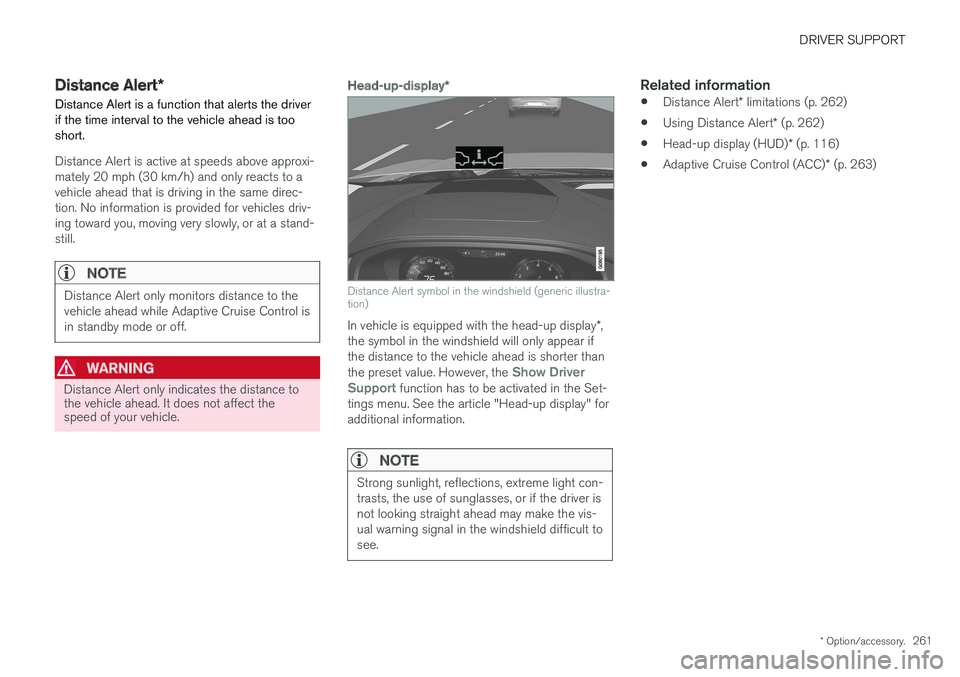
Distance Alert symbol in the windshield (generic illustra- tion)
In vehicle is equipped with the head-up display *,
the symbol in the windshield will only appear if the distance to the vehicle ahead is shorter than the preset value. However, the
Show Driver
Support function has to be activated in the Set-
tings menu. See the article "Head-up display" for additional information.
NOTE
Strong sunlight, reflections, extreme light con- trasts, the use of sunglasses, or if the driver isnot looking straight ahead may make the vis-ual warning signal in the windshield difficult tosee.
Related information
• Distance Alert
* limitations (p. 262)
• Using Distance Alert
* (p. 262)
• Head-up display (HUD)
* (p. 116)
• Adaptive Cruise Control (ACC)
* (p. 263)
Page 264 of 552
DRIVER SUPPORT
* Option/accessory.
262
Using Distance Alert *
Distance Alert is used as follows:
OperationPull down the center display's Top view and select Settingsfollowed by Distance alert.
Tap to turn the function On or Off.
Setting a time interval
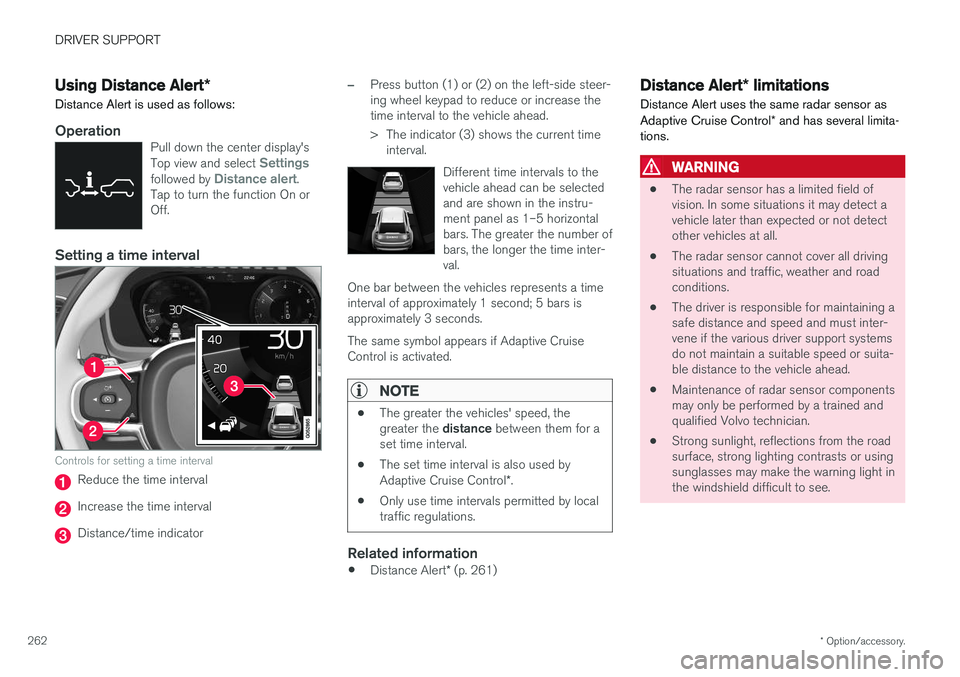
Controls for setting a time interval
Reduce the time interval
Increase the time interval
Distance/time indicator
–Press button (1) or (2) on the left-side steer- ing wheel keypad to reduce or increase thetime interval to the vehicle ahead.
> The indicator (3) shows the current time interval.
Different time intervals to the vehicle ahead can be selectedand are shown in the instru-ment panel as 1–5 horizontalbars. The greater the number ofbars, the longer the time inter-val.
One bar between the vehicles represents a timeinterval of approximately 1 second; 5 bars isapproximately 3 seconds. The same symbol appears if Adaptive Cruise Control is activated.
NOTE
• The greater the vehicles' speed, the greater the
distance between them for a
set time interval.
• The set time interval is also used by Adaptive Cruise Control
*.
• Only use time intervals permitted by local traffic regulations.
Related information
•
Distance Alert
* (p. 261)
Distance Alert * limitations
Distance Alert uses the same radar sensor as Adaptive Cruise Control * and has several limita-
tions.
WARNING
• The radar sensor has a limited field of vision. In some situations it may detect avehicle later than expected or not detectother vehicles at all.
• The radar sensor cannot cover all drivingsituations and traffic, weather and roadconditions.
• The driver is responsible for maintaining asafe distance and speed and must inter-vene if the various driver support systemsdo not maintain a suitable speed or suita-ble distance to the vehicle ahead.
• Maintenance of radar sensor componentsmay only be performed by a trained andqualified Volvo technician.
• Strong sunlight, reflections from the roadsurface, strong lighting contrasts or usingsunglasses may make the warning light inthe windshield difficult to see.
Page 265 of 552
DRIVER SUPPORT
}}
* Option/accessory.263
WARNING
•Poor weather or winding roads can affect the radar sensor's capacity to detect vehi-cles ahead.
• A vehicle's size (e.g., a motorcycle) canalso affect the radar sensor's capacity todetect another vehicle. This may result inthe warning light illuminating at a shorterdistance than the one that has been setor not illuminating at all.
• High speeds may also result in the warn-ing light illuminating at a shorter distancethan the one that has been set due tolimitations in the radar sensor's range.
For additional information, see also the article"Radar sensor limitations."
Related information
• Radar sensor limitations (p. 291)
• Distance Alert
* (p. 261)
Adaptive Cruise Control (ACC) *
ACC is an optional system designed to assist the driver by maintaining a set speed or a settime interval to the vehicle ahead.
ACC helps provide more relaxed driving on long trips on highways or other major roads in a rela-tively even flow of traffic.
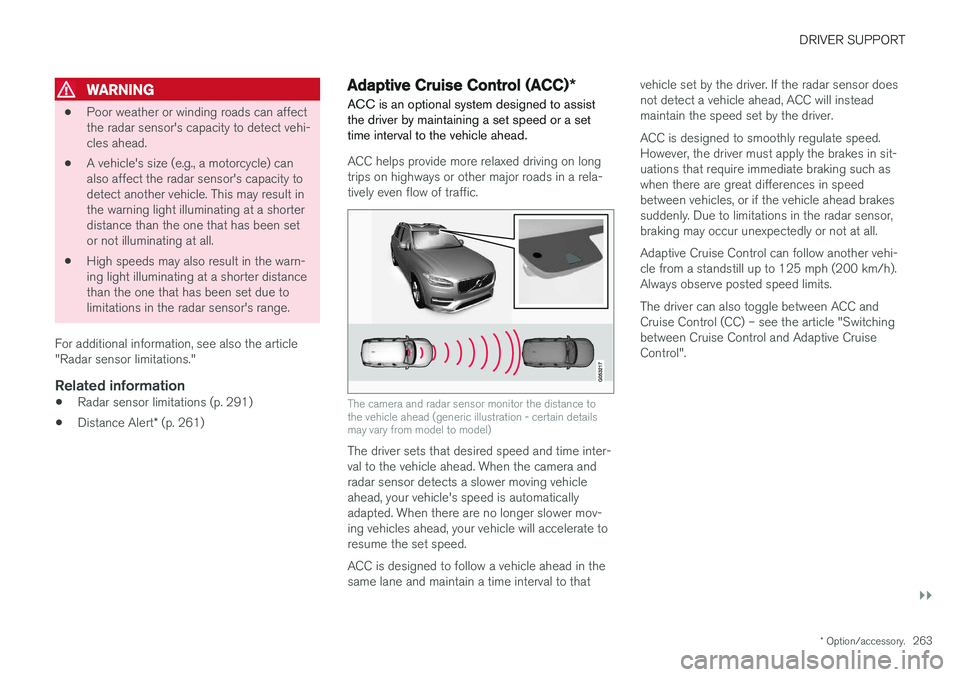
The camera and radar sensor monitor the distance to the vehicle ahead (generic illustration - certain detailsmay vary from model to model)
The driver sets that desired speed and time inter- val to the vehicle ahead. When the camera andradar sensor detects a slower moving vehicleahead, your vehicle's speed is automaticallyadapted. When there are no longer slower mov-ing vehicles ahead, your vehicle will accelerate toresume the set speed. ACC is designed to follow a vehicle ahead in the same lane and maintain a time interval to that vehicle set by the driver. If the radar sensor doesnot detect a vehicle ahead, ACC will insteadmaintain the speed set by the driver. ACC is designed to smoothly regulate speed. However, the driver must apply the brakes in sit-uations that require immediate braking such aswhen there are great differences in speedbetween vehicles, or if the vehicle ahead brakessuddenly. Due to limitations in the radar sensor,braking may occur unexpectedly or not at all. Adaptive Cruise Control can follow another vehi- cle from a standstill up to 125 mph (200 km/h).Always observe posted speed limits. The driver can also toggle between ACC and Cruise Control (CC) – see the article "Switchingbetween Cruise Control and Adaptive CruiseControl".
Page 267 of 552
DRIVER SUPPORT
}}
* Option/accessory.265
Instrument panel
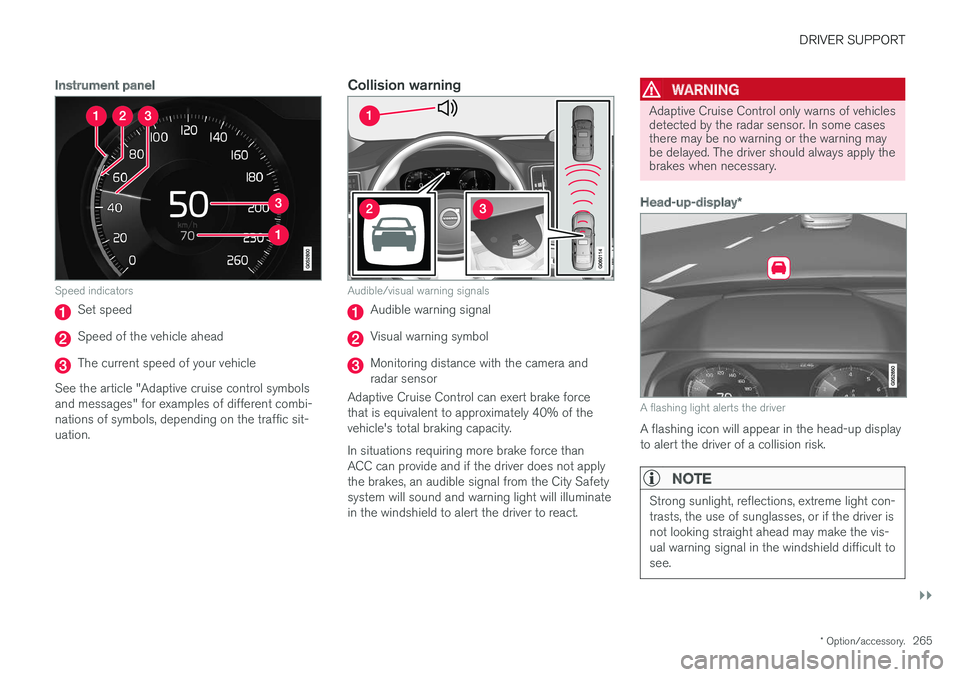
Speed indicators
Set speed
Speed of the vehicle ahead
The current speed of your vehicle
See the article "Adaptive cruise control symbols and messages" for examples of different combi-nations of symbols, depending on the traffic sit-uation.
Collision warning
Audible/visual warning signals
Audible warning signal
Visual warning symbol
Monitoring distance with the camera and radar sensor
Adaptive Cruise Control can exert brake forcethat is equivalent to approximately 40% of thevehicle's total braking capacity. In situations requiring more brake force than ACC can provide and if the driver does not applythe brakes, an audible signal from the City Safetysystem will sound and warning light will illuminatein the windshield to alert the driver to react.
WARNING
Adaptive Cruise Control only warns of vehicles detected by the radar sensor. In some casesthere may be no warning or the warning maybe delayed. The driver should always apply thebrakes when necessary.
Head-up-display *
A flashing light alerts the driver
A flashing icon will appear in the head-up display to alert the driver of a collision risk.
NOTE
Strong sunlight, reflections, extreme light con- trasts, the use of sunglasses, or if the driver isnot looking straight ahead may make the vis-ual warning signal in the windshield difficult tosee.
Page 272 of 552
||
DRIVER SUPPORT
* Option/accessory.
270
Changing a time interval
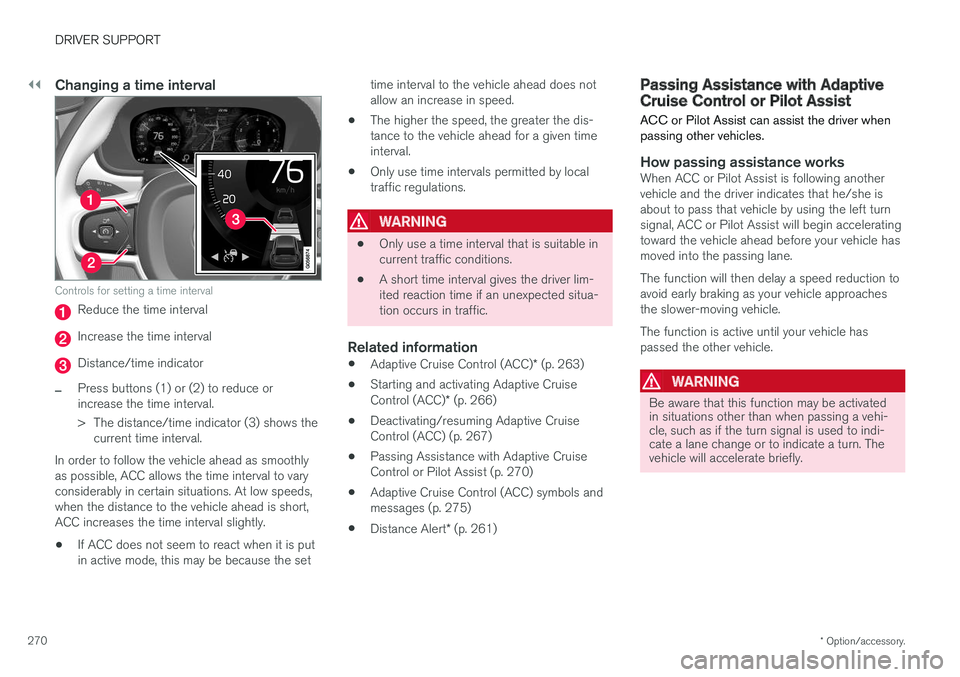
Controls for setting a time interval
Reduce the time interval
Increase the time interval
Distance/time indicator
–Press buttons (1) or (2) to reduce or increase the time interval.
> The distance/time indicator (3) shows the
current time interval.
In order to follow the vehicle ahead as smoothly as possible, ACC allows the time interval to varyconsiderably in certain situations. At low speeds,when the distance to the vehicle ahead is short,ACC increases the time interval slightly. • If ACC does not seem to react when it is put in active mode, this may be because the set time interval to the vehicle ahead does notallow an increase in speed.
• The higher the speed, the greater the dis-tance to the vehicle ahead for a given timeinterval.
• Only use time intervals permitted by localtraffic regulations.
WARNING
•
Only use a time interval that is suitable in current traffic conditions.
• A short time interval gives the driver lim-ited reaction time if an unexpected situa-tion occurs in traffic.
Related information
•
Adaptive Cruise Control (ACC)
* (p. 263)
• Starting and activating Adaptive Cruise Control (ACC)
* (p. 266)
• Deactivating/resuming Adaptive Cruise Control (ACC) (p. 267)
• Passing Assistance with Adaptive CruiseControl or Pilot Assist (p. 270)
• Adaptive Cruise Control (ACC) symbols andmessages (p. 275)
• Distance Alert
* (p. 261)
Passing Assistance with Adaptive Cruise Control or Pilot Assist
ACC or Pilot Assist can assist the driver when passing other vehicles.
How passing assistance worksWhen ACC or Pilot Assist is following another vehicle and the driver indicates that he/she isabout to pass that vehicle by using the left turnsignal, ACC or Pilot Assist will begin acceleratingtoward the vehicle ahead before your vehicle hasmoved into the passing lane. The function will then delay a speed reduction to avoid early braking as your vehicle approachesthe slower-moving vehicle. The function is active until your vehicle has passed the other vehicle.
WARNING
Be aware that this function may be activated in situations other than when passing a vehi-cle, such as if the turn signal is used to indi-cate a lane change or to indicate a turn. Thevehicle will accelerate briefly.
Page 274 of 552
||
DRIVER SUPPORT
* Option/accessory.
272
WARNING
At speeds above 20 mph (30 km/h), if ACC
changes targets from a moving vehicle to a stationary one, the system will not react to the
stationary vehicle and will accelerate to the previously set speed. The driver must actively apply the brakes to slow/stop the vehicle.
Automatic standby mode when changing targets
ACC disengages and goes into standby mode if:
• your vehicle's speed goes below approx. 3 mph (5 km/h) and ACC cannot determineif the target object is a stationary vehicle orsome other type of object such as a speedbump, etc
• the vehicle's speed goes below approx.3 mph (5 km/h) and the vehicle aheadchanges lanes or turns so that ACC nolonger has a target vehicle to follow.
Auto-hold brake functionIn slow-moving, stop-and-go traffic or when stop-ped at a traffic light, driving will resume automati-cally if the vehicle is not stopped for more thanapprox. 3 seconds. If it takes more than3 seconds for the vehicle ahead to begin movingagain, ACC will go into standby mode and theauto-hold brake function will activate.
–The driver will then have to reactivate ACC in one of the following ways:
• Press the
button on the left-side
steering wheel keypad.
• Press the accelerator pedal.
> ACC will resume following the vehicle ahead (target vehicle) if it begins to move within approx. 6 seconds.
NOTE
ACC can keep the vehicle at a standstill for up to 5 minutes, after which the parking brakewill be set and ACC will go into standbymode. The parking brake has to be released before ACC can be reactivated.
Deactivation of the auto-hold brake function
In certain situations, auto-hold will be deactivated when the vehicle is at a standstill and ACC will gointo standby mode. This means that the brakes will be released and the vehicle can begin to roll. The driver must actively apply the brakes to keep the vehicle at a standstill. This can occur in the following situations: • the driver presses the brake pedal
• the parking brake is set •
the gear selector is moved to the
P, N or R
positions
• the driver puts ACC in standby mode.
Automatically setting the parking brakeIn certain situations, the parking brake is set automatically to help keep the vehicle at a stand-still. This occurs if ACC keeps the vehicle at a stand- still with the brakes and:
• the driver unbuckles the seat belt or opensthe door
• ACC has kept the vehicle at a standstill formore than approx. 5 minutes
• the brakes overheat
• the engine is turned off.
Related information
•
Adaptive Cruise Control (ACC)
* (p. 263)
• Auto-hold brake function (p. 350)
• Parking brake (p. 354)