brake VOLVO V90 CROSS COUNTRY 2017 Owner´s Manual
[x] Cancel search | Manufacturer: VOLVO, Model Year: 2017, Model line: V90 CROSS COUNTRY, Model: VOLVO V90 CROSS COUNTRY 2017Pages: 552, PDF Size: 13.6 MB
Page 5 of 552
3
Top tether anchors86
Integrated booster cushion *
87
Raising the integrated booster cushion *
89
Stowing the integrated booster cushion *
91
INSTRUMENTS AND CONTROLS
Instruments and controls
94
Trip computer 95
Displaying trip computer information 96
Displaying trip statistics 98
HomeLink ®
Wireless Control System *98
Programming the HomeLink ®
Wire-
less Control System * 99
Adjusting the power door mirrors 102
Laminated panoramic roof *
104
Operating the laminated panoramic roof *
105
Power windows 107
Operating the power windows 107
Rearview mirror 108
Using sun curtains *
109
Settings view 109
Categories in Settings view 110
Changing system settings in Set- tings view 112
Changing settings in apps 113
Resetting the settings view 113
Resetting user data when the vehiclechanges owners 114
Ambient temperature sensor 114
Clock 115
Head-up display (HUD) *
116
Voice control
119
Using voice commands 119
Voice control for cell phones 120
Voice control for radio and media 121
Climate system voice commands 122
Navigation system voice commands 123
Voice control settings 124
Instrument panel 124
Instrument panel settings 126
Indicator symbols in the instrument panel 127
Instrument panel licenses 130
Warning symbols in the instrument panel 135
Compass 136
Calibrating the compass 137
Lighting panel and controls 138
Parking lights 140
Daytime Running Lights (DRL) 140
Low beam headlights 141
High and low beam headlights 142
Active Bending Lights *
143
Front fog lights *
144
Rear fog lights (certain models only) 145
Brake lights 146
Hazard warning flashers 146
Page 10 of 552
8
STARTING AND DRIVING
Starting and driving348
Brakes 348
Brake functions 350
Auto-hold brake function 350
Brake assist system 351
Braking effect after a collision 351
Emergency brake lights 352
Hill Descent Control (HDC) 352
Low Speed Control (LSC) 353
Hill Start Assist 354
Parking brake 354
Using the parking brake 355
Parking brake malfunctions 357
Before a long distance trip 357
Driving economically 358
Driving through standing water 359
Overheating the engine and transmission 360
Winter driving 361
Towing eyelet 361
Towing recommendations 363
Fuel 365
Octane rating 366
Opening/closing the fuel filler door 367
Emission controls 368
Jump starting368
Driving with a trailer 370
Retractable towbar *
372
Trailer Stability Assist (TSA) 374
Ignition modes 375
Battery drain 377
Starting the engine 377
Turning the engine off 379
Drive modes *
379
ECO drive mode 382
Start/Stop 383
Using the Start/Stop function 383
Conditions for Start/Stop 385
Automatic transmission 386
Shiftlock 387
Gear shift indicator 388
Gear selector positions 388
Steering wheel paddles *
390
All Wheel Drive (AWD) 391
Leveling control * and suspension
392
INFOTAINMENT
The infotainment system
394
Apps (applications) 394
Sound settings 395
Radio 396
Radio settings 396
RBDS radio 397
Changing and searching for radio stations 397
HD Radio ™reception
398
Switching HD Radio on and off 400
HD Radio sub-channels 400
HD Radio limitations 401
SiriusXM ®
Satellite radio * 402
Using SiriusXM ®
Satellite radio *403
SiriusXM ®
Satellite radio * settings 404
SiriusXM Travel Link *
405
SiriusXM Travel Link - Weather 407
SiriusXM Travel Link - Alerts 408
SiriusXM Travel Link - Fuel 409
SiriusXM Travel Link - Sports 410
Phone 411
Pairing a cell phone 412
Connecting/disconnecting a cell phone 413
Handling phone calls 414
Page 13 of 552
11
SPECIFICATIONS
Label information524
Dimensions 527
Weights 529
Air conditioning refrigerant 531
Brake fluid specification and volume 531
Coolant specifications 532
Engine specifications 533
Engine oil specifications and volume 535
Fuel tank volume 535
Tire inflation pressure table 536
Transmission fluid specification and volume 537
INDEX
Index 539
Page 17 of 552
INTRODUCTION
15
Mobile apps
Beginning with model year 2014, the owner's manual is available in the form of an app for cer-tain Volvo models. The Volvo On Call app canalso be found here.
Owner's manuals for earlier model Volvos
Owner's manuals for earlier model Volvos are available in PDF format. Quick Guides and sup-plements can also be found on the support site.Select a model and a model year and downloadthe desired information.
ContactContact information for customer support and thenearest Volvo retailer are available on the site.
Related information
•Using the owner's manual (p. 48)
• On-board digital owner's manual (p. 50)
• Volvo ID (p. 27)
Volvo and the environment Volvo is committed to the well-being of its cus- tomers. As a natural part of this commitment, wecare about the environment in which we all live.Concern for the environment means an everydayinvolvement in reducing our environmentalimpact.
Volvo's environmental activities are based on a holistic view, which means we consider the over-all environmental impact of a product throughoutits complete life cycle. In this context, design, pro-duction, product use, and recycling are all impor-tant considerations. In production, Volvo haspartly or completely phased out several chemicalsincluding CFCs, lead chromates, asbestos, andcadmium; and reduced the number of chemicalsused in our plants 50% since 1991. Volvo was the first in the world to introduce into production a three-way catalytic converter with aLambda sond, now called the heated oxygen sen-sor, in 1976. The current version of this highlyefficient system reduces emissions of harmfulsubstances (CO, HC, NOx) from the exhaust pipeby approximately 95 – 99% and the search toeliminate the remaining emissions continues.Volvo is the only automobile manufacturer tooffer CFC-free retrofit kits for the air conditioningsystem of all models as far back as the 1975model 240. Advanced electronic engine controlsand cleaner fuels are bringing us closer to ourgoal. In addition to continuous environmental refinement of conventional gasoline-poweredinternal combustion engines, Volvo is activelylooking at advanced technology alternative-fuelvehicles. When you drive a Volvo, you become our partner in the work to lessen the car's impact on theenvironment. To reduce your vehicle's environ-mental impact, you can:
• Maintain proper air pressure in your tires.Tests have shown decreased fuel economywith improperly inflated tires.
• Follow the recommended maintenanceschedule in your Warranty and ServiceRecords Information booklet.
• Drive at a constant speed whenever possible.
• See a trained and qualified Volvo servicetechnician as soon as possible for inspectionif the check engine (malfunction indicator)light illuminates, or stays on after the vehiclehas started.
• Properly dispose of any vehicle-related wastesuch as used motor oil, used batteries, brakepads, etc.
• When cleaning your vehicle, please use gen-uine Volvo car care products. All Volvo carcare products are formulated to be environ-mentally friendly.
Related information
•Driving economically (p. 358)
Page 18 of 552
INTRODUCTION
* Option/accessory.
16
Owner's manual and the environment
The wood pulp in Volvo's printed owner's infor- mation comes from FSC ®
(Forest Stewardship
Council ®
) certified forests and other responsible
sources.
FSC ®
The symbol above indicates that the wood pulp is FSC
®
certified.
Related information
• Volvo and the environment (p. 15)
IntelliSafe
—driver support
IntelliSafe is Volvo's philosophy regarding vehi- cle safety. It encompasses a number of systems,both standard and optional, that are designed tohelp make driving and traveling in a Volvo safer.
SupportSystems that help make driving safer are an inte- gral part of IntelliSafe. These include optional features such as Adaptive Cruise Control * that
helps maintain a set distance to a vehicle ahead,Park Assist Pilot *, which assists in parking the
vehicle, Cross Traffic Alert *, Blind Spot
Information *, etc.
Accident preventionSystems such as City Safety are designed to automatically apply the brakes in situations inwhich the driver does not have time to react. Lane Keeping Aid * alerts the driver if the vehicle
inadvertently crosses a lane's/road's side marker line.
ProtectionThe vehicle is equipped with e.g., seat belt pre-tensioners that pull the seat belts taut in criticalsituations when there is a collision risk andnumerous airbags designed to help provide cush-ioning if certain types of collisions should occur.
Related information
• Adaptive Cruise Control (ACC)
* (p. 263)
• Park Assist Pilot (PAP)
* (p. 340) •
High and low beam headlights (p. 142)
• Cross Traffic Alert (CTA)
* (p. 313)
• Blind Spot Information (BLIS)
* (p. 311)
• City Safety
™ (p. 298)
• Driving lane assistance (p. 322)
• Airbag system (p. 65)
• Roll stability control (RSC) (p. 249)
• Seat belts (p. 60)
• General safety information (p. 56)
Page 28 of 552
||
INTRODUCTION
26vehicle that has been previously damaged. Although these parts may appear equivalent, it isdifficult to tell if the parts have been previouslyreplaced with non-OE parts or if the part hasbeen damaged as a result of a prior collision. Thequality of these used parts may also have beenaffected due to environmental exposure.
Related information
•
Crash event data (p. 26)
• Contacting Volvo (p. 14)
Crash event data
This vehicle is equipped with an event data recorder (EDR). The main purpose of an EDR isto record, in certain crash or near crash-like sit-uations, such as an air bag deployment or hittinga road obstacle, data that will assist in under-standing how a vehicle's systems performed.The EDR is designed to record data related tovehicle dynamics and safety systems for a shortperiod of time, typically 30 seconds or less. TheEDR in this vehicle is designed to record suchdata as:
• How various systems in your vehicle were operating;
• Whether or not the driver and passengersafety belts were buckled/fastened;
• How far (if at all) the driver was depressingthe accelerator and/or brake pedal; and,
• How fast the vehicle was traveling.
These data can help provide a better understand-ing of the circumstances in which crashes andinjuries occur. EDR data are recorded by your vehicle only if a non-trivial crash situation occurs; no data arerecorded by the EDR under normal driving condi-tions and the EDR never registers who is drivingthe vehicle or the location of a crash or a nearcrash-like situation. However, other parties, suchas law enforcement, could combine the EDR datawith the type of personally identifying data rou- tinely acquired during a crash investigation. Toread data recorded by an EDR, special equipmentis required, and access to the vehicle or the EDRis needed. Furthermore, your vehicle is equipped with a number of computers whose task is to continu-ously control and monitor the vehicle
Page 75 of 552
SAFETY
}}
73
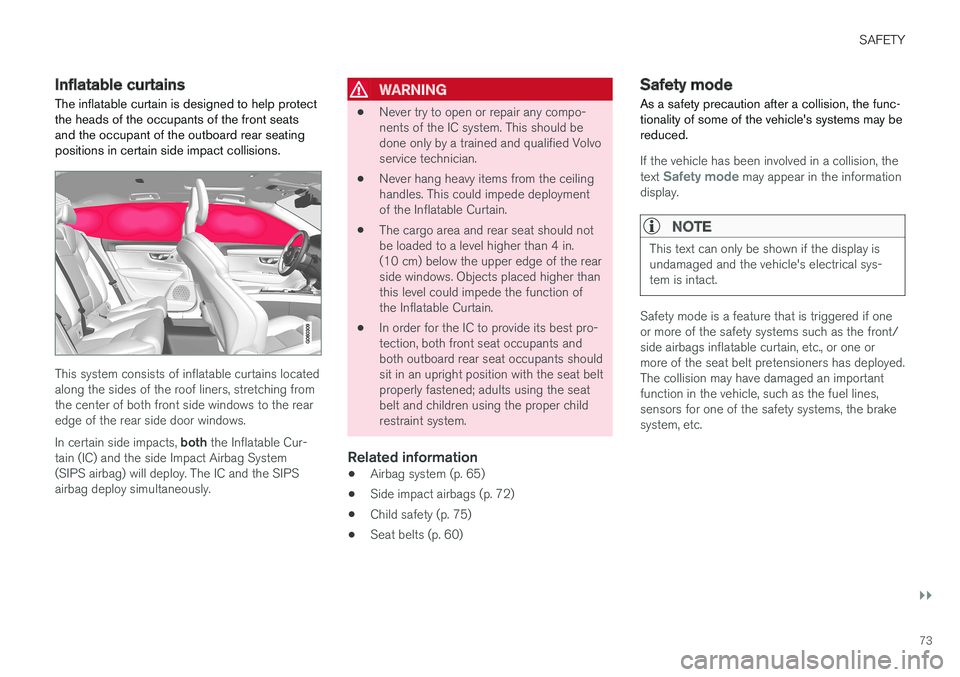
Inflatable curtainsThe inflatable curtain is designed to help protect the heads of the occupants of the front seatsand the occupant of the outboard rear seatingpositions in certain side impact collisions.
This system consists of inflatable curtains located along the sides of the roof liners, stretching fromthe center of both front side windows to the rearedge of the rear side door windows. In certain side impacts, both the Inflatable Cur-
tain (IC) and the side Impact Airbag System (SIPS airbag) will deploy. The IC and the SIPSairbag deploy simultaneously.
WARNING
• Never try to open or repair any compo- nents of the IC system. This should bedone only by a trained and qualified Volvoservice technician.
• Never hang heavy items from the ceilinghandles. This could impede deploymentof the Inflatable Curtain.
• The cargo area and rear seat should notbe loaded to a level higher than 4 in.(10 cm) below the upper edge of the rearside windows. Objects placed higher thanthis level could impede the function ofthe Inflatable Curtain.
• In order for the IC to provide its best pro-tection, both front seat occupants andboth outboard rear seat occupants shouldsit in an upright position with the seat beltproperly fastened; adults using the seatbelt and children using the proper childrestraint system.
Related information
• Airbag system (p. 65)
• Side impact airbags (p. 72)
• Child safety (p. 75)
• Seat belts (p. 60)
Safety mode As a safety precaution after a collision, the func- tionality of some of the vehicle's systems may bereduced.
If the vehicle has been involved in a collision, the text Safety mode may appear in the information
display.
NOTE
This text can only be shown if the display is undamaged and the vehicle's electrical sys-tem is intact.
Safety mode is a feature that is triggered if one or more of the safety systems such as the front/side airbags inflatable curtain, etc., or one ormore of the seat belt pretensioners has deployed.The collision may have damaged an importantfunction in the vehicle, such as the fuel lines,sensors for one of the safety systems, the brakesystem, etc.
Page 97 of 552
INSTRUMENTS AND CONTROLS
}}
* Option/accessory.95
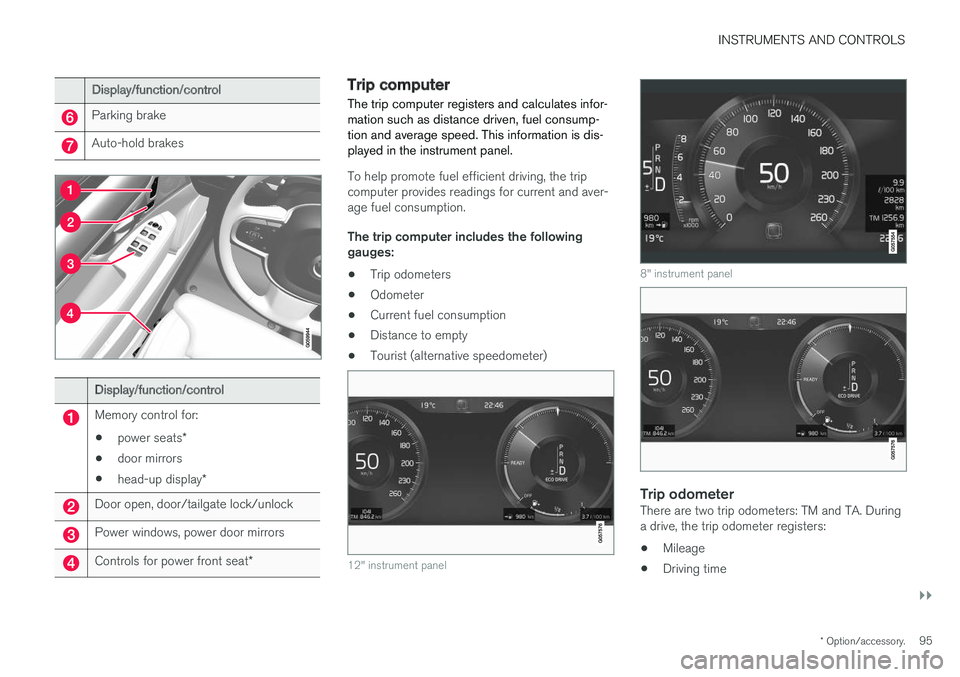
Display/function/control
Parking brake
Auto-hold brakes
Display/function/control
Memory control for:
• power seats
*
• door mirrors
• head-up display
*
Door open, door/tailgate lock/unlock
Power windows, power door mirrors
Controls for power front seat *
Trip computer The trip computer registers and calculates infor- mation such as distance driven, fuel consump-tion and average speed. This information is dis-played in the instrument panel.
To help promote fuel efficient driving, the trip computer provides readings for current and aver-age fuel consumption. The trip computer includes the following gauges:
• Trip odometers
• Odometer
• Current fuel consumption
• Distance to empty
• Tourist (alternative speedometer)
12" instrument panel
8" instrument panel
Trip odometerThere are two trip odometers: TM and TA. During a drive, the trip odometer registers:
• Mileage
• Driving time
Page 113 of 552
INSTRUMENTS AND CONTROLS
* Option/accessory.111
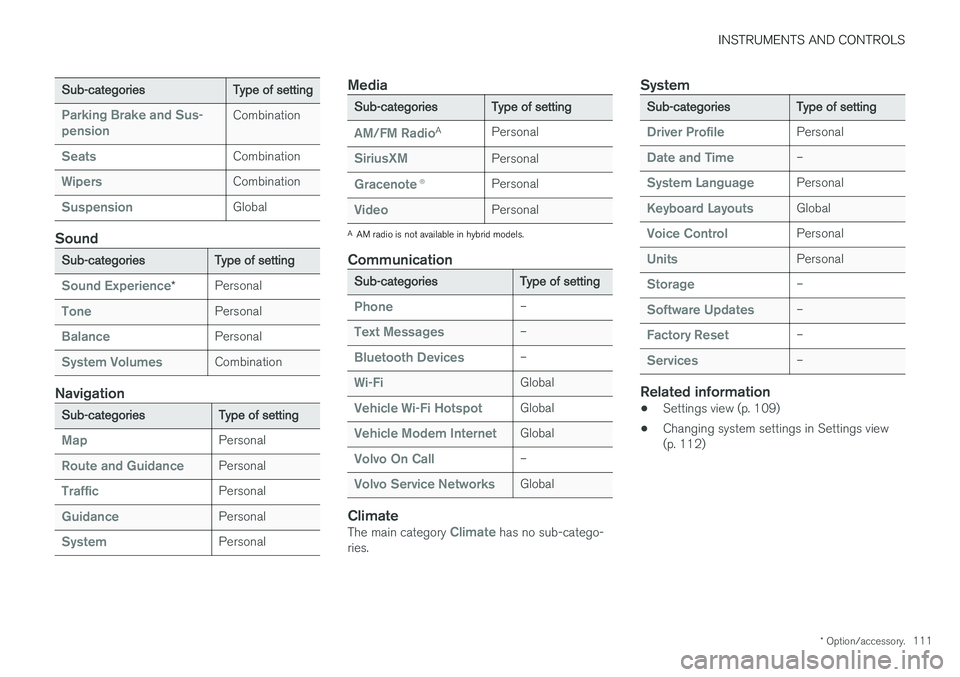
Sub-categories Type of setting
Parking Brake and Sus- pensionCombination
SeatsCombination
WipersCombination
SuspensionGlobal
Sound
Sub-categoriesType of setting
Sound Experience*Personal
TonePersonal
BalancePersonal
System VolumesCombination
Navigation
Sub-categories
Type of setting
MapPersonal
Route and GuidancePersonal
TrafficPersonal
GuidancePersonal
SystemPersonal
Media
Sub-categoriesType of setting
AM/FM RadioA
Personal
SiriusXMPersonal
Gracenote ®Personal
VideoPersonal
A
AM radio is not available in hybrid models.
Communication
Sub-categories Type of setting
Phone–
Text Messages–
Bluetooth Devices–
Wi-FiGlobal
Vehicle Wi-Fi HotspotGlobal
Vehicle Modem InternetGlobal
Volvo On Call–
Volvo Service NetworksGlobal
ClimateThe main category Climate has no sub-catego-
ries.
System
Sub-categories Type of setting
Driver ProfilePersonal
Date and Time–
System LanguagePersonal
Keyboard LayoutsGlobal
Voice ControlPersonal
UnitsPersonal
Storage–
Software Updates–
Factory Reset–
Services–
Related information
•Settings view (p. 109)
• Changing system settings in Settings view (p. 112)
Page 126 of 552
INSTRUMENTS AND CONTROLS
* Option/accessory.
124
Voice control settings
There are a number of settings that can be made for the voice control system.
Open the center display's Top view and tap
SettingsSystemVoice Control and
select settings. •
Repeat Voice Command
•Gender
•Speech Rate
Sound settings
Open Top view and tap SettingsSound
System VolumesVoice Control.
Changing languages
The voice control system only understands the languages marked by the
symbol in the list
of possible system languages. Changing the language for this system also affects menus, messages and help texts. Open Top view and tap
SettingsSystemSystem Language.
Related information
• Voice control (p. 119)
• Using voice commands (p. 119)
• Navigation system voice commands (p. 123)
Instrument panel
The instrument panel displays vehicle- and driv- ing-related information.
The gauges, indicators, symbols and functions displayed in the instrument panel depend on theequipment/systems installed in the vehicle andwhich functions are currently activated. The instrument panel is available in two versions: 12" and 8". Some of the functions listed below are optional.
WARNING
• If the instrument panel is not functioning properly, information about e.g., brakes,airbags or other safety-related messagescannot be displayed and the driver cannotbe alerted to possible problems.
• If the instrument panel turns off, does notactivate when the ignition is switched onor is completely/partially not possible toread, do not drive the vehicle. Contact atrained and qualified Volvo service techni-cian.
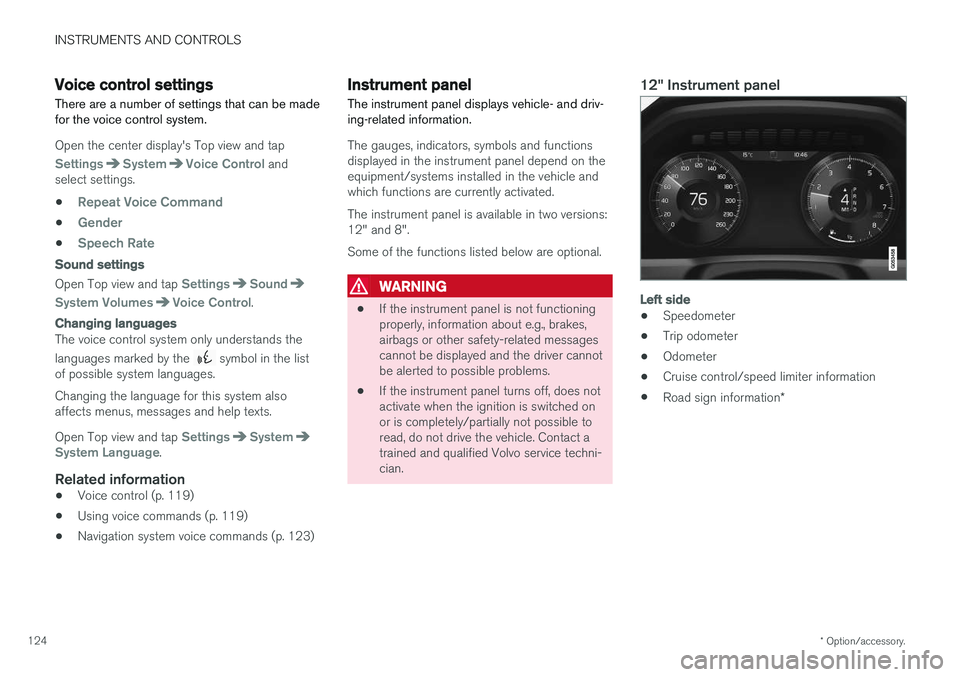
12" Instrument panel
Left side
• Speedometer
• Trip odometer
• Odometer
• Cruise control/speed limiter information
• Road sign information
*