heating VOLVO V90 CROSS COUNTRY 2017 Owner´s Manual
[x] Cancel search | Manufacturer: VOLVO, Model Year: 2017, Model line: V90 CROSS COUNTRY, Model: VOLVO V90 CROSS COUNTRY 2017Pages: 552, PDF Size: 13.6 MB
Page 6 of 552
4
Using turn signals146
Passenger compartment lighting 147
Home safe lighting 150
Approach lighting 150
Messages in the instrument panel and center display 150
Handling messages in the instru-ment panel and center display 152
Handling messages stored from theinstrument panel and center display 154
Instrument panel App menu 155
Using the instrument panel App menu 156
Using the windshield wipers 157
Activating/deactivating the rain sensor 157
Windshield and headlight washers 158
Tailgate window wiper and washer 159
Steering wheel 160
Adjusting the steering wheel 161
Seats 162
Manually operated front seats 162
Power front seats *
163
Adjusting power front seats *
163
Adjusting the passenger's seat from the driver's seat * 164
Using the power seat memory function *
164
Multifunctional front seats *
165
Adjusting function settings in the multifunctional front seats *166
Rear seats 169
Adjusting the second row head restraints 169
Folding down the rear seat backrests 171
Driver profiles 172
Selecting a driver profile 173
Editing a driver profile 174
Linking a remote key to a driver profile 174
Importing/exporting a driver profile from/to a USB flash drive 175
CLIMATE
Climate control system
178
Perceived temperature 178
Climate system sensors 179
Air quality 179
Clean Zone Interior Package (CZIP) *
180
Interior Air Quality System (IAQS) *
181
Passenger compartment air filter 181
Automatic climate control 182
Climate system controls 182
Climate system controls in the center display 183
Rear climate system controls on the tunnel console * 185
Setting the blower speed 185
Setting the temperature 187
Turning recirculation on and off 189
Defrosting windows and mirrors 190
Turning steering wheel heating * on
and off 192
Air conditioning 193
Turning seat heating * on and off
194
Turning front seat ventilation * on and off
195
Air distribution 196
Opening/closing/directing air vents 197
Adjusting air distribution 198
Page 10 of 552
8
STARTING AND DRIVING
Starting and driving348
Brakes 348
Brake functions 350
Auto-hold brake function 350
Brake assist system 351
Braking effect after a collision 351
Emergency brake lights 352
Hill Descent Control (HDC) 352
Low Speed Control (LSC) 353
Hill Start Assist 354
Parking brake 354
Using the parking brake 355
Parking brake malfunctions 357
Before a long distance trip 357
Driving economically 358
Driving through standing water 359
Overheating the engine and transmission 360
Winter driving 361
Towing eyelet 361
Towing recommendations 363
Fuel 365
Octane rating 366
Opening/closing the fuel filler door 367
Emission controls 368
Jump starting368
Driving with a trailer 370
Retractable towbar *
372
Trailer Stability Assist (TSA) 374
Ignition modes 375
Battery drain 377
Starting the engine 377
Turning the engine off 379
Drive modes *
379
ECO drive mode 382
Start/Stop 383
Using the Start/Stop function 383
Conditions for Start/Stop 385
Automatic transmission 386
Shiftlock 387
Gear shift indicator 388
Gear selector positions 388
Steering wheel paddles *
390
All Wheel Drive (AWD) 391
Leveling control * and suspension
392
INFOTAINMENT
The infotainment system
394
Apps (applications) 394
Sound settings 395
Radio 396
Radio settings 396
RBDS radio 397
Changing and searching for radio stations 397
HD Radio ™reception
398
Switching HD Radio on and off 400
HD Radio sub-channels 400
HD Radio limitations 401
SiriusXM ®
Satellite radio * 402
Using SiriusXM ®
Satellite radio *403
SiriusXM ®
Satellite radio * settings 404
SiriusXM Travel Link *
405
SiriusXM Travel Link - Weather 407
SiriusXM Travel Link - Alerts 408
SiriusXM Travel Link - Fuel 409
SiriusXM Travel Link - Sports 410
Phone 411
Pairing a cell phone 412
Connecting/disconnecting a cell phone 413
Handling phone calls 414
Page 31 of 552
INTRODUCTION
* Option/accessory.29
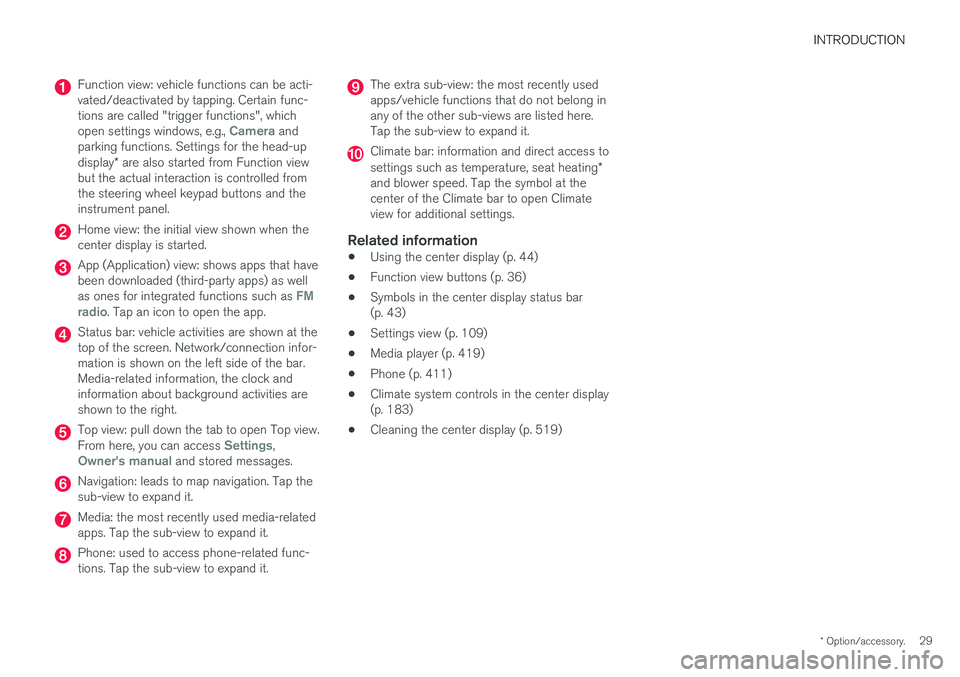
Function view: vehicle functions can be acti- vated/deactivated by tapping. Certain func-tions are called "trigger functions", which open settings windows, e.g.,
Camera and
parking functions. Settings for the head-up display * are also started from Function view
but the actual interaction is controlled from the steering wheel keypad buttons and theinstrument panel.
Home view: the initial view shown when the center display is started.
App (Application) view: shows apps that have been downloaded (third-party apps) as well as ones for integrated functions such as
FM
radio. Tap an icon to open the app.
Status bar: vehicle activities are shown at the top of the screen. Network/connection infor-mation is shown on the left side of the bar.Media-related information, the clock andinformation about background activities areshown to the right.
Top view: pull down the tab to open Top view. From here, you can access Settings,Owner's manual and stored messages.
Navigation: leads to map navigation. Tap the sub-view to expand it.
Media: the most recently used media-related apps. Tap the sub-view to expand it.
Phone: used to access phone-related func- tions. Tap the sub-view to expand it.
The extra sub-view: the most recently used apps/vehicle functions that do not belong inany of the other sub-views are listed here.Tap the sub-view to expand it.
Climate bar: information and direct access to settings such as temperature, seat heating *
and blower speed. Tap the symbol at the center of the Climate bar to open Climateview for additional settings.
Related information
• Using the center display (p. 44)
• Function view buttons (p. 36)
• Symbols in the center display status bar(p. 43)
• Settings view (p. 109)
• Media player (p. 419)
• Phone (p. 411)
• Climate system controls in the center display(p. 183)
• Cleaning the center display (p. 519)
Page 112 of 552
||
INSTRUMENTS AND CONTROLS
* Option/accessory.
110
Changing a setting
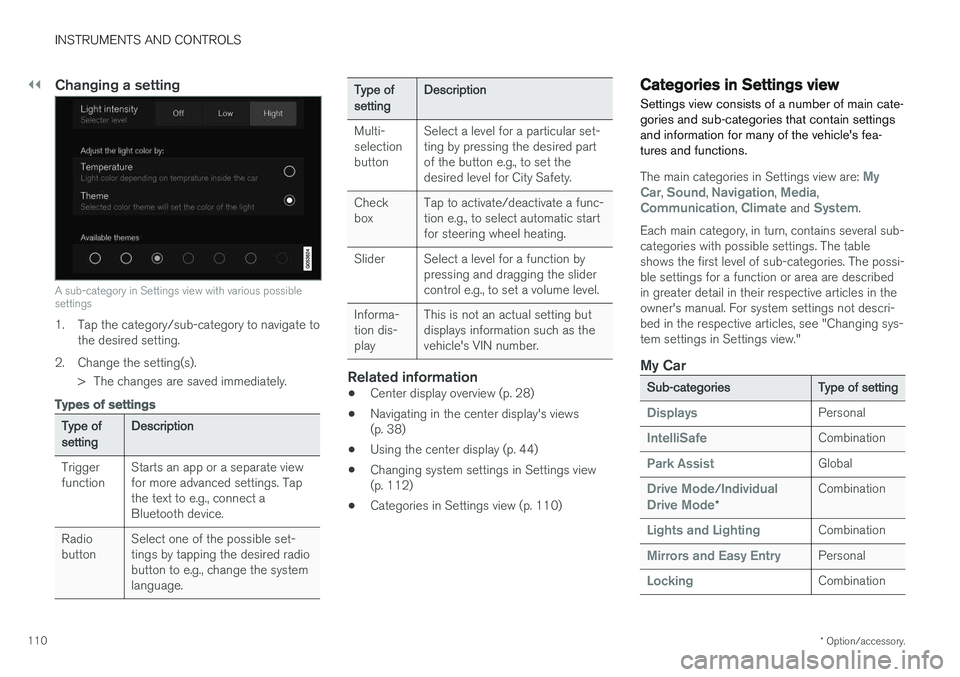
A sub-category in Settings view with various possible settings
1. Tap the category/sub-category to navigate to
the desired setting.
2. Change the setting(s). > The changes are saved immediately.
Types of settings
Type of setting Description
Trigger function Starts an app or a separate viewfor more advanced settings. Tapthe text to e.g., connect aBluetooth device.
Radiobutton Select one of the possible set-tings by tapping the desired radiobutton to e.g., change the systemlanguage.
Type of settingDescription
Multi- selectionbutton Select a level for a particular set-ting by pressing the desired partof the button e.g., to set thedesired level for City Safety.
Checkbox Tap to activate/deactivate a func-tion e.g., to select automatic startfor steering wheel heating.
Slider Select a level for a function by pressing and dragging the slidercontrol e.g., to set a volume level.
Informa-tion dis-play This is not an actual setting butdisplays information such as thevehicle's VIN number.
Related information
•
Center display overview (p. 28)
• Navigating in the center display's views (p. 38)
• Using the center display (p. 44)
• Changing system settings in Settings view(p. 112)
• Categories in Settings view (p. 110)
Categories in Settings view
Settings view consists of a number of main cate- gories and sub-categories that contain settingsand information for many of the vehicle's fea-tures and functions.
The main categories in Settings view are: My
Car, Sound, Navigation, Media,Communication, Climate and System.
Each main category, in turn, contains several sub- categories with possible settings. The tableshows the first level of sub-categories. The possi-ble settings for a function or area are describedin greater detail in their respective articles in theowner's manual. For system settings not descri-bed in the respective articles, see "Changing sys-tem settings in Settings view."
My Car
Sub-categories Type of setting
DisplaysPersonal
IntelliSafeCombination
Park AssistGlobal
Drive Mode/Individual
Drive Mode* Combination
Lights and LightingCombination
Mirrors and Easy EntryPersonal
LockingCombination
Page 124 of 552
INSTRUMENTS AND CONTROLS
* Option/accessory.
122
Climate system voice commands Voice commands can be used to control the cli- mate system to e.g., change the temperature, activate seat heating * or change blower (fan)
speed.
To use the voice control system, press the on the right-side steering wheel keypad and say one of the following commands after the tone:
• "
Climate": starts a command dialog and
provides examples of commands that can be used.
• "
Set temperature to X degrees": sets the
desired temperature.
• "
Raise temperature"/"Lower
temperature": raises/lowers the tempera-
ture.
• "
Sync temperature": synchronizes the tem-
perature in all of the vehicle's climate zones with the one set for the driver's side.
• "
Air on feet"/"Air on body": opens the
desired air vent.
• "
Air on feet off"/"Air on body off": closes
the desired air vent.
• "
Set fan to max"/"Turn off fan": changes
the blower speed to Max/Off.
• "
Raise fan speed"/"Lower fan speed":
raises/lowers the blower speed.
• "
Turn on auto": activates automatic climate
control. •
"
Air condition on"/"Air condition off":
activates/deactivates the air conditioning.
• "
Recirculation on"/"Recirculation off":
activates/deactivates recirculation.
• "
Turn on defroster "/"Turn off defroster":
activates/deactivates window and door mirror defrosting.
• "
Turn on max defroster"/"Turn off max
defroster": activates/deactivates max
defroster.
• "
Turn on electric defroster"/"Turn off
electric defroster": activates/deactivates
the electrically heated windshield *.
• "
Turn on rear defroster"/"Turn off rear
defroster": activates/deactivates the electri-
cally heated rear window and door mirrors.
• "
Turn steering wheel heat on"/"Turn
steering wheel heat off": activates/deacti-
vates the electrically heated steering wheel *.
• "
Raise steering wheel heat"/"Lower
steering wheel heat": raises/lowers the
heating level for the electrically heated steer- ing wheel *.
• "
Turn on seat heat"/"Turn off seat heat":
activates/deactivates the electrically heated seats *.
• "
Raise seat heat"/"Lower seat heat": rai-
ses/lowers the heating level for the electri- cally heated seats *. •
"
Turn on seat ventilation"/"Turn off seat
ventilation": activates/deactivates seat ven-
tilation *.
• "
Raise seat ventilation"/"Lower seat
ventilation": raises/lowers the level for seat
ventilation *.
Related information
• Climate system controls (p. 182)
• Voice control (p. 119)
• Using voice commands (p. 119)
Page 139 of 552

INSTRUMENTS AND CONTROLS
}}
* Option/accessory.137
Related information
•Calibrating the compass (p. 137)
• Ignition modes (p. 375)
Calibrating the compass
North America is divided into 15 magnetic zones and the compass will need to be calibrated if thevehicle is driven from one zone to another.
To calibrate the compass:
1. Stop the vehicle in a large open area, safely out of traffic and away from steel structures and high-tension electrical wires.
2. Start the vehicle.
NOTE
• For best calibration results, switch off all electrical equipment in the vehicle (climatesystem, windshield wipers, audio system,etc.) and make sure that all doors areclosed.
• Calibration may not succeed or be incor-rect if the vehicle's electrical equipment isnot switched off.
3. Using a pen, paperclip or similar object, press
and hold the button on the underside of mir- ror for approx. 3 seconds until the number ofthe current magnetic zone is displayed.
15
14
13
12
11
9
8
7
6
5
4
3
2
1
10
Magnetic zones
4. Press the button on the underside of mirrorrepeatedly until the desired magnetic zone (
1–15) is displayed (see the map of mag-
netic zones).
5. Wait until
C is again displayed in the mirror
or hold the button on the underside of mirror for approx. 6 seconds until
C is displayed in
the mirror.
6. Drive slowly in a circle at a speed of no more than 6 mph (10 km/h) until a direction is dis- played. This indicates that calibration is com-plete. Drive around in a circle an additionaltwo times to fine-tune the calibration.
7. Vehicles with an electrically heated wind- shield: * if
C is displayed when the heating
function is activated, perform step 6 with the heating function on.
Page 162 of 552
||
INSTRUMENTS AND CONTROLS
* Option/accessory.
160
Tailgate wiper and reverse gear1.
In the center display, select SettingsMy
Car
Wipers.
2. Activate/deactivate by selecting/deselecting the
Auto Rear Wiper box.
If the windshield wipers are on and the transmis- sion is put into reverse gear, the tailgate wiperwill start. This function is deactivated when a dif-ferent gear is selected.
Related information
• Using the windshield wipers (p. 157)
• Windshield and headlight washers (p. 158)
• Refilling the windshield washer fluid reservoir(p. 513)
• Activating/deactivating the rain sensor(p. 157)
Steering wheel The steering wheel has controls for the horn, certain optional driver support systems, menus/messages and paddles for manually shifting gears
*.
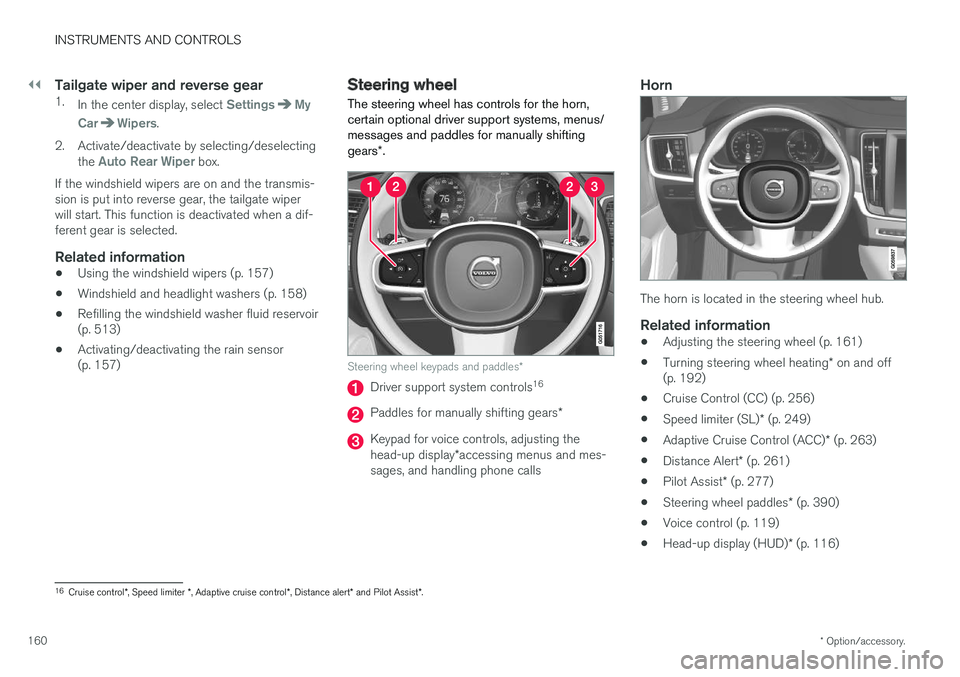
Steering wheel keypads and paddles *
Driver support system controls16
Paddles for manually shifting gears
*
Keypad for voice controls, adjusting the head-up display*accessing menus and mes-
sages, and handling phone calls
Horn
The horn is located in the steering wheel hub.
Related information
• Adjusting the steering wheel (p. 161)
• Turning steering wheel heating
* on and off
(p. 192)
• Cruise Control (CC) (p. 256)
• Speed limiter (SL)
* (p. 249)
• Adaptive Cruise Control (ACC)
* (p. 263)
• Distance Alert
* (p. 261)
• Pilot Assist
* (p. 277)
• Steering wheel paddles
* (p. 390)
• Voice control (p. 119)
• Head-up display (HUD)
* (p. 116)
16
Cruise control *, Speed limiter *, Adaptive cruise control *, Distance alert * and Pilot Assist *.
Page 164 of 552
INSTRUMENTS AND CONTROLS
* Option/accessory.
162
Seats
The front seats can be adjusted electronically * or
manually. The rear seats are adjusted primarily manually.
The adjustment settings for the power front seats *, door mirrors and the head-up display can
be stored in memory buttons. Using the multi-function control *, comfort in the
front seats can be further enhance by e.g., adjust- ing the lumbar support or extending the length ofthe front seat cushion. The rear seats are split and can be folded down separately.
Related information
• Adjusting power front seats
* (p. 163)
• Adjusting function settings in the multifunc- tional front seats
* (p. 166)
• Manually operated front seats (p. 162)
• Using the power seat memory function
*
(p. 164)
• Folding down the rear seat backrests (p. 171)
Manually operated front seats
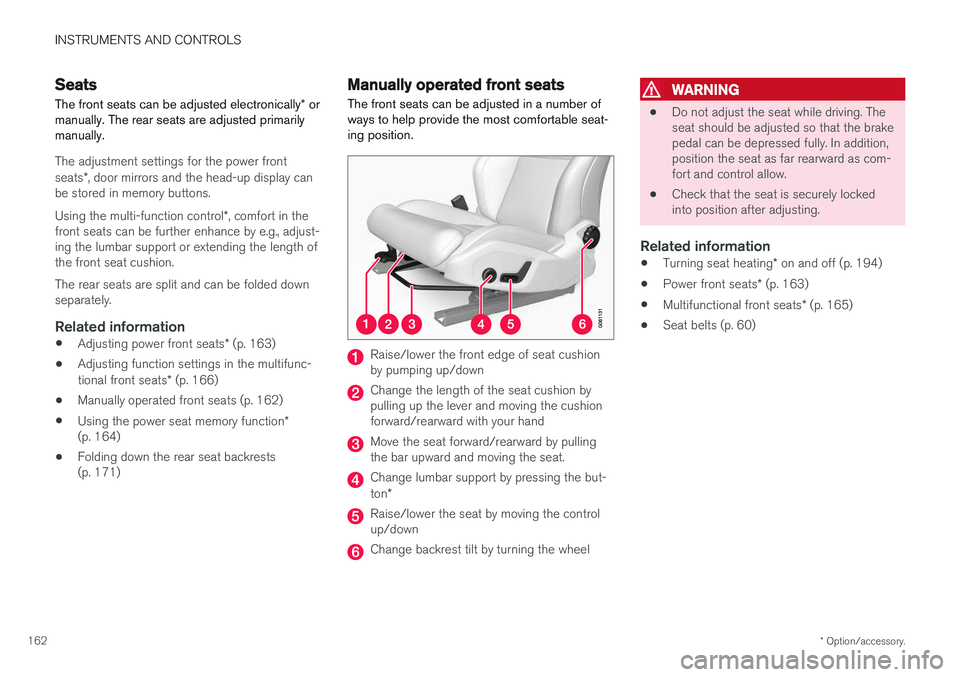
The front seats can be adjusted in a number of ways to help provide the most comfortable seat-ing position.
Raise/lower the front edge of seat cushion by pumping up/down
Change the length of the seat cushion by pulling up the lever and moving the cushionforward/rearward with your hand
Move the seat forward/rearward by pulling the bar upward and moving the seat.
Change lumbar support by pressing the but- ton *
Raise/lower the seat by moving the control up/down
Change backrest tilt by turning the wheel
WARNING
• Do not adjust the seat while driving. The seat should be adjusted so that the brakepedal can be depressed fully. In addition,position the seat as far rearward as com-fort and control allow.
• Check that the seat is securely lockedinto position after adjusting.
Related information
•
Turning seat heating
* on and off (p. 194)
• Power front seats
* (p. 163)
• Multifunctional front seats
* (p. 165)
• Seat belts (p. 60)
Page 165 of 552
INSTRUMENTS AND CONTROLS
* Option/accessory.163
Power front seats *
The power front seats offer a number of adjust- ment possibilities to help maximize comfort andergonomics.
The power seats have an overload protector that
activates if a seat is blocked by any object. If this occurs, put the ignition in mode I or 0 and wait
for a short period before operating the seat again. The power seat(s) can be adjusted for a short period after unlocking the door with the remotekey without switching the ignition on. Seat adjust-ment can always be made when the engine isrunning.
Related information
• Multifunctional front seats
* (p. 165)
• Adjusting power front seats
* (p. 163)
• Using the power seat memory function
*
(p. 164)
• Manually operated front seats (p. 162)
• Turning seat heating
* on and off (p. 194)
• Turning front seat ventilation
* on and off
(p. 195)
Adjusting power front seats *
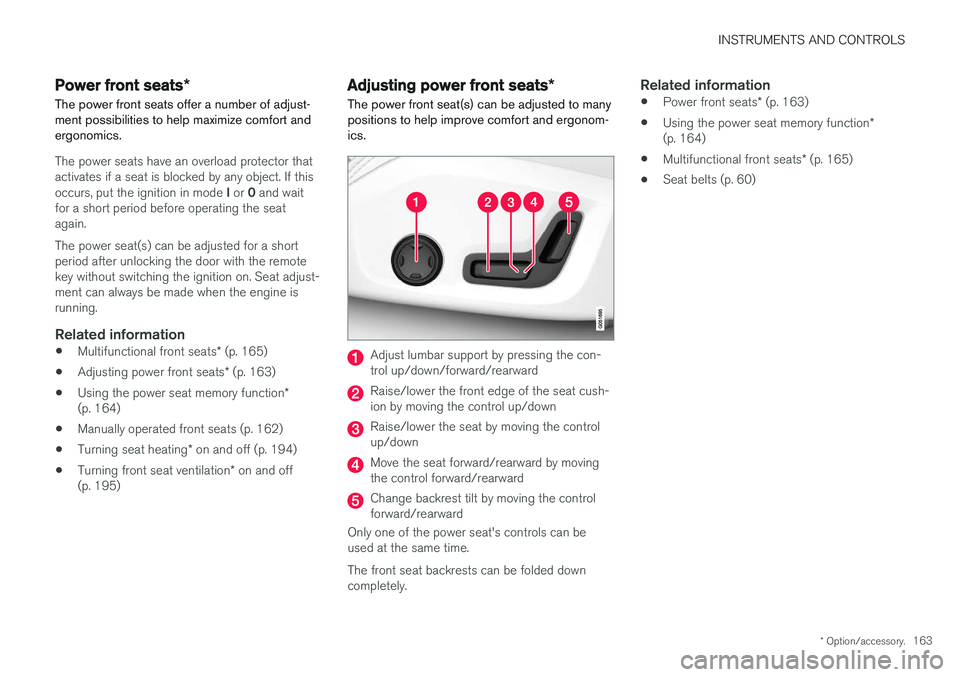
The power front seat(s) can be adjusted to many positions to help improve comfort and ergonom-ics.
Adjust lumbar support by pressing the con- trol up/down/forward/rearward
Raise/lower the front edge of the seat cush- ion by moving the control up/down
Raise/lower the seat by moving the control up/down
Move the seat forward/rearward by moving the control forward/rearward
Change backrest tilt by moving the control forward/rearward
Only one of the power seat's controls can beused at the same time. The front seat backrests can be folded down completely.
Related information
• Power front seats
* (p. 163)
• Using the power seat memory function
*
(p. 164)
• Multifunctional front seats
* (p. 165)
• Seat belts (p. 60)
Page 168 of 552
||
INSTRUMENTS AND CONTROLS
* Option/accessory.
166 center of the display. If both seats are adjusted, the settings for the driver seat are shown on theupper half of the screen and the ones made forthe passenger seat are on the lower half. Press the Home button on the center console to exit the seat adjustment setting view.
Related information
•
Power front seats
* (p. 163)
• Adjusting function settings in the multifunc- tional front seats
* (p. 166)
• Turning seat heating
* on and off (p. 194)
Adjusting function settings in the multifunctional front seats *
The multifunction controls on the side of the seat as well as the center display can be used tomake seat adjustments. The adjustment settings are shown in the center display *.
Multifunction control on the side of the seat
Turn the control up or down to activate.
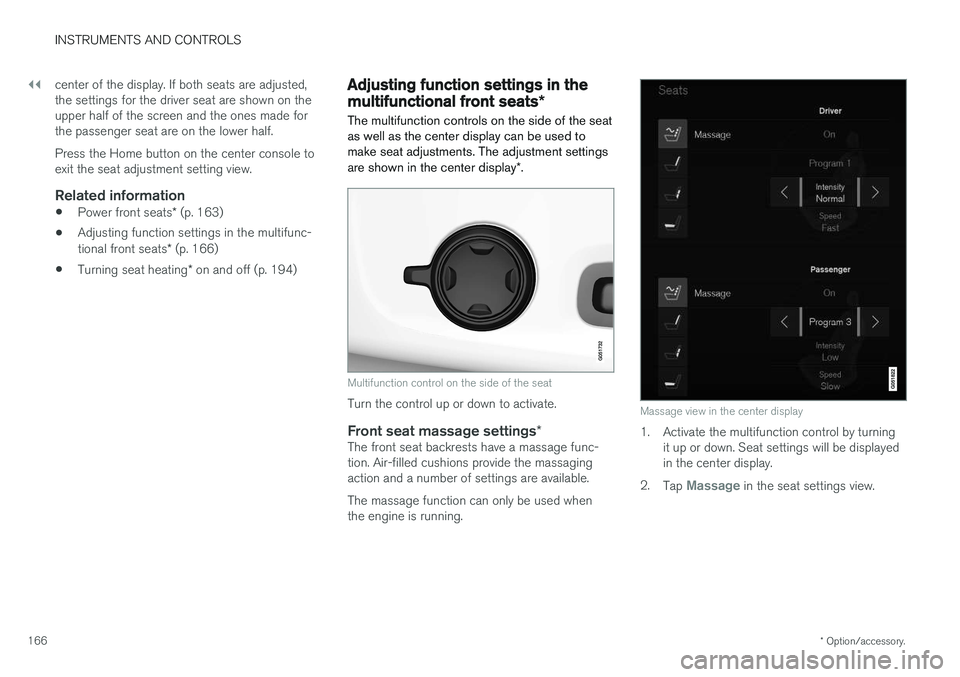
Front seat massage settings *The front seat backrests have a massage func- tion. Air-filled cushions provide the massagingaction and a number of settings are available. The massage function can only be used when the engine is running.
Massage view in the center display
1. Activate the multifunction control by turning
it up or down. Seat settings will be displayed in the center display.
2. Tap
Massage in the seat settings view.