navigation VOLVO V90 CROSS COUNTRY 2017 Owner´s Manual
[x] Cancel search | Manufacturer: VOLVO, Model Year: 2017, Model line: V90 CROSS COUNTRY, Model: VOLVO V90 CROSS COUNTRY 2017Pages: 552, PDF Size: 13.6 MB
Page 5 of 552
3
Top tether anchors86
Integrated booster cushion *
87
Raising the integrated booster cushion *
89
Stowing the integrated booster cushion *
91
INSTRUMENTS AND CONTROLS
Instruments and controls
94
Trip computer 95
Displaying trip computer information 96
Displaying trip statistics 98
HomeLink ®
Wireless Control System *98
Programming the HomeLink ®
Wire-
less Control System * 99
Adjusting the power door mirrors 102
Laminated panoramic roof *
104
Operating the laminated panoramic roof *
105
Power windows 107
Operating the power windows 107
Rearview mirror 108
Using sun curtains *
109
Settings view 109
Categories in Settings view 110
Changing system settings in Set- tings view 112
Changing settings in apps 113
Resetting the settings view 113
Resetting user data when the vehiclechanges owners 114
Ambient temperature sensor 114
Clock 115
Head-up display (HUD) *
116
Voice control
119
Using voice commands 119
Voice control for cell phones 120
Voice control for radio and media 121
Climate system voice commands 122
Navigation system voice commands 123
Voice control settings 124
Instrument panel 124
Instrument panel settings 126
Indicator symbols in the instrument panel 127
Instrument panel licenses 130
Warning symbols in the instrument panel 135
Compass 136
Calibrating the compass 137
Lighting panel and controls 138
Parking lights 140
Daytime Running Lights (DRL) 140
Low beam headlights 141
High and low beam headlights 142
Active Bending Lights *
143
Front fog lights *
144
Rear fog lights (certain models only) 145
Brake lights 146
Hazard warning flashers 146
Page 16 of 552
INTRODUCTION
14
Contacting Volvo
Use the following contact information if you would like to get in touch with Volvo in the Uni-ted States or Canada.
In the USA: Volvo Car USA, LLC Customer Care Center1 Volvo Drive,P.O. Box 914Rockleigh, New Jersey 076471-800-458-1552www.volvocars.com/us In Canada: Volvo Cars of Canada National Customer Service9130 Leslie Street, Suite 101Richmond Hill, Ontario L4B 0B91-800-663-8255www.volvocars.com/ca
Volvo On Call Roadside Assistance Your new Volvo comes with a four year ON CALL roadside assistance.
Additional information, features, and benefits of this program are described in a separate informa-tion package in your glove compartment. If you require assistance, dial: In the U.S. 1-800-638-6586 (1-800-63-
VOLVO)In Canada 1-800-263-0475
NOTE
Some vehicles may be equipped with Volvo On Call with Sensus Connect , which
will allow access to the call center and addi- tional features directly from the vehicle. Thisis in addition to the Volvo On Call RoadsideAssistance program mentioned above. Volvo On Call with Sensus Connect will be
a customer pay subscription offer after an ini- tial complimentary trial period.
Additional information about your vehicle Volvo Cars' website and support site provide additional information about your vehicle.
Support on the Internet
Go to support.volvocars.com or use the QR code below to visit the site, which is available in mostmarkets.
QR code to the support site
The information on the support site is searchable and is grouped into different categories. Itincludes support for e.g., Internet-based servicesand functions, Volvo On Call, the navigation sys-tem and apps. Video and step-by-step instruc-tions explain various procedures such as how toconnect the vehicle to the Internet via a cellphone.
Downloadable information
Maps
Sensus Navigation system maps can be down- loaded from the support site.
Page 19 of 552
INTRODUCTION
}}
17
Sensus
Sensus is the core of your personal Volvo experi- ence and provides information, entertainmentand features that make owning your vehicle eas-ier.
This is Sensus
Sensus provides an intelligent interface and Internet-connected service with an intuitive navi-gation structure that offers access to relevantinformation when it is needed, with minimal dis-tractions. Sensus also includes all of your vehicle's solu- tions relating to entertainment, connecting to theInternet, navigation and the user interfacebetween the driver and the vehicle. Sensusmakes communication between you, the vehicleand the digital world around you possible.
Page 20 of 552
||
INTRODUCTION
* Option/accessory.
18
Information when it's needed, where it's needed
G000000
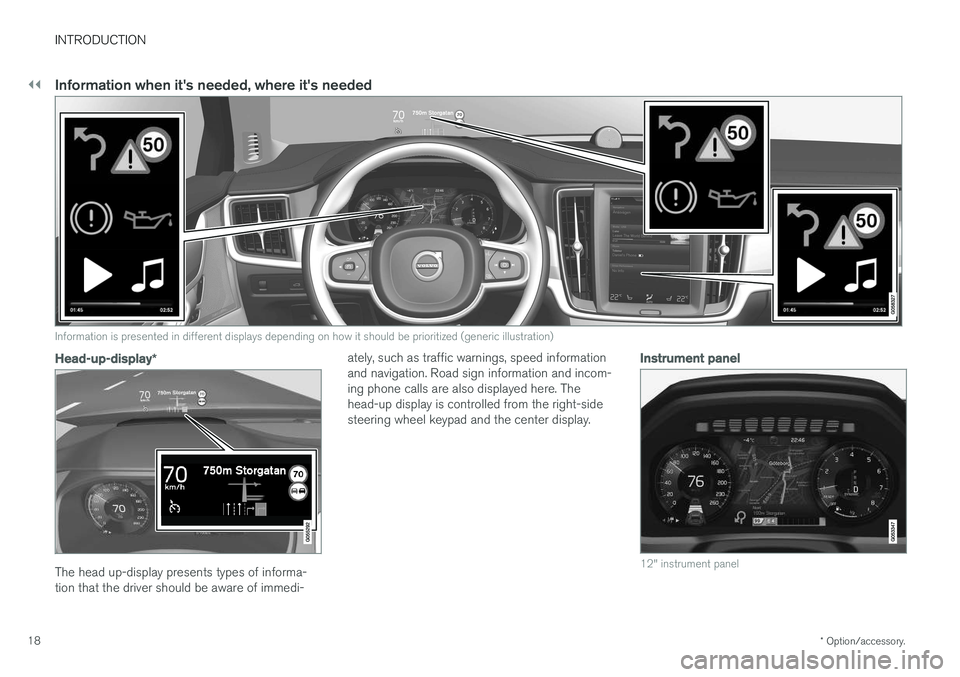
Information is presented in different displays depending on how it should be prioritized (generic illustration)
Head-up-display *
The head up-display presents types of informa- tion that the driver should be aware of immedi- ately, such as traffic warnings, speed informationand navigation. Road sign information and incom-ing phone calls are also displayed here. Thehead-up display is controlled from the right-sidesteering wheel keypad and the center display.
Instrument panel
12" instrument panel
Page 25 of 552
INTRODUCTION
}}
23
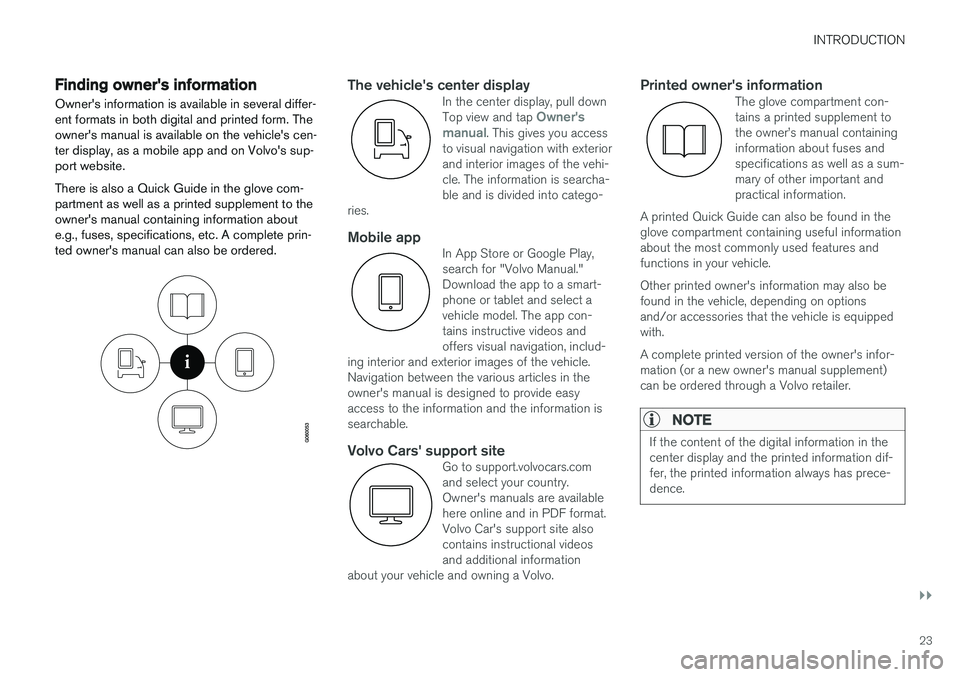
Finding owner's information Owner's information is available in several differ- ent formats in both digital and printed form. Theowner's manual is available on the vehicle's cen-ter display, as a mobile app and on Volvo's sup-port website. There is also a Quick Guide in the glove com- partment as well as a printed supplement to theowner's manual containing information aboute.g., fuses, specifications, etc. A complete prin-ted owner's manual can also be ordered.The vehicle's center displayIn the center display, pull down Top view and tap Owner's
manual. This gives you access
to visual navigation with exterior and interior images of the vehi-cle. The information is searcha-ble and is divided into catego-
ries.
Mobile appIn App Store or Google Play, search for "Volvo Manual."Download the app to a smart-phone or tablet and select avehicle model. The app con-tains instructive videos andoffers visual navigation, includ-
ing interior and exterior images of the vehicle.Navigation between the various articles in theowner's manual is designed to provide easyaccess to the information and the information issearchable.
Volvo Cars' support siteGo to support.volvocars.com and select your country.Owner's manuals are availablehere online and in PDF format.Volvo Car's support site alsocontains instructional videosand additional information
about your vehicle and owning a Volvo.
Printed owner's informationThe glove compartment con- tains a printed supplement tothe owner
Page 26 of 552
||
INTRODUCTION
24
WARNING
The driver is always responsible for operating the vehicle in a safe manner and adhering tocurrent laws and traffic regulations. It is also important that the vehicle be oper- ated, maintained and serviced according toVolvo's recommendations/instructions in theowner's manual.
Changing the language used in the vehicle's center display
Changing languages in the center display could mean that some of the owner's information provi-ded may not comply with national or local stat-utes and regulations. Changing to a languagethat you do not understand may also make it diffi-cult to change back to the original language.
Related information
•Owner's manual in mobile devices (p. 20)
• Navigating in the digital owner's manual(p. 51)
• On-board digital owner's manual (p. 50)
• Navigating in the digital owner's manual(p. 51)
• Using the owner's manual (p. 48)
• Additional information about your vehicle(p. 14)
Driver distraction
Please keep the following warnings in mind when operating/servicing your vehicle.
A driver has a responsibility to do everything pos- sible to ensure his or her own safety and thesafety of passengers in the vehicle and otherssharing the roadway. Avoiding distractions is partof that responsibility. Driver distraction results from driver activities that are not directly related to controlling the vehiclein the driving environment. Your new Volvo is, orcan be, equipped with many feature-rich enter-tainment and communication systems. Theseinclude hands-free cellular telephones, navigationsystems, and multipurpose audio systems. Youmay also own other portable electronic devicesfor your own convenience. When used properlyand safely, they enrich the driving experience.Improperly used, any of these could cause a dis-traction. For all of these systems, we want to provide the following warning that reflects the strong Volvoconcern for your safety. Never use these devicesor any feature of your vehicle in a way that dis-tracts you from the task of driving safely. Distrac-tion can lead to a serious accident. In addition tothis general warning, we offer the following guid-ance regarding specific newer features that maybe found in your vehicle:
WARNING
• Never use a hand-held cellular telephone while driving. Some jurisdictions prohibitcellular telephone use by a driver whilethe vehicle is moving.
• If your vehicle is equipped with a naviga-tion system, set and make changes toyour travel itinerary only with the vehicleparked.
• Never program your audio system whilethe vehicle is moving. Program radio pre-sets with the vehicle parked, and use yourprogrammed presets to make radio usequicker and simpler.
• Never use portable computers or per-sonal digital assistants while the vehicleis moving.
Accessory installation
•We strongly recommend that Volvo ownersinstall only genuine, Volvo-approved acces-sories, and that accessory installations beperformed only by a trained and qualifiedVolvo service technician.
• Genuine Volvo accessories are tested toensure compatibility with the performance,safety, and emission systems in your vehicle.Additionally, a trained and qualified Volvoservice technician knows where accessoriesmay and may not be safely installed in yourVolvo. In all cases, please consult a trained
Page 31 of 552
INTRODUCTION
* Option/accessory.29
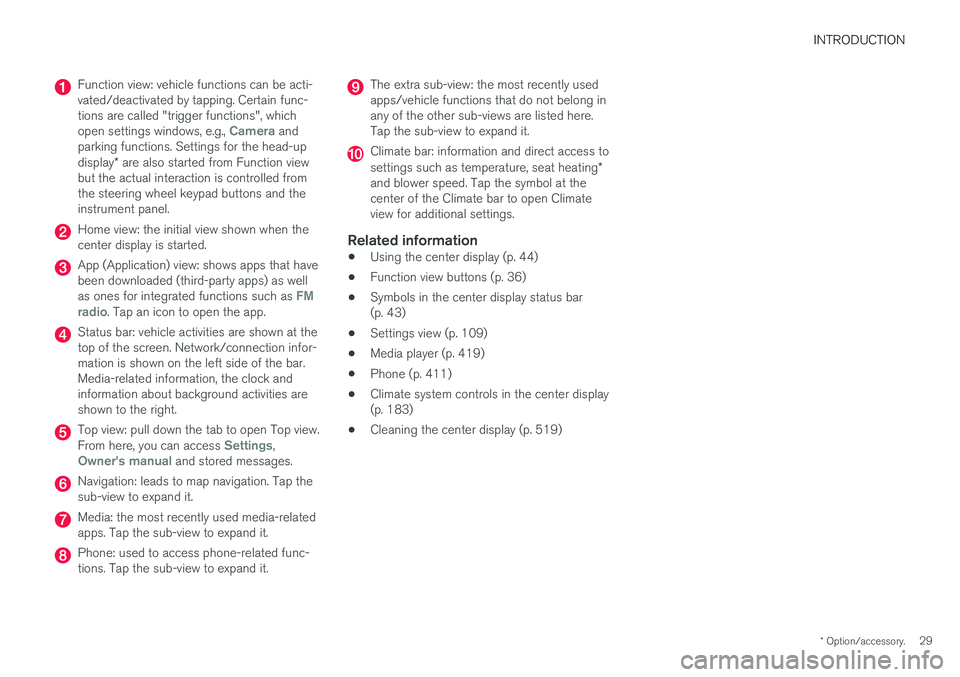
Function view: vehicle functions can be acti- vated/deactivated by tapping. Certain func-tions are called "trigger functions", which open settings windows, e.g.,
Camera and
parking functions. Settings for the head-up display * are also started from Function view
but the actual interaction is controlled from the steering wheel keypad buttons and theinstrument panel.
Home view: the initial view shown when the center display is started.
App (Application) view: shows apps that have been downloaded (third-party apps) as well as ones for integrated functions such as
FM
radio. Tap an icon to open the app.
Status bar: vehicle activities are shown at the top of the screen. Network/connection infor-mation is shown on the left side of the bar.Media-related information, the clock andinformation about background activities areshown to the right.
Top view: pull down the tab to open Top view. From here, you can access Settings,Owner's manual and stored messages.
Navigation: leads to map navigation. Tap the sub-view to expand it.
Media: the most recently used media-related apps. Tap the sub-view to expand it.
Phone: used to access phone-related func- tions. Tap the sub-view to expand it.
The extra sub-view: the most recently used apps/vehicle functions that do not belong inany of the other sub-views are listed here.Tap the sub-view to expand it.
Climate bar: information and direct access to settings such as temperature, seat heating *
and blower speed. Tap the symbol at the center of the Climate bar to open Climateview for additional settings.
Related information
• Using the center display (p. 44)
• Function view buttons (p. 36)
• Symbols in the center display status bar(p. 43)
• Settings view (p. 109)
• Media player (p. 419)
• Phone (p. 411)
• Climate system controls in the center display(p. 183)
• Cleaning the center display (p. 519)
Page 33 of 552
INTRODUCTION
}}
31
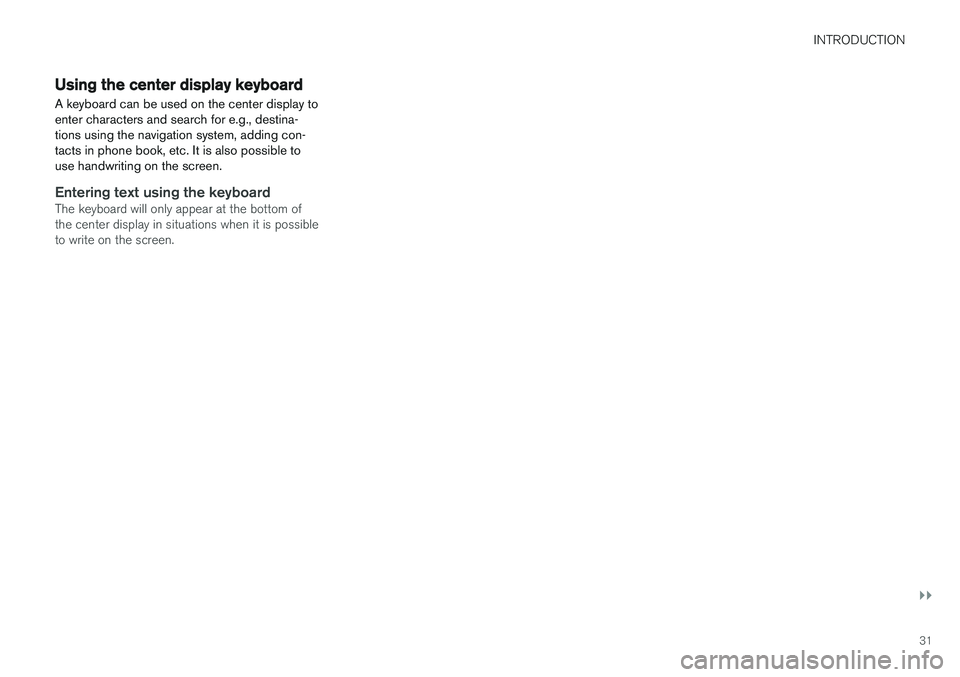
Using the center display keyboard A keyboard can be used on the center display to enter characters and search for e.g., destina-tions using the navigation system, adding con-tacts in phone book, etc. It is also possible touse handwriting on the screen.
Entering text using the keyboardThe keyboard will only appear at the bottom of the center display in situations when it is possibleto write on the screen.
Page 35 of 552
INTRODUCTION
}}
33
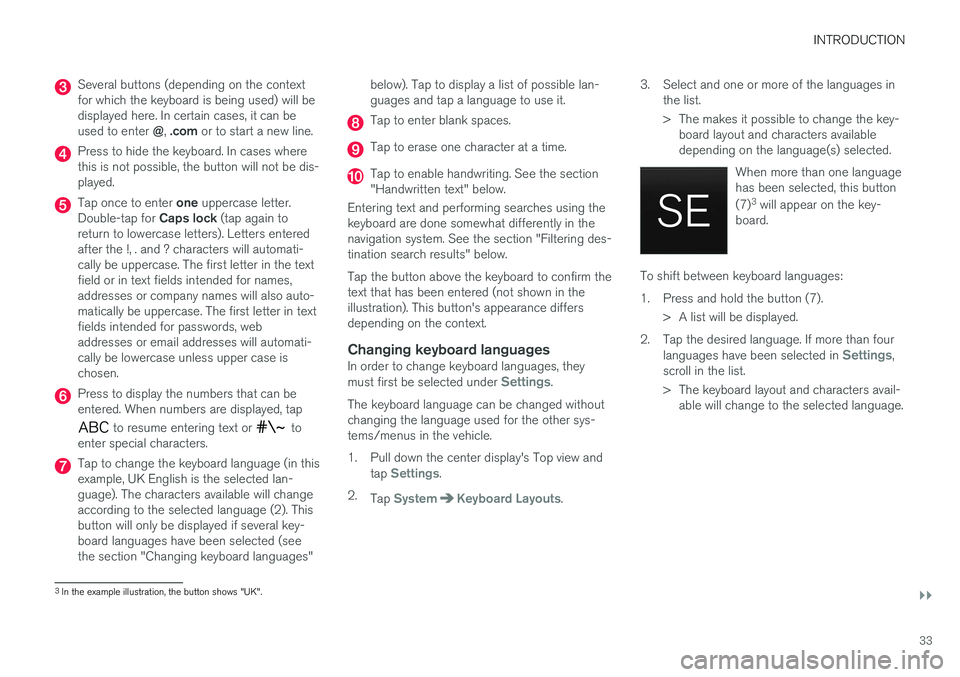
Several buttons (depending on the context for which the keyboard is being used) will bedisplayed here. In certain cases, it can be used to enter @, .com or to start a new line.
Press to hide the keyboard. In cases where this is not possible, the button will not be dis-played.
Tap once to enter one uppercase letter.
Double-tap for Caps lock (tap again to
return to lowercase letters). Letters entered after the !, . and ? characters will automati-cally be uppercase. The first letter in the textfield or in text fields intended for names,addresses or company names will also auto-matically be uppercase. The first letter in textfields intended for passwords, webaddresses or email addresses will automati-cally be lowercase unless upper case ischosen.
Press to display the numbers that can be entered. When numbers are displayed, tap
to resume entering text or to
enter special characters.
Tap to change the keyboard language (in this example, UK English is the selected lan-guage). The characters available will changeaccording to the selected language (2). Thisbutton will only be displayed if several key-board languages have been selected (seethe section "Changing keyboard languages" below). Tap to display a list of possible lan-guages and tap a language to use it.
Tap to enter blank spaces.
Tap to erase one character at a time.
Tap to enable handwriting. See the section "Handwritten text" below.
Entering text and performing searches using thekeyboard are done somewhat differently in thenavigation system. See the section "Filtering des-tination search results" below. Tap the button above the keyboard to confirm the text that has been entered (not shown in theillustration). This button's appearance differsdepending on the context.
Changing keyboard languagesIn order to change keyboard languages, they must first be selected under Settings.
The keyboard language can be changed without changing the language used for the other sys-tems/menus in the vehicle.
1. Pull down the center display's Top view and tap
Settings.
2. Tap
SystemKeyboard Layouts. 3. Select and one or more of the languages in
the list.
> The makes it possible to change the key-board layout and characters available depending on the language(s) selected.
When more than one languagehas been selected, this button (7)3
will appear on the key-
board.
To shift between keyboard languages:
1. Press and hold the button (7).
> A list will be displayed.
2. Tap the desired language. If more than four languages have been selected in
Settings,
scroll in the list.
> The keyboard layout and characters avail- able will change to the selected language.
3In the example illustration, the button shows "UK".
Page 40 of 552
INTRODUCTION
38
Navigating in the center display's views
There are 5 different basic views in the center display: Home view, Top view, Climate view, Appview and Function view. The display is activatedautomatically when the driver's door is opened.
Home viewHome view is displayed when the screen is acti- vated. It consists of four sub-views: Navigation,Media, Phone and an extra sub-view. The extra sub-view contains the most recently used app/ vehicle function that is not related to the otherthree sub-views. For example, if the most recentlyused app/vehicle function is a music app, the
Media sub-view will be displayed.
The sub-views display brief information about the respective apps. The first time the vehicle is started, some of the Home view's sub-views will not contain any infor-mation.
NOTE
• In Home view's standard mode (reached by pressing the Home button briefly), ananimation explaining how to access thedifferent views will be shown on thescreen.
• Some functions may be disabled whenthe vehicle is moving.