start stop button VOLVO V90 CROSS COUNTRY 2018 Owner´s Manual
[x] Cancel search | Manufacturer: VOLVO, Model Year: 2018, Model line: V90 CROSS COUNTRY, Model: VOLVO V90 CROSS COUNTRY 2018Pages: 662, PDF Size: 11.93 MB
Page 455 of 662
STARTING AND DRIVING
}}
* Option/accessory.453
HomeLink
®
is delivered integrated in the rearview
mirror. The HomeLink ®
panel consists of three
programmable buttons and an indicator light in the mirror. For more information about HomeLink ®
, please
visit www.HomeLink.com, www.youtube.com/ HomeLinkGentex or call 1-800-355-3515. Save the original remote controls for future pro- gramming (e.g. for use in another vehicle). It isalso advisable to delete the button programmingif the vehicle is sold.
Related information
• Using HomeLink (p. 454)
• Programming HomeLink ®
* (p. 453)
• Type approval for HomeLink ®
* (p. 455)
Programming HomeLink®
*14
Follow these instructions to program HomeLink ®
, reset all programming, or program
individual buttons.
NOTE
In some vehicles, the ignition must be on or in the "accessory position" before HomeLink ®
can be programmed or used. It can be a good idea to put new batteries in the remote con- trol being replaced by HomeLink ®
for faster
programming and better radio signal trans-mission. The HomeLink ®
buttons should be
reset before programming.
WARNING
While HomeLink ®
is being programmed, the
garage door or gate being programmed may be activated. Make sure that no one is nearthe door or gate during programming. Whenprogramming a garage door opener, it isadvised to park outside of the garage. 1.
Point the remote control at the HomeLink ®
button to be programmed and hold it about 2-8 cm (1-3 inches) from the button. Do not obstruct the HomeLink ®
indicator light.
Note: Some remote controls are more effec-
tive at programming HomeLink ®
from a dis-
tance of about 15-20 cm (6-12 inches). Try moving the remote control closer or furtheraway if you are experiencing any difficultiesprogramming.
2. Press and hold both the remote control but- ton and the HomeLink ®
button to be pro-
grammed.
3. Do not release the buttons until the indicator light has stopped flashing slowly (about oncea second) and either flashes quickly (about10 times a second) or glows steadily. >Steady glow: Indication that program-
ming is complete. Press the programmed button twice to activate. Flashing quickly: The device being pro-
grammed with HomeLink ®
may have a
security function that requires an extra step. Try pressing the programmed buttontwice to see whether the programmingworks. Otherwise, continue with the fol-lowing steps.
13 HomeLink and the HomeLink house symbol are registered trademarks of Gentex Corporation.
14 Certain markets only.
Page 458 of 662
STARTING AND DRIVING
456
Compass
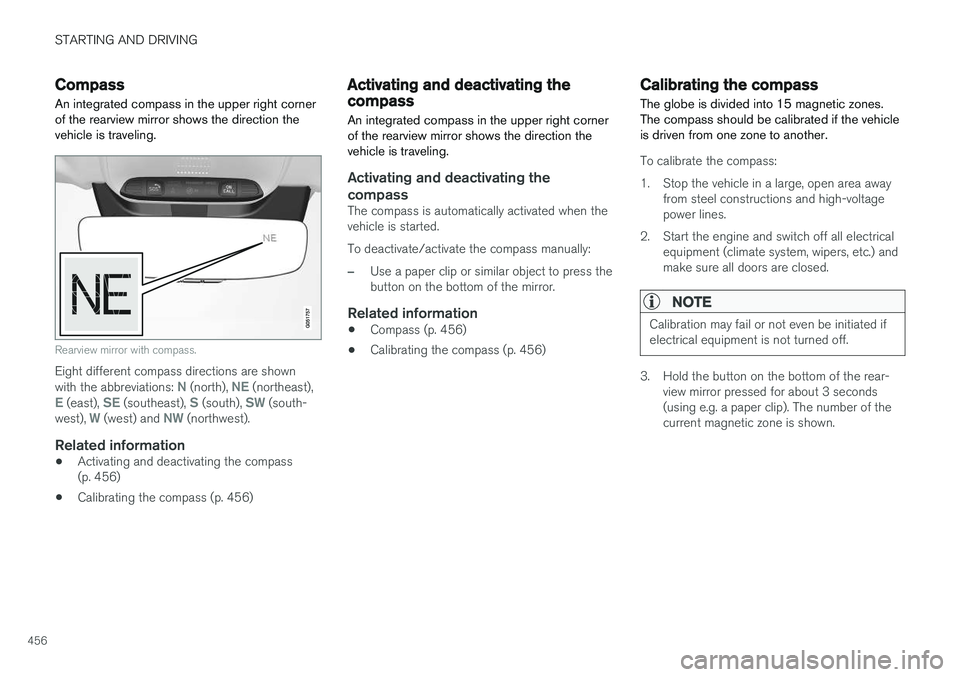
An integrated compass in the upper right corner of the rearview mirror shows the direction thevehicle is traveling.
Rearview mirror with compass.
Eight different compass directions are shown with the abbreviations: N (north), NE (northeast),E (east), SE (southeast), S (south), SW (south-
west), W (west) and NW (northwest).
Related information
• Activating and deactivating the compass (p. 456)
• Calibrating the compass (p. 456)
Activating and deactivating thecompass
An integrated compass in the upper right corner of the rearview mirror shows the direction thevehicle is traveling.
Activating and deactivating the compass
The compass is automatically activated when the vehicle is started. To deactivate/activate the compass manually:
–Use a paper clip or similar object to press the button on the bottom of the mirror.
Related information
• Compass (p. 456)
• Calibrating the compass (p. 456)
Calibrating the compass
The globe is divided into 15 magnetic zones. The compass should be calibrated if the vehicleis driven from one zone to another.
To calibrate the compass:
1. Stop the vehicle in a large, open area away from steel constructions and high-voltage power lines.
2. Start the engine and switch off all electrical equipment (climate system, wipers, etc.) andmake sure all doors are closed.
NOTE
Calibration may fail or not even be initiated if electrical equipment is not turned off.
3. Hold the button on the bottom of the rear-view mirror pressed for about 3 seconds (using e.g. a paper clip). The number of thecurrent magnetic zone is shown.
Page 650 of 662

INDEX
648CZIP (Clean Zone Interior Package) 206
D
Data
recording 33 transferring between vehicle and work-
shop 574
Data sharing 510
Daytime running lights 156Decals location of 632
Defrosting 222
Detection of cyclist 333
Dimensions 635
Dipstick, electronic 584
Direction of rotation 526
Disengaging the shiftlock 417
Display lighting 167
Distance Alert 285, 286, 287 limitations 288
DivX ®
486
Door mirrors 173, 175 compass 456
dimming 174
outer 173, 175
power folding 175
resetting 175
Driveline transmission 413
Drive mode 419 changing 421
Driver Alert Control 356 operation 357, 358
Driver Alert Control limitations 358
Driver performance 92, 93
Driver profile 139 edit 141
select 140
Driver support system 266 Driving cooling system 440
with a trailer 445
Driving economy 433
Driving through standing water 435 driving with a trailer towball load 638
towing capacity 638E
ECO climate 422
ECO mode 422
activate with function button 424
Economical driving 422, 433
Electrical outlet 556 use 558
Electrical system 595
Electric parking brake 407
Electronic immobilizer 246
emergency brake lights 163
Emission inspection readiness 572 Engine overheating 440
start 400
Start/Stop 424
turn off 402
Engine braking, automatic 431 Engine compartment coolant 586
engine oil 583
overview 583
Engine drag control 268
Engine oil 583 filling 584