check engine VOLVO V90 CROSS COUNTRY 2018 Owner´s Manual
[x] Cancel search | Manufacturer: VOLVO, Model Year: 2018, Model line: V90 CROSS COUNTRY, Model: VOLVO V90 CROSS COUNTRY 2018Pages: 662, PDF Size: 11.93 MB
Page 578 of 662
||
MAINTENANCE AND SERVICE
* Option/accessory.
576
Canceling software download
–Tap the checkbox in the activity indicator that replaced the Install button when the down-
load began.
Note that only a download can be cancelled. An installation cannot be cancelled once it hasbegun.
Deactivating the background search for software update
Automatic background searching for softwareupdates is activated as the default factory setting,but the function can be deactivated. 1. Tap
Settings in the center display's Top
view.
2. Tap
SystemDownload Center.
3. Tap to deselect
Auto Software Update.
Related information
• Download Center (p. 575)
• Internet-connected vehicle
* (p. 503)
• Navigating in the center display's views (p. 117)
Vehicle status
The vehicle's general status can be displayed in the center display along with the option to schedule service 3
.
The Car status app is started
from the center display's App view and has four tabs:
•Messages - status messages
•
Status - engine oil level check
•
TPMS - tire inflation pressure check
•
Appointments - appointment information
and vehicle information 3
.
Related information
• Handling messages saved from the instru- ment panel (p. 109)
• Checking and filling engine oil (p. 584)
• Tire pressure monitoring system
* (p. 533)
• Scheduling service and repairs (p. 576)
• Sending vehicle information to the workshop(p. 578)
• Navigating in the center display's views(p. 117)
Scheduling service and repairs4
This service offers a convenient way to schedule service and workshop appoints directly from thevehicle.
When it is time for service, and in certain cases if the vehicle requires repairs, a message will bedisplayed in the instrument panel and at the topof the center display. The time for service isdetermined by how much time has elapsed, thenumber of hours the engine has run, or the dis-tance driven since the last service.
To use the service
• Create a Volvo ID and register the Volvo IDto the vehicle.
• To select a Volvo retailer you would like tocontact, go to www.volvocars.com and log in.
• To send and receive appointment informa-tion, the vehicle must be connected to the Internet 5
.
Book serviceWhen you schedule service from your vehicle, theinformation is sent via your Internet connection 5
.
Submit an appointment request whenever you need service or when a message regarding theneed for service or repairs has been displayed in
3 Certain markets only.
4 Certain markets only.
5 There may be a charge for transmitting data over the Internet, depending on your service plan.
Page 585 of 662
MAINTENANCE AND SERVICE
}}
583
Engine compartment overview
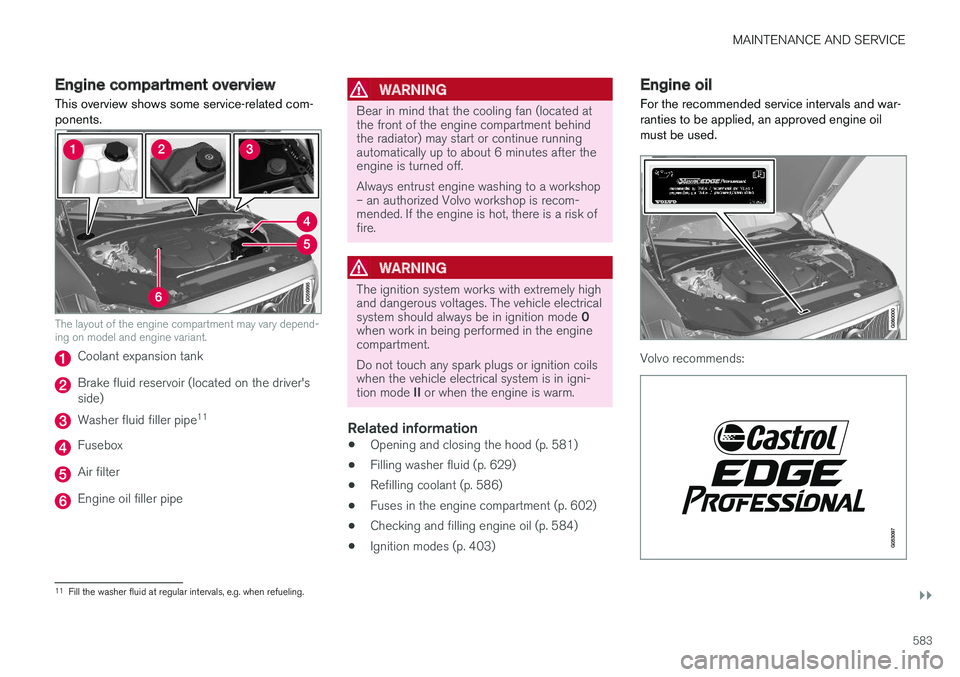
This overview shows some service-related com- ponents.
The layout of the engine compartment may vary depend- ing on model and engine variant.
Coolant expansion tank
Brake fluid reservoir (located on the driver's side)
Washer fluid filler pipe 11
Fusebox
Air filter
Engine oil filler pipe
WARNING
Bear in mind that the cooling fan (located at the front of the engine compartment behindthe radiator) may start or continue runningautomatically up to about 6 minutes after theengine is turned off. Always entrust engine washing to a workshop – an authorized Volvo workshop is recom-mended. If the engine is hot, there is a risk offire.
WARNING
The ignition system works with extremely high and dangerous voltages. The vehicle electrical system should always be in ignition mode
0
when work in being performed in the engine compartment. Do not touch any spark plugs or ignition coils when the vehicle electrical system is in igni- tion mode II or when the engine is warm.
Related information
• Opening and closing the hood (p. 581)
• Filling washer fluid (p. 629)
• Refilling coolant (p. 586)
• Fuses in the engine compartment (p. 602)
• Checking and filling engine oil (p. 584)
• Ignition modes (p. 403)
Engine oil
For the recommended service intervals and war- ranties to be applied, an approved engine oilmust be used.
Volvo recommends:
11 Fill the washer fluid at regular intervals, e.g. when refueling.
Page 586 of 662
||
MAINTENANCE AND SERVICE
584If the engine oil is not checked regularly and the level becomes low, this could cause seriousengine damage.
CAUTION
To satisfy the requirements for the engine's service intervals, all engines are factory-filledwith a specially adapted synthetic engine oil.Great care has been put into the choice of oil,with consideration given to service life, starta-bility, fuel consumption and environmentalimpact. For the recommended service intervals to apply, an approved engine oil must be used.Only use the prescribed oil grade to top off orchange the oil. Otherwise, there is a risk ofthe vehicle's service life, startability, fuel con-sumption and environmental impact beingaffected. Failure to use engine oil of the prescribed grade and viscosity could cause damage toengine-related components. Volvo Car Corpo-ration disclaims warranty liability for such typeof damage. Volvo recommends entrusting oil changes to an authorized Volvo workshop.
Volvo uses different systems to warn if the oil level is too low/high or the oil pressure is low. Onengine variants with an oil pressure sensor, a
warning symbol is displayed in the instrument panel when oil pressure is low
. On engine
variants with an oil level sensor, the
warn-
ing symbol in the instrument panel and display messages are used to alert the driver. Someengine variants have both systems. Contact aVolvo retailer for more information. Change the engine oil and oil filter according to the schedule specified in the Warranty and Main-tenance Records Information booklet. Oils of ahigher grade than that specified may be used. Ifthe vehicle is driven in adverse conditions, Volvorecommends using an oil with a higher gradethan that specified.
Related information
• Checking and filling engine oil (p. 584)
• Engine oil specifications (p. 640)
Checking and filling engine oil
The engine oil level is monitored by an electronic oil level sensor.
Page 587 of 662
MAINTENANCE AND SERVICE
}}
585
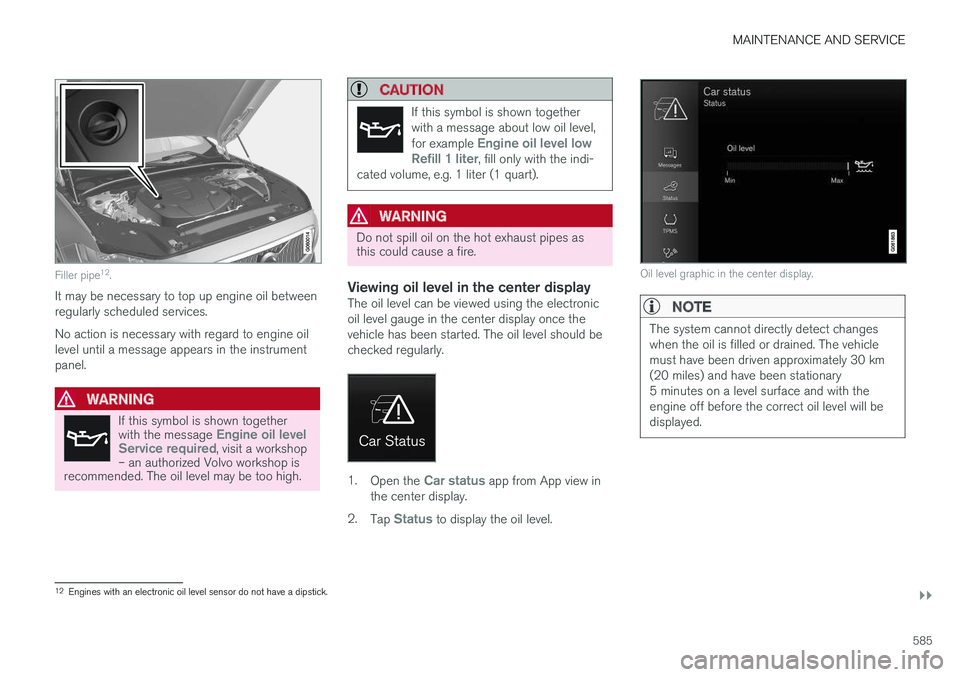
Filler pipe12
.
It may be necessary to top up engine oil between regularly scheduled services. No action is necessary with regard to engine oil level until a message appears in the instrumentpanel.
WARNING
If this symbol is shown together with the message Engine oil level
Service required, visit a workshop
– an authorized Volvo workshop is
recommended. The oil level may be too high.
CAUTION
If this symbol is shown together with a message about low oil level, for example
Engine oil level low
Refill 1 liter, fill only with the indi-
cated volume, e.g. 1 liter (1 quart).
WARNING
Do not spill oil on the hot exhaust pipes as this could cause a fire.
Viewing oil level in the center displayThe oil level can be viewed using the electronic oil level gauge in the center display once thevehicle has been started. The oil level should bechecked regularly.
1. Open the Car status app from App view in
the center display.
2. Tap
Status to display the oil level.
Oil level graphic in the center display.
NOTE
The system cannot directly detect changes when the oil is filled or drained. The vehiclemust have been driven approximately 30 km(20 miles) and have been stationary5 minutes on a level surface and with theengine off before the correct oil level will bedisplayed.
12
Engines with an electronic oil level sensor do not have a dipstick.
Page 602 of 662
||
MAINTENANCE AND SERVICE
600
Avoid smoking, open
flames, and/or sparks.
Risk of explosion.
Recycle properly.
NOTE
A used start battery or backup battery con- tains lead and must be recycled in an environ-mentally responsible manner.
Related information
• Start battery (p. 595)
• Support battery (p. 598)
Fuses and fuseboxes
All electrical functions and components are pro- tected by a number of fuses in order to protectthe vehicle's electrical system from damage byshort circuiting or overloading.
WARNING
Never use a foreign object or a fuse with a higher amperage than that specified toreplace a fuse. This could cause significantdamage to the electrical system and possiblylead to a fire.
If any electrical component or function is not responding, the component may have blown afuse due to temporary overload. If the same fuseblows repeatedly, there may be a problem withthe component. Volvo recommends contacting anauthorized Volvo workshop to have the compo-nent checked.
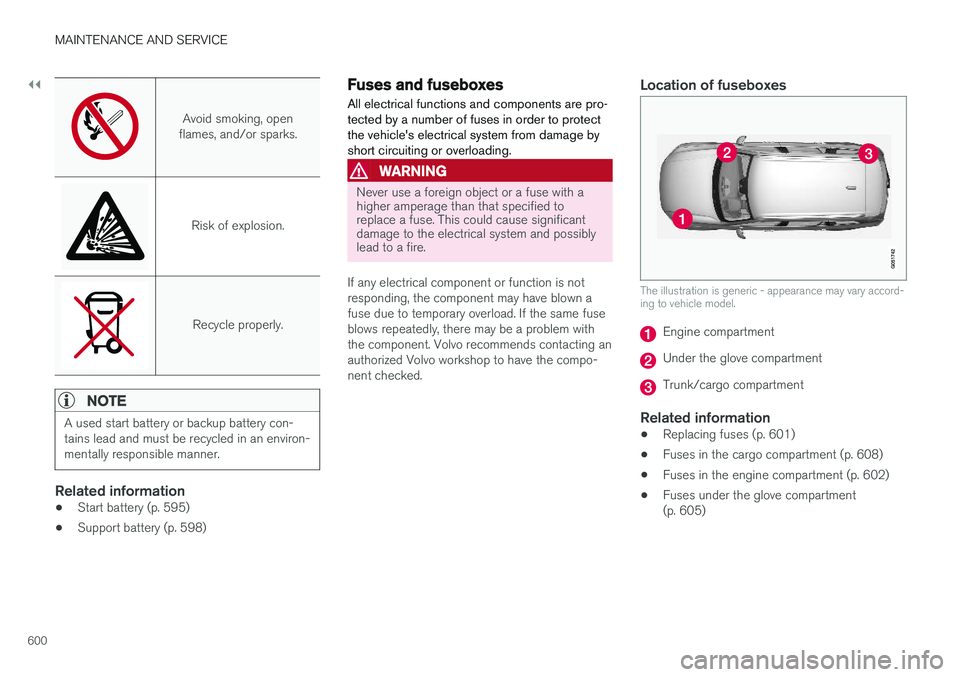
Location of fuseboxes
The illustration is generic - appearance may vary accord- ing to vehicle model.
Engine compartment
Under the glove compartment
Trunk/cargo compartment
Related information
• Replacing fuses (p. 601)
• Fuses in the cargo compartment (p. 608)
• Fuses in the engine compartment (p. 602)
• Fuses under the glove compartment (p. 605)
Page 642 of 662
SPECIFICATIONS
640
Engine oil specificationsFully synthetic engine oil of at least ACEA A5/B5 must be used. Lower oil gradesmay not offer the same fuel economy, engineperformance or engine protection.
Volvo recommends:
GeneralSee the Service and warranty booklet for infor- mation about oil change intervals.
NOTE
This vehicle is delivered from the factory with synthetic oil.
Do not use oil additives.
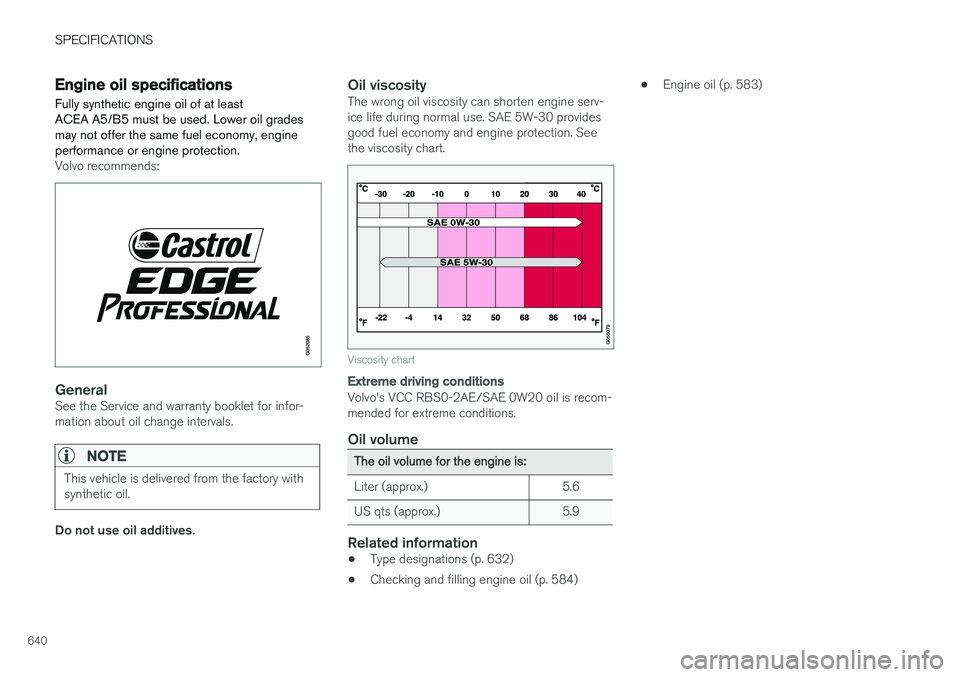
Oil viscosityThe wrong oil viscosity can shorten engine serv- ice life during normal use. SAE 5W-30 providesgood fuel economy and engine protection. Seethe viscosity chart.
Viscosity chart
Extreme driving conditions
Volvo's VCC RBS0-2AE/SAE 0W20 oil is recom- mended for extreme conditions.
Oil volume
The oil volume for the engine is:
Liter (approx.) 5.6
US qts (approx.) 5.9
Related information
• Type designations (p. 632)
• Checking and filling engine oil (p. 584) •
Engine oil (p. 583)
Page 648 of 662
INDEX
646
B
Backrestfront seat, adjusting 188, 189, 192, 193 , 194
rear seat, folding 196
Battery jump-start 442
Maintenance 595
start 595
support 598
symbols on the battery 599
warning symbols 599
BLIS 342, 343, 344, 345 Blower adjusting 225, 226
air distribution 208
air vents 209
Bluetooth connect 487
connecting vehicle to Internet 505
phone 494
settings 503
Book service and repair 576
Booster cushions 71Brake assist after collision 413
Brake fluidgrade 641
Brake functions 404
Brake light 163
Brakes 405 anti-lock brakes, ABS 405
automatic when stationary 411
Brake Assist System, BAS 406
brake lights 163
brake system 404
emergency brake lights 163
handbrake 407
Maintenance 407
on salted roads 407
on wet roads 406
brake system fluid 641
C
Camera sensor 338
Camera unit 325
Capacity weight 552, 637
Cargo compartment 561
attachment points 563
cargo net 568
electrical outlet 556, 558
Lighting 166
Cargo compartment cover 564, 565
cargo net 568
Car wash 617, 618, 620, 621, 622, 623
Catalytic converter 440 recovery 449
CD player 485
Cell phone, see Phone 495
Center console 555Center display change appearance 133
cleaning 612
climate controls 214
Function view 124
keyboard 128
messages 142, 143, 144
operation 114, 117, 121, 126
overview 111
settings 134, 135, 136
switch off and change volume 133
symbols in status bar 126
views 117
Central locking 251
Change of owner 136
Changing a wheel 538
Checking engine oil level 585
Page 652 of 662
INDEX
650
H
Handbrake 407, 408
Hand wash 618Hard diskspace 512
Hazard warning flashers 164
HDC 431
HD radio 468
Head restraint 198
Head-up display 144 activate and deactivate 146
cleaning 613
replacing windshield 582
settings 146
Heated washer nozzles 181 Heating Seats 216, 217
steering wheel 219, 220
windows 223, 224
high beams 158, 159
High engine temperature 440
Hill Descent Control 431, 432 activate with function button 432
Hill Start Assist 412 Hill Start Assist (HSA) 412
Hoisting the vehicle 579
HomeLink ® 452
programming 453
use 454
HomeLink ® remote control
programmable 452
Home safe lighting 164
Honk 199
Hood, opening 581
Horn 199
I
IAQS (Interior Air Quality System) 206
IC (Inflatable Curtain) 60
ID, Volvo 26
Identification number 38
Ignition mode 403, 404
Immobilizer 246 Electronic immobilizer 246
Indicator symbols 95
Individual drive mode 419
Infant seats 67
Inflatable curtain 60
Inflatable Curtain 60
Inflating tires 551
Inflation pressure adjusting 532
Checking 531
recommended 533
Inflation pressure monitoring 533 action 537
Status 536
Inflation pressure table 643
Information display 84, 88
Infotainment (Audio and media) 460
Instrument cluster 84 settings 88
Instrument illumination 167
Instrument lighting 167 Instrument panel App menu 104, 105
messages 106
Instruments and controls 82 Instruments overview left-hand drive vehicle 82
Integrated booster cushion 75 folding down 78
folding up 77
IntelliSafe driver support 28
Interior Air Quality System 206
Intermittent wiping 180