mileage VOLVO V90 CROSS COUNTRY 2021 Owners Manual
[x] Cancel search | Manufacturer: VOLVO, Model Year: 2021, Model line: V90 CROSS COUNTRY, Model: VOLVO V90 CROSS COUNTRY 2021Pages: 683, PDF Size: 14.19 MB
Page 95 of 683

DISPLAYS AND VOICE CONTROL
}}
93
Fuel gauge The fuel gauge in the instrument panel shows the fuel level in the tank.
The illustration is generic - details may vary accord- ing to vehicle model.
Fuel gauge in 12" instrument panel: The beige area in the fuel gauge indicates the amount of fuel left in the tank. When the fuel level is low, the fuel pump sym- bol will illuminate with an amber-colored light.The trip computer also indicates the approxi-mate distance that can be driven on the fuelremaining in the tank.
The illustration is generic - details may vary accord- ing to vehicle model.
Fuel gauge in 8" instrument panel: The bars in the fuel gauge indicate the amount of fuel left in the tank. When the fuel level is low, the fuel pump sym- bol will illuminate with an amber-colored light.The trip computer also indicates the approxi-mate distance that can be driven on the fuelremaining in the tank.
Related information
Instrument panel (p. 88)
Refueling (p. 438)
Fuel tank volume (p. 659)
Trip computer
The vehicle's trip computer registers data while driving such as mileage, fuel consump-tion and average speed.
To help promote fuel-efficient driving, data is recorded on both current and average fuelconsumption. Data from the trip computer canbe displayed in the instrument panel.
Page 96 of 683
||
DISPLAYS AND VOICE CONTROL
* Option/accessory.
94
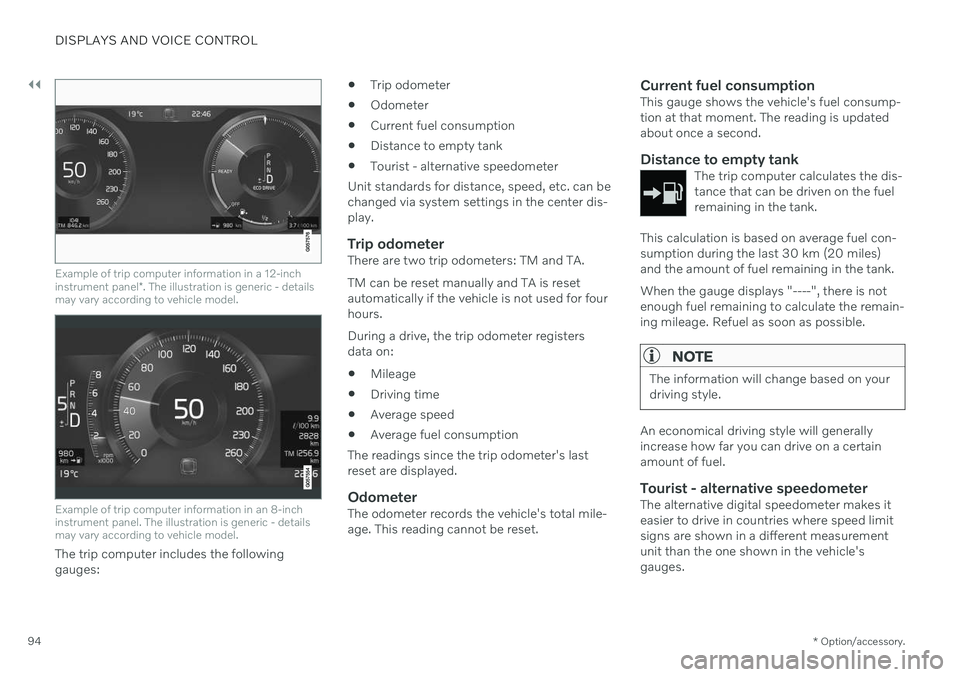
Example of trip computer information in a 12-inch instrument panel *. The illustration is generic - details
may vary according to vehicle model.
Example of trip computer information in an 8-inch instrument panel. The illustration is generic - detailsmay vary according to vehicle model.
The trip computer includes the following gauges:
Trip odometer
Odometer
Current fuel consumption
Distance to empty tank
Tourist - alternative speedometer
Unit standards for distance, speed, etc. can bechanged via system settings in the center dis-play.
Trip odometerThere are two trip odometers: TM and TA. TM can be reset manually and TA is reset automatically if the vehicle is not used for fourhours. During a drive, the trip odometer registers data on:
Mileage
Driving time
Average speed
Average fuel consumption
The readings since the trip odometer's lastreset are displayed.
OdometerThe odometer records the vehicle's total mile-age. This reading cannot be reset.
Current fuel consumptionThis gauge shows the vehicle's fuel consump-tion at that moment. The reading is updatedabout once a second.
Distance to empty tankThe trip computer calculates the dis-tance that can be driven on the fuelremaining in the tank.
This calculation is based on average fuel con- sumption during the last 30 km (20 miles)and the amount of fuel remaining in the tank. When the gauge displays "----", there is not enough fuel remaining to calculate the remain-ing mileage. Refuel as soon as possible.
NOTE
The information will change based on your driving style.
An economical driving style will generally increase how far you can drive on a certainamount of fuel.
Tourist - alternative speedometerThe alternative digital speedometer makes iteasier to drive in countries where speed limitsigns are shown in a different measurementunit than the one shown in the vehicle'sgauges.
Page 98 of 683
||
DISPLAYS AND VOICE CONTROL
963. Scroll down to the option buttons to
choose which information to show in the instrument panel: Odometer
Distance to empty tank
Tourist (alternative speedometer)
Mileage for trip odometer TM, TA or no display of mileage
Current fuel consumption, average fuelconsumption for TM or TA, or no dis-play of fuel consumption
Select or clear a selection using the O but-
ton (4). The change will apply immedi-ately.
Related information
Trip computer (p. 93)
Resetting the trip odometer (p. 96)
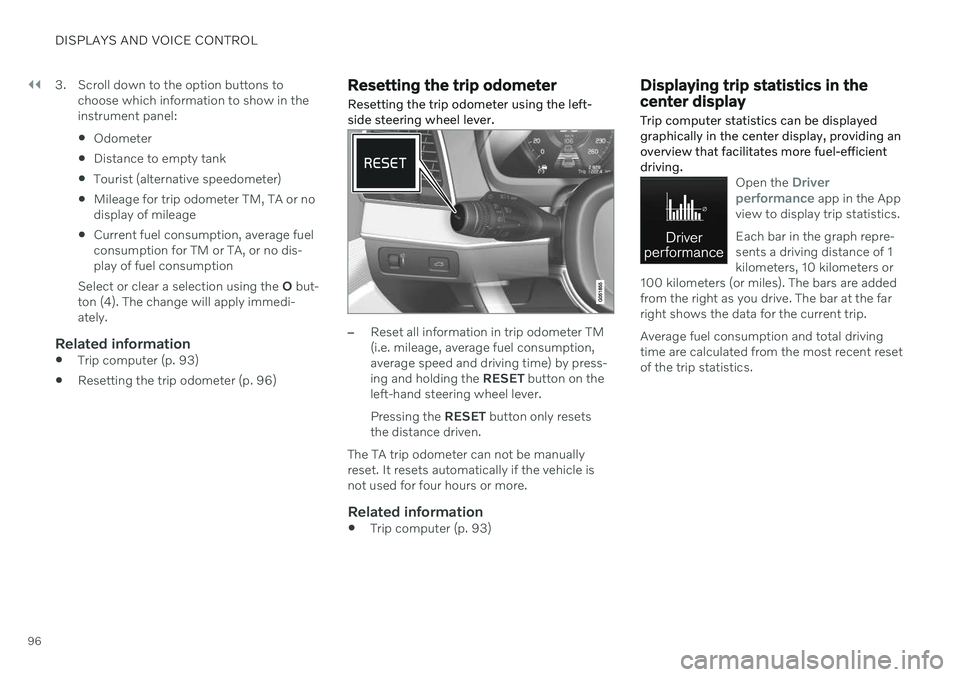
Resetting the trip odometer Resetting the trip odometer using the left- side steering wheel lever.
–Reset all information in trip odometer TM (i.e. mileage, average fuel consumption,average speed and driving time) by press-ing and holding the
RESET button on the
left-hand steering wheel lever. Pressing the RESET button only resets
the distance driven.
The TA trip odometer can not be manually reset. It resets automatically if the vehicle isnot used for four hours or more.
Related information
Trip computer (p. 93)
Displaying trip statistics in the center display Trip computer statistics can be displayed graphically in the center display, providing anoverview that facilitates more fuel-efficientdriving.
Open the Driver
performance app in the App
view to display trip statistics. Each bar in the graph repre- sents a driving distance of 1kilometers, 10 kilometers or
100 kilometers (or miles). The bars are addedfrom the right as you drive. The bar at the farright shows the data for the current trip. Average fuel consumption and total driving time are calculated from the most recent resetof the trip statistics.
Page 448 of 683
STARTING AND DRIVING
446
Selecting ignition mode (p. 402)
Support battery (p. 602)
Driving with a trailer
There are a number of things to consider when towing a trailer, such as the towbar, thetrailer and how the load is distributed in thetrailer.
Load-carrying capacity is determined by the vehicle's curb weight. The total weight of allpassengers and any installed accessories, e.g.towbar, reduces the vehicle's load-carryingcapacity by the corresponding amount.
Towbars used on the vehicle must beapproved for the applicable use.
Distribute the load on the trailer so thatthe weight on the towbar complies withthe specified maximum towball weight.The tongue weight is calculated as part ofthe vehicle's payload.
Increase the tire pressure to the recom-mended pressure for a full load.
The engine is subjected to more load thanusual when towing a trailer.
Towing a trailer affects the vehicle's han-dling, durability and driving economy.
Do not drive with a heavy trailer when thevehicle is very new. Wait until the mileagehas reached at least 1000 km (620 miles).
On long and steep downgrades, the vehi-cle's brakes are subjected to much moreload than usual. When manually shifting, downshift and adapt speed accordingly.
Follow applicable regulations regarding permitted speed and weight.
Drive slowly when towing a trailer up along and steep incline.
The maximum trailer weights given onlyapply to altitudes up to 1000 meters(3280 feet) above sea level. At higher alti-tudes, engine power (and thus the vehi-cle's climbing ability) is decreased due tothe reduced air density, and the maximumtrailer weight must therefore be reduced.The weight of the vehicle and trailer mustbe decreased by 10% for each additional1000 m (3280 feet) or part thereof.
Avoid driving with a trailer on inclines ofmore than 12%.
Avoid overloading and other incorrect use.
The trailer's brakes must be balanced withthe vehicle's brakes to help ensure safestops (follow applicable local regulations).
Page 590 of 683

||
MAINTENANCE AND SERVICE
* Option/accessory.
588
Related information
Vehicle status (p. 586)
Sending vehicle information to the work- shop (p. 588)
Navigating in the center display's views(p. 119)
Volvo ID (p. 26)
Internet-connected vehicle
* (p. 514)
Sending vehicle information to the workshop 9
Vehicle-related information can be sent at any time from the vehicle, e.g. if you schedulea visit to a workshop and would like to assistyour workshop by providing additional basicinformation. Sending vehicle information isnot the same as scheduling service.
1. Open the Car Status app from App view
in the center display.
2. Tap
Appointments.
3. Tap
Send vehicle data.
> A message confirming that vehicle-rela- ted information has been sent will appear at the top of the center display.You can cancel data transmission bytapping the checkbox in the activityindicator. Information is sent via the vehicle's Internet connection 10
.
Vehicle information can be accessed by any retailer if they are provided with your vehicle identification number (VIN 11
).
Vehicle information contentsThe most recently saved vehicle-related infor- mation will be sent (the last time the vehicle was turned on). This includes informationregarding:
service requirements
time since last service was performed
function status
fluid levels
mileage (odometer reading)
Vehicle Identification Number (VIN 11
)
software version
diagnostic information.
Related information
Scheduling service and repairs (p. 587)
Vehicle status (p. 586)
Navigating in the center display's views(p. 119)
Internet-connected vehicle
* (p. 514)
9
Certain markets only.
10 There may be a charge for transmitting data over the Internet, depending on your service plan.
11 Vehicle Identification Number.
Page 673 of 683
INDEX
671
Locks and remote keys 244 Low battery charge level
start battery 443
Low beams 159
Low-speed driving 432 activate with function button 433
M
Maintained climate comfort 239start/stop 239
Maintenance 582 corrosion protection 641
Max. axle weight 655
Max. roof load 655
Media player 483, 484, 485 compatible file formats 491
voice control 153
Messages and symbols Adaptive Cruise Control 302
Assistance at risk of collision 350
BLIS 355
camera and radar unit 395
City Safety 344
Cross Traffic Alert 363
Lane Keeping Aid 328
Park Assist Camera 377
Park Assist Pilot 386
Parking Assist 368
Pilot Assist 314
stability and traction control system 282
Messages in display 110, 144 handling 111, 144
saved 112, 145
Mileage 93 Misting condensation in headlights 634, 637
Mood lighting 168 adjusting 168
N
Netcargo compartment 577
O
Occupant safety 45
Occupant weight sensor 59
Octane rating 440
Oil, see also Engine oil 658
Oil filter 595
Oil level 596
On-board diagnostics 582
On-board Diagnostic socket 37
Option/accessory 21
Outside temperature gauge 98
Overheating 442, 446
Owner's information 16
OWNER'S MANUAL 21 environmental labeling 23
in cellular phone 20
in the center display 17, 18
P
Paddle at steering wheel 202 Paint
color code 643
paint damage and touch-up 641, 642 , 643
Panoramic roof 179 opening and closing 180
pinch protection 172
sun shade 182
ventilation position 181
Parallel parking 379
Park Assist Camera 369 activating 375
limitations 390