keyless VOLVO XC60 2009 Owner´s Manual
[x] Cancel search | Manufacturer: VOLVO, Model Year: 2009, Model line: XC60, Model: VOLVO XC60 2009Pages: 297, PDF Size: 21.16 MB
Page 107 of 297
03 Your driving environment
Starting the engine03
}}
105
Starting the engine
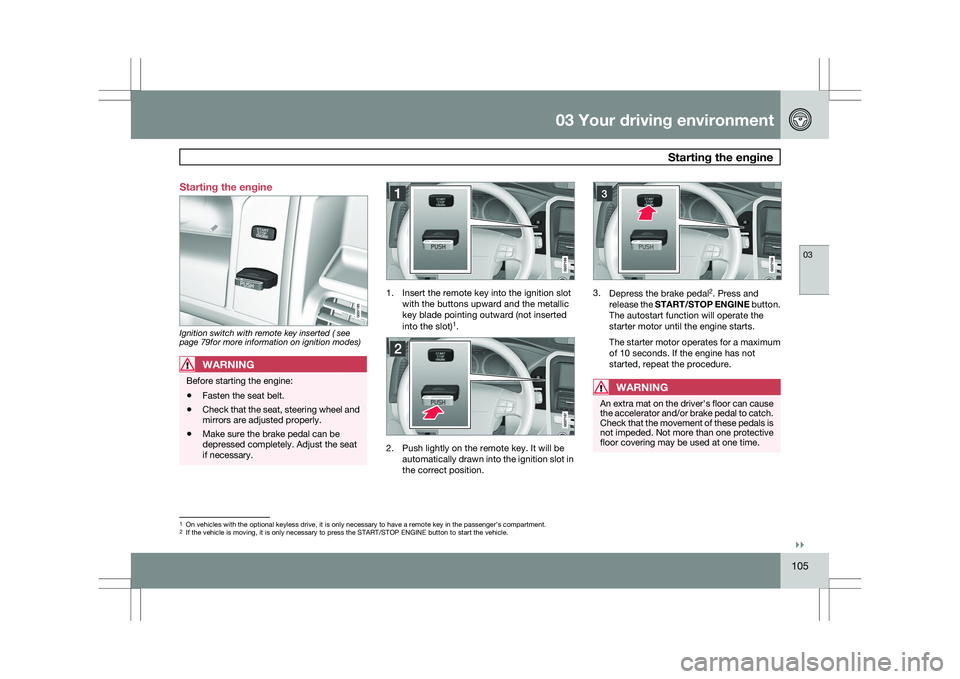
Ignition switch with remote key inserted ( see
page 79for more information on ignition modes)
WARNING
Before starting the engine:
\b
Fasten the seat belt.
\b Check that the seat, steering wheel and
mirrors are adjusted properly.
\b Make sure the brake pedal can be
depressed completely. Adjust the seat
if necessary. 1. Insert the remote key into the ignition slot
with the buttons upward and the metallic
key blade pointing outward (not inserted
into the slot) 1
. 2. Push lightly on the remote key. It will be
automatically drawn into the ignition slot in
the correct position. 3.
Depress the brake pedal 2
. Press and
release the START/STOP ENGINE button.
The autostart function will operate the
starter motor until the engine starts.
The starter motor operates for a maximum
of 10 seconds. If the engine has not
started, repeat the procedure.
WARNING An extra mat on the driver\fs floor can cause
the accelerator and/or brake pedal to catch.
Check that the movement of these pedals is
not impeded. Not more than one protective
floor covering may be used at one time.
1
On vehicles with the optional keyless drive, it is only necessary to hav\
e a remote key in the passenger’s compartment.
2 If the vehicle is moving, it is only necessary to press the START/STOP E\
NGINE button to start the vehicle.
Page 108 of 297
03 Your driving environmentStarting the engine 03
106
* Option/accessory, for more information, see Introduction.
WARNING \b
Always remove the remote key from the
ignition slot when leaving the vehicle,
especially if there are children in the
vehicle.
\b Never remove the remote key from the
ignition slot while driving or when the
vehicle is being towed. The steering
lock could otherwise be activated, mak-
ing it impossible to steer the vehicle. On
vehicles with the optional keyless drive,
never remove the remote key from the
vehicle while driving or during towing.
\b Always place the gear selector in Park
and apply the parking brake before
leaving the vehicle. Never leave the
vehicle unattended with the engine run-
ning.
\b Always open garage doors fully before
starting the engine inside a garage to
ensure adequate ventilation. The
exhaust gases contain carbon monox-
ide, which is invisible and odorless but
very poisonous.NOTE \b
The idling speed can be noticeably
higher than normal during cold starts.
This is to enable emission control sys-
tem can reach normal operating tem-
perature as quickly as possible, which
helps reduce exhaust emissions 3
.
\b Keylock: Your vehicle is equipped with
a keylock system. When the engine is
switched off, the gear selector must be
in the Park position before the key can
be removed 4
from the ignition slot.CAUTION \b
When starting in cold weather, the auto-
matic transmission may shift up at
slightly higher engine speeds than nor-
mal until the automatic transmission
fluid reaches normal operating tem-
perature.
\b Do not race a cold engine immediately
after starting. Oil flow may not reach
some lubrication points fast enough to
prevent engine damage.
\b The engine should be idling when you
move the gear selector. Never acceler-
ate until after you feel the transmission
engage. Accelerating immediately after
selecting a gear will cause harsh
engagement and premature transmis-
sion wear.
\b Selecting
P or N when idling at a stand-
still for prolonged periods of time will
help prevent overheating of the auto-
matic transmission fluid.
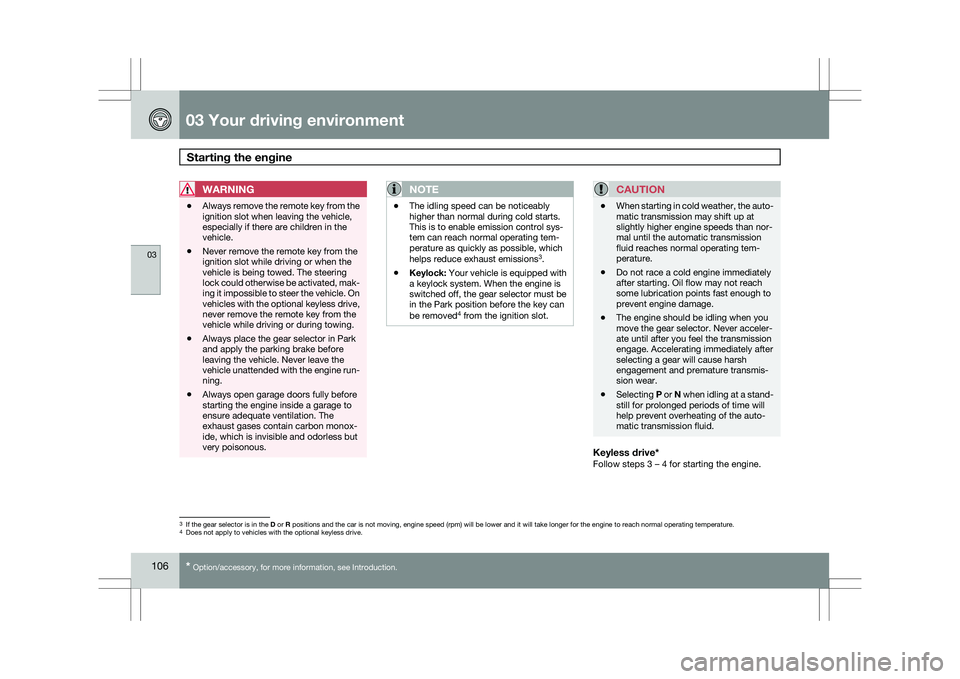
Keyless drive*Follow steps 3 – 4 for starting the engine. 3
If the gear selector is in the D or R positions and the car is not moving, engine speed (rpm) will be lower\
and it will take longer for the engine to reach normal operating temper\
ature.
4 Does not apply to vehicles with the optional keyless drive.
Page 119 of 297
03 Your driving environment
Parking brake03
}}
* Option/accessory, for more information, see Introduction. 117
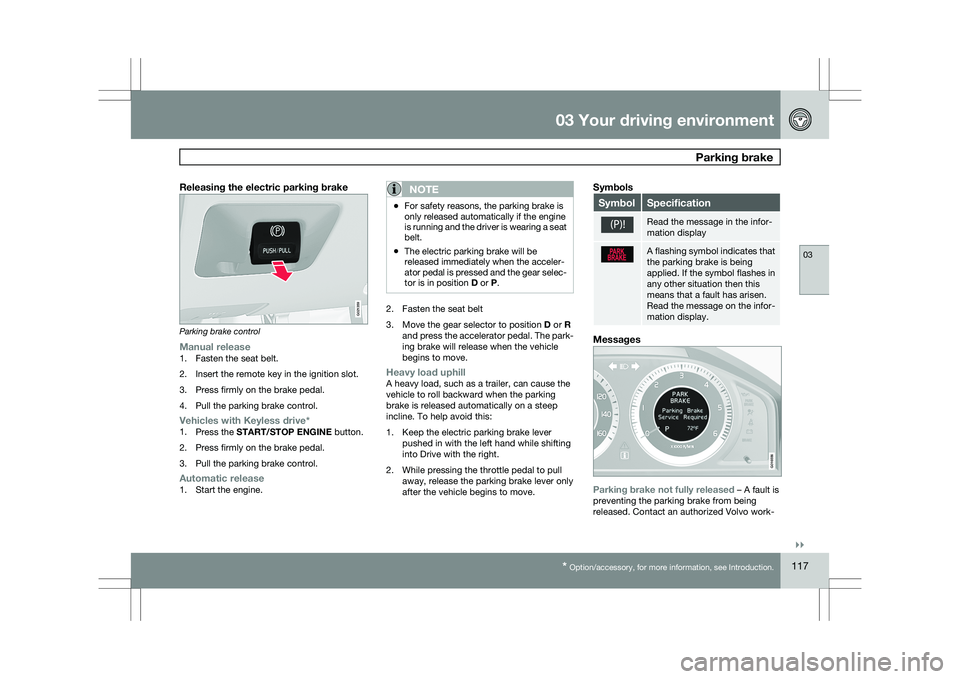
Releasing the electric parking brakeParking brake control
Manual release1. Fasten the seat belt.
2. Insert the remote key in the ignition slot.
3. Press firmly on the brake pedal.
4. Pull the parking brake control.
Vehicles with Keyless drive*1.
Press the START/STOP ENGINE button.
2. Press firmly on the brake pedal.
3. Pull the parking brake control.
Automatic release1. Start the engine.
NOTE \b
For safety reasons, the parking brake is
only released automatically if the engine
is running and the driver is wearing a seat
belt.
\b The electric parking brake will be
released immediately when the acceler-
ator pedal is pressed and the gear selec-
tor is in position
D or P. 2. Fasten the seat belt
3.
Move the gear selector to position D or R
and press the accelerator pedal. The park-
ing brake will release when the vehicle
begins to move.
Heavy load uphillA heavy load, such as a trailer, can cause the
vehicle to roll backward when the parking
brake is released automatically on a steep
incline. To help avoid this:
1. Keep the electric parking brake lever pushed in with the left hand while shifting
into Drive with the right.
2. While pressing the throttle pedal to pull away, release the parking brake lever only
after the vehicle begins to move.
Symbols Symbol Specification
Read the message in the infor-
mation display
A flashing symbol indicates that
the parking brake is being
applied. If the symbol flashes in
any other situation then this
means that a fault has arisen.
Read the message on the infor-
mation display.
Messages
Parking brake not fully released – A fault is
preventing the parking brake from being
released. Contact an authorized Volvo work- G021359 G016556
Page 135 of 297
04 Comfort and driving pleasure
Audio system04
}}
* Option/accessory, for more information, see Introduction. 133
Introduction
The audio system is available in two versions:
High Performance and Premium Sound. The
system version is shown in the display when
the audio system is switched on.
If the audio system is on when the ignition is
switched off, it will come on automatically the
next time the ignition is put in mode
I or higher.
The audio system can be operated without a
key in the ignition slot for 15 minutes at a time
by pressing the POWER button (the driver\fs
door must be closed on vehicles with the
optional keyless drive).
Some functions are controlled from the menu
system in the center console. For more infor-
mation on menus, see page 122.
Dolby Surround Pro Logic II and the sym-
bol are trademarks of Dolby Laboratories
Licensing Corporation. The Dolby Surround
Pro Logic II System is manufactured under
license from Dolby Laboratories Licensing Cor-
poration.
Remote key and ignition modesThe audio system can be used for 15 minutes
at a time if the remote key is not inserted in the
ignition slot.
NOTE To prevent unnecessary drain on the vehi-
cle\fs battery, remove the remote key from
the ignition slot if the audio system is used
when the engine is not running.
If the audio system is playing when the engine
is switched off, it will be on when the engine is
restarted.
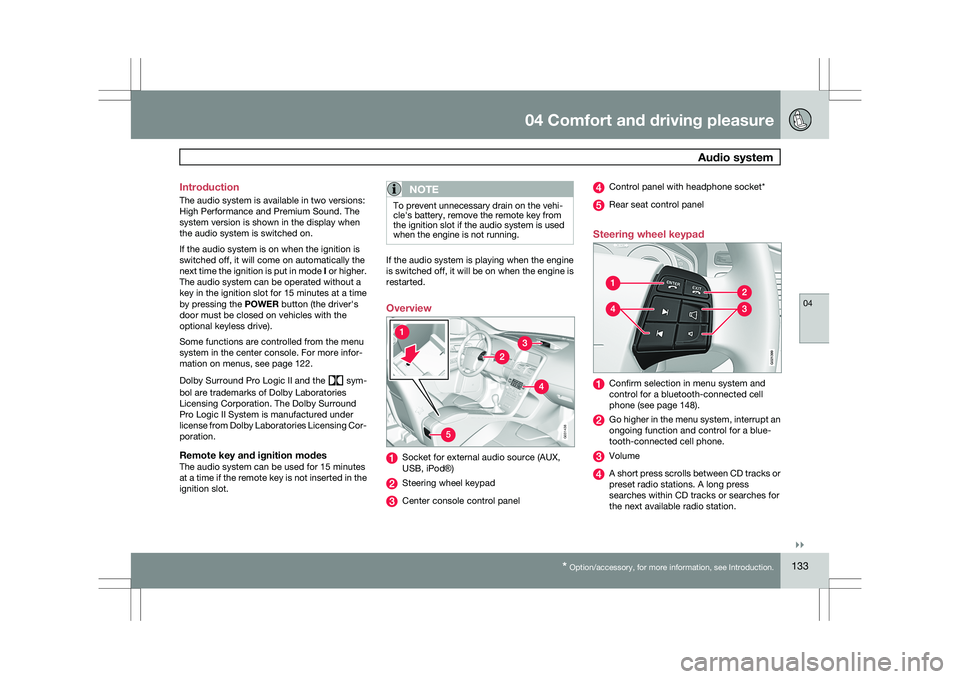
Overview
Socket for external audio source (AUX,
USB, iPod®)
Steering wheel keypad
Center console control panel Control panel with headphone socket*
Rear seat control panel
Steering wheel keypad Confirm selection in menu system and
control for a bluetooth-connected cell
phone (see page 148).
Go higher in the menu system, interrupt an
ongoing function and control for a blue-
tooth-connected cell phone.
Volume
A short press scrolls between CD tracks or
preset radio stations. A long press
searches within CD tracks or searches for
the next available radio station. 5G031438 G02139
9
Page 151 of 297
04 Comfort and driving pleasure
Bluetooth® hands-free connection04
}}
149
3.
Press ENTER.
End the call by pressing EXIT.
Disconnecting the cell phoneThe cell phone is automatically disconnected
from the audio system if it is moved out of
range. For more information about connec-
tions, see page 148.
The cell phone can be manually disconnected
from the hands-free system by pressing
PHONE. The hands-free system is also deac-
tivated when the ignition is switched off (or if
the driver’s door is opened on vehicles equip-
ped with the optional keyless drive).
When the cell phone is disconnected from the
hands-free system, a call in progress can be
continued using the cell phone’s own speaker
and microphone.
NOTE Certain cell phones may require confirma-
tion from the phone’s keypad when a call is
transferred from hands-free to the cell
phone. Handling calls
Incoming callsPress ENTER to answer a call, even if the audio
system is currently in e.g., CD or FM mode.
Press EXIT to defer a call.
Automatic answerThis function means that incoming calls will be
answered automatically. Activate or deactivate
the function in the menu system under Phone
settings Call options Automatic
answer.
Call settingsWhile a call is in progress, press MENU or
ENTER on the center console to access the
following functions:
\b Microphone off–mute the audio system’s
microphone.
\b Transfer call to mobile–transfer the call
from hands-free to the cell phone.
\b Phone book–this feature enables you to
search for a stored telephone number.
NOTE \b
On certain cell phones, the connection
is broken when the mute function is
used, which is normal. If this happens,
the hands-free system will prompt you
to reconnect.
\b A new call cannot be initiated while
another call is in progress. Sound settings
Call volumeCall volume can be adjusted when the hands-
free system is activated. Use the buttons in the
steering wheel keypad or the audio system’s
volume control.
Audio system volumeWhile a phone call is in progress, volume for
the audio system can be adjusted in the normal
way with the audio system\fs volume control. In
order to adjust volume during a phone call, the
audio system must be switched to one of the
other modes (FM, CD, etc).
Audio system sound can be automatically
muted when a phone call is received in
Phone
settings Sounds and volume Mute
radio and adjust the volume with the /
keys on the center console.
Page 170 of 297
04 Comfort and driving pleasureCity Safety™ 04
168 1.
Use the thumb wheel to scroll until City
Safety is displayed.
2. Press the RESET button for approximately
1 second until Off is displayed.
WARNINGThe laser sensor emits light when the igni-
tion is in mode II or higher, even if City
Safety™ has been switched off.
To switch City Safety™ on again:
\b
Follow the same procedure as for switch-
ing City Safety™ off but select On by
pressing RESET.
or
\b Vehicles not equipped with keyless
drive: Press lightly on the remote key to
release it partially from the ignition slot.
Press the remote key into the ignition slot
again. Depress the brake pedal and press
the START/STOP ENGINE button to start
the engine. This restarts City Safety™
.
\b Vehicles equipped with the optional
keyless drive: Press the START/STOP
ENGINE button to switch off the engine.
Depress the brake pedal and press the
START/STOP ENGINE button to start the
engine. This restarts City Safety™.
See page 79 for information on ignition modes. City Safety™ will be automatically switched on
the next time the engine is started, even if it was
off when the engine was switched off.
Limitations
The sensor used by City Safety™ is designed
to detect cars and other larger motor vehicles
ahead of your vehicle in both daylight and dark-
ness.
However, there are certain limitations and the
laser sensor’s function may be reduced by, for
example, heavy rain or snowfall, or by dense
fog or thick, blowing dust or snow. Condensa-
tion, dirt, ice or snow on the windshield may
also interfere with the sensor’s function.
Objects such as warning flags hanging from
long objects on the roof or accessories such as
auxiliary lights or protective arches on the front
of the vehicle that are higher than the hood may
also impede the sensor’s function.
Braking distance to the vehicle ahead increa-
ses on slippery road surfaces, which may
reduce City Safety’s capacity to avoid a colli-
sion. In situations like this, the DSTC system
(see page 155) will help provide the best pos-
sible braking capacity and stability.
City Safety™ emits infrared light and measures
the way in which the light is reflected. There-
fore, vehicles or objects with low-reflective sur-faces may not be detected. Normally, the
license plate and taillight reflectors give the
rear section of a vehicle ahead sufficient reflec-
tive surfaces to be detected.
NOTE
\b
Keep the windshield in front of the laser
sensor free of ice, snow, dirt, etc. See
the illustration on page
167
\b Snow or ice on the hood deeper than
2 inches (5 cm) may obstruct the sen-
sor. Keep the hood free of ice and snow.
\b Do not mount or in any way attach any-
thing on the windshield that could
obstruct the laser sensor. Troubleshooting
If Windshield sensors blocked appears in
the information display, this indicates that the
City Safety™ laser sensor is obstructed in
some way and cannot detect vehicles ahead of
you, which means that the system is not func-
tioning.
However, this message will not be displayed in
all situations in which the sensor is obstructed.
For this reason, the driver must ensure that the
area of the windshield in front of the sensor is
always kept clean.
Page 222 of 297
05 During your tripEmergency towing 05
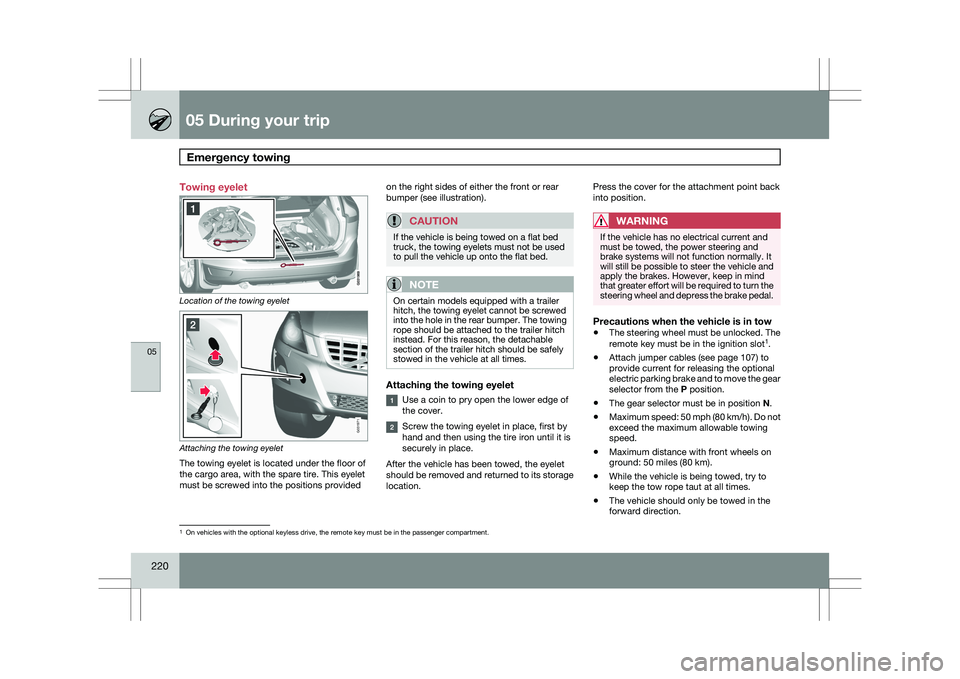
220 Towing eyelet
Location of the towing eyelet
Attaching the towing eyelet
The towing eyelet is located under the floor of
the cargo area, with the spare tire. This eyelet
must be screwed into the positions provided on the right sides of either the front or rear
bumper (see illustration).
CAUTION If the vehicle is being towed on a flat bed
truck, the towing eyelets must not be used
to pull the vehicle up onto the flat bed.
NOTE
On certain models equipped with a trailer
hitch, the towing eyelet cannot be screwed
into the hole in the rear bumper. The towing
rope should be attached to the trailer hitch
instead. For this reason, the detachable
section of the trailer hitch should be safely
stowed in the vehicle at all times.
Attaching the towing eyelet
Use a coin to pry open the lower edge of
the cover.
Screw the towing eyelet in place, first by
hand and then using the tire iron until it is
securely in place.
After the vehicle has been towed, the eyelet
should be removed and returned to its storage
location. Press the cover for the attachment point back
into position.
WARNING If the vehicle has no electrical current and
must be towed, the power steering and
brake systems will not function normally. It
will still be possible to steer the vehicle and
apply the brakes. However, keep in mind
that greater effort will be required to turn the
steering wheel and depress the brake pedal.
Precautions when the vehicle is in tow
\b
The steering wheel must be unlocked. The
remote key must be in the ignition slot 1
.
\b Attach jumper cables (see page 107) to
provide current for releasing the optional
electric parking brake and to move the gear
selector from the
P position.
\b The gear selector must be in position
N.
\b Maximum speed: 50 mph (80 km/h). Do not
exceed the maximum allowable towing
speed.
\b Maximum distance with front wheels on
ground: 50 miles (80 km).
\b While the vehicle is being towed, try to
keep the tow rope taut at all times.
\b The vehicle should only be towed in the
forward direction. 1
On vehicles with the optional keyless drive, the remote key must be in t\
he passenger compartment. G031971
Page 235 of 297
06 Maintenance and specifications
Replacing bulbs06
}}
233
CAUTIONNever touch the glass of bulbs with your fin-
gers. Grease and oils from your fingers
vaporize in the heat and will leave a deposit
on the reflector, which will damage it.
NOTE
\b
Always switch off the ignition before
starting to replace a bulb.
\b The optional Active Dual Xenon head-
light bulbs contain trace amounts of
mercury. These bulbs should always be
disposed of by a trained and qualified
Volvo service technician.
Removing the headlight housing1. Switch off the ignition by pressing quickly
on the START/STOP ENGINE button and
remove the remote key from the ignition
slot1
.
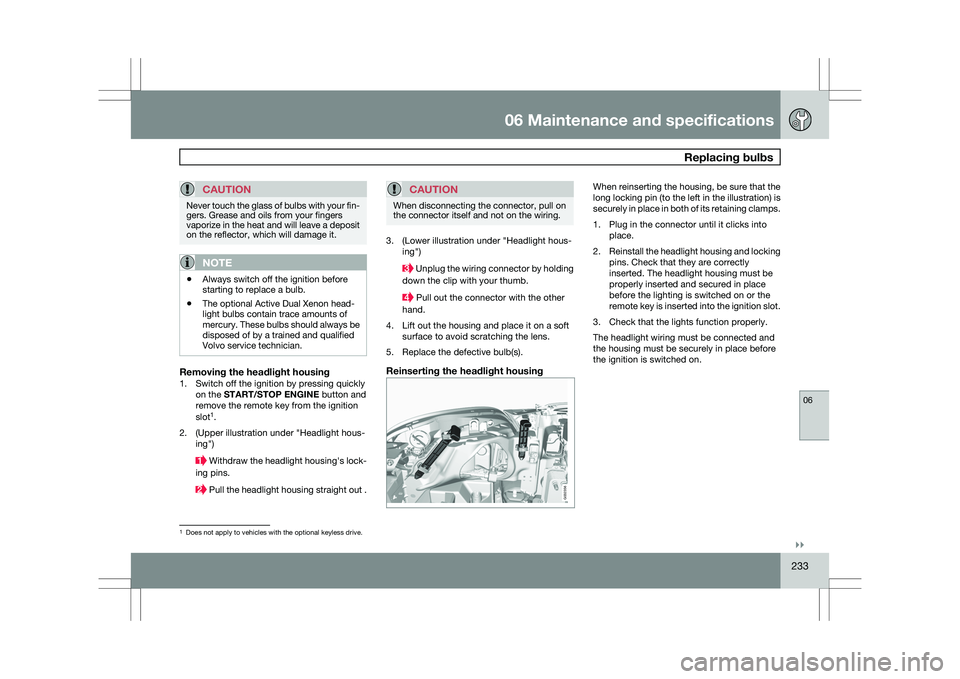
2. (Upper illustration under "Headlight hous- ing") Withdraw the headlight housing\fs lock-
ing pins. Pull the headlight housing straight out .
CAUTION When disconnecting the connector, pull on
the connector itself and not on the wiring.
3. (Lower illustration under "Headlight hous-
ing") Unplug the wiring connector by holding
down the clip with your thumb. Pull out the connector with the other
hand.
4. Lift out the housing and place it on a soft surface to avoid scratching the lens.
5. Replace the defective bulb(s).
Reinserting the headlight housing When reinserting the housing, be sure that the
long locking pin (to the left in the illustration) is
securely in place in both of its retaining clamps.
1. Plug in the connector until it clicks into
place.
2. Reinstall the headlight housing and locking
pins. Check that they are correctly
inserted. The headlight housing must be
properly inserted and secured in place
before the lighting is switched on or the
remote key is inserted into the ignition slot.
3. Check that the lights function properly.
The headlight wiring must be connected and
the housing must be securely in place before
the ignition is switched on. 1
Does not apply to vehicles with the optional keyless drive. G032356
Page 242 of 297
06 Maintenance and specificationsWiper blades and washer fluid 06
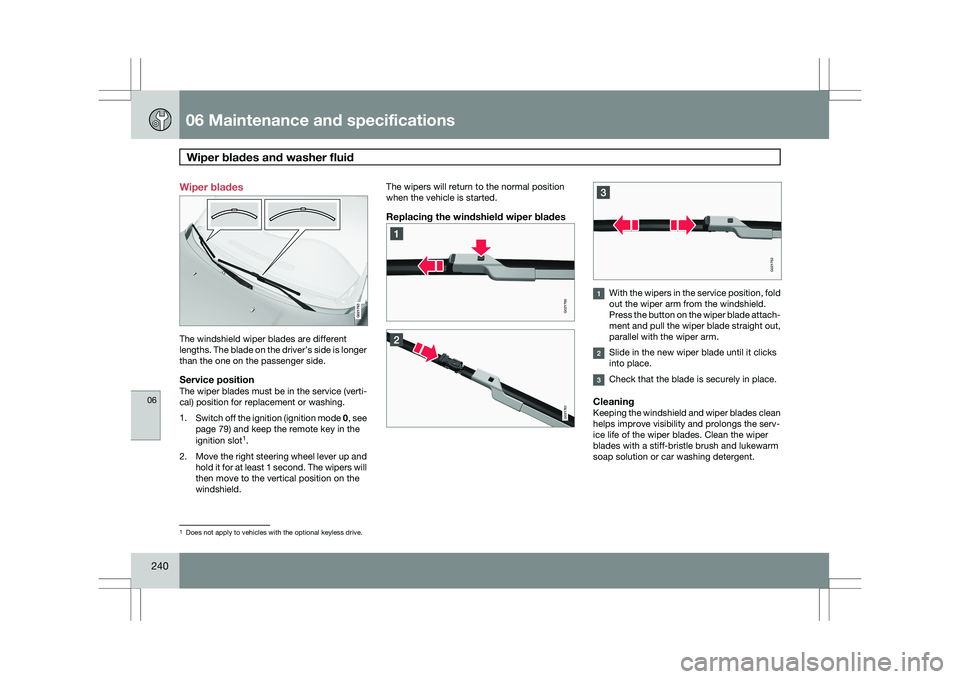
240 Wiper blades
The windshield wiper blades are different
lengths. The blade on the driver’s side is longer
than the one on the passenger side.
Service positionThe wiper blades must be in the service (verti-
cal) position for replacement or washing.
1.
Switch off the ignition (ignition mode 0, see
page 79) and keep the remote key in the
ignition slot 1
.
2. Move the right steering wheel lever up and
hold it for at least 1 second. The wipers will
then move to the vertical position on the
windshield. The wipers will return to the normal position
when the vehicle is started.
Replacing the windshield wiper blades
With the wipers in the service position, fold
out the wiper arm from the windshield.
Press the button on the wiper blade attach-
ment and pull the wiper blade straight out,
parallel with the wiper arm.
Slide in the new wiper blade until it clicks
into place.
Check that the blade is securely in place.
CleaningKeeping the windshield and wiper blades clean
helps improve visibility and prolongs the serv-
ice life of the wiper blades. Clean the wiper
blades with a stiff-bristle brush and lukewarm
soap solution or car washing detergent.
1
Does not apply to vehicles with the optional keyless drive. G021763 G021760 G021761 G021762
Page 254 of 297
06 Maintenance and specificationsFuses 06
252
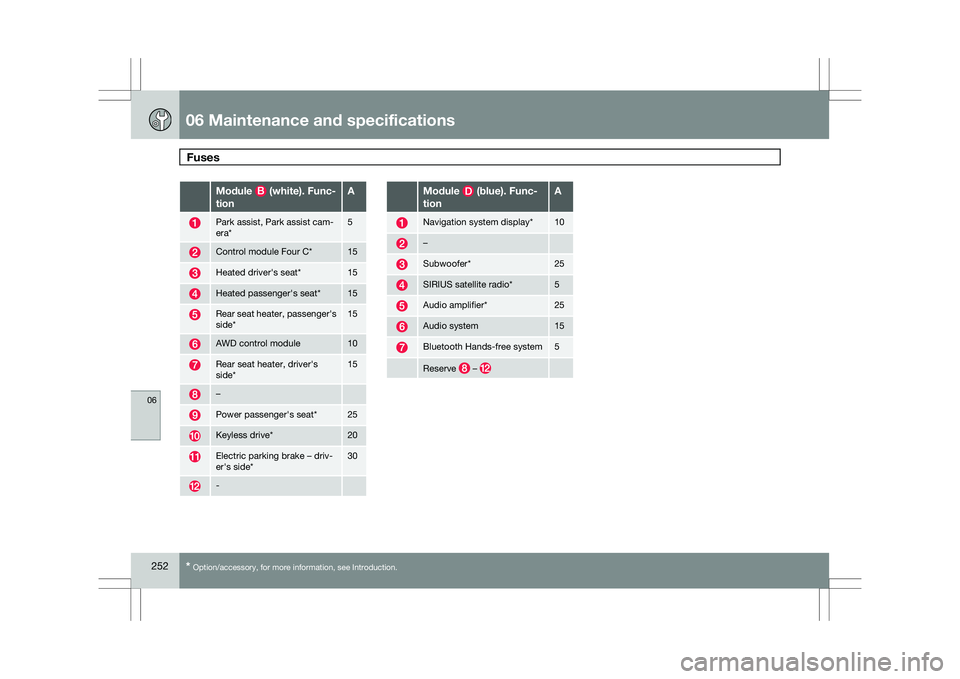
* Option/accessory, for more information, see Introduction. Module (white). Func-
tion A
Park assist, Park assist cam-
era* 5
Control module Four C* 15
Heated driver\fs seat* 15
Heated passenger\fs seat* 15
Rear seat heater, passenger\fs
side* 15
AWD control module 10
Rear seat heater, driver\fs
side* 15
–
Power passenger\fs seat* 25
Keyless drive* 20
Electric parking brake – driv-
er\fs side* 30
- Module (blue). Func-
tion A
Navigation system display* 10
–
Subwoofer* 25
SIRIUS satellite radio* 5
Audio amplifier* 25
Audio system 15
Bluetooth Hands-free system 5
Reserve –