warning VOLVO XC60 2009 Owner´s Manual
[x] Cancel search | Manufacturer: VOLVO, Model Year: 2009, Model line: XC60, Model: VOLVO XC60 2009Pages: 297, PDF Size: 21.16 MB
Page 45 of 297
01 Safety
Top tether anchors01
43
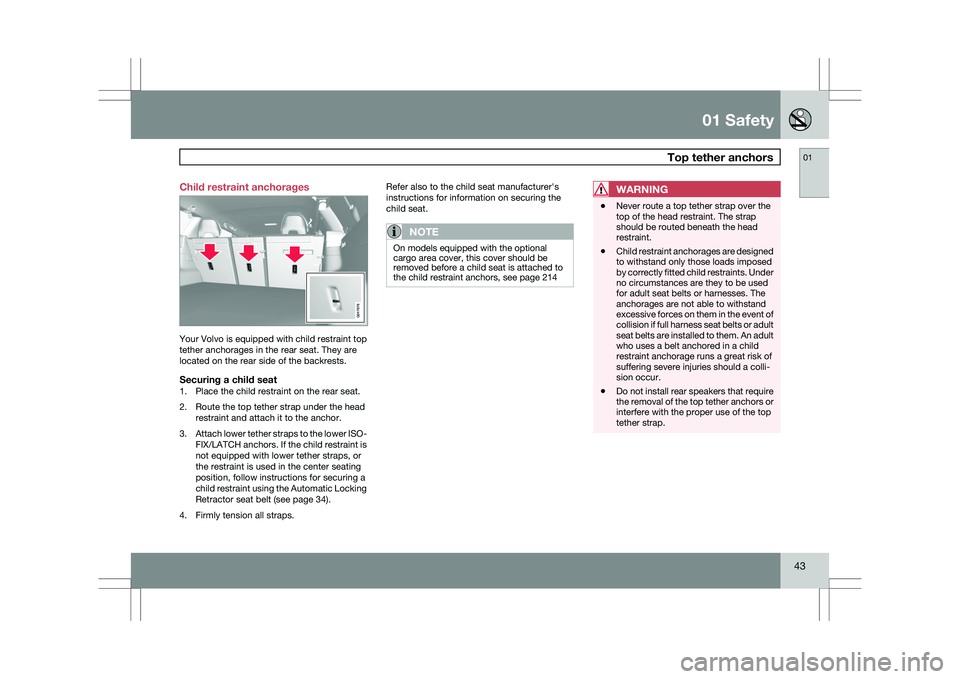
Child restraint anchorages
Your Volvo is equipped with child restraint top
tether anchorages in the rear seat. They are
located on the rear side of the backrests.
Securing a child seat1. Place the child restraint on the rear seat.
2. Route the top tether strap under the head
restraint and attach it to the anchor.
3. Attach lower tether straps to the lower ISO-
FIX/LATCH anchors. If the child restraint is
not equipped with lower tether straps, or
the restraint is used in the center seating
position, follow instructions for securing a
child restraint using the Automatic Locking
Retractor seat belt (see page 34).
4. Firmly tension all straps. Refer also to the child seat manufacturer\fs
instructions for information on securing the
child seat.
NOTE
On models equipped with the optional
cargo area cover, this cover should be
removed before a child seat is attached to
the child restraint anchors, see page 214
WARNING \b
Never route a top tether strap over the
top of the head restraint. The strap
should be routed beneath the head
restraint.
\b Child restraint anchorages are designed
to withstand only those loads imposed
by correctly fitted child restraints. Under
no circumstances are they to be used
for adult seat belts or harnesses. The
anchorages are not able to withstand
excessive forces on them in the event of
collision if full harness seat belts or adult
seat belts are installed to them. An adult
who uses a belt anchored in a child
restraint anchorage runs a great risk of
suffering severe injuries should a colli-
sion occur.
\b Do not install rear speakers that require
the removal of the top tether anchors or
interfere with the proper use of the top
tether strap. G017676
Page 49 of 297
01 Safety
Integrated booster cushion01
47
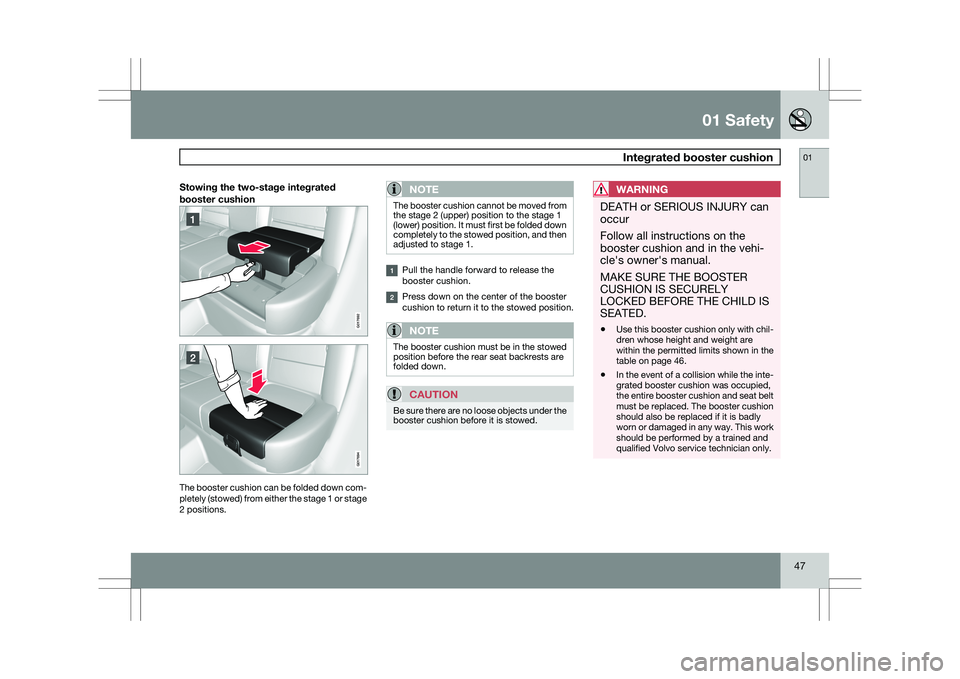
Stowing the two-stage integrated
booster cushionThe booster cushion can be folded down com-
pletely (stowed) from either the stage 1 or stage
2 positions.NOTE The booster cushion cannot be moved from
the stage 2 (upper) position to the stage 1
(lower) position. It must first be folded down
completely to the stowed position, and then
adjusted to stage 1.
Pull the handle forward to release the
booster cushion.
Press down on the center of the booster
cushion to return it to the stowed position.
NOTE
The booster cushion must be in the stowed
position before the rear seat backrests are
folded down.
CAUTION
Be sure there are no loose objects under the
booster cushion before it is stowed.
WARNING DEATH or SERIOUS INJURY can
occur
Follow all instructions on the
booster cushion and in the vehi-
cle\fs owner\fs manual.
MAKE SURE THE BOOSTER
CUSHION IS SECURELY
LOCKED BEFORE THE CHILD IS
SEATED.
\b
Use this booster cushion only with chil-
dren whose height and weight are
within the permitted limits shown in the
table on page 46.
\b In the event of a collision while the inte-
grated booster cushion was occupied,
the entire booster cushion and seat belt
must be replaced. The booster cushion
should also be replaced if it is badly
worn or damaged in any way. This work
should be performed by a trained and
qualified Volvo service technician only. G01769
2 G017694
Page 52 of 297
02 Locks and alarmRemote key and key blade 02
50 Introduction
Two remote keys or optional Personal Car
Communicators (PCC) are provided with your
vehicle. They enable you to unlock the doors
and tailgate, and also function as ignition keys
to start the vehicle or operate electrical com-
ponents. The remote keys contain detachable
metal key blades for manually locking or
unlocking the driver\fs door and the glove com-
partment. Up to six remotes can be pro-
grammed for use on the same vehicle.
The PCCs have enhanced functionality com-
pared with the standard remote control.
NOTE
In the remainder of this chapter, all referen-
ces to the remote key also pertain to the
PCC unless otherwise stated.
WARNING
Never leave the remote key in the ignition if
children are to remain in the vehicle.
Detachable key bladeEach remote key or PCC contains a detachable
metal key blade for mechanically locking or
unlocking the driver\fs door and the glove com-
partment. The key blades have a unique code,
which is used if new ones need to be produced. This code is available at an authorized Volvo
retailer.
Loss of a remote keyIf a remote key is lost, the other one must be
taken with the vehicle to a trained and qualified
Volvo service technician. As an anti-theft
measure, the code of the lost remote must be
erased from the system.
The number of registered keys for the vehicle
can be found in the vehicle\fs menu under
Car
settings Car key memory Number of
keys. See page 122 for a description of the
menu system.
USA-5WK49264
FCC ID:KR55WK49264 + Siemens VDO
5WK49236
FCC ID:KR55WK49236, 5WK49266
FCC ID:KR55WK49266 + Siemens VDO
5WK49233
FCC ID:KR55WK49233
This device complies with part 15 of the FCC
rules and RSS-210. Operation is subject to the
following conditions: (1) This device may not
cause harmful interference, and (2) this device
must accept any interference received, includ-
ing interference that may cause undesired
operation. Canada-5WK49264
IC:267T-5WK49264 + Siemens VDO
5WK49236
IC:267T-5WK49236, 5WK49266
IC:267T-5WK49266 + Siemens VDO
5WK49233
IC:267T-5WK49233
Operation is subject to the following condi-
tions: (1) this device may not cause interfer-
ence, and (2) this device must accept any inter-
ference, including interference that may cause
undesired operation of the device.
Key memory – door mirrors and driver\fs
seat
The position of the side door mirrors and
optional power driver\fs seat are stored in the
remote keys when the vehicle is locked. The
next time the driver\fs door is unlocked with the
same remote key and the door is opened within
2 minutes, the power driver\fs seat and side
door mirrors will automatically move to the
position that they were in when the doors were
most recently locked with the same remote
key. See page 82 for more information.
This feature can be activated or deactivated in
the vehicle\fs menu under
Car settings Car
key memory Seat & mirror positions
.
See
Page 62 of 297
02 Locks and alarmKeyless drive 02
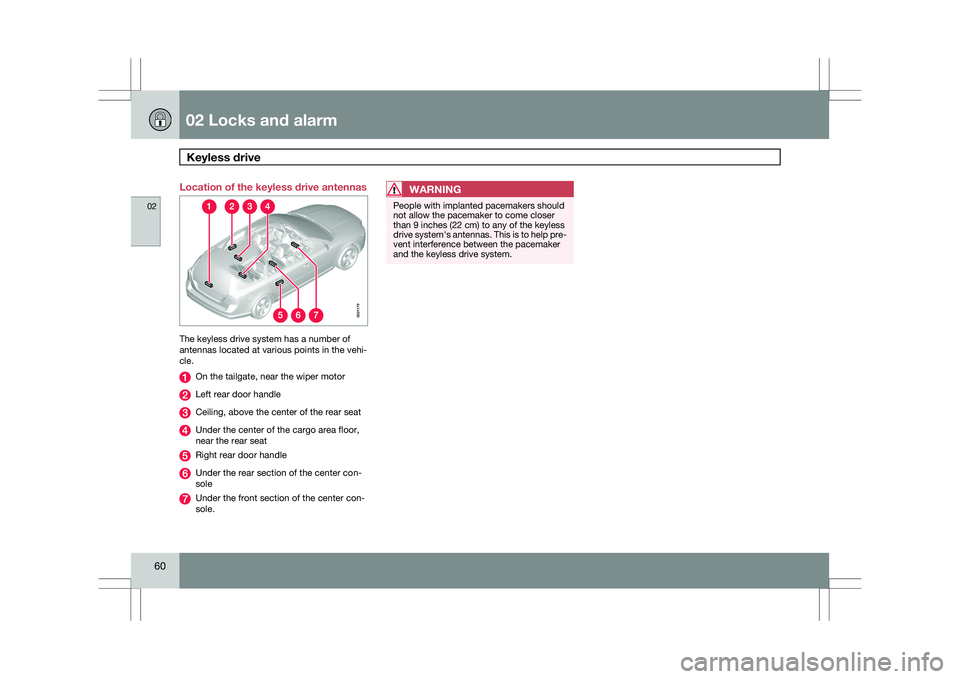
60 Location of the keyless drive antennas
The keyless drive system has a number of
antennas located at various points in the vehi-
cle.
On the tailgate, near the wiper motor
Left rear door handle
Ceiling, above the center of the rear seat
Under the center of the cargo area floor,
near the rear seat
Right rear door handle
Under the rear section of the center con-
sole
Under the front section of the center con-
sole.
WARNING People with implanted pacemakers should
not allow the pacemaker to come closer
than 9 inches (22 cm) to any of the keyless
drive system\fs antennas. This is to help pre-
vent interference between the pacemaker
and the keyless drive system. G021179
Page 65 of 297
02 Locks and alarm
Locks02
}}
* Option/accessory, for more information, see Introduction. 63
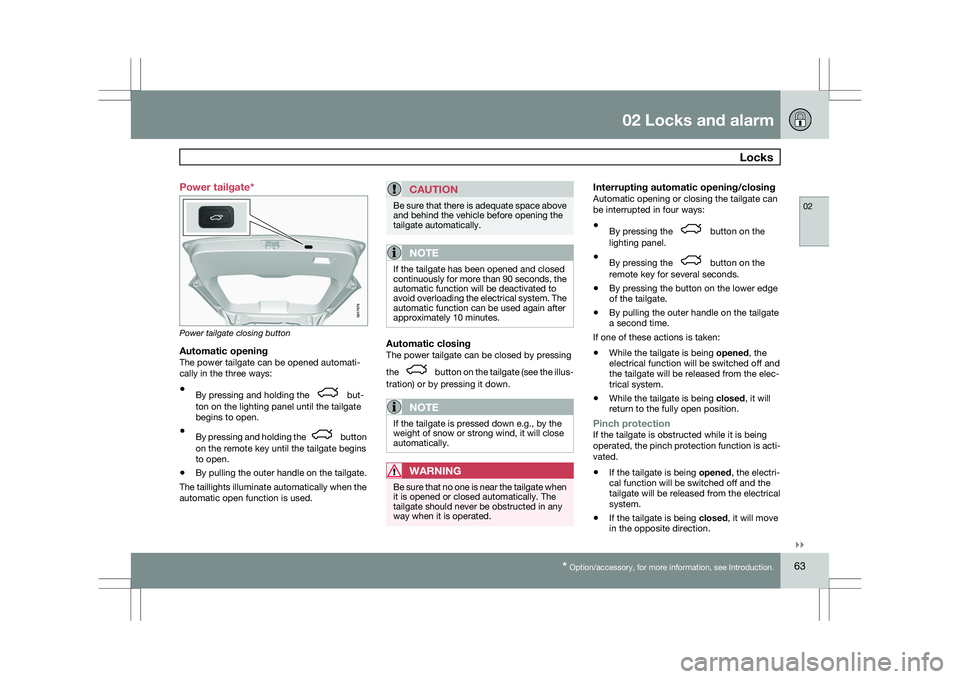
Power tailgate*
Power tailgate closing button
Automatic openingThe power tailgate can be opened automati-
cally in the three ways:
\b
By pressing and holding the but-
ton on the lighting panel until the tailgate
begins to open.
\b By pressing and holding the button
on the remote key until the tailgate begins
to open.
\b By pulling the outer handle on the tailgate.
The taillights illuminate automatically when the
automatic open function is used.
CAUTION Be sure that there is adequate space above
and behind the vehicle before opening the
tailgate automatically.
NOTE
If the tailgate has been opened and closed
continuously for more than 90 seconds, the
automatic function will be deactivated to
avoid overloading the electrical system. The
automatic function can be used again after
approximately 10 minutes.
Automatic closingThe power tailgate can be closed by pressing
the
button on the tailgate (see the illus-
tration) or by pressing it down.
NOTE If the tailgate is pressed down e.g., by the
weight of snow or strong wind, it will close
automatically.
WARNING
Be sure that no one is near the tailgate when
it is opened or closed automatically. The
tailgate should never be obstructed in any
way when it is operated.
Interrupting automatic opening/closingAutomatic opening or closing the tailgate can
be interrupted in four ways:
\b
By pressing the button on the
lighting panel.
\b By pressing the button on the
remote key for several seconds.
\b By pressing the button on the lower edge
of the tailgate.
\b By pulling the outer handle on the tailgate
a second time.
If one of these actions is taken:
\b While the tailgate is being
opened, the
electrical function will be switched off and
the tailgate will be released from the elec-
trical system.
\b While the tailgate is being
closed, it will
return to the fully open position.
Pinch protectionIf the tailgate is obstructed while it is being
operated, the pinch protection function is acti-
vated.
\b If the tailgate is being opened, the electri-
cal function will be switched off and the
tailgate will be released from the electrical
system.
\b If the tailgate is being closed, it will move
in the opposite direction. G017876
Page 67 of 297
02 Locks and alarm
Child safety locks02
* Option/accessory, for more information, see Introduction. 65
Child safety locks
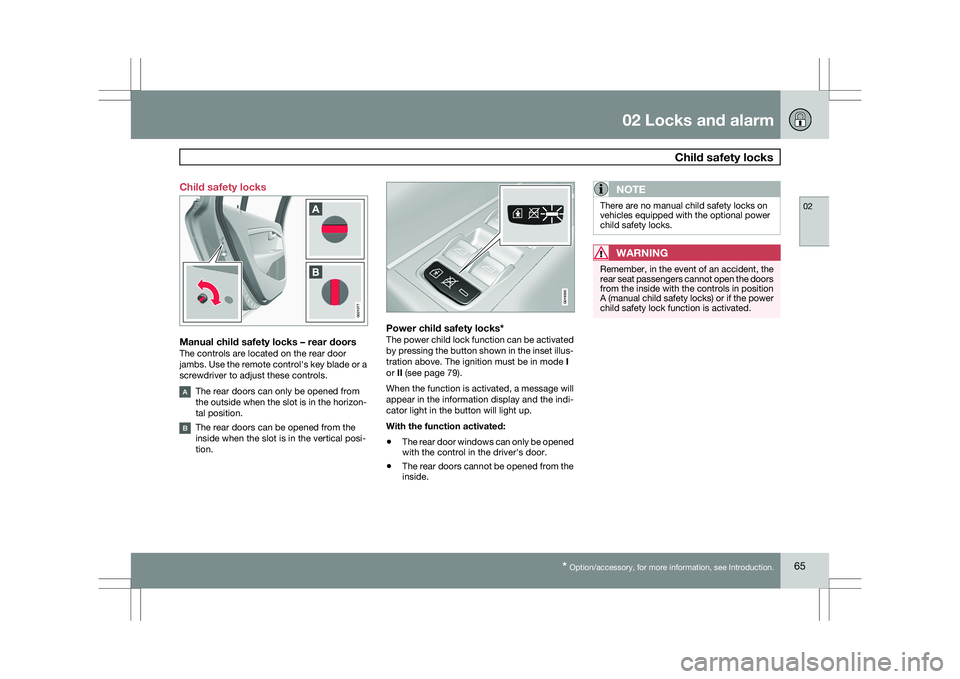
Manual child safety locks – rear doorsThe controls are located on the rear door
jambs. Use the remote control\fs key blade or a
screwdriver to adjust these controls.
The rear doors can only be opened from
the outside when the slot is in the horizon-
tal position.
The rear doors can be opened from the
inside when the slot is in the vertical posi-
tion.
Power child safety locks*The power child lock function can be activated
by pressing the button shown in the inset illus-
tration above. The ignition must be in mode
I
or II (see page 79).
When the function is activated, a message will
appear in the information display and the indi-
cator light in the button will light up.
With the function activated:
\b The rear door windows can only be opened
with the control in the driver\fs door.
\b The rear doors cannot be opened from the
inside.
NOTE There are no manual child safety locks on
vehicles equipped with the optional power
child safety locks.
WARNING
Remember, in the event of an accident, the
rear seat passengers cannot open the doors
from the inside with the controls in position
A (manual child safety locks) or if the power
child safety lock function is activated. G02107
7 G019300
Page 75 of 297
03 Your driving environment
Instruments and controls03
}}
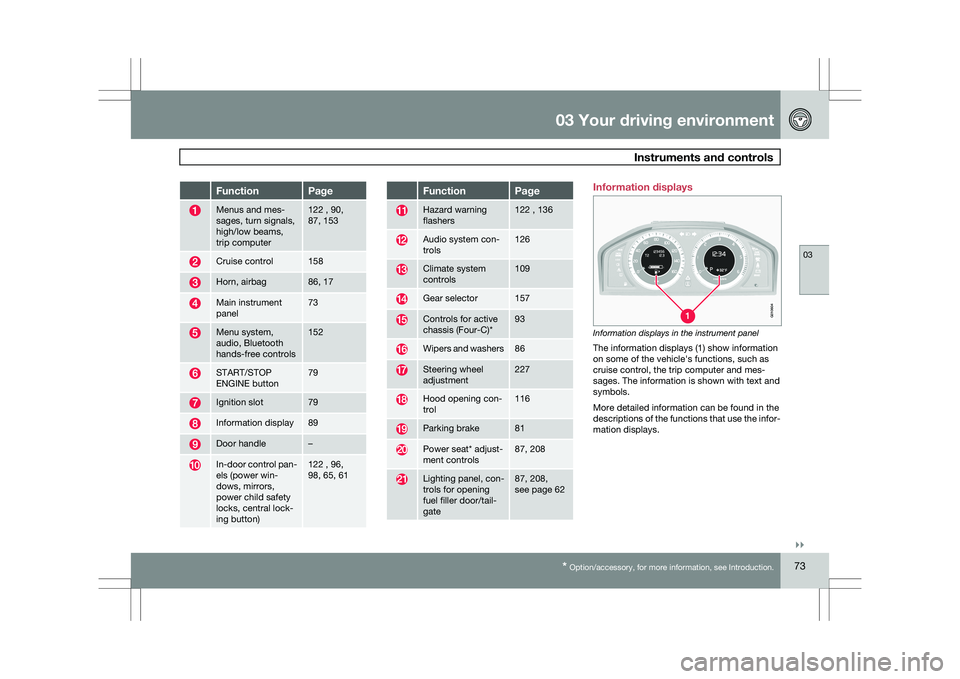
* Option/accessory, for more information, see Introduction. 73Function Page
Menus and mes-
sages, turn signals,
high/low beams,
trip computer 122 , 90,
87, 153
Cruise control 158
Horn, airbag 86, 17
Main instrument
panel 73
Menu system,
audio, Bluetooth
hands-free controls 152
START/STOP
ENGINE button 79
Ignition slot 79
Information display 89
Door handle –
In-door control pan-
els (power win-
dows, mirrors,
power child safety
locks, central lock-
ing button) 122 , 96,
98, 65, 61 Function Page
Hazard warning
flashers 122 , 136
Audio system con-
trols 126
Climate system
controls 109
Gear selector 157
Controls for active
chassis (Four-C)* 93
Wipers and washers 86
Steering wheel
adjustment 227
Hood opening con-
trol 116
Parking brake 81
Power seat* adjust-
ment controls 87, 208
Lighting panel, con-
trols for opening
fuel filler door/tail-
gate 87, 208,
see page 62 Information displays
Information displays in the instrument panel
The information displays (1) show information
on some of the vehicle\fs functions, such as
cruise control, the trip computer and mes-
sages. The information is shown with text and
symbols.
More detailed information can be found in the
descriptions of the functions that use the infor-
mation displays. G01060
4
Page 76 of 297
03 Your driving environmentInstruments and controls 03
74 Gauges
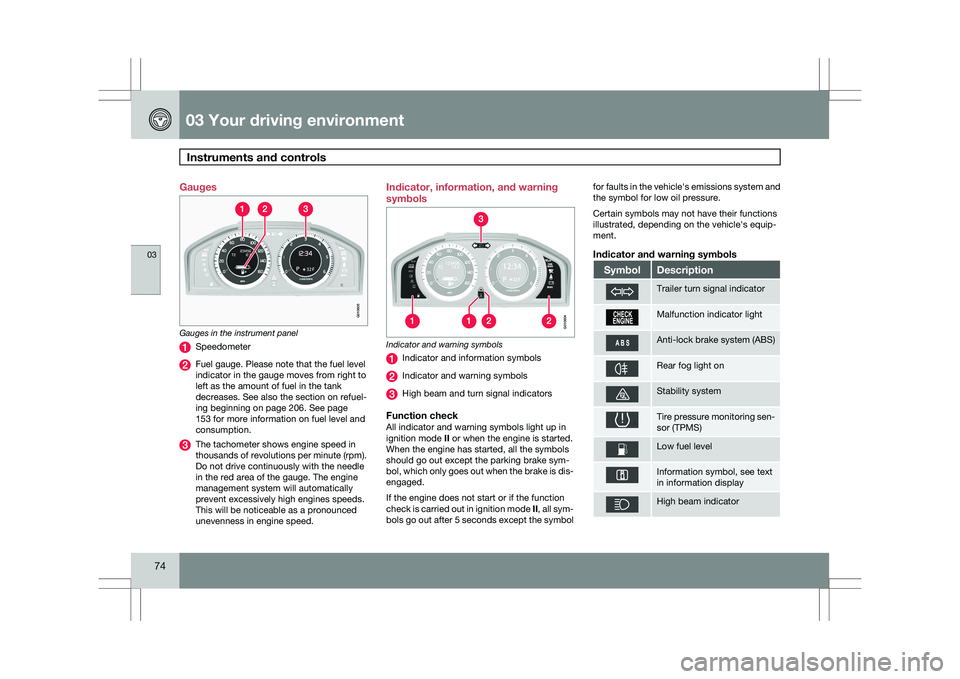
Gauges in the instrument panel
Speedometer
Fuel gauge. Please note that the fuel level
indicator in the gauge moves from right to
left as the amount of fuel in the tank
decreases. See also the section on refuel-
ing beginning on page 206. See page
153 for more information on fuel level and
consumption.
The tachometer shows engine speed in
thousands of revolutions per minute (rpm).
Do not drive continuously with the needle
in the red area of the gauge. The engine
management system will automatically
prevent excessively high engines speeds.
This will be noticeable as a pronounced
unevenness in engine speed. Indicator, information, and warning
symbols
Indicator and warning symbols
Indicator and information symbols
Indicator and warning symbols
High beam and turn signal indicators
Function checkAll indicator and warning symbols light up in
ignition mode
II or when the engine is started.
When the engine has started, all the symbols
should go out except the parking brake sym-
bol, which only goes out when the brake is dis-
engaged.
If the engine does not start or if the function
check is carried out in ignition mode II, all sym-
bols go out after 5 seconds except the symbol for faults in the vehicle\fs emissions system and
the symbol for low oil pressure.
Certain symbols may not have their functions
illustrated, depending on the vehicle\fs equip-
ment.
Indicator and warning symbols
Symbol Description
Trailer turn signal indicator
Malfunction indicator light
Anti-lock brake system (ABS)
Rear fog light on
Stability system
Tire pressure monitoring sen-
sor (TPMS)
Low fuel level
Information symbol, see text
in information display
High beam indicator G010605 G010604
Page 77 of 297
03 Your driving environment
Instruments and controls03
}}
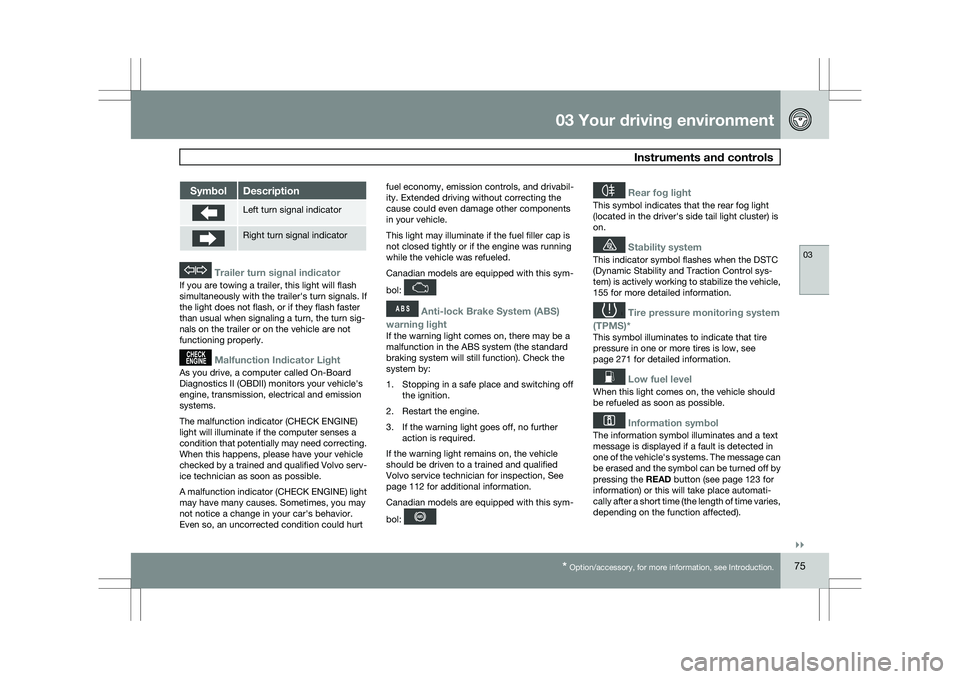
* Option/accessory, for more information, see Introduction. 75Symbol Description
Left turn signal indicator
Right turn signal indicator
Trailer turn signal indicator
If you are towing a trailer, this light will flash
simultaneously with the trailer\fs turn signals. If
the light does not flash, or if they flash faster
than usual when signaling a turn, the turn sig-
nals on the trailer or on the vehicle are not
functioning properly.
Malfunction Indicator Light
As you drive, a computer called On-Board
Diagnostics II (OBDII) monitors your vehicle\fs
engine, transmission, electrical and emission
systems.
The malfunction indicator (CHECK ENGINE)
light will illuminate if the computer senses a
condition that potentially may need correcting.
When this happens, please have your vehicle
checked by a trained and qualified Volvo serv-
ice technician as soon as possible.
A malfunction indicator (CHECK ENGINE) light
may have many causes. Sometimes, you may
not notice a change in your car\fs behavior.
Even so, an uncorrected condition could hurt
fuel economy, emission controls, and drivabil-
ity. Extended driving without correcting the
cause could even damage other components
in your vehicle.
This light may illuminate if the fuel filler cap is
not closed tightly or if the engine was running
while the vehicle was refueled.
Canadian models are equipped with this sym-
bol:
Anti-lock Brake System (ABS)
warning light
If the warning light comes on, there may be a
malfunction in the ABS system (the standard
braking system will still function). Check the
system by:
1. Stopping in a safe place and switching off the ignition.
2. Restart the engine.
3. If the warning light goes off, no further action is required.
If the warning light remains on, the vehicle
should be driven to a trained and qualified
Volvo service technician for inspection,
See
page 112 for additional information.
Canadian models are equipped with this sym-
bol:
Rear fog light
This symbol indicates that the rear fog light
(located in the driver\fs side tail light cluster) is
on.
Stability system
This indicator symbol flashes when the DSTC
(Dynamic Stability and Traction Control sys-
tem) is actively working to stabilize the vehicle,
155 for more detailed information.
Tire pressure monitoring system
(TPMS)*
This symbol illuminates to indicate that tire
pressure in one or more tires is low, see
page 271 for detailed information.
Low fuel level
When this light comes on, the vehicle should
be refueled as soon as possible.
Information symbol
The information symbol illuminates and a text
message is displayed if a fault is detected in
one of the vehicle\fs systems. The message can
be erased and the symbol can be turned off by
pressing the READ button (see page 123 for
information) or this will take place automati-
cally after a short time (the length of time varies,
depending on the function affected).
Page 78 of 297
03 Your driving environmentInstruments and controls 03
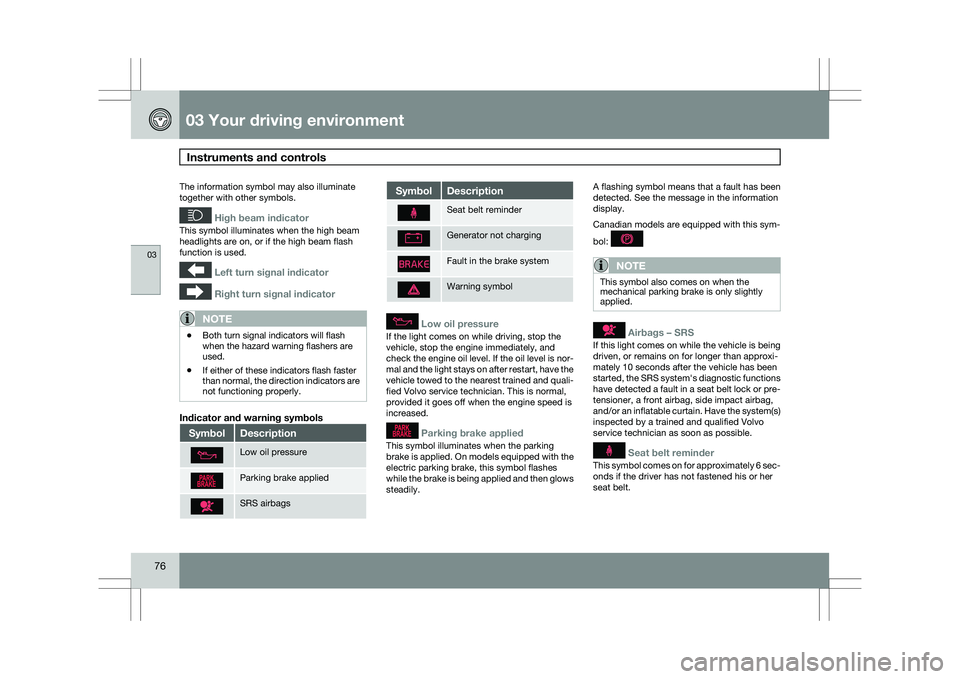
76 The information symbol may also illuminate
together with other symbols.
High beam indicator
This symbol illuminates when the high beam
headlights are on, or if the high beam flash
function is used.
Left turn signal indicator
Right turn signal indicator
NOTE
\b
Both turn signal indicators will flash
when the hazard warning flashers are
used.
\b If either of these indicators flash faster
than normal, the direction indicators are
not functioning properly.
Indicator and warning symbols Symbol Description
Low oil pressure
Parking brake applied
SRS airbags Symbol Description
Seat belt reminder
Generator not charging
Fault in the brake system
Warning symbol
Low oil pressure
If the light comes on while driving, stop the
vehicle, stop the engine immediately, and
check the engine oil level. If the oil level is nor-
mal and the light stays on after restart, have the
vehicle towed to the nearest trained and quali-
fied Volvo service technician. This is normal,
provided it goes off when the engine speed is
increased.
Parking brake applied
This symbol illuminates when the parking
brake is applied. On models equipped with the
electric parking brake, this symbol flashes
while the brake is being applied and then glows
steadily.A flashing symbol means that a fault has been
detected. See the message in the information
display.
Canadian models are equipped with this sym-
bol:
NOTE
This symbol also comes on when the
mechanical parking brake is only slightly
applied.
Airbags – SRS
If this light comes on while the vehicle is being
driven, or remains on for longer than approxi-
mately 10 seconds after the vehicle has been
started, the SRS system\fs diagnostic functions
have detected a fault in a seat belt lock or pre-
tensioner, a front airbag, side impact airbag,
and/or an inflatable curtain. Have the system(s)
inspected by a trained and qualified Volvo
service technician as soon as possible.
Seat belt reminder
This symbol comes on for approximately 6 sec-
onds if the driver has not fastened his or her
seat belt.