USB VOLVO XC60 2009 Owner´s Manual
[x] Cancel search | Manufacturer: VOLVO, Model Year: 2009, Model line: XC60, Model: VOLVO XC60 2009Pages: 297, PDF Size: 21.16 MB
Page 135 of 297
04 Comfort and driving pleasure
Audio system04
}}
* Option/accessory, for more information, see Introduction. 133
Introduction
The audio system is available in two versions:
High Performance and Premium Sound. The
system version is shown in the display when
the audio system is switched on.
If the audio system is on when the ignition is
switched off, it will come on automatically the
next time the ignition is put in mode
I or higher.
The audio system can be operated without a
key in the ignition slot for 15 minutes at a time
by pressing the POWER button (the driver\fs
door must be closed on vehicles with the
optional keyless drive).
Some functions are controlled from the menu
system in the center console. For more infor-
mation on menus, see page 122.
Dolby Surround Pro Logic II and the sym-
bol are trademarks of Dolby Laboratories
Licensing Corporation. The Dolby Surround
Pro Logic II System is manufactured under
license from Dolby Laboratories Licensing Cor-
poration.
Remote key and ignition modesThe audio system can be used for 15 minutes
at a time if the remote key is not inserted in the
ignition slot.
NOTE To prevent unnecessary drain on the vehi-
cle\fs battery, remove the remote key from
the ignition slot if the audio system is used
when the engine is not running.
If the audio system is playing when the engine
is switched off, it will be on when the engine is
restarted.
Overview
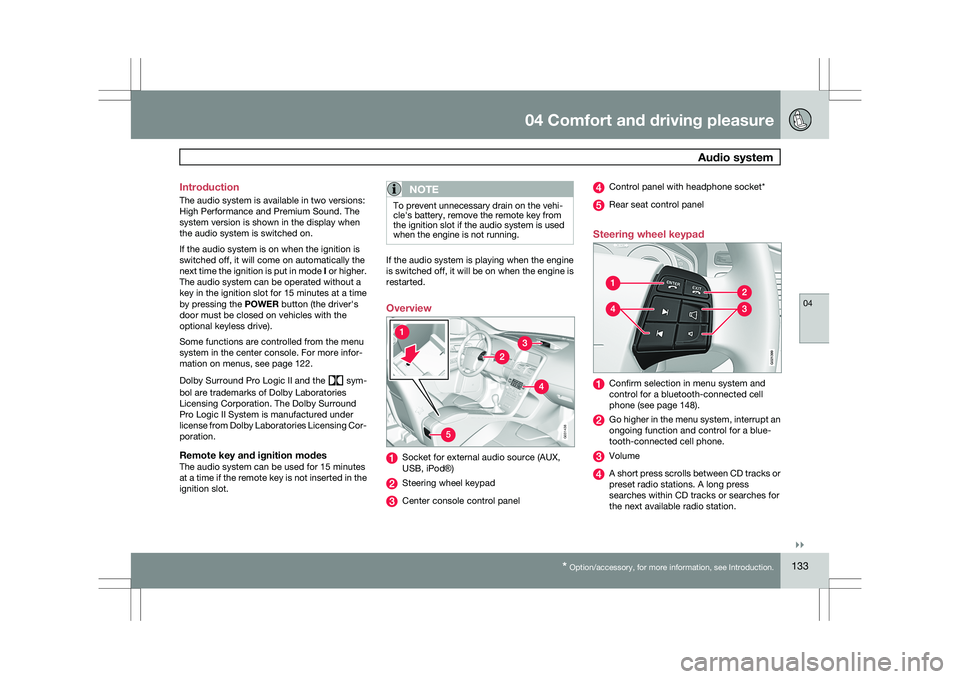
Socket for external audio source (AUX,
USB, iPod®)
Steering wheel keypad
Center console control panel Control panel with headphone socket*
Rear seat control panel
Steering wheel keypad Confirm selection in menu system and
control for a bluetooth-connected cell
phone (see page 148).
Go higher in the menu system, interrupt an
ongoing function and control for a blue-
tooth-connected cell phone.
Volume
A short press scrolls between CD tracks or
preset radio stations. A long press
searches within CD tracks or searches for
the next available radio station. 5G031438 G02139
9
Page 136 of 297
04 Comfort and driving pleasureAudio system 04
134 Please note that these functions are also avail-
able through the audio system controls on cen-
ter console.
USB/iPod connector
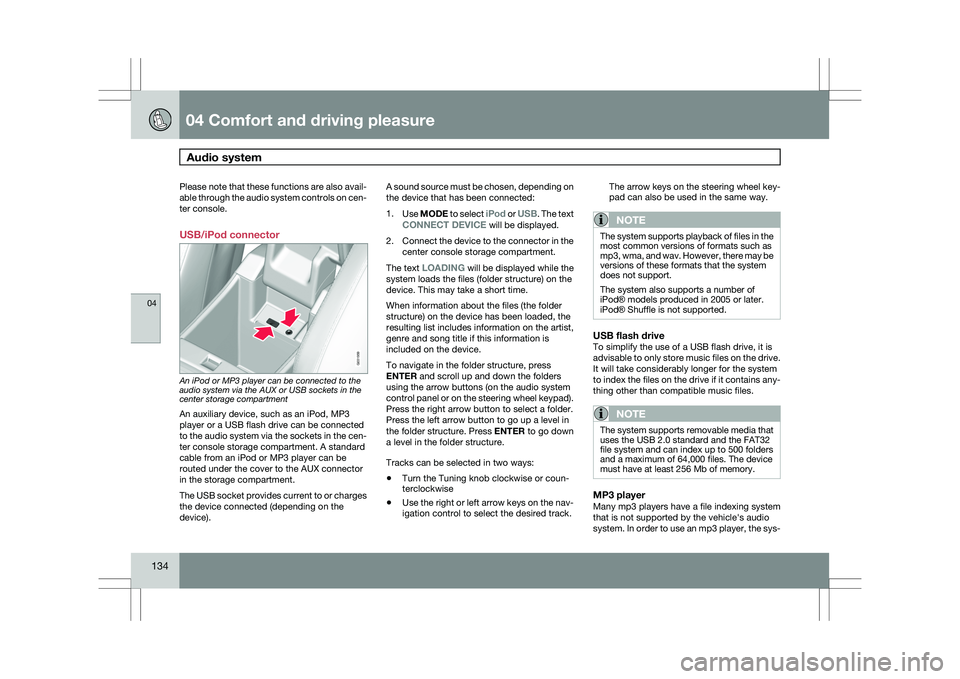
An iPod or MP3 player can be connected to the
audio system via the AUX or USB sockets in the
center storage compartment
An auxiliary device, such as an iPod, MP3
player or a USB flash drive can be connected
to the audio system via the sockets in the cen-
ter console storage compartment. A standard
cable from an iPod or MP3 player can be
routed under the cover to the AUX connector
in the storage compartment.
The USB socket provides current to or charges
the device connected (depending on the
device). A sound source must be chosen, depending on
the device that has been connected:
1.
Use MODE to select iPod or USB. The text
CONNECT DEVICE will be displayed.
2. Connect the device to the connector in the
center console storage compartment.
The text LOADING will be displayed while the
system loads the files (folder structure) on the
device. This may take a short time.
When information about the files (the folder
structure) on the device has been loaded, the
resulting list includes information on the artist,
genre and song title if this information is
included on the device.
To navigate in the folder structure, press
ENTER and scroll up and down the folders
using the arrow buttons (on the audio system
control panel or on the steering wheel keypad).
Press the right arrow button to select a folder.
Press the left arrow button to go up a level in
the folder structure. Press ENTER to go down
a level in the folder structure.
Tracks can be selected in two ways:
\b Turn the Tuning knob clockwise or coun-
terclockwise
\b Use the right or left arrow keys on the nav-
igation control to select the desired track. The arrow keys on the steering wheel key-
pad can also be used in the same way.
NOTE The system supports playback of files in the
most common versions of formats such as
mp3, wma, and wav. However, there may be
versions of these formats that the system
does not support.
The system also supports a number of
iPod® models produced in 2005 or later.
iPod® Shuffle is not supported.
USB flash driveTo simplify the use of a USB flash drive, it is
advisable to only store music files on the drive.
It will take considerably longer for the system
to index the files on the drive if it contains any-
thing other than compatible music files.
NOTE
The system supports removable media that
uses the USB 2.0 standard and the FAT32
file system and can index up to 500 folders
and a maximum of 64,000 files. The device
must have at least 256 Mb of memory.
MP3 playerMany mp3 players have a file indexing system
that is not supported by the vehicle\fs audio
system. In order to use an mp3 player, the sys- G031959
Page 137 of 297
04 Comfort and driving pleasure
Audio system04
}}
* Option/accessory, for more information, see Introduction. 135
tem must be set to USB Removable device/
Mass Storage Device.
iPodAn iPod receives current and its battery is
charged through the connecting cord. How-
ever, if the iPod\fs battery is completely
drained, it should be recharged before the iPod
is connected to the audio system.
NOTE
When an iPod® is used as a sound source,
the vehicle\fs audio system has a menu
structure similar to the one in the iPod
®. See
the iPod\fs manual for detailed information. For further information, refer to the accessory
manual USB/iPod Music Interface.
Rear seat control panel with
headphone sockets
Headphones with an impedance of
16 – 32 ohm and sensitivity of 102 dB or higher
are recommended for best sound reproduc-
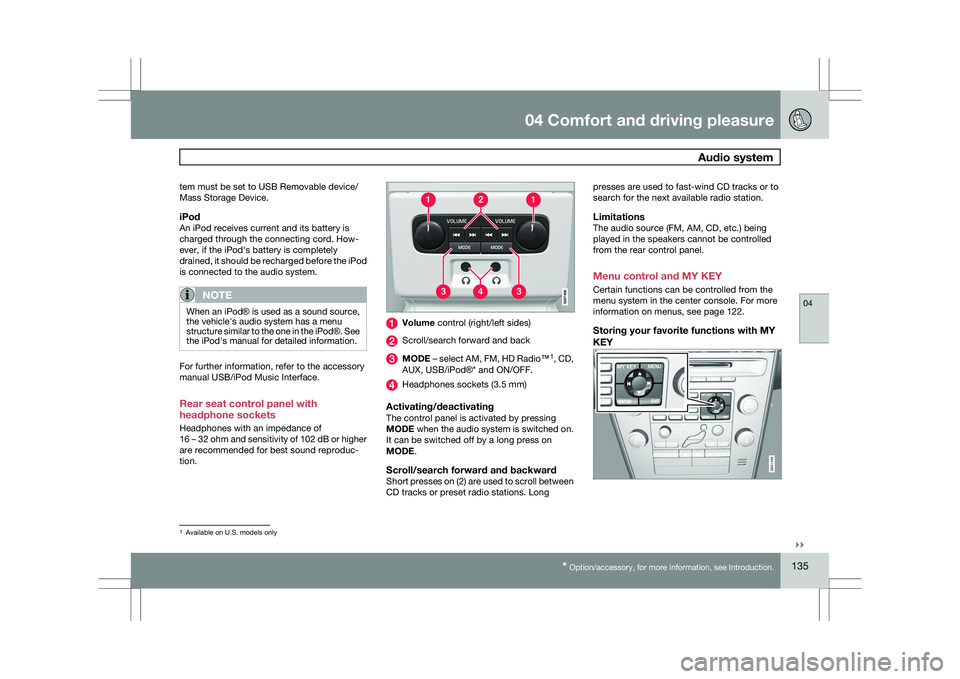
tion. Volume control (right/left sides)
Scroll/search forward and back
MODE – select AM, FM, HD Radio™
1
, CD,
AUX, USB/iPod®* and ON/OFF. Headphones sockets (3.5 mm)
Activating/deactivatingThe control panel is activated by pressing
MODE when the audio system is switched on.
It can be switched off by a long press on
MODE.
Scroll/search forward and backwardShort presses on (2) are used to scroll between
CD tracks or preset radio stations. Longpresses are used to fast-wind CD tracks or to
search for the next available radio station.
LimitationsThe audio source (FM, AM, CD, etc.) being
played in the speakers cannot be controlled
from the rear control panel.
Menu control and MY KEY
Certain functions can be controlled from the
menu system in the center console. For more
information on menus, see page 122.
Storing your favorite functions with MY
KEY
1
Available on U.S. models only G031439
Page 200 of 297
04 Comfort and driving pleasurePassenger compartment convenience 04
198
* Option/accessory, for more information, see Introduction. Compartment in door panel
Storage pocket on the front edge of the
front seat cushions
Glove compartment
Storage compartment, 12-volt socket and
AUX input/USB connector*
Jacket holder
Rear seat cup holders
Storage pocket
Jacket holderThe jacket hanger is located on the inboard
side of the front passenger\fs seat head
restraint. It is only intended for hanging light
garments.
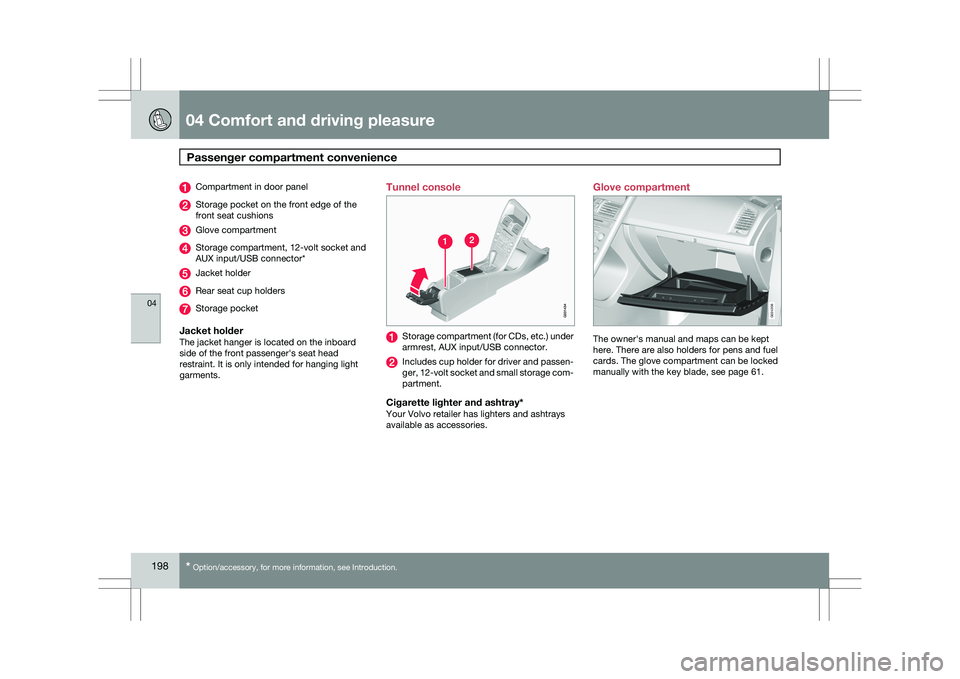
Tunnel console Storage compartment (for CDs, etc.) under
armrest, AUX input/USB connector.
Includes cup holder for driver and passen-
ger, 12-volt socket and small storage com-
partment.
Cigarette lighter and ashtray*Your Volvo retailer has lighters and ashtrays
available as accessories.Glove compartment
The owner\fs manual and maps can be kept
here. There are also holders for pens and fuel
cards. The glove compartment can be locked
manually with the key blade, see page 61. G02420
6
Page 290 of 297
07 Index07
288 1, 2, 3 ...
12-volt sockets
........................................ 199
A Accessory installation warning
.................... 8
Active chassis system .............................157
Active yaw control ................................... 155
Adaptive cruise control ....172, 173, 174, 175
Airbags disconnecting the front passenger’s
side................................................. 22, 23
front.......................................... 18, 19, 20
inflatable curtain ................................... 28
side impact........................................... 26
Air conditioning ........................................ 129
Air distribution..........................................
127
Air distribution table................................. 131
Air vents................................................... 127
All Wheel Drive ......................................... 111
Anti-freeze ....................................... 204, 230
Anti-lock brake system ............................112
warning light ......................................... 74Approach lighting................................. 52, 92
Audio system
audio functions ................................... 136
CD player/changer
...................... 144, 145
Digital Audio Broadcasting (DAB) .......140
HD digital radio ................................... 139
menu control....................................... 135
overview.............................................. 133
radio functions .................................... 138
Sirius satellite radio ............141, 143, 144
sound settings .................................... 136
steering wheel keypad ........................133
USB/iPod® connector ........................134
Auto-dim rearview mirror ...........................99
Automatic locking retractor .......................34
Automatic transmission Geartronic ................................... 109, 110
general description .....................109, 110
oil ........................................................ 285
shiftlock override ................................ 110
Axle weight .............................................. 261B Battery
changing ..................................... 242, 243
maintenance ....................................... 242
remote control, replacing .....................56
specifications ...................................... 286
warning symbols.................................
242
Black box............................................. 7, 224
Blind Spot Information System
(BLIS)....................................... 193, 194, 195
Booster cushion, integrated ......................45
Booster cushions ....................................... 41
Brake lights ................................................ 88
emergency brake lights ........................88
Brake system checking fluid level ............................. 230
emergency brake assistance ..............113
fluid..................................................... 285
general information ............................. 112
Hill Descent Control ............................114
warning light ......................................... 76
Bulbs cargo area lighting .............................. 237
footwell lighting................................... 237
headlights ................................... 232, 234