power steering VOLVO XC60 2009 Owner´s Manual
[x] Cancel search | Manufacturer: VOLVO, Model Year: 2009, Model line: XC60, Model: VOLVO XC60 2009Pages: 297, PDF Size: 21.16 MB
Page 5 of 297
Contents* Option/accessory, for more information, see Introduction. 3
03
03
Your driving environment
Instruments and controls ..........................72
Ignition modes .......................................... 79
Seats......................................................... 81
Steering wheel .......................................... 86
Lighting ..................................................... 87
Wipers and washers................................. 93
Power windows......................................... 96
Mirrors....................................................... 98
Power panorama moonroof*................... 100
HomeLink® Wireless Control System* ...102
Starting the engine .................................. 105
Transmission ........................................... 109
Brakes..................................................... 112
Hill Descent Control (HDC) .....................114
Parking brake .......................................... 116
04
04Comfort and driving pleasure
Menus and messages .............................122
Climate system ....................................... 126
Audio system.......................................... 133
Bluetooth ® hands-free connection......... 147
Trip computer......................................... 153
Compass................................................. 154
Stability system....................................... 155
Active chassis system–Four C ................157
Cruise control.......................................... 158
Collision warning with Auto-brake*......... 160
City Safety™ .......................................... 166
Adaptive Cruise Control (ACC)* ..............172
Distance alert ......................................... 179
Driver Alert System*................................ 182
Park assist*............................................. 187
Park Assist Camera (PAC)* .................... 190
Blind Spot Information System*.............. 193
Passenger compartment convenience ...197
05
05 During your trip
Driving recommendations .......................202
Refueling ................................................. 206
Loading ................................................... 210
Cargo area .............................................. 213
Towing a trailer ....................................... 217
Emergency towing .................................. 220
Page 72 of 297

70
* Option/accessory, for more information, see Introduction. Instruments and controls
........................................................................\
72
Ignition modes ........................................................................\
................ 79
Seats........................................................................\
............................... 81
Steering wheel ........................................................................\
................ 86
Lighting ........................................................................\
........................... 87
Wipers and washers......................................................\
..........................
93
Power windows........................................................................\
............... 96
Mirrors........................................................................\
............................. 98
Power panorama moonroof*................................................................. 100
HomeLink® Wireless Control System* .................................................102
Starting the engine ........................................................................\
........ 105
Transmission ........................................................................\
................. 109
Brakes........................................................................\
........................... 112
Hill Descent Control (HDC).................................................................... 114
Parking brake ........................................................................\
................ 116
G02091
2
Page 75 of 297
03 Your driving environment
Instruments and controls03
}}
* Option/accessory, for more information, see Introduction. 73Function Page
Menus and mes-
sages, turn signals,
high/low beams,
trip computer 122 , 90,
87, 153
Cruise control 158
Horn, airbag 86, 17
Main instrument
panel 73
Menu system,
audio, Bluetooth
hands-free controls 152
START/STOP
ENGINE button 79
Ignition slot 79
Information display 89
Door handle –
In-door control pan-
els (power win-
dows, mirrors,
power child safety
locks, central lock-
ing button) 122 , 96,
98, 65, 61 Function Page
Hazard warning
flashers 122 , 136
Audio system con-
trols 126
Climate system
controls 109
Gear selector 157
Controls for active
chassis (Four-C)* 93
Wipers and washers 86
Steering wheel
adjustment 227
Hood opening con-
trol 116
Parking brake 81
Power seat* adjust-
ment controls 87, 208
Lighting panel, con-
trols for opening
fuel filler door/tail-
gate 87, 208,
see page 62 Information displays
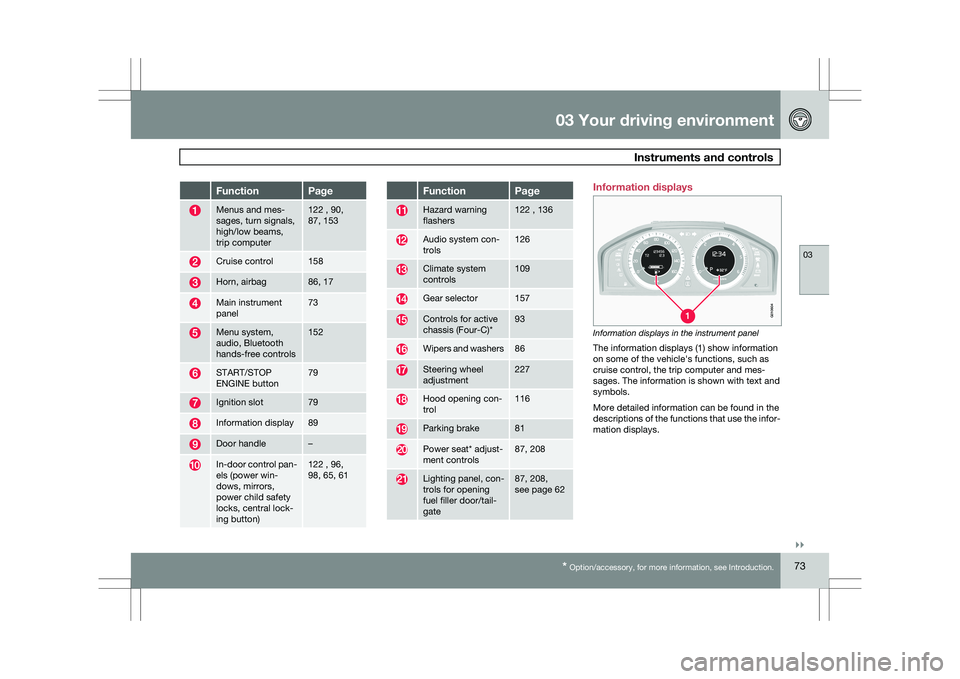
Information displays in the instrument panel
The information displays (1) show information
on some of the vehicle\fs functions, such as
cruise control, the trip computer and mes-
sages. The information is shown with text and
symbols.
More detailed information can be found in the
descriptions of the functions that use the infor-
mation displays. G01060
4
Page 88 of 297
03 Your driving environmentSteering wheel 03
86
* Option/accessory, for more information, see Introduction.
Adjusting
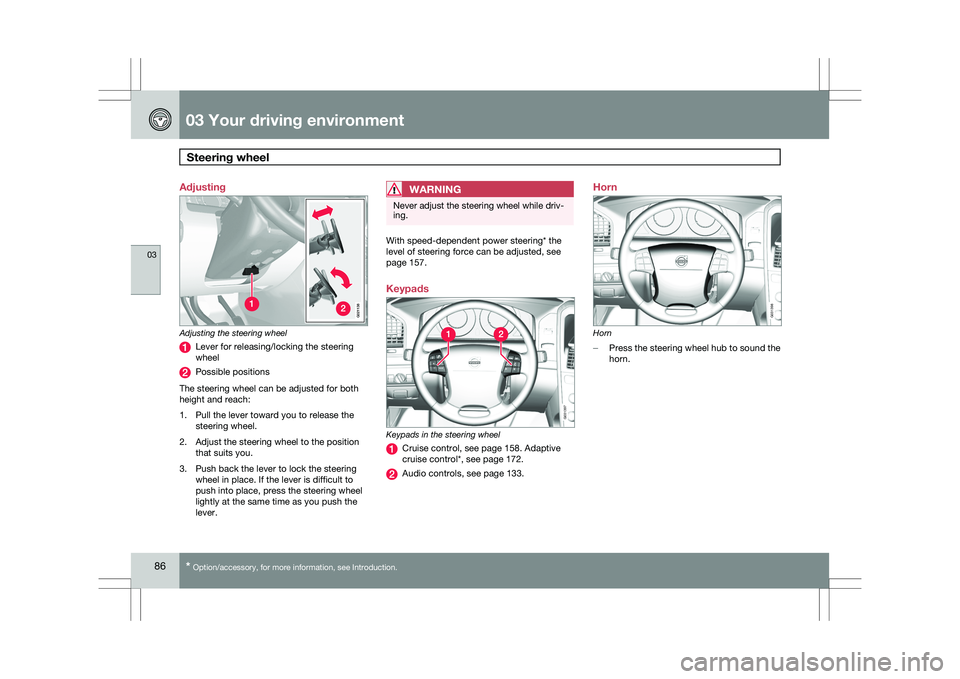
Adjusting the steering wheel
Lever for releasing/locking the steering
wheel
Possible positions
The steering wheel can be adjusted for both
height and reach:
1. Pull the lever toward you to release the steering wheel.
2. Adjust the steering wheel to the position that suits you.
3. Push back the lever to lock the steering wheel in place. If the lever is difficult to
push into place, press the steering wheel
lightly at the same time as you push the
lever.
WARNING Never adjust the steering wheel while driv-
ing.
With speed-dependent power steering* the
level of steering force can be adjusted, see
page 157.
Keypads
Keypads in the steering wheel
Cruise control, see page 158. Adaptive
cruise control*, see page 172.
Audio controls, see page 133.Horn
Horn
–
Press the steering wheel hub to sound the
horn. G02113
8 G031397 G031398
Page 114 of 297
03 Your driving environmentBrakes 03
112 Brake system
The brake system is a hydraulic system con-
sisting of two separate brake circuits. If a prob-
lem should occur in one of these circuits, it is
still possible to stop the vehicle with the other
brake circuit.
If the brake pedal must be depressed farther
than normal and requires greater foot pressure,
the stopping distance will be longer.
A warning light in the instrument panel will light
up to warn the driver that a fault has occurred.
If this light comes on while driving or braking,
stop immediately and check the brake fluid
level in the reservoir.
NOTE
Press the brake pedal hard and maintain
pressure on the pedal – do not pump the
brakes.
WARNING
If the fluid level is below the MIN mark in the
reservoir or if a brake system message is
shown in the information display:
DO NOT
DRIVE. Have the vehicle towed to a trained
and qualified Volvo service technician and
have the brake system inspected.
Power brakes function only when the
engine is running
The power brakes utilize vacuum pressure
which is only created when the engine is run-
ning. Never let the vehicle roll to a stop with the
engine switched off.
If the power brakes are not working, the brake
pedal must be pressed approximately five
times harder than usual to make up for the lack
of power assistance. This can happen for
example when towing your vehicle or if the
engine is switched off when the vehicle is roll-
ing. The brake pedal feels harder than usual.
Water on brake discs and brake pads
affects braking
Driving in rain and slush or passing through an
automatic car wash can cause water to collect
on the brake discs and pads. This will cause a
delay in braking effect when the pedal is
depressed. To avoid such a delay when the
brakes are needed, depress the pedal occa-
sionally when driving through rain, slush, etc.
This will remove the water from the brakes.
Check that brake application feels normal. This
should also be done after washing or starting
in very damp or cold weather.
Severe strain on the brake systemThe brakes will be subject to severe strain
when driving in mountains or hilly areas, or
when towing a trailer. Vehicle speed is usually slower, which means that the cooling of the
brakes is less efficient than when driving on
level roads. To reduce the strain on the brakes,
shift into a lower gear and let the engine help
with the braking. Do not forget that if you are
towing a trailer, the brakes will be subjected to
a greater than normal load.
Anti-lock braking systemThe Anti-lock Braking System (ABS) helps to
improve vehicle control (stopping and steering)
during severe braking conditions by limiting
brake lockup. When the system "senses"
impending lockup, braking pressure is auto-
matically modulated in order to help prevent
lockup that could lead to a skid.
The system performs a brief self-diagnostic
test when the engine has been started and
driver releases the brake pedal. Another auto-
matic test may be performed when the vehicle
first reaches a speed of approximately 25 mph
(40 km/h
). The brake pedal will pulsate several
times and a sound may be audible from the
ABS control module. This is normal.
Cleaning the brake discsCoatings of dirt and water on the brake discs
may result in delayed brake function. This delay
is minimized by cleaning the brake linings.
Cleaning the brake pads is advisable in wet
weather, prior to long-term parking, and after
the vehicle has been washed. Do this by brak-
Page 135 of 297
04 Comfort and driving pleasure
Audio system04
}}
* Option/accessory, for more information, see Introduction. 133
Introduction
The audio system is available in two versions:
High Performance and Premium Sound. The
system version is shown in the display when
the audio system is switched on.
If the audio system is on when the ignition is
switched off, it will come on automatically the
next time the ignition is put in mode
I or higher.
The audio system can be operated without a
key in the ignition slot for 15 minutes at a time
by pressing the POWER button (the driver\fs
door must be closed on vehicles with the
optional keyless drive).
Some functions are controlled from the menu
system in the center console. For more infor-
mation on menus, see page 122.
Dolby Surround Pro Logic II and the sym-
bol are trademarks of Dolby Laboratories
Licensing Corporation. The Dolby Surround
Pro Logic II System is manufactured under
license from Dolby Laboratories Licensing Cor-
poration.
Remote key and ignition modesThe audio system can be used for 15 minutes
at a time if the remote key is not inserted in the
ignition slot.
NOTE To prevent unnecessary drain on the vehi-
cle\fs battery, remove the remote key from
the ignition slot if the audio system is used
when the engine is not running.
If the audio system is playing when the engine
is switched off, it will be on when the engine is
restarted.
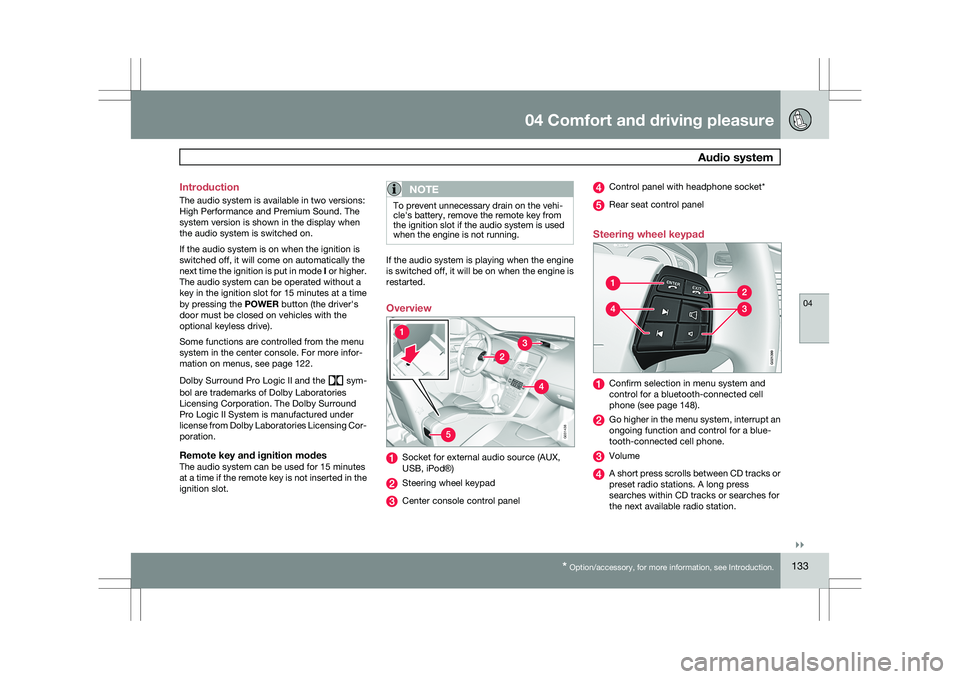
Overview
Socket for external audio source (AUX,
USB, iPod®)
Steering wheel keypad
Center console control panel Control panel with headphone socket*
Rear seat control panel
Steering wheel keypad Confirm selection in menu system and
control for a bluetooth-connected cell
phone (see page 148).
Go higher in the menu system, interrupt an
ongoing function and control for a blue-
tooth-connected cell phone.
Volume
A short press scrolls between CD tracks or
preset radio stations. A long press
searches within CD tracks or searches for
the next available radio station. 5G031438 G02139
9
Page 221 of 297
05 During your trip
Towing a trailer05
219
in the trailer, there is risk of swaying at speeds
between approximately 45-55 mph
(70-90 km/h).
NOTE
\b
The TSA system intervenes at speeds
above approximately 40 mph
(60 km/h).
\b The DSTC symbol ( ) in the instru-
ment panel will flash when TSA is work-
ing.
\b If the driver switches off the
DSTC sys-
tem\fs Spin Control function (see
page 155), TSA will also be switched off.
\b TSA may not intervene when the vehicle
and trailer begin to sway if the driver
tries to compensate for the swaying
motion by moving the steering wheel
rapidly. Swaying may be caused by one of the following
factors:
\b
The vehicle and trailer are hit by a sudden,
strong crosswind
\b The vehicle and trailer are traveling on an
uneven road surface or drive over a bump
\b Sudden movements of the steering wheel
How TSA worksOnce swaying has begun, it can be very diffi-
cult to stop, which makes it difficult to control
the vehicle and trailer.
The TSA system continuously monitors the
vehicle\fs movements, particularly lateral
movement. If the system detects a tendency to
sway, the brakes are applied individually on the
front wheels, which has a stabilizing effect on
the vehicle and trailer. This is often enough to
enable the driver to regain control of the vehi-
cle.
If this is not adequate to stop the swaying
motion, the brakes are applied to all of the
wheels on the vehicle and on the trailer if it is
equipped with brakes, and engine power is
temporarily reduced. As the swaying motion
begins to decrease and the vehicle-trailer have
once again become stable, TSA will no stop
regulating the brakes/engine power and the
driver regains control of the vehicle.
Page 222 of 297
05 During your tripEmergency towing 05
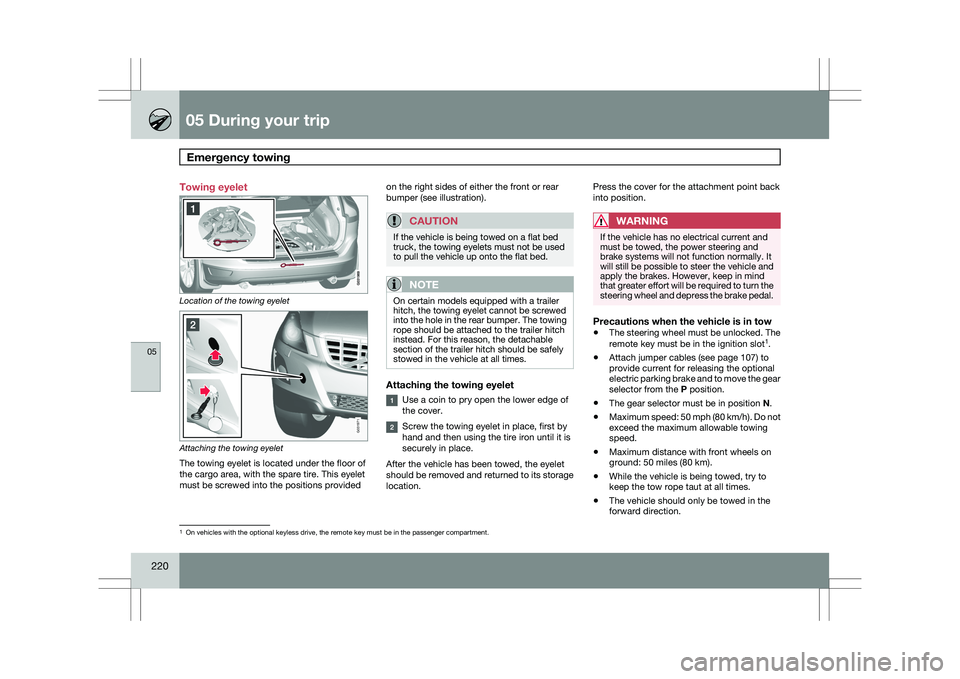
220 Towing eyelet
Location of the towing eyelet
Attaching the towing eyelet
The towing eyelet is located under the floor of
the cargo area, with the spare tire. This eyelet
must be screwed into the positions provided on the right sides of either the front or rear
bumper (see illustration).
CAUTION If the vehicle is being towed on a flat bed
truck, the towing eyelets must not be used
to pull the vehicle up onto the flat bed.
NOTE
On certain models equipped with a trailer
hitch, the towing eyelet cannot be screwed
into the hole in the rear bumper. The towing
rope should be attached to the trailer hitch
instead. For this reason, the detachable
section of the trailer hitch should be safely
stowed in the vehicle at all times.
Attaching the towing eyelet
Use a coin to pry open the lower edge of
the cover.
Screw the towing eyelet in place, first by
hand and then using the tire iron until it is
securely in place.
After the vehicle has been towed, the eyelet
should be removed and returned to its storage
location. Press the cover for the attachment point back
into position.
WARNING If the vehicle has no electrical current and
must be towed, the power steering and
brake systems will not function normally. It
will still be possible to steer the vehicle and
apply the brakes. However, keep in mind
that greater effort will be required to turn the
steering wheel and depress the brake pedal.
Precautions when the vehicle is in tow
\b
The steering wheel must be unlocked. The
remote key must be in the ignition slot 1
.
\b Attach jumper cables (see page 107) to
provide current for releasing the optional
electric parking brake and to move the gear
selector from the
P position.
\b The gear selector must be in position
N.
\b Maximum speed: 50 mph (80 km/h). Do not
exceed the maximum allowable towing
speed.
\b Maximum distance with front wheels on
ground: 50 miles (80 km).
\b While the vehicle is being towed, try to
keep the tow rope taut at all times.
\b The vehicle should only be towed in the
forward direction. 1
On vehicles with the optional keyless drive, the remote key must be in t\
he passenger compartment. G031971
Page 229 of 297
06 Maintenance and specifications
Hood and engine compartment06
227
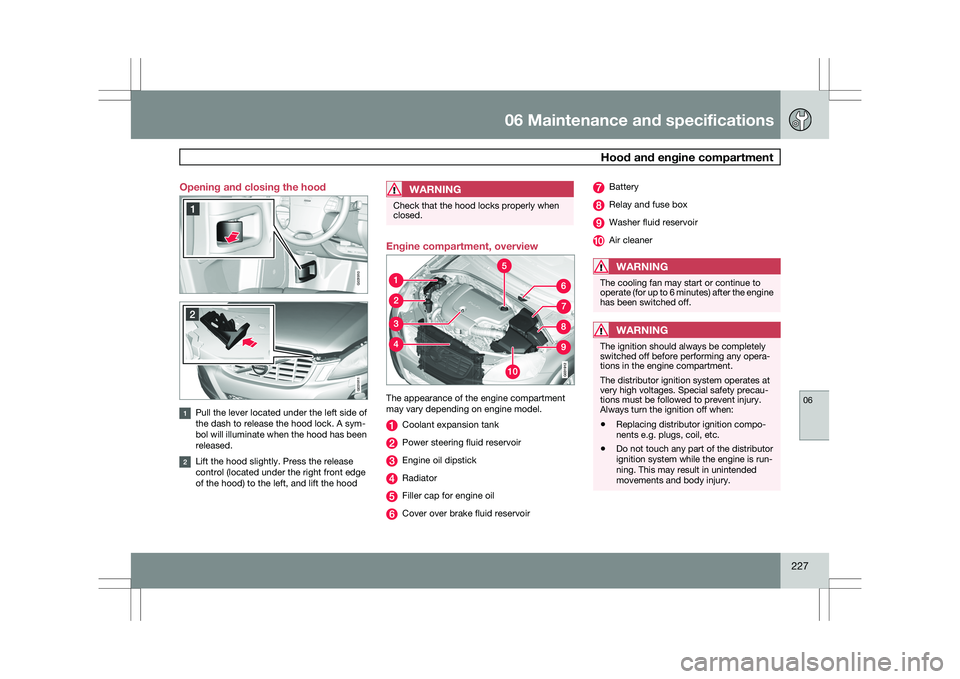
Opening and closing the hood
Pull the lever located under the left side of
the dash to release the hood lock. A sym-
bol will illuminate when the hood has been
released.
Lift the hood slightly. Press the release
control (located under the right front edge
of the hood) to the left, and lift the hood
WARNING Check that the hood locks properly when
closed.
Engine compartment, overview
The appearance of the engine compartment
may vary depending on engine model.
Coolant expansion tank
Power steering fluid reservoir
Engine oil dipstick
Radiator
Filler cap for engine oil
Cover over brake fluid reservoir Battery
Relay and fuse box
Washer fluid reservoir
Air cleaner
WARNING
The cooling fan may start or continue to
operate (for up to 6 minutes) after the engine
has been switched off.
WARNING
The ignition should always be completely
switched off before performing any opera-
tions in the engine compartment.
The distributor ignition system operates at
very high voltages. Special safety precau-
tions must be followed to prevent injury.
Always turn the ignition off when:
\b
Replacing distributor ignition compo-
nents e.g. plugs, coil, etc.
\b Do not touch any part of the distributor
ignition system while the engine is run-
ning. This may result in unintended
movements and body injury. G031910 G031911
Page 233 of 297
06 Maintenance and specifications
Fluids06
231
The brake fluid should always be between the
MIN and MAX marks on the inside of the res-
ervoir. Check, without removing the cap, that
there is sufficient fluid in the reservoir.
Fluid type: DOT 4+ boiling point >536 °F
(280 °C), P/N 9437433
Replace: The fluid should be replaced accord-
ing to the intervals specified in the Warranty
and Service Records Information booklet.
When driving under extremely hard conditions
(mountain driving, etc), it may be necessary to
replace the fluid more often. Consult a trained
and qualified Volvo service technician.
Always entrust brake fluid changing to a
trained and qualified Volvo service technician.
WARNING
If the fluid level is below the MIN mark in the
reservoir or if a brake-related message is
shown in the information display:
DO NOT
DRIVE. Have the car towed to a trained and
qualified Volvo service technician and have
the brake system inspected.
Filling1. Turn and open the cover.
2. Unscrew the reservoir cap and fill the fluid.
The level must be between the MIN and
MAX marks. Power steering fluid
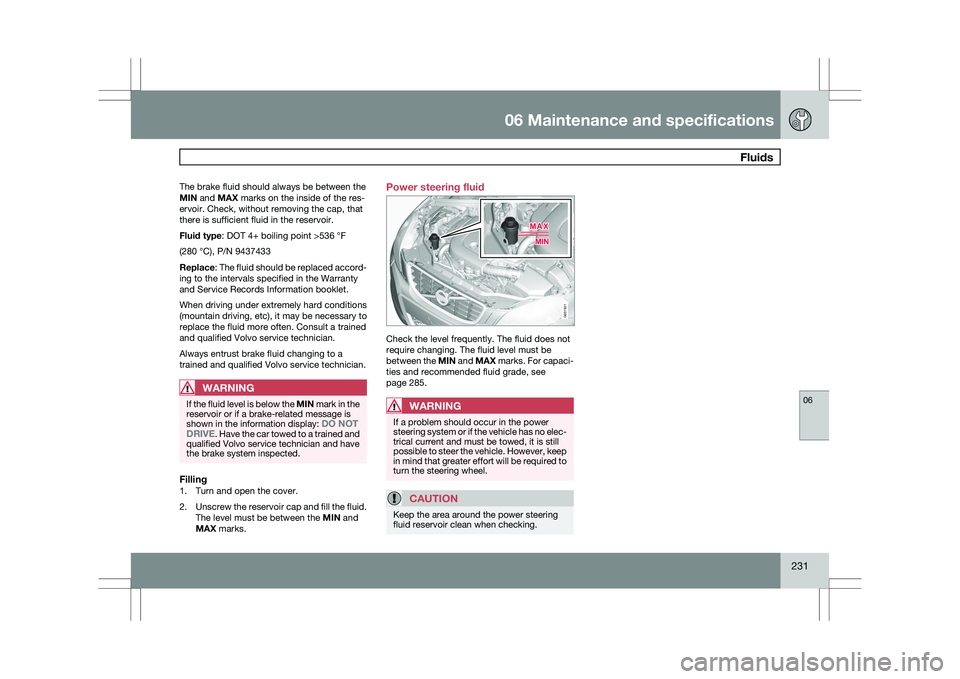
Check the level frequently. The fluid does not
require changing. The fluid level must be
between the MIN and MAX marks. For capaci-
ties and recommended fluid grade, see
page 285.
WARNING
If a problem should occur in the power
steering system or if the vehicle has no elec-
trical current and must be towed, it is still
possible to steer the vehicle. However, keep
in mind that greater effort will be required to
turn the steering wheel.
CAUTION
Keep the area around the power steering
fluid reservoir clean when checking. G031921