transmission VOLVO XC60 2009 Owner´s Manual
[x] Cancel search | Manufacturer: VOLVO, Model Year: 2009, Model line: XC60, Model: VOLVO XC60 2009Pages: 297, PDF Size: 21.16 MB
Page 5 of 297
Contents* Option/accessory, for more information, see Introduction. 3
03
03
Your driving environment
Instruments and controls ..........................72
Ignition modes .......................................... 79
Seats......................................................... 81
Steering wheel .......................................... 86
Lighting ..................................................... 87
Wipers and washers................................. 93
Power windows......................................... 96
Mirrors....................................................... 98
Power panorama moonroof*................... 100
HomeLink® Wireless Control System* ...102
Starting the engine .................................. 105
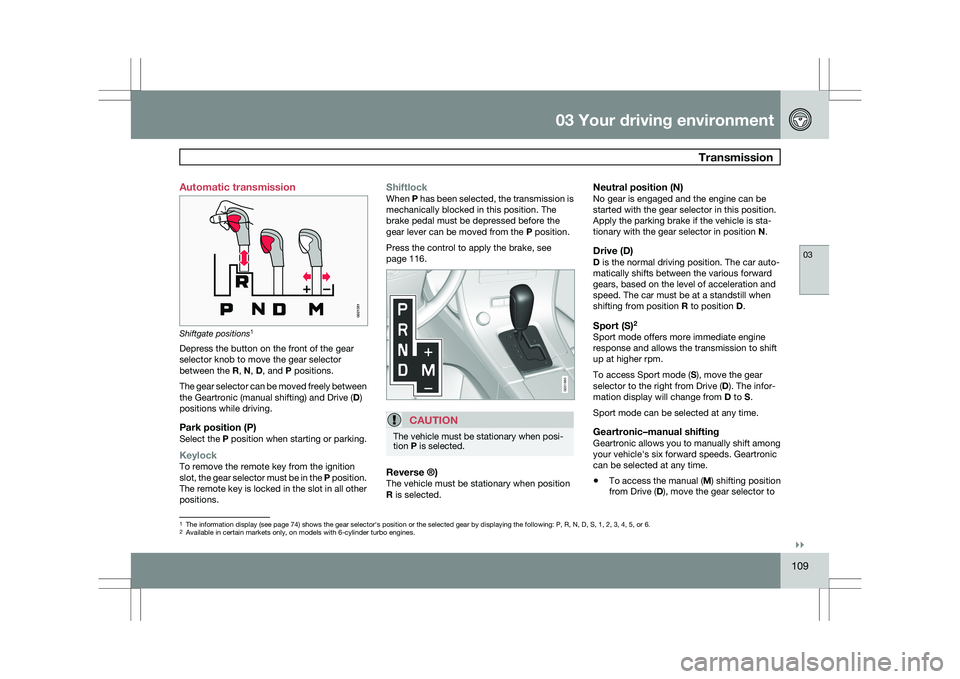
Transmission ........................................... 109
Brakes..................................................... 112
Hill Descent Control (HDC) .....................114
Parking brake .......................................... 116
04
04Comfort and driving pleasure
Menus and messages .............................122
Climate system ....................................... 126
Audio system.......................................... 133
Bluetooth ® hands-free connection......... 147
Trip computer......................................... 153
Compass................................................. 154
Stability system....................................... 155
Active chassis system–Four C ................157
Cruise control.......................................... 158
Collision warning with Auto-brake*......... 160
City Safety™ .......................................... 166
Adaptive Cruise Control (ACC)* ..............172
Distance alert ......................................... 179
Driver Alert System*................................ 182
Park assist*............................................. 187
Park Assist Camera (PAC)* .................... 190
Blind Spot Information System*.............. 193
Passenger compartment convenience ...197
05
05 During your trip
Driving recommendations .......................202
Refueling ................................................. 206
Loading ................................................... 210
Cargo area .............................................. 213
Towing a trailer ....................................... 217
Emergency towing .................................. 220
Page 19 of 297
01 Safety
Supplemental Restraint System (SRS)01
}}
17
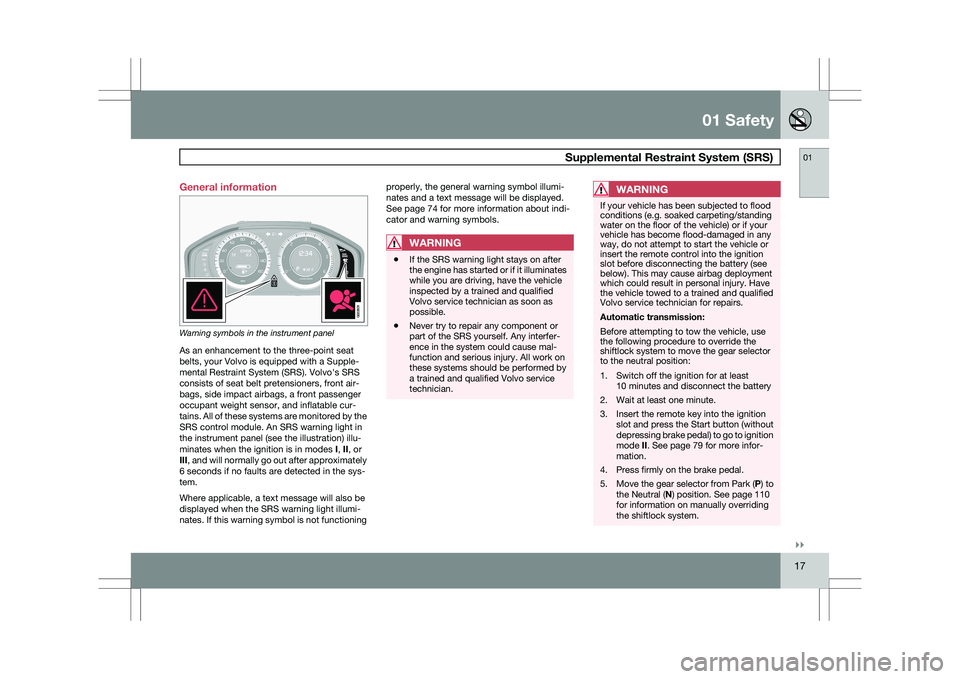
General information
Warning symbols in the instrument panel
As an enhancement to the three-point seat
belts, your Volvo is equipped with a Supple-
mental Restraint System (SRS). Volvo\fs SRS
consists of seat belt pretensioners, front air-
bags, side impact airbags, a front passenger
occupant weight sensor, and inflatable cur-
tains. All of these systems are monitored by the
SRS control module. An SRS warning light in
the instrument panel (see the illustration) illu-
minates when the ignition is in modes
I, II, or
III, and will normally go out after approximately
6 seconds if no faults are detected in the sys-
tem.
Where applicable, a text message will also be
displayed when the SRS warning light illumi-
nates. If this warning symbol is not functioning properly, the general warning symbol illumi-
nates and a text message will be displayed.
See page 74 for more information about indi-
cator and warning symbols.
WARNING
\b
If the SRS warning light stays on after
the engine has started or if it illuminates
while you are driving, have the vehicle
inspected by a trained and qualified
Volvo service technician as soon as
possible.
\b Never try to repair any component or
part of the SRS yourself. Any interfer-
ence in the system could cause mal-
function and serious injury. All work on
these systems should be performed by
a trained and qualified Volvo service
technician.
WARNING If your vehicle has been subjected to flood
conditions (e.g. soaked carpeting/standing
water on the floor of the vehicle) or if your
vehicle has become flood-damaged in any
way, do not attempt to start the vehicle or
insert the remote control into the ignition
slot before disconnecting the battery (see
below). This may cause airbag deployment
which could result in personal injury. Have
the vehicle towed to a trained and qualified
Volvo service technician for repairs.
Automatic transmission:
Before attempting to tow the vehicle, use
the following procedure to override the
shiftlock system to move the gear selector
to the neutral position:
1. Switch off the ignition for at least
10 minutes and disconnect the battery
2. Wait at least one minute.
3. Insert the remote key into the ignition slot and press the Start button (without
depressing brake pedal) to go to ignition
mode II. See page 79 for more infor-
mation.
4. Press firmly on the brake pedal.
5. Move the gear selector from Park ( P) to
the Neutral (N) position. See page 110
for information on manually overriding
the shiftlock system. G022831
Page 56 of 297
02 Locks and alarmRemote key and key blade 02
54 cate that the PCC is receiving information
from the vehicle. If any of the buttons are
pressed during this 7-second period,
transmission of information to the PCC will
be interrupted.
NOTE
If none of the indicator lights flash when the
information button has been pressed sev-
eral times from different places in relation to
the vehicle, contact an authorized Volvo
service technician.
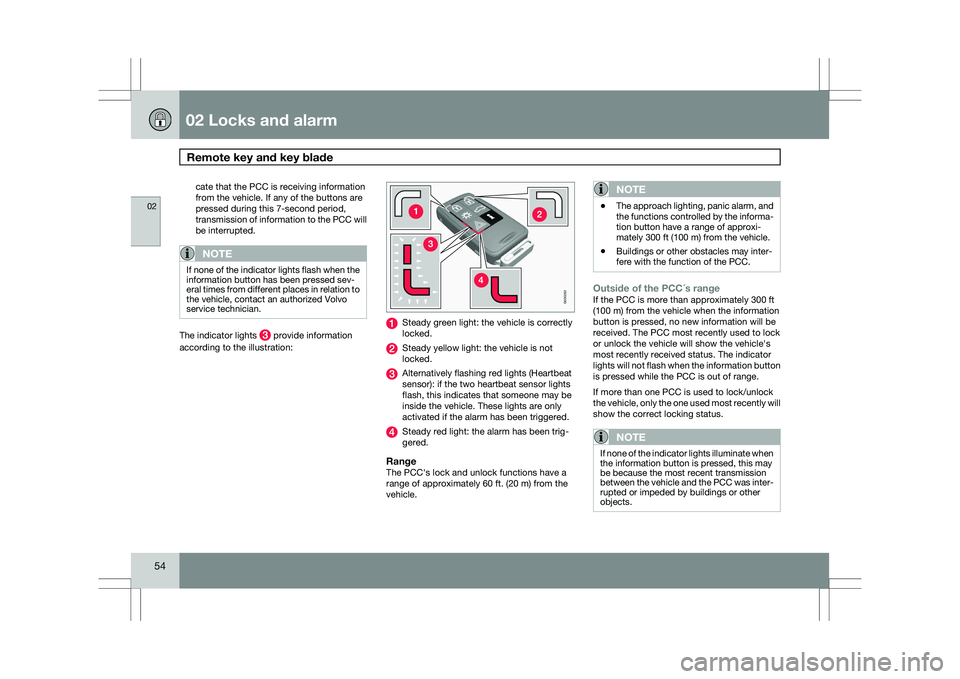
The indicator lights provide information
according to the illustration: Steady green light: the vehicle is correctly
locked.
Steady yellow light: the vehicle is not
locked.
Alternatively flashing red lights (Heartbeat
sensor): if the two heartbeat sensor lights
flash, this indicates that someone may be
inside the vehicle. These lights are only
activated if the alarm has been triggered.
Steady red light: the alarm has been trig-
gered.
RangeThe PCC\fs lock and unlock functions have a
range of approximately 60 ft. (20 m) from the
vehicle.
NOTE \b
The approach lighting, panic alarm, and
the functions controlled by the informa-
tion button have a range of approxi-
mately 300 ft (100 m) from the vehicle.
\b Buildings or other obstacles may inter-
fere with the function of the PCC.
Outside of the PCC´s rangeIf the PCC is more than approximately 300 ft
(100 m) from the vehicle when the information
button is pressed, no new information will be
received. The PCC most recently used to lock
or unlock the vehicle will show the vehicle\fs
most recently received status. The indicator
lights will not flash when the information button
is pressed while the PCC is out of range.
If more than one PCC is used to lock/unlock
the vehicle, only the one used most recently will
show the correct locking status.
NOTE If none of the indicator lights illuminate when
the information button is pressed, this may
be because the most recent transmission
between the vehicle and the PCC was inter-
rupted or impeded by buildings or other
objects. G03026
2
Page 72 of 297

70
* Option/accessory, for more information, see Introduction. Instruments and controls
........................................................................\
72
Ignition modes ........................................................................\
................ 79
Seats........................................................................\
............................... 81
Steering wheel ........................................................................\
................ 86
Lighting ........................................................................\
........................... 87
Wipers and washers......................................................\
..........................
93
Power windows........................................................................\
............... 96
Mirrors........................................................................\
............................. 98
Power panorama moonroof*................................................................. 100
HomeLink® Wireless Control System* .................................................102
Starting the engine ........................................................................\
........ 105
Transmission ........................................................................\
................. 109
Brakes........................................................................\
........................... 112
Hill Descent Control (HDC).................................................................... 114
Parking brake ........................................................................\
................ 116
G02091
2
Page 77 of 297
03 Your driving environment
Instruments and controls03
}}
* Option/accessory, for more information, see Introduction. 75Symbol Description
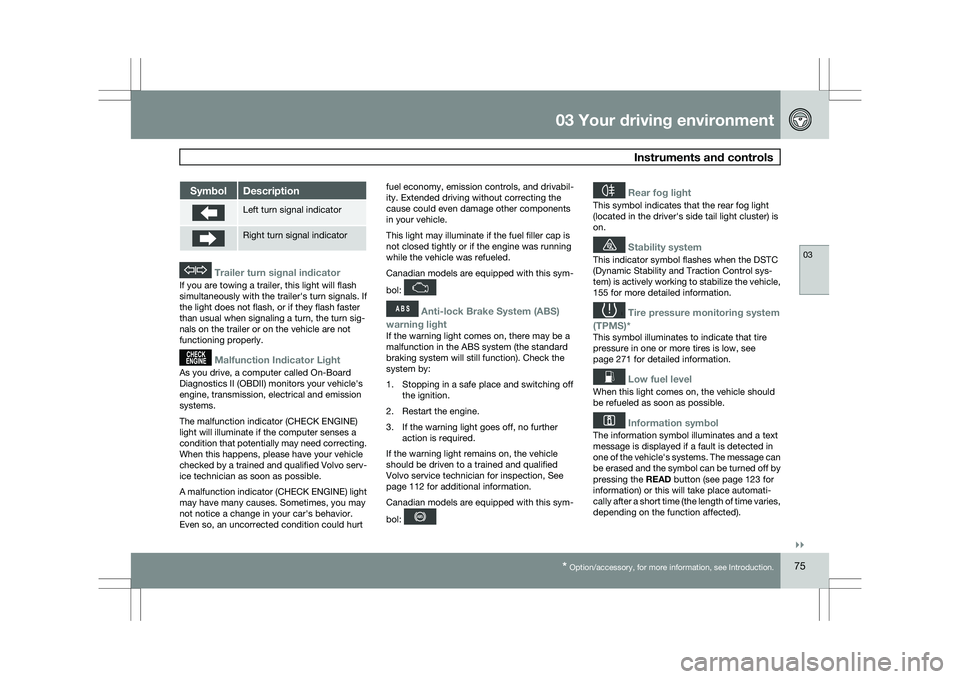
Left turn signal indicator
Right turn signal indicator
Trailer turn signal indicator
If you are towing a trailer, this light will flash
simultaneously with the trailer\fs turn signals. If
the light does not flash, or if they flash faster
than usual when signaling a turn, the turn sig-
nals on the trailer or on the vehicle are not
functioning properly.
Malfunction Indicator Light
As you drive, a computer called On-Board
Diagnostics II (OBDII) monitors your vehicle\fs
engine, transmission, electrical and emission
systems.
The malfunction indicator (CHECK ENGINE)
light will illuminate if the computer senses a
condition that potentially may need correcting.
When this happens, please have your vehicle
checked by a trained and qualified Volvo serv-
ice technician as soon as possible.
A malfunction indicator (CHECK ENGINE) light
may have many causes. Sometimes, you may
not notice a change in your car\fs behavior.
Even so, an uncorrected condition could hurt
fuel economy, emission controls, and drivabil-
ity. Extended driving without correcting the
cause could even damage other components
in your vehicle.
This light may illuminate if the fuel filler cap is
not closed tightly or if the engine was running
while the vehicle was refueled.
Canadian models are equipped with this sym-
bol:
Anti-lock Brake System (ABS)
warning light
If the warning light comes on, there may be a
malfunction in the ABS system (the standard
braking system will still function). Check the
system by:
1. Stopping in a safe place and switching off the ignition.
2. Restart the engine.
3. If the warning light goes off, no further action is required.
If the warning light remains on, the vehicle
should be driven to a trained and qualified
Volvo service technician for inspection,
See
page 112 for additional information.
Canadian models are equipped with this sym-
bol:
Rear fog light
This symbol indicates that the rear fog light
(located in the driver\fs side tail light cluster) is
on.
Stability system
This indicator symbol flashes when the DSTC
(Dynamic Stability and Traction Control sys-
tem) is actively working to stabilize the vehicle,
155 for more detailed information.
Tire pressure monitoring system
(TPMS)*
This symbol illuminates to indicate that tire
pressure in one or more tires is low, see
page 271 for detailed information.
Low fuel level
When this light comes on, the vehicle should
be refueled as soon as possible.
Information symbol
The information symbol illuminates and a text
message is displayed if a fault is detected in
one of the vehicle\fs systems. The message can
be erased and the symbol can be turned off by
pressing the READ button (see page 123 for
information) or this will take place automati-
cally after a short time (the length of time varies,
depending on the function affected).
Page 86 of 297
03 Your driving environmentSeats 03
84 \b
The right (passenger\fs side) section can be
folded down together with the center sec-
tion.
\b All three sections can be folded down
together. Release and lower the center head
restraint (see page 83) if the center and/or
right section of the backrest is to be low-
ered. The outboard head restraints fold
down automatically.
Pull up the backrest release control on the
respective section(s) and fold the sec-
tion(s) down.
NOTE
It may be necessary to move the front seats
forward or put their backrests in a more
upright position before folding down the
rear seat backrests.
WARNING \b
When the backrest(s) are returned to the
upright position, check that it is properly
locked in place. The red indicators
should not be visible.
\b Return the outboard head restraints to
the upright position.
\b Long loads should always be securely
anchored to help avoid injury in the
event of a sudden stop.
\b Always turn the engine off and apply the
parking brake when loading/unloading
the vehicle.
\b Place the transmission in the Park (
P)
position to help prevent inadvertent
movement of the gear selector.
\b On hot days, the temperature in the
vehicle interior can rise very quickly.
Exposure of people to these high tem-
peratures for even a short period of time
can cause heat-related injury or death.
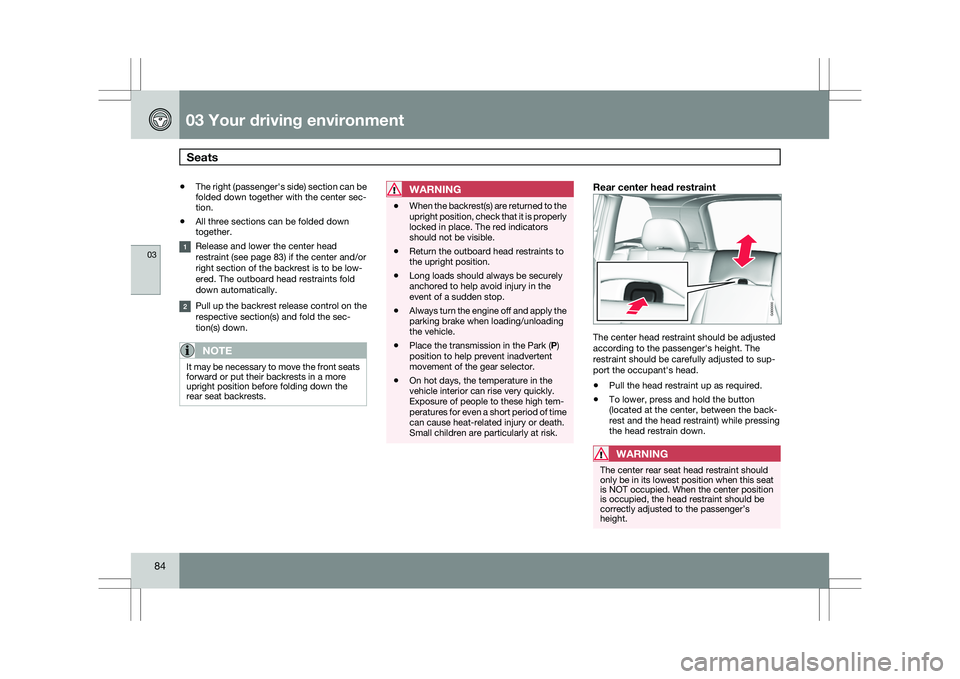
Small children are particularly at risk.Rear center head restraint The center head restraint should be adjusted
according to the passenger\fs height. The
restraint should be carefully adjusted to sup-
port the occupant\fs head.
\b
Pull the head restraint up as required.
\b To lower, press and hold the button
(located at the center, between the back-
rest and the head restraint) while pressing
the head restrain down.
WARNING The center rear seat head restraint should
only be in its lowest position when this seat
is NOT occupied. When the center position
is occupied, the head restraint should be
correctly adjusted to the passenger’s
height. G000000
Page 104 of 297
03 Your driving environmentHomeLink® Wireless Control System* 03
102
* Option/accessory, for more information, see Introduction.
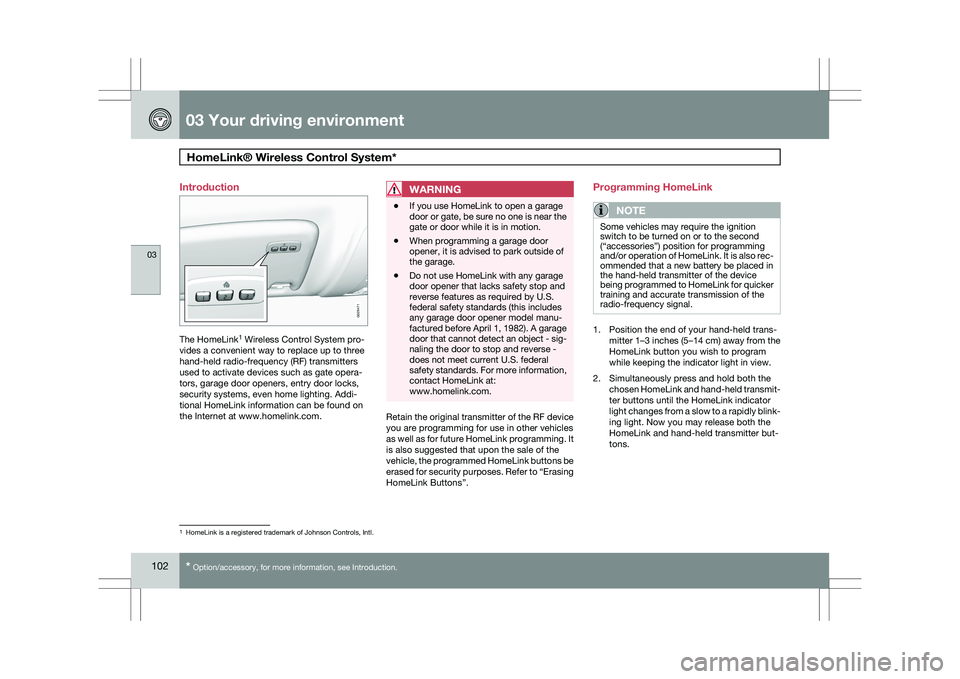
Introduction
The HomeLink
1
Wireless Control System pro-
vides a convenient way to replace up to three
hand-held radio-frequency (RF) transmitters
used to activate devices such as gate opera-
tors, garage door openers, entry door locks,
security systems, even home lighting. Addi-
tional HomeLink information can be found on
the Internet at www.homelink.com.
WARNING \b
If you use HomeLink to open a garage
door or gate, be sure no one is near the
gate or door while it is in motion.
\b When programming a garage door
opener, it is advised to park outside of
the garage.
\b Do not use HomeLink with any garage
door opener that lacks safety stop and
reverse features as required by U.S.
federal safety standards (this includes
any garage door opener model manu-
factured before April 1, 1982). A garage
door that cannot detect an object - sig-
naling the door to stop and reverse -
does not meet current U.S. federal
safety standards. For more information,
contact HomeLink at:
www.homelink.com. Retain the original transmitter of the RF device
you are programming for use in other vehicles
as well as for future HomeLink programming. It
is also suggested that upon the sale of the
vehicle, the programmed HomeLink buttons be
erased for security purposes. Refer to “Erasing
HomeLink Buttons”.Programming HomeLink
NOTE Some vehicles may require the ignition
switch to be turned on or to the second
(“accessories”) position for programming
and/or operation of HomeLink. It is also rec-
ommended that a new battery be placed in
the hand-held transmitter of the device
being programmed to HomeLink for quicker
training and accurate transmission of the
radio-frequency signal.
1. Position the end of your hand-held trans-
mitter 1–3 inches (5–14 cm) away from the
HomeLink button you wish to program
while keeping the indicator light in view.
2. Simultaneously press and hold both the chosen HomeLink and hand-held transmit-
ter buttons until the HomeLink indicator
light changes from a slow to a rapidly blink-
ing light. Now you may release both the
HomeLink and hand-held transmitter but-
tons. 1
HomeLink is a registered trademark of Johnson Controls, Intl. G029471
Page 105 of 297
03 Your driving environment
HomeLink® Wireless Control System*03
}}
* Option/accessory, for more information, see Introduction. 103
NOTESome devices may require you to replace
this Programming Step 2 with procedures
noted in the “Gate Operator / Canadian Pro-
gramming” section. If the HomeLink indica-
tor light does not change to a rapidly blink-
ing light after performing these steps, con-
tact HomeLink at www.homelink.com
.3.
Firmly press, hold for five seconds and
release the programmed HomeLink but-
ton up to two separate times to activate the
door. If the door does not activate, press
and hold the just-trained HomeLink button
and observe the indicator light.
\bIf the indicator light
stays on con-
stantly, programming is complete
and your device should activate when
the HomeLink button is pressed and
released.
\b If the indicator light blinks
rapidly for
two seconds and then turns to a con-
stant light continue with “Program-
ming” steps 4-6 to complete the pro-
gramming of a rolling code equipped
device (most commonly a garage door
opener).
4. At the garage door opener receiver (motor-
head unit) in the garage, locate the “learn”
or “smart” button. This can usually be found where the hanging antenna wire is
attached to the motor-head unit.
5. Firmly press and release the “learn” or “smart” button. (The name and color of the
button may vary by manufacturer.) There
are 30 seconds to initiate step 6.
6. Return to the vehicle and firmly press, hold
for two seconds and release the pro-
grammed HomeLink button. Repeat the
“press/hold/release” sequence a second
time, and, depending on the brand of the
garage door opener (or other rolling code
equipped device), repeat this sequence a
third time to complete the programming
process.
HomeLink should now activate your rolling
code equipped device.
Gate Operator/Canadian ProgrammingCanadian radio-frequency laws require trans-
mitter signals to “time-out” (or quit) after sev-
eral seconds of transmission – which may not
be long enough for HomeLink to pick up the
signal during programming. Similar to this
Canadian law, some U.S. gate operators are
designed to “time-out” in the same manner.
If you live in Canada or you are having difficul-
ties programming a gate operator or garage
door opener by using the “Programming” pro- cedures, replace “Programming HomeLink”
step 2 with the following:
\b
Continue to press and hold the HomeLink
button while you press and release -
every two seconds (“cycle”) your hand-
held transmitter until the HomeLink indica-
tor light changes from a slow to a rapidly
blinking light. Now you may release both
the HomeLink and hand-held transmitter
buttons.
Proceed with “Programming” step 3 to com-
plete.
Using HomeLink
To operate, simply press and release the pro-
grammed HomeLink button. Activation will
now occur for the trained device (i.e., garage
door opener, gate operator, security system,
entry door lock, home/office lighting, etc.). For
convenience, the hand-held transmitter of the
device may also be used at any time. In the
event that there are still programming difficul-
ties or questions, contact HomeLink at:
www.homelink.com.
Page 108 of 297
03 Your driving environmentStarting the engine 03
106
* Option/accessory, for more information, see Introduction.
WARNING \b
Always remove the remote key from the
ignition slot when leaving the vehicle,
especially if there are children in the
vehicle.
\b Never remove the remote key from the
ignition slot while driving or when the
vehicle is being towed. The steering
lock could otherwise be activated, mak-
ing it impossible to steer the vehicle. On
vehicles with the optional keyless drive,
never remove the remote key from the
vehicle while driving or during towing.
\b Always place the gear selector in Park
and apply the parking brake before
leaving the vehicle. Never leave the
vehicle unattended with the engine run-
ning.
\b Always open garage doors fully before
starting the engine inside a garage to
ensure adequate ventilation. The
exhaust gases contain carbon monox-
ide, which is invisible and odorless but
very poisonous.NOTE \b
The idling speed can be noticeably
higher than normal during cold starts.
This is to enable emission control sys-
tem can reach normal operating tem-
perature as quickly as possible, which
helps reduce exhaust emissions 3
.
\b Keylock: Your vehicle is equipped with
a keylock system. When the engine is
switched off, the gear selector must be
in the Park position before the key can
be removed 4
from the ignition slot.CAUTION \b
When starting in cold weather, the auto-
matic transmission may shift up at
slightly higher engine speeds than nor-
mal until the automatic transmission
fluid reaches normal operating tem-
perature.
\b Do not race a cold engine immediately
after starting. Oil flow may not reach
some lubrication points fast enough to
prevent engine damage.
\b The engine should be idling when you
move the gear selector. Never acceler-
ate until after you feel the transmission
engage. Accelerating immediately after
selecting a gear will cause harsh
engagement and premature transmis-
sion wear.
\b Selecting
P or N when idling at a stand-
still for prolonged periods of time will
help prevent overheating of the auto-
matic transmission fluid.
Keyless drive*Follow steps 3 – 4 for starting the engine. 3
If the gear selector is in the D or R positions and the car is not moving, engine speed (rpm) will be lower\
and it will take longer for the engine to reach normal operating temper\
ature.
4 Does not apply to vehicles with the optional keyless drive.
Page 111 of 297
03 Your driving environment
Transmission03
}}
109
Automatic transmission
Shiftgate positions
1
Depress the button on the front of the gear
selector knob to move the gear selector
between the R, N, D, and P positions.
The gear selector can be moved freely between
the Geartronic (manual shifting) and Drive ( D)
positions while driving.
Park position (P)Select the P position when starting or parking.
KeylockTo remove the remote key from the ignition
slot, the gear selector must be in the P position.
The remote key is locked in the slot in all other
positions.
ShiftlockWhen P has been selected, the transmission is
mechanically blocked in this position. The
brake pedal must be depressed before the
gear lever can be moved from the P position.
Press the control to apply the brake, see
page 116.
CAUTION The vehicle must be stationary when posi-
tion P is selected.
Reverse ®)The vehicle must be stationary when position
R is selected.
Neutral position (N)No gear is engaged and the engine can be
started with the gear selector in this position.
Apply the parking brake if the vehicle is sta-
tionary with the gear selector in position
N.
Drive (D)D is the normal driving position. The car auto-
matically shifts between the various forward
gears, based on the level of acceleration and
speed. The car must be at a standstill when
shifting from position R to position D.
Sport (S)2Sport mode offers more immediate engine
response and allows the transmission to shift
up at higher rpm.
To access Sport mode (S), move the gear
selector to the right from Drive (
D). The infor-
mation display will change from D to S.
Sport mode can be selected at any time.
Geartronic–manual shiftingGeartronic allows you to manually shift among
your vehicle\fs six forward speeds. Geartronic
can be selected at any time.
\b To access the manual (
M) shifting position
from Drive (D), move the gear selector to 1
The information display (see page 74) shows the gear selector\fs position or the selected gear by displayin\
g the following: P, R, N, D, S, 1, 2, 3, 4, 5, or 6.
2Available in certain markets only, on models with 6-cylinder turbo engin\
es.
G021351 G031963