sport mode VOLVO XC60 2012 Owner´s Manual
[x] Cancel search | Manufacturer: VOLVO, Model Year: 2012, Model line: XC60, Model: VOLVO XC60 2012Pages: 374, PDF Size: 7.41 MB
Page 162 of 374
04 Comfort and driving pleasure
Adaptive Cruise Control (ACC)*
04
162* Option/accessory, for more information, see Introduction.
CauseAction
Swirling water or snow from the surface of the road may interfere with
the radar signals.No action possible. A very wet or snow-covered road surface may affect
the function of the radar.
The surface of the radar is clean but the message remains in the display.Wait a short time. It may take several minutes for the radar to detect that
it is no longer obstructed.
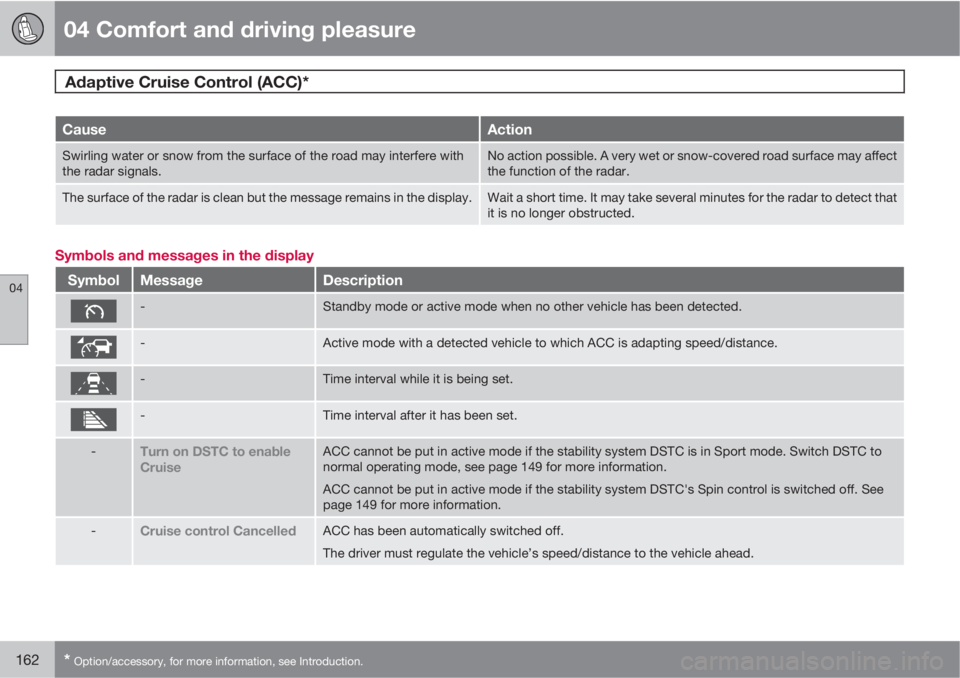
Symbols and messages in the display
SymbolMessageDescription
-Standby mode or active mode when no other vehicle has been detected.
-Active mode with a detected vehicle to which ACC is adapting speed/distance.
-Time interval while it is being set.
-Time interval after it has been set.
-Turn on DSTC to enable
CruiseACC cannot be put in active mode if the stability system DSTC is in Sport mode. Switch DSTC to
normal operating mode, see page 149 for more information.
ACC cannot be put in active mode if the stability system DSTC's Spin control is switched off. See
page 149 for more information.
-Cruise control CancelledACC has been automatically switched off.
The driver must regulate the vehicle’s speed/distance to the vehicle ahead.
Page 218 of 374
05 Infotainment
Radio
05
218* Option/accessory, for more information, see Introduction.
In many cases, a main HD Radio station (FM
wavebands only) will also have sub-channels
offering additional types of programming or
music.
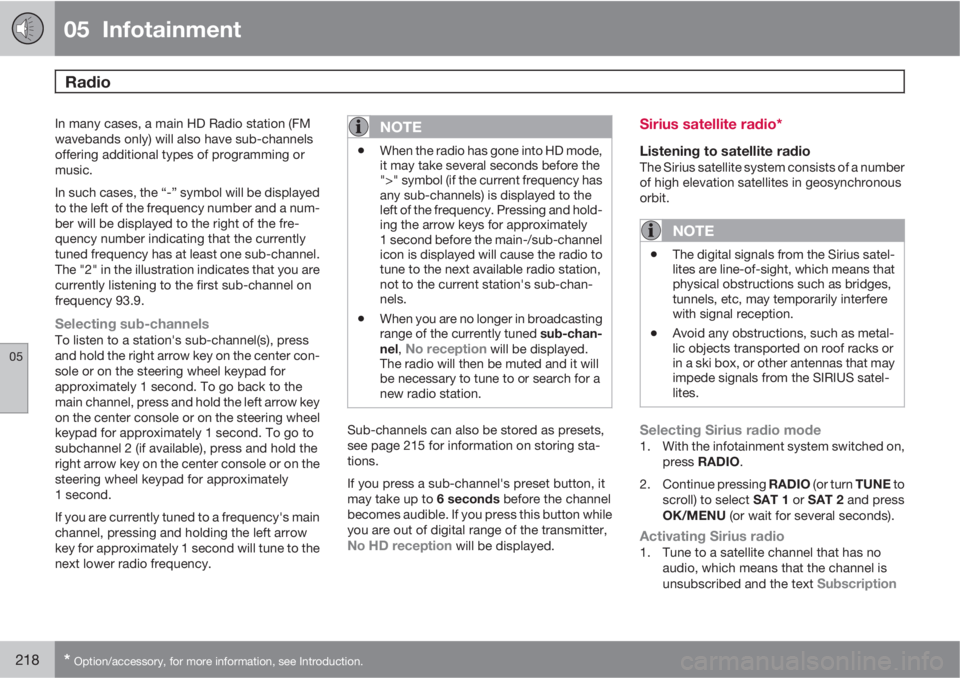
In such cases, the “-” symbol will be displayed
to the left of the frequency number and a num-
ber will be displayed to the right of the fre-
quency number indicating that the currently
tuned frequency has at least one sub-channel.
The "2" in the illustration indicates that you are
currently listening to the first sub-channel on
frequency 93.9.
Selecting sub-channelsTo listen to a station's sub-channel(s), press
and hold the right arrow key on the center con-
sole or on the steering wheel keypad for
approximately 1 second. To go back to the
main channel, press and hold the left arrow key
on the center console or on the steering wheel
keypad for approximately 1 second. To go to
subchannel 2 (if available), press and hold the
right arrow key on the center console or on the
steering wheel keypad for approximately
1 second.
If you are currently tuned to a frequency's main
channel, pressing and holding the left arrow
key for approximately 1 second will tune to the
next lower radio frequency.
NOTE
•When the radio has gone into HD mode,
it may take several seconds before the
">" symbol (if the current frequency has
any sub-channels) is displayed to the
left of the frequency. Pressing and hold-
ing the arrow keys for approximately
1 second before the main-/sub-channel
icon is displayed will cause the radio to
tune to the next available radio station,
not to the current station's sub-chan-
nels.
•When you are no longer in broadcasting
range of the currently tuned sub-chan-
nel,
No reception will be displayed.
The radio will then be muted and it will
be necessary to tune to or search for a
new radio station.
Sub-channels can also be stored as presets,
see page 215 for information on storing sta-
tions.
If you press a sub-channel's preset button, it
may take up to 6 seconds before the channel
becomes audible. If you press this button while
you are out of digital range of the transmitter,
No HD reception will be displayed.
Sirius satellite radio*
Listening to satellite radioThe Sirius satellite system consists of a number
of high elevation satellites in geosynchronous
orbit.
NOTE
•The digital signals from the Sirius satel-
lites are line-of-sight, which means that
physical obstructions such as bridges,
tunnels, etc, may temporarily interfere
with signal reception.
•Avoid any obstructions, such as metal-
lic objects transported on roof racks or
in a ski box, or other antennas that may
impede signals from the SIRIUS satel-
lites.
Selecting Sirius radio mode1. With the infotainment system switched on,
press RADIO.
2.
Continue pressing RADIO (or turn TUNE to
scroll) to select SAT 1 or SAT 2 and press
OK/MENU (or wait for several seconds).
Activating Sirius radio1. Tune to a satellite channel that has no
audio, which means that the channel is
unsubscribed and the text
Subscription
Page 246 of 374
05 Infotainment
Rear Seat Entertainment (RSE)*
05
246* Option/accessory, for more information, see Introduction.
CAUTION
When transporting large objects in the rear
seat, be sure that there is adequate space
between the object(s) and the RSE screens
to help avoid scratching or damaging these
screens.
If necessary, cover the screens with a suit-
able material.
NOTE
•The RSE screens and remote control
may not function in very low or very high
cabin temperatures. They will become
operable again after the climate control
system has created a comfortable tem-
perature in the cabin.
•Keep the IR transceivers' lenses clean
by wiping them regularly with a damp
cloth. A dirty lens could affect the func-
tion of the remote control.
Ignition modes and electrical current to
RSE
RSE can be activated with the ignition in
modes I or II (and when the engine is running).
See page 82 for detailed information about the
various ignition modes. If a film is being played,
it will stop momentarily while the engine isbeing started and will resume when the engine
is running.
NOTE
Using RSE for more than approx.
10 minutes when the engine is not running
will drain the vehicle's battery and may
make the engine difficult or impossible to
start.
A message will be displayed on the screen
if the battery's charge level becomes too
low.
Using the system's menusSelections in the RSE menus are made using
the remote control. See page 251 for more
information about the RSE menus.
Remote control
A remote control is included with the RSE sys-
tem, which can be used to control both screens
in the rear seat as well as other infotainment
system functions.
See page 254 for more detailed information
about the remote control.
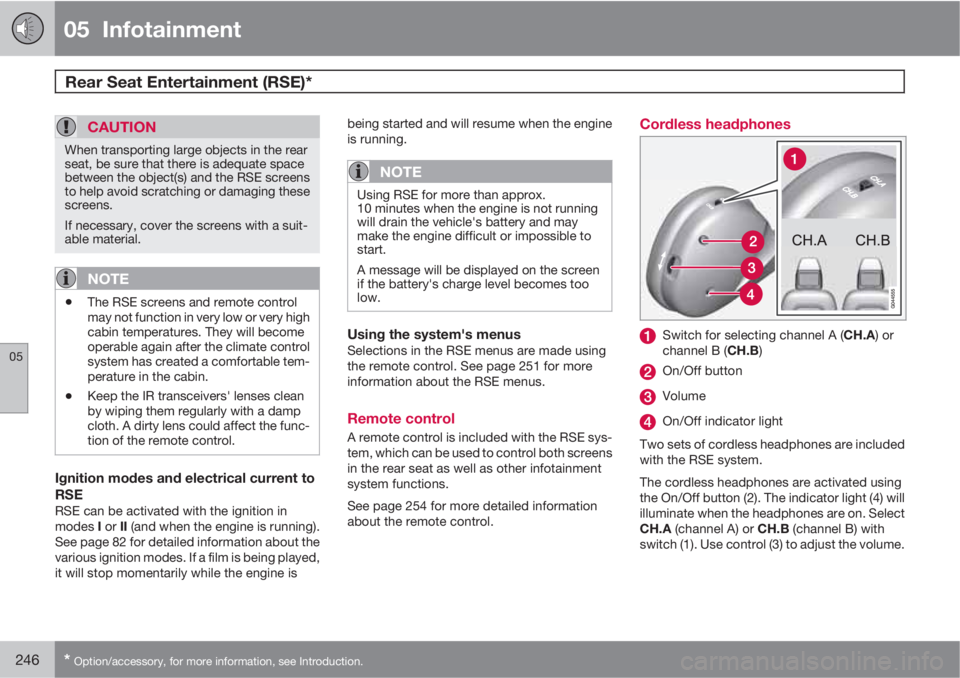
Cordless headphones
Switch for selecting channel A (CH.A) or
channel B (CH.B)
On/Off button
Volume
On/Off indicator light
Two sets of cordless headphones are included
with the RSE system.
The cordless headphones are activated using
the On/Off button (2). The indicator light (4) will
illuminate when the headphones are on. Select
CH.A (channel A) or CH.B (channel B) with
switch (1). Use control (3) to adjust the volume.
Page 262 of 374
06 During your trip
Driving recommendations
06
262
General information
Economical driving conserves natural
resources
Better driving economy may be obtained by
thinking ahead, avoiding rapid starts and stops
and adjusting the speed of your vehicle to
immediate traffic conditions.
Observe the following rules:
•Bring the engine to normal operating tem-
perature as soon as possible by driving
with a light foot on the accelerator pedal for
the first few minutes of operation. A cold
engine uses more fuel and is subject to
increased wear.
•Whenever possible, avoid using the vehicle
for driving short distances. This does not
allow the engine to reach normal operating
temperature.
•Drive carefully and avoid rapid acceleration
and hard braking.
•Use the transmission's Drive (D) position
as often as possible and avoid using kick-
down.
•Using the transmission's Sport mode1 may
increase fuel consumption somewhat. Use
the transmission's Drive (D) position as
often as possible. See page 117 for addi-
tional information about Sport mode.
•Do not exceed posted speed limits.
•Avoid carrying unnecessary items (extra
load) in the vehicle.
•Maintain correct tire pressure. Check tire
pressure regularly (when tires are cold).
•Remove snow tires when threat of snow or
ice has ended.
•Note that roof racks, ski racks, etc,
increase air resistance and also fuel con-
sumption.
•At highway driving speeds, fuel consump-
tion will be lower with the air conditioning
on and the windows closed than with the
air conditioning off and the windows open.
•Using the onboard trip computer's fuel
consumption modes can help you learn
how to drive more economically.
Other factors that decrease gas mileage
are:
•Dirty air cleaner
•Dirty engine oil and clogged oil filter
•Dragging brakes
•Incorrect front end alignment
Some of the above mentioned items and others
are checked at the standard maintenance
intervals.
WARNING
Driving with the tailgate open: Driving with
the tailgate open could lead to poisonous
exhaust gases entering the passenger com-
partment. If the tailgate must be kept open
for any reason, proceed as follows:
•Close the windows
•Set the ventilation system control to air
flow to floor, windshield and side win-
dows and the blower control to its high-
est setting.
Weight distribution affects handlingAt the specified curb weight your vehicle has a
tendency to understeer, which means that the
steering wheel has to be turned more than
might seem appropriate for the curvature of a
bend. This ensures good stability and reduces
the risk of rear wheel skid. Remember that
these properties can alter with the vehicle load.
The heavier the load in the cargo area, the less
the tendency to understeer.
Handling, roadholdingVehicle load, tire design and inflation pressure
all affect vehicle handling. Therefore, check
that the tires are inflated to the recommended
pressure according to the vehicle load. See the
"Tire pressure" section. Loads should be dis-
1Models with the T6 turbo engine only.
Page 286 of 374
07 Wheels and tires
General information
07
286
Introduction
Your vehicle is equipped with tires according
to the vehicle's tire information placard on the
B-pillar (the structural member at the side of
the vehicle, at the rear of the driver's door
opening).
CAUTION
Some Volvo models are equipped with an
Ultra High Performance tire and wheel com-
bination designed to provide maximum dry
pavement performance with consideration
for hydroplaning resistance. They may be
more susceptible to road hazard damage
and, depending on driving conditions, may
achieve a tread life of less than 20,000 miles
(30,000 km). Even if this vehicle is equipped
with Volvo’s advanced AWD or DSTC sys-
tem, these tires are not designed for winter
driving, and should be replaced with winter
tires when weather conditions dictate.
The tires have good road holding characteris-
tics and offer good handling on dry and wet
surfaces. It should be noted however that the
tires have been developed to give these fea-
tures on snow/ice-free surfaces.
Most models are equipped with "all-season"
tires, which provide a somewhat higher degree
of road holding on slippery surfaces than tireswithout the "all-season" rating. However, for
optimum road holding on icy or snow-covered
roads, we recommend suitable winter tires on
all four wheels.
When replacing tires, be sure that the new tires
are the same size designation, type (radial) and
preferably from the same manufacturer, on all
four wheels. Otherwise there is a risk of altering
the car's roadholding and handling characte-
ristics.
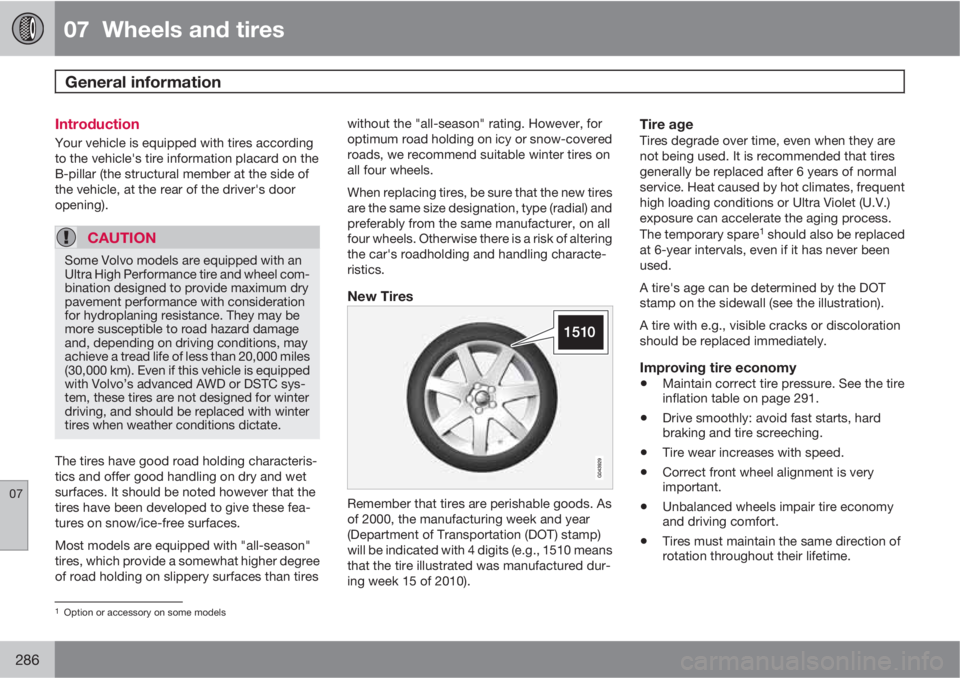
New Tires
Remember that tires are perishable goods. As
of 2000, the manufacturing week and year
(Department of Transportation (DOT) stamp)
will be indicated with 4 digits (e.g., 1510 means
that the tire illustrated was manufactured dur-
ing week 15 of 2010).
Tire ageTires degrade over time, even when they are
not being used. It is recommended that tires
generally be replaced after 6 years of normal
service. Heat caused by hot climates, frequent
high loading conditions or Ultra Violet (U.V.)
exposure can accelerate the aging process.
The temporary spare
1 should also be replaced
at 6-year intervals, even if it has never been
used.
A tire's age can be determined by the DOT
stamp on the sidewall (see the illustration).
A tire with e.g., visible cracks or discoloration
should be replaced immediately.
Improving tire economy
•Maintain correct tire pressure. See the tire
inflation table on page 291.
•Drive smoothly: avoid fast starts, hard
braking and tire screeching.
•Tire wear increases with speed.
•Correct front wheel alignment is very
important.
•Unbalanced wheels impair tire economy
and driving comfort.
•Tires must maintain the same direction of
rotation throughout their lifetime.
1Option or accessory on some models
Page 311 of 374
07 Wheels and tires
Tire Pressure Monitoring System (TPMS)
07
311
tion pressure table on page 291), for example,
if higher inflation pressure is necessary when
transporting heavy loads, etc.
This is done in the vehicle's menu system (see
page 134).
To recalibrate:
1. Switch off the engine.
2. Inflate the tires to the desired pressure and
put the ignition in mode I or II (see page
82 for additional information).
3.
Press the MY CAR key in the center con-
sole control panel and select Settings
Car settingsTire pressure
4.
Press OK/MENU, select
Calibrate tire
pressure and press OK/MENU again.
5. Drive the vehicle at a speed above
25 mph (40 km/h) continuously for at least
1 minute.
> When the calibration message is no
longer displayed, TPMS has been reca-
librated to the new inflation pressure.
Activating/deactivating TPMS (Canadian
models only)
1. Switch off the engine.
2.
Put the ignition in mode I or II (see page
82 for additional information).3.
Press the MY CAR key in the center con-
sole control panel and select Settings
Car settingsTire pressure
4.
Select
Tire pressure system ON/Off and
press OK/MENU.
Page 351 of 374
09 Specifications
Label information09
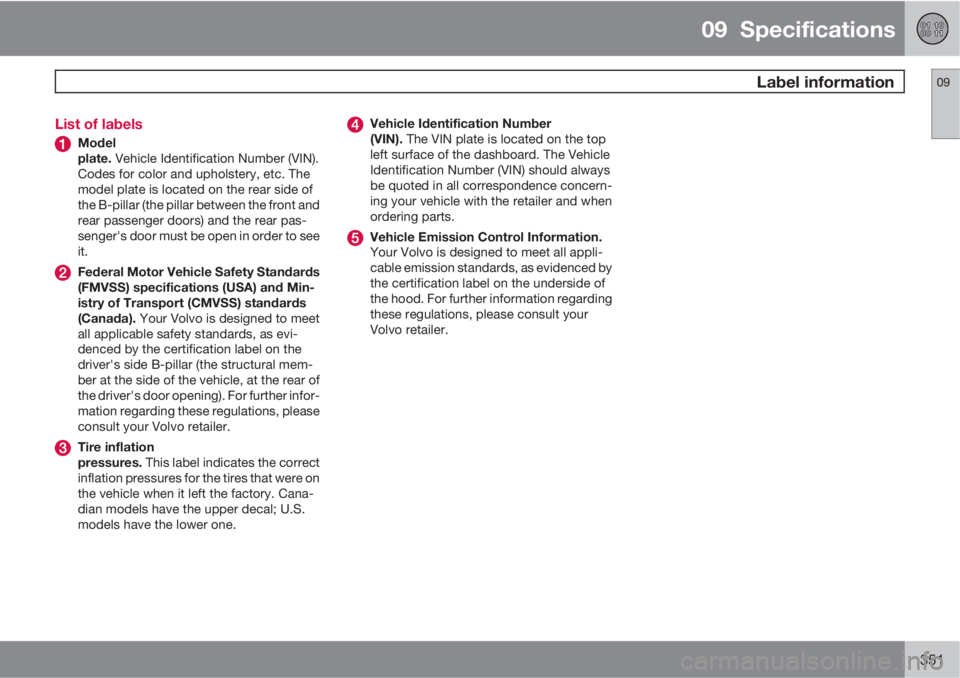
351 List of labels
Model
plate. Vehicle Identification Number (VIN).
Codes for color and upholstery, etc. The
model plate is located on the rear side of
the B-pillar (the pillar between the front and
rear passenger doors) and the rear pas-
senger's door must be open in order to see
it.
Federal Motor Vehicle Safety Standards
(FMVSS) specifications (USA) and Min-
istry of Transport (CMVSS) standards
(Canada). Your Volvo is designed to meet
all applicable safety standards, as evi-
denced by the certification label on the
driver's side B-pillar (the structural mem-
ber at the side of the vehicle, at the rear of
the driver's door opening). For further infor-
mation regarding these regulations, please
consult your Volvo retailer.
Tire inflation
pressures. This label indicates the correct
inflation pressures for the tires that were on
the vehicle when it left the factory. Cana-
dian models have the upper decal; U.S.
models have the lower one.
Vehicle Identification Number
(VIN). The VIN plate is located on the top
left surface of the dashboard. The Vehicle
Identification Number (VIN) should always
be quoted in all correspondence concern-
ing your vehicle with the retailer and when
ordering parts.
Vehicle Emission Control Information.
Your Volvo is designed to meet all appli-
cable emission standards, as evidenced by
the certification label on the underside of
the hood. For further information regarding
these regulations, please consult your
Volvo retailer.