fog light VOLVO XC60 2013 Owner´s Manual
[x] Cancel search | Manufacturer: VOLVO, Model Year: 2013, Model line: XC60, Model: VOLVO XC60 2013Pages: 382, PDF Size: 7.08 MB
Page 185 of 382
04 Driver support
Blind Spot Information System*
04
* Option/accessory, for more information, see Introduction.183 When does BLIS function
The system functions when your vehicle is
moving at speeds above 6 mph (10 km/h).
When you pass another vehicle:The system reacts when you pass another
vehicle at a speed of up to 6 mph (10 km/h)
faster than that vehicle.
When you are passed by another vehicle:The system reacts if your vehicle is passed by
another vehicle at a speed of up to 43 mph
(70 km/h) faster than your vehicle.
WARNING
•BLIS does not function in sharp curves.
•BLIS does not function when your vehi-
cle is backing up.
•If you are towing a wide trailer, this may
prevent the BLIS cameras from detect-
ing other vehicles in adjacent lanes.
How BLIS functions in daylight and
darkness
Daylight
BLIS reacts to the shape of surrounding vehi-
cles. The system is designed to help detect
motor vehicles such as cars, trucks, buses,
motorcycles, etc.
DarknessBLIS reacts to the headlights of surrounding
vehicles. In order to be detected by BLIS, a
vehicle in the blind area must have its head-
lights on. This means, for example, that the
system will not detect a trailer without head-
lights that is being towed behind a car or truck.
WARNING
•BLIS does not react to cyclists or
mopeds.
•BLIS does not react to vehicles that are
standing still.
•The BLIS cameras have the same limi-
tation as the human eye. In other words,
their "vision is impaired" by adverse
weather conditions such as heavy
snowfall, intense light directly into the
camera, dense fog, etc.
LimitationsIn certain situations, the BLIS indicator light(s)
may illuminate even when there are no other
vehicles in the area monitored by the system.
NOTE
If the BLIS indicator lights illuminate occa-
sionally even when there are no other vehi-
cles in the blind area, this does not indicate
a fault in the system.
In the event of a fault,
Blind spot syst.
Service required will be displayed.
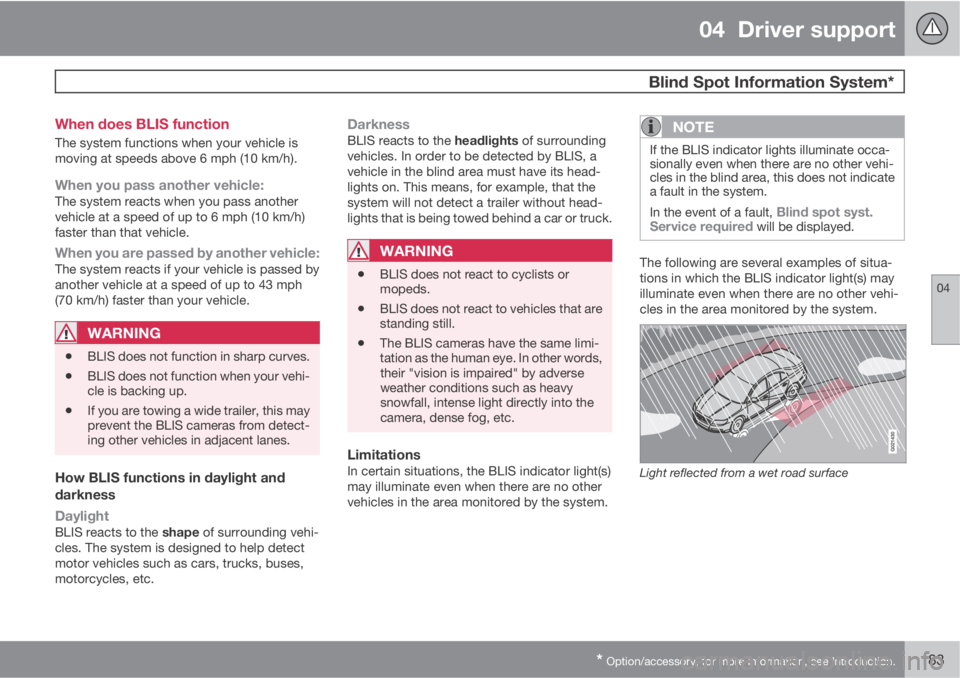
The following are several examples of situa-
tions in which the BLIS indicator light(s) may
illuminate even when there are no other vehi-
cles in the area monitored by the system.
Light reflected from a wet road surface
Page 199 of 382
05 Comfort and driving pleasure
Climate system
05
* Option/accessory, for more information, see Introduction.197 Introduction
Air conditioningThe vehicle is equipped with Electronic Climate
Control (ECC). The climate control system
cools, heats or dehumidifies the air in the pas-
senger compartment.
NOTE
•The air conditioning can be switched
off, but to ensure the best possible cli-
mate comfort in the passenger com-
partment and to prevent the windows
from misting, it should always be on.
•In warm weather, a small amount of
water may accumulate under the car
when it has been parked. This water is
condensation from the A/C system and
is normal.
Sensor location
•The sunlight sensor is located on the top
side of the dashboard.
NOTE
The sunlight sensor monitors which side of
the car that is most exposed to sunlight.
This can mean that the temperature may
differ between the right and left-side air
vents, even if the temperatures set for both
sides of the passenger compartment are the
same.
•The temperature sensor for the passenger
compartment is located below the climate
control panel.
•The outside (ambient) temperature sensor
is located on the door mirror.
•The humidity sensor* is located in the inte-
rior rearview mirror.
NOTE
Do not cover or block the sensors with
clothing or other objects.
Side windows and laminated panoramic
roof
To ensure that the air conditioning works opti-
mally, the side windows, and the laminated
panoramic roof should be closed.
Fog on the inside of the windowsThe defroster function should be used to
remove fog or mist from the inside of the win-
dows. Keeping the windows clean with a com-mercially available window washing spray will
also help prevent fogging or misting.
Temporary shut-off of the air
conditioning
The air conditioning is momentarily disen-
gaged during full-throttle acceleration or when
driving uphill with a trailer. This may result in a
temporary increase in cabin temperature.
Ice and snowAlways keep the air intake grille at the base of
the windshield free of snow.
Climate system maintenanceSpecial tools and equipment are required to
maintain and carry out repairs on the climate
system. Work of this type should only be done
by a trained and qualified Volvo service tech-
nician.
RefrigerantVolvo cares about the environment. The air
conditioning system in your car contains a
CFC-free refrigerant – R134a. This substance
will not deplete the ozone layer. The air condi-
tioning system contains 1.8 lbs (820 g) of
R134a. The systems uses PAG oil.
Passenger compartment filterReplace the cabin air filter with a new one at
the recommended intervals. Please refer to
Page 203 of 382
05 Comfort and driving pleasure
Climate system
05
* Option/accessory, for more information, see Introduction.201 Climate system controls
Heated front seats*
The current seat temperature is shown in the cen-
ter console display
Press the button once for the
highest heat level – three indi-
cator lights come on.
Press the button twice for a
lower heat level – two indica-
tor lights come on.
Press the button three times for the lowest heat
level – one indicator light comes on.
Press the button four times to switch off the
heat – no indicator lights come on.
Seat heating will automatically switch off when
the engine is switched off.
Heated rear seats*1
Heat control for the outboard seating positions
is done in the same way as for the front seats.
Blower controlTurn the control clockwise to
increase or counterclockwise
to decrease the blower
speed. If AUTO is selected,
blower speed will be regula-
ted automatically and this will
override manual adjustment.
NOTE
If the blower is turned off completely, the air
conditioning is disengaged, which may
result in fogging on the windows.
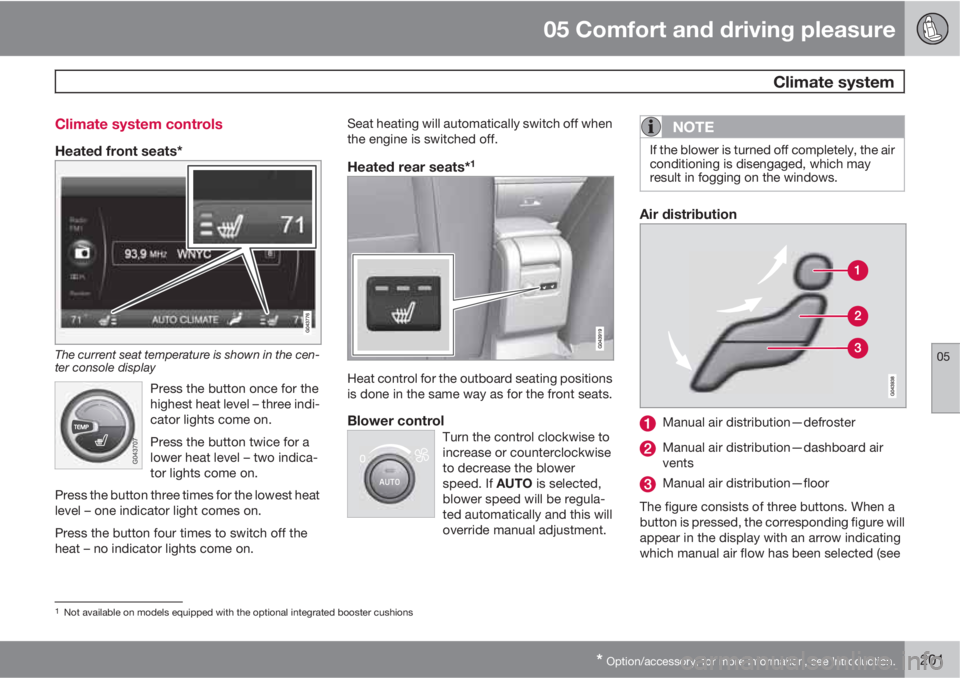
Air distribution
Manual air distribution—defroster
Manual air distribution—dashboard air
vents
Manual air distribution—floor
The figure consists of three buttons. When a
button is pressed, the corresponding figure will
appear in the display with an arrow indicating
which manual air flow has been selected (see
1Not available on models equipped with the optional integrated booster cushions
Page 204 of 382
05 Comfort and driving pleasure
Climate system
05
202
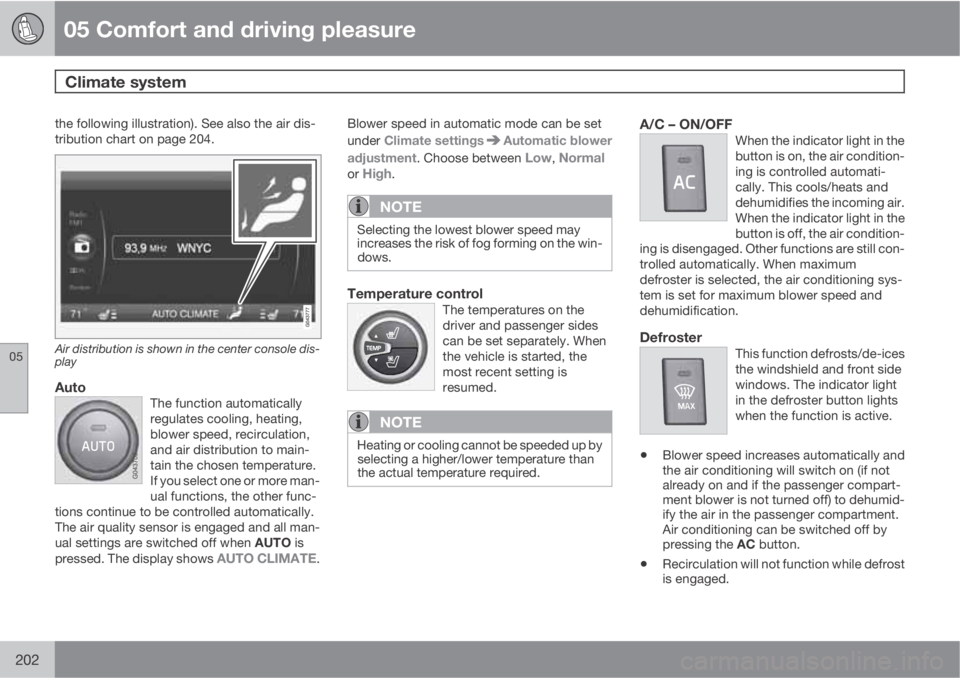
the following illustration). See also the air dis-
tribution chart on page 204.
Air distribution is shown in the center console dis-
play
AutoThe function automatically
regulates cooling, heating,
blower speed, recirculation,
and air distribution to main-
tain the chosen temperature.
If you select one or more man-
ual functions, the other func-
tions continue to be controlled automatically.
The air quality sensor is engaged and all man-
ual settings are switched off when AUTO is
pressed. The display shows
AUTO CLIMATE.
Blower speed in automatic mode can be set
under Climate settings
Automatic blower
adjustment. Choose between
Low, Normalor High.
NOTE
Selecting the lowest blower speed may
increases the risk of fog forming on the win-
dows.
Temperature controlThe temperatures on the
driver and passenger sides
can be set separately. When
the vehicle is started, the
most recent setting is
resumed.
NOTE
Heating or cooling cannot be speeded up by
selecting a higher/lower temperature than
the actual temperature required.
A/C – ON/OFFWhen the indicator light in the
button is on, the air condition-
ing is controlled automati-
cally. This cools/heats and
dehumidifies the incoming air.
When the indicator light in the
button is off, the air condition-
ing is disengaged. Other functions are still con-
trolled automatically. When maximum
defroster is selected, the air conditioning sys-
tem is set for maximum blower speed and
dehumidification.
DefrosterThis function defrosts/de-ices
the windshield and front side
windows. The indicator light
in the defroster button lights
when the function is active.
•Blower speed increases automatically and
the air conditioning will switch on (if not
already on and if the passenger compart-
ment blower is not turned off) to dehumid-
ify the air in the passenger compartment.
Air conditioning can be switched off by
pressing the AC button.
•Recirculation will not function while defrost
is engaged.
Page 205 of 382
05 Comfort and driving pleasure
Climate system
05
* Option/accessory, for more information, see Introduction.203
The climate system will return to its previous
settings when the defroster function is
switched off.
Recirculation/air quality system
Recirculation
This function can be used to
shut out exhaust fumes,
smoke, etc., from the passen-
ger compartment. The air in
the passenger compartment
is then recirculated, i.e., no air
from outside the car is taken
into the car when this function is activated. The
indicator light in the button will illuminate when
recirculation is selected.
If the air in the car recirculates for too long,
there is a risk of condensation forming on the
insides of the windows, especially in winter.
TimerThe timer function minimizes the risk of fog-
ging, or stale air when the recirculation functionis selected by automatically switching off the
function after a certain length of time, depend-
ing on the ambient temperature. Activate/
deactivate the function under Climate
settings
Recirculation timer. See page
191 for a description of the menu system.
NOTE
When Defroster is selected, recirculation is
always deactivated.
Interior Air Quality System–IAQS*This system consists of a multifilter and an air
quality sensor. The filter helps remove gases
and particles from the incoming air, thereby
reducing the amounts of odors and contami-
nants entering the vehicle. The air quality sen-
sor detects increased levels of contaminants in
the outside air. When the air quality sensor
detects contaminated outside air, the air intake
closes and the air inside the passenger com-
partment is recirculated, i.e., no outside airenters the vehicle. The filter also cleans recir-
culated passenger compartment air. When the
AUTO button is depressed the air quality sen-
sor is always engaged.
Activate or deactivate this function in Climate
settings
Interior air quality system.
NOTE
•The air quality sensor should always be
engaged in order to obtain the best air
in the passenger compartment.
•Recirculation is limited in cold weather
to avoid fogging.
•If the insides of the windows start fog-
ging, disengage the air quality sensor.
Use the defroster function to increase
airflow to the front, side, and rear win-
dows.
Page 332 of 382
09 Maintenance and specifications
Replacing bulbs 09
330* Option/accessory, for more information, see Introduction.
Introduction
All bulb specifications are listed on page 336.
The following bulbs should only be replaced by
a trained and qualified Volvo service techni-
cian:
•Dome lighting, reading lights
•Glove compartment lighting
•Footwell lighting
•Turn signals in the door mirrors
•Approach lighting in the door mirrors
•Brake lights/rear fog light/taillights
•Rear parking lights
•Active Bending Lights
•LED bulbs
NOTE
For information regarding any other bulbs
not mentioned in this section, please con-
tact your Volvo retailer or a trained and
authorized Volvo service technician.
WARNING
•The engine should not be running when
changing bulbs.
•If the engine has been running just prior
to replacing bulbs in the headlight hous-
ing, please keep in mind that compo-
nents in the engine compartment will be
hot.
WARNING
•Active Bending Lights* – due to the high
voltage used by these headlights, these
bulbs should only be replaced by a
trained and qualified Volvo service tech-
nician.
•Turn off the lights and remove the
remote key from the ignition before
changing any bulbs.
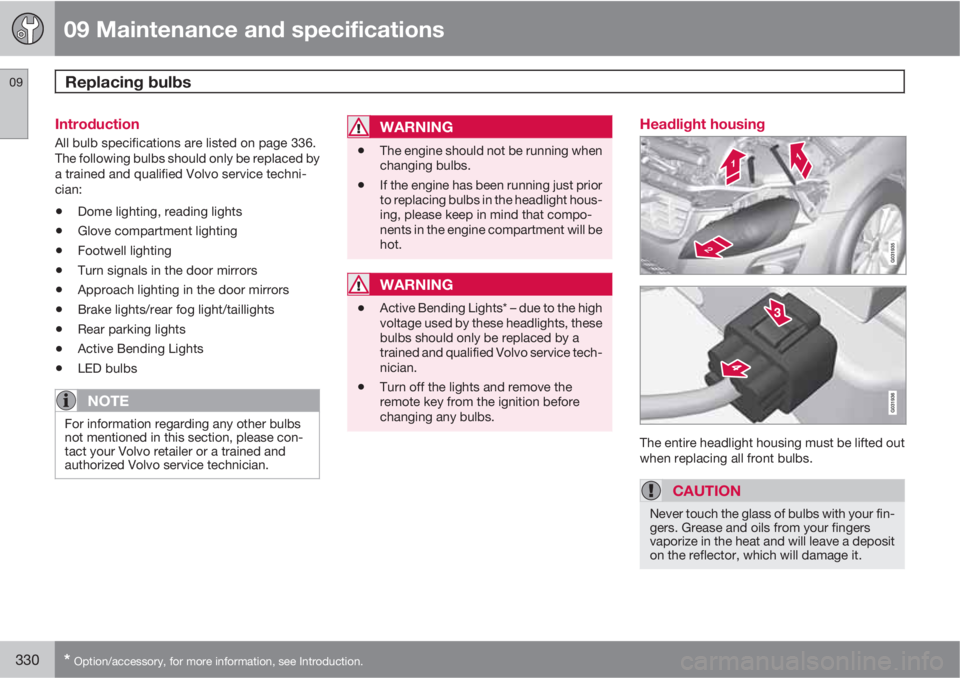
Headlight housing
The entire headlight housing must be lifted out
when replacing all front bulbs.
CAUTION
Never touch the glass of bulbs with your fin-
gers. Grease and oils from your fingers
vaporize in the heat and will leave a deposit
on the reflector, which will damage it.
Page 336 of 382
09 Maintenance and specifications
Replacing bulbs 09
334
Rear fog light
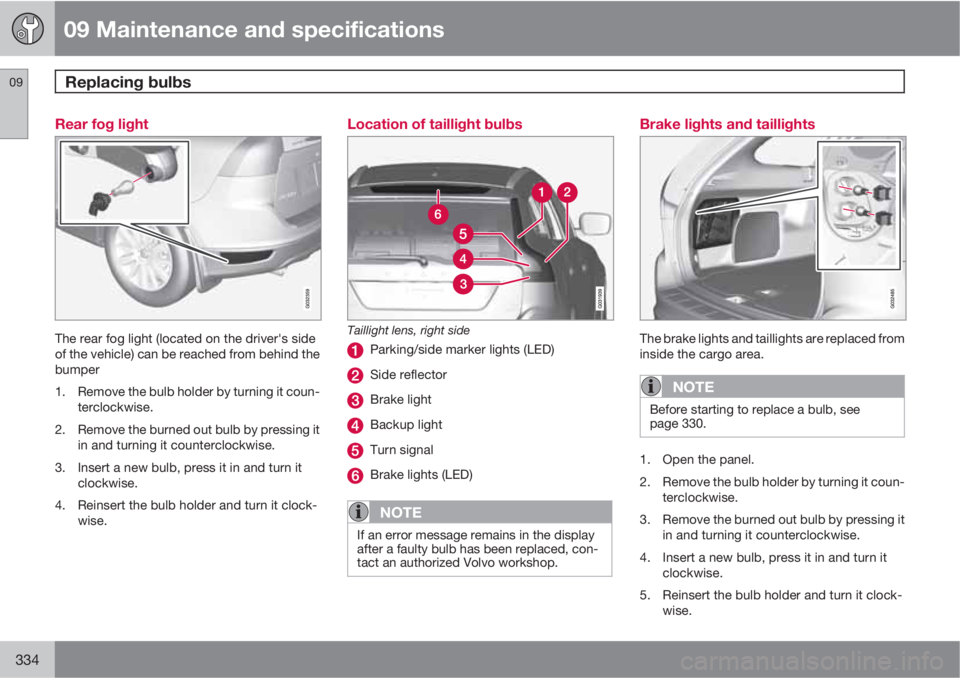
The rear fog light (located on the driver's side
of the vehicle) can be reached from behind the
bumper
1. Remove the bulb holder by turning it coun-
terclockwise.
2. Remove the burned out bulb by pressing it
in and turning it counterclockwise.
3. Insert a new bulb, press it in and turn it
clockwise.
4. Reinsert the bulb holder and turn it clock-
wise.
Location of taillight bulbs
Taillight lens, right side
Parking/side marker lights (LED)
Side reflector
Brake light
Backup light
Turn signal
Brake lights (LED)
NOTE
If an error message remains in the display
after a faulty bulb has been replaced, con-
tact an authorized Volvo workshop.
Brake lights and taillights
The brake lights and taillights are replaced from
inside the cargo area.
NOTE
Before starting to replace a bulb, see
page 330.
1. Open the panel.
2. Remove the bulb holder by turning it coun-
terclockwise.
3. Remove the burned out bulb by pressing it
in and turning it counterclockwise.
4. Insert a new bulb, press it in and turn it
clockwise.
5. Reinsert the bulb holder and turn it clock-
wise.
Page 338 of 382
09 Maintenance and specifications
Replacing bulbs 09
336* Option/accessory, for more information, see Introduction.
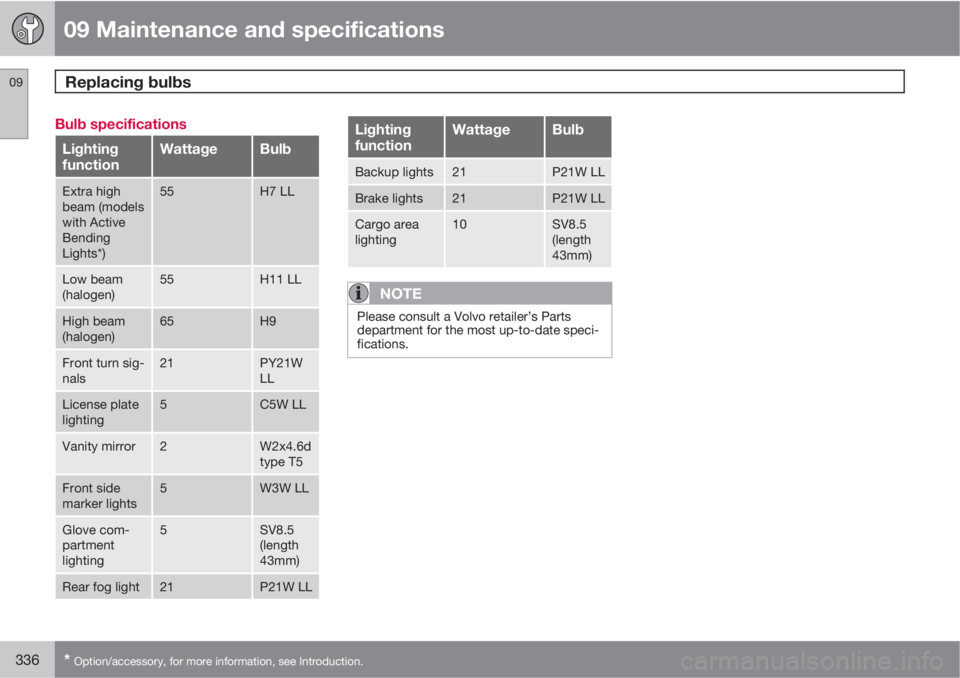
Bulb specifications
Lighting
functionWattageBulb
Extra high
beam (models
with Active
Bending
Lights*)55H7 LL
Low beam
(halogen)55H11 LL
High beam
(halogen)65H9
Front turn sig-
nals21PY21W
LL
License plate
lighting5C5W LL
Vanity mirror2W2x4.6d
type T5
Front side
marker lights5W3W LL
Glove com-
partment
lighting5SV8.5
(length
43mm)
Rear fog light21P21W LL
Lighting
functionWattageBulb
Backup lights21P21W LL
Brake lights21P21W LL
Cargo area
lighting10SV8.5
(length
43mm)
NOTE
Please consult a Volvo retailer’s Parts
department for the most up-to-date speci-
fications.
Page 353 of 382
09 Maintenance and specifications
Vehicle care09
351
CAUTION
•Avoid waxing or polishing plastic or rub-
ber components
•Polishing chromed strips can wear
away or damage the surface
•Polishes containing abrasive sub-
stances should not be used
Automatic car wash
•We do NOT recommend washing your car
in an automatic wash during the first few
months (because the paint will not have
hardened sufficiently).
•An automatic wash is a simple and quick
way to clean your car, but it is worth
remembering that it may not be as thor-
ough as when you yourself go over the car
with sponge and water. Keeping the under-
body clean is most important, especially in
the winter. Some automatic washers do
not have facilities for washing the under-
body.
CAUTION
•Before driving into an automatic car
wash, turn off the optional rain sensor to
avoid damaging the windshield wipers.
•Make sure that side view mirrors, auxil-
iary lamps, etc, are secure, and that any
antenna(s) are retracted or removed.
Otherwise there is risk of the machine
dislodging them.
•Chromed wheels: Clean chrome-
plated wheels using the same deter-
gents used for the body of the vehicle.
Aggressive wheel-cleaning agents can
permanently stain chrome-plated
wheels.
WARNING
•When the vehicle is driven immediately
after being washed, apply the brakes,
including the parking brake, several
times in order to remove any moisture
from the brake linings.
•Engine cleaning agents should not be
used when the engine is warm. This
constitutes a fire risk.
Exterior lightingCondensation may form temporarily on the
inside of the lenses of exterior lights such as
headlights, fog lights, or taillights. This is nor-mal and the lights are designed to withstand
moisture. Normally, condensation will dissi-
pate after the lights have been on for a short
time.
Polishing and waxing
•Normally, polishing is not required during
the first year after delivery, however, wax-
ing may be beneficial.
•Before applying polish or wax the vehicle
must be washed and dried. Tar spots can
be removed with kerosene or tar remover.
Difficult spots may require a fine rubbing
compound.
•After polishing use liquid or paste wax.
•Several commercially available products
contain both polish and wax.
•Waxing alone does not substitute for pol-
ishing a dull surface.
•A wide range of polymer-based waxes can
be purchased today. These waxes are easy
to use and produce a long-lasting, high-
gloss finish that protects the bodywork
against oxidation, road dirt and fading.
•Do not polish or wax your vehicle in direct
sunlight (the surface of the vehicle should
not be warmer than 113 °F (45 °C).
Page 368 of 382
10 Specifications
Overview of information and warning symbols
10
366* Option/accessory, for more information, see Introduction.
Introduction
The symbols in the vehicle's various displays
are divided into three main categories:
•Warning symbols
•Indicator symbols
•Information symbols
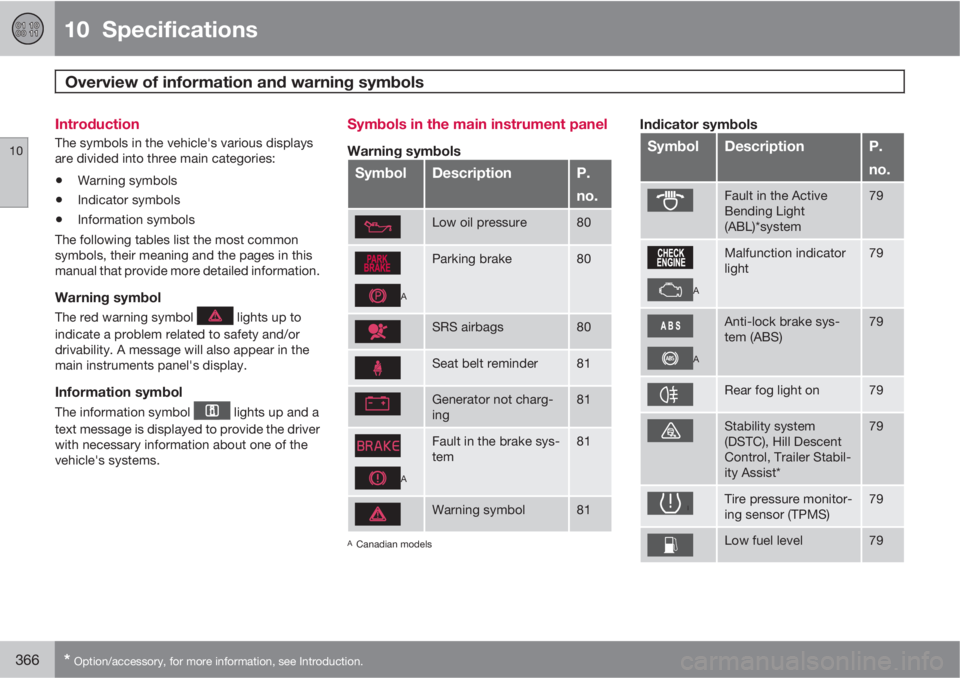
The following tables list the most common
symbols, their meaning and the pages in this
manual that provide more detailed information.
Warning symbol
The red warning symbol lights up to
indicate a problem related to safety and/or
drivability. A message will also appear in the
main instruments panel's display.
Information symbol
The information symbol lights up and a
text message is displayed to provide the driver
with necessary information about one of the
vehicle's systems.
Symbols in the main instrument panel
Warning symbols
SymbolDescriptionP.
no.
Low oil pressure80
A
Parking brake80
SRS airbags80
Seat belt reminder81
Generator not charg-
ing81
A
Fault in the brake sys-
tem81
Warning symbol81
ACanadian models
Indicator symbols
SymbolDescriptionP.
no.
Fault in the Active
Bending Light
(ABL)*system79
A
Malfunction indicator
light79
A
Anti-lock brake sys-
tem (ABS)79
Rear fog light on79
Stability system
(DSTC), Hill Descent
Control, Trailer Stabil-
ity Assist*79
Tire pressure monitor-
ing sensor (TPMS)79
Low fuel level79