tow VOLVO XC60 2013 Owner´s Manual
[x] Cancel search | Manufacturer: VOLVO, Model Year: 2013, Model line: XC60, Model: VOLVO XC60 2013Pages: 382, PDF Size: 7.08 MB
Page 83 of 382
03 Your driving environment
Instruments and controls
03
81
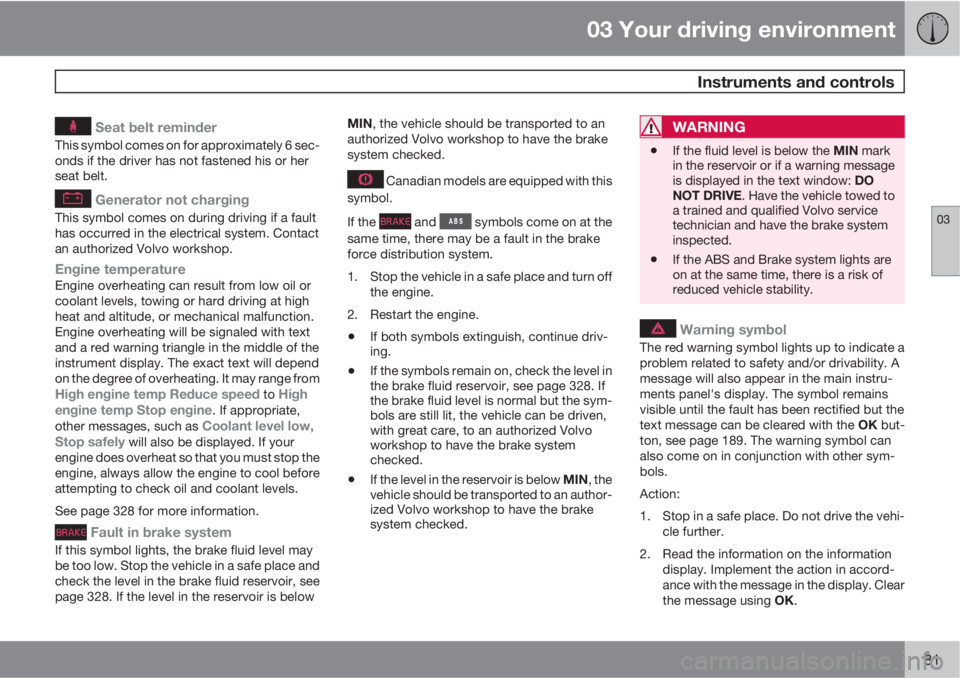
Seat belt reminder
This symbol comes on for approximately 6 sec-
onds if the driver has not fastened his or her
seat belt.
Generator not charging
This symbol comes on during driving if a fault
has occurred in the electrical system. Contact
an authorized Volvo workshop.
Engine temperatureEngine overheating can result from low oil or
coolant levels, towing or hard driving at high
heat and altitude, or mechanical malfunction.
Engine overheating will be signaled with text
and a red warning triangle in the middle of the
instrument display. The exact text will depend
on the degree of overheating. It may range from
High engine temp Reduce speed to High
engine temp Stop engine. If appropriate,
other messages, such as Coolant level low,
Stop safely will also be displayed. If your
engine does overheat so that you must stop the
engine, always allow the engine to cool before
attempting to check oil and coolant levels.
See page 328 for more information.
Fault in brake system
If this symbol lights, the brake fluid level may
be too low. Stop the vehicle in a safe place and
check the level in the brake fluid reservoir, see
page 328. If the level in the reservoir is belowMIN, the vehicle should be transported to an
authorized Volvo workshop to have the brake
system checked.
Canadian models are equipped with this
symbol.
If the
and symbols come on at the
same time, there may be a fault in the brake
force distribution system.
1. Stop the vehicle in a safe place and turn off
the engine.
2. Restart the engine.
•If both symbols extinguish, continue driv-
ing.
•If the symbols remain on, check the level in
the brake fluid reservoir, see page 328. If
the brake fluid level is normal but the sym-
bols are still lit, the vehicle can be driven,
with great care, to an authorized Volvo
workshop to have the brake system
checked.
•If the level in the reservoir is below MIN, the
vehicle should be transported to an author-
ized Volvo workshop to have the brake
system checked.
WARNING
•If the fluid level is below the MIN mark
in the reservoir or if a warning message
is displayed in the text window: DO
NOT DRIVE. Have the vehicle towed to
a trained and qualified Volvo service
technician and have the brake system
inspected.
•If the ABS and Brake system lights are
on at the same time, there is a risk of
reduced vehicle stability.
Warning symbol
The red warning symbol lights up to indicate a
problem related to safety and/or drivability. A
message will also appear in the main instru-
ments panel's display. The symbol remains
visible until the fault has been rectified but the
text message can be cleared with the OK but-
ton, see page 189. The warning symbol can
also come on in conjunction with other sym-
bols.
Action:
1. Stop in a safe place. Do not drive the vehi-
cle further.
2. Read the information on the information
display. Implement the action in accord-
ance with the message in the display. Clear
the message using OK.
Page 87 of 382
03 Your driving environment
Ignition modes
03
85 Ignition modes
Ignition mode 0–The vehicle is unlocked.
Ignition mode I–With the remote key fully pressed into the
ignition slot1, press START/STOP
ENGINE briefly.
Ignition mode II–With the remote key fully pressed into the
ignition slot1, press START/STOP
ENGINE for approximately 2 seconds.
Returning to mode 0To return to mode 0 from mode II or I, press
START/STOP ENGINE briefly.
Starting and stopping the engine
See page 116 for information on starting the
engine and switching it off.
Emergency towing
See page 287 for important information about
the remote key when the vehicle is being
towed.
1Not necessary in vehicles with the optional keyless drive.
Page 95 of 382
03 Your driving environment
Steering wheel
03
* Option/accessory, for more information, see Introduction.93 Adjusting
G021138
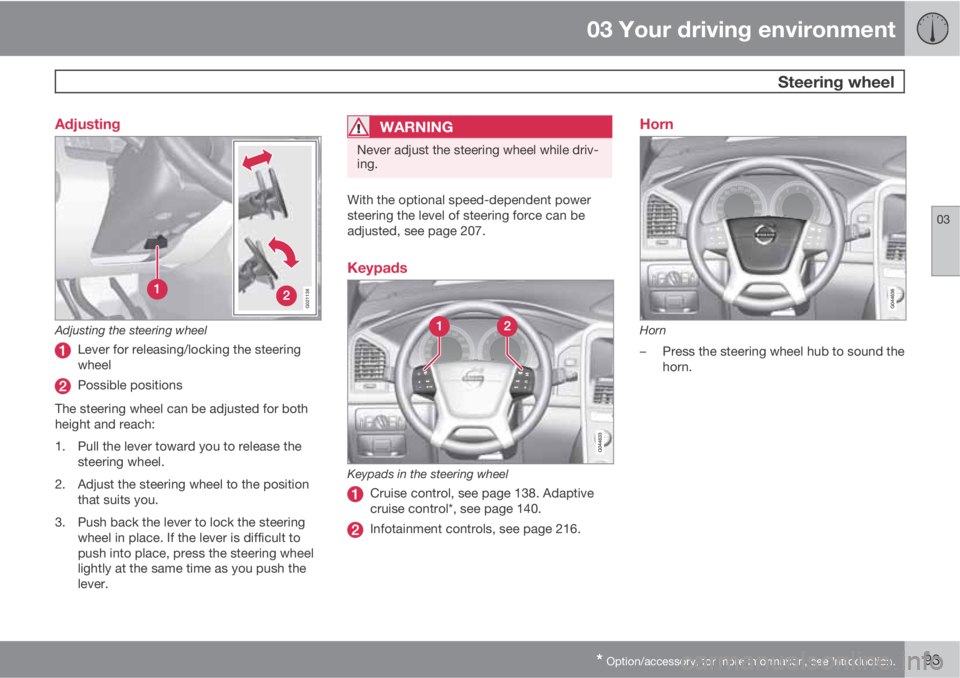
Adjusting the steering wheel
Lever for releasing/locking the steering
wheel
Possible positions
The steering wheel can be adjusted for both
height and reach:
1. Pull the lever toward you to release the
steering wheel.
2. Adjust the steering wheel to the position
that suits you.
3. Push back the lever to lock the steering
wheel in place. If the lever is difficult to
push into place, press the steering wheel
lightly at the same time as you push the
lever.
WARNING
Never adjust the steering wheel while driv-
ing.
With the optional speed-dependent power
steering the level of steering force can be
adjusted, see page 207.
Keypads
Keypads in the steering wheel
Cruise control, see page 138. Adaptive
cruise control*, see page 140.
Infotainment controls, see page 216.
Horn
Horn
–Press the steering wheel hub to sound the
horn.
Page 97 of 382
03 Your driving environment
Lighting
03
* Option/accessory, for more information, see Introduction.95
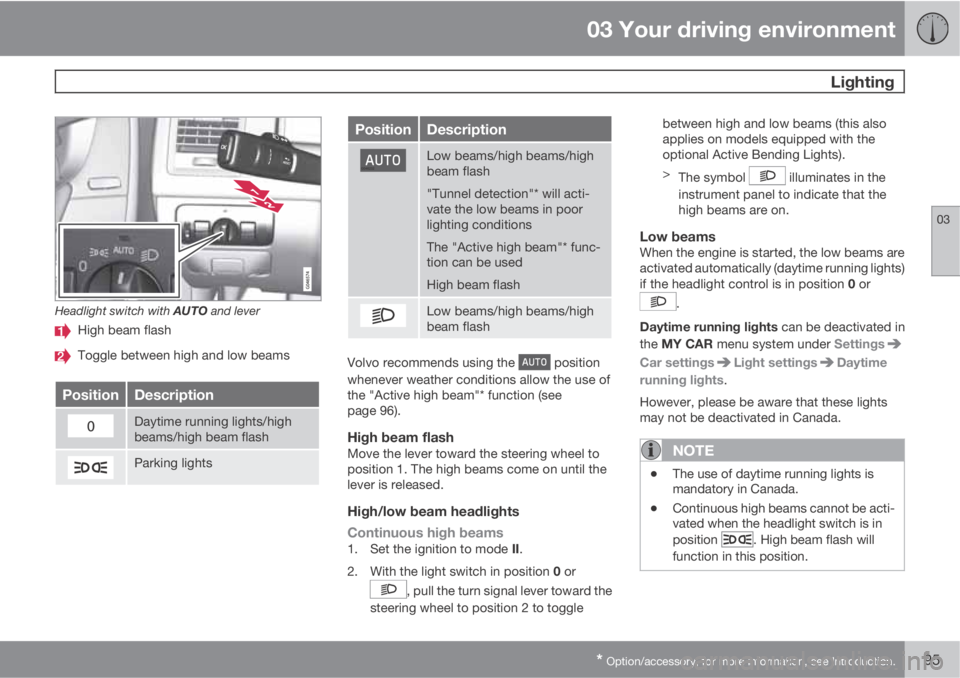
Headlight switch with AUTO and lever
High beam flash
Toggle between high and low beams
PositionDescription
Daytime running lights/high
beams/high beam flash
Parking lights
PositionDescription
Low beams/high beams/high
beam flash
"Tunnel detection"* will acti-
vate the low beams in poor
lighting conditions
The "Active high beam"* func-
tion can be used
High beam flash
Low beams/high beams/high
beam flash
Volvo recommends using the position
whenever weather conditions allow the use of
the "Active high beam"* function (see
page 96).
High beam flashMove the lever toward the steering wheel to
position 1. The high beams come on until the
lever is released.
High/low beam headlights
Continuous high beams
1.
Set the ignition to mode II.
2.
With the light switch in position 0 or
, pull the turn signal lever toward the
steering wheel to position 2 to togglebetween high and low beams (this also
applies on models equipped with the
optional Active Bending Lights).
>
The symbol
illuminates in the
instrument panel to indicate that the
high beams are on.
Low beamsWhen the engine is started, the low beams are
activated automatically (daytime running lights)
if the headlight control is in position 0 or
.
Daytime running lights can be deactivated in
the MY CAR menu system under Settings
Car settingsLight settingsDaytime
running lights.
However, please be aware that these lights
may not be deactivated in Canada.
NOTE
•The use of daytime running lights is
mandatory in Canada.
•Continuous high beams cannot be acti-
vated when the headlight switch is in
position
. High beam flash will
function in this position.
Page 98 of 382
03 Your driving environment
Lighting
03
96* Option/accessory, for more information, see Introduction.
Active high beams – AHB*AHB is a feature that uses a camera at the
upper edge of the windshield to detect the
headlights of oncoming vehicles or the tail-
lights of a vehicle directly ahead. When this
happens, the headlights will automatically
switch from high beams to low beams. When
the camera no longer detects the headlights/
taillights of other vehicles, your headlights will
switch back to high beams after several sec-
onds.
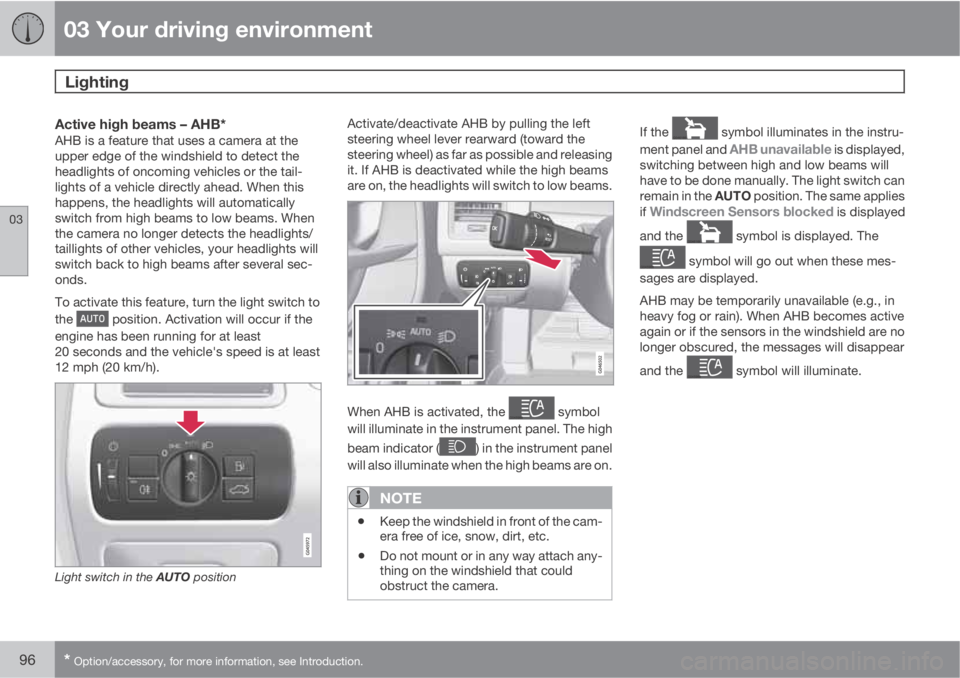
To activate this feature, turn the light switch to
the
position. Activation will occur if the
engine has been running for at least
20 seconds and the vehicle's speed is at least
12 mph (20 km/h).
Light switch in the AUTO position
Activate/deactivate AHB by pulling the left
steering wheel lever rearward (toward the
steering wheel) as far as possible and releasing
it. If AHB is deactivated while the high beams
are on, the headlights will switch to low beams.
When AHB is activated, the symbol
will illuminate in the instrument panel. The high
beam indicator (
) in the instrument panel
will also illuminate when the high beams are on.
NOTE
•Keep the windshield in front of the cam-
era free of ice, snow, dirt, etc.
•Do not mount or in any way attach any-
thing on the windshield that could
obstruct the camera.
If the symbol illuminates in the instru-
ment panel and
AHB unavailable is displayed,
switching between high and low beams will
have to be done manually. The light switch can
remain in the AUTO position. The same applies
if
Windscreen Sensors blocked is displayed
and the
symbol is displayed. The
symbol will go out when these mes-
sages are displayed.
AHB may be temporarily unavailable (e.g., in
heavy fog or rain). When AHB becomes active
again or if the sensors in the windshield are no
longer obscured, the messages will disappear
and the
symbol will illuminate.
Page 103 of 382
03 Your driving environment
Lighting
03
101
Cargo area lightingThe cargo area lighting comes on automatically
when the tailgate is opened.
Home safe lighting
When you leave your vehicle at night, you can
make use of the home safe lighting function to
illuminate the area in front of the vehicle.
1. Remove the key from the ignition slot to put
the ignition in mode 0 (see page 85 for
information about the ignition modes).
2. Pull the turn signal lever as far as possible
towards the steering wheel and release it.
3. Exit the vehicle and lock the doors.
The headlights, parking lights, turn signals,
lights in the door mirrors, license plate lights,
and footwell lighting will illuminate and remain
on for 30
3, 60 or 90 seconds. The time interval
can be set in MY CAR under Settings
Car
settings
Light settingsHome safe light
duration. See page 191 for a description of
the menu system.
Approach lighting
Approach lighting is activated by pressing the
approach light button on the remote key (see
the illustration on page 59).
When the function has been activated, the
parking lights, indicator lights, door mirror
lights, license plate lighting, dome lighting and
door step lighting come on.
The time interval for this lighting can be set by
pressing MY CAR and going to Car settings
Light settingsApproach light
duration. See page 191 for a description of
the menu system.
3Factory setting
Page 105 of 382
03 Your driving environment
Wipers and washers
03
* Option/accessory, for more information, see Introduction.103
The rain sensor is automatically deactivated
when the key is removed from the ignition slot
or five minutes after the ignition has been
switched off.
CAUTION
The rain sensor should be deactivated when
washing the car in an automatic car wash,
etc. If the rain sensor function is left on, the
wipers will start inadvertently in the car
wash and could be damaged.
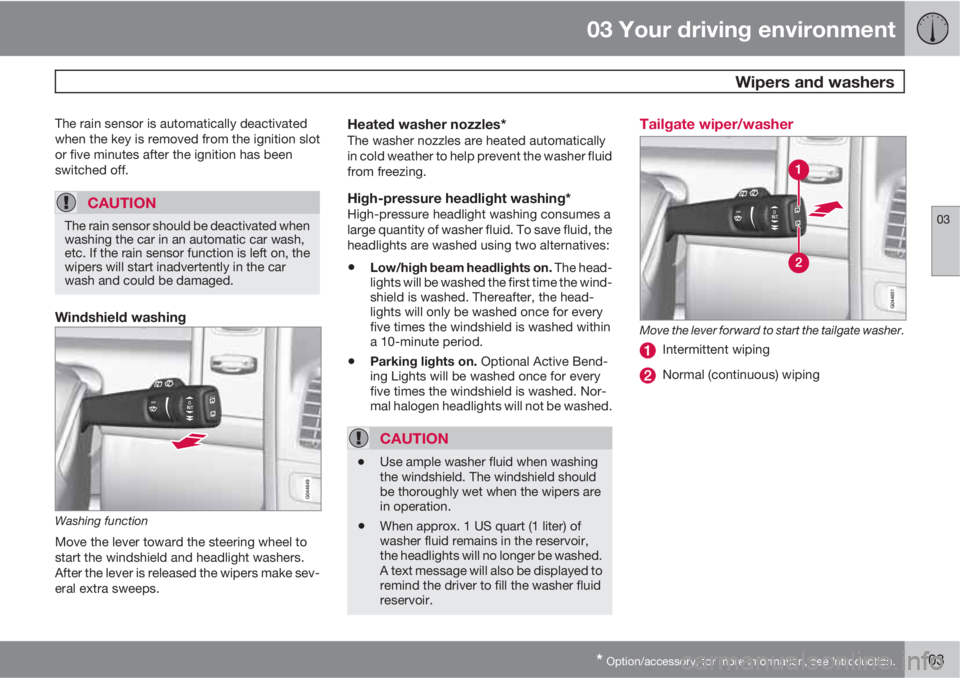
Windshield washing
Washing function
Move the lever toward the steering wheel to
start the windshield and headlight washers.
After the lever is released the wipers make sev-
eral extra sweeps.
Heated washer nozzles*The washer nozzles are heated automatically
in cold weather to help prevent the washer fluid
from freezing.
High-pressure headlight washing*High-pressure headlight washing consumes a
large quantity of washer fluid. To save fluid, the
headlights are washed using two alternatives:
•Low/high beam headlights on. The head-
lights will be washed the first time the wind-
shield is washed. Thereafter, the head-
lights will only be washed once for every
five times the windshield is washed within
a 10-minute period.
•Parking lights on. Optional Active Bend-
ing Lights will be washed once for every
five times the windshield is washed. Nor-
mal halogen headlights will not be washed.
CAUTION
•Use ample washer fluid when washing
the windshield. The windshield should
be thoroughly wet when the wipers are
in operation.
•When approx. 1 US quart (1 liter) of
washer fluid remains in the reservoir,
the headlights will no longer be washed.
A text message will also be displayed to
remind the driver to fill the washer fluid
reservoir.
Tailgate wiper/washer
Move the lever forward to start the tailgate washer.
Intermittent wiping
Normal (continuous) wiping
Page 112 of 382
03 Your driving environment
Laminated panoramic roof*
03
110* Option/accessory, for more information, see Introduction.
Introduction
The laminated panoramic roof is divided into
two sections.
•The rear glass section is fixed in place and
cannot be moved.
•The front glass section can be slid hori-
zontally to the open or closed positions or
its rear edge can be raised and lowered to
allow ventilation.
All references in this section to opening or clos-
ing the panoramic roof pertain to the front glass
section.
The laminated panoramic roof also has a sun
shade made of perforated fabric that is located
below the sections of glass. This shade can be
opened or closed, for example when driving in
bright sunlight.
Both the laminated panoramic roof and the sun
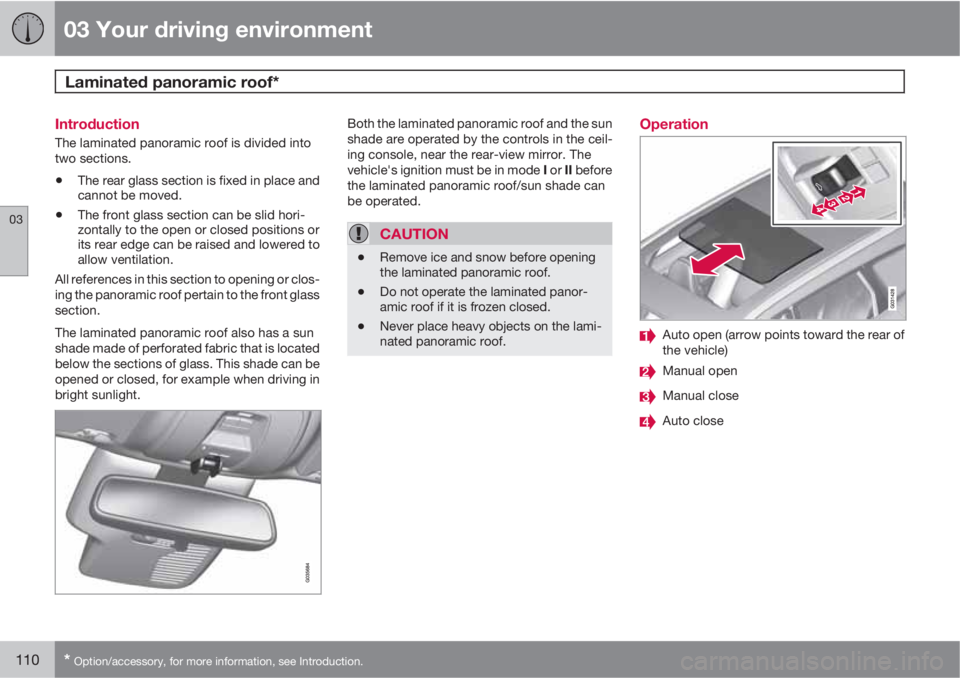
shade are operated by the controls in the ceil-
ing console, near the rear-view mirror. The
vehicle's ignition must be in mode I or II before
the laminated panoramic roof/sun shade can
be operated.
CAUTION
•Remove ice and snow before opening
the laminated panoramic roof.
•Do not operate the laminated panor-
amic roof if it is frozen closed.
•Never place heavy objects on the lami-
nated panoramic roof.
Operation
Auto open (arrow points toward the rear of
the vehicle)
Manual open
Manual close
Auto close
Page 119 of 382
03 Your driving environment
Starting the engine
03
117
WARNING
•Always remove the remote key from the
ignition slot when leaving the vehicle
and ensure that the ignition in mode 0
(see page 85 for information about the
ignition modes), especially if there are
children in the vehicle.
•On vehicles with th optional keyless
drive, never remove the remote key
from the vehicle while it is being driven
or towed.
•Always place the gear selector in Park
and apply the parking brake before
leaving the vehicle. Never leave the
vehicle unattended with the engine run-
ning.
•Always open garage doors fully before
starting the engine inside a garage to
ensure adequate ventilation. The
exhaust gases contain carbon monox-
ide, which is invisible and odorless but
very poisonous.
NOTE
•After a cold start, idle speed may be
noticeably higher than normal for a
short period. This is done to help bring
components in the emission control
system to their normal operating tem-
perature as quickly as possible, which
enables them to control emissions and
help reduce the vehicle's impact on the
environment
3.
CAUTION
•When starting in cold weather, the auto-
matic transmission may shift up at
slightly higher engine speeds than nor-
mal until the automatic transmission
fluid reaches normal operating tem-
perature.
•Do not race a cold engine immediately
after starting. Oil flow may not reach
some lubrication points fast enough to
prevent engine damage.
•The engine should be idling when you
move the gear selector. Never acceler-
ate until after you feel the transmission
engage. Accelerating immediately after
selecting a gear will cause harsh
engagement and premature transmis-
sion wear.
•Selecting P or N when idling at a stand-
still for prolonged periods of time will
help prevent overheating of the auto-
matic transmission fluid.
3If the gear selector is in the D or R positions and the car is not moving, engine speed (rpm) will be lower and it will take longer for the engine to reach normal operating temperature.
Page 124 of 382
03 Your driving environment
Transmission
03
122
gears, based on the level of acceleration and
speed. The car must be at a standstill when
shifting from position R to position D.
Geartronic–manual shiftingGeartronic allows you to manually shift among
your vehicle's six forward speeds. Geartronic
can be selected at any time.
•To access the manual shifting position
from Drive (D), move the gear selector to
the right (to the area marked M in the illus-
tration.
•To return to the D position from the manual
shifting position, move the gear selector to
the left.
While driving
•If you select the manual shifting position
while driving, the gear that was being used
in the Drive position will also initially be
selected in the manual shifting position.
•Move the gear selector forward (toward
"+") to shift to a higher gear or rearward
(toward "–") to shift to a lower gear.
•If you hold the gear selector toward "–", the
transmission will downshift one gear at a
time and will utilize the braking power of
the engine. If the current speed is too high
for using a lower gear, the downshift willnot occur until the speed has decreased
enough to allow the lower gear to be used.
•If you slow to a very low speed, the trans-
mission will automatically shift down.
Shiftlock – Neutral (N)If the gear selector is in the N position and the
vehicle has been stationary for at least 3 sec-
onds (irrespective of whether the engine is run-
ning) then the gear selector is locked.
To be able to move the gear selector from N to
another gear position, the brake pedal must be
depressed and the ignition must be in posi-
tion II, see page 84.
Geartronic–Sport mode (S)2
This transmission mode provides sportier shift-
ing characteristics and enables a more active
driving style by making it possible to drive at
higher rpm in each gear before shifting up. The
engine also responds faster when the throttle
pedal is pressed.
To access Sport mode from Drive (D), move the
gear selector to the right. The transmission will
not switch to manual shifting mode until the
gear selector is moved forward or rearward
toward + or –.
Sport mode can be selected any time.
NOTE
•On vehicles equipped with Sport mode,
the transmission symbol in the main
instrument panel will change from D to
S when the gear selector is moved to
the manual shifting mode. If the gear
selector is moved toward "+" or "-", the
number of the gear currently being used
will be displayed, see page 77).
•Please be aware that using Sport mode
may result in a slight decrease in fuel
economy. Driving in D can help improve
fuel economy.
Geartronic–starting on slippery surfacesSelecting 3rd gear in Geartronic’s manual shift-
ing mode can help provide better traction when
starting off on slippery surfaces. To do so:
1. Depress the brake pedal and move the
gear selector to the right from the D posi-
tion to the manual shifting position. The
text in the instrument panel display will
change from
D to 1.
2. Press the gear selector forward and
release it (this selects 2nd gear). Press the
selector forward again and release it to
select 3rd gear.
2Certain models only