warning lights VOLVO XC60 2013 Owner´s Manual
[x] Cancel search | Manufacturer: VOLVO, Model Year: 2013, Model line: XC60, Model: VOLVO XC60 2013Pages: 382, PDF Size: 7.08 MB
Page 178 of 382
04 Driver support
Park assist*
04
176* Option/accessory, for more information, see Introduction.
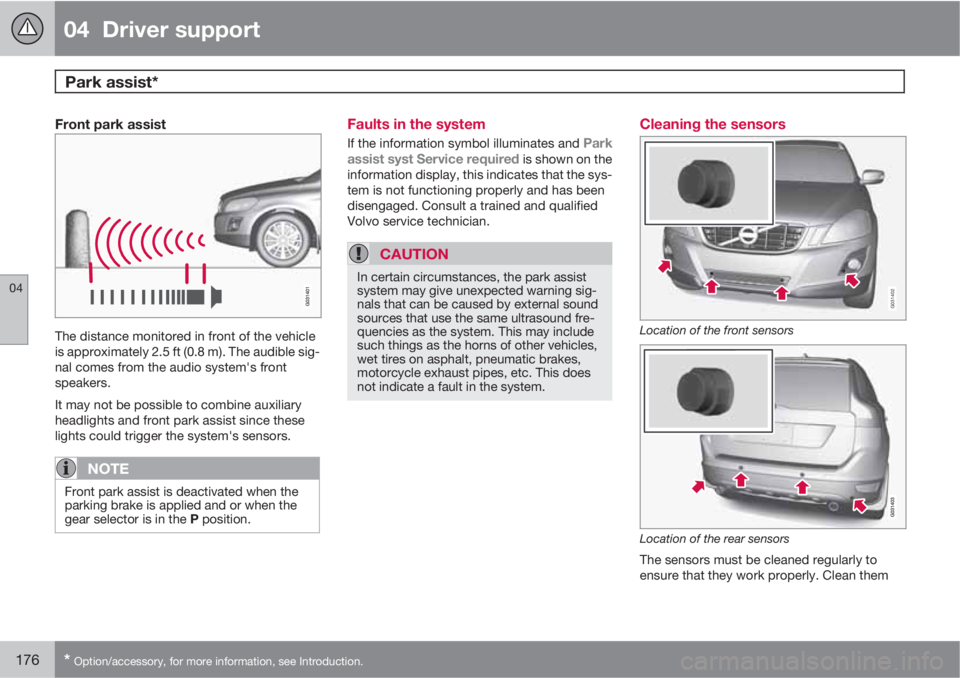
Front park assist
The distance monitored in front of the vehicle
is approximately 2.5 ft (0.8 m). The audible sig-
nal comes from the audio system's front
speakers.
It may not be possible to combine auxiliary
headlights and front park assist since these
lights could trigger the system's sensors.
NOTE
Front park assist is deactivated when the
parking brake is applied and or when the
gear selector is in the P position.
Faults in the system
If the information symbol illuminates and Park
assist syst Service required is shown on the
information display, this indicates that the sys-
tem is not functioning properly and has been
disengaged. Consult a trained and qualified
Volvo service technician.
CAUTION
In certain circumstances, the park assist
system may give unexpected warning sig-
nals that can be caused by external sound
sources that use the same ultrasound fre-
quencies as the system. This may include
such things as the horns of other vehicles,
wet tires on asphalt, pneumatic brakes,
motorcycle exhaust pipes, etc. This does
not indicate a fault in the system.
Cleaning the sensors
G031402
Location of the front sensors
Location of the rear sensors
The sensors must be cleaned regularly to
ensure that they work properly. Clean them
Page 184 of 382
04 Driver support
Blind Spot Information System*
04
182* Option/accessory, for more information, see Introduction.
Introduction
G031404
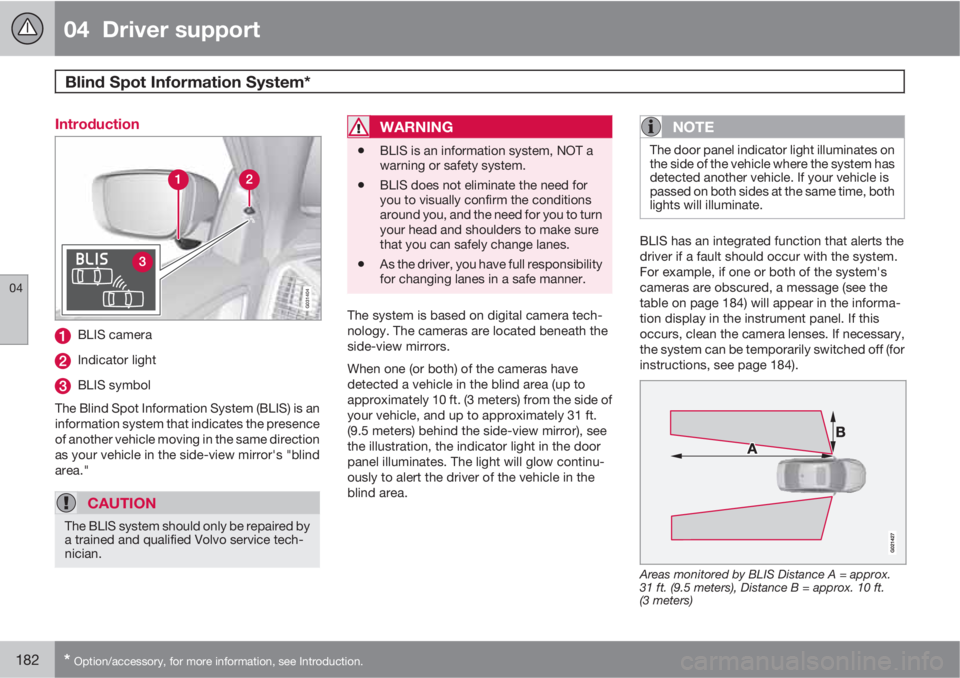
BLIS camera
Indicator light
BLIS symbol
The Blind Spot Information System (BLIS) is an
information system that indicates the presence
of another vehicle moving in the same direction
as your vehicle in the side-view mirror's "blind
area."
CAUTION
The BLIS system should only be repaired by
a trained and qualified Volvo service tech-
nician.
WARNING
•BLIS is an information system, NOT a
warning or safety system.
•BLIS does not eliminate the need for
you to visually confirm the conditions
around you, and the need for you to turn
your head and shoulders to make sure
that you can safely change lanes.
•As the driver, you have full responsibility
for changing lanes in a safe manner.
The system is based on digital camera tech-
nology. The cameras are located beneath the
side-view mirrors.
When one (or both) of the cameras have
detected a vehicle in the blind area (up to
approximately 10 ft. (3 meters) from the side of
your vehicle, and up to approximately 31 ft.
(9.5 meters) behind the side-view mirror), see
the illustration, the indicator light in the door
panel illuminates. The light will glow continu-
ously to alert the driver of the vehicle in the
blind area.
NOTE
The door panel indicator light illuminates on
the side of the vehicle where the system has
detected another vehicle. If your vehicle is
passed on both sides at the same time, both
lights will illuminate.
BLIS has an integrated function that alerts the
driver if a fault should occur with the system.
For example, if one or both of the system's
cameras are obscured, a message (see the
table on page 184) will appear in the informa-
tion display in the instrument panel. If this
occurs, clean the camera lenses. If necessary,
the system can be temporarily switched off (for
instructions, see page 184).
Areas monitored by BLIS Distance A = approx.
31 ft. (9.5 meters), Distance B = approx. 10 ft.
(3 meters)
Page 185 of 382
04 Driver support
Blind Spot Information System*
04
* Option/accessory, for more information, see Introduction.183 When does BLIS function
The system functions when your vehicle is
moving at speeds above 6 mph (10 km/h).
When you pass another vehicle:The system reacts when you pass another
vehicle at a speed of up to 6 mph (10 km/h)
faster than that vehicle.
When you are passed by another vehicle:The system reacts if your vehicle is passed by
another vehicle at a speed of up to 43 mph
(70 km/h) faster than your vehicle.
WARNING
•BLIS does not function in sharp curves.
•BLIS does not function when your vehi-
cle is backing up.
•If you are towing a wide trailer, this may
prevent the BLIS cameras from detect-
ing other vehicles in adjacent lanes.
How BLIS functions in daylight and
darkness
Daylight
BLIS reacts to the shape of surrounding vehi-
cles. The system is designed to help detect
motor vehicles such as cars, trucks, buses,
motorcycles, etc.
DarknessBLIS reacts to the headlights of surrounding
vehicles. In order to be detected by BLIS, a
vehicle in the blind area must have its head-
lights on. This means, for example, that the
system will not detect a trailer without head-
lights that is being towed behind a car or truck.
WARNING
•BLIS does not react to cyclists or
mopeds.
•BLIS does not react to vehicles that are
standing still.
•The BLIS cameras have the same limi-
tation as the human eye. In other words,
their "vision is impaired" by adverse
weather conditions such as heavy
snowfall, intense light directly into the
camera, dense fog, etc.
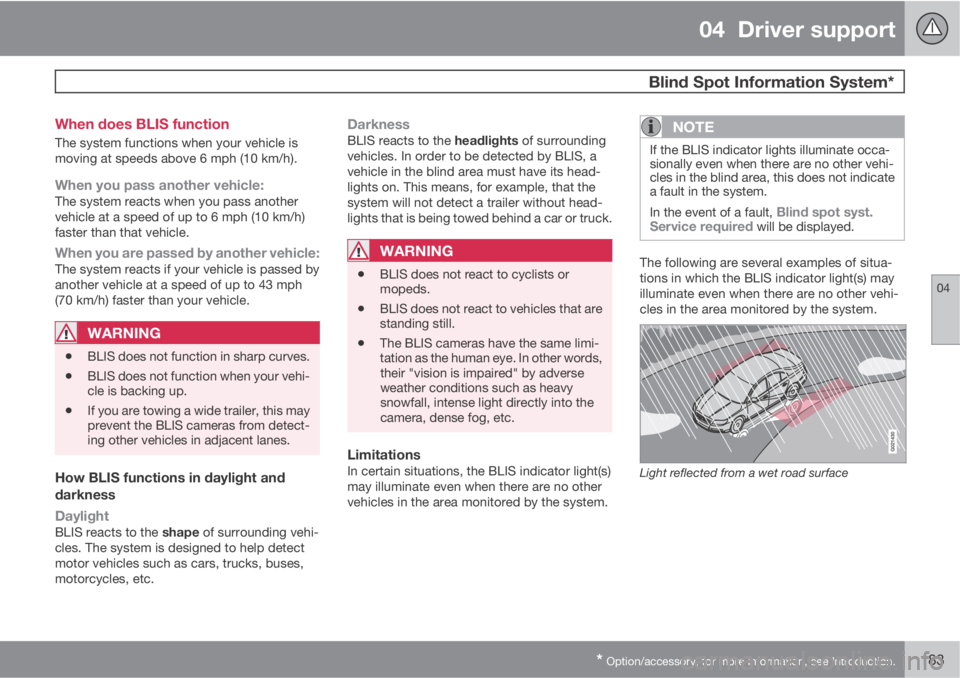
LimitationsIn certain situations, the BLIS indicator light(s)
may illuminate even when there are no other
vehicles in the area monitored by the system.
NOTE
If the BLIS indicator lights illuminate occa-
sionally even when there are no other vehi-
cles in the blind area, this does not indicate
a fault in the system.
In the event of a fault,
Blind spot syst.
Service required will be displayed.
The following are several examples of situa-
tions in which the BLIS indicator light(s) may
illuminate even when there are no other vehi-
cles in the area monitored by the system.
Light reflected from a wet road surface
Page 271 of 382
07 During your trip
Driving recommendations
07
269
tributed so that capacity weight or maximum
permissible axle loads are not exceeded.
Driving through water
•The vehicle can be driven through water up
to a depth of approximately 10 in. (25 cm),
at a maximum speed of 6 mph (10 km/h).
•Take particular care when driving through
flowing water.
•Clean the electrical connections for trailer
wiring after driving in mud or water.
•When driving through water, maintain low
speed and do not stop in the water.
WARNING
After driving through water, press lightly on
the brake pedal to ensure that the brakes
are functioning normally. Water or mud can
make the brake linings slippery, resulting in
delayed braking effect.
CAUTION
•Engine damage will occur if water is
drawn into the air cleaner.
•If the vehicle is driven through water
deeper than 10 in (25 cm), water may
enter the differential and the transmis-
sion. This reduces the oil's lubricating
capacity and may shorten the service
life of these components.
•Do not allow the vehicle to stand in
water up to the door sills longer than
absolutely necessary. This could result
in electrical malfunctions.
•If the engine has been stopped while the
vehicle is in water, do not attempt to
restart it. Have the vehicle towed out of
the water.
Engine and cooling systemUnder special conditions, for example when
driving in hilly terrain, extreme heat or with
heavy loads, there is a risk that the engine and
cooling system will overheat. Proceed as fol-
lows to avoid overheating the engine.
•Maintain a low speed when driving with a
trailer up long, steep hills.
•Do not turn the engine off immediately
when stopping after a hard drive.
WARNING
The cooling fan may start or continue to
operate (for up to 6 minutes) after the engine
has been switched off.
•Remove any auxiliary lights from in front of
the grille when driving in hot weather con-
ditions.
•Do not exceed engine speeds of 4500 rpm
if driving with a trailer in hilly terrain. The oil
temperature could become too high.
Conserving electrical currentKeep the following in mind to help minimize
battery drain:
•When the engine is not running, avoid
using ignition mode II. Many electrical sys-
tems (the audio system, the optional navi-
gation system, power windows, etc) will
function in ignition modes 0 and I. These
modes reduce drain on the battery.
•Please keep in mind that using systems,
accessories, etc., that consume a great
deal of current when the engine is not run-
ning could result in the battery being com-
pletely drained. Driving or having the
engine running for approximately
15 minutes will help keep the battery
charged.
•The optional 12 volt socket in the cargo
area provides electrical current even with
Page 272 of 382
07 During your trip
Driving recommendations
07
270
the ignition switched off, which drains the
battery.
Before a long distance tripIt is always worthwhile to have your vehicle
checked by a trained and qualified Volvo serv-
ice technician before driving long distances.
Your retailer will also be able to supply you with
bulbs, fuses, spark plugs and wiper blades for
your use in the event that problems occur.
As a minimum, the following items should be
checked before any long trip:
•Check that engine runs smoothly and that
fuel consumption is normal.
•Check for fuel, oil, and fluid leakage.
•Have the transmission oil level checked.
•Check condition of drive belts.
•Check state of the battery's charge.
•Examine tires carefully (the spare tire as
well), and replace those that are worn.
Check tire pressures.
•The brakes, front wheel alignment, and
steering gear should be checked by a
trained and qualified Volvo service techni-
cian only.
•Check all lights, including high beams.
•Reflective warning triangles are legally
required in some states/provinces.
•Have a word with a trained and qualified
Volvo service technician if you intend to
drive in countries where it may be difficult
to obtain the correct fuel.
•Consider your destination. If you will be
driving through an area where snow or ice
are likely to occur, consider snow tires.
Cold weather precautionsIf you wish to check your vehicle before the
approach of cold weather, the following advice
is worth noting:
•Make sure that the engine coolant contains
50 percent antifreeze. Any other mixture
will reduce freeze protection. This gives
protection against freezing down to
–31 °F (–35 °C). The use of "recycled" anti-
freeze is not approved by Volvo. Different
types of antifreeze must not be mixed.
•Volvo recommends using only genuine
Volvo antifreeze in your vehicle's radiator.
•Try to keep the fuel tank well filled – this
helps prevent the formation of condensa-
tion in the tank. In addition, in extremely
cold weather conditions it is worthwhile to
add fuel line de-icer before refueling.
•The viscosity of the engine oil is important.
Oil with low viscosity (thinner oil) improves
cold-weather starting as well as decreas-
ing fuel consumption while the engine is
warming up. 0W-30 oil is recommended fordriving in areas with sustained low temper-
atures.
•The load placed on the battery is greater
during the winter since the windshield wip-
ers, lighting, etc., are used more often.
Moreover, the capacity of the battery
decreases as the temperature drops. In
very cold weather, a poorly charged bat-
tery can freeze and be damaged. It is there-
fore advisable to check the state of charge
more frequently and spray an anti-rust oil
on the battery posts.
•Volvo recommends the use of snow tires
on all four wheels for winter driving, see
page 304.
•To prevent the washer fluid reservoir from
freezing, add washer solvents containing
antifreeze. This is important since dirt is
often splashed on the windshield during
winter driving, requiring the frequent use of
the washers and wipers. Volvo Washer
Solvent should be diluted as follows: Down
to 14 °F (–10 °C): 1 part washer solvent and
4 parts water Down to 5 °F (–15 °C): 1 part
washer solvent and 3 parts water Down to
0 °F (–18 °C): 1 part washer solvent and
2 parts water Down to –18 °F (–28 °C):
1 part washer solvent and 1 part water.
•Use Volvo Teflon Lock Spray in the locks.
•Avoid using de-icing sprays as they can
cause damage to the locks.
Page 278 of 382
07 During your trip
Loading
07
276* Option/accessory, for more information, see Introduction.
Introduction
The load carrying capacity of your vehicle is
determined by factors such as the number of
passengers, the amount of cargo, the weight
of any accessories that may be installed, etc.
To increase loading space, the rear seat back-
rests can be folded down, see page 89.
When loading the cargo area, keep the follow-
ing in mind:
•Load objects in the cargo area against the
backrest whenever possible.
•Unstable loads can be secured to the load
anchoring eyelets with straps or web lash-
ings to help keep them from shifting.
•Stop the engine and apply the parking
brake when loading or unloading long
objects. The gear selector can be knocked
out of position by long loads, which could
set the vehicle in motion.
WARNING
•Stop the engine, put the gear selector in
P, and apply the parking brake when
loading or unloading long objects.
•The vehicle's driving characteristics
may change depending on the weight
and distribution of the load.
•A 44-pound (20 kg) object produces a
force of 2,200 pounds (1,000 kg) in a
head-on collision at 30 mph (50 km/h).
•The cargo area and rear seat should not
be loaded to a level higher than 2 in.
(5 cm) below the upper edge of the rear
side windows. Objects placed higher
than this level could impede the func-
tion of the Inflatable Curtain.
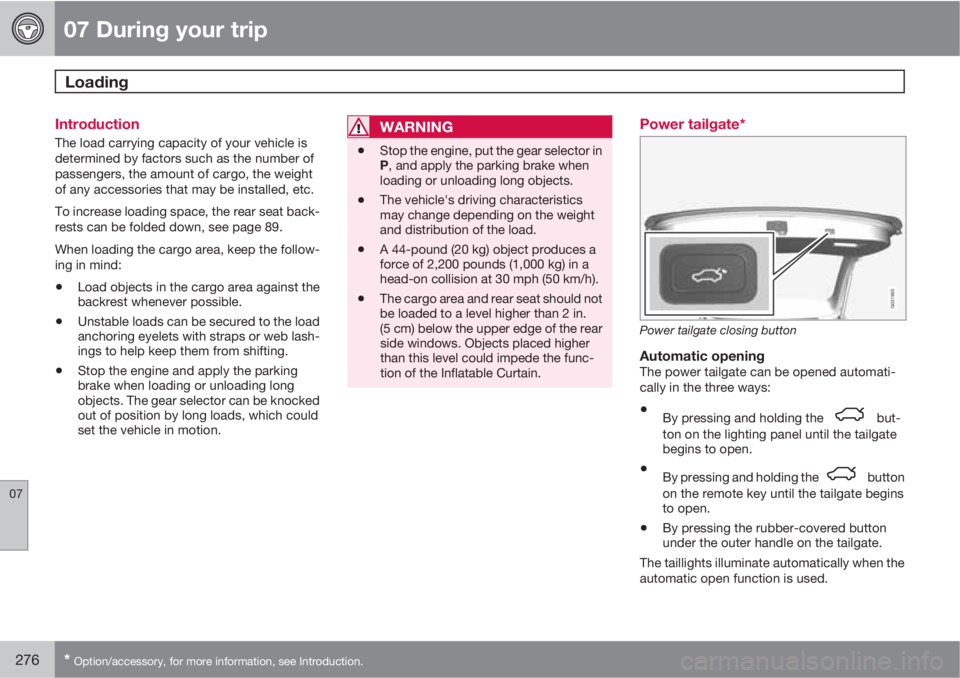
Power tailgate*
G031965
Power tailgate closing button
Automatic openingThe power tailgate can be opened automati-
cally in the three ways:
•By pressing and holding the but-
ton on the lighting panel until the tailgate
begins to open.
•By pressing and holding the button
on the remote key until the tailgate begins
to open.
•By pressing the rubber-covered button
under the outer handle on the tailgate.
The taillights illuminate automatically when the
automatic open function is used.
Page 332 of 382
09 Maintenance and specifications
Replacing bulbs 09
330* Option/accessory, for more information, see Introduction.
Introduction
All bulb specifications are listed on page 336.
The following bulbs should only be replaced by
a trained and qualified Volvo service techni-
cian:
•Dome lighting, reading lights
•Glove compartment lighting
•Footwell lighting
•Turn signals in the door mirrors
•Approach lighting in the door mirrors
•Brake lights/rear fog light/taillights
•Rear parking lights
•Active Bending Lights
•LED bulbs
NOTE
For information regarding any other bulbs
not mentioned in this section, please con-
tact your Volvo retailer or a trained and
authorized Volvo service technician.
WARNING
•The engine should not be running when
changing bulbs.
•If the engine has been running just prior
to replacing bulbs in the headlight hous-
ing, please keep in mind that compo-
nents in the engine compartment will be
hot.
WARNING
•Active Bending Lights* – due to the high
voltage used by these headlights, these
bulbs should only be replaced by a
trained and qualified Volvo service tech-
nician.
•Turn off the lights and remove the
remote key from the ignition before
changing any bulbs.
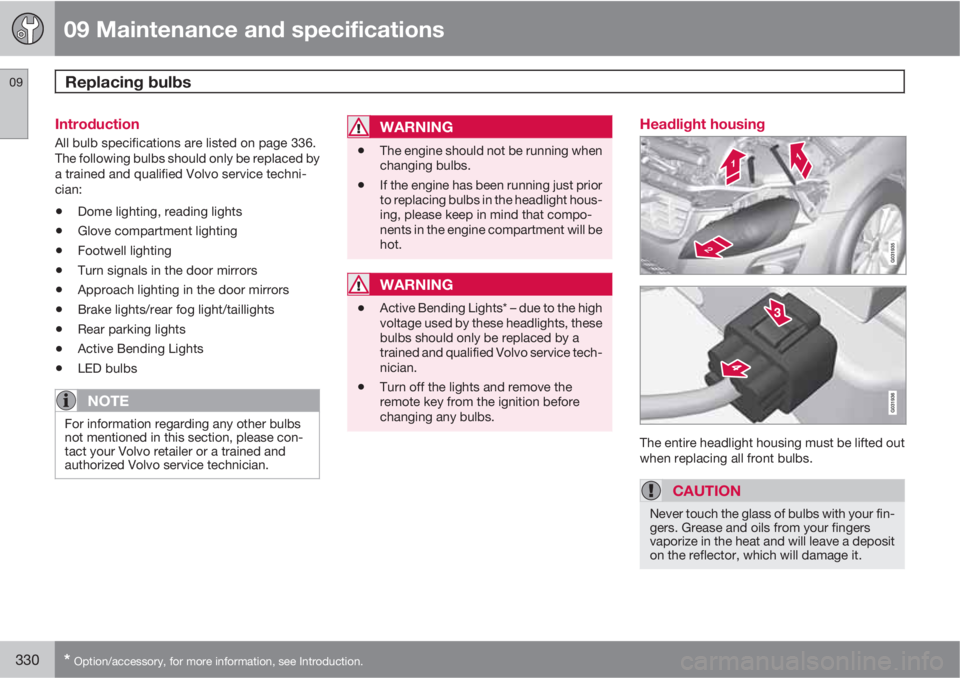
Headlight housing
The entire headlight housing must be lifted out
when replacing all front bulbs.
CAUTION
Never touch the glass of bulbs with your fin-
gers. Grease and oils from your fingers
vaporize in the heat and will leave a deposit
on the reflector, which will damage it.
Page 350 of 382
09 Maintenance and specifications
Fuses 09
348* Option/accessory, for more information, see Introduction.
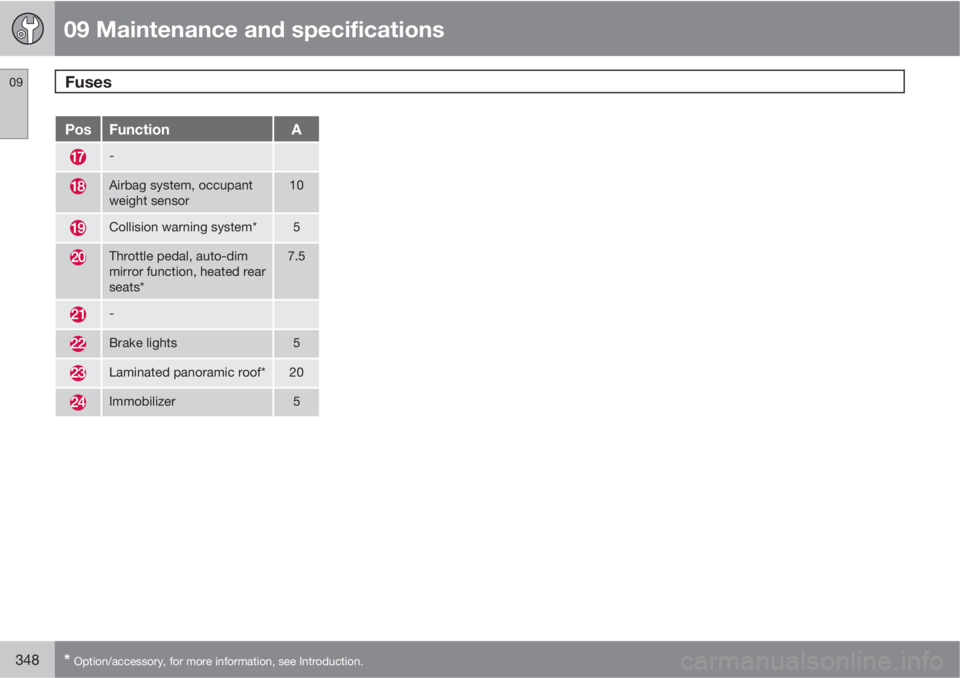
PosFunctionA
-
Airbag system, occupant
weight sensor10
Collision warning system*5
Throttle pedal, auto-dim
mirror function, heated rear
seats*7.5
-
Brake lights5
Laminated panoramic roof*20
Immobilizer5
Page 353 of 382
09 Maintenance and specifications
Vehicle care09
351
CAUTION
•Avoid waxing or polishing plastic or rub-
ber components
•Polishing chromed strips can wear
away or damage the surface
•Polishes containing abrasive sub-
stances should not be used
Automatic car wash
•We do NOT recommend washing your car
in an automatic wash during the first few
months (because the paint will not have
hardened sufficiently).
•An automatic wash is a simple and quick
way to clean your car, but it is worth
remembering that it may not be as thor-
ough as when you yourself go over the car
with sponge and water. Keeping the under-
body clean is most important, especially in
the winter. Some automatic washers do
not have facilities for washing the under-
body.
CAUTION
•Before driving into an automatic car
wash, turn off the optional rain sensor to
avoid damaging the windshield wipers.
•Make sure that side view mirrors, auxil-
iary lamps, etc, are secure, and that any
antenna(s) are retracted or removed.
Otherwise there is risk of the machine
dislodging them.
•Chromed wheels: Clean chrome-
plated wheels using the same deter-
gents used for the body of the vehicle.
Aggressive wheel-cleaning agents can
permanently stain chrome-plated
wheels.
WARNING
•When the vehicle is driven immediately
after being washed, apply the brakes,
including the parking brake, several
times in order to remove any moisture
from the brake linings.
•Engine cleaning agents should not be
used when the engine is warm. This
constitutes a fire risk.
Exterior lightingCondensation may form temporarily on the
inside of the lenses of exterior lights such as
headlights, fog lights, or taillights. This is nor-mal and the lights are designed to withstand
moisture. Normally, condensation will dissi-
pate after the lights have been on for a short
time.
Polishing and waxing
•Normally, polishing is not required during
the first year after delivery, however, wax-
ing may be beneficial.
•Before applying polish or wax the vehicle
must be washed and dried. Tar spots can
be removed with kerosene or tar remover.
Difficult spots may require a fine rubbing
compound.
•After polishing use liquid or paste wax.
•Several commercially available products
contain both polish and wax.
•Waxing alone does not substitute for pol-
ishing a dull surface.
•A wide range of polymer-based waxes can
be purchased today. These waxes are easy
to use and produce a long-lasting, high-
gloss finish that protects the bodywork
against oxidation, road dirt and fading.
•Do not polish or wax your vehicle in direct
sunlight (the surface of the vehicle should
not be warmer than 113 °F (45 °C).
Page 368 of 382
10 Specifications
Overview of information and warning symbols
10
366* Option/accessory, for more information, see Introduction.
Introduction
The symbols in the vehicle's various displays
are divided into three main categories:
•Warning symbols
•Indicator symbols
•Information symbols
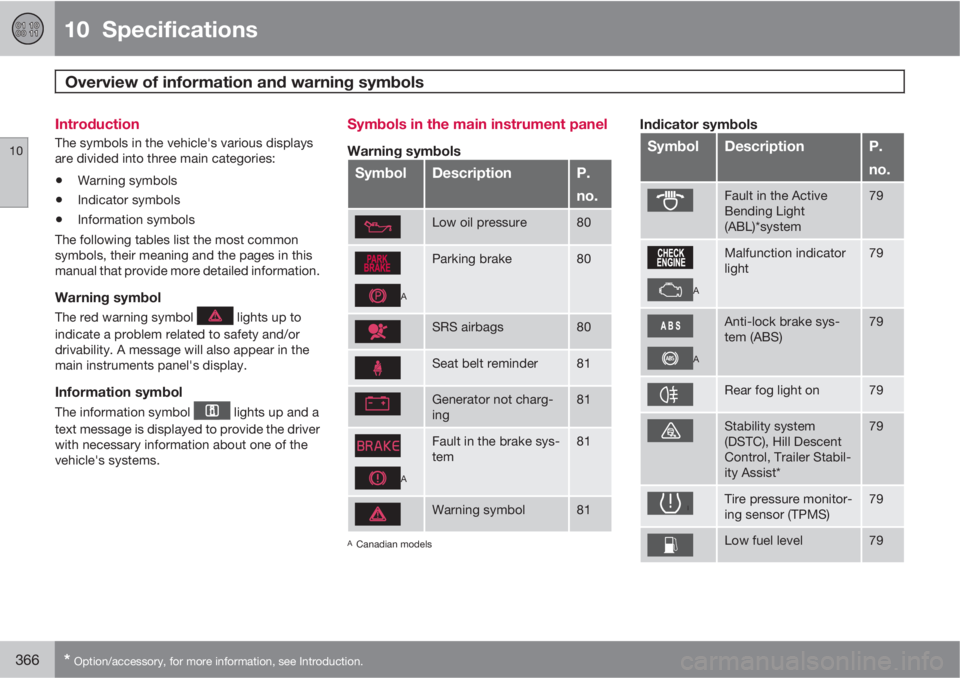
The following tables list the most common
symbols, their meaning and the pages in this
manual that provide more detailed information.
Warning symbol
The red warning symbol lights up to
indicate a problem related to safety and/or
drivability. A message will also appear in the
main instruments panel's display.
Information symbol
The information symbol lights up and a
text message is displayed to provide the driver
with necessary information about one of the
vehicle's systems.
Symbols in the main instrument panel
Warning symbols
SymbolDescriptionP.
no.
Low oil pressure80
A
Parking brake80
SRS airbags80
Seat belt reminder81
Generator not charg-
ing81
A
Fault in the brake sys-
tem81
Warning symbol81
ACanadian models
Indicator symbols
SymbolDescriptionP.
no.
Fault in the Active
Bending Light
(ABL)*system79
A
Malfunction indicator
light79
A
Anti-lock brake sys-
tem (ABS)79
Rear fog light on79
Stability system
(DSTC), Hill Descent
Control, Trailer Stabil-
ity Assist*79
Tire pressure monitor-
ing sensor (TPMS)79
Low fuel level79