brake light VOLVO XC60 2013 Owner´s Manual
[x] Cancel search | Manufacturer: VOLVO, Model Year: 2013, Model line: XC60, Model: VOLVO XC60 2013Pages: 382, PDF Size: 7.08 MB
Page 157 of 382
04 Driver support
City Safety™
04
155 Function
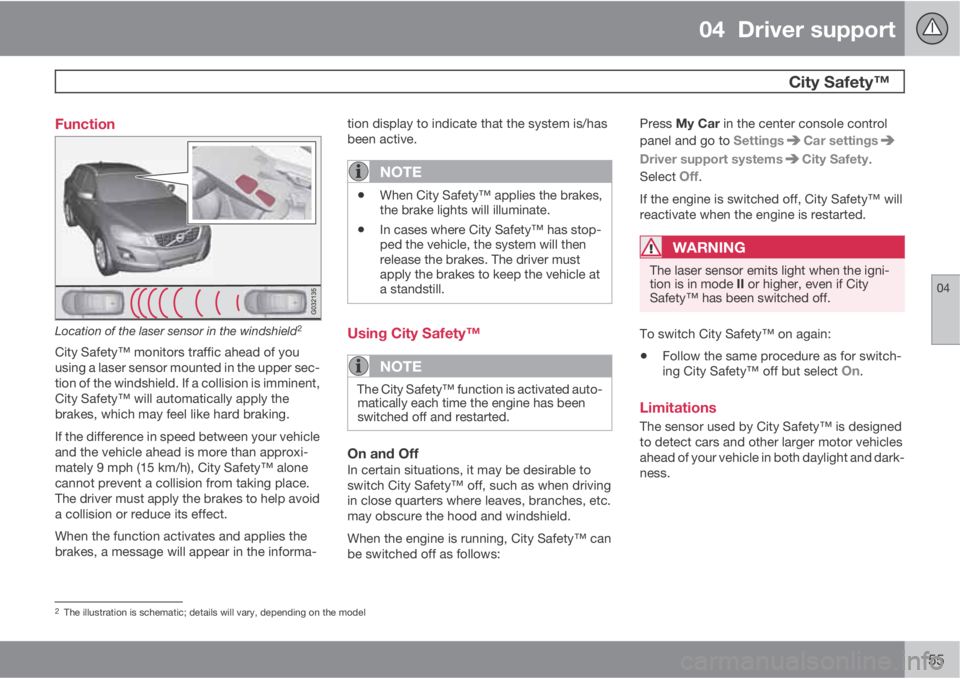
Location of the laser sensor in the windshield2
City Safety™ monitors traffic ahead of you
using a laser sensor mounted in the upper sec-
tion of the windshield. If a collision is imminent,
City Safety™ will automatically apply the
brakes, which may feel like hard braking.
If the difference in speed between your vehicle
and the vehicle ahead is more than approxi-
mately 9 mph (15 km/h), City Safety™ alone
cannot prevent a collision from taking place.
The driver must apply the brakes to help avoid
a collision or reduce its effect.
When the function activates and applies the
brakes, a message will appear in the informa-tion display to indicate that the system is/has
been active.
NOTE
•When City Safety™ applies the brakes,
the brake lights will illuminate.
•In cases where City Safety™ has stop-
ped the vehicle, the system will then
release the brakes. The driver must
apply the brakes to keep the vehicle at
a standstill.
Using City Safety™
NOTE
The City Safety™ function is activated auto-
matically each time the engine has been
switched off and restarted.
On and OffIn certain situations, it may be desirable to
switch City Safety™ off, such as when driving
in close quarters where leaves, branches, etc.
may obscure the hood and windshield.
When the engine is running, City Safety™ can
be switched off as follows:Press My Car in the center console control
panel and go to Settings
Car settings
Driver support systemsCity Safety.
Select
Off.
If the engine is switched off, City Safety™ will
reactivate when the engine is restarted.
WARNING
The laser sensor emits light when the igni-
tion is in mode II or higher, even if City
Safety™ has been switched off.
To switch City Safety™ on again:
•Follow the same procedure as for switch-
ing City Safety™ off but select On.
Limitations
The sensor used by City Safety™ is designed
to detect cars and other larger motor vehicles
ahead of your vehicle in both daylight and dark-
ness.
2The illustration is schematic; details will vary, depending on the model
Page 163 of 382
04 Driver support
Collision warning with Full Auto-brake and Pedestrian Detection*
04
* Option/accessory, for more information, see Introduction.161
WARNING
•Collision Warning will not provide a
warning or brake the vehicle for pedes-
trians in darkness or in tunnels, even if
there is street lighting in the area.
•The auto-brake function can help pre-
vent a collision or reduce the speed at
impact but the driver should always
apply the brakes for the best possible
braking effect, even if auto-brake is
actively applying the brakes.
•Never wait for a collision warning. This
system is designed to be a supplemen-
tary driving aid. It is not, however,
intended to replace the driver's atten-
tion and judgement. The driver is
responsible for maintaining a safe dis-
tance and speed, even when the colli-
sion warning system is in use.
•Maintenance of the Collision Warning
system's components must only be
performed by a trained and qualified
Volvo technician.
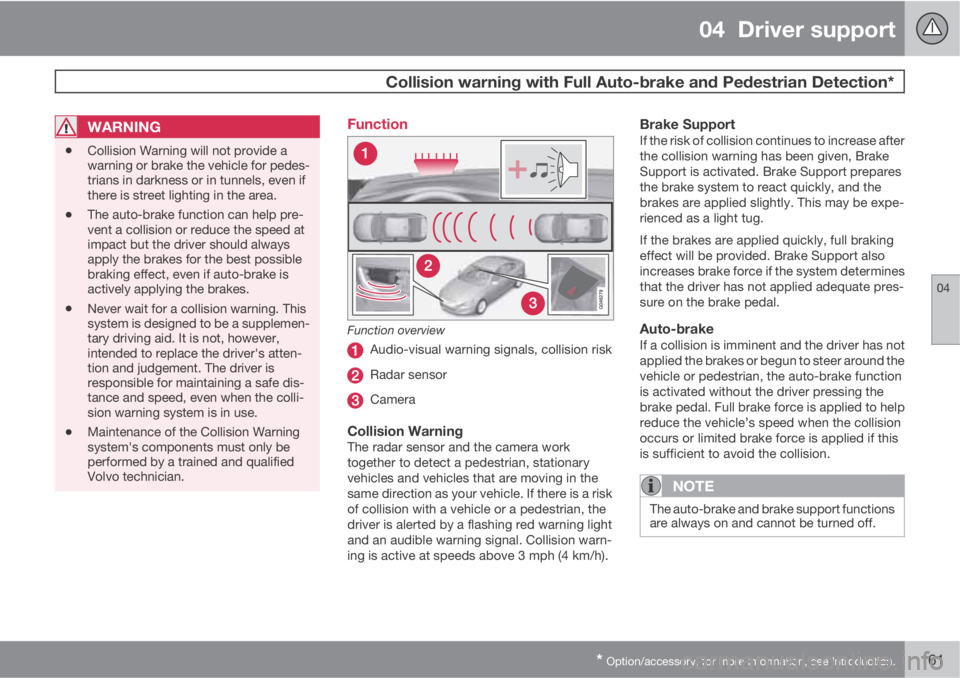
Function
Function overview
Audio-visual warning signals, collision risk
Radar sensor
Camera
Collision WarningThe radar sensor and the camera work
together to detect a pedestrian, stationary
vehicles and vehicles that are moving in the
same direction as your vehicle. If there is a risk
of collision with a vehicle or a pedestrian, the
driver is alerted by a flashing red warning light
and an audible warning signal. Collision warn-
ing is active at speeds above 3 mph (4 km/h).
Brake SupportIf the risk of collision continues to increase after
the collision warning has been given, Brake
Support is activated. Brake Support prepares
the brake system to react quickly, and the
brakes are applied slightly. This may be expe-
rienced as a light tug.
If the brakes are applied quickly, full braking
effect will be provided. Brake Support also
increases brake force if the system determines
that the driver has not applied adequate pres-
sure on the brake pedal.
Auto-brakeIf a collision is imminent and the driver has not
applied the brakes or begun to steer around the
vehicle or pedestrian, the auto-brake function
is activated without the driver pressing the
brake pedal. Full brake force is applied to help
reduce the vehicle’s speed when the collision
occurs or limited brake force is applied if this
is sufficient to avoid the collision.
NOTE
The auto-brake and brake support functions
are always on and cannot be turned off.
Page 164 of 382
04 Driver support
Collision warning with Full Auto-brake and Pedestrian Detection*
04
162* Option/accessory, for more information, see Introduction.
Operation
Settings are made by pressing MY CAR on the
center console control panel and using the
menus displayed.
Activating/deactivating both warning
signals
To switch Collision Warning's audible and vis-
ual signals on or off at the same time, press
MY CAR on the center console control panel
and go to Settings
Car settingsDriver
support systems
Collision Warning. If
Collision Warning is on, the system will perform
a self-test each time the engine is started by
briefly illuminating the warning light. See page
191 for a description of the menu system.
When the engine is switched on, the Collision
Warning setting that was being used when it
was switched off will be the default setting.
NOTE
The auto-brake and pedestrian detection
features are always on, even if the audible
and visual warning signals have been deac-
tivated.
Activating/deactivating the audible
warning signal only
The audible warning signal can be activated/
deactivated by pressing MY CAR on the centerconsole control panel and going to Settings
Car settingsDriver support systems
Warning sound if risk of collision.
Setting a warning distanceThis setting determines the distance at which
the visual and audible warnings are triggered.
Select
Long, Normal or Short by pressing MY
CAR on the center console control panel and
going to Settings
Car settingsDriver
support systems
Collision Warning
Warning distance.
The warning distance determines the level of
sensitivity used by the system. The warning
distance
Long provides an earlier warning.
Begin by using Long and if the system gives
too many warnings, try changing to Normal.
WARNING
•The setting Short should only be used
in situations where traffic is light and
moving at low speeds.
•Collision Warning alerts the driver to the
risk of a collision but this function can-
not reduce the driver’s reaction time.
•For Collision Warning to be as effective
as possible, it is recommended that Dis-
tance Alert be set to 4 or 5, see
page 151.
NOTE
•When Adaptive Cruise Control is used,
the warning light and signal will be used
by that function, even if the warnings
provided by Collision Warning have
been deactivated by the driver.
•In situations where traffic is moving at
considerably different speeds, or if the
vehicle ahead brakes suddenly, warn-
ings may be considered to be late, even
if the setting
Long has been selected.
Checking settingsThe current Collision Warning settings can be
checked by pressing MY CAR on the center
console control panel and going to Settings
Car settingsDriver support systems
Collision Warning.
Limitations
Strong sunlight, reflections, extreme light con-
trasts, the use of sunglasses, or if the driver is
not looking straight ahead may make the visual
warning signal in the windshield difficult to see.
For this reason, always activate the audible
warning signal.
Slippery driving conditions increase braking
distance, which can reduce the system's
Page 165 of 382
04 Driver support
Collision warning with Full Auto-brake and Pedestrian Detection*
04
* Option/accessory, for more information, see Introduction.163
capacity to avoid a collision. In these condi-
tions, the ABS and DSTC systems provide the
best possible braking effect while helping to
maintain stability.
NOTE
The visual warning signal may be temporar-
ily disengaged in the event of high passen-
ger compartment temperature due to strong
sunlight, etc. If this occurs, the audible
warning signal will be used, even if it has
been deactivated in the menu system.
WARNING
•In certain situations, the system cannot
provide warnings or warnings may be
delayed if traffic conditions or other
external factors make it impossible for
the radar sensor or camera to detect a
pedestrian or a vehicle ahead.
•Warnings may not be provided if the
distance to the vehicle ahead is short,
or if movements of the steering wheel/
brake pedal are great, such as during
active driving.
•The sensor system has a limited range
for pedestrians and provides warnings
and braking effect most effectively at
speeds up to 30 mph (50 km/h). For sta-
tionary or slow-moving vehicles, the
system functions best if your vehicle’s
speed is below approximately 45 mph
(70 km/h).
•Warnings for stationary or slow-moving
vehicles may not be provided in dark
conditions or in poor visibility.
The Collision Warning system uses the same
radar sensors as Adaptive Cruise Control. For
more information on the radar sensor and its
limitations, see page 146.
NOTE
If warnings are given too frequently, the
warning distance can be reduced (see
page 162). This causes the system to pro-
vide later warnings, which decreases the
total number of warnings provided.
WARNING
•The system is not activated at speeds
under approx. 2 mph (4 km/h). There-
fore, it will not brake your vehicle if you
approach a vehicle ahead at very low
speed, such as when parking.
•The driver's actions always have high-
est priority and override the Collision
Warning system. This means that the
system will not intervene in situations
where the driver is actively steering,
braking or pressing the accelerator
pedal, even if a collision is imminent.
•When Auto-brake has prevented a col-
lision with a stationary object, your vehi-
cle will remain at a standstill for approx.
1.5 seconds. If your vehicle has been
braked for a moving vehicle ahead, your
vehicle's speed will be reduced to the
same speed as that vehicle's.
Page 166 of 382
04 Driver support
Collision warning with Full Auto-brake and Pedestrian Detection*
04
164* Option/accessory, for more information, see Introduction.
The camera’s limitationsThe camera is used by Collision Warning with
Auto-brake, Driver Alert Control (see
page 168), and Lane Departure Warning (see
page 171).
NOTE
•To help protect the camera in very hot
conditions, it may be temporarily
switched off for approximately 15
minutes after the engine has been
started.
•Keep the section of the windshield in
front of the camera clean and free of ice,
snow, or condensation.
WARNING
•The camera has the same limitations as
the human eye. In other words, its
“vision is impaired” by adverse weather
conditions such as heavy snowfall,
dense fog, etc. These conditions may
reduce the function of systems that
depend on the camera or cause these
systems to temporarily stop function-
ing.
•Never place any objects, decals, etc.,
on the windshield in front of the camera.
This could reduce or block the camera’s
function, and could cause one or more
of the systems that utilize the camera to
stop functioning.
•Strong sunlight, reflections from the
road surface, ice or snow covering the
road, a dirty road surface, or unclear
lane marker lines may drastically reduce
the camera’s capacity to detect the side
of a lane, a pedestrian or another vehi-
cle.
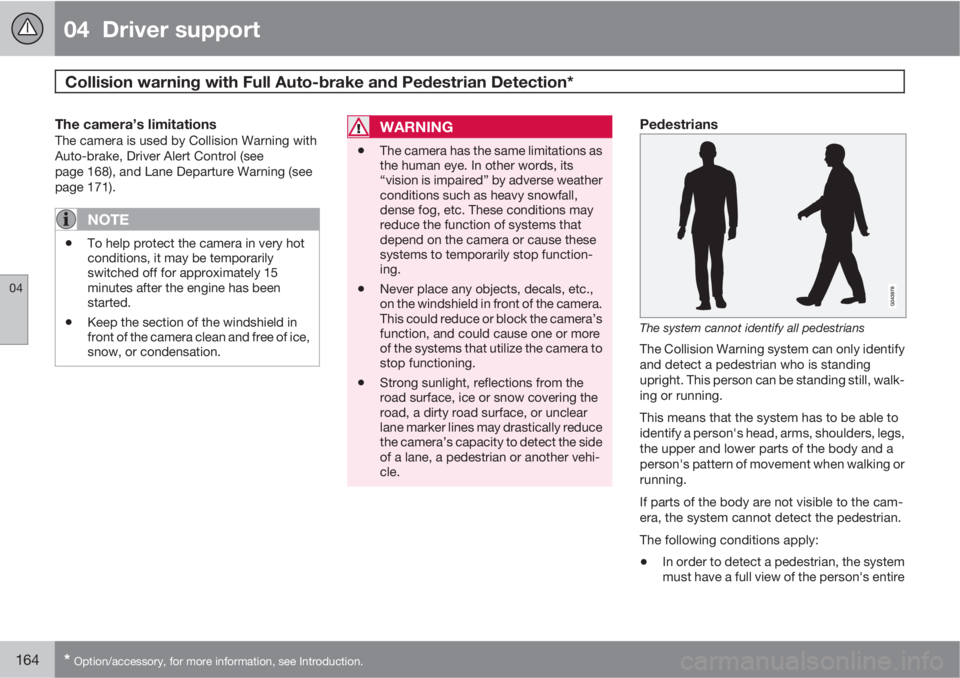
Pedestrians
The system cannot identify all pedestrians
The Collision Warning system can only identify
and detect a pedestrian who is standing
upright. This person can be standing still, walk-
ing or running.
This means that the system has to be able to
identify a person's head, arms, shoulders, legs,
the upper and lower parts of the body and a
person's pattern of movement when walking or
running.
If parts of the body are not visible to the cam-
era, the system cannot detect the pedestrian.
The following conditions apply:
•In order to detect a pedestrian, the system
must have a full view of the person's entire
Page 167 of 382
04 Driver support
Collision warning with Full Auto-brake and Pedestrian Detection*
04
* Option/accessory, for more information, see Introduction.165
body and the person must be at least
32 in. (80 cm) tall.
•The system cannot detect a pedestrian
carrying a large object.
•The camera's capacity to see a pedestrian
at dawn or dusk is limited, much as it is for
the human eye.
•The camera's function is deactivated and
will not detect a pedestrian in darkness or
in tunnels, even if there is street lighting in
the area.
WARNING
•Collision Warning with Full Auto-brake
and Pedestrian Detection is designed to
be a supplementary driving aid. It is not,
however, intended to replace the driv-
er's attention and judgement. The driver
is always responsible for operating the
vehicle in a safe manner.
•The system cannot detect all pedes-
trians in all situations, such as in dark-
ness/at night and cannot detect parti-
ally hidden pedestrians, people who are
less than approx. 32 in. (80 cm) tall, or
people wearing clothing that obscures
the contours of their bodies.
Fault tracing and actions
If the message Windscreen Sensors
blocked is displayed, this means that the cam-
era is obscured and cannot detect pedestrians,
vehicles or road marker lines in front of the
vehicle.
This, in turn, means that Collision Warning with
Full Auto-brake and Pedestrian Detection,
Lane Departure Warning, and Driver Alert Con-
trol will not have full functionality.
The table lists possible causes for this mes-
sage being displayed, and suitable actions.
Page 173 of 382
04 Driver support
Driver Alert System*
04
* Option/accessory, for more information, see Introduction.171 Lane Departure Warning (LDW)–
introduction
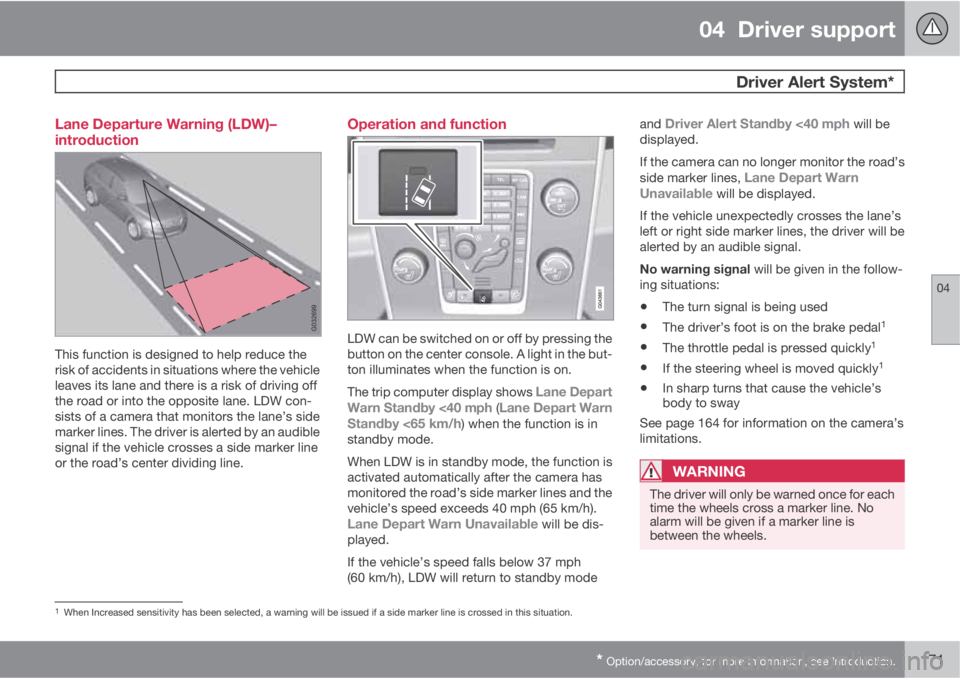
This function is designed to help reduce the
risk of accidents in situations where the vehicle
leaves its lane and there is a risk of driving off
the road or into the opposite lane. LDW con-
sists of a camera that monitors the lane’s side
marker lines. The driver is alerted by an audible
signal if the vehicle crosses a side marker line
or the road’s center dividing line.
Operation and function
LDW can be switched on or off by pressing the
button on the center console. A light in the but-
ton illuminates when the function is on.
The trip computer display shows
Lane Depart
Warn Standby <40 mph (Lane Depart Warn
Standby <65 km/h) when the function is in
standby mode.
When LDW is in standby mode, the function is
activated automatically after the camera has
monitored the road’s side marker lines and the
vehicle’s speed exceeds 40 mph (65 km/h).
Lane Depart Warn Unavailable will be dis-
played.
If the vehicle’s speed falls below 37 mph
(60 km/h), LDW will return to standby modeand
Driver Alert Standby <40 mph will be
displayed.
If the camera can no longer monitor the road’s
side marker lines,
Lane Depart Warn
Unavailable will be displayed.
If the vehicle unexpectedly crosses the lane’s
left or right side marker lines, the driver will be
alerted by an audible signal.
No warning signal will be given in the follow-
ing situations:
•The turn signal is being used
•The driver’s foot is on the brake pedal1
•The throttle pedal is pressed quickly1
•If the steering wheel is moved quickly1
•In sharp turns that cause the vehicle’s
body to sway
See page 164 for information on the camera’s
limitations.
WARNING
The driver will only be warned once for each
time the wheels cross a marker line. No
alarm will be given if a marker line is
between the wheels.
1When Increased sensitivity has been selected, a warning will be issued if a side marker line is crossed in this situation.
Page 176 of 382
04 Driver support
Park assist*
04
174* Option/accessory, for more information, see Introduction.
Introduction
The park assist system is designed to assist
you when driving into parking spaces, garages,
etc. It utilizes ultrasound sensors in the front
bumper and rear bumper(s) to measure the dis-
tance to a vehicle or an object that may be
close to the front or rear of your vehicle. An
audible signal and symbols in the audio sys-
tem’s display indicate the distance to the
object.
NOTE
A trailer hitch whose wiring is integrated
with the vehicle's electrical system will be
included in the measurement of the availa-
ble space behind the vehicle.
WARNING
Park Assist is an information system, NOT a
safety system. This system is designed to
be a supplementary aid when parking the
vehicle. It is not, however, intended to
replace the driver's attention and judge-
ment.
Function
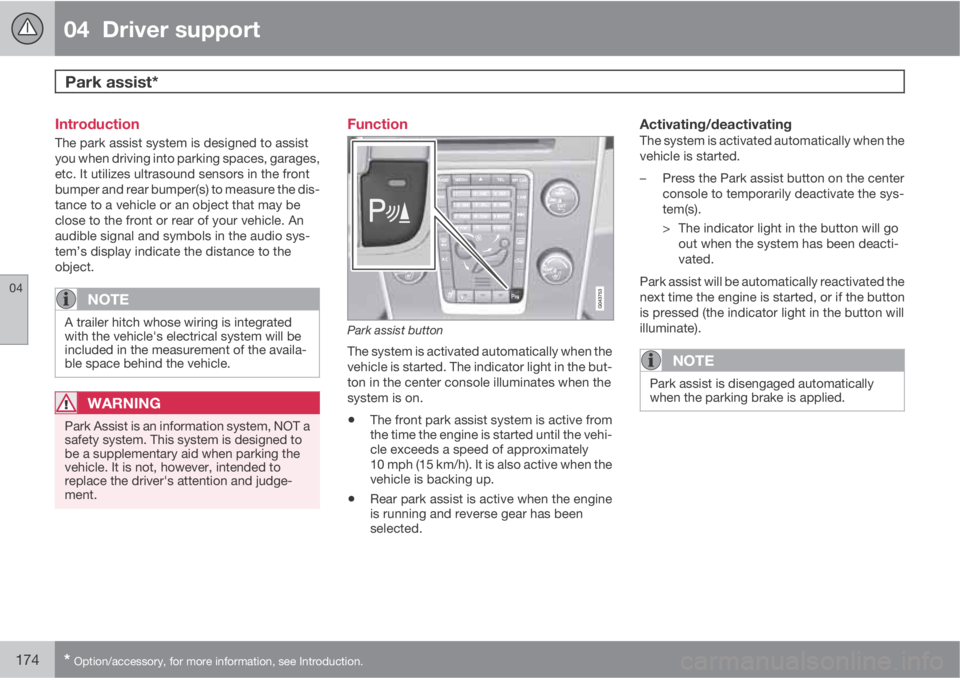
Park assist button
The system is activated automatically when the
vehicle is started. The indicator light in the but-
ton in the center console illuminates when the
system is on.
•The front park assist system is active from
the time the engine is started until the vehi-
cle exceeds a speed of approximately
10 mph (15 km/h). It is also active when the
vehicle is backing up.
•Rear park assist is active when the engine
is running and reverse gear has been
selected.
Activating/deactivatingThe system is activated automatically when the
vehicle is started.
–Press the Park assist button on the center
console to temporarily deactivate the sys-
tem(s).
> The indicator light in the button will go
out when the system has been deacti-
vated.
Park assist will be automatically reactivated the
next time the engine is started, or if the button
is pressed (the indicator light in the button will
illuminate).
NOTE
Park assist is disengaged automatically
when the parking brake is applied.
Page 178 of 382
04 Driver support
Park assist*
04
176* Option/accessory, for more information, see Introduction.
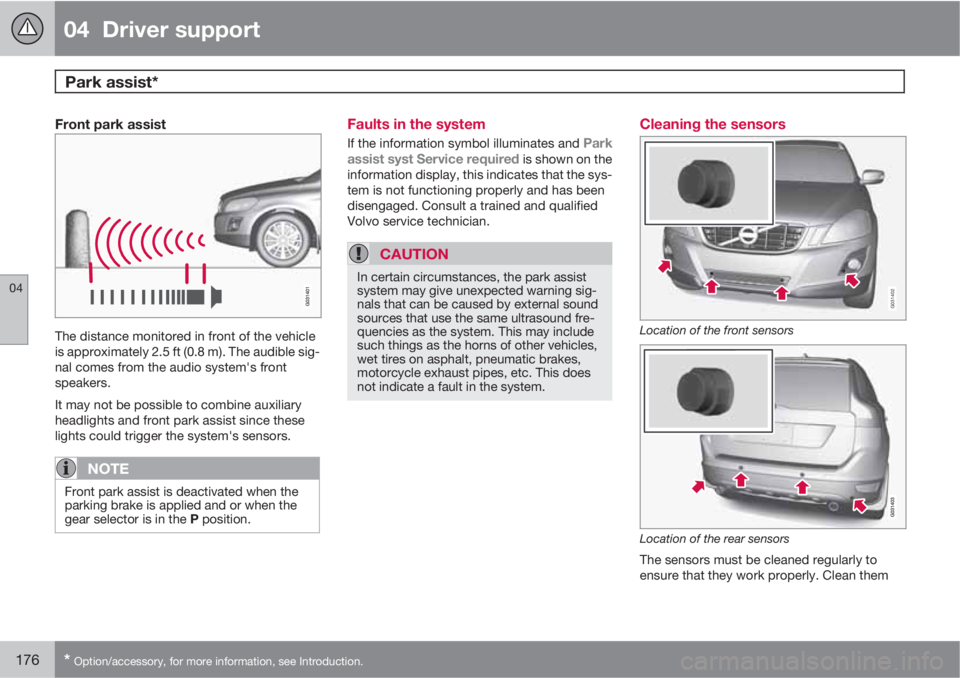
Front park assist
The distance monitored in front of the vehicle
is approximately 2.5 ft (0.8 m). The audible sig-
nal comes from the audio system's front
speakers.
It may not be possible to combine auxiliary
headlights and front park assist since these
lights could trigger the system's sensors.
NOTE
Front park assist is deactivated when the
parking brake is applied and or when the
gear selector is in the P position.
Faults in the system
If the information symbol illuminates and Park
assist syst Service required is shown on the
information display, this indicates that the sys-
tem is not functioning properly and has been
disengaged. Consult a trained and qualified
Volvo service technician.
CAUTION
In certain circumstances, the park assist
system may give unexpected warning sig-
nals that can be caused by external sound
sources that use the same ultrasound fre-
quencies as the system. This may include
such things as the horns of other vehicles,
wet tires on asphalt, pneumatic brakes,
motorcycle exhaust pipes, etc. This does
not indicate a fault in the system.
Cleaning the sensors
G031402
Location of the front sensors
Location of the rear sensors
The sensors must be cleaned regularly to
ensure that they work properly. Clean them
Page 270 of 382
07 During your trip
Driving recommendations
07
268
General information
Economical driving conserves natural
resources
Better driving economy may be obtained by
thinking ahead, avoiding rapid starts and stops
and adjusting the speed of your vehicle to
immediate traffic conditions.
Observe the following rules:
•Bring the engine to normal operating tem-
perature as soon as possible by driving
with a light foot on the accelerator pedal for
the first few minutes of operation. A cold
engine uses more fuel and is subject to
increased wear.
•Whenever possible, avoid using the vehicle
for driving short distances. This does not
allow the engine to reach normal operating
temperature.
•Drive carefully and avoid rapid acceleration
and hard braking.
•Use the transmission's Drive (D) position
as often as possible and avoid using kick-
down.
•Using the transmission's Sport mode1 may
increase fuel consumption somewhat. Use
the transmission's Drive (D) position as
often as possible. See page 122 for addi-
tional information about Sport mode.
•Do not exceed posted speed limits.
•Avoid carrying unnecessary items (extra
load) in the vehicle.
•Maintain correct tire pressure. Check tire
pressure regularly (when tires are cold).
•Remove snow tires when threat of snow or
ice has ended.
•Note that roof racks, ski racks, etc,
increase air resistance and also fuel con-
sumption.
•At highway driving speeds, fuel consump-
tion will be lower with the air conditioning
on and the windows closed than with the
air conditioning off and the windows open.
•Using the onboard trip computer's fuel
consumption modes can help you learn
how to drive more economically.
Other factors that decrease gas mileage
are:
•Dirty air cleaner
•Dirty engine oil and clogged oil filter
•Dragging brakes
•Incorrect front end alignment
Some of the above mentioned items and others
are checked at the standard maintenance
intervals.
WARNING
Driving with the tailgate open: Driving with
the tailgate open could lead to poisonous
exhaust gases entering the passenger com-
partment. If the tailgate must be kept open
for any reason, proceed as follows:
•Close the windows
•Set the ventilation system control to air
flow to floor, windshield and side win-
dows and the blower control to its high-
est setting.
Weight distribution affects handlingAt the specified curb weight your vehicle has a
tendency to understeer, which means that the
steering wheel has to be turned more than
might seem appropriate for the curvature of a
bend. This ensures good stability and reduces
the risk of rear wheel skid. Remember that
these properties can alter with the vehicle load.
The heavier the load in the cargo area, the less
the tendency to understeer.
Handling, roadholdingVehicle load, tire design and inflation pressure
all affect vehicle handling. Therefore, check
that the tires are inflated to the recommended
pressure according to the vehicle load. See the
"Tire pressure" section. Loads should be dis-
1Models with the T6 turbo engine only.