change time VOLVO XC60 2013 Owner´s Manual
[x] Cancel search | Manufacturer: VOLVO, Model Year: 2013, Model line: XC60, Model: VOLVO XC60 2013Pages: 382, PDF Size: 7.08 MB
Page 209 of 382
05 Comfort and driving pleasure
Active chassis system–Four C*
05
* Option/accessory, for more information, see Introduction.207 Active chassis (Four C)
Active chassis, Four-C (Continuously Con-
trolled Chassis Concept), regulates the cha-
racteristics of the shock absorbers so that the
car's driving characteristics can be adjusted.
There are three settings: Comfort, Sport and
Advanced.
NOTE
This system is available on Canadian mod-
els only.
ComfortComfort mode offers a somewhat softer ride
and the transmission shifts gears at lower rpm.
This mode is particularly suitable for long-dis-
tance highway driving. The indicator light in the
button will be on when this mode is selected.
SportIn this mode, the vehicle's body sway is
reduced during cornering and steering
response is more immediate. The transmission
shifts up at higher rpm for sportier driving. The
indicator light in the button will be on to indi-
cate that Sport mode has been selected.
AdvancedIn this mode, body sway in curves is minimal
and steering response is very direct. Gear shift-ing is done at high rpm in each gear for
dynamic and active driving.
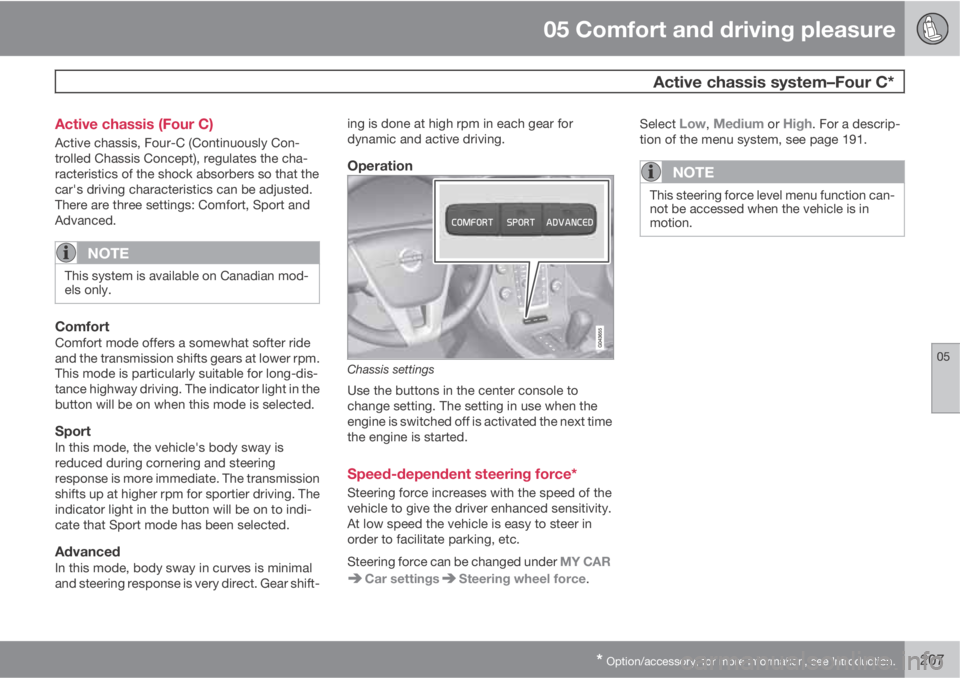
Operation
Chassis settings
Use the buttons in the center console to
change setting. The setting in use when the
engine is switched off is activated the next time
the engine is started.
Speed-dependent steering force*
Steering force increases with the speed of the
vehicle to give the driver enhanced sensitivity.
At low speed the vehicle is easy to steer in
order to facilitate parking, etc.
Steering force can be changed under MY CAR
Car settingsSteering wheel force.Select
Low, Medium or High. For a descrip-
tion of the menu system, see page 191.
NOTE
This steering force level menu function can-
not be accessed when the vehicle is in
motion.
Page 223 of 382
06 Infotainment
Introduction
06
* Option/accessory, for more information, see Introduction.221
•Subwoofer*: subwoofer volume level.
•DPL II centre level/3 channel centre
level4: Volume for the center speaker.
•DPL II surround level4/5: Surround level.
Advanced sound settings
EqualizerSound levels for different frequencies can be
adjusted separately using this feature.
To do so:
1.
Press OK/MENU to access
Audio
settings and select Equalizer
2.
Turn TUNE to select one of the frequencies
and press OK/MENU.
3.
Turn TUNE to adjust the sound setting and
confirm the change by pressing OK/
MENU. Do the same for the other frequen-
cies.
4. When you have finished making your set-
tings, press EXIT to save and return to nor-
mal view.
For general information regarding menu navi-
gation, see page 218 and menu overview see
page 222.
Sound stage6
The sound experience can be optimized for the
driver's seat, both front seats or the rear seat.
If the front and rear seats are occupied, the
sound stage setting
Front seats is recom-
mended. Select one of the options under
Audio settings
Sound stage.
Audio volume and automatic volume
control
The infotainment system compensates for dis-
rupting noises in the passenger compartment
by increasing the volume according to the
speed of the vehicle. The level of sound com-
pensation can be set at low, medium, high or
off. Select the level under Audio settings
Volume compensation.
External audio source volumeIf an external device such as an MP3 player or
an iPod Ÿ is connected to the AUX socket, the
device's volume may be different than the vol-
ume of the internal sound sources such as the
disc player or the radio. If the external sound
source's volume is too high, the quality of the
sound may be impaired. To help prevent this,adjust the input volume of the external audio
source:
NOTE
Sound quality may be affected if the MP3
player is being charged while the system is
in AUX mode. To help prevent this, avoid
charging the MP3 player in a 12-volt socket
while it is being played.
1.
Press MEDIA and turn TUNE to AUX.
Press OK/MENU or the thumb wheel on
the steering wheel keypad.
2.
Press OK/MENU and turn TUNE to
AUX
input volume. Confirm by pressing OK/
MENU.
3.
Turn TUNE to adjust the volume.
Optimal sound reproductionThe infotainment system is pre-calibrated for
optimal sound reproduction using digital signal
processing.
This calibration takes into account factors such
as the speakers, amplifier, cabin acoustics, the
listeners' seating positions, etc., for each com-
bination of vehicle/infotainment system.
4Premium Sound Multimedia only5Only when Surround is on.6Premium Sound Multimedia only
Page 224 of 382
06 Infotainment
Introduction
06
222* Option/accessory, for more information, see Introduction.
There is also a dynamic calibration that takes
into consideration the volume level, radio
reception, and the speed of the vehicle.
The settings that are described in this manual,
(
Bass, Treble, Equalizer etc.) are only
intended to enable the user to adapt sound
reproduction to his/her personal tastes.
Infotainment system menus
RADIO menus
Main AM menuAM menu
Show presets7
Scan
Audio settings8
Sound stage9
Equalizer10
Volume compensation
Reset all audio settings
Main FM1/FM2 menuFM menu
Show radio text
Show presets
Scan
Advanced settings
Reset all FM settings
Audio settings8
Main SAT1*/SAT2* menu (SiriusXM
E
E
satellite radio)SAT1
SIRIUS radio off. Press RADIO button
to activate SIRIUS.
SAT2
SIRIUS radio off. Press RADIO button
to activate SIRIUS.
Song memory
Add song
Song Seek
Delete songView song memory
Channel list information
Station name
Artist
Title
Information
Show presets
Category list
Advanced SIRIUS settings
Skip options
Channel skip list
Lock options
Channel lock list
Unlock all channels
Temporarily unlock all chan-
nels
Change code
Audio settings8
7High Performance Multimedia and Premium Sound Multimedia only.8The audio settings are the same for all infotainment system modes9Premium Sound Multimedia only.10To reach sub menus, see "Main menu AM.
Page 228 of 382
06 Infotainment
Radio
06
226
keypad on the center console to switch to
manual tuning (or to switch back from manual
tuning to the "list of stations" function).
Manual tuningBy default, the list of stations of the strongest
stations in the area will be displayed when you
turn TUNE (see the preceding section, "List of
stations"). While the list of stations is displayed,
press
on the center console keypad to
switch to manual tuning, which enables you to
select a frequency from the complete list of all
radio frequencies available on the currently
selected waveband. In other words, in manual
tuning mode, turning TUNE one step will
change from e.g., 93.3 to 93.5, etc.).
To manually tune a station:
1.
Press RADIO. Turn TUNE to scroll to the
desired waveband (
AM, FM1, etc.) and
press OK/MENU or the thumb wheel on
the steering wheel keypad to confirm.
2.
Turn TUNE or the thumb wheel to select a
frequency.
NOTE
The radio is initially set to automatically
search for stations in the area in which you
are driving (see the preceding section, "List
of stations").
However, if you have switched to manual
tuning (by pressing
on the keypad on
the center console while the list of stations
is displayed), the radio will remain in manual
tuning mode the next time it is switched on.
To switch back to "list of stations" mode,
turn TUNE one step (to display the full list of
stations) and press
.
Please note that if you press
when the
list of stations is not displayed, this will acti-
vate the INFO function.
Storing preset stationsTen preset stations can be stored for each
waveband (AM, FM1, etc.).
Stored preset stations are selected using the
buttons on the keypad on the center console.
Manually storing preset stations1. Tune to a station (see "Selecting a station"
on page 225).
2. Press and hold one of the number key but-
tons.
> The sound will be muted for several sec-
onds and when it returns, the station hasbeen stored on the number key button
used.
A list of preset stations can be displayed. This
function can be activated/deactivated in AM/
FM mode in FM menu
Show presets or in
AM menu
Show presets
ScanThe function automatically searches the cur-
rent waveband for radio stations. When a sta-
tion is found, it is played for several seconds
before scanning is resumed. While the station
is playing it can be stored as a preset in the
usual way (see "Manually storing preset sta-
tions").
–To start scanning in AM/FM mode, go to
FM menu
Scan or in AM menu
Scan.
Stop station scanning by pressing EXIT.
NOTE
Storing a station interrupts the SCAN func-
tion.
Radio textSome stations transmit information on pro-
gram content, artists, etc. This information can
be shown on the display.
Page 230 of 382
06 Infotainment
Radio
06
228
mode only. The main FM channel will be
displayed as, for example, 93.9 WNYC
(Volvo uses the symbol ">" to indicate
there are sub-channels available) The sub-
FM channels will be displayed as 93.9 – 2
WNYC, 93.9 - 3 WNYC, etc.
•Reception coverage area: Due to current
IBOC transmitter power limitations, the
reception coverage area in digital mode is
somewhat more limited than the station's
analogue coverage area. Please be aware
that as with any radio broadcast technol-
ogy, terrain, time of day, foliage level and
building location can have positive or neg-
ative effects on radio reception.
•Analogue to digital/digital to analogue
blending: Analogue to digital blending will
occur as the signal strength reaches a pre-
set threshold in the receiver. This will be
noticeable in fringe areas (areas with weak
reception) and is normal.
NOTE
There may be a noticeable difference in
sound quality when a change from analogue
to digital or digital to analogue occurs, such
as:
•Volume increase or decrease
•Equalizer settings, i.e., Bass/ Midrange/
Treble cut or boost
•Time alignment (Digital program mate-
rial in extreme cases can be as much as
8 seconds behind the analogue). This
will noticeable as a "stuttering" effect.
The above items are dependant on the
broadcaster's equipment settings and do
not indicate a fault in the vehicle's radio
receiver or antenna systems.
Switching HD on or offThe factory setting for HD radio is off. If acti-
vated when driving through areas with weak
HD signals (fringe areas), you may experience
that the radio repeatedly switches between
analogue/digital and digital/analogue recep-
tion. If this happens, it may be desirable to
switch HD off. To do so:
1. Be sure the infotainment system is
switched on and in one of the AM or FM
modes.
2.
Press OK/MENU in the center console
control panel.3.
Turn TUNE and move the marker to
HD
Radio.
4.
Press OK/MENU to turn HD off (the X will
disappear from the box on the display
screen).
This will disable the radio's capability to receive
digital broadcasts but it will continue to func-
tion as a conventional (analogue) AM/FM
receiver. Please note that when HD is switched
off, it will not be possible to tune to sub-chan-
nels (see the following section for a more
detailed explanation of sub-channels).
Repeat steps 2-4 above to reactivate HD (an X
will appear in the box on the display screen).
Please note that this will only switch HD on or
off for the selected waveband (AM, FM1, etc.).
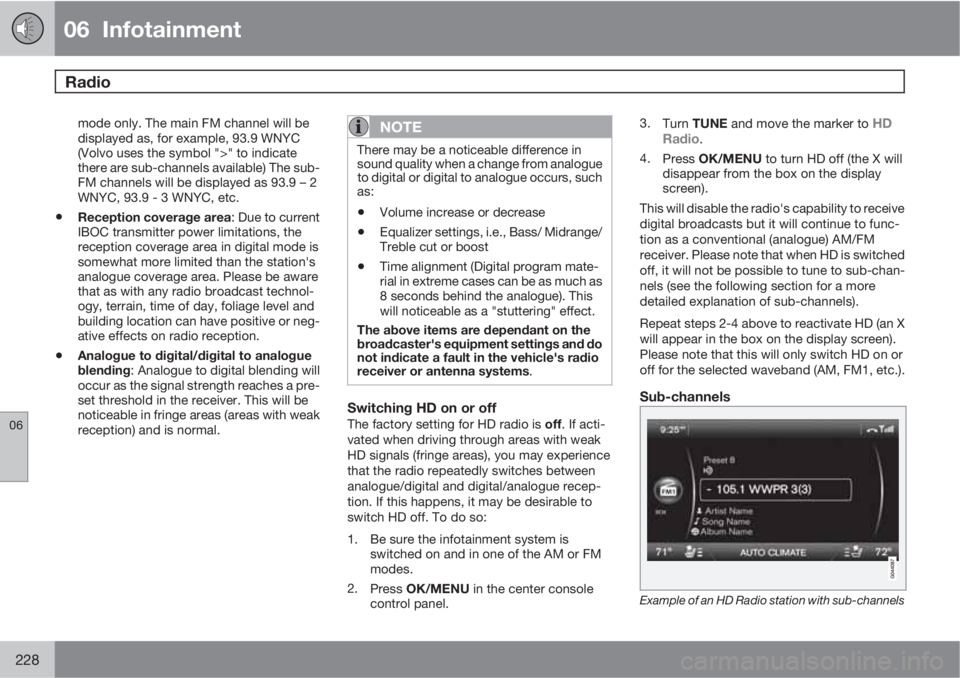
Sub-channels
Example of an HD Radio station with sub-channels
Page 234 of 382
06 Infotainment
Radio
06
232
Skip optionsThis function is used to remove a channel from
the list of available channels.
Skipping a channel1.
Press OK/MENU.
2.
Scroll to the
Advanced settings menu.
3.
Press OK/MENU to enter the
Skip
options menu.
4.
Press OK/MENU to enter
Channel skip
list.
5.
Press OK/MENU to select
All categoriesor turn TUNE to scroll to a category and
press OK/MENU to select it.
6.
Press OK/MENU to select
Skip all
channels in the category or turn TUNE
to scroll to a channel and press OK/
MENU to select or deselect it. Multiple
channels can be selected.
Unskip all channelsThis removes all channels from the skip list and
makes them available for selection.
Temporary unskip all channelsThis function will temporarily unskip all chan-
nels and make them available for selection. The
channels remain on the skip list and will againbe skipped the next time the ignition is
switched on.
Channel lockAccess to specific channels can be restricted
(locked). A locked channel will not provide
audio, song titles, or artist information.
NOTE
All channels are initially unlocked.
Locking a channel1.
Press OK/MENU.
2.
Scroll to the
Advanced settings menu.
3.
Press OK/MENU and turn TUNE to scroll
to the
Lock options menu and press OK/
MENU.
4. Use the keypad in the central control panel
to enter the channel access code
2 and
press OK/MENU.
5.
Press OK/MENU to enter the
Channel
lock list.
6.
Press OK/MENU to select
All categoriesor turn TUNE to scroll to a category and
press OK/MENU to select it.7.
Press OK/MENU to select
Lock all
channels in the category or turn TUNE
to scroll to a channel and press OK/
MENU to select it. Multiple channels can
be selected.
The selected channel is now locked and a
checked box will be displayed to indicate this.
It will be necessary to enter the channel access
code
2 in order to listen to a locked channel.
Unlocking a channel
A channel's access code2 is required to unlock
a channel.
Unlock all channelsThis permanently removes all channels from
the locked list and makes them available for
selection.
Temporarily unlock all channelsThis function will temporarily unlock all chan-
nels and make them available for selection. The
channels remain on the locked list and will
again be locked the next time the ignition is
switched on.
CHANGE CODEThis function makes it possible to change the
channel access code. The default code is
0000.
To change the code:
2The default code is 0000. If you have changed the code and forgotten it, see the section "If you have forgotten the access code."
Page 237 of 382
06 Infotainment
Media player
06
* Option/accessory, for more information, see Introduction.235
Navigating a disc and playing tracks
CD audio discs
Turn TUNE to access the disc's playlist and to
navigate in this list. Press OK/MENU to con-
firm a choice and begin listening. Press EXIT
to cancel. Press and hold EXIT to return to the
playlist's root level.
The
/ buttons on the center console or
steering wheel keypad can also be used to
change tracks.
Home-burned CD/DVD audio/video filesTurn TUNE to access the disc's playlist and to
navigate in this list. Press OK/MENU to con-
firm a choice and begin listening. Use EXIT to
stop or to go back in the disc's folder structure.
Press and hold EXIT to return to the playlist's
root level.
The
/ buttons on the center console or
steering wheel keypad* can also be used to
change audio/video files.
The following symbols are used in the display:
•- audio files
•- video files
•- foldersWhen a file has been played, the player will
continue to play the rest of the files (of the same
type) in the current folder. When all of the files
in the folder have been played, the player will
automatically go to the next folder and play the
files in it (unless
Repeat folder is activated).
The system automatically detects and changes
settings if a disc containing only audio or only
video files is inserted in the player and will play
these files. However, the system will not
change settings if a disc containing both audio
and video files is inserted and the player will
continue to play the current type of file.
NOTE
Video images will only be visible when the
vehicle is not moving. When the vehicle is
traveling faster than approximately 4 mph
(6 km/h),
No visual media available while
driving will be displayed. Sound from the
film will still be audible and video images will
be shown again when the vehicle stops.
NOTE
Some copy protected audio files or home-
burned audio files may not be read by the
player.
DVD videosFor information, see page 234.
Fast forward/reverse
Press and hold the / buttons to fast
forward/reverse. This is done at one speed for
audio files but several speeds can be chosen
for video files. Press the
/ buttons sev-
eral times to increase the speed. Release the
button to return to normal viewing speed.
Scan3
This function plays the first ten seconds of
each track/audio file. To start scanning:
1.
Press OK/MENU.
2.
Scroll to
Scan.
> The first ten seconds of each track/
audio file will be played.
3.
Stop scanning by pressing EXIT. The cur-
rent track/audio file will continue playing.
Random3
This function plays the tracks in random order
(shuffle). The random tracks/sound files can be
scrolled through in the normal way. To listen to
tracks in random order:
1.
Press OK/MENU,
3Not video DVDs
Page 241 of 382
06 Infotainment
AUX/USB sockets
06
239
The / buttons on the center console or
steering wheel keypad can also be used to
change tracks/files.
The following symbols are used in the display:
•- audio files
•- video files
•- folders
When a file has been played, the player will
continue to play the rest of the files (of the same
type) in the current folder. When all of the files
in the folder have been played, the player will
automatically go to the next folder
1 (unlessRepeat folder is activated) and play the files
in it.
The system automatically detects and changes
settings if a device containing only audio or
only video files is connected to the USB socket
and will play these files. However, the system
will not change settings if the device contains
both audio and video files and will continue to
play the current type of file.
Fast forward/reverse1
For information, see page 235.
Scan1
For information, see page 235.
Random1
For information, see page 235.
Search1
The keypad in the center console can be used
to search for a file in the currently selected
folder.
Start the search by either turning TUNE (to
access the folders) or by pressing one of the
character keys to enter a letter/number. Pos-
sible search results will be displayed as char-
acters are entered.
Play the file by pressing OK/MENU.
Repeat2
This function makes it possible to play files in
a folder repeatedly. When the last file has been
played, the first file will begin again. For infor-
mation, see page 236.
PauseWhen the infotainment system volume is
turned off completely or the sound is muted,
the player will pause. It will resume playing
when the volume is turned up again or if the
sound is unmuted. Pause is also available via
the menu system, select
Play/Pause.
External sound sources
USB flash drive
To simplify the use of a USB flash drive, it is
advisable to only store music files on the drive.
It will take considerably longer for the system
to index the files on the drive if it contains any-
thing other than compatible music files.
NOTE
•The system supports removable media
that uses the USB 2.0 standard and the
FAT32 file system. It can index up to
1,000 folders and a maximum of 254
sub-folders/files for each folder. How-
ever, the highest folder level can sup-
port up to 1,000 sub-folders/files.
•When using a longer type of USB
device, connecting it with a USB
adapter cable will help reduce mechan-
ical wear on the USB socket and on the
device.
USB hubA USB hub can be connected to the USB
socket, making it possible to connect several
USB devices at the same time. To select one
of the devices, go to the menu USB menu
Select USB device
1USB and iPodŸ only2USB only
Page 246 of 382
06 Infotainment
Bluetooth® hands-free connection
06
244
Bluetooth® functions in the center
console control panel
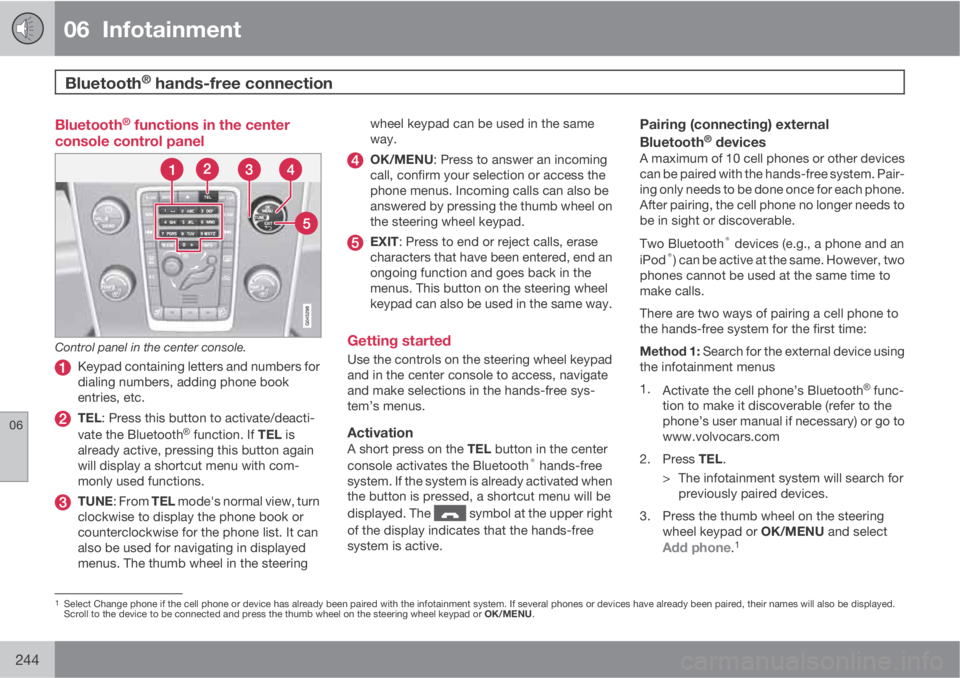
Control panel in the center console.
Keypad containing letters and numbers for
dialing numbers, adding phone book
entries, etc.
TEL: Press this button to activate/deacti-
vate the BluetoothŸ function. If TEL is
already active, pressing this button again
will display a shortcut menu with com-
monly used functions.
TUNE: From TEL mode's normal view, turn
clockwise to display the phone book or
counterclockwise for the phone list. It can
also be used for navigating in displayed
menus. The thumb wheel in the steeringwheel keypad can be used in the same
way.
OK/MENU: Press to answer an incoming
call, confirm your selection or access the
phone menus. Incoming calls can also be
answered by pressing the thumb wheel on
the steering wheel keypad.
EXIT: Press to end or reject calls, erase
characters that have been entered, end an
ongoing function and goes back in the
menus. This button on the steering wheel
keypad can also be used in the same way.
Getting started
Use the controls on the steering wheel keypad
and in the center console to access, navigate
and make selections in the hands-free sys-
tem’s menus.
ActivationA short press on the TEL button in the center
console activates the Bluetooth® hands-free
system. If the system is already activated when
the button is pressed, a shortcut menu will be
displayed. The
symbol at the upper right
of the display indicates that the hands-free
system is active.
Pairing (connecting) external
Bluetooth® devicesA maximum of 10 cell phones or other devices
can be paired with the hands-free system. Pair-
ing only needs to be done once for each phone.
After pairing, the cell phone no longer needs to
be in sight or discoverable.
Two Bluetooth
® devices (e.g., a phone and an
iPod®) can be active at the same. However, two
phones cannot be used at the same time to
make calls.
There are two ways of pairing a cell phone to
the hands-free system for the first time:
Method 1: Search for the external device using
the infotainment menus
1.
Activate the cell phone’s Bluetooth
Ÿ func-
tion to make it discoverable (refer to the
phone’s user manual if necessary) or go to
www.volvocars.com
2.
Press TEL.
> The infotainment system will search for
previously paired devices.
3. Press the thumb wheel on the steering
wheel keypad or OK/MENU and select
Add phone.1
1Select Change phone if the cell phone or device has already been paired with the infotainment system. If several phones or devices have already been paired, their names will also be displayed.
Scroll to the device to be connected and press the thumb wheel on the steering wheel keypad or OK/MENU.
Page 250 of 382
06 Infotainment
Bluetooth® hands-free connection
06
248
NOTE
Changes made from the infotainment sys-
tem to a contact in the cell phone's phone
book will result in a new contact being
added to the infotainment system's phone
book. However, this contact will not be
saved in the cell phone's phone book. The
infotainment system's display will show
duplicate contacts with different icons.
Please also note that if a speed dial number
is saved or if a contact's information is edi-
ted, this will result in a new contact in the
infotainment system's phone book.
The symbol must be displayed before
the phone book can be used and the hands-
free function must be in phone mode.
The infotainment system saves a copy of each
paired cell phone's phone book. This phone
book can be copied each time the phone is
connected.
–Activate/deactivate this function in phone
mode in Phone menu
Phone settings
Download phone book.
If the phone book contains information about
someone who is trying to call you, this infor-
mation will be shown in the display.
Contact shortcutsA quick way of searching the phone book for
contacts in normal view is to turn TUNE clock-
wise to access the phone book and then coun-
ter-clockwise to select a contact from the list.
Press OK/MENU to call.
Each name in the phone book has a default
phone number. If the
symbol is displayed to
the right of it, this indicates that there are addi-
tional phone numbers for this contact. To use
a phone number other than the default one,
press the
button on the center console
control panel. Turn TUNE to select a different
phone number and press OK/MENU to call.
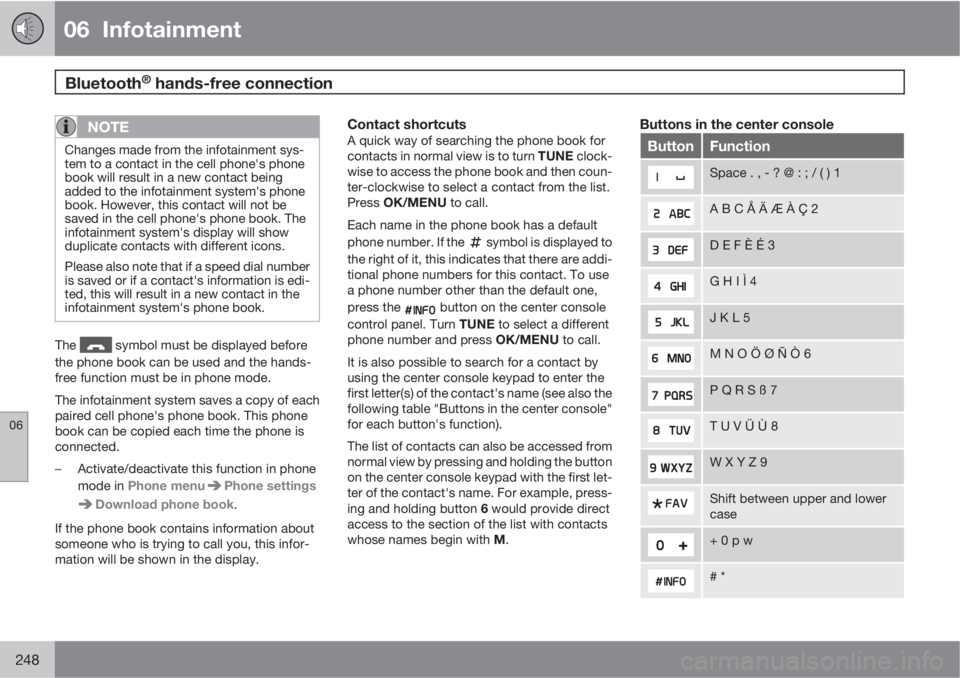
It is also possible to search for a contact by
using the center console keypad to enter the
first letter(s) of the contact's name (see also the
following table "Buttons in the center console"
for each button's function).
The list of contacts can also be accessed from
normal view by pressing and holding the button
on the center console keypad with the first let-
ter of the contact's name. For example, press-
ing and holding button 6 would provide direct
access to the section of the list with contacts
whose names begin with M.
Buttons in the center console
ButtonFunction
Space . , - ? @ : ; / ( ) 1
A B C Å Ä Æ À Ç 2
D E F È É 3
G H I Ì 4
J K L 5
M N O Ö Ø Ñ Ò 6
P Q R S ß 7
T U V Ü Ù 8
W X Y Z 9
Shift between upper and lower
case
+ 0 p w
# *