door lock VOLVO XC60 2013 Owner´s Manual
[x] Cancel search | Manufacturer: VOLVO, Model Year: 2013, Model line: XC60, Model: VOLVO XC60 2013Pages: 382, PDF Size: 7.08 MB
Page 89 of 382
03 Your driving environment
Seats
03
87
Power seat1
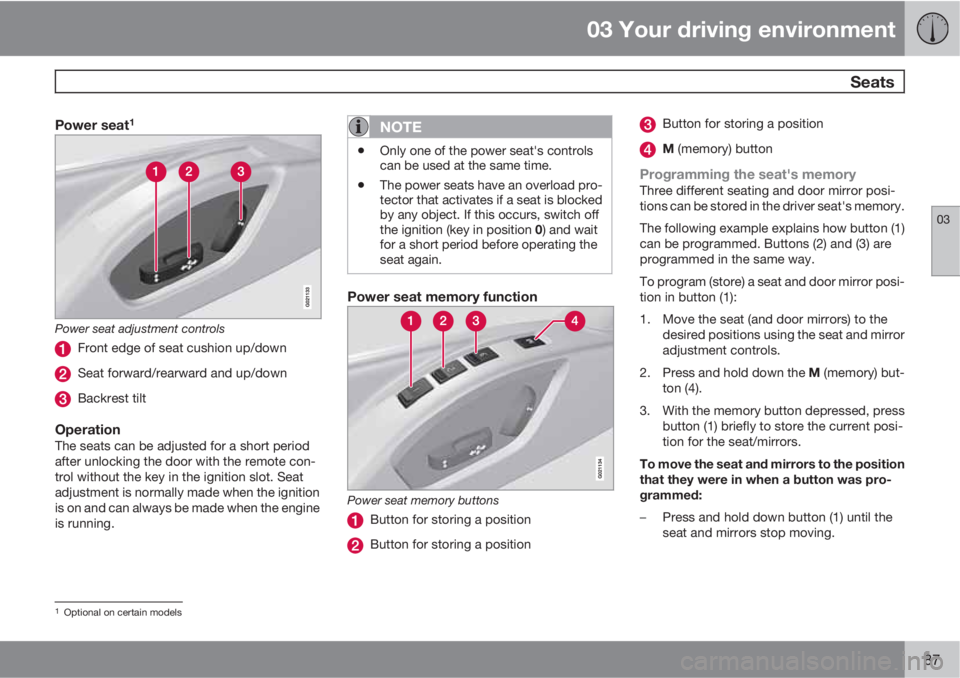
Power seat adjustment controls
Front edge of seat cushion up/down
Seat forward/rearward and up/down
Backrest tilt
OperationThe seats can be adjusted for a short period
after unlocking the door with the remote con-
trol without the key in the ignition slot. Seat
adjustment is normally made when the ignition
is on and can always be made when the engine
is running.
NOTE
•Only one of the power seat's controls
can be used at the same time.
•The power seats have an overload pro-
tector that activates if a seat is blocked
by any object. If this occurs, switch off
the ignition (key in position 0) and wait
for a short period before operating the
seat again.
Power seat memory function
Power seat memory buttons
Button for storing a position
Button for storing a position
Button for storing a position
M (memory) button
Programming the seat's memoryThree different seating and door mirror posi-
tions can be stored in the driver seat's memory.
The following example explains how button (1)
can be programmed. Buttons (2) and (3) are
programmed in the same way.
To program (store) a seat and door mirror posi-
tion in button (1):
1. Move the seat (and door mirrors) to the
desired positions using the seat and mirror
adjustment controls.
2.
Press and hold down the M (memory) but-
ton (4).
3. With the memory button depressed, press
button (1) briefly to store the current posi-
tion for the seat/mirrors.
To move the seat and mirrors to the position
that they were in when a button was pro-
grammed:
–Press and hold down button (1) until the
seat and mirrors stop moving.
1Optional on certain models
Page 90 of 382
03 Your driving environment
Seats
03
88* Option/accessory, for more information, see Introduction.
NOTE
As a safety precaution, the seat will stop
automatically if the button is released before
the seat has reached the preset position.
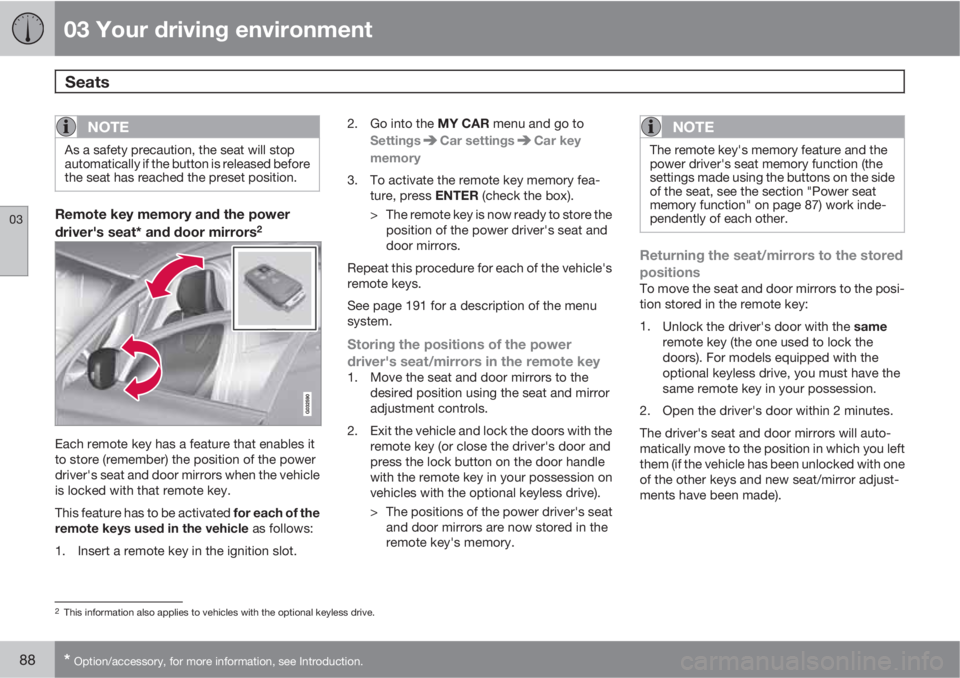
Remote key memory and the power
driver's seat* and door mirrors2
Each remote key has a feature that enables it
to store (remember) the position of the power
driver's seat and door mirrors when the vehicle
is locked with that remote key.
This feature has to be activated for each of the
remote keys used in the vehicle as follows:
1. Insert a remote key in the ignition slot.2.
Go into the MY CAR menu and go to
Settings
Car settingsCar key
memory
3. To activate the remote key memory fea-
ture, press ENTER (check the box).
> The remote key is now ready to store the
position of the power driver's seat and
door mirrors.
Repeat this procedure for each of the vehicle's
remote keys.
See page 191 for a description of the menu
system.
Storing the positions of the power
driver's seat/mirrors in the remote key
1. Move the seat and door mirrors to the
desired position using the seat and mirror
adjustment controls.
2. Exit the vehicle and lock the doors with the
remote key (or close the driver's door and
press the lock button on the door handle
with the remote key in your possession on
vehicles with the optional keyless drive).
> The positions of the power driver's seat
and door mirrors are now stored in the
remote key's memory.
NOTE
The remote key's memory feature and the
power driver's seat memory function (the
settings made using the buttons on the side
of the seat, see the section "Power seat
memory function" on page 87) work inde-
pendently of each other.
Returning the seat/mirrors to the stored
positions
To move the seat and door mirrors to the posi-
tion stored in the remote key:
1.
Unlock the driver's door with the same
remote key (the one used to lock the
doors). For models equipped with the
optional keyless drive, you must have the
same remote key in your possession.
2. Open the driver's door within 2 minutes.
The driver's seat and door mirrors will auto-
matically move to the position in which you left
them (if the vehicle has been unlocked with one
of the other keys and new seat/mirror adjust-
ments have been made).
2This information also applies to vehicles with the optional keyless drive.
Page 102 of 382
03 Your driving environment
Lighting
03
100* Option/accessory, for more information, see Introduction.
Interior lighting, front
G021149
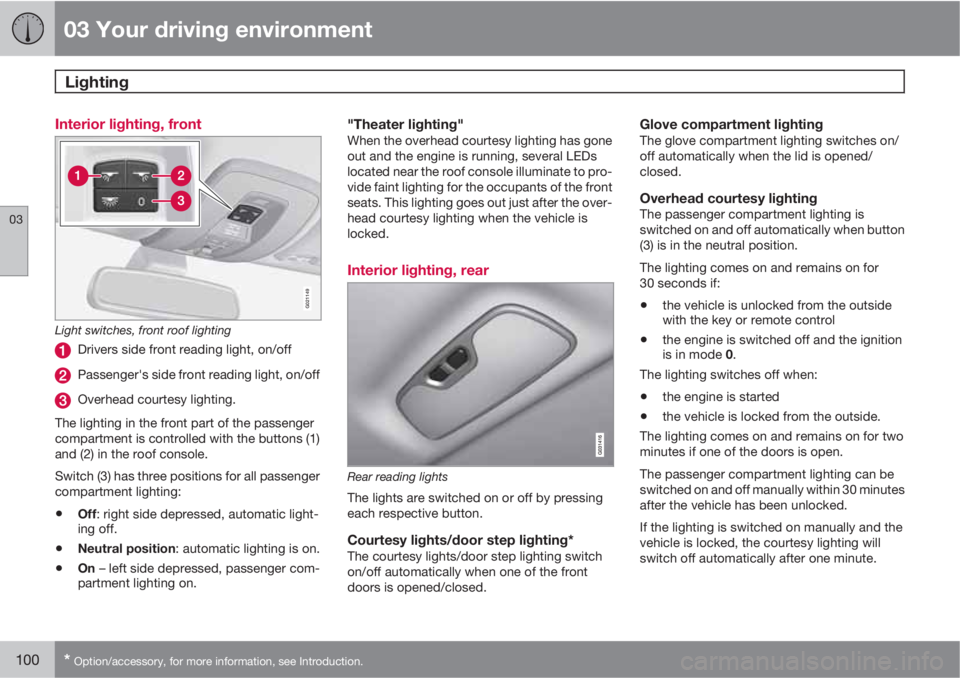
Light switches, front roof lighting
Drivers side front reading light, on/off
Passenger's side front reading light, on/off
Overhead courtesy lighting.
The lighting in the front part of the passenger
compartment is controlled with the buttons (1)
and (2) in the roof console.
Switch (3) has three positions for all passenger
compartment lighting:
•Off: right side depressed, automatic light-
ing off.
•Neutral position: automatic lighting is on.
•On – left side depressed, passenger com-
partment lighting on.
"Theater lighting"When the overhead courtesy lighting has gone
out and the engine is running, several LEDs
located near the roof console illuminate to pro-
vide faint lighting for the occupants of the front
seats. This lighting goes out just after the over-
head courtesy lighting when the vehicle is
locked.
Interior lighting, rear
Rear reading lights
The lights are switched on or off by pressing
each respective button.
Courtesy lights/door step lighting*The courtesy lights/door step lighting switch
on/off automatically when one of the front
doors is opened/closed.
Glove compartment lightingThe glove compartment lighting switches on/
off automatically when the lid is opened/
closed.
Overhead courtesy lightingThe passenger compartment lighting is
switched on and off automatically when button
(3) is in the neutral position.
The lighting comes on and remains on for
30 seconds if:
•the vehicle is unlocked from the outside
with the key or remote control
•the engine is switched off and the ignition
is in mode 0.
The lighting switches off when:
•the engine is started
•the vehicle is locked from the outside.
The lighting comes on and remains on for two
minutes if one of the doors is open.
The passenger compartment lighting can be
switched on and off manually within 30 minutes
after the vehicle has been unlocked.
If the lighting is switched on manually and the
vehicle is locked, the courtesy lighting will
switch off automatically after one minute.
Page 103 of 382
03 Your driving environment
Lighting
03
101
Cargo area lightingThe cargo area lighting comes on automatically
when the tailgate is opened.
Home safe lighting
When you leave your vehicle at night, you can
make use of the home safe lighting function to
illuminate the area in front of the vehicle.
1. Remove the key from the ignition slot to put
the ignition in mode 0 (see page 85 for
information about the ignition modes).
2. Pull the turn signal lever as far as possible
towards the steering wheel and release it.
3. Exit the vehicle and lock the doors.
The headlights, parking lights, turn signals,
lights in the door mirrors, license plate lights,
and footwell lighting will illuminate and remain
on for 30
3, 60 or 90 seconds. The time interval
can be set in MY CAR under Settings
Car
settings
Light settingsHome safe light
duration. See page 191 for a description of
the menu system.
Approach lighting
Approach lighting is activated by pressing the
approach light button on the remote key (see
the illustration on page 59).
When the function has been activated, the
parking lights, indicator lights, door mirror
lights, license plate lighting, dome lighting and
door step lighting come on.
The time interval for this lighting can be set by
pressing MY CAR and going to Car settings
Light settingsApproach light
duration. See page 191 for a description of
the menu system.
3Factory setting
Page 107 of 382
03 Your driving environment
Power windows
03
* Option/accessory, for more information, see Introduction.105 Power windows
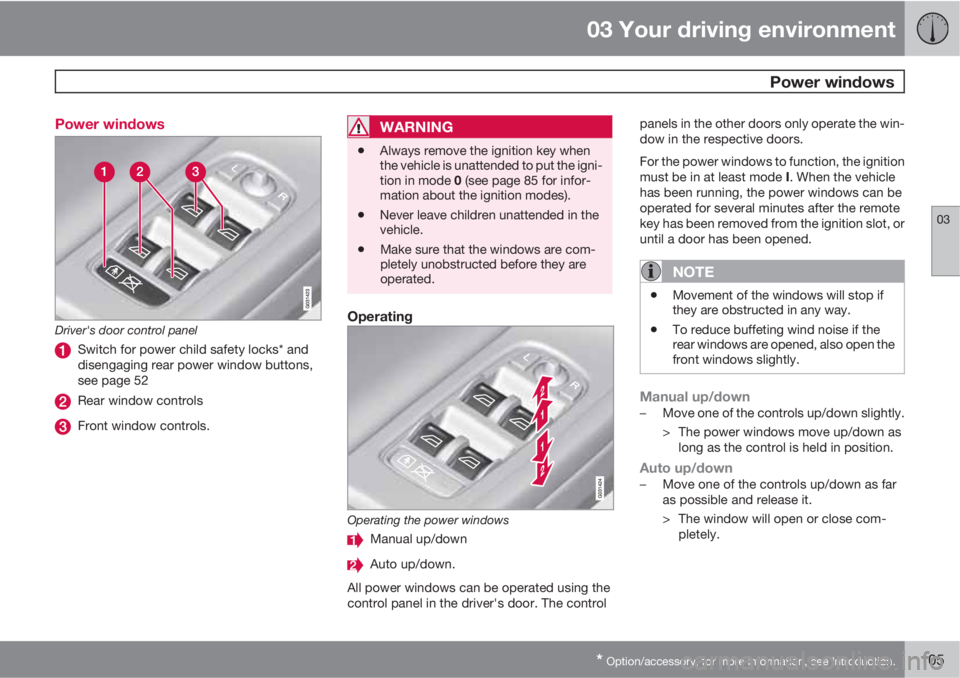
Driver's door control panel
Switch for power child safety locks* and
disengaging rear power window buttons,
see page 52
Rear window controls
Front window controls.
WARNING
•Always remove the ignition key when
the vehicle is unattended to put the igni-
tion in mode 0 (see page 85 for infor-
mation about the ignition modes).
•Never leave children unattended in the
vehicle.
•Make sure that the windows are com-
pletely unobstructed before they are
operated.
Operating
Operating the power windows
Manual up/down
Auto up/down.
All power windows can be operated using the
control panel in the driver's door. The controlpanels in the other doors only operate the win-
dow in the respective doors.
For the power windows to function, the ignition
must be in at least mode I. When the vehicle
has been running, the power windows can be
operated for several minutes after the remote
key has been removed from the ignition slot, or
until a door has been opened.
NOTE
•Movement of the windows will stop if
they are obstructed in any way.
•To reduce buffeting wind noise if the
rear windows are opened, also open the
front windows slightly.
Manual up/down–Move one of the controls up/down slightly.
> The power windows move up/down as
long as the control is held in position.
Auto up/down–Move one of the controls up/down as far
as possible and release it.
> The window will open or close com-
pletely.
Page 109 of 382
03 Your driving environment
Mirrors
03
* Option/accessory, for more information, see Introduction.107 Power door mirrors
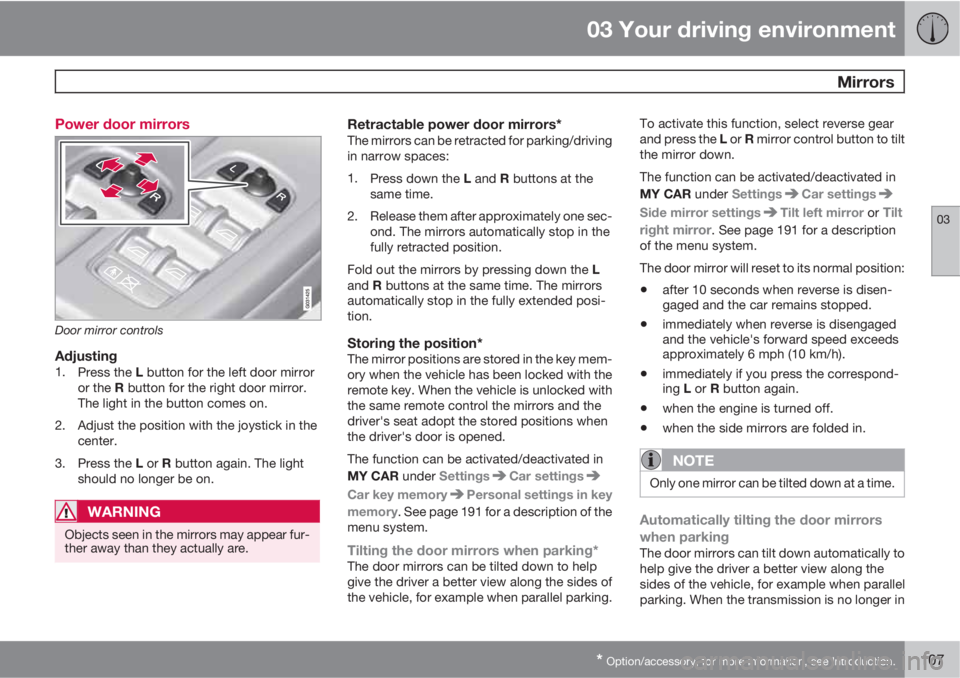
Door mirror controls
Adjusting1.
Press the L button for the left door mirror
or the R button for the right door mirror.
The light in the button comes on.
2. Adjust the position with the joystick in the
center.
3.
Press the L or R button again. The light
should no longer be on.
WARNING
Objects seen in the mirrors may appear fur-
ther away than they actually are.
Retractable power door mirrors*The mirrors can be retracted for parking/driving
in narrow spaces:
1.
Press down the L and R buttons at the
same time.
2. Release them after approximately one sec-
ond. The mirrors automatically stop in the
fully retracted position.
Fold out the mirrors by pressing down the L
and R buttons at the same time. The mirrors
automatically stop in the fully extended posi-
tion.
Storing the position*The mirror positions are stored in the key mem-
ory when the vehicle has been locked with the
remote key. When the vehicle is unlocked with
the same remote control the mirrors and the
driver's seat adopt the stored positions when
the driver's door is opened.
The function can be activated/deactivated in
MY CAR under Settings
Car settings
Car key memoryPersonal settings in key
memory. See page 191 for a description of the
menu system.
Tilting the door mirrors when parking*The door mirrors can be tilted down to help
give the driver a better view along the sides of
the vehicle, for example when parallel parking.To activate this function, select reverse gear
and press the L or R mirror control button to tilt
the mirror down.
The function can be activated/deactivated in
MY CAR under Settings
Car settings
Side mirror settingsTilt left mirror or Tilt
right mirror
. See page 191 for a description
of the menu system.
The door mirror will reset to its normal position:
•after 10 seconds when reverse is disen-
gaged and the car remains stopped.
•immediately when reverse is disengaged
and the vehicle's forward speed exceeds
approximately 6 mph (10 km/h).
•immediately if you press the correspond-
ing L or R button again.
•when the engine is turned off.
•when the side mirrors are folded in.
NOTE
Only one mirror can be tilted down at a time.
Automatically tilting the door mirrors
when parking
The door mirrors can tilt down automatically to
help give the driver a better view along the
sides of the vehicle, for example when parallel
parking. When the transmission is no longer in
Page 110 of 382
03 Your driving environment
Mirrors
03
108
reverse, the mirrors will automatically return to
their original position.
This function can be activated/deactivated in
MY CAR under Settings
Car settings
Side mirror settingsIn reverse gear tilt
left mirror or
In reverse gear tilt right
mirror. See page 191 for information about
the MY CAR menu system.
Automatic retraction when lockingWhen the vehicle is locked/unlocked with the
remote key the door mirrors are automatically
retracted/extended.
The function can be activated/deactivated in
MY CAR under Settings
Car settings
Side mirror settingsRetract side mirrors
when locking. See page 191 for a description
of the menu system.
Resetting to neutralMirrors that have been moved out of position
by an external force must be electrically reset
to the neutral position for electric retracting/
extending to work.
•Retract the mirrors with the L and R but-
tons.
•Fold them out again with the L and R but-
tons.
The mirrors are now reset in neutral position.
Home safe and approach lightingThe light on the door mirrors comes on when
approach lighting or home safe lighting is
selected, see page 101.
Rear window and door mirror
defrosters
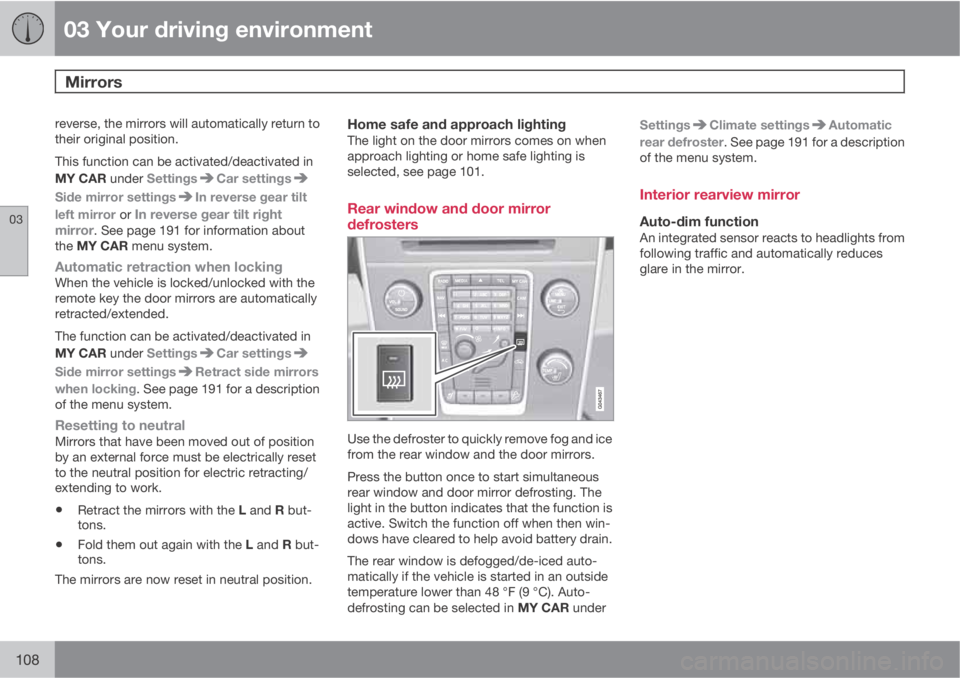
Use the defroster to quickly remove fog and ice
from the rear window and the door mirrors.
Press the button once to start simultaneous
rear window and door mirror defrosting. The
light in the button indicates that the function is
active. Switch the function off when then win-
dows have cleared to help avoid battery drain.
The rear window is defogged/de-iced auto-
matically if the vehicle is started in an outside
temperature lower than 48 °F (9 °C). Auto-
defrosting can be selected in MY CAR underSettings
Climate settingsAutomatic
rear defroster. See page 191 for a description
of the menu system.
Interior rearview mirror
Auto-dim functionAn integrated sensor reacts to headlights from
following traffic and automatically reduces
glare in the mirror.
Page 115 of 382
03 Your driving environment
HomeLink® Wireless Control System*
03
* Option/accessory, for more information, see Introduction.113 Introduction
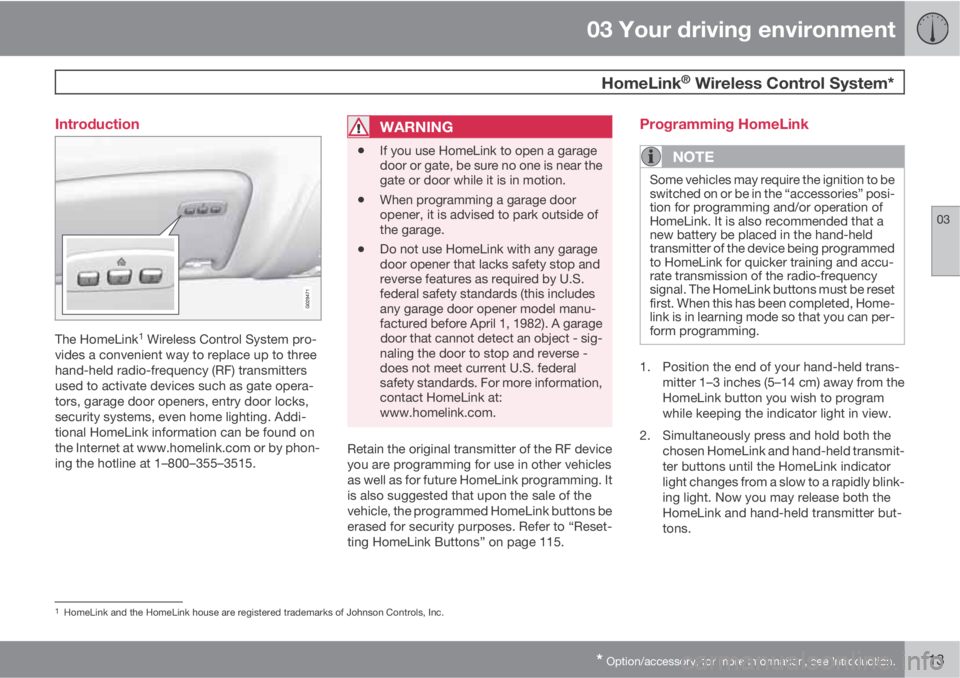
The HomeLink1 Wireless Control System pro-
vides a convenient way to replace up to three
hand-held radio-frequency (RF) transmitters
used to activate devices such as gate opera-
tors, garage door openers, entry door locks,
security systems, even home lighting. Addi-
tional HomeLink information can be found on
the Internet at www.homelink.com or by phon-
ing the hotline at 1–800–355–3515.
WARNING
•If you use HomeLink to open a garage
door or gate, be sure no one is near the
gate or door while it is in motion.
•When programming a garage door
opener, it is advised to park outside of
the garage.
•Do not use HomeLink with any garage
door opener that lacks safety stop and
reverse features as required by U.S.
federal safety standards (this includes
any garage door opener model manu-
factured before April 1, 1982). A garage
door that cannot detect an object - sig-
naling the door to stop and reverse -
does not meet current U.S. federal
safety standards. For more information,
contact HomeLink at:
www.homelink.com.
Retain the original transmitter of the RF device
you are programming for use in other vehicles
as well as for future HomeLink programming. It
is also suggested that upon the sale of the
vehicle, the programmed HomeLink buttons be
erased for security purposes. Refer to “Reset-
ting HomeLink Buttons” on page 115.
Programming HomeLink
NOTE
Some vehicles may require the ignition to be
switched on or be in the “accessories” posi-
tion for programming and/or operation of
HomeLink. It is also recommended that a
new battery be placed in the hand-held
transmitter of the device being programmed
to HomeLink for quicker training and accu-
rate transmission of the radio-frequency
signal. The HomeLink buttons must be reset
first. When this has been completed, Home-
link is in learning mode so that you can per-
form programming.
1. Position the end of your hand-held trans-
mitter 1–3 inches (5–14 cm) away from the
HomeLink button you wish to program
while keeping the indicator light in view.
2. Simultaneously press and hold both the
chosen HomeLink and hand-held transmit-
ter buttons until the HomeLink indicator
light changes from a slow to a rapidly blink-
ing light. Now you may release both the
HomeLink and hand-held transmitter but-
tons.
1HomeLink and the HomeLink house are registered trademarks of Johnson Controls, Inc.
Page 116 of 382
03 Your driving environment
HomeLink® Wireless Control System*
03
114* Option/accessory, for more information, see Introduction.
NOTE
Some devices may require you to replace
this Programming Step 2 with procedures
noted in the “Gate Operator / Canadian Pro-
gramming” section. If the HomeLink indica-
tor light does not change to a rapidly blink-
ing light after performing these steps, con-
tact HomeLink at www.homelink.com or by
phoning the hotline at 1–800–355–3515.
3.
Firmly press, hold for five seconds and
release the programmed HomeLink but-
ton up to two separate times to activate the
door. If the door does not activate, press
and hold the just-trained HomeLink button
and observe the indicator light.
•If the indicator light stays on con-
stantly, programming is complete
and your device should activate when
the HomeLink button is pressed and
released.
•If the indicator light blinks rapidly for
two seconds and then turns to a con-
stant light continue with “Program-
ming” steps 4-6 to complete the pro-
gramming of a rolling code equipped
device (most commonly a garage door
opener).
4. At the garage door opener receiver (motor-
head unit) in the garage, locate the “learn”or “smart” button. This can usually be
found where the hanging antenna wire is
attached to the motor-head unit.
5. Firmly press and release the “learn” or
“smart” button. (The name and color of the
button may vary by manufacturer.) There
are 30 seconds to initiate step 6.
6. Return to the vehicle and firmly press, hold
for two seconds and release the pro-
grammed HomeLink button. Repeat the
“press/hold/release” sequence a second
time, and, depending on the brand of the
garage door opener (or other rolling code
equipped device), repeat this sequence a
third time to complete the programming
process.
HomeLink should now activate your rolling
code equipped device.
Gate Operator/Canadian ProgrammingCanadian radio-frequency laws require trans-
mitter signals to “time-out” (or quit) after sev-
eral seconds of transmission – which may not
be long enough for HomeLink to pick up the
signal during programming. Similar to this
Canadian law, some U.S. gate operators are
designed to “time-out” in the same manner.
If you live in Canada or you are having difficul-
ties programming a gate operator or garage
door opener by using the “Programming” pro-cedures, replace “Programming HomeLink”
step 2 with the following:
•Continue to press and hold the HomeLink
button while you press and release -
every two seconds (“cycle”) your hand-
held transmitter until the HomeLink indica-
tor light changes from a slow to a rapidly
blinking light. Now you may release both
the HomeLink and hand-held transmitter
buttons.
Proceed with “Programming” step 3 to com-
plete.
Using HomeLink
To operate, simply press and hold the pro-
grammed HomeLink button until the trained
device begins to operate (this may take several
seconds). Activation will now occur for the
trained device (i.e., garage door opener, gate
operator, security system, entry door lock,
home/office lighting, etc.). For convenience,
the hand-held transmitter of the device may
also be used at any time. In the event that there
are still programming difficulties or questions,
contact HomeLink at: www.homelink.com or
by phoning the hotline at 1–800–355–3515.
Page 120 of 382
03 Your driving environment
Starting the engine
03
118* Option/accessory, for more information, see Introduction.
Engine Remote Start (ERS)*
IntroductionERS is a feature that makes it possible to
remotely start the engine to cool or heat the
passenger compartment before driving.
The climate control system will start using the
same settings as when the engine was
switched off.
When the engine is started using ERS, it will run
for a maximum of 15 minutes before automat-
ically switching off again. After 2 ERS starts,
the engine must be started in the normal way
before ERS can be used again.
NOTE
Always adhere to applicable State, Province
and or Local laws regarding engine idling
when using ERS.
WARNING
Keep the following in mind before using ERS
•The vehicle should be in view.
•The vehicle should be unoccupied.
•The vehicle must not be parked indoors
or in an enclosed area. Exhaust fumes
are harmful to the health.
Using ERS
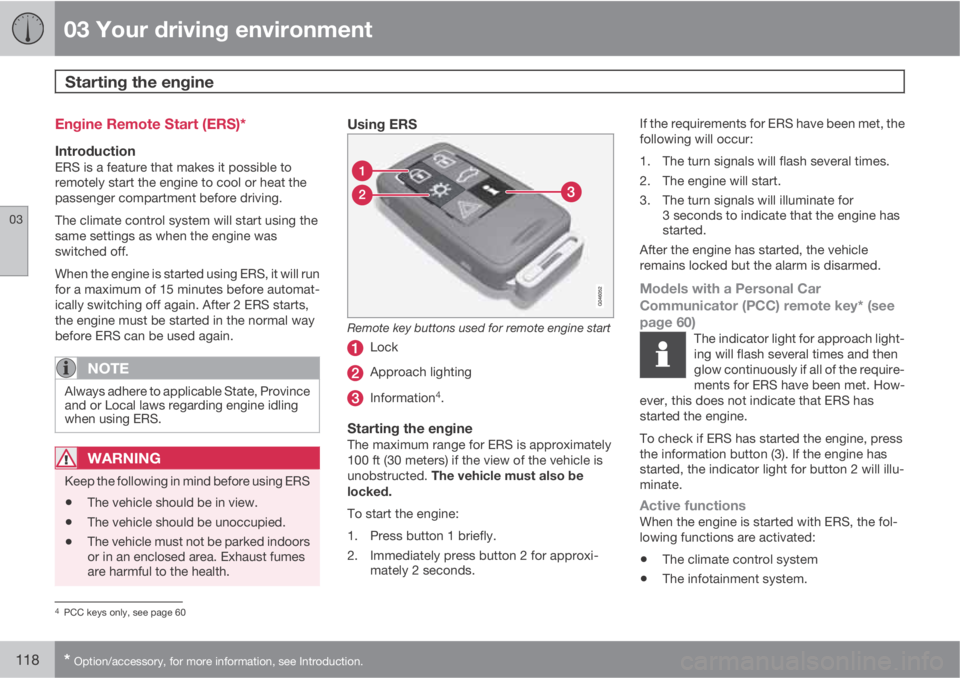
Remote key buttons used for remote engine start
Lock
Approach lighting
Information4.
Starting the engineThe maximum range for ERS is approximately
100 ft (30 meters) if the view of the vehicle is
unobstructed. The vehicle must also be
locked.
To start the engine:
1. Press button 1 briefly.
2. Immediately press button 2 for approxi-
mately 2 seconds.If the requirements for ERS have been met, the
following will occur:
1. The turn signals will flash several times.
2. The engine will start.
3. The turn signals will illuminate for
3 seconds to indicate that the engine has
started.
After the engine has started, the vehicle
remains locked but the alarm is disarmed.
Models with a Personal Car
Communicator (PCC) remote key* (see
page 60)
The indicator light for approach light-
ing will flash several times and then
glow continuously if all of the require-
ments for ERS have been met. How-
ever, this does not indicate that ERS has
started the engine.
To check if ERS has started the engine, press
the information button (3). If the engine has
started, the indicator light for button 2 will illu-
minate.
Active functionsWhen the engine is started with ERS, the fol-
lowing functions are activated:
•The climate control system
•The infotainment system.
4PCC keys only, see page 60