ignition VOLVO XC60 2013 Owner´s Manual
[x] Cancel search | Manufacturer: VOLVO, Model Year: 2013, Model line: XC60, Model: VOLVO XC60 2013Pages: 382, PDF Size: 7.08 MB
Page 89 of 382
03 Your driving environment
Seats
03
87
Power seat1
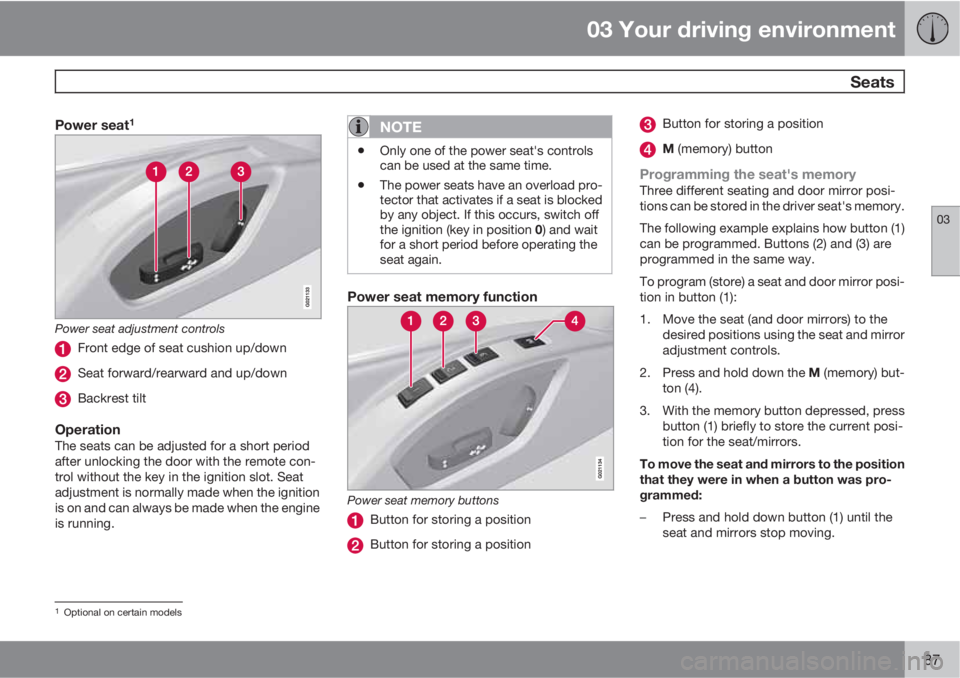
Power seat adjustment controls
Front edge of seat cushion up/down
Seat forward/rearward and up/down
Backrest tilt
OperationThe seats can be adjusted for a short period
after unlocking the door with the remote con-
trol without the key in the ignition slot. Seat
adjustment is normally made when the ignition
is on and can always be made when the engine
is running.
NOTE
•Only one of the power seat's controls
can be used at the same time.
•The power seats have an overload pro-
tector that activates if a seat is blocked
by any object. If this occurs, switch off
the ignition (key in position 0) and wait
for a short period before operating the
seat again.
Power seat memory function
Power seat memory buttons
Button for storing a position
Button for storing a position
Button for storing a position
M (memory) button
Programming the seat's memoryThree different seating and door mirror posi-
tions can be stored in the driver seat's memory.
The following example explains how button (1)
can be programmed. Buttons (2) and (3) are
programmed in the same way.
To program (store) a seat and door mirror posi-
tion in button (1):
1. Move the seat (and door mirrors) to the
desired positions using the seat and mirror
adjustment controls.
2.
Press and hold down the M (memory) but-
ton (4).
3. With the memory button depressed, press
button (1) briefly to store the current posi-
tion for the seat/mirrors.
To move the seat and mirrors to the position
that they were in when a button was pro-
grammed:
–Press and hold down button (1) until the
seat and mirrors stop moving.
1Optional on certain models
Page 90 of 382
03 Your driving environment
Seats
03
88* Option/accessory, for more information, see Introduction.
NOTE
As a safety precaution, the seat will stop
automatically if the button is released before
the seat has reached the preset position.
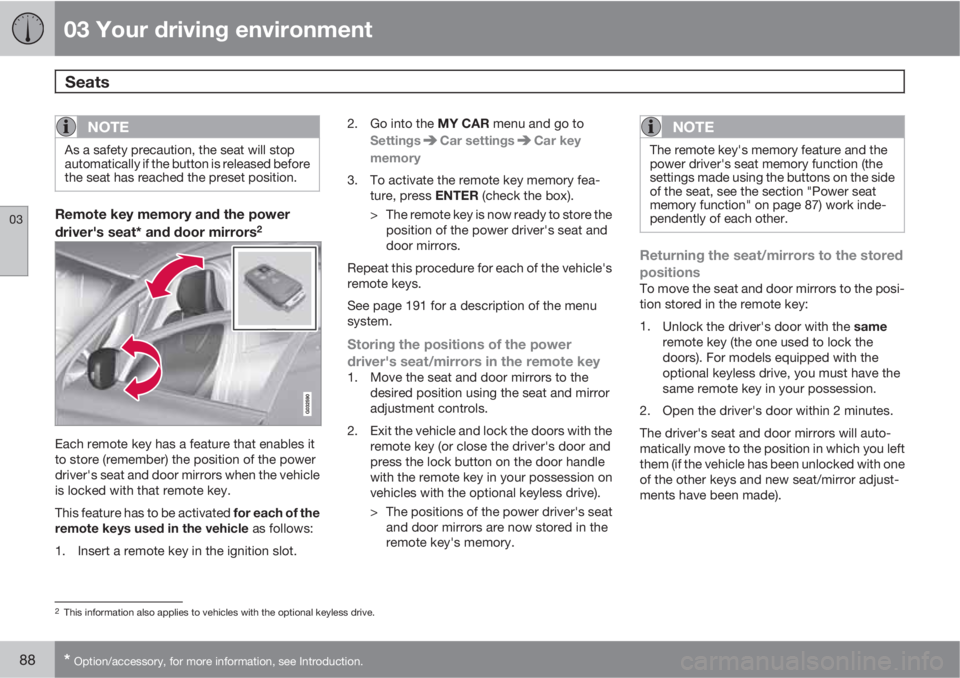
Remote key memory and the power
driver's seat* and door mirrors2
Each remote key has a feature that enables it
to store (remember) the position of the power
driver's seat and door mirrors when the vehicle
is locked with that remote key.
This feature has to be activated for each of the
remote keys used in the vehicle as follows:
1. Insert a remote key in the ignition slot.2.
Go into the MY CAR menu and go to
Settings
Car settingsCar key
memory
3. To activate the remote key memory fea-
ture, press ENTER (check the box).
> The remote key is now ready to store the
position of the power driver's seat and
door mirrors.
Repeat this procedure for each of the vehicle's
remote keys.
See page 191 for a description of the menu
system.
Storing the positions of the power
driver's seat/mirrors in the remote key
1. Move the seat and door mirrors to the
desired position using the seat and mirror
adjustment controls.
2. Exit the vehicle and lock the doors with the
remote key (or close the driver's door and
press the lock button on the door handle
with the remote key in your possession on
vehicles with the optional keyless drive).
> The positions of the power driver's seat
and door mirrors are now stored in the
remote key's memory.
NOTE
The remote key's memory feature and the
power driver's seat memory function (the
settings made using the buttons on the side
of the seat, see the section "Power seat
memory function" on page 87) work inde-
pendently of each other.
Returning the seat/mirrors to the stored
positions
To move the seat and door mirrors to the posi-
tion stored in the remote key:
1.
Unlock the driver's door with the same
remote key (the one used to lock the
doors). For models equipped with the
optional keyless drive, you must have the
same remote key in your possession.
2. Open the driver's door within 2 minutes.
The driver's seat and door mirrors will auto-
matically move to the position in which you left
them (if the vehicle has been unlocked with one
of the other keys and new seat/mirror adjust-
ments have been made).
2This information also applies to vehicles with the optional keyless drive.
Page 91 of 382
03 Your driving environment
Seats
03
* Option/accessory, for more information, see Introduction.89
NOTE
•The seat will move to this position even
if someone else has moved it to a dif-
ferent position and locked the vehicle
with a different remote key.
•This feature will work in the same way
with all of the remote keys that you use
with your vehicle.
Emergency stop
WARNING
•Because the driver's seat can be
adjusted with the ignition off, children
should never be left unattended in the
vehicle.
•Movement of the seat can be STOPPED
at any time by pressing any button on
the power seat control panel.
•Do not adjust the seat while driving. The
seat should be adjusted so that the
brake pedal can be depressed fully. In
addition, position the seat as far rear-
ward as comfort and control allow.
•The seat rails on the floor must not be
obstructed in any way when the seat is
in motion.
Heated seats*See page 201.
Rear seats
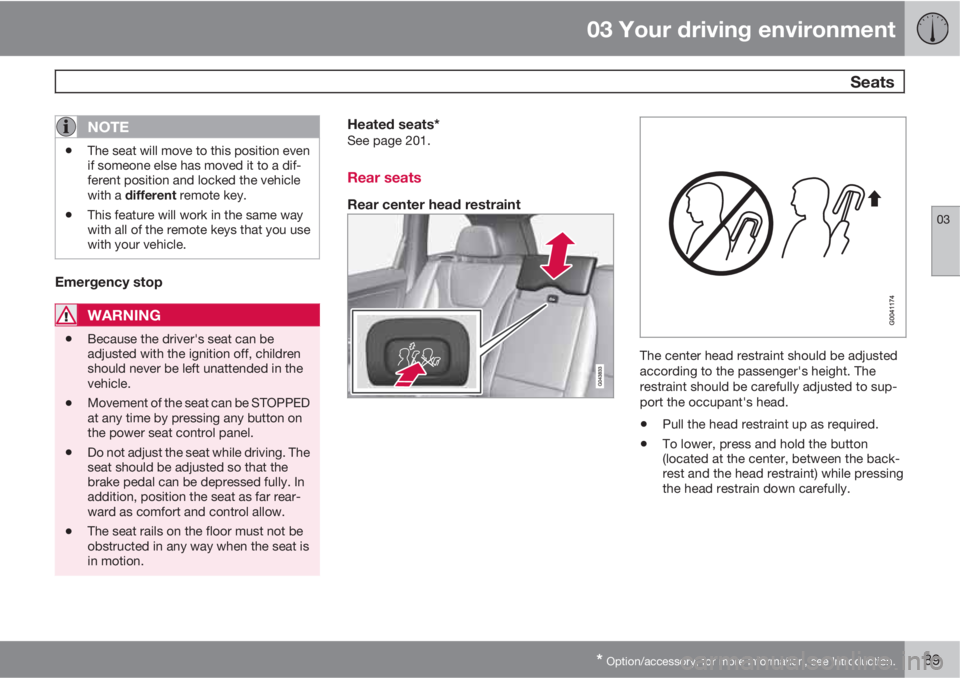
Rear center head restraint
The center head restraint should be adjusted
according to the passenger's height. The
restraint should be carefully adjusted to sup-
port the occupant's head.
•Pull the head restraint up as required.
•To lower, press and hold the button
(located at the center, between the back-
rest and the head restraint) while pressing
the head restrain down carefully.
Page 92 of 382
03 Your driving environment
Seats
03
90
WARNING
The center rear seat head restraint should
only be in its lowest position when this seat
is NOT occupied. When the center position
is occupied, the head restraint should be
correctly adjusted to the passenger’s
height. The upper edge of the head restraint
should be at least on a level with the upper-
most point of the seat occupant's ear.
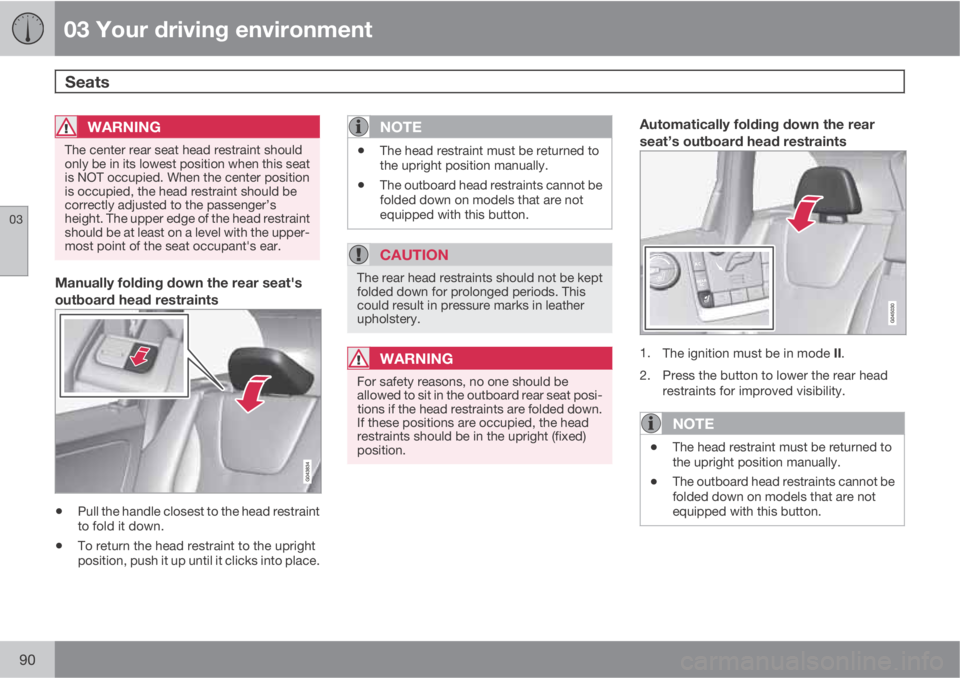
Manually folding down the rear seat's
outboard head restraints
•Pull the handle closest to the head restraint
to fold it down.
•To return the head restraint to the upright
position, push it up until it clicks into place.
NOTE
•The head restraint must be returned to
the upright position manually.
•The outboard head restraints cannot be
folded down on models that are not
equipped with this button.
CAUTION
The rear head restraints should not be kept
folded down for prolonged periods. This
could result in pressure marks in leather
upholstery.
WARNING
For safety reasons, no one should be
allowed to sit in the outboard rear seat posi-
tions if the head restraints are folded down.
If these positions are occupied, the head
restraints should be in the upright (fixed)
position.
Automatically folding down the rear
seat’s outboard head restraints
1.
The ignition must be in mode II.
2. Press the button to lower the rear head
restraints for improved visibility.
NOTE
•The head restraint must be returned to
the upright position manually.
•The outboard head restraints cannot be
folded down on models that are not
equipped with this button.
Page 96 of 382
03 Your driving environment
Lighting
03
94
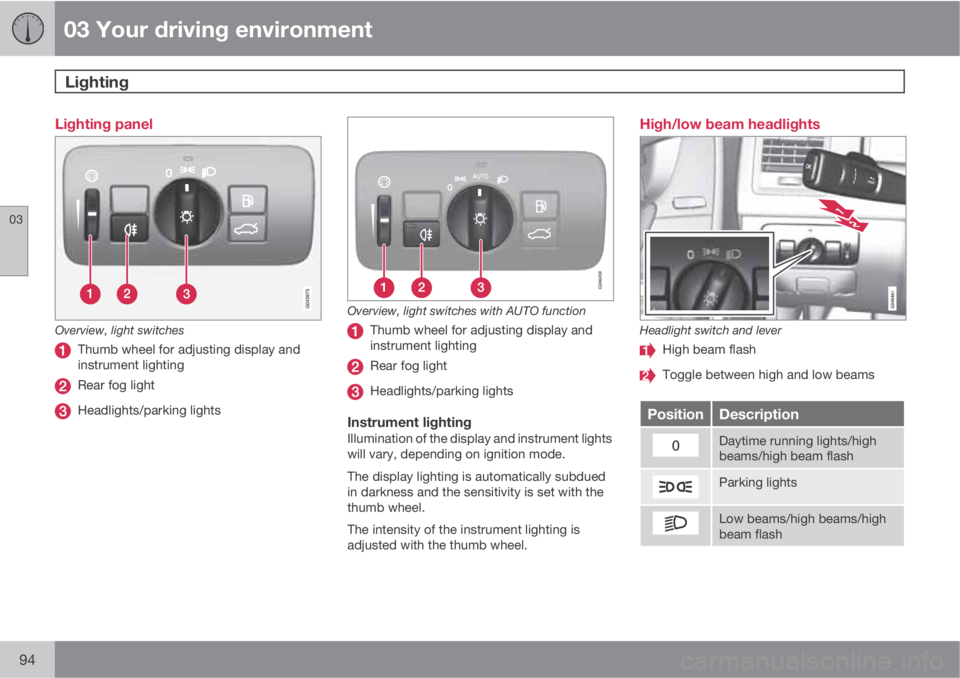
Lighting panel
Overview, light switches
Thumb wheel for adjusting display and
instrument lighting
Rear fog light
Headlights/parking lights
Overview, light switches with AUTO function
Thumb wheel for adjusting display and
instrument lighting
Rear fog light
Headlights/parking lights
Instrument lightingIllumination of the display and instrument lights
will vary, depending on ignition mode.
The display lighting is automatically subdued
in darkness and the sensitivity is set with the
thumb wheel.
The intensity of the instrument lighting is
adjusted with the thumb wheel.
High/low beam headlights
Headlight switch and lever
High beam flash
Toggle between high and low beams
PositionDescription
Daytime running lights/high
beams/high beam flash
Parking lights
Low beams/high beams/high
beam flash
Page 97 of 382
03 Your driving environment
Lighting
03
* Option/accessory, for more information, see Introduction.95
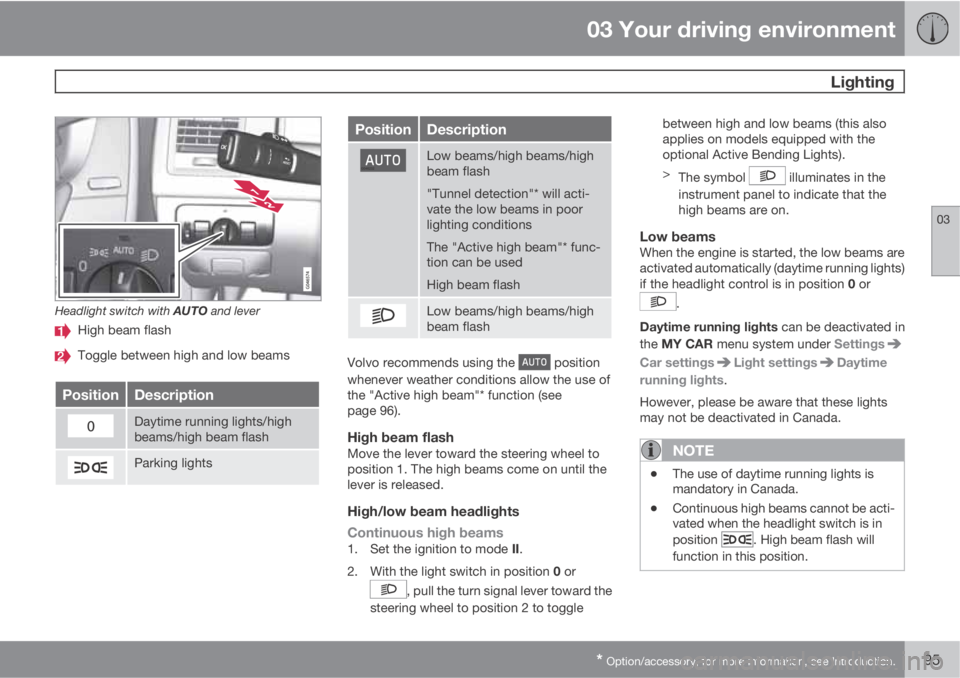
Headlight switch with AUTO and lever
High beam flash
Toggle between high and low beams
PositionDescription
Daytime running lights/high
beams/high beam flash
Parking lights
PositionDescription
Low beams/high beams/high
beam flash
"Tunnel detection"* will acti-
vate the low beams in poor
lighting conditions
The "Active high beam"* func-
tion can be used
High beam flash
Low beams/high beams/high
beam flash
Volvo recommends using the position
whenever weather conditions allow the use of
the "Active high beam"* function (see
page 96).
High beam flashMove the lever toward the steering wheel to
position 1. The high beams come on until the
lever is released.
High/low beam headlights
Continuous high beams
1.
Set the ignition to mode II.
2.
With the light switch in position 0 or
, pull the turn signal lever toward the
steering wheel to position 2 to togglebetween high and low beams (this also
applies on models equipped with the
optional Active Bending Lights).
>
The symbol
illuminates in the
instrument panel to indicate that the
high beams are on.
Low beamsWhen the engine is started, the low beams are
activated automatically (daytime running lights)
if the headlight control is in position 0 or
.
Daytime running lights can be deactivated in
the MY CAR menu system under Settings
Car settingsLight settingsDaytime
running lights.
However, please be aware that these lights
may not be deactivated in Canada.
NOTE
•The use of daytime running lights is
mandatory in Canada.
•Continuous high beams cannot be acti-
vated when the headlight switch is in
position
. High beam flash will
function in this position.
Page 100 of 382
03 Your driving environment
Lighting
03
98* Option/accessory, for more information, see Introduction.
SymbolDisplayExplana-
tion
Headlamp
failure
Service
requiredThe system
is not func-
tioning
properly and
should be
inspected/
repaired by
a trained
and qualified
Volvo serv-
ice techni-
cian.
Auxiliary lights*If the vehicle is fitted with auxiliary lights, the
driver can use the MY CAR menu system to
choose to deactivate and turn these lights on
and off along with the high beam headlights
2.
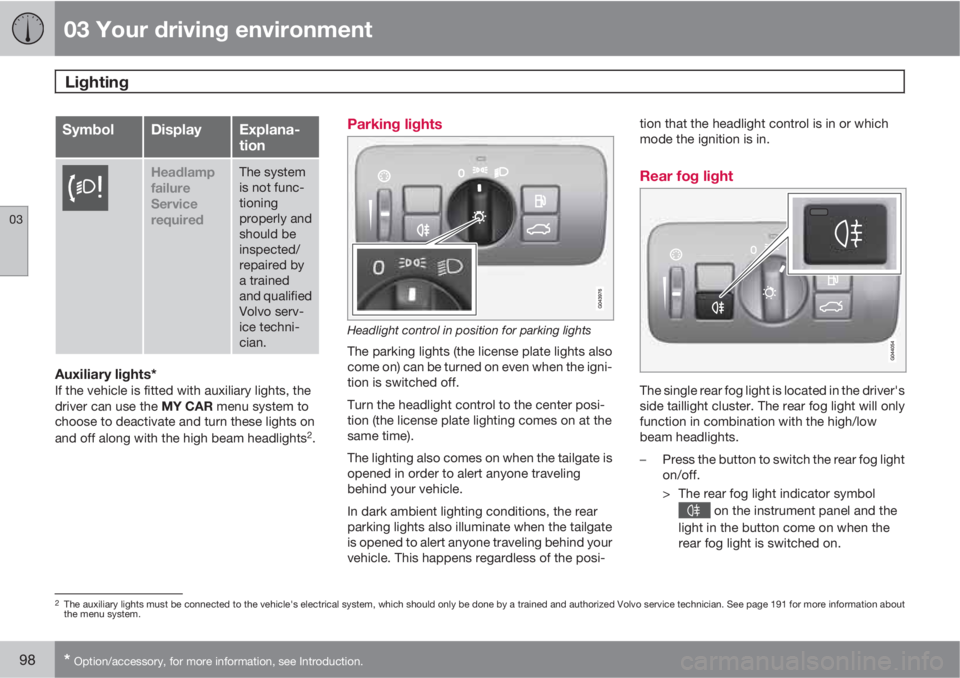
Parking lights
Headlight control in position for parking lights
The parking lights (the license plate lights also
come on) can be turned on even when the igni-
tion is switched off.
Turn the headlight control to the center posi-
tion (the license plate lighting comes on at the
same time).
The lighting also comes on when the tailgate is
opened in order to alert anyone traveling
behind your vehicle.
In dark ambient lighting conditions, the rear
parking lights also illuminate when the tailgate
is opened to alert anyone traveling behind your
vehicle. This happens regardless of the posi-tion that the headlight control is in or which
mode the ignition is in.
Rear fog light
The single rear fog light is located in the driver's
side taillight cluster. The rear fog light will only
function in combination with the high/low
beam headlights.
–Press the button to switch the rear fog light
on/off.
> The rear fog light indicator symbol
on the instrument panel and the
light in the button come on when the
rear fog light is switched on.
2The auxiliary lights must be connected to the vehicle's electrical system, which should only be done by a trained and authorized Volvo service technician. See page 191 for more information about
the menu system.
Page 102 of 382
03 Your driving environment
Lighting
03
100* Option/accessory, for more information, see Introduction.
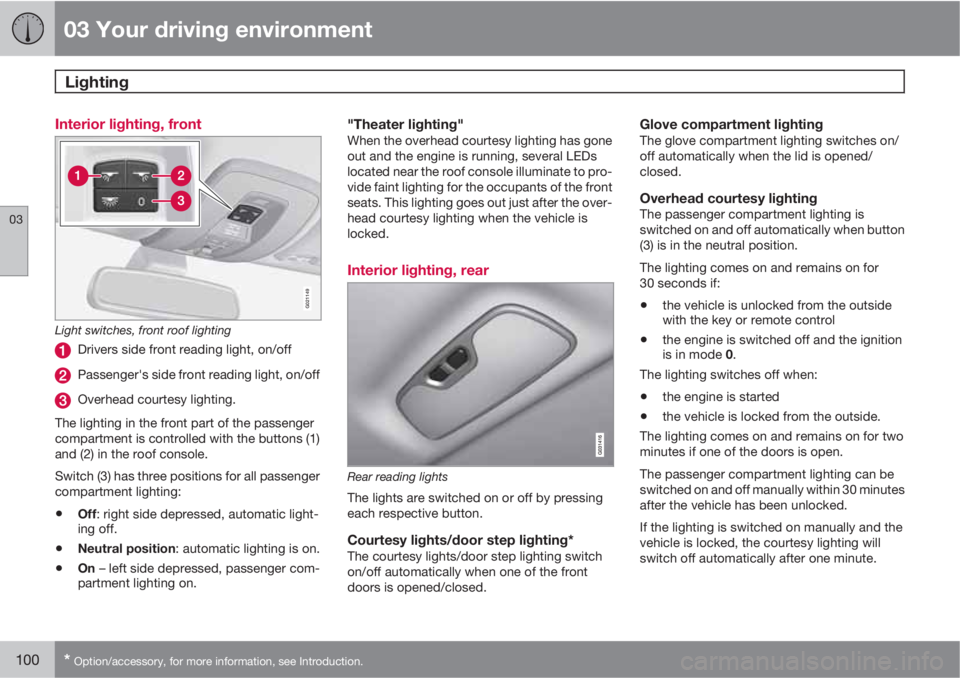
Interior lighting, front
G021149
Light switches, front roof lighting
Drivers side front reading light, on/off
Passenger's side front reading light, on/off
Overhead courtesy lighting.
The lighting in the front part of the passenger
compartment is controlled with the buttons (1)
and (2) in the roof console.
Switch (3) has three positions for all passenger
compartment lighting:
•Off: right side depressed, automatic light-
ing off.
•Neutral position: automatic lighting is on.
•On – left side depressed, passenger com-
partment lighting on.
"Theater lighting"When the overhead courtesy lighting has gone
out and the engine is running, several LEDs
located near the roof console illuminate to pro-
vide faint lighting for the occupants of the front
seats. This lighting goes out just after the over-
head courtesy lighting when the vehicle is
locked.
Interior lighting, rear
Rear reading lights
The lights are switched on or off by pressing
each respective button.
Courtesy lights/door step lighting*The courtesy lights/door step lighting switch
on/off automatically when one of the front
doors is opened/closed.
Glove compartment lightingThe glove compartment lighting switches on/
off automatically when the lid is opened/
closed.
Overhead courtesy lightingThe passenger compartment lighting is
switched on and off automatically when button
(3) is in the neutral position.
The lighting comes on and remains on for
30 seconds if:
•the vehicle is unlocked from the outside
with the key or remote control
•the engine is switched off and the ignition
is in mode 0.
The lighting switches off when:
•the engine is started
•the vehicle is locked from the outside.
The lighting comes on and remains on for two
minutes if one of the doors is open.
The passenger compartment lighting can be
switched on and off manually within 30 minutes
after the vehicle has been unlocked.
If the lighting is switched on manually and the
vehicle is locked, the courtesy lighting will
switch off automatically after one minute.
Page 103 of 382
03 Your driving environment
Lighting
03
101
Cargo area lightingThe cargo area lighting comes on automatically
when the tailgate is opened.
Home safe lighting
When you leave your vehicle at night, you can
make use of the home safe lighting function to
illuminate the area in front of the vehicle.
1. Remove the key from the ignition slot to put
the ignition in mode 0 (see page 85 for
information about the ignition modes).
2. Pull the turn signal lever as far as possible
towards the steering wheel and release it.
3. Exit the vehicle and lock the doors.
The headlights, parking lights, turn signals,
lights in the door mirrors, license plate lights,
and footwell lighting will illuminate and remain
on for 30
3, 60 or 90 seconds. The time interval
can be set in MY CAR under Settings
Car
settings
Light settingsHome safe light
duration. See page 191 for a description of
the menu system.
Approach lighting
Approach lighting is activated by pressing the
approach light button on the remote key (see
the illustration on page 59).
When the function has been activated, the
parking lights, indicator lights, door mirror
lights, license plate lighting, dome lighting and
door step lighting come on.
The time interval for this lighting can be set by
pressing MY CAR and going to Car settings
Light settingsApproach light
duration. See page 191 for a description of
the menu system.
3Factory setting
Page 104 of 382
03 Your driving environment
Wipers and washers
03
102* Option/accessory, for more information, see Introduction.
Windshield wipers/washers
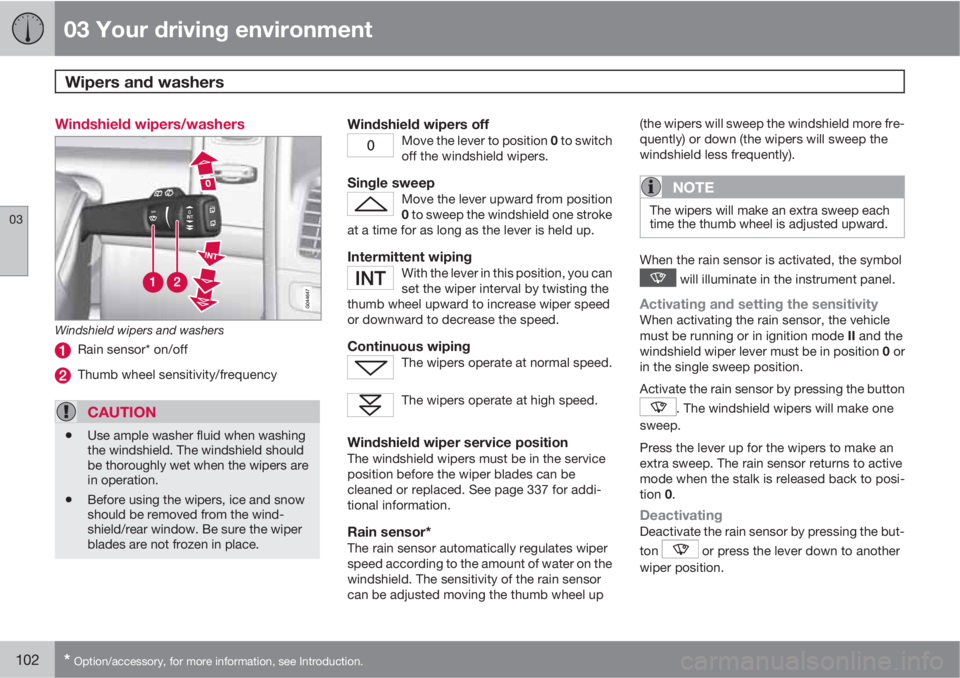
Windshield wipers and washers
Rain sensor* on/off
Thumb wheel sensitivity/frequency
CAUTION
•Use ample washer fluid when washing
the windshield. The windshield should
be thoroughly wet when the wipers are
in operation.
•Before using the wipers, ice and snow
should be removed from the wind-
shield/rear window. Be sure the wiper
blades are not frozen in place.
Windshield wipers offMove the lever to position 0 to switch
off the windshield wipers.
Single sweepMove the lever upward from position
0 to sweep the windshield one stroke
at a time for as long as the lever is held up.
Intermittent wipingWith the lever in this position, you can
set the wiper interval by twisting the
thumb wheel upward to increase wiper speed
or downward to decrease the speed.
Continuous wipingThe wipers operate at normal speed.
The wipers operate at high speed.
Windshield wiper service positionThe windshield wipers must be in the service
position before the wiper blades can be
cleaned or replaced. See page 337 for addi-
tional information.
Rain sensor*The rain sensor automatically regulates wiper
speed according to the amount of water on the
windshield. The sensitivity of the rain sensor
can be adjusted moving the thumb wheel up(the wipers will sweep the windshield more fre-
quently) or down (the wipers will sweep the
windshield less frequently).
NOTE
The wipers will make an extra sweep each
time the thumb wheel is adjusted upward.
When the rain sensor is activated, the symbol
will illuminate in the instrument panel.
Activating and setting the sensitivityWhen activating the rain sensor, the vehicle
must be running or in ignition mode II and the
windshield wiper lever must be in position 0 or
in the single sweep position.
Activate the rain sensor by pressing the button
. The windshield wipers will make one
sweep.
Press the lever up for the wipers to make an
extra sweep. The rain sensor returns to active
mode when the stalk is released back to posi-
tion 0.
DeactivatingDeactivate the rain sensor by pressing the but-
ton
or press the lever down to another
wiper position.