ECO mode VOLVO XC60 2013 Owner´s Manual
[x] Cancel search | Manufacturer: VOLVO, Model Year: 2013, Model line: XC60, Model: VOLVO XC60 2013Pages: 382, PDF Size: 7.08 MB
Page 170 of 382
04 Driver support
Driver Alert System*
04
168* Option/accessory, for more information, see Introduction.
Introduction
The Driver Alert System is designed to help a
driver who may be becoming fatigued or who
is inadvertently leaving the lane.
The Driver Alert System consists of two differ-
ent functions that can be switched on together
or separately.
•Driver Alert Control (DAC)
•Lane Departure Warning (LDW), see
page 171
When one or both of the functions has been
switched on, it is in standby mode and is acti-
vated when the vehicle exceeds a speed of
40 mph (65 km/h).
The function deactivates if the vehicle's speed
goes under 37 mph (60 km/h).
Both functions use a camera that is dependent
on the road/lane being clearly marked by pain-
ted lines on each side.
WARNING
The Driver Alert System does not function in
all situations and is designed to be a sup-
plementary aid. It is not, however, intended
to replace the driver’s attention and judge-
ment.
Driver Alert Control (DAC)–
introduction
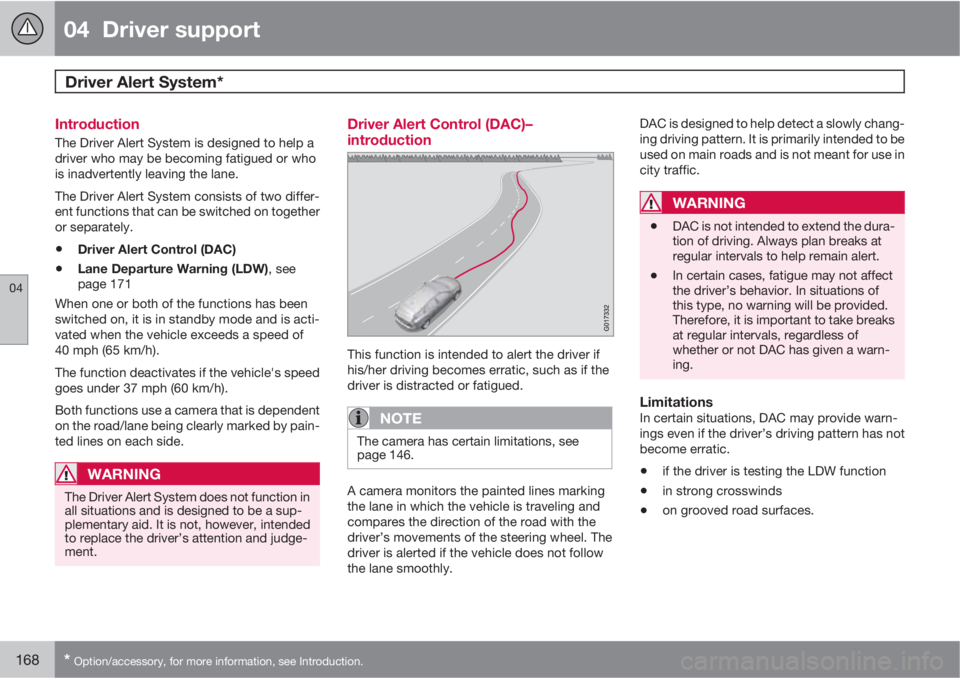
This function is intended to alert the driver if
his/her driving becomes erratic, such as if the
driver is distracted or fatigued.
NOTE
The camera has certain limitations, see
page 146.
A camera monitors the painted lines marking
the lane in which the vehicle is traveling and
compares the direction of the road with the
driver’s movements of the steering wheel. The
driver is alerted if the vehicle does not follow
the lane smoothly.DAC is designed to help detect a slowly chang-
ing driving pattern. It is primarily intended to be
used on main roads and is not meant for use in
city traffic.
WARNING
•DAC is not intended to extend the dura-
tion of driving. Always plan breaks at
regular intervals to help remain alert.
•In certain cases, fatigue may not affect
the driver’s behavior. In situations of
this type, no warning will be provided.
Therefore, it is important to take breaks
at regular intervals, regardless of
whether or not DAC has given a warn-
ing.
LimitationsIn certain situations, DAC may provide warn-
ings even if the driver’s driving pattern has not
become erratic.
•if the driver is testing the LDW function
•in strong crosswinds
•on grooved road surfaces.
Page 174 of 382
04 Driver support
Driver Alert System*
04
172* Option/accessory, for more information, see Introduction.
Settings
Settings for Lane Departure Warning can be
made in the menu system by pressing My
Car. Go to Settings
Car settingsDriver
support systems
Lane Departure
Warning.
There are two alternatives:
On at start-up: This selection switches LDW
on each time the engine is started. Otherwise,the system will be in the mode that it was in
when the engine was switched off.
Increased sensitivity: This selection increa-
ses the function’s sensitivity. Warnings will be
given at an earlier stage and fewer limitations
apply. When this setting is being used, the sys-
tem only needs to monitor lane marker lines on
one side of the vehicle to change status to
Lane Depart Warn Available.
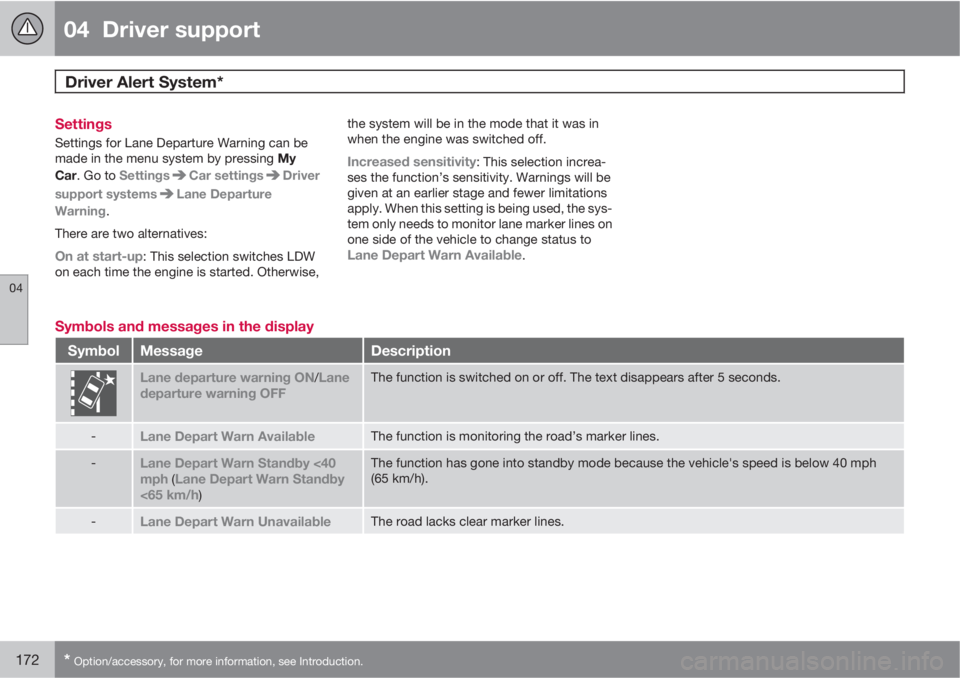
Symbols and messages in the display
SymbolMessageDescription
Lane departure warning ON/Lane
departure warning OFFThe function is switched on or off. The text disappears after 5 seconds.
-Lane Depart Warn AvailableThe function is monitoring the road’s marker lines.
-Lane Depart Warn Standby <40
mph (Lane Depart Warn Standby
<65 km/h)
The function has gone into standby mode because the vehicle's speed is below 40 mph
(65 km/h).
-Lane Depart Warn UnavailableThe road lacks clear marker lines.
Page 181 of 382
04 Driver support
Rear Park Assist Camera (PAC)*
04
* Option/accessory, for more information, see Introduction.179 Using PAC
Activation
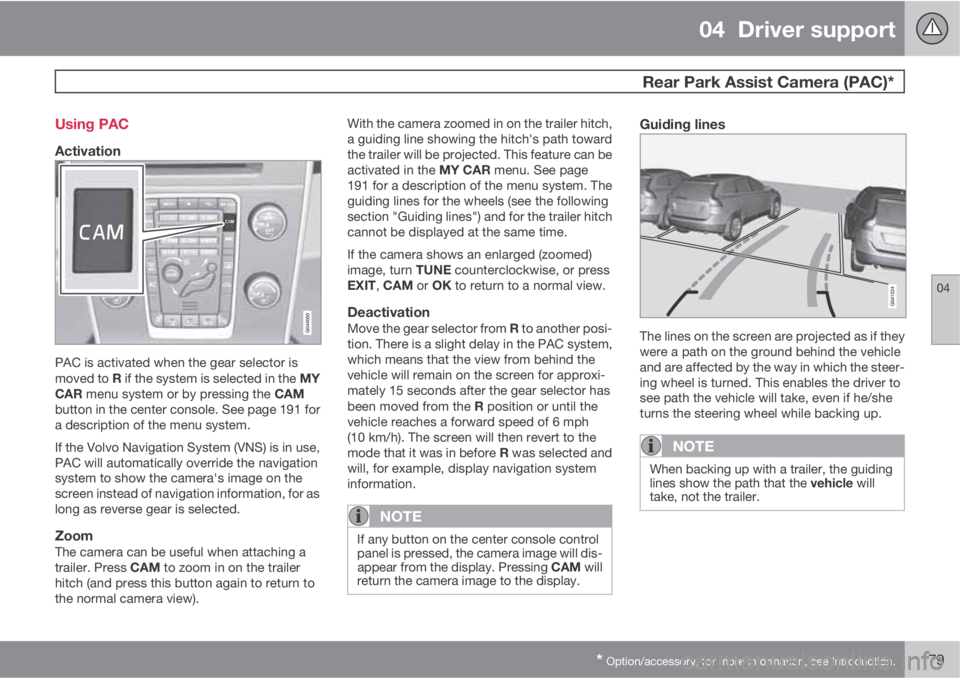
PAC is activated when the gear selector is
moved to R if the system is selected in the MY
CAR menu system or by pressing the CAM
button in the center console. See page 191 for
a description of the menu system.
If the Volvo Navigation System (VNS) is in use,
PAC will automatically override the navigation
system to show the camera's image on the
screen instead of navigation information, for as
long as reverse gear is selected.
ZoomThe camera can be useful when attaching a
trailer. Press CAM to zoom in on the trailer
hitch (and press this button again to return to
the normal camera view).With the camera zoomed in on the trailer hitch,
a guiding line showing the hitch's path toward
the trailer will be projected. This feature can be
activated in the MY CAR menu. See page
191 for a description of the menu system. The
guiding lines for the wheels (see the following
section "Guiding lines") and for the trailer hitch
cannot be displayed at the same time.
If the camera shows an enlarged (zoomed)
image, turn TUNE counterclockwise, or press
EXIT, CAM or OK to return to a normal view.
DeactivationMove the gear selector from R to another posi-
tion. There is a slight delay in the PAC system,
which means that the view from behind the
vehicle will remain on the screen for approxi-
mately 15 seconds after the gear selector has
been moved from the R position or until the
vehicle reaches a forward speed of 6 mph
(10 km/h). The screen will then revert to the
mode that it was in before R was selected and
will, for example, display navigation system
information.
NOTE
If any button on the center console control
panel is pressed, the camera image will dis-
appear from the display. Pressing CAM will
return the camera image to the display.
Guiding lines
The lines on the screen are projected as if they
were a path on the ground behind the vehicle
and are affected by the way in which the steer-
ing wheel is turned. This enables the driver to
see path the vehicle will take, even if he/she
turns the steering wheel while backing up.
NOTE
When backing up with a trailer, the guiding
lines show the path that the vehicle will
take, not the trailer.
Page 200 of 382
05 Comfort and driving pleasure
Climate system
05
198
your Warranty and Service Records Informa-
tion booklet, or consult a trained and qualified
Volvo service technician for these intervals.
The filter should be replaced more often when
driving under dirty and dusty conditions. The
filter cannot be cleaned and therefore should
always be replaced with a new one.
NOTE
There are different types of cabin air filters.
Ensure that the correct type is installed.
Interior Air Quality System (IAQS)A multifilter helps reduce gases and particles
in the incoming air, thereby reducing the levels
of odors and contaminants entering the vehi-
cle. The air quality sensor detects increased
levels of contaminants in the outside air. When
the air quality sensor detects contaminated
outside air, the air intake closes and the air
inside the passenger compartment is recircu-
lated, i.e. no outside air enters the vehicle. The
filter also cleans recirculated passenger com-
partment air.
NOTE
Contact your Volvo retailer for IAQS air filter
replacement intervals.
Materials used in the cabinThe materials used in the cabin have been
developed to help minimize the amount of dust
and make the cabin easier to keep clean. All
floor mats can be easily removed for cleaning.
Use car cleaning products recommended by
Volvo. See also the information beginning on
page 352.
Menu settingsThe default settings for four of the climate sys-
tem's functions can be changed in the menu
system.
•Blower speed in automatic mode.
•Recirculation timer for passenger com-
partment air.
•Automatic rear window defrosting.
•The optional Interior Air Quality System
(IAQS).
The functions can also be returned to factory
settings in the menu system.
See page 191 for a description of the menu
system.
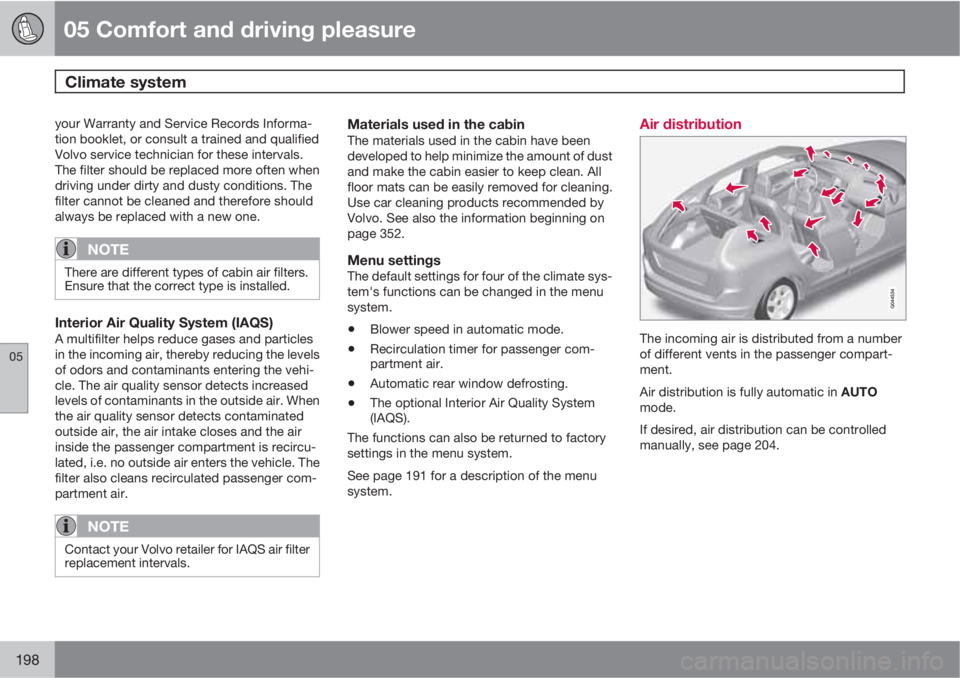
Air distribution
The incoming air is distributed from a number
of different vents in the passenger compart-
ment.
Air distribution is fully automatic in AUTO
mode.
If desired, air distribution can be controlled
manually, see page 204.
Page 207 of 382
05 Comfort and driving pleasure
Trip computer
05
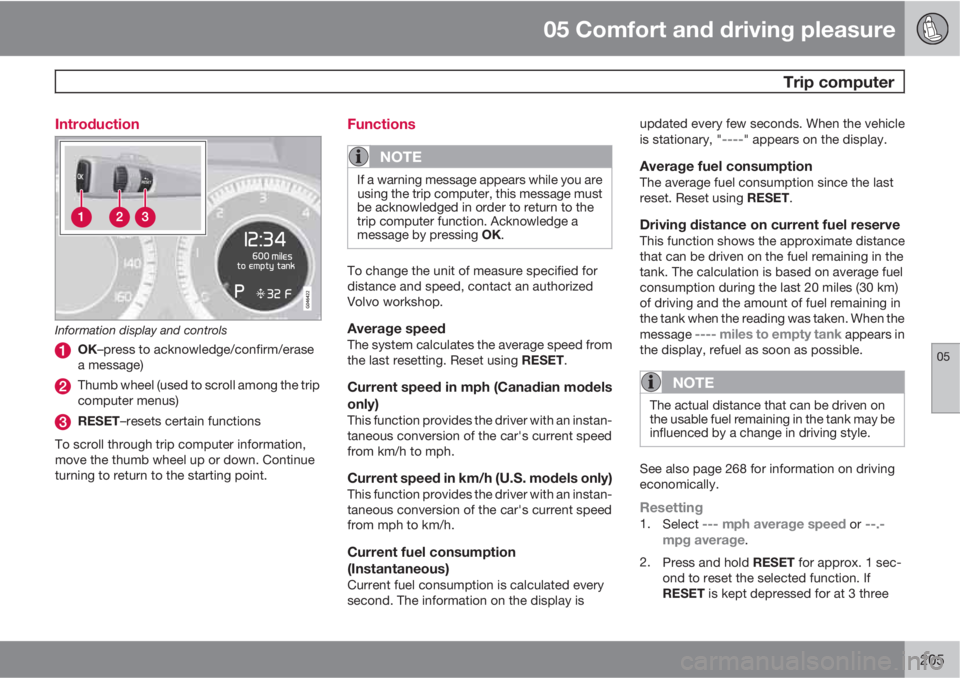
205 Introduction
Information display and controls
OK–press to acknowledge/confirm/erase
a message)
Thumb wheel (used to scroll among the trip
computer menus)
RESET–resets certain functions
To scroll through trip computer information,
move the thumb wheel up or down. Continue
turning to return to the starting point.
Functions
NOTE
If a warning message appears while you are
using the trip computer, this message must
be acknowledged in order to return to the
trip computer function. Acknowledge a
message by pressing OK.
To change the unit of measure specified for
distance and speed, contact an authorized
Volvo workshop.
Average speedThe system calculates the average speed from
the last resetting. Reset using RESET.
Current speed in mph (Canadian models
only)
This function provides the driver with an instan-
taneous conversion of the car's current speed
from km/h to mph.
Current speed in km/h (U.S. models only)This function provides the driver with an instan-
taneous conversion of the car's current speed
from mph to km/h.
Current fuel consumption
(Instantaneous)
Current fuel consumption is calculated every
second. The information on the display isupdated every few seconds. When the vehicle
is stationary, "
----" appears on the display.
Average fuel consumptionThe average fuel consumption since the last
reset. Reset using RESET.
Driving distance on current fuel reserveThis function shows the approximate distance
that can be driven on the fuel remaining in the
tank. The calculation is based on average fuel
consumption during the last 20 miles (30 km)
of driving and the amount of fuel remaining in
the tank when the reading was taken. When the
message
---- miles to empty tank appears in
the display, refuel as soon as possible.
NOTE
The actual distance that can be driven on
the usable fuel remaining in the tank may be
influenced by a change in driving style.
See also page 268 for information on driving
economically.
Resetting1.
Select --- mph average speed or --.-
mpg average.
2.
Press and hold RESET for approx. 1 sec-
ond to reset the selected function. If
RESET is kept depressed for at 3 three
Page 221 of 382
06 Infotainment
Introduction
06
* Option/accessory, for more information, see Introduction.219
Mode button (in this example, the MEDIA
button). The number of buttons varies,
depending on your vehicle’s specifica-
tions). Each mode has four basic views:
Normal view
Shortcut view
Quick scroll view
Menu view
Select a mode by pressing its button (1)
(RADIO, MEDIA, TEL, etc.). Navigate using
TUNE, OK/MENU or EXIT.
Rear control panel with headphone
sockets*
Headphones with an impedance of
16 – 32 ohm and sensitivity of 102 dB or higher
are recommended for best sound reproduc-
tion.
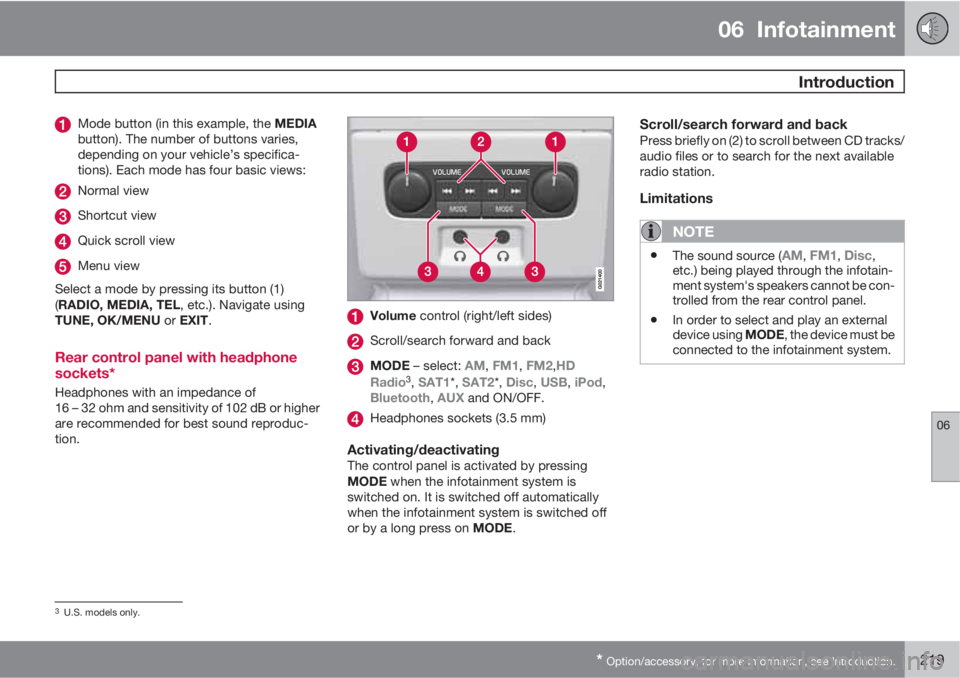
Volume control (right/left sides)
Scroll/search forward and back
MODE – select: AM, FM1, FM2,HD
Radio3, SAT1*, SAT2*, Disc, USB, iPod,
Bluetooth, AUX and ON/OFF.
Headphones sockets (3.5 mm)
Activating/deactivatingThe control panel is activated by pressing
MODE when the infotainment system is
switched on. It is switched off automatically
when the infotainment system is switched off
or by a long press on MODE.
Scroll/search forward and backPress briefly on (2) to scroll between CD tracks/
audio files or to search for the next available
radio station.
Limitations
NOTE
•The sound source (AM, FM1, Disc,
etc.) being played through the infotain-
ment system's speakers cannot be con-
trolled from the rear control panel.
•In order to select and play an external
device using MODE, the device must be
connected to the infotainment system.
3U.S. models only.
Page 222 of 382
06 Infotainment
Introduction
06
220* Option/accessory, for more information, see Introduction.
* FAV—storing a shortcut
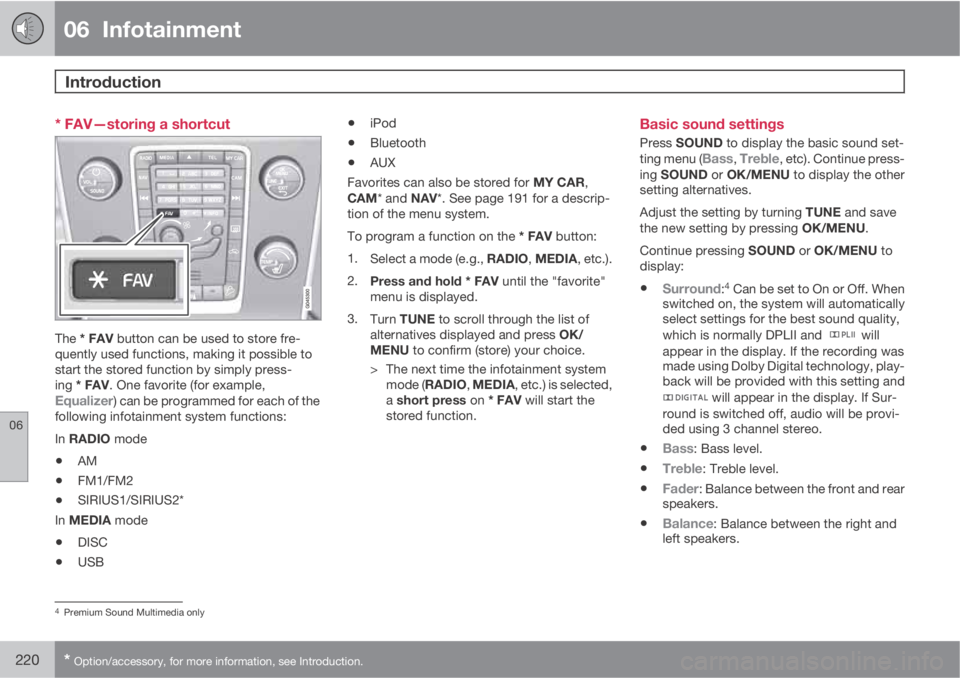
The * FAV button can be used to store fre-
quently used functions, making it possible to
start the stored function by simply press-
ing * FAV. One favorite (for example,
Equalizer) can be programmed for each of the
following infotainment system functions:
In RADIO mode
•AM
•FM1/FM2
•SIRIUS1/SIRIUS2*
In MEDIA mode
•DISC
•USB
•iPod
•Bluetooth
•AUX
Favorites can also be stored for MY CAR,
CAM* and NAV*. See page 191 for a descrip-
tion of the menu system.
To program a function on the * FAV button:
1.
Select a mode (e.g., RADIO, MEDIA, etc.).
2.
Press and hold * FAV until the "favorite"
menu is displayed.
3.
Turn TUNE to scroll through the list of
alternatives displayed and press OK/
MENU to confirm (store) your choice.
> The next time the infotainment system
mode (RADIO, MEDIA, etc.) is selected,
a short press on * FAV will start the
stored function.
Basic sound settings
Press SOUND to display the basic sound set-
ting menu (Bass, Treble, etc). Continue press-
ing SOUND or OK/MENU to display the other
setting alternatives.
Adjust the setting by turning TUNE and save
the new setting by pressing OK/MENU.
Continue pressing SOUND or OK/MENU to
display:
•Surround:4 Can be set to On or Off. When
switched on, the system will automatically
select settings for the best sound quality,
which is normally DPLII and
will
appear in the display. If the recording was
made using Dolby Digital technology, play-
back will be provided with this setting and
will appear in the display. If Sur-
round is switched off, audio will be provi-
ded using 3 channel stereo.
•Bass: Bass level.
•Treble: Treble level.
•Fader: Balance between the front and rear
speakers.
•Balance: Balance between the right and
left speakers.
4Premium Sound Multimedia only
Page 223 of 382
06 Infotainment
Introduction
06
* Option/accessory, for more information, see Introduction.221
•Subwoofer*: subwoofer volume level.
•DPL II centre level/3 channel centre
level4: Volume for the center speaker.
•DPL II surround level4/5: Surround level.
Advanced sound settings
EqualizerSound levels for different frequencies can be
adjusted separately using this feature.
To do so:
1.
Press OK/MENU to access
Audio
settings and select Equalizer
2.
Turn TUNE to select one of the frequencies
and press OK/MENU.
3.
Turn TUNE to adjust the sound setting and
confirm the change by pressing OK/
MENU. Do the same for the other frequen-
cies.
4. When you have finished making your set-
tings, press EXIT to save and return to nor-
mal view.
For general information regarding menu navi-
gation, see page 218 and menu overview see
page 222.
Sound stage6
The sound experience can be optimized for the
driver's seat, both front seats or the rear seat.
If the front and rear seats are occupied, the
sound stage setting
Front seats is recom-
mended. Select one of the options under
Audio settings
Sound stage.
Audio volume and automatic volume
control
The infotainment system compensates for dis-
rupting noises in the passenger compartment
by increasing the volume according to the
speed of the vehicle. The level of sound com-
pensation can be set at low, medium, high or
off. Select the level under Audio settings
Volume compensation.
External audio source volumeIf an external device such as an MP3 player or
an iPod Ÿ is connected to the AUX socket, the
device's volume may be different than the vol-
ume of the internal sound sources such as the
disc player or the radio. If the external sound
source's volume is too high, the quality of the
sound may be impaired. To help prevent this,adjust the input volume of the external audio
source:
NOTE
Sound quality may be affected if the MP3
player is being charged while the system is
in AUX mode. To help prevent this, avoid
charging the MP3 player in a 12-volt socket
while it is being played.
1.
Press MEDIA and turn TUNE to AUX.
Press OK/MENU or the thumb wheel on
the steering wheel keypad.
2.
Press OK/MENU and turn TUNE to
AUX
input volume. Confirm by pressing OK/
MENU.
3.
Turn TUNE to adjust the volume.
Optimal sound reproductionThe infotainment system is pre-calibrated for
optimal sound reproduction using digital signal
processing.
This calibration takes into account factors such
as the speakers, amplifier, cabin acoustics, the
listeners' seating positions, etc., for each com-
bination of vehicle/infotainment system.
4Premium Sound Multimedia only5Only when Surround is on.6Premium Sound Multimedia only
Page 227 of 382
06 Infotainment
Radio
06
* Option/accessory, for more information, see Introduction.225 General functions
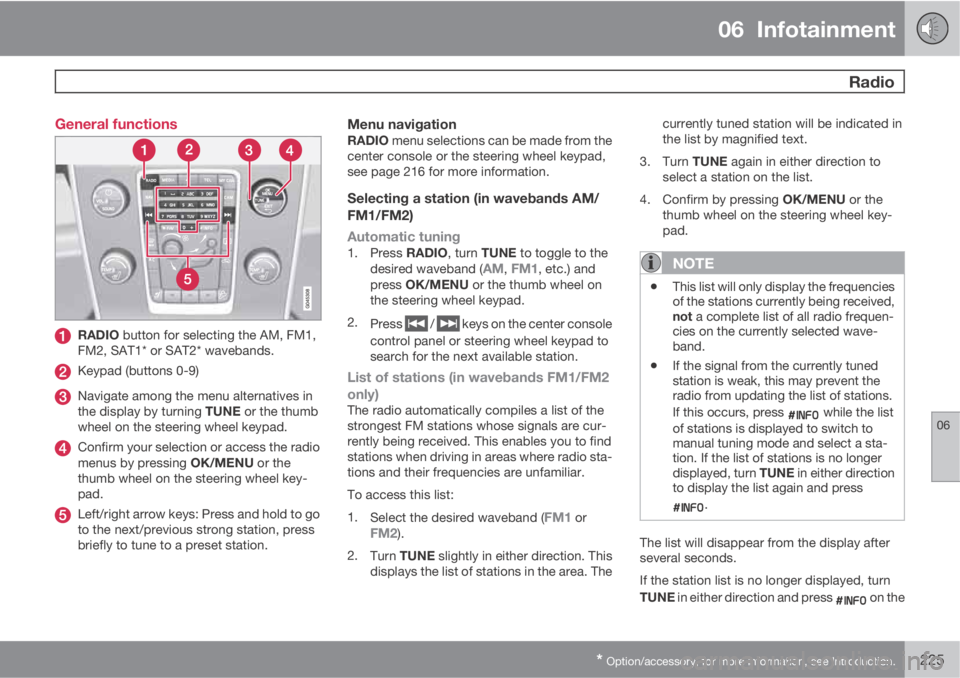
RADIO button for selecting the AM, FM1,
FM2, SAT1* or SAT2* wavebands.
Keypad (buttons 0-9)
Navigate among the menu alternatives in
the display by turning TUNE or the thumb
wheel on the steering wheel keypad.
Confirm your selection or access the radio
menus by pressing OK/MENU or the
thumb wheel on the steering wheel key-
pad.
Left/right arrow keys: Press and hold to go
to the next/previous strong station, press
briefly to tune to a preset station.
Menu navigationRADIO menu selections can be made from the
center console or the steering wheel keypad,
see page 216 for more information.
Selecting a station (in wavebands AM/
FM1/FM2)
Automatic tuning
1.
Press RADIO, turn TUNE to toggle to the
desired waveband (AM, FM1, etc.) and
press OK/MENU or the thumb wheel on
the steering wheel keypad.
2.
Press
/ keys on the center console
control panel or steering wheel keypad to
search for the next available station.
List of stations (in wavebands FM1/FM2
only)
The radio automatically compiles a list of the
strongest FM stations whose signals are cur-
rently being received. This enables you to find
stations when driving in areas where radio sta-
tions and their frequencies are unfamiliar.
To access this list:
1.
Select the desired waveband (
FM1 orFM2).
2.
Turn TUNE slightly in either direction. This
displays the list of stations in the area. Thecurrently tuned station will be indicated in
the list by magnified text.
3.
Turn TUNE again in either direction to
select a station on the list.
4.
Confirm by pressing OK/MENU or the
thumb wheel on the steering wheel key-
pad.
NOTE
•This list will only display the frequencies
of the stations currently being received,
not a complete list of all radio frequen-
cies on the currently selected wave-
band.
•If the signal from the currently tuned
station is weak, this may prevent the
radio from updating the list of stations.
If this occurs, press
while the list
of stations is displayed to switch to
manual tuning mode and select a sta-
tion. If the list of stations is no longer
displayed, turn TUNE in either direction
to display the list again and press
.
The list will disappear from the display after
several seconds.
If the station list is no longer displayed, turn
TUNE in either direction and press
on the
Page 228 of 382
06 Infotainment
Radio
06
226
keypad on the center console to switch to
manual tuning (or to switch back from manual
tuning to the "list of stations" function).
Manual tuningBy default, the list of stations of the strongest
stations in the area will be displayed when you
turn TUNE (see the preceding section, "List of
stations"). While the list of stations is displayed,
press
on the center console keypad to
switch to manual tuning, which enables you to
select a frequency from the complete list of all
radio frequencies available on the currently
selected waveband. In other words, in manual
tuning mode, turning TUNE one step will
change from e.g., 93.3 to 93.5, etc.).
To manually tune a station:
1.
Press RADIO. Turn TUNE to scroll to the
desired waveband (
AM, FM1, etc.) and
press OK/MENU or the thumb wheel on
the steering wheel keypad to confirm.
2.
Turn TUNE or the thumb wheel to select a
frequency.
NOTE
The radio is initially set to automatically
search for stations in the area in which you
are driving (see the preceding section, "List
of stations").
However, if you have switched to manual
tuning (by pressing
on the keypad on
the center console while the list of stations
is displayed), the radio will remain in manual
tuning mode the next time it is switched on.
To switch back to "list of stations" mode,
turn TUNE one step (to display the full list of
stations) and press
.
Please note that if you press
when the
list of stations is not displayed, this will acti-
vate the INFO function.
Storing preset stationsTen preset stations can be stored for each
waveband (AM, FM1, etc.).
Stored preset stations are selected using the
buttons on the keypad on the center console.
Manually storing preset stations1. Tune to a station (see "Selecting a station"
on page 225).
2. Press and hold one of the number key but-
tons.
> The sound will be muted for several sec-
onds and when it returns, the station hasbeen stored on the number key button
used.
A list of preset stations can be displayed. This
function can be activated/deactivated in AM/
FM mode in FM menu
Show presets or in
AM menu
Show presets
ScanThe function automatically searches the cur-
rent waveband for radio stations. When a sta-
tion is found, it is played for several seconds
before scanning is resumed. While the station
is playing it can be stored as a preset in the
usual way (see "Manually storing preset sta-
tions").
–To start scanning in AM/FM mode, go to
FM menu
Scan or in AM menu
Scan.
Stop station scanning by pressing EXIT.
NOTE
Storing a station interrupts the SCAN func-
tion.
Radio textSome stations transmit information on pro-
gram content, artists, etc. This information can
be shown on the display.