seats VOLVO XC60 2013 Owner´s Manual
[x] Cancel search | Manufacturer: VOLVO, Model Year: 2013, Model line: XC60, Model: VOLVO XC60 2013Pages: 382, PDF Size: 7.08 MB
Page 94 of 382
03 Your driving environment
Seats
03
92
WARNING
•When one or more sections of the back-
rest is returned to the upright position,
check that it is properly locked in place
by pushing and pulling it. The red indi-
cators should also not be visible.
•Return the outboard head restraints to
the upright position.
•Long loads should always be securely
anchored to help avoid injury in the
event of a sudden stop.
•Always turn the engine off and apply the
parking brake when loading/unloading
the vehicle.
•Place the transmission in the Park (P)
position to help prevent inadvertent
movement of the gear selector.
•On hot days, the temperature in the
vehicle interior can rise very quickly.
Exposure of people to these high tem-
peratures for even a short period of time
can cause heat-related injury or death.
Small children are particularly at risk.
Page 102 of 382
03 Your driving environment
Lighting
03
100* Option/accessory, for more information, see Introduction.
Interior lighting, front
G021149
Light switches, front roof lighting
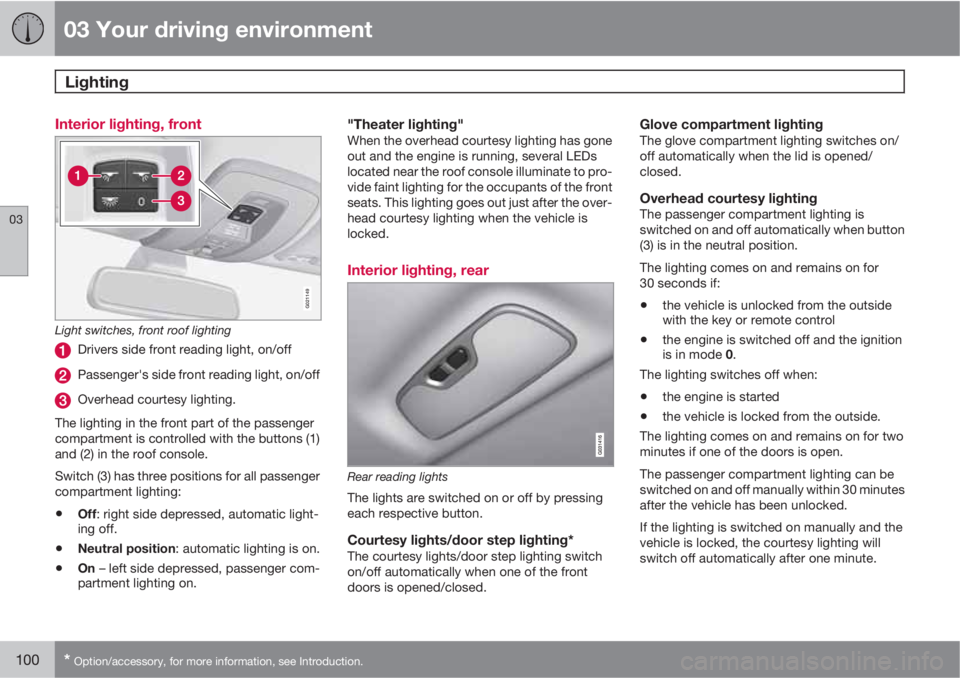
Drivers side front reading light, on/off
Passenger's side front reading light, on/off
Overhead courtesy lighting.
The lighting in the front part of the passenger
compartment is controlled with the buttons (1)
and (2) in the roof console.
Switch (3) has three positions for all passenger
compartment lighting:
•Off: right side depressed, automatic light-
ing off.
•Neutral position: automatic lighting is on.
•On – left side depressed, passenger com-
partment lighting on.
"Theater lighting"When the overhead courtesy lighting has gone
out and the engine is running, several LEDs
located near the roof console illuminate to pro-
vide faint lighting for the occupants of the front
seats. This lighting goes out just after the over-
head courtesy lighting when the vehicle is
locked.
Interior lighting, rear
Rear reading lights
The lights are switched on or off by pressing
each respective button.
Courtesy lights/door step lighting*The courtesy lights/door step lighting switch
on/off automatically when one of the front
doors is opened/closed.
Glove compartment lightingThe glove compartment lighting switches on/
off automatically when the lid is opened/
closed.
Overhead courtesy lightingThe passenger compartment lighting is
switched on and off automatically when button
(3) is in the neutral position.
The lighting comes on and remains on for
30 seconds if:
•the vehicle is unlocked from the outside
with the key or remote control
•the engine is switched off and the ignition
is in mode 0.
The lighting switches off when:
•the engine is started
•the vehicle is locked from the outside.
The lighting comes on and remains on for two
minutes if one of the doors is open.
The passenger compartment lighting can be
switched on and off manually within 30 minutes
after the vehicle has been unlocked.
If the lighting is switched on manually and the
vehicle is locked, the courtesy lighting will
switch off automatically after one minute.
Page 203 of 382
05 Comfort and driving pleasure
Climate system
05
* Option/accessory, for more information, see Introduction.201 Climate system controls
Heated front seats*
The current seat temperature is shown in the cen-
ter console display
Press the button once for the
highest heat level – three indi-
cator lights come on.
Press the button twice for a
lower heat level – two indica-
tor lights come on.
Press the button three times for the lowest heat
level – one indicator light comes on.
Press the button four times to switch off the
heat – no indicator lights come on.
Seat heating will automatically switch off when
the engine is switched off.
Heated rear seats*1
Heat control for the outboard seating positions
is done in the same way as for the front seats.
Blower controlTurn the control clockwise to
increase or counterclockwise
to decrease the blower
speed. If AUTO is selected,
blower speed will be regula-
ted automatically and this will
override manual adjustment.
NOTE
If the blower is turned off completely, the air
conditioning is disengaged, which may
result in fogging on the windows.
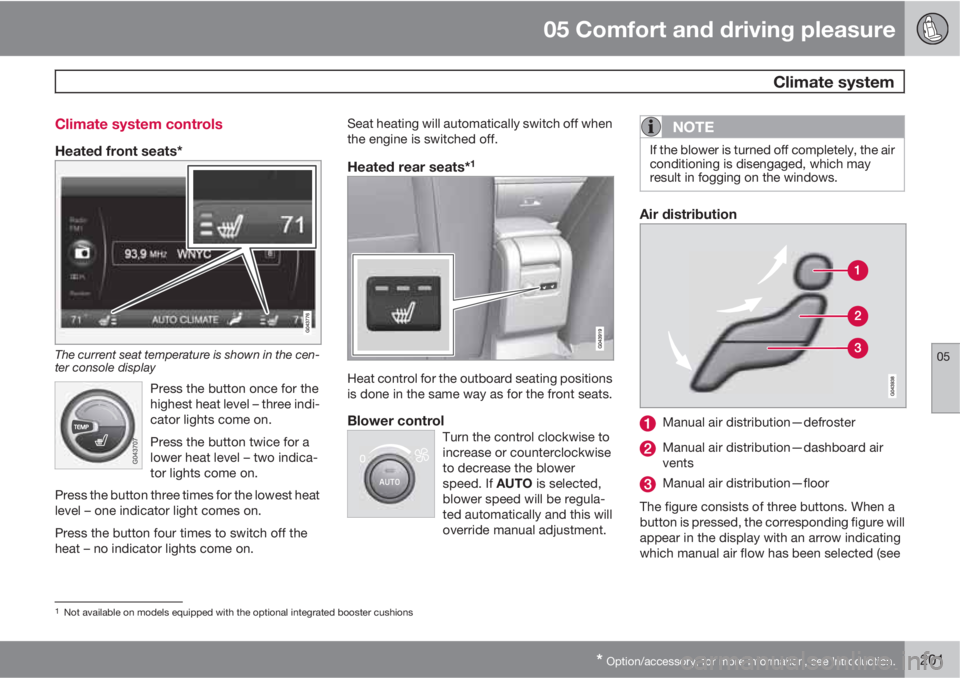
Air distribution
Manual air distribution—defroster
Manual air distribution—dashboard air
vents
Manual air distribution—floor
The figure consists of three buttons. When a
button is pressed, the corresponding figure will
appear in the display with an arrow indicating
which manual air flow has been selected (see
1Not available on models equipped with the optional integrated booster cushions
Page 223 of 382
06 Infotainment
Introduction
06
* Option/accessory, for more information, see Introduction.221
•Subwoofer*: subwoofer volume level.
•DPL II centre level/3 channel centre
level4: Volume for the center speaker.
•DPL II surround level4/5: Surround level.
Advanced sound settings
EqualizerSound levels for different frequencies can be
adjusted separately using this feature.
To do so:
1.
Press OK/MENU to access
Audio
settings and select Equalizer
2.
Turn TUNE to select one of the frequencies
and press OK/MENU.
3.
Turn TUNE to adjust the sound setting and
confirm the change by pressing OK/
MENU. Do the same for the other frequen-
cies.
4. When you have finished making your set-
tings, press EXIT to save and return to nor-
mal view.
For general information regarding menu navi-
gation, see page 218 and menu overview see
page 222.
Sound stage6
The sound experience can be optimized for the
driver's seat, both front seats or the rear seat.
If the front and rear seats are occupied, the
sound stage setting
Front seats is recom-
mended. Select one of the options under
Audio settings
Sound stage.
Audio volume and automatic volume
control
The infotainment system compensates for dis-
rupting noises in the passenger compartment
by increasing the volume according to the
speed of the vehicle. The level of sound com-
pensation can be set at low, medium, high or
off. Select the level under Audio settings
Volume compensation.
External audio source volumeIf an external device such as an MP3 player or
an iPod Ÿ is connected to the AUX socket, the
device's volume may be different than the vol-
ume of the internal sound sources such as the
disc player or the radio. If the external sound
source's volume is too high, the quality of the
sound may be impaired. To help prevent this,adjust the input volume of the external audio
source:
NOTE
Sound quality may be affected if the MP3
player is being charged while the system is
in AUX mode. To help prevent this, avoid
charging the MP3 player in a 12-volt socket
while it is being played.
1.
Press MEDIA and turn TUNE to AUX.
Press OK/MENU or the thumb wheel on
the steering wheel keypad.
2.
Press OK/MENU and turn TUNE to
AUX
input volume. Confirm by pressing OK/
MENU.
3.
Turn TUNE to adjust the volume.
Optimal sound reproductionThe infotainment system is pre-calibrated for
optimal sound reproduction using digital signal
processing.
This calibration takes into account factors such
as the speakers, amplifier, cabin acoustics, the
listeners' seating positions, etc., for each com-
bination of vehicle/infotainment system.
4Premium Sound Multimedia only5Only when Surround is on.6Premium Sound Multimedia only
Page 240 of 382
06 Infotainment
AUX/USB sockets
06
238
Connecting external devices
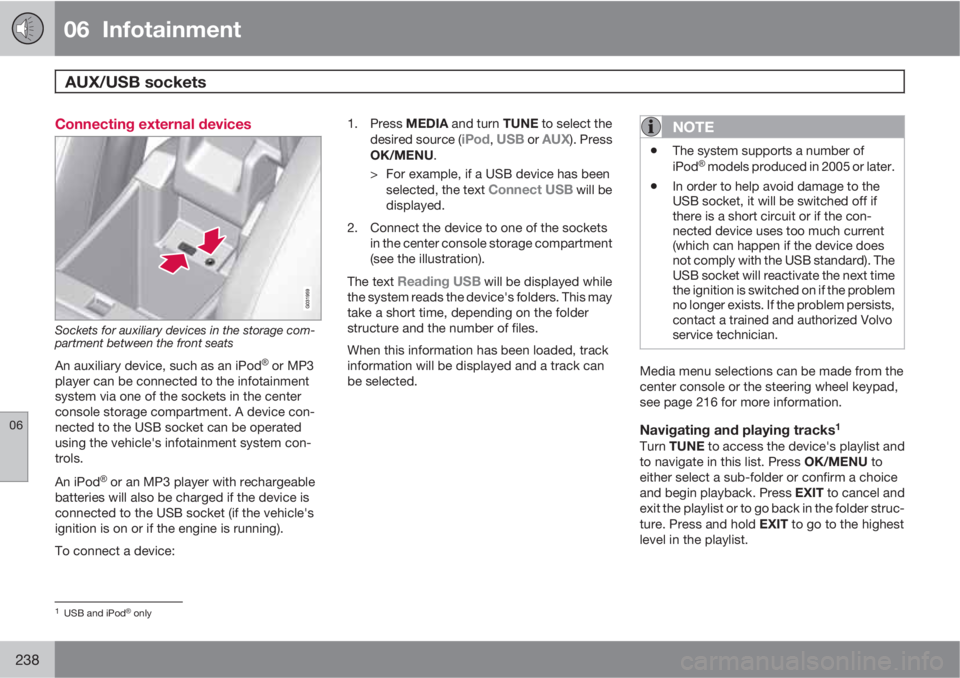
Sockets for auxiliary devices in the storage com-
partment between the front seats
An auxiliary device, such as an iPodŸ or MP3
player can be connected to the infotainment
system via one of the sockets in the center
console storage compartment. A device con-
nected to the USB socket can be operated
using the vehicle's infotainment system con-
trols.
An iPod
Ÿ or an MP3 player with rechargeable
batteries will also be charged if the device is
connected to the USB socket (if the vehicle's
ignition is on or if the engine is running).
To connect a device:1.
Press MEDIA and turn TUNE to select the
desired source (
iPod, USB or AUX). Press
OK/MENU.
> For example, if a USB device has been
selected, the text
Connect USB will be
displayed.
2. Connect the device to one of the sockets
in the center console storage compartment
(see the illustration).
The text
Reading USB will be displayed while
the system reads the device's folders. This may
take a short time, depending on the folder
structure and the number of files.
When this information has been loaded, track
information will be displayed and a track can
be selected.
NOTE
•The system supports a number of
iPodŸ models produced in 2005 or later.
•In order to help avoid damage to the
USB socket, it will be switched off if
there is a short circuit or if the con-
nected device uses too much current
(which can happen if the device does
not comply with the USB standard). The
USB socket will reactivate the next time
the ignition is switched on if the problem
no longer exists. If the problem persists,
contact a trained and authorized Volvo
service technician.
Media menu selections can be made from the
center console or the steering wheel keypad,
see page 216 for more information.
Navigating and playing tracks1
Turn TUNE to access the device's playlist and
to navigate in this list. Press OK/MENU to
either select a sub-folder or confirm a choice
and begin playback. Press EXIT to cancel and
exit the playlist or to go back in the folder struc-
ture. Press and hold EXIT to go to the highest
level in the playlist.
1USB and iPodŸ only
Page 284 of 382
07 During your trip
Cargo area
07
282
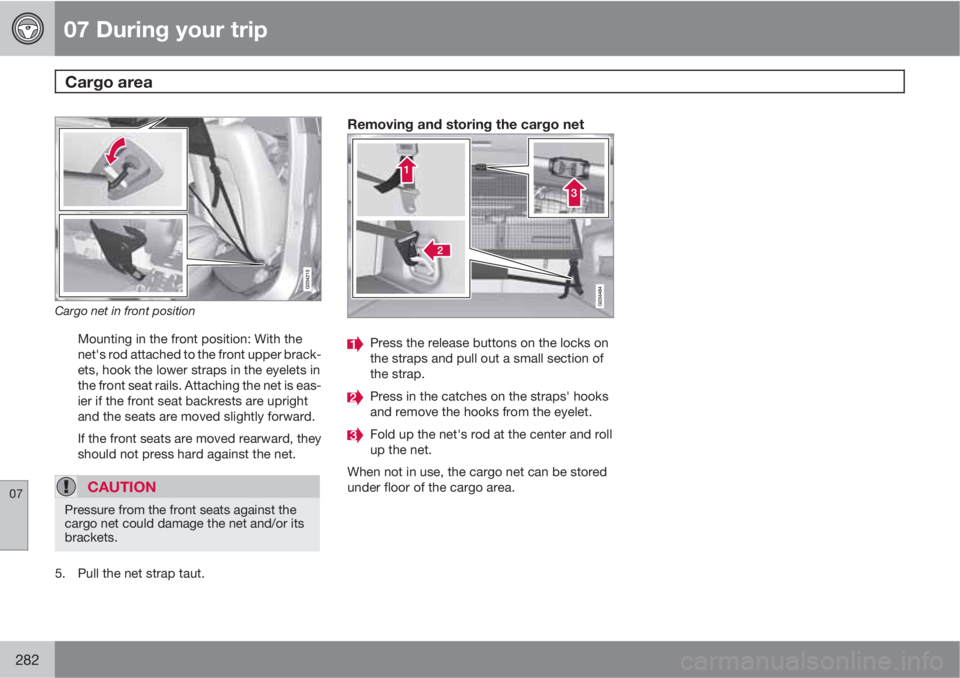
Cargo net in front position
Mounting in the front position: With the
net's rod attached to the front upper brack-
ets, hook the lower straps in the eyelets in
the front seat rails. Attaching the net is eas-
ier if the front seat backrests are upright
and the seats are moved slightly forward.
If the front seats are moved rearward, they
should not press hard against the net.
CAUTION
Pressure from the front seats against the
cargo net could damage the net and/or its
brackets.
5. Pull the net strap taut.
Removing and storing the cargo net
Press the release buttons on the locks on
the straps and pull out a small section of
the strap.
Press in the catches on the straps' hooks
and remove the hooks from the eyelet.
Fold up the net's rod at the center and roll
up the net.
When not in use, the cargo net can be stored
under floor of the cargo area.
Page 340 of 382
09 Maintenance and specifications
Wiper blades and washer fluid 09
338
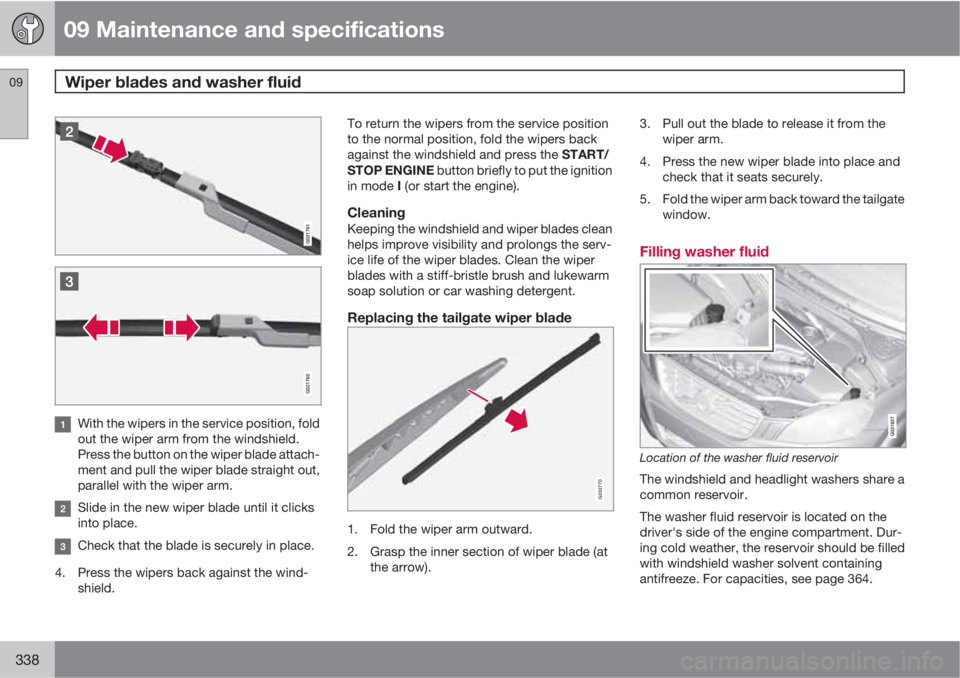
With the wipers in the service position, fold
out the wiper arm from the windshield.
Press the button on the wiper blade attach-
ment and pull the wiper blade straight out,
parallel with the wiper arm.
Slide in the new wiper blade until it clicks
into place.
Check that the blade is securely in place.
4. Press the wipers back against the wind-
shield.To return the wipers from the service position
to the normal position, fold the wipers back
against the windshield and press the START/
STOP ENGINE button briefly to put the ignition
in mode I (or start the engine).
CleaningKeeping the windshield and wiper blades clean
helps improve visibility and prolongs the serv-
ice life of the wiper blades. Clean the wiper
blades with a stiff-bristle brush and lukewarm
soap solution or car washing detergent.
Replacing the tailgate wiper blade
G032770
1. Fold the wiper arm outward.
2. Grasp the inner section of wiper blade (at
the arrow).3. Pull out the blade to release it from the
wiper arm.
4. Press the new wiper blade into place and
check that it seats securely.
5. Fold the wiper arm back toward the tailgate
window.
Filling washer fluid
Location of the washer fluid reservoir
The windshield and headlight washers share a
common reservoir.
The washer fluid reservoir is located on the
driver's side of the engine compartment. Dur-
ing cold weather, the reservoir should be filled
with windshield washer solvent containing
antifreeze. For capacities, see page 364.
Page 350 of 382
09 Maintenance and specifications
Fuses 09
348* Option/accessory, for more information, see Introduction.
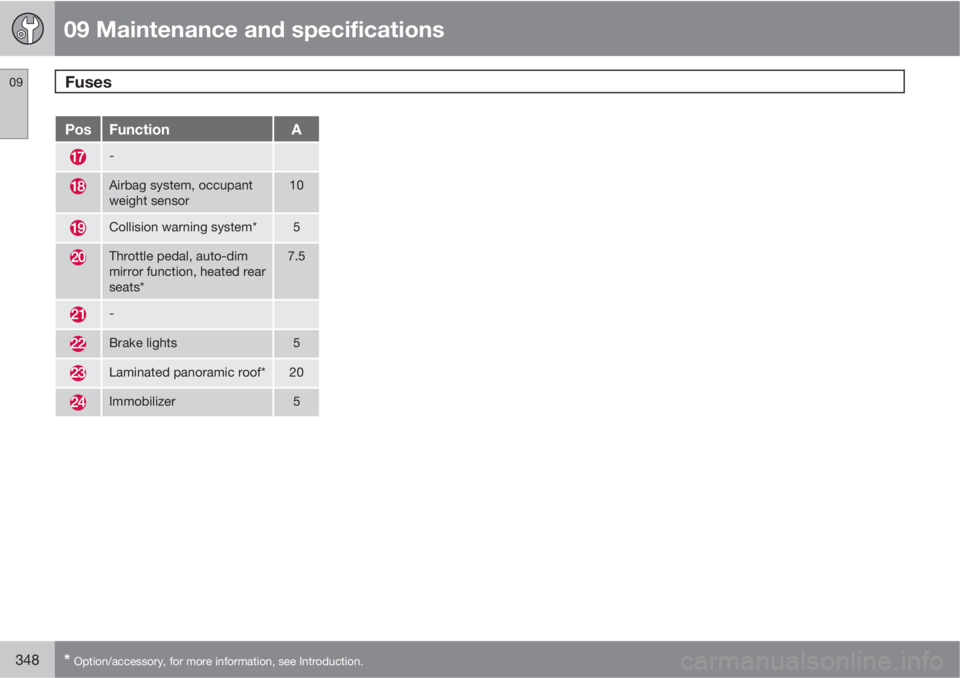
PosFunctionA
-
Airbag system, occupant
weight sensor10
Collision warning system*5
Throttle pedal, auto-dim
mirror function, heated rear
seats*7.5
-
Brake lights5
Laminated panoramic roof*20
Immobilizer5
Page 373 of 382
11 Index
11
371
Hill Descent Control............................ 130
warning light......................................... 80
Bulbs
cargo area lighting.............................. 335
headlights...........................330, 331, 332
introduction......................................... 330
license plate lights.............................. 335
side marker lights...............................333
specifications...................................... 336
taillight................................................ 334
C
Camera, Park Assist................................ 178
Capacity weight....................................... 301
Cargo area
changing bulbs................................... 335
steel grid............................................. 280
Cargo area cover..................................... 280
Cargo area net......................................... 281
Catalytic converter................................... 274
Cell phone, hands-free connection......... 243
Cell phone voice control.......................... 251
Central locking system, introduction......... 56
Chains...................................................... 304Check engine light..................................... 78
Check Engine warning light....................... 79
Child restraints
recalls and registration......................... 39
Child restraint systems.............................. 40
booster cushions.................................. 46
convertible seats.................................. 44
infant seats........................................... 42
ISOFIX/LATCH anchors........................ 47
top tether anchors................................ 48
Child safety................................................ 37
booster cushions.................................. 46
child restraint systems.......................... 40
convertible seats.................................. 44
infant seats........................................... 42
Child safety locks...................................... 52
City Safety™............................................ 154
Climate system........................................ 202
air distribution............................. 198, 204
air vents.............................................. 199
Interior Air Quality System.................. 198
introduction......................................... 197
passenger compartment filter............ 197
refrigerant........................................... 197
Clock, setting............................................. 82
Cold weather driving................................ 270Collision warning system.................160, 161
Compass in rearview mirror..................... 109
Conserving electrical current................... 269
Controls, center console.......................... 215
Convertible seats....................................... 44
Coolant............................................328, 364
Cooling system, general information....... 269
Courtesy lighting...................................... 100
Crash event data......................................... 9
Crash mode............................................... 36
Cruise control..................................138, 139
adaptive.............................................. 140
Curb weight............................................. 301
Current, conserving................................. 269
D
Defroster.................................................. 202
Detachable key blade................................ 61
Dimensions.............................................. 360
Disconnecting the front passenger’s air-
bag....................................................... 26, 27
Dome lighting........................................... 100
Page 374 of 382
11 Index
11
372
Door mirrors............................................. 107
Driver alert............................................... 168
Driver distraction warning.......................... 13
Driving economically................................ 268
Driving in cold weather............................ 270
Driving through water..............................269
E
ECC.................................................202, 203
Economical driving.................................. 268
Electric parking brake.............................. 127
Electronic Climate Control.......200, 202, 203
air distribution table............................ 204
Interior Air Quality System.................. 203
Emergency locking retractor...................... 38
Emergency starting.................................. 119
Emergency towing................................... 286
Emission inspection readiness................ 323
Engine
overheating........................................... 81
specifications...................................... 362
starting................................................ 116
switching off....................................... 119Engine compartment overview................325
Engine Drag Control (EDC)......................134
Engine oil................................................. 363
checking............................................. 326
low pressure warning light.............. 79, 80
volumes.............................................. 363
Engine remote start (ERS)........................ 118
Environment............................................... 12
Eyelets for anchoring loads..................... 278
F
Federal Clean Air Act............................... 322
Flat tires
repairing with tire sealing system....... 306
Floor mats
cleaning.............................................. 353
placing correctly................................. 116
Fluid specifications.................................. 364
Fog lights
front/rear............................................... 98
rear...................................................... 334
Four C (active chassis system)................207Front airbags.............................................. 22
disconnecting passenger’s side air-
bag.................................................. 26, 27
Front park assist.............................. 174, 176
Front seats...........................................86, 88
Fuel filler cap........................................... 274
Fuel filler door, opening........................... 273
Fuel level warning light.............................. 79
Fuel requirements............................ 271, 272
Fuel tank volume.....................................364
Fuses............................... 342, 343, 346, 349
G
Garage door opener
HomeLink® Wireless Control System. 113
Gasoline requirements............................. 272
Gas tank volume...................................... 364
Gauges...................................................... 77
Geartronic................................................ 122
Geartronic automatic transmission.......... 122
Generator warning light............................. 80
Glossary of tire terminology..................... 300